

Few things are more frustrating in Mortal Kombat 1 than landing a perfectly timed combo only to watch your inputs vanish into thin air. You press the buttons, you know the timing is right, but your character just stands there while your opponent punishes you for free.
Or worse — you’re mid-juggle in a Kombat League set, your Kameo assist fires off, and suddenly the entire sequence resets as if it never happened. This is packet loss in action, and it’s one of the most destructive connection problems a fighting game player can face.
Unlike high ping, which at least gives you a consistent delay you can adapt to, packet loss means your commands literally disappear between your PC and the game server, leaving gaps in your gameplay that no amount of skill can compensate for. Mortal Kombat 1 is among the supported titles that benefit from connection optimization, and for good reason, fighting games are uniquely punished by lost data.

What is packet loss in Mortal Kombat 1?
Packet loss occurs when data packets sent between your device and the game servers fail to reach their destination. Every action you take in Mortal Kombat 1 — every button press, every movement input, every Kameo call — is converted into small bundles of data that travel through your internet connection to the MK1 server. The server processes these commands, updates the game state, and sends information back to your screen. This transmission happens continuously, dozens of times per second, throughout every match.
When packets of data get lost along the way, the information they carried simply never arrives. Think of it like sending a series of text messages during a conversation — if three out of every hundred messages you send never reach the other person, the conversation becomes confusing and incomplete.
In Mortal Kombat 1, those “missing messages” are your gameplay commands. The server never receives them, so your actions never happen in the game world. The result is a disconnect between what you’re doing on your controller and what’s actually occurring on screen.
The impact is compounded by MK1’s rollback netcode system. When the game detects missing data, it must either wait for retransmission (causing a visible freeze) or make predictions about what happened (which may require sudden corrections). Either way, packet loss creates a fundamentally broken gameplay experience that no amount of hardware power or graphical optimization can fix — because the problem is in the network, not your PC.
How packet loss affects your gameplay in Mortal Kombat 1
Packet loss creates a uniquely devastating set of problems in a precision fighting game like Mortal Kombat 1:
- Inputs that vanish completely: You execute a combo string perfectly, but one or more button presses never reach the server. The combo drops mid-sequence, leaving you standing still and vulnerable to a full punish from your opponent. This is different from lag — the input doesn’t arrive late, it never arrives at all.
- Rubberbanding during movement: Your character moves forward, then snaps back to a previous position as the game corrects for missing positional data. In a fighting game where spacing is critical, this can pull you out of optimal range or, worse, snap you into your opponent’s attack range.
- Kameo assist desynchronization: You call your Kameo Fighter at the right moment, but the command packet is lost. The assist either doesn’t come out at all, or fires at the wrong time after a retransmission delay, breaking your combo route and wasting your Kameo cooldown.
- Fatal Blow and Fatality failures: These multi-input sequences are especially vulnerable to packet loss. If even one input in the sequence is lost, the entire move fails, potentially costing you a round when you needed that comeback mechanic most.
- Ghost hits and phantom damage: Your attacks visually connect on screen, but the hit confirmation packets are lost, so the server never registers the damage. Conversely, you may take damage from attacks you thought you blocked because your block input was the packet that got lost.
- Sudden disconnections from matches: Severe packet loss can cause the game to lose synchronization entirely, resulting in a disconnection that counts as a loss in Kombat League and may trigger temporary matchmaking penalties.
- Unpredictable opponent behavior: When your opponent’s data packets are lost on the way to your screen, their character appears to teleport, skip animation frames, or perform actions without telegraphing. Reacting to mixups becomes impossible when you can’t see what they’re actually doing.
Main causes of packet loss in Mortal Kombat 1
Inefficient routing
Your data doesn’t travel directly from your PC to the Mortal Kombat 1 servers. It passes through numerous intermediate routers, switches, and network nodes operated by different companies and providers. At each of these “hops,” there’s a chance that packets can be dropped due to congestion, misconfiguration, or hardware issues. If your ISP’s routing sends your data through a particularly problematic node, you’ll experience consistent packet loss every time you play — even though your internet may seem fine for browsing or streaming.
Unstable connection
Problems with your local network equipment are a common source of packet loss. An aging modem, a router with outdated firmware, loose Ethernet connections, or degraded cables can all cause intermittent data loss. Wi-Fi connections are especially vulnerable because wireless signals are inherently less reliable than wired ones. Even a high-quality Wi-Fi setup introduces more points of failure than a simple Ethernet cable directly to your router.
Distance from servers
Mortal Kombat 1 uses dedicated servers in specific geographic regions. The farther your data must travel to reach these servers, the more intermediate network equipment it passes through, and the higher the probability that some packets will be lost along the way. Players in South America connecting to North American servers, or Middle Eastern players routing through European infrastructure, face inherently higher packet loss rates simply due to the length and complexity of their data’s journey.
Network congestion
During peak usage hours, the networks between you and the game servers become crowded with traffic from millions of other users. When routers along your path become overloaded, they begin dropping packets that they can’t process quickly enough. This is why many players notice worse packet loss during evenings and weekends — the infrastructure simply can’t handle the volume, and gaming data gets caught in the congestion.
Hardware problems
Faulty network interface cards, damaged Ethernet cables, overheating routers, and aging modems can all contribute to packet loss at the hardware level. A cable with a damaged connector might work fine most of the time but drop data intermittently under load. A network card with failing components might introduce errors into your data stream that cause packets to be discarded by downstream equipment.
MK1’s server-relayed architecture
Mortal Kombat 1 routes all online match data through dedicated game servers rather than using direct peer-to-peer connections. This means your data takes a longer path: from you to the server, then from the server to your opponent. Each leg of this journey represents an opportunity for packet loss to occur, making the game more sensitive to network quality than titles that use direct connections between players.
How to identify packet loss in Mortal Kombat 1
Identifying packet loss in Mortal Kombat 1 requires paying attention to both in-game symptoms and external diagnostic tools. Within the game itself, the connection indicator provides a general sense of connection quality, but MK1 doesn’t display specific packet loss percentages. However, the symptoms are distinctive — if you experience inputs that simply don’t register (not delayed, but absent), characters teleporting or snapping to new positions, and inconsistent hit registration where attacks connect visually but don’t deal damage, packet loss is very likely the cause.
For precise measurement, use your system’s command line. On Windows, open Command Prompt and type ping -n 100 8.8.8.8 to send 100 ping requests. If the results show any percentage of lost packets (ideally you want 0%), you have a measurable packet loss problem. For a more detailed picture, use tracert to identify exactly which hop along your route is dropping data. Third-party tools like PingPlotter provide visual, real-time monitoring that can pinpoint the source of loss over extended periods.
Key signs of packet loss during gameplay include: latency that seems inconsistent even though your ping number looks stable; lag symptoms appearing despite having a low displayed ping; opponents behaving erratically with teleportation and skipped animations; frequent rubberbanding that snaps your character backward; and skills or commands that occasionally don’t execute despite correct input timing.
The most telling indicator is experiencing these problems while your ping remains relatively low. If your ping is 40ms but the game feels terrible, packet loss is almost certainly the culprit — your data is arriving quickly when it arrives, but some of it isn’t arriving at all.
Packet loss level reference for Mortal Kombat 1
| Packet Loss % | Classification | Impact on Mortal Kombat 1 gameplay |
|---|---|---|
| 0% | Perfect | No data loss. All inputs register perfectly, combos execute reliably, and the game responds exactly as expected. The ideal state for competitive play. |
| 0.1–1% | Minor | Occasional ghost inputs. Most gameplay feels normal, but you may notice rare instances of commands not registering or slight visual inconsistencies during fast sequences. |
| 1–2% | Moderate | Noticeable impact. Combo drops become more frequent, Kameo assist timing feels unreliable, and occasional rubberbanding disrupts positioning. Competitive play is compromised. |
| 2–5% | Severe | Significant gameplay disruption. Frequent missed inputs, constant rubberbanding, unreliable hit registration, and visible desynchronization with the server. Ranked play becomes frustrating. |
| 5–10% | Critical | Nearly unplayable for competitive modes. Inputs are lost regularly, opponents teleport frequently, and the game experience bears little resemblance to normal gameplay. |
| 10%+ | Unplayable | Constant disconnections, complete input loss, and severe desynchronization. Online play is not viable at this level of packet loss. |
Basic solutions to reduce packet loss in Mortal Kombat 1
Optimize your local connection
- Use a wired Ethernet connection: Wi-Fi is the single biggest source of preventable packet loss in home networks. Wireless signals are vulnerable to interference, distance degradation, and congestion from other devices. A direct Ethernet cable from your router to your PC eliminates these variables entirely. For fighting games like MK1, where even a single lost packet can cost you a combo, wired connections are essential.
- Close background applications: Applications consuming bandwidth create competition for your network resources, increasing the chance of packets being dropped. Cloud sync services (Google Drive, OneDrive, Dropbox), streaming platforms, automatic update services, torrent clients, and browsers with active tabs all generate traffic that can interfere with your game data. Close everything non-essential before launching MK1.
- Update network drivers: Outdated or corrupted network adapter drivers can cause improper packet handling, leading to data loss that appears as packet loss to the game. Visit your motherboard or network adapter manufacturer’s website and install the latest drivers. After major Windows updates, verify that your drivers haven’t been replaced with generic versions.
- Configure QoS on your router: Quality of Service settings let you prioritize gaming traffic on your network. By giving Mortal Kombat 1 data the highest priority, your router ensures game packets are processed before less time-sensitive traffic even when your network is busy. Access your router’s admin panel and set your gaming device’s IP address or gaming traffic category to maximum priority.
- Test and replace cables: A damaged Ethernet cable can cause intermittent packet loss that’s difficult to diagnose. Try swapping your cable, checking for bent pins in connectors, and ensuring connections are firmly seated. Even new cables can have manufacturing defects, so testing with an alternative is always worthwhile.
- Restart network equipment regularly: Routers and modems accumulate cache data and can develop routing inefficiencies over time. A weekly restart clears these issues and forces fresh network path negotiations, potentially resolving packet loss caused by stale routing tables.
Contact your ISP
If you’ve optimized your local network and still experience persistent packet loss, the problem likely exists within your internet service provider’s infrastructure. Contact your ISP with documented evidence — run extended ping tests and traceroute commands beforehand so you can show exactly where packets are being dropped. Ask them to check your line quality, verify their equipment, and investigate whether their routing to gaming servers has known issues. In some cases, a technician visit to inspect physical lines or replace aging infrastructure can resolve the problem entirely.
Be specific when describing the issue: tell them you’re experiencing data loss, not just “slow internet.” Speed tests may show normal results because they measure bandwidth, not packet integrity. Emphasize that you need stable, loss-free delivery rather than faster speeds.
ExitLag: the definitive solution to eliminate packet loss in Mortal Kombat 1
What is ExitLag?
ExitLag is a specialized software built from the ground up to optimize gaming connections. Unlike generic network tools that treat all internet traffic the same way, ExitLag uses advanced technology specifically designed to solve the connection problems that plague online games — with packet loss elimination being its most powerful capability.
Think of your default internet connection as a single road between your PC and the game server. If there’s an accident or construction on that road, your data has no alternative — it either waits in traffic or gets lost. ExitLag creates multiple optimized highways running simultaneously, ensuring your gaming data always has a clear, fast path to its destination. This fundamental approach to connection optimization is what makes ExitLag the definitive solution for fighting game players.
Learn more about the technology behind ExitLag and why it’s engineered specifically for the demands of competitive online gaming.
How does ExitLag eliminate packet loss?
ExitLag’s proprietary Multi-Internet technology directly targets the mechanisms that cause packet loss. Here’s how it works to deliver a loss-free connection for Mortal Kombat 1:
- Real-time route analysis: ExitLag continuously monitors the quality of all available network paths between your device and MK1 servers, measuring latency, stability, and packet delivery rates on each route. This constant analysis means the system always knows which paths are reliable and which are experiencing loss.
- Multiple simultaneous connections: Instead of relying on a single path, ExitLag sends your data through several optimized routes at the same time. If a packet is lost on one route, it arrives through another. This redundancy is the core of how ExitLag achieves near-zero packet loss — your data has multiple chances to reach its destination.
- Automatic failover selection: When the system detects that a route is beginning to drop packets, it automatically shifts traffic to healthier paths without any interruption to your gameplay. You never need to manually switch servers or restart the software.
- Hop optimization: Every intermediate router your data passes through is a potential point of packet loss. ExitLag reduces the number of hops between your device and the game servers by finding more direct paths, eliminating unnecessary detours where data can be dropped.
- Connection stabilization: Beyond just preventing loss, ExitLag maintains a consistent, predictable connection throughout your entire gaming session. This stability ensures that your Mortal Kombat 1 experience remains smooth from the first round to the last.
Advantages of ExitLag for Mortal Kombat 1 players
- Elimination of packet loss: This is ExitLag’s primary advantage and the most impactful benefit for fighting game players. Through multi-route redundancy, ExitLag dramatically reduces or completely eliminates packet loss, ensuring every input you make reaches the server. In MK1, this means your combos execute as intended, your Kameo assists fire when called, and your defensive inputs register consistently.
- Ping reduction: By finding the most direct, optimized routes to game servers, ExitLag frequently reduces overall ping alongside eliminating loss. Lower latency combined with zero packet loss creates the most responsive online fighting game experience possible.
- Stable connection throughout sessions: ExitLag doesn’t just fix problems momentarily — it maintains consistent connection quality throughout your entire play session. No more experiencing great connections in round one that deteriorate by round three. The stability lets you build and maintain rhythm in your matches.
- Ease of use: ExitLag is designed for gamers, not network engineers. Select Mortal Kombat 1, activate optimization, and play. The software handles all the complex routing decisions automatically while you focus on your gameplay. No port forwarding, no manual server selection, no technical knowledge required.
- Support for all server regions: Whether matchmaking connects you to nearby regional servers or routes you internationally, ExitLag optimizes your connection regardless of destination. You get the same packet loss protection across all your matches.
- Competitive integrity: In Kombat League and tournament play, connection quality directly impacts results. ExitLag ensures your connection is never the reason you lose, giving you the confidence to compete knowing every input will register.
Is ExitLag worth using for Mortal Kombat 1?
ExitLag is worth the investment if you:
- Play on international or geographically distant servers where routing is less reliable
- Compete in Kombat League, ranked sets, or tournaments where every input matters
- Experience packet loss or connection instability during your gaming sessions
- Want a competitive advantage through superior connection quality
- Game during peak hours when network congestion increases data loss
- Use an ISP with poor routing to MK1’s game servers
- Have lost matches, ranked points, or tournament sets due to connection issues
- Want the peace of mind that every input will reach the server
For most competitive Mortal Kombat 1 players, ExitLag pays for itself by eliminating the frustration of lost inputs, dropped combos, and disconnections that no amount of practice can overcome. Compare the available pricing plans to find the option that fits your needs.
How to use ExitLag in Mortal Kombat 1: Step by Step
The process is extremely simple:
Step 1 – Access the official ExitLag website and download the application. There’s a free trial period for new users.
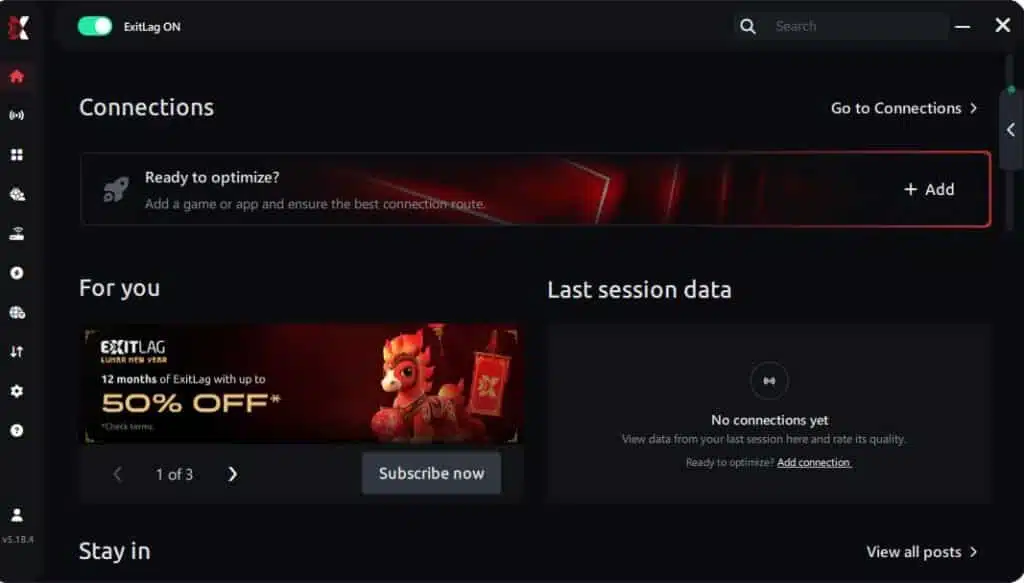
Step 2 – Install and open the program. Log in with your account.
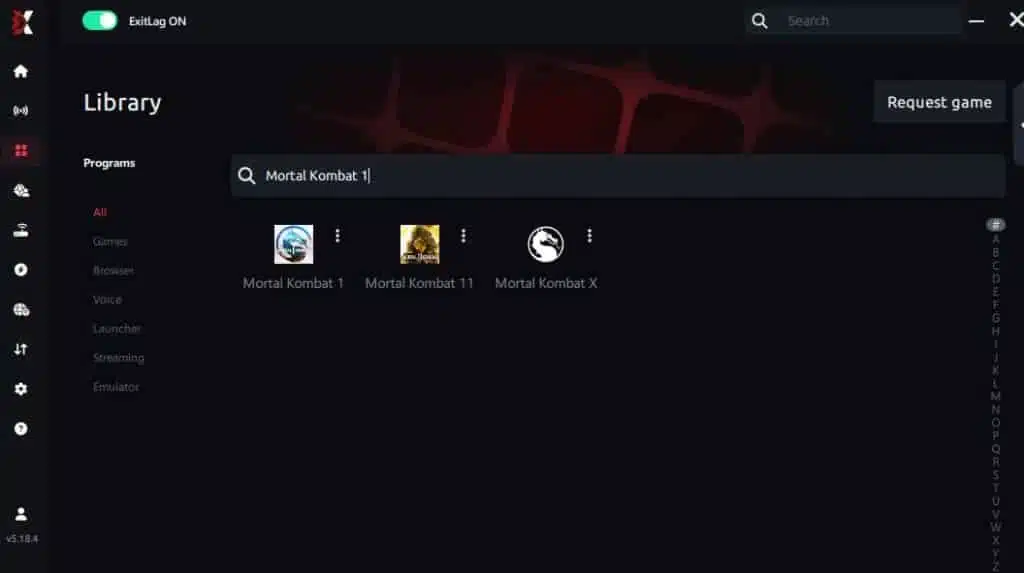
Step 3 – In the search bar, type “Mortal Kombat 1” and select the game from the list.
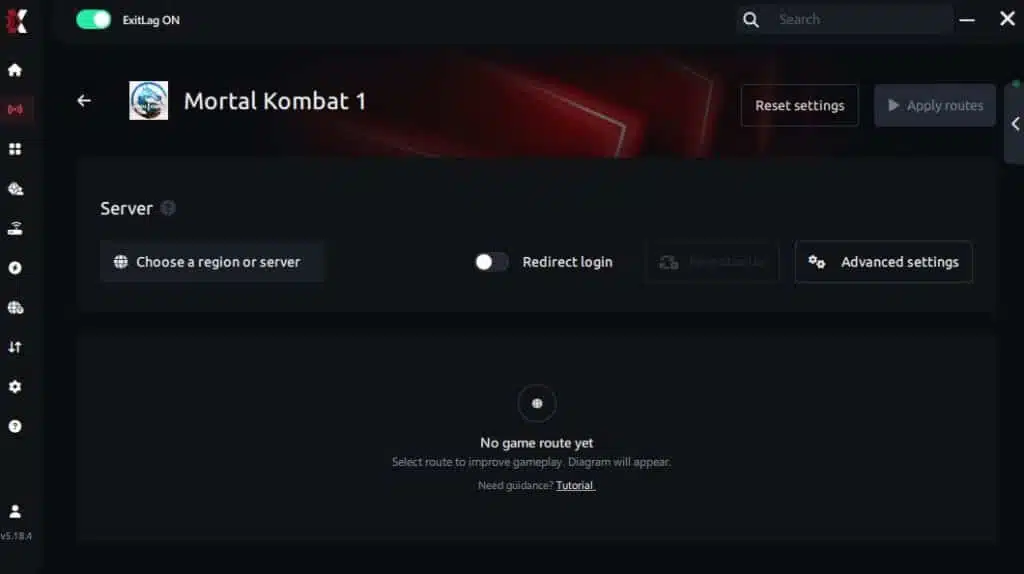
Step 4 – Choose between automated or manual route
Based on the results, you can let ExitLag automatically select the best route or manually choose the server that showed the lowest latency for your connection.
AI-optimized automated route
You can let ExitLag automatically select the best route through AI optimization. The system analyzes multiple connection paths in real time and automatically identifies the most efficient route for your connection, ensuring the lowest possible latency without requiring manual choices.
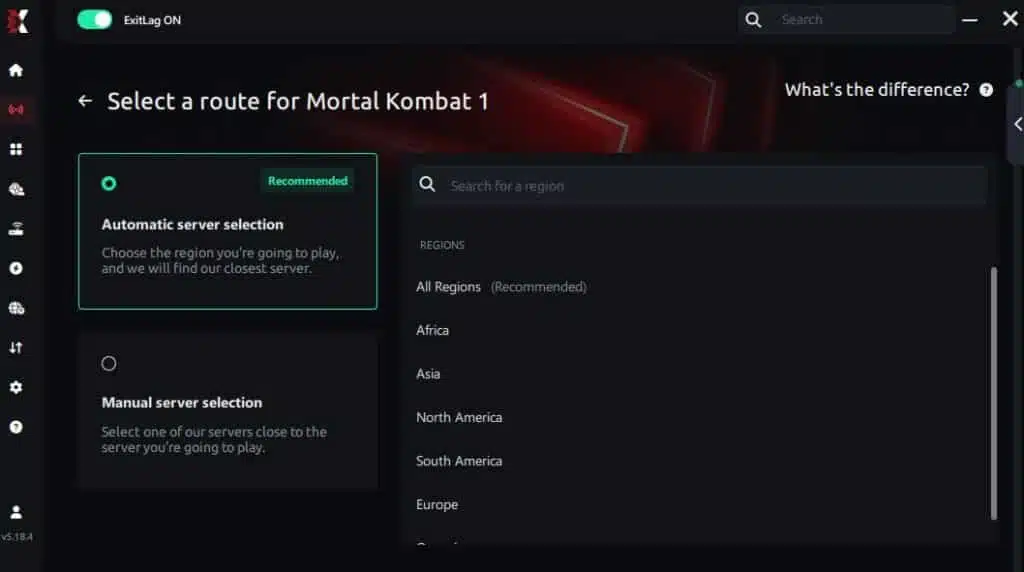
Manual route
If you prefer to have full control over your connection, you can manually choose the server based on the ping test results. Simply select the server that showed the lowest latency or the one that best meets your specific gaming needs, allowing complete customization of your experience.
Step 5 – Click “Apply routes” or the play button. ExitLag will begin optimizing your connection automatically.
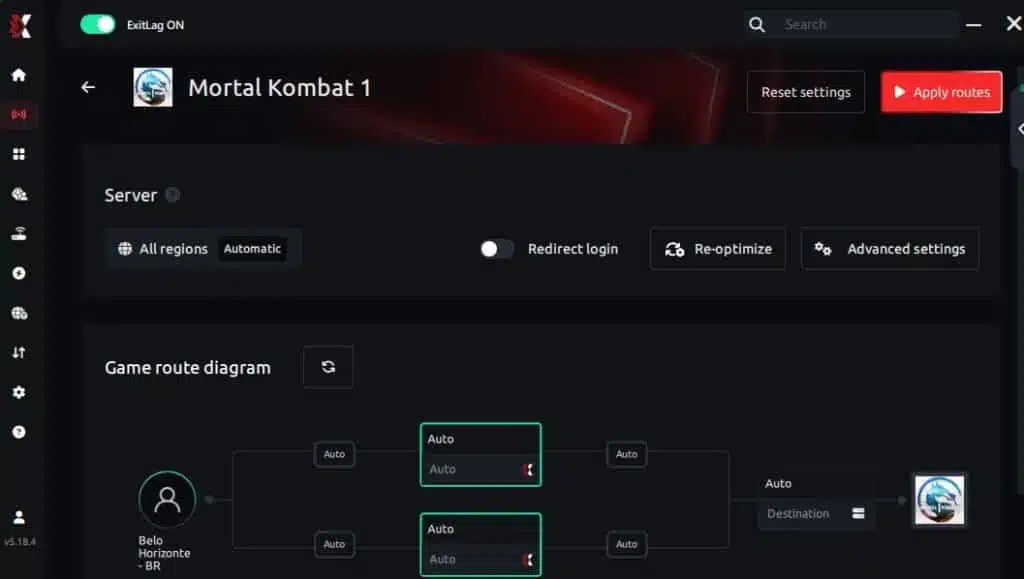
Step 6 – Wait a few seconds until optimization is complete. You’ll see ping indicators in the interface.
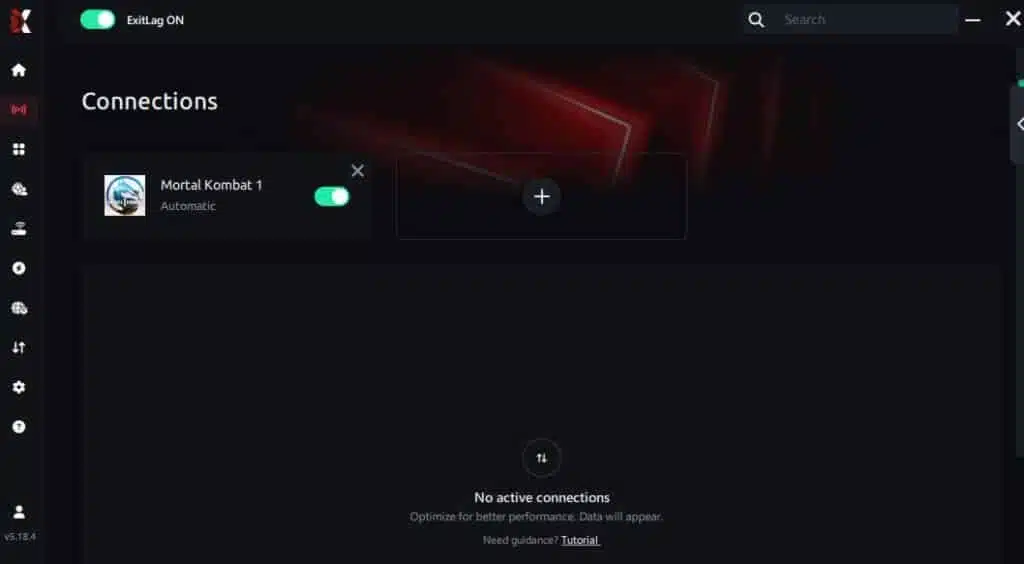
Step 7 – Launch Mortal Kombat 1 normally. The optimization will already be active.
ExitLag runs in the background while you play, constantly adjusting routes to maintain the best possible performanc
FAQ about packet loss in Mortal Kombat 1
Is packet loss the same as lag?
No, they’re different problems that can occur independently. Lag refers to high latency (high ping) — your data takes a long time to travel between your device and the server, but it still arrives. Packet loss means your data never arrives at all. You can have low ping with significant packet loss, resulting in a connection that appears fast but is actually missing critical data.
This combination is especially deceptive because your ping readout looks fine while your gameplay feels terrible. In Mortal Kombat 1, lag causes consistent delay on all your actions, while packet loss causes intermittent failures where specific inputs simply vanish.
Why do I experience packet loss only in Mortal Kombat 1 and not in other games?
Different games use servers in different geographic locations and connect through different network infrastructure. The route your data takes to reach MK1’s servers may pass through a congested or problematic network node that your route to other game servers avoids entirely.
Additionally, Mortal Kombat 1’s server-relayed architecture means your data passes through more infrastructure than games using peer-to-peer connections, providing more opportunities for loss. This is why optimizing the specific route to MK1’s servers — which is exactly what ExitLag does — can solve packet loss in one game even when others seem fine.
Can packet loss get me banned for suspected hacking?
Generally, no. Game anti-cheat systems are designed to distinguish between the erratic behavior caused by packet loss and the patterns produced by actual cheats.
However, extremely severe packet loss can cause you to appear to teleport or behave unpredictably from other players’ perspectives, which may generate manual reports. More practically, severe packet loss will cause frequent disconnections from Kombat League matches, which triggers automatic penalties (point deductions and temporary matchmaking cooldowns) that are separate from anti-cheat bans.
How much packet loss is acceptable for competitive Mortal Kombat 1?
Ideally, zero percent. Mortal Kombat 1 is a game where individual frames and single inputs determine the outcome of rounds. Even 1% packet loss means roughly 1 out of every 100 data transmissions fails — and in a fast-paced fighting game sending data dozens of times per second, that translates to multiple lost inputs per match. For casual play, up to 1% is tolerable though noticeable.
For competitive Kombat League play or tournaments, any measurable packet loss puts you at a disadvantage because you cannot predict which inputs will be the ones that disappear.
Can my hardware cause packet loss?
Yes. Defective network interface cards, damaged Ethernet cables (including cables with bent pins, frayed shielding, or loose connectors), overheating routers, aging modems, and even faulty USB adapters for wireless connections can all cause packet loss at the hardware level. The simplest test is swapping components one at a time: try a different cable, connect directly to the modem bypassing the router, or test with a different network adapter. If the packet loss changes with a component swap, you’ve identified the culprit.
Does ExitLag work with all Mortal Kombat 1 server regions?
Yes. ExitLag optimizes your connection regardless of which MK1 server region matchmaking connects you to. Whether you’re playing on nearby regional servers or being matched with players across the globe, ExitLag’s multi-route technology provides the same packet loss protection and connection optimization across all destinations.
Do I need to keep ExitLag running the entire time I play?
Yes, ExitLag should be active throughout your entire gaming session. The software continuously monitors and optimizes your connection in real time, so closing it mid-session would revert your connection to its default, unoptimized state. It’s recommended to start ExitLag before launching Mortal Kombat 1 to ensure optimization is active from the first match. You can minimize it to the system tray — it uses minimal system resources.
Why is packet loss worse during evening hours in Mortal Kombat 1?
Evening hours represent peak internet usage across most regions. Millions of users streaming video, downloading content, and browsing simultaneously create congestion throughout network infrastructure. When routers and switches along your path become overloaded, they begin dropping packets they can’t process quickly enough. Your Mortal Kombat 1 data gets caught in this congestion. ExitLag addresses this directly by routing your data through less congested paths that bypass the bottlenecks causing peak-hour packet loss.
Packet loss doesn’t have to define your Mortal Kombat 1 online experience. While it’s one of the most frustrating and difficult-to-diagnose connection problems — especially in a precision fighting game where a single missing input can cost you an entire match — it’s also a problem with a clear, proven solution.
Basic optimizations like switching to Ethernet, closing background applications, and updating your hardware can reduce packet loss from local sources. But for the routing inefficiencies, ISP congestion, and server distance issues that cause most packet loss, ExitLag provides the definitive answer. Its multi-route technology ensures your data always reaches the game servers, eliminating the disappeared inputs, rubberbanding, and disconnections that make online MK1 so frustrating.
Invest in your connection and experience Mortal Kombat 1 the way it was meant to be played — every combo connecting, every Kameo assist landing, every defensive input registering exactly when you need it. Take control of your ranked climb, dominate Kombat League with confidence, and stop letting connection issues steal matches you deserved to win. For more tips on optimizing your gaming experience, explore the ExitLag blog for guides across hundreds of popular titles.
Ready to eliminate packet loss in Mortal Kombat 1? Try ExitLag for free and feel the difference when every single input reaches the server. Your combos deserve a connection that delivers every packet, every time.
Got questions or want to connect with other players? Join the conversation at the ExitLag Forum!



