Playing Otserv can feel nearly impossible when your character freezes, teleports or fails to execute spells because of packet loss Otserv. Many players believe these issues come from low FPS or old hardware, but the real problem is usually unstable routes and interruptions in data transmission. Therefore, understanding the root cause is the first step to solving disruptions and restoring smooth gameplay. For many, the search starts with trying different ways to fix packet loss Otserv, but few solutions truly address the real issue.
However, packet loss quickly becomes noticeable in an MMORPG like Otserv, where quick reactions, spell timing and movement precision define whether you survive a hunt or lose precious experience. Like this, you experience severe Otserv connection issues, even though your internet speed may appear normal in everyday browsing or streaming situations.
Finally, packet loss needs proper diagnosis and the right tools to be fully resolved. Reducing interruptions is not just about improving your ping; it’s about ensuring every single data packet reaches the server correctly. When you identify the cause behind packet loss Otserv, you gain control over your gameplay experience again.

What is packet loss in Otserv
Packet loss happens when pacotes de dados fail to reach the game servidores, causing delays, freezes or completely missing actions. In Otserv, the game constantly communicates with the server to update your position, damage output, spell usage and item interactions. When that transmission is interrupted, the server receives incomplete information.
This perda de pacotes results in your character not performing the actions you executed. It’s like sending a message to a friend that never gets delivered. Even a tiny percentage of packet loss disrupts the smoothness of combat, exploration and looting.
Since Otserv is highly sensitive to connection quality, any interruption in pacotes de dados becomes immediately visible in your gameplay performance.
How packet loss affects Otserv gameplay
Packet loss creates several in-game issues, including:
- Delayed spells that activate seconds after pressed
- Rubberbanding, where your character snaps back to a previous position
- Sudden disconnections during hunts or quests
- Lost XP or items because enemies hit you before the server registers your actions
- Monster teleporting, making combat unpredictable
- Unregistered skills, especially in fast-paced hunts
- Erratic hit detection, causing damage to fail unexpectedly
Main causes of packet loss in Otserv
Inefficient routing
Your data travels through many routers before reaching the server. If one of these nodes fails, packets are lost. Therefore, routing problems are one of the biggest causes of packet loss Otserv.
Unstable connection
ISP fluctuations, outdated modems or weak routers can cause momentary drops. Even small interruptions create noticeable Otserv lag during hunts.
Distance from servers
If you play on servers far from your region, your packets travel longer routes, increasing the chances of delays or loss.
Network congestion
Peak usage hours or multiple devices on the same network create congestion. Like this, your Otserv performance drops even though your internet plan is fast.
Faulty hardware
Damaged network cables, old Wi-Fi cards or overheating routers can result in lost packets during intense gameplay.
How to identify packet loss in Otserv
Detecting packet loss starts by observing unusual behavior inside the game. Frequent rubberbanding, teleporting monsters or spells failing to cast are clear signs. Although your ping may appear stable, you can still experience packet loss Otserv, because ping measures speed while packet loss measures transmission quality.
Another method is performing a local test using your device’s terminal, which helps reveal unstable routes or inconsistent packet travel. Even small percentages like 1% or 2% can drastically affect Otserv performance. Finally, if players around you behave erratically or enemies move unpredictably, packet loss is likely happening behind the scenes.
Packet loss severity table
| Packet Loss | Gameplay Impact | Severity |
| 0% | Smooth gameplay | Low |
| 1%–2% | Noticeable delay | Medium |
| 3%–5% | Skills fail, rubberbanding | High |
| 5%+ | Unplayable, disconnects | Very High |
Basic solutions to reduce packet loss
Optimize your local connection
- Use a wired connection instead of Wi-Fi
- Close all background downloads or streams
- Update your network drivers
- Restart modem and router regularly
- Replace damaged cables
- Test different network adapters if possible
Contact your isp
If packet loss persists, your ISP may be routing you through unstable nodes. Contacting them can help identify regional instability, line noise or interference. However, ISP assistance rarely provides a permanent fix, especially for long-distance connections.
ExitLag: the ultimate solution for eliminating packet loss
What is ExitLag?
ExitLagis a software specialized in connection optimization, designed to ensure your packets take the fastest and most stable route to Otserv servers. It uses advanced technology to eliminate interruptions and provide a smoother hunting experience.

How ExitLag eliminates packet loss
ExitLag uses multi-route technology to ensure your data never depends on a single unstable path. Instead, it sends packets through multiple optimized routes simultaneously.
Key mechanisms include:
- Real-time route analysis
- Multiple simultaneous paths
- Automatic route switching
- Hop optimization
- Connection stabilization
Benefits of using ExitLag for Otserv players
- Eliminates packet loss through redundant optimized routes
- Reduces ping by finding shorter and more stable paths
- Keeps the connection stable, even during peak hours
- Protects against route instability, avoiding random spikes
- Easy to use, with intuitive setup
- Works with both official and private servers
These advantages directly enhance your gameplay, preventing deaths, lost XP and failed spells.
Is ExitLag worth it for Otserv?
ExitLag is ideal if you play on distant servers, face constant instability, participate in PvP, or experience frequent packet loss Otserv. It improves reliability, reaction time and consistency, giving you a competitive edge in hunts and wars.
How to use ExitLag in Otserv
The process is extremely simple:
Step 1 – Access the official ExitLag website and download the application. There’s a free trial period for new users.
Step 2 – Install and open the program. Log in with your account.
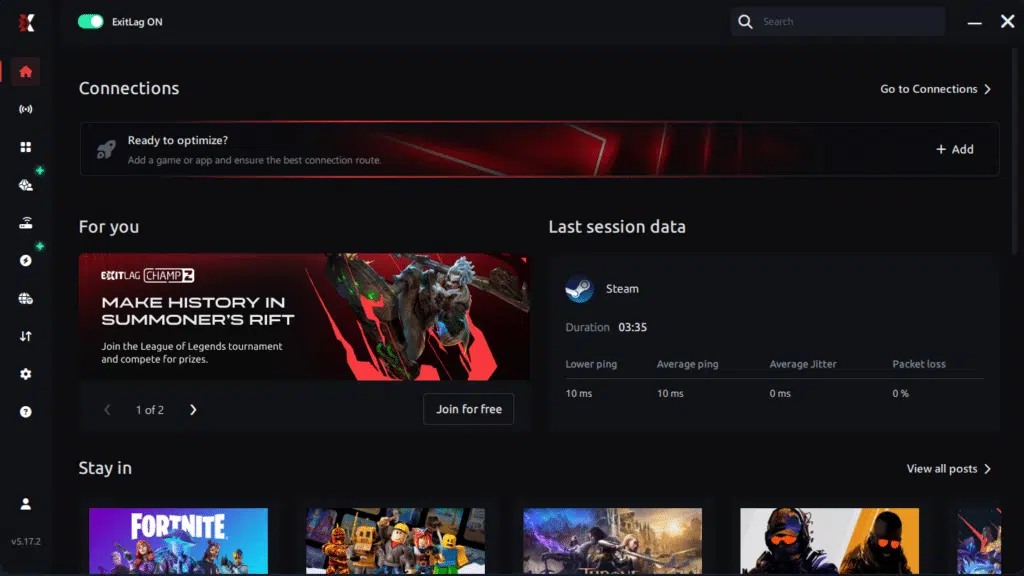
Step 3 – In the search bar, type “Otserv” and select the game from the list.

Step 4 – Choose between automated or manual route
Based on the results, you can let ExitLag automatically select the best route or manually choose the server that showed the lowest latency for your connection.
AI-optimized automated route
Based on the results, you can let ExitLag automatically select the best route through AI optimization. The system analyzes multiple connection paths in real time and automatically identifies the most efficient route for your connection, ensuring the lowest possible latency without requiring manual choices.
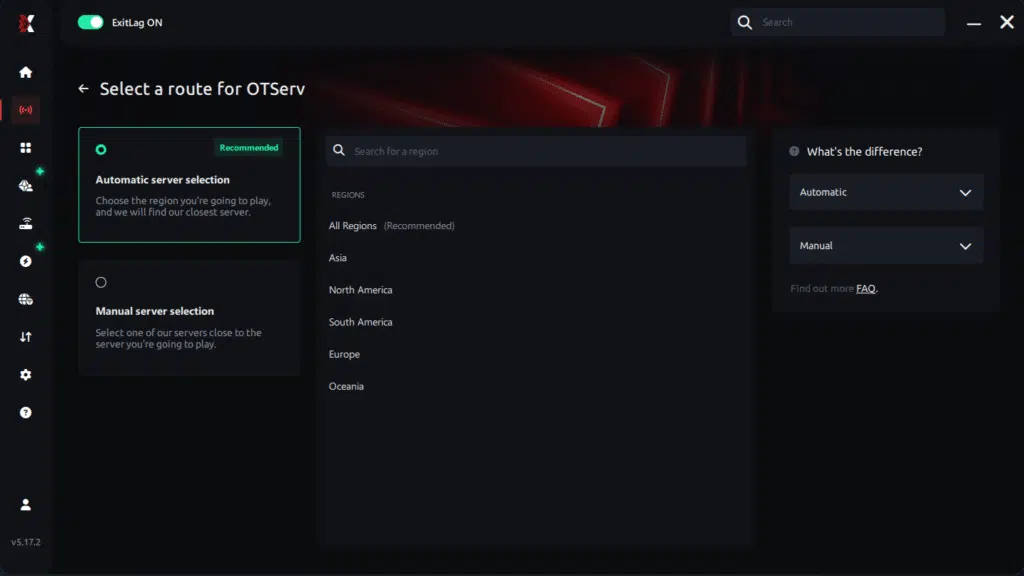
Manual route
If you prefer to have full control over your connection, you can manually choose the server based on the ping test results. Simply select the server that showed the lowest latency or the one that best meets your specific gaming needs, allowing complete customization of your experience.
Step 5 – Click “Otserv” or the play button. ExitLag will begin optimizing your connection automatically.

Step 6 – Wait a few seconds until optimization is complete. You’ll see ping indicators in the interface.
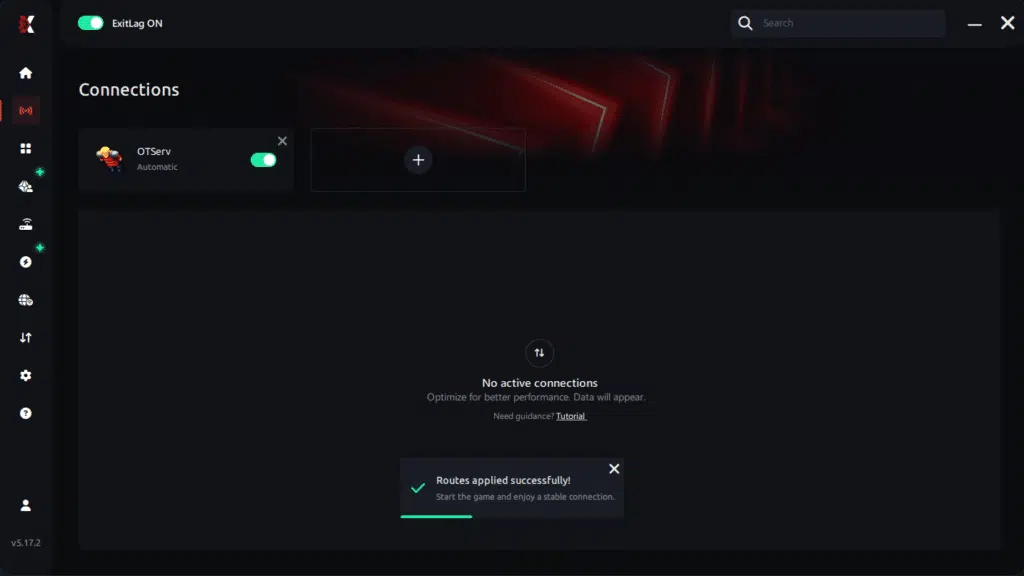
Step 7 – Launch Otserv normally. The optimization will already be active.
ExitLag runs in the background while you play, constantly adjusting routes to maintain the best possible performance.
Faq: common questions about packet loss in Otserv
Is packet loss the same as lag?
No. Packet loss is when data fails to reach the server, while lag is often caused by high ping. You can experience packet loss even with low ping in Otserv.
Why do I have packet loss only in Otserv and not in other games?
Different games use different server routes. Otserv servers may be hosted farther away or use unstable paths, increasing the chance of packet loss.
Can packet loss cause bans?
Not normally. Packet loss creates erratic movement that looks very different from cheating. However, extreme instability may trigger automated disconnections.
How much packet loss is acceptable?
Ideally 0%. Casual players may tolerate up to 1%, but anything above that creates delays and risks in competitive hunts or wars.
Can hardware cause packet loss?
Yes. Faulty cables, routers and network cards can interrupt packet transmission.
Does ExitLag work on private Otserv servers?
Yes. As long as the server is selectable, ExitLag optimizes the route effectively.
Do I need ExitLag on all hunts?
You only need it while playing, but using it consistently ensures stable performance in every session.
Eliminate packet loss and play Otserv without interruptions
Packet loss doesn’t have to ruin your hunts, quests or PvP battles. By understanding the causes and applying the right optimizations, you can drastically improve your stability and responsiveness. ExitLag stands out as the definitive solution to remove packet loss Otserv, prevent rubberbanding and ensure consistent performance. With a stable route, your spells register instantly, your movements remain precise and your hunts become safer and more productive.
Got questions or want to connect with other players? Join the conversation at the ExitLag Forum!