Playing Poketibia with Poketibia high ping can quickly turn exciting battles and smooth movement into a frustrating experience filled with delays and freezes. Skills take too long to activate, characters respond late, and unexpected disconnects can completely ruin immersion. Many players assume the problem is their internet speed, but in reality, connection routing and server paths often play a much bigger role. That’s why understanding how Poketibia high ping works, and knowing which tools actually solve it, is essential for players looking for a stable and consistent gameplay experience.

What is high ping in Poketibia?
Ping is the time it takes for information to travel from your device to the game servers and back, measured in milliseconds (ms). In Poketibia, every action, moving, attacking, casting spells, depends on this round-trip communication. When latency is low, the game feels responsive and precise. When it’s high, everything feels delayed.
High ping happens when data packets take inefficient or unstable routes before reaching the server. Even with fast internet, long distances or poor routing can increase ping significantly. In Poketibia, this means spells may trigger late, movement may feel sluggish, and combat timing becomes unreliable.
The key difference between low and high ping is consistency. Low ping provides smooth, predictable gameplay, while high ping introduces spikes and instability that directly affect performance.
How high ping affects your gameplay in Poketibia
When high ping is present, several gameplay issues become noticeable:
- Delay in commands, causing spells and attacks to activate with a delay
- Rubberbanding, where your character abruptly returns to previous positions
- Poor hit registration, causing attacks to miss even when well-synchronized
- Imprecise movement, especially during PvP encounters
- Unexpected disconnections during intense fights
- Competitive disadvantage, as opponents with lower ping react more quickly
These problems make Poketibia feel inconsistent and unfair, particularly in combat-focused situations.
Main causes of high ping in Poketibia
Distance from servers
The farther you are from Poketibia servers, the longer data must travel. Physical distance alone can add latency, even if everything else is working correctly.
Internet service provider (ISP) issues
Some ISPs prioritize certain types of traffic or use suboptimal routes for gaming data. This can result in unstable ping and packet loss during peak hours.
Inefficient routing
Automatic routing chosen by providers is not always optimized for games. Data may pass through congested or unnecessary nodes, increasing latency before reaching Poketibia servers.
Network congestion
Heavy traffic on shared networks, especially at night, can overload routes and cause sudden ping spikes, making gameplay unpredictable.
Outdated hardware or equipment
Old routers, damaged cables, or poorly configured network equipment can struggle to handle real-time game data efficiently.
How to identify and test high ping in Poketibia
Poketibia usually displays ping values within its interface, allowing players to monitor latency during gameplay. Consistently high numbers or sudden spikes are clear indicators of a problem.
You can also test your connection using command-line tools, such as ping tests to the game server or nearby nodes. This helps determine whether delays are constant or fluctuate throughout the day.
As a reference, ping below 60 ms is generally excellent for Poketibia, 60–120 ms is playable, and anything above 150 ms often leads to noticeable lag and reduced performance.
Ping levels and gameplay impact
| Ping (ms) | Connection quality | Gameplay impact |
| 0–60 | Excellent | Smooth and responsive gameplay |
| 60–120 | Good | Minor delays, mostly playable |
| 120–180 | Average | Noticeable lag in combat |
| 180+ | Poor | Severe delays and instability |
Basic solutions to reduce high ping in Poketibia
Optimize your local connection
- Use a wired Ethernet connection instead of Wi‑Fi
- Close background applications using bandwidth
- Update network drivers regularly
- Configure QoS settings on your router
- Connect to the closest available game server
Contact your ISP
If high ping persists despite local optimizations, it may be necessary to contact your provider. Ask about routing issues, packet loss, or congestion during peak hours, and request improvements or diagnostics on your line.
ExitLag: the best solution to reduce high ping in Poketibia
What is ExitLag?
ExitLag is a specialized software designed for otimização de conexão in online games. Instead of relying on default ISP routes, it actively finds the fastest and most stable paths between players and game servers.
By focusing on routing efficiency rather than raw speed, ExitLag addresses the root causes of high ping in Poketibia, delivering consistent latency and smoother gameplay.
How does ExitLag work to reduce high ping?
ExitLag uses Multi-Internet technology to optimize routes in real time. Its process includes:
- Real-time route analysis
- Multiple simultaneous connection paths
- Automatic selection of the best route
- Optimization of network hops
- Continuous connection stabilization
Advantages of ExitLag for Poketibia players
- Significant ping reduction, improving reaction times
- Elimination of packet loss, ensuring consistent data flow
- Stable connection even during peak hours
- Easy-to-use interface suitable for beginners
- Support for multiple servers, adapting automatically
Each of these advantages contributes directly to smoother combat, more precise movement, and a more reliable Poketibia experience.
Is ExitLag worth using in Poketibia?
For players who want consistent performance, ExitLag is a worthwhile investment. Pricing and plan details are available at Exitlag site, allowing users to choose the option that best fits their needs.
How to use ExitLag in PokeTibia
The process is extremely simple:
Step 1 – Access the official ExitLag website and download the application. There’s a free trial period for new users.
Step 2 – Install and open the program. Log in with your account.
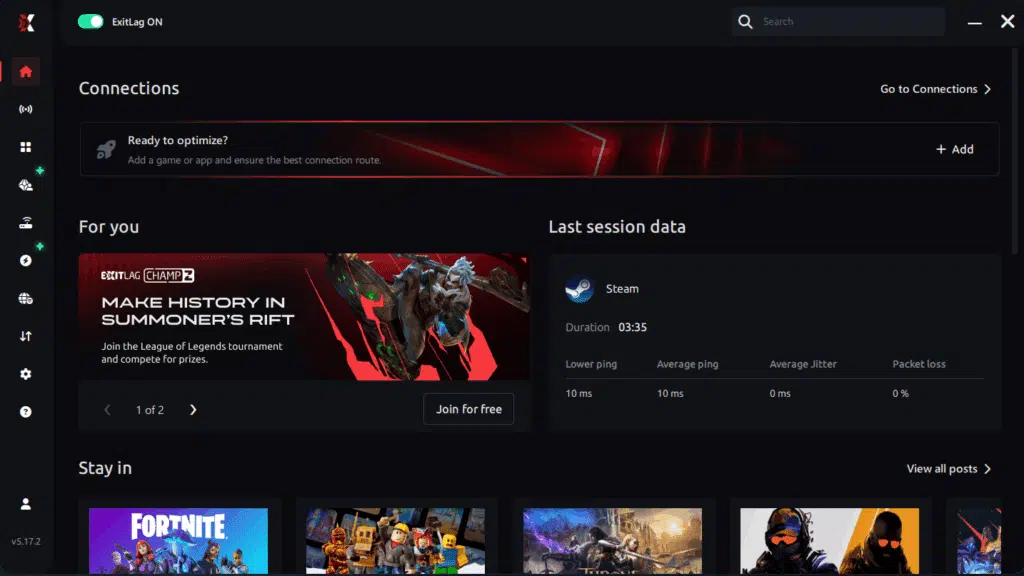
Step 3 – In the search bar, type “PokeTibia” and select the game from the list.

Step 4 – Choose between automated or manual route
Based on the results, you can let ExitLag automatically select the best route or manually choose the server that showed the lowest latency for your connection.
AI-optimized automated route
Based on the results, you can let ExitLag automatically select the best route through AI optimization. The system analyzes multiple connection paths in real time and automatically identifies the most efficient route for your connection, ensuring the lowest possible latency without requiring manual choices.
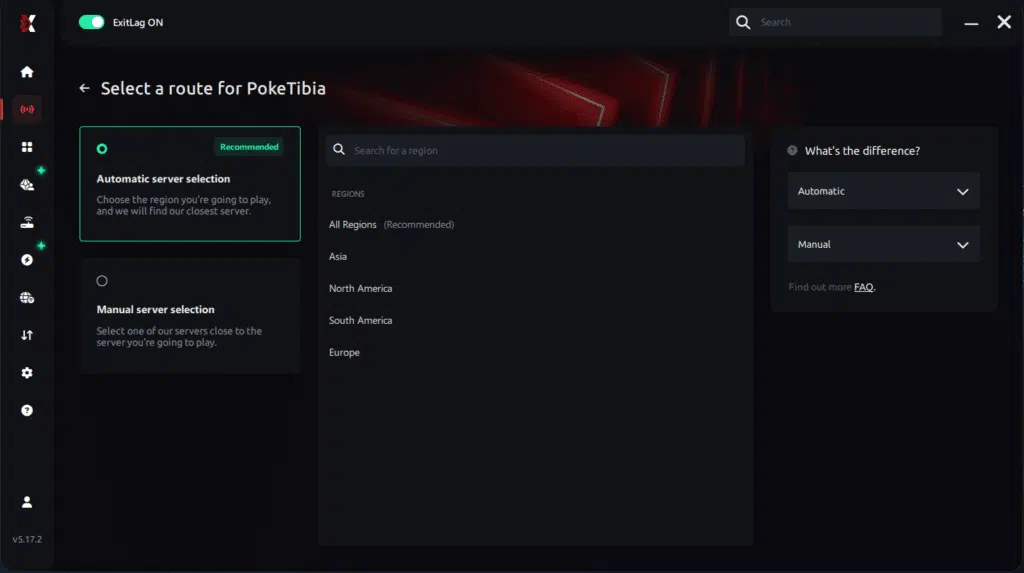
Manual route
If you prefer to have full control over your connection, you can manually choose the server based on the ping test results. Simply select the server that showed the lowest latency or the one that best meets your specific gaming needs, allowing complete customization of your experience.
Step 5 – Click “Apply routes” or the play button. ExitLag will begin optimizing your connection automatically.
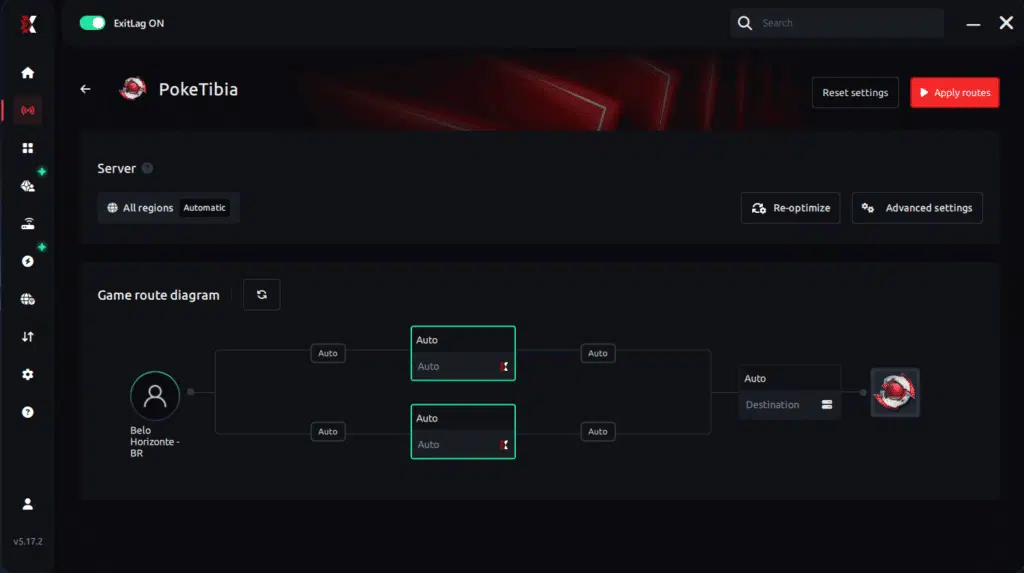
Step 6 – Wait a few seconds until optimization is complete. You’ll see ping indicators in the interface.
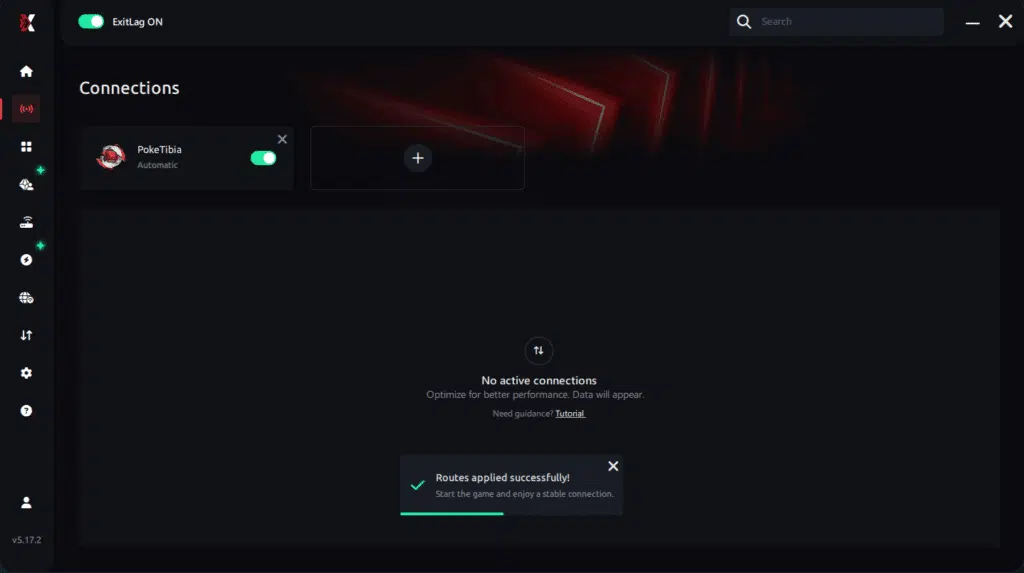
Step 7 – Launch PokeTibia normally. The optimization will already be active.
ExitLag runs in the background while you play, constantly adjusting routes to maintain the best possible performance.
Final thoughts: Play PokeTibia without lag forever
At the end of the day, PokeTibia lag should never ruin your experience. Whether you’re hunting Pokémon,™ training, questing, or battling other players, your internet connection should never be the reason you disconnect or lose progress.
With ExitLag, you finally take control of your network performance. The software finds the fastest routes, eliminates lag, and stabilizes your ping so that every step, every battle, and every capture happens exactly when you want it to.
Try ExitLag for free right now and experience how smooth PokeTibia can be when your connection is fully optimized. Play with confidence, progress faster, and make lag a thing of the past.
FAQ: high ping in Poketibia
What causes high ping in Poketibia? High ping is usually caused by inefficient routing, distance from servers, ISP congestion, or packet loss. These factors delay data transmission between your device and the game servers.
How do I check my ping in Poketibia? You can check ping directly in the game interface or use external network tests to monitor latency and stability.
What is a good ping for Poketibia? A good ping is generally below 60 ms. Values up to 120 ms are playable, but anything higher may impact combat performance.
Can high ping get you banned? No. High ping does not result in bans, but it can negatively affect gameplay and competitive outcomes.
Does ExitLag work for Poketibia? Yes. ExitLag is specifically designed to optimize routing for online games, including Poketibia, reducing latency and improving stability.
Why does my ping change throughout the day? Ping fluctuations usually occur due to network congestion and changing routing conditions during peak usage hours.
Conclusion
High ping doesn’t have to ruin your Poketibia experience. While basic optimizations help, true stability only comes from fixing routing and packet loss issues. That’s where ExitLag stands out as the definitive solution.
By optimizing connection paths and stabilizing latency, ExitLag ensures smoother gameplay, faster reactions, and more reliable combat. To learn more about improving your gaming experience, visit our site at ExitLag.
Got questions or want to connect with other players? Join the conversation at the ExitLag Forum!