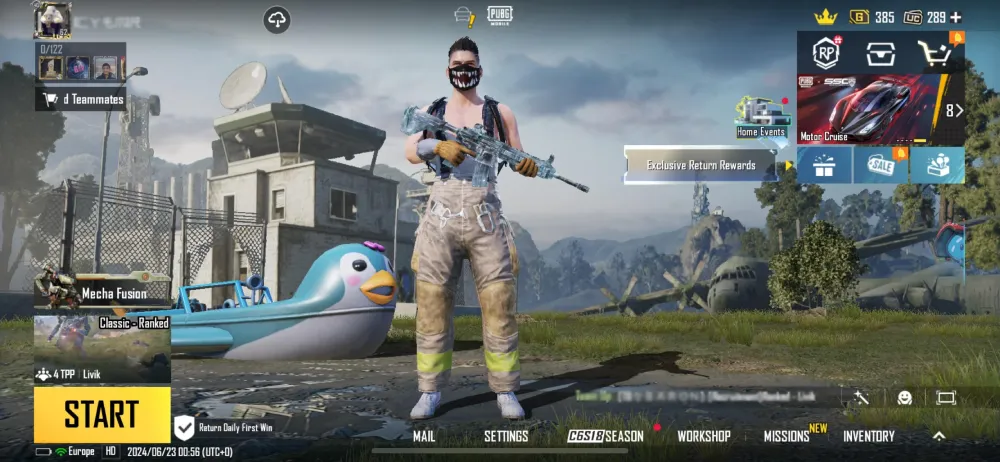
In PUBG: Battlegrounds, understanding your performance is an important part of becoming a better player. Instead of relying only on wins or losses, players can use PUBG stats to examine their matches, identify patterns, and understand where their gameplay can improve. From eliminations and damage to survival time and placement, statistics provide a clearer picture of what happens during each match.
Clearly, reviewing PUBG stats can help players make more informed decisions about their gameplay. A player might have a high number of eliminations but struggle with positioning, while another might survive for a long time but rarely take favorable fights. By looking beyond the final placement, players can recognize strengths, identify weaknesses, and build a more consistent approach to PUBG: Battlegrounds.
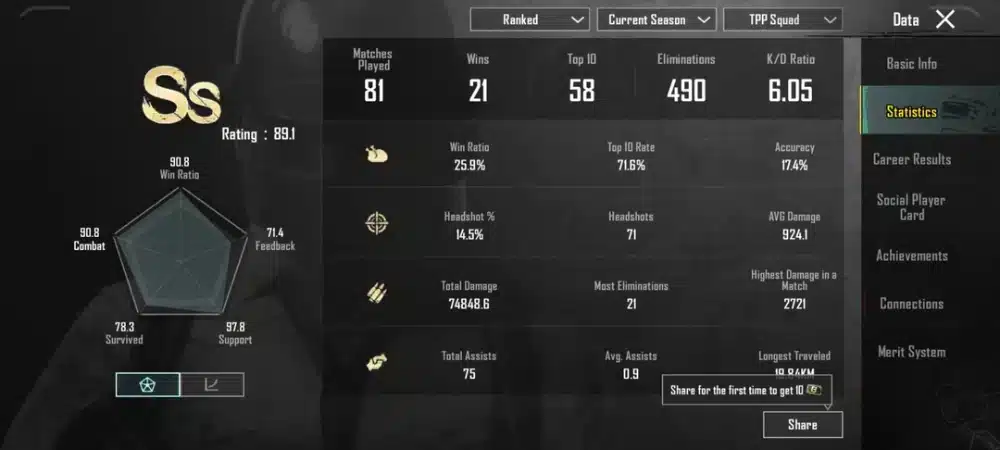
What are PUBG Stats?
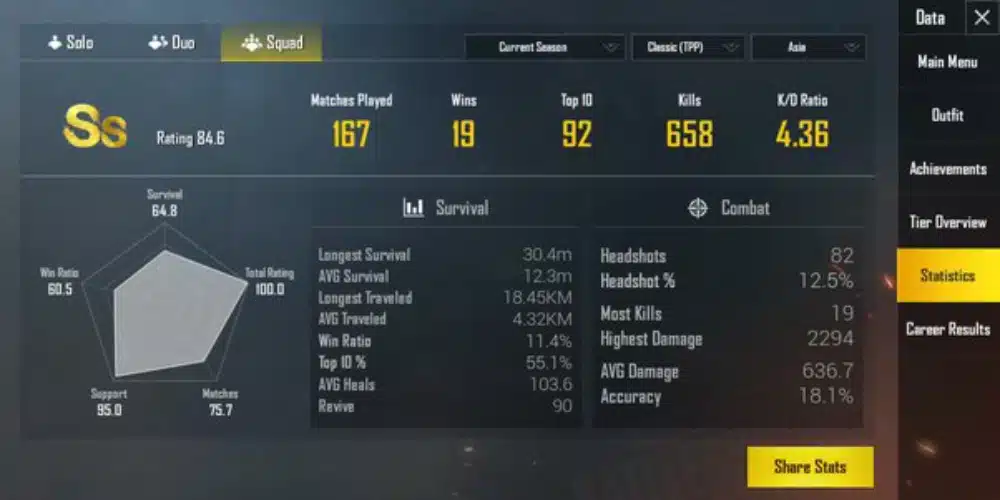
First, PUBG stats are performance metrics that show how a player has performed across matches in PUBG: Battlegrounds. These statistics can include kills, assists, damage dealt, survival time, headshots, win rate, average placement, and other indicators depending on the platform, game mode, and tracking service being used. A detailed PUBG report can organize this information into a broader view of a player’s recent or historical performance.
For players who want to improve, statistics are particularly useful because they turn individual matches into measurable information. Instead of simply thinking that a match went badly, you can look at the numbers and determine whether the problem was low damage, poor survival, inefficient engagements, or inconsistent placement.
How PUBG Stats Work in PUBG: Battlegrounds
Understanding the Most Important Statistics
The first step toward using statistics effectively is knowing what each number represents. PUBG offers a wide variety of performance information, and not every metric has the same value for every player.
Kills are one of the easiest statistics to understand. They show how many opponents a player eliminated during a match or over a larger sample of games. However, kills alone do not tell the entire story.
For example, a player with eight kills and an early elimination in several other matches may have a very different overall performance profile from a player who consistently reaches the final circles with fewer eliminations.
Damage dealt provides another important perspective. High damage can indicate that a player is consistently winning engagements or creating pressure, even when every opponent is not eliminated.
Survival time also matters. In battle royale matches, staying alive creates more opportunities to collect resources, rotate, take advantageous fights, and reach the final stages of a match.
Other useful statistics can include:
- Kills and assists per match.
- Average damage dealt.
- Average survival time.
- Headshot percentage.
- Win rate.
- Average placement.
- Matches played.
- Knockdowns or revives in team modes.
- Longest survival time.
- Performance across different game modes.
Looking at these metrics together creates a much more useful picture than focusing on one number.
Why One Number Does Not Tell the Whole Story
A common mistake when analyzing PUBG stats is treating one metric as a complete measurement of skill.
For example, a high kill count can look impressive, but it does not necessarily mean that a player is making optimal decisions. Aggressive players may collect many eliminations while frequently dying before the final circles.
On the other hand, a cautious player may have fewer kills but consistently reach strong placements. That does not automatically mean the cautious player is better either. It simply means the two players are approaching the game differently.
This is why statistics should be evaluated as a group.
A useful analysis can compare kills, damage, placement, and survival time. When several statistics move in the same direction, the resulting pattern becomes more meaningful.
For example, a player who has increased average damage while also improving average placement may be developing stronger combat efficiency. However, a player whose kills increase while average placement falls may be taking more fights without improving overall consistency.
The goal is not to maximize every number independently. Instead, the goal is to understand how the statistics interact.
How to Check and Read a PUBG Report
What a PUBG Report Can Show
A PUBG report can be useful when you want a broader view of your performance instead of looking at individual match results.
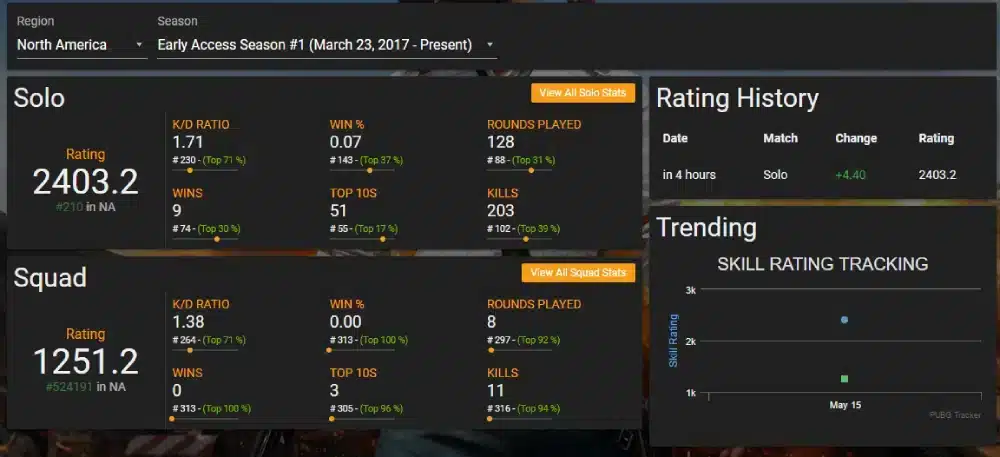
Depending on the tracking system, a report can organize statistics by player, match, game mode, or period. This makes it easier to compare recent performances and identify recurring trends.
For example, you might notice that your solo performance is significantly different from your squad performance. You may also discover that your damage is higher on one map while your placement is better on another.
These differences can reveal areas that deserve more attention.
A useful report should therefore answer practical questions rather than simply display numbers.
Ask yourself:
- Am I consistently reaching the late game?
- Is my average damage increasing?
- Am I winning more of the fights I choose?
- Do my statistics change significantly between solo and squad matches?
- Are my recent performances improving?
- Which statistics remain weak even when I have a good match?
The answers can turn raw data into actionable information.
Reading Trends Instead of Isolated Matches
One match can be misleading.
A player can have an unusually high kill game because of favorable circumstances, strong loot, an advantageous drop, or opponents who make mistakes. Similarly, one terrible game can happen because of an unlucky encounter, poor positioning, or an unexpected third party.
Therefore, a broader sample is usually more useful.
If your average damage increases over several matches, that trend is more significant than one exceptionally high-damage game. Likewise, consistently reaching better placements is a stronger indication of improvement than a single victory.
When reviewing PUBG stats, consider grouping matches into manageable samples. You can compare your last several games against an earlier group and look for meaningful changes.
This approach can make performance analysis less emotional.
Instead of asking, “Why did I lose that match?” you can ask, “What happens repeatedly in the matches where I fail to reach the final circles?”
That question is much easier to answer with data.
Reporting in PUBG: What Players Should Look For
Understanding Reporting in PUBG
The concept of reporting in PUBG is different from simply reviewing personal statistics.
When players talk about reporting, they may be referring to submitting reports about suspected rule violations, while performance reports focus on gameplay statistics. Keeping these concepts separate is important because they serve completely different purposes.
A performance report helps you understand your own gameplay.
A player report is intended to bring potentially inappropriate behavior to the attention of the game’s systems.
These functions should not be confused when analyzing PUBG: Battlegrounds.
If your objective is improvement, focus on statistics that can reveal gameplay patterns. If your objective is addressing suspected misconduct, use the appropriate in-game reporting mechanisms rather than attempting to interpret performance statistics as evidence.
When Statistical Data Is Useful
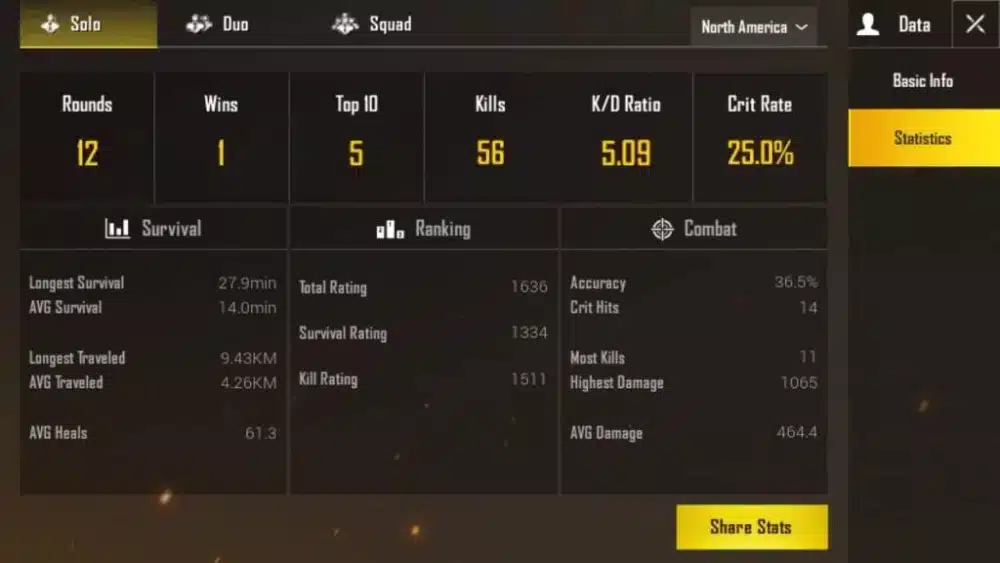
Statistical data is especially useful when it reveals repeated behavior.
Suppose your damage remains low across many games, even though you survive until the mid-game consistently. That could indicate that you are avoiding too many engagements or failing to capitalize on opportunities.
Alternatively, if your damage is high but your placement remains poor, you may be taking unnecessary fights.
These patterns can help players adjust their strategy.
A simple comparison can be useful:
| Statistic | What It Can Indicate | What to Consider |
| Kills | Combat success | Are kills leading to better placements? |
| Damage | Engagement effectiveness | Are you dealing damage consistently? |
| Survival Time | Longevity | Are you surviving through important rotations? |
| Placement | Overall match progression | Is your consistency improving? |
| Headshots | Precision in certain engagements | Is the percentage stable across matches? |
| Assists | Team contribution | Are you supporting squad engagements? |
| Win Rate | Match success | Is the sample size large enough? |
| Matches Played | Data volume | Are there enough games to identify trends? |
The key is to use these numbers together.
A statistic becomes more meaningful when it answers a gameplay question.
Using PUBG Stats to Improve Your Gameplay
Identify Your Strongest Area
Before focusing on weaknesses, identify what you already do well.
A player might have excellent survival statistics but average combat statistics. Another might have strong damage numbers but poor late-game consistency.
Your strongest statistic can help establish a foundation for improvement.
If your survival time is strong, for example, you may already understand rotations and positioning relatively well. Your next objective could be learning when to convert that survival into better engagements.
Likewise, if your damage is high, you may have strong mechanical skills. However, improving decision-making and positioning could help turn that combat ability into more frequent high placements.
The purpose of statistics is not to criticize your gameplay. They provide a framework for understanding it.
Find the Weakest Link
Once you know your strengths, look for the statistic that repeatedly limits your results.
Consider a player who averages high damage but frequently finishes outside the top ten. The obvious conclusion might be that the player needs to become more aggressive.
However, the data may suggest the opposite.
If the player already deals significant damage, taking even more fights may increase the number of early deaths. A better adjustment could involve improving positioning, rotations, or disengagement decisions.
This is why statistics need context.
A low number does not automatically mean that the player should maximize it. Instead, it should prompt a question about why the number is low.
Building a Better Performance Routine
Review Matches After Playing
A practical way to use statistics is to create a short review routine after a gaming session.
You do not need to analyze every detail after every match. That can quickly become overwhelming.
Instead, focus on a few recurring metrics.
For example, after several matches, review your average damage, average placement, survival time, and kills. Then compare them with your previous session.
Look for meaningful changes rather than perfection.
A simple routine can include:
- Record your recent match results.
- Compare kills, damage, placement, and survival time.
- Identify one recurring weakness.
- Review the situations where that weakness appears.
- Choose one gameplay adjustment for the next session.
This process keeps performance analysis practical.
Avoid Changing Too Many Things at Once
Another important principle is consistency.
If you change your landing strategy, weapon preferences, sensitivity, rotation habits, and engagement style simultaneously, it becomes difficult to know what actually improved your performance.
Instead, select one area.
For example, you could focus on improving late-game positioning for several sessions. Afterward, check whether your placement and survival statistics changed.
If they improved, you have evidence that the adjustment helped.
This approach also makes learning more manageable.
Rather than attempting to become better at everything immediately, you can gradually build a stronger overall game.
PUBG Stats and Different Playstyles
Aggressive Players
Aggressive players often prioritize engagements and eliminations.
Their statistics may show high kills and damage, but these numbers should be considered alongside placement and survival time.
If aggressive play consistently produces strong placements, it may be an effective strategy for that player.
However, if the player regularly accumulates damage and eliminations before dying early, the data may indicate that aggression needs better timing.
The objective is not necessarily to become less aggressive.
Instead, it may be about becoming more selective.
Knowing when to fight can be just as important as knowing how to fight.
Passive and Position-Focused Players
More cautious players can use statistics differently.
If survival time is consistently high but kills and damage remain low, the player may have strong patience but limited engagement conversion.
That does not mean the entire playstyle needs to change.
A better adjustment may be to identify safe opportunities for engagement.
For example, a player can focus on taking fights when they have positional advantages, better information, or stronger resources.
In this way, statistics can help refine a playstyle rather than replace it.
Understanding PUBGReport and Community Tracking
What PUBGReport Means
The term PUBGreport can refer to community-oriented tracking or reporting concepts associated with PUBG-related player information.
Because third-party tracking services can differ in their features, players should always pay attention to what information a specific service actually provides.
Not every website or tool offers the same statistics.
Some may focus on match histories. Others may provide player comparisons, rankings, performance summaries, or additional community features.
Therefore, when using an external tracking service, consider the source and the information it actually displays.
Comparing Data Carefully
External statistics can be useful, but they should not automatically be treated as a complete representation of player skill.
Different platforms can have different data availability, update schedules, and methods of presenting information.
For that reason, compare information consistently.
If you use one service to track your performance, continue using the same source when comparing sessions whenever possible.
This reduces confusion caused by differences in data presentation.
It is also useful to remember that game updates can change mechanics, maps, weapons, and player behavior. A statistic from one period may not have exactly the same context as the same statistic from another period.
Chocotaco Catch It and the Value of Learning From Strong Players
What Chocotaco Catch It Can Represent
The keyword chocotaco catch it connects to the broader idea of learning from experienced PUBG players and gameplay moments.
Watching strong players can provide context that statistics alone cannot provide.
Numbers can show that a player survives longer, deals more damage, or achieves better placements. Gameplay footage can help explain how those results are produced.
For example, statistics may show strong survival performance.
A gameplay review can reveal that this comes from disciplined rotations, careful information gathering, smart positioning, and controlled engagements.
That distinction matters because statistics tell you what happened, while gameplay analysis can help explain why it happened.
Combining Statistics With Gameplay Observation
A useful learning method is to combine quantitative and qualitative analysis.
First, identify a statistic that you want to improve.
Then, watch gameplay from a strong player and focus specifically on that area.
If your objective is better positioning, do not watch only for eliminations. Pay attention to where the player moves, when they rotate, what information they collect, and when they decide not to fight.
If your objective is better combat performance, examine how the player approaches engagements.
Look at timing, cover, movement, weapon choice, and disengagement decisions.
This makes watching gameplay more purposeful.
How Network Performance Can Affect PUBG Stats
Why Connection Quality Matters
Performance statistics are not determined exclusively by decision-making and mechanical ability.
Technical conditions can also influence gameplay.
Latency, packet loss, unstable connections, and inconsistent network performance can affect how responsive a game feels. In a competitive battle royale, even small disruptions can influence an engagement.
A player may therefore want to consider network consistency when interpreting a sudden change in performance.
If your statistics decline at the same time that you experience connection instability, the numbers may not accurately represent your usual gameplay level.
Creating More Consistent Conditions
For meaningful statistical comparisons, try to keep your playing conditions as consistent as possible.
Using a stable connection and avoiding unnecessary background network activity can reduce variables that might affect your matches.
This is particularly useful when testing a new strategy.
If the strategy is the only major variable that changes, your performance data becomes easier to interpret.
Consistency is one of the foundations of useful performance analysis.
Common Mistakes When Reading PUBG Stats
Focusing Only on Kills
Kills are easy to understand, which is why many players focus on them.
However, kills do not automatically equal successful matches.
A player can have fewer eliminations while achieving consistently strong placements. Conversely, a player can collect numerous kills but repeatedly lose before the final stage.
Therefore, kills should be considered alongside other metrics.
Damage, survival time, placement, and win rate can provide additional context.
Comparing Yourself With the Wrong Player
Comparisons can also become misleading.
A player with thousands of matches has a much larger sample size than someone who has only recently started playing.
Different game modes and playstyles also affect statistics.
Instead of asking whether your numbers match another player’s numbers, first ask whether your own numbers are improving.
Personal progression is often a more useful benchmark.
Treating a Short Sample as a Final Verdict
Another common mistake is drawing strong conclusions from only a few matches.
A short losing streak does not necessarily indicate that your strategy is bad.
Likewise, several excellent games do not prove that every decision was optimal.
Use larger samples whenever possible.
The more matches you review, the easier it becomes to distinguish normal variation from genuine trends.
A Practical Method for Tracking PUBG Stats
Create a Simple Tracking System
You do not need complicated software to start.
A simple record can include the date, number of matches, kills, damage, placement, and survival time.
After several sessions, calculate basic averages.
This allows you to compare periods without becoming overwhelmed by excessive data.
You can also divide your tracking into different categories, such as solo, duo, and squad matches.
This can reveal differences that a single overall average might hide.
Review Progress Over Time
The most important part of tracking is actually using the information.
At the end of a period, ask:
- Which statistic improved?
- Which statistic stayed the same?
- Which statistic declined?
- What gameplay change might explain the difference?
- What should be tested next?
This creates a continuous improvement cycle.
You collect data, interpret it, make one adjustment, and then collect more data.
Over time, that process can produce a clearer understanding of your gameplay.
Making Better Decisions With PUBG Stats
Turn Data Into Specific Goals
Statistics become most useful when they lead to clear objectives.
Instead of setting a vague goal such as “play better,” create a measurable target.
For example, you might focus on improving average placement over several sessions.
Another player might focus on increasing average damage without reducing survival time.
The best objective depends on the player’s current weaknesses.
A useful goal should also be realistic.
Trying to dramatically improve every statistic at once can create unnecessary pressure. One focused adjustment is easier to evaluate.
Measure the Result
Once you have established a goal, give yourself enough matches to evaluate it.
Do not change the strategy after one bad result.
Instead, compare a meaningful group of matches before and after the adjustment.
If the statistic improves consistently, the change may be helping.
If it does not, consider whether the strategy needs modification.
This turns statistics into a feedback system rather than a scoreboard.
The Bigger Picture Behind PUBG Stats
Statistics Are a Tool, Not a Definition of Skill
No collection of numbers can completely describe a PUBG player.
Decision-making, communication, adaptability, awareness, positioning, and mechanical execution all interact during a match.
Some of these qualities can be represented indirectly through statistics, while others are difficult to measure.
Therefore, PUBG stats should be treated as a tool for understanding performance rather than an absolute definition of skill.
The most useful approach combines numbers with gameplay review.
Use Data to Build Better Habits
The ultimate value of tracking statistics is habit formation.
When players regularly review their matches, they become more aware of recurring decisions.
They may start noticing that they rotate too late, take fights without enough information, expose themselves unnecessarily, or fail to capitalize on positional advantages.
Once those patterns become visible, they can be addressed deliberately.
That is where statistical tracking becomes more than a collection of numbers.
It becomes part of the learning process.
Final Thoughts on PUBG Stats
Understanding PUBG stats can give PUBG: Battlegrounds players a clearer way to evaluate their performance and make more informed decisions. Instead of judging every match only by whether it ended in a win or loss, players can examine kills, damage, survival time, placement, and other available metrics to identify recurring patterns. And to improve your gaming even further, ExitLag can be used as a network optimization solution for gaming, helping players focus on creating a more consistent connection environment while playing supported games.
FAQ – PUBG Reports
What are PUBG reports?
PUBG reports are player-submitted reports used to flag suspected cheating, toxic behavior, griefing, exploit abuse, or other conduct that may violate the game’s rules. A report is a signal for review and does not automatically mean that the reported player will receive a penalty.
How does reporting in PUBG work?
Reporting in PUBG allows players to flag suspicious or inappropriate behavior through the available reporting tools. Reports can provide information to the game’s moderation and security systems, where additional evidence and gameplay information may be considered before enforcement action is taken.
Can PUBG reports result in a ban?
A report does not automatically result in a ban. PUBG reports are treated as part of a broader evaluation process. If a violation is confirmed, consequences may vary depending on the nature and severity of the behavior, while false or unsupported reports do not necessarily result in punishment.
Where can I check my PUBG stats?
You can check your PUBG statistics through the game’s built-in statistics and career features. Third-party services such as Tracker.gg, PUBG.OP.GG, and PUBG Lookup can also provide additional information, including match history, rankings, seasonal performance, and other available statistics.
What is PUBG maintenance?
PUBG maintenance refers to periods when the game’s online services may temporarily be unavailable while technical teams apply updates, fixes, security improvements, or other server-side changes. During maintenance, players may be unable to access matchmaking or certain online features until service is restored.
Got questions or want to connect with other players? Join the conversation at the ExitLag Forum!