Red Dead Redemption pc is one of the most searched topics among western RPG fans who want to experience Rockstar’s classic on modern hardware. Even years after its original console release, players continue to look for ways to play it on computer.
If you are wondering about Red Dead Redemption pc availability, the situation is more complex than many expect. Unlike Red Dead 2, the original title has never received an official PC version from Rockstar. And before we continue, know that to know more about all the relevant content about gaming, you just have to check our blog.
What does Red Dead Redemption pc mean?
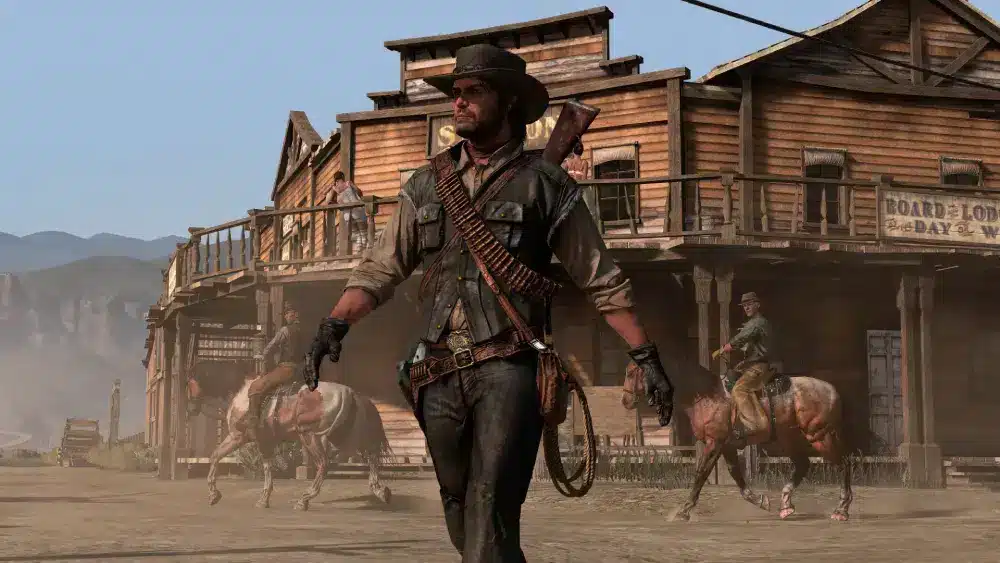
So what does Red Dead Redemption pc actually mean today? In practical terms, it refers to playing the game on computer through emulation or unofficial solutions, since Rockstar has not released a native rockstar port for PC.
Understanding Red Dead Redemption pc requires clarity about what is official and what is not. While Red Dead 2 launched on PC with full support, the original western rpg remains console-focused.
Is there an official Red Dead Redemption pc version?
At first glance, many players assume there must be a PC version because of Red Dead 2’s success. However, Rockstar has never launched a standalone PC port of the original Red Dead Redemption.
The game was officially released for:
- PlayStation 3 (May 2010)
- Xbox 360 (May 2010)
Later compatibility expansions allowed:
- Xbox One backward compatibility
- PlayStation 4 re-release bundle versions
But none of these releases included a dedicated pc version.
Why Rockstar never released a PC port
There are several possible reasons:
- Technical limitations from the original engine
- Focus shifting toward Red Dead 2
- Commercial prioritization of newer projects
Although Rockstar has not provided an official explanation, the absence of a rockstar port remains one of the biggest mysteries in gta and western rpg history.
Red Dead Redemption pc requirements (emulation scenario)
Since there is no official pc version, players rely on emulators like RPCS3 to run the PlayStation 3 version.
Below is a realistic performance expectation table for Red Dead Redemption pc via emulation:
| Component | Minimum | Recommended |
| OS | Windows 10 | Windows 10 / 11 |
| CPU | Quad-core 3.2 GHz | 6-core 3.6 GHz+ |
| RAM | 8 GB | 16 GB |
| GPU | GTX 1060 / RX 580 | RTX 2060+ / RX 6600+ |
| Storage | 30 GB | SSD recommended |
Keep in mind that emulation requires more processing power than native PC games.
Check also: High Ping in Red Dead Redemption Online: How ExitLag Fixes It
Performance expectations across PC tiers
Performance varies dramatically depending on hardware.
Low-end setup
- Frequent frame drops
- Long loading times
- Visual instability
This tier struggles with Red Dead Redemption pc emulation.
Mid-range setup
- Playable frame rates (25–40 FPS)
- Occasional stuttering
- Moderate shader compilation delays
This is the minimum comfortable tier.
High-end setup
- Stable 40–60 FPS in many areas
- Faster loading
- Better texture clarity
High-end PCs deliver the closest experience to a stable console build.
Differences between Red Dead 2 and Red Dead Redemption pc
Many players confuse Red Dead 2 PC with the original title. However, they are separate products.
Red Dead 2 launched officially on PC with:
- Full graphics settings customization
- Ultra textures
- Native keyboard and mouse support
- Rockstar Launcher integration
By contrast, Red Dead Redemption pc depends on emulator configuration and hardware strength.
Midway through your setup process, connection stability also becomes important — especially if you are using online services or syncing Rockstar accounts. ExitLag helps optimize routing and reduce packet loss, ensuring smoother performance when launching Rockstar titles or playing Red Dead 2 online.
You may also like: How to Reduce Lag in Red Dead Redemption Online with ExitLag
Should you wait for a Rockstar port?
Rumors about an official rockstar port surface every year. However, there has been no confirmed announcement.
If Rockstar ever releases an official pc version, it would likely include:
- Enhanced textures
- Higher frame rate support
- Updated lighting
- Improved anti-aliasing
Until then, Red Dead Redemption pc remains dependent on unofficial solutions.
Ultimately, Red Dead Redemption pc continues to attract attention because of the game’s legacy. As one of the most influential western rpg titles ever made, its absence on PC only increases demand among players who want the full frontier experience on modern systems.
Red Dead Redemption pc performance, setup strategies, and future expectations
Red Dead Redemption pc remains one of the most requested releases in Rockstar’s catalog. Even without an official announcement, the demand for a proper PC adaptation continues to grow among fans of this legendary western rpg.
When evaluating Red Dead Redemption pc today, players must understand that there is still no native PC build. Instead, current access depends on emulation, console compatibility, or waiting for a potential future rockstar port.
So what does Red Dead Redemption pc truly represent in 2025? It represents a community-driven effort to bring the original console experience to modern hardware, since Rockstar has not delivered an official pc version.
Because of that, Red Dead Redemption pc performance is determined by three key factors: hardware power, emulator configuration, and overall system optimization. Unlike Red Dead 2 on PC, this is not a plug-and-play experience.
Read too: Red Dead Redemption 2 Arthur Morgan: The Heart of the Wild West Story
How to properly set up Red Dead Redemption pc via emulation
If you plan to run the game using RPCS3, preparation is critical. Emulation simulates PlayStation 3 architecture, which places heavy strain on CPU resources.
Step-by-step setup guide
- Install the latest stable version of RPCS3
- Update your GPU drivers to the newest release
- Dump your legally owned PS3 game files
- Configure CPU and GPU settings based on your hardware tier
- Enable recommended patches for stability
- Test performance at native resolution before increasing internal scaling
Skipping configuration steps often results in instability or unnecessary performance drops.
Recommended emulator settings
For better results:
- Use Vulkan renderer instead of OpenGL
- Enable asynchronous shader compilation when supported
- Set SPU threads according to CPU core count
- Keep background applications closed
- Install the game on an SSD instead of HDD
These adjustments significantly reduce shader stutter and improve frame pacing.
Performance expectations by hardware class

Understanding realistic expectations prevents frustration.
Mid-range CPU with strong GPU
- 30–40 FPS average
- Minor frame pacing issues
- Occasional stutters during intense shootouts
This setup is playable but not flawless.
High-end multi-core CPU
- 45–60 FPS in many regions
- Faster streaming of environmental assets
- More stable gunfight performance
This tier delivers the closest experience to stable console emulation.
You may also like: Lag spikes: how to reduce lag in online game for a smoother experience
Ultra-high-end modern systems
- Near-locked 60 FPS in optimized builds
- Higher internal resolution rendering
- Minimal shader compilation interruptions
Even at this tier, emulation overhead can still cause rare instability.
Common bottlenecks affecting Red Dead Redemption pc
Several technical factors limit performance:
- CPU thread scheduling limitations
- PS3 architecture complexity
- Heavy reliance on single-core efficiency
- Shader cache rebuilding during updates
Unlike native PC titles, emulation demands far more from processors than graphics cards.
Midway through optimizing your system, network stability also becomes relevant — especially if you frequently switch between Red Dead 2 Online or Rockstar Launcher services. ExitLag improves routing efficiency, reduces latency spikes, and minimizes packet loss when accessing Rockstar platforms. While it does not impact offline emulation performance, it enhances overall Rockstar ecosystem stability.
Comparing Red Dead Redemption pc with Red Dead 2 PC
It is important to distinguish between the two experiences.
Red Dead 2 PC offers:
- Official optimization
- Graphics presets and fine tuning
- DLSS and modern rendering technologies
- Native mouse and keyboard support
- Official technical support
By contrast, Red Dead Redemption pc relies entirely on:
- Emulator updates
- Community patches
- Hardware brute force
- Manual troubleshooting
This contrast explains why an official rockstar port remains highly anticipated.
Could Rockstar release an official PC version?
Speculation resurfaces every year, especially around major anniversaries.
Possible scenarios for a future release include:
- Anniversary remaster edition
- Bundle with Red Dead 2
- Engine rebuild using modern Rockstar tools
- Subscription-based Rockstar Launcher exclusive
If Rockstar ever confirms a rockstar port, it would likely include higher resolution textures, improved lighting systems, 60+ FPS support, and SSD-optimized loading times.
Until then, Red Dead Redemption pc remains dependent on community effort and hardware capability.
Read this: Ping Test: learn how to do it and interpret the results properly
Is Red Dead Redemption pc worth playing via emulation?
The answer depends on your expectations.
It is worth trying if:
- You own the original console copy
- You have a powerful multi-core CPU
- You are comfortable adjusting technical settings
You may want to wait if:
- You expect perfect 60 FPS stability
- You prefer official support
- Your system is mid-range or below
Realistic expectations are key when approaching Red Dead Redemption pc through unofficial solutions.
Frequently Asked Questions (FAQ)
No. Rockstar has never released a native PC version of the original Red Dead Redemption. Any PC gameplay currently relies on emulation.
Yes, but only on high-end or ultra-high-end systems with strong CPUs. Even then, performance may fluctuate depending on scene complexity.
The emulator itself is legal in many regions, but you must own a legitimate copy of the game. Downloading copyrighted files without ownership may violate local laws.
Check this: Ping for Gaming: what’s slowing your sessions and how to prevent
Red Dead 2 has full official optimization and support. Red Dead Redemption pc, on the other hand, is community-driven and hardware-dependent.
In Conclusion

The current state of Red Dead Redemption pc reflects both demand and limitation. While the western rpg remains one of Rockstar’s most iconic releases, it still lacks an official PC adaptation.
For now, players can explore emulation with the right hardware and configuration. However, many fans continue to hope for a polished rockstar port that delivers native optimization and long-term support.
Know that you know everything avout rRed Dead Redemption pc, if you frequently play Rockstar titles on PC, optimizing your connection is also essential. ExitLag provides improved routing stability, reduced latency, and better overall session consistency across Rockstar services. Until Rockstar releases an official pc version, the best experience depends on preparation, hardware power, and smart optimization choices. Download ExitLag now!
Got questions or want to connect with other players? Join the conversation at the ExitLag Forum!