The Repo controls system is one of the most important things to understand when starting R.E.P.O., especially because the game relies heavily on movement, physics interactions, teamwork, and precise object handling. Unlike traditional horror games, R.E.P.O. requires players to carefully control their characters while carrying valuable objects and avoiding dangerous creatures.
Learning the Repo controls early can make a huge difference during missions. Since the game combines chaotic physics-based gameplay with cooperative extraction mechanics, knowing how to move efficiently, interact with objects, communicate with teammates, and react quickly can determine whether your team succeeds or loses valuable progress.
The Repo controls are designed primarily for PC players using keyboard and mouse, although controller support can also provide a comfortable alternative for some users. In this guide, you will learn every important command, understand how movement and interactions work, adjust settings, and discover useful tips to improve your experience in R.E.P.O.
Repo Controls: Understanding the Basic Commands
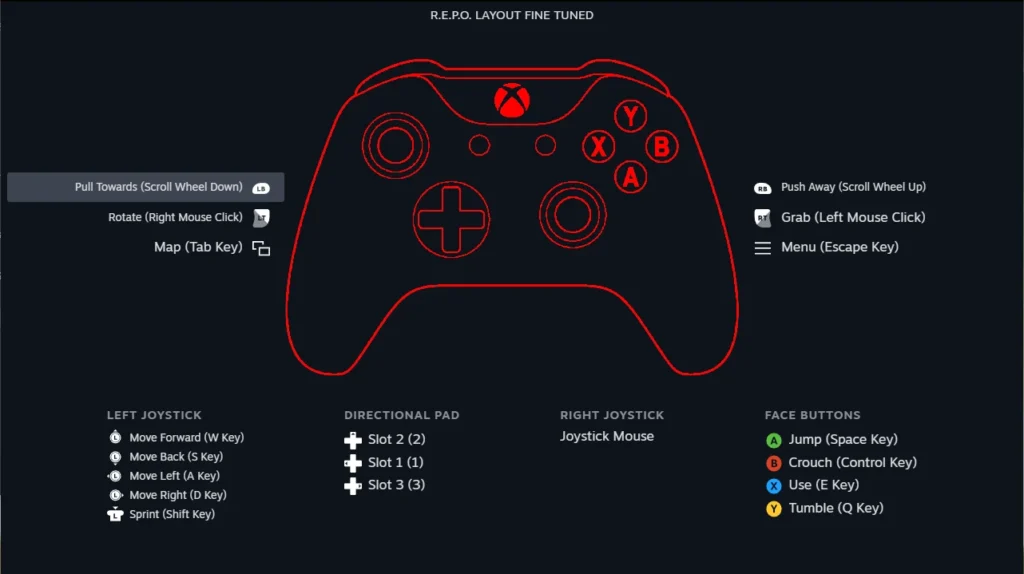
Before entering dangerous areas or attempting difficult extractions, it is important to understand the basic REPO game controls.
R.E.P.O. is built around physics-based interactions, meaning that simple actions like grabbing, carrying, throwing, and positioning objects require more attention than in many other games.
Default keyboard controls
The standard keyboard layout allows players to control movement and interact with the environment quickly.
|
Action |
Default Key |
|
Move Forward |
W |
|
Move Backward |
S |
|
Move Left |
A |
|
Move Right |
D |
|
Jump |
Space |
|
Crouch |
Ctrl |
|
Sprint |
Shift |
|
Interact / Grab |
E |
|
Use Voice Chat |
V |
|
Push to Talk |
T |
|
Open Menu |
Esc |
These commands represent the foundation of the game.
However, because R.E.P.O. focuses so much on teamwork and physics, players should spend some time becoming comfortable with object interactions before attempting harder missions.
Why learning controls matters
Many new players underestimate how important movement precision is in R.E.P.O.
For example, carrying a valuable object through a dangerous area requires more than simply walking toward the exit. Players need to manage movement, avoid obstacles, communicate with teammates, and react quickly when enemies appear.
Because of this, mastering the basics can improve both survival and efficiency.
REPO Keyboard Controls and Object Interaction
One of the biggest differences between R.E.P.O. and traditional horror games is the importance of physical interaction.
The game is built around manipulating objects, which makes understanding REPO keyboard controls essential.
Picking up and carrying objects
The interaction button allows players to grab items throughout the environment.
However, objects behave differently depending on:
- Size;
- Weight;
- Position;
- Environment;
- Player movement.
Large objects may require teamwork, while smaller objects can often be carried individually.
Throwing and positioning items
Movement physics play an important role when transporting valuable objects.
Players need to consider:
- Where they place objects;
- How they rotate them;
- Whether they have enough space;
- Whether enemies are nearby.
A careless movement can send an important item flying or create unnecessary noise.
Team coordination
Because R.E.P.O. is designed as a cooperative experience, communication is a major part of success.
Players should coordinate when:
- Moving large objects;
- Exploring dangerous rooms;
- Escaping enemies;
- Planning extraction routes.
Good communication often matters more than simply having fast reactions.
REPO Game Controls for Movement and Survival
Movement is a major part of surviving in R.E.P.O.
Although the controls appear simple, using them effectively requires practice.
Sprinting and positioning
Sprint allows players to quickly reposition when danger appears.
However, constantly running is not always the best strategy.
Players should balance speed with awareness because rushing into unknown areas can create unnecessary problems.
Crouching and careful movement
Crouching can be useful when navigating tight areas or trying to move more carefully.
Since the game includes unpredictable situations, slower movement can sometimes prevent mistakes.
Jumping and environmental movement
Jumping is useful for navigating the environment, reaching areas, and avoiding obstacles.
However, because the game uses physics-based mechanics, players should avoid unnecessary movement when carrying important objects.
Small mistakes can quickly become expensive.
R.E.P.O. Controller Support: Can You Play With a Gamepad?
Many players searching for R.E.P.O. controller support want to know whether they can play using a gamepad instead of keyboard and mouse.
Controller support can provide a more comfortable experience for players who prefer console-style controls.
Keyboard vs controller
Both options have advantages.
|
Input Method |
Advantages |
|
Keyboard and Mouse |
More precise camera control and faster input |
|
Controller |
More comfortable movement and relaxed gameplay |
Keyboard and mouse generally provide better precision, especially during situations that require accurate object handling.
Controllers, meanwhile, may feel more natural for players who prefer analog movement.
Choosing the best option
The best control method depends on your personal preference.
Players who enjoy competitive precision may prefer keyboard and mouse, while those focused on casual cooperative gameplay may enjoy a controller.
Testing both options is the best way to determine what feels comfortable.
REPO Controls and Settings: How to Customize Your Experience
Adjusting REPO controls and settings can improve comfort and make gameplay smoother.
Every player has different preferences, so customizing settings is worth doing.
Sensitivity settings
Mouse sensitivity affects how quickly your camera moves.
A sensitivity level that is too high can make aiming and object interaction feel unstable.
A sensitivity level that is too low may make turning around during emergencies difficult.
Finding a balanced setting is important.
Audio settings
Audio is extremely important in R.E.P.O.
Players rely on sound to:
- Detect danger;
- Communicate;
- Understand nearby events;
- Coordinate with teammates.
Using appropriate volume levels can improve awareness.
Key customization
If the game allows custom key bindings, players can adjust controls based on comfort.
Some players prefer moving interaction keys closer together, while others keep the default layout.
The important thing is creating a setup that feels natural.
How to Play REPO Game: Beginner Tips
Knowing how to play REPO game involves more than memorizing controls.
The game rewards teamwork, patience, and careful decision-making.
Communicate with your team
R.E.P.O. becomes much easier when players communicate.
Useful information includes:
- Enemy locations;
- Valuable objects found;
- Safe routes;
- Extraction plans.
A silent team will usually struggle more than a coordinated one.
Do not rush objectives
New players often try to complete objectives as quickly as possible.
However, rushing can create mistakes.
Take time to:
- Observe the environment;
- Plan movement;
- Coordinate actions;
- Protect valuable items.
Practice object physics
The physics system is one of the game’s main features.
Spend time learning how objects react.
Understanding weight and movement will make later missions much easier.
Common REPO Controls Problems and Fixes
Sometimes players experience issues with controls or input settings.
Controls not responding
If commands stop working:
- Restart the game;
- Check controller connection;
- Verify keyboard settings;
- Restart Steam;
- Check for updates.
Temporary input issues can often be solved with a simple restart.
Controller not detected
If your controller is not working:
- Check USB or Bluetooth connection;
- Confirm controller compatibility;
- Restart the game after connecting the controller;
- Check Steam controller settings.
Sometimes the controller must be connected before launching the game.
Performance affecting controls
Input delay can sometimes feel like a control problem when the real issue is performance.
Low frame rates, connection problems, or system limitations can make controls feel less responsive.
Improving performance can create a smoother experience.
How ExitLag Can Improve Your R.E.P.O. Experience
Although Repo controls are related to gameplay input, online performance also affects cooperative experiences.
R.E.P.O. depends on stable multiplayer connections, especially when playing with friends.
Connection problems can affect gameplay
Network issues may cause:
- Delayed actions;
- Synchronization problems;
- Disconnects;
- Unstable multiplayer sessions.
These problems are different from control settings, but they can still affect how responsive the game feels.
Optimizing your connection
ExitLag focuses on optimizing network routes for supported games.
It does not change your keyboard settings or improve your hardware, but it can help reduce connection-related issues by improving the path between your device and game servers.
For multiplayer games, a more stable connection can make cooperative gameplay smoother.
FAQ
What are the default Repo controls?
The default Repo controls use keyboard and mouse commands such as WASD for movement, Space for jumping, E for interaction, and Shift for sprinting.
Does R.E.P.O. have controller support?
R.E.P.O. supports controller gameplay for players who prefer using a gamepad. However, keyboard and mouse may provide more precision for physics-based interactions.
How do you grab objects in R.E.P.O.?
Players can grab objects using the interaction key. Object movement depends on weight, position, and physics, making careful handling important.
How do you communicate in R.E.P.O.?
R.E.P.O. includes voice communication options that allow players to coordinate during missions and share information with teammates.
Can I change REPO controls?
If customization options are available in the game settings, players can adjust controls and sensitivity to match their preferred setup.
Why are my REPO controls not working?
Control problems can be caused by input conflicts, controller connection issues, outdated settings, or temporary game bugs. Restarting the game and checking input devices usually solves common problems.
Repo Controls: Master the Game and Improve Your Multiplayer Experience
Understanding Repo controls is one of the first steps toward becoming more effective in R.E.P.O. Whether you play with keyboard and mouse or prefer a controller, mastering movement, interactions, and teamwork will help you complete missions more efficiently.
Once your controls are configured correctly, use ExitLag to optimize your connection and enjoy smoother multiplayer sessions while exploring everything R.E.P.O. has to offer.
Got questions or want to connect with other players? Join the conversation at the ExitLag Forum!