

For players eager to grow their inventory and collect rare items, Roblox trading has become one of the most exciting and strategic features of the platform. This system allows Premium users to trade limited collectibles, exclusive gear, and even Robux—creating a dynamic, player-driven economy.
Even more, Roblox trading provides an engaging way to interact with other users, build your avatar’s identity, and turn common items into high-value assets over time. If done right, it can be both profitable and rewarding.
So, what is Roblox trading exactly? It’s the official method for exchanging limited items and collectibles between players. Trades can include items, Robux (up to 50% of a trade’s value), or a combination of both—making it possible to acquire ultra-rare gear without spending real money in the catalog.
What Is Roblox Trading?
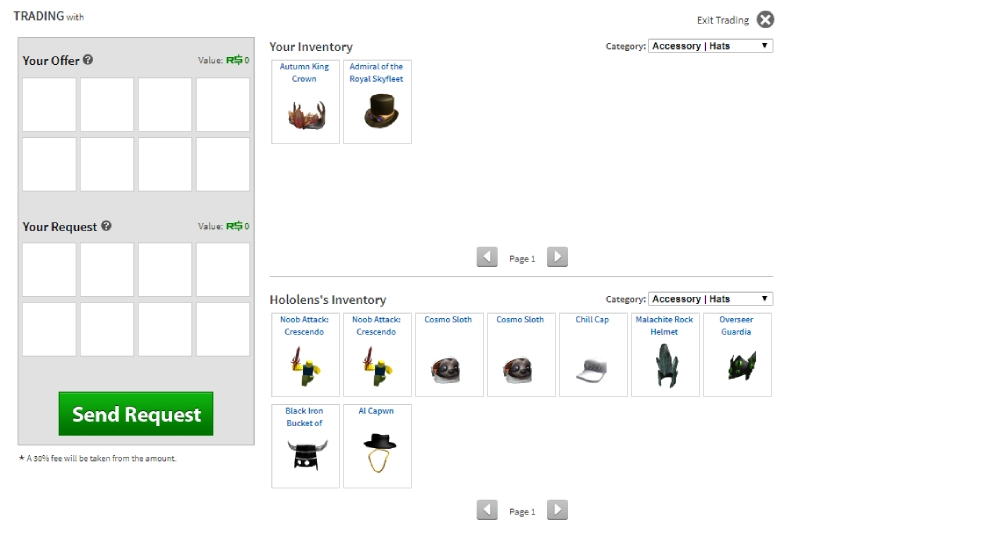
At its core, Roblox trading is designed to let players exchange exclusive items that are no longer available in the shop. These typically fall under two categories: Limited and Limited U items.
To access the trading feature, players must be subscribed to Roblox Premium, which also unlocks daily Robux stipends and the ability to resell items from your inventory.
Which Items Are Eligible?
Only a specific set of items can be traded on the platform:
- Limited Items: Released in the past and marked with a green “Limited” icon. These are tradable and retain value in the player market.
- Limited U Items: Serialized collectibles with unique numbers assigned to each item.
- Seasonal or Promo Gear: Occasionally tradable if labeled as “Limited.”
Note: Standard items, accessories, and game passes purchased from the catalog are not eligible for trading.
What Are the Basic Rules?
Roblox enforces several key rules to keep Roblox trading fair and secure:
- You must be a Roblox Premium subscriber.
- Only limited items and collectibles are eligible for trade.
- Robux can be included but cannot exceed 50% of the trade’s total value.
- All trades are final once accepted—you cannot reverse a completed deal.
- Roblox’s system monitors trades for scams and may roll back unfair trades in rare cases.
These rules are crucial for protecting players and maintaining the integrity of the in-game economy.
Check also: How to Download and Install Roblox on Any Device
How to Trade on Roblox: Step-by-Step Setup
If you’re ready to dive into Roblox trading, you’ll first need to activate the system and ensure your account meets the requirements. Fortunately, Roblox makes the process straightforward for Premium users.
Step 1: Get Roblox Premium
You must subscribe to Roblox Premium—trading is only available to active Premium accounts. There are multiple Premium tiers, but any of them will unlock access to the trading feature. Once active, your account will receive a Robux allowance and gain access to selling and trading features on the platform.
Step 2: Enable Trading
After activating Premium, navigate to your Account Settings > Privacy tab and ensure that Trading is enabled. You may also want to adjust who can send you trade offers (e.g., Everyone, Friends, or No One).
Step 3: Find a Trade Partner
You can search for other traders using the Roblox search bar or via external Roblox trading sites like Rolimons. Once you’re on someone’s profile:
- Click the three dots (More button)
- Select “Trade Items”
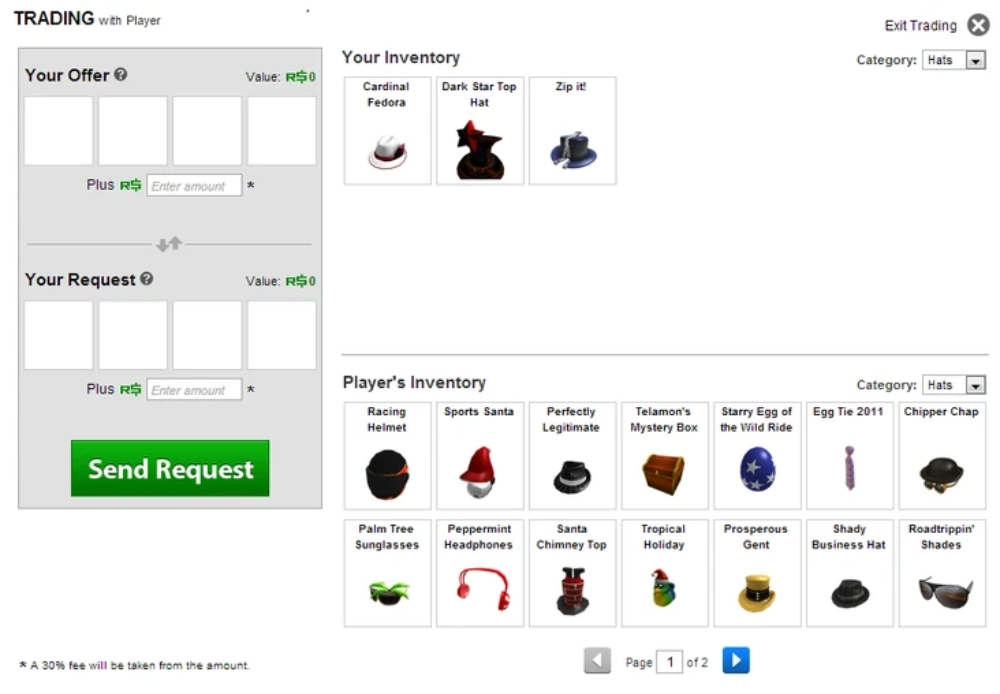
This opens the trading interface where you’ll select the items you want to offer and request.
Step 4: Make Your Offer
Use the side-by-side inventory interface to pick which Roblox trading items you want to send and what you want in return. You can include Robux (up to 50% of the total trade value) to balance the offer.
After reviewing everything carefully, click “Send Offer.”
Check also: How to Unblock Someone on Roblox
Step 5: Monitor the Trade
You can track pending, completed, declined, and countered trades under the “Trades” tab in your account settings. Use this dashboard to manage your activity and adjust future offers based on what works best.
Understanding Roblox Trading Value and Negotiation
One of the most important elements of Roblox trading is understanding what your items are worth. Overpaying or accepting undervalued trades can cost you thousands of Robux worth of inventory.
What Affects Item Value?
Item value fluctuates based on several factors:
- Original sale quantity and release date
- Current demand from collectors
- Rarity and how many exist in circulation
- Trends from influencers or events
Some Roblox limited trading items double or triple in value over time, while others lose popularity. That’s why research is critical.
Tools to Help You Trade Smarter
- Rolimons.com: The most reliable community-run tool for checking live values, trade charts, RAP (Recent Average Price), and demand tier lists.
- Trade Hangout: An official Roblox game where traders meet to propose offers in real-time.
- Discord servers: Many reputable Roblox trading communities exist for discussing deals and item speculation.
Here’s a basic value comparison table based on 2025 averages:
| Item Name | RAP | Value (Estimated) | Demand |
| Valkyrie Helm | 150,000 | 190,000+ | Very High |
| Black Iron Commando | 12,500 | 15,000 | Medium |
| Classic Fedora | 78,000 | 100,000+ | High |
| Bighead | 40,000 | 50,000 | Medium |
| Super Happy Face | 95,000 | 110,000+ | Very High |
Keep in mind: RAP is not the same as market value. Always compare recent trades before sending or accepting offers.
Roblox Trading Guide: How to Avoid Scams and Trade Safely
As exciting as Roblox trading can be, the system also comes with risks—especially for newer users who aren’t familiar with the tactics used by scammers. Learning how to spot red flags and protect your account is essential to maintaining a safe and profitable trading experience.
Check also: Big Paintball Reviews for Kids Roblox: A Review of this Popular Game
Common Roblox Trading Scams to Avoid
Unfortunately, scammers constantly look for ways to trick users into giving away valuable items. Here are the most frequent types of scams:
- Fake item valuations: A trader may lie about an item’s demand or falsely claim it’s about to be removed from circulation.
- External link scams: If someone asks you to click a link outside Roblox, don’t. It could lead to phishing sites.
- Trust trades: These often involve someone saying “send your item first, I’ll trade mine after.” Never do this—it’s almost always a scam.
- Clone items or impersonators: Some scammers use fake profiles or misleading avatars to appear legitimate.
How to Protect Your Inventory
To trade safely in Roblox trading, follow these essential tips:
- Always trade within the Roblox platform.
- Use trusted tools like Rolimons to verify item value and demand.
- Never share your password or login credentials.
- Set up 2-Step Verification and account PIN to prevent unauthorized access.
- Be skeptical of “too good to be true” offers.
These steps, combined with smart negotiation and verified sources, will help ensure your trading experience is both secure and successful.
Smart Strategies to Grow Your Trading Inventory
Building a powerful inventory through Roblox trading takes time, consistency, and smart decision-making. Here are key principles that help beginner traders build wealth in the virtual marketplace.
You may also like: How to Create a Custom Avatar in Roblox Studio
What to Look for in a Good Trade
- Fair market value: Always compare offers against real-time data from trusted Roblox trading sites.
- Item demand: Items that are always in high demand (like Valkyrie Helm or Super Happy Face) tend to appreciate faster.
- Upgrade vs. Downgrade: Trading multiple lower-value items for one high-value item is called an upgrade—and is often a good move if you plan to hold long-term.
- Projected value growth: Some items show consistent price increases over time, especially after being taken off sale.
Common Mistakes to Avoid
- Trading too quickly: Always double-check values before accepting.
- Overpaying based on hype or rumors.
- Ignoring RAP vs. value: RAP is just an average; it doesn’t always reflect true trade value.
- Trading for looks over value: Aesthetics can be tempting, but value drives your long-term gains.
These lessons form the foundation of a solid Roblox trading guide, ensuring you trade smart—not just fast.
Frequently Asked Questions About Roblox Trading
Roblox trading allows Premium users to exchange limited items and collectibles. Users send trade offers that can include items and Robux (up to 50% of trade value). Both players must accept the trade for it to go through.
To unlock trading, you need to:
Subscribe to Roblox Premium
Own at least one limited item
Enable trading in Privacy Settings
Once these steps are complete, the “Trade Items” option will appear on user profiles.
Highly sought-after items include:
Valkyrie Helm
Super Happy Face
Classic Fedora
Dominus series
These are known for strong resale value and high demand in the Roblox trading market.
Yes—if you follow best practices. Use trusted tools, never leave the platform to negotiate, and avoid “trust trades.” Roblox also monitors trades and offers account security options like PIN protection and 2FA.
No. Roblox trading is exclusive to Roblox Premium members. Non-Premium users can’t send or receive trades.
Check also: How to Change Your Username on Roblox
Final Thoughts: Is Roblox Trading Worth It?
Absolutely. Roblox trading is one of the most dynamic and community-driven systems in the game. It rewards strategy, patience, and market knowledge—and offers the thrill of building a unique, high-value inventory through smart exchanges.
Whether you’re collecting for status, profit, or fun, trading opens new doors in how you interact with Roblox’s economy. And with the right tools and mindset, anyone can succeed—even starting with a small inventory.
Use ExitLag for a Smoother Roblox Trading Experience
Trading often happens in real-time. Whether you’re browsing Roblox trading sites, visiting Trade Hangout, or joining events, having a stable connection is critical—especially if you’re managing multiple accounts or switching regions.
That’s where ExitLag comes in. It’s a powerful connection optimizer that routes your traffic through the best-performing paths for speed, reliability, and stability.
Why Use ExitLag with Roblox?
- Reduces ping spikes and disconnection risks
- Optimizes server routes in high-traffic zones
- Works with Wi-Fi or cable setups
- Supports multiplayer and trade-centric games
- Great for international users needing faster routing to Roblox servers
Now that you know everything about Roblox Trading, it’s time to try ExitLag now, to keep your trades fast, stable, and secure—no matter where you’re playing from.
Got questions or want to connect with other players? Join the conversation at the ExitLag Forum!



