Roblox age groups have become increasingly important for anyone who plays, chats, creates, or connects with other users on the platform. Age is no longer simply a detail attached to an account. It can influence communication features, content access, parental controls, and how players interact with others.
Understanding roblox age groups is especially useful because Roblox now relies on age checks for communication and other platform features. Depending on a player’s verified or estimated age, the platform can provide different content and social options designed for that age range.
So, what are roblox age groups? They are age-based categories that Roblox uses to determine which games, communication tools, and features a player can access. Current broad categories include Under 9, 9–12, 13–15, 16–17, and 18+, although facial age estimation can use more specific brackets.
This system matters whether you’re joining a Community, talking with friends, exploring multiplayer experiences, or managing a younger player’s account. It also means that two players can use the same Roblox platform while having different communication and content options.
At the same time, terminology can be confusing. Players still frequently search for roblox groups, while Roblox’s current interface and support documentation commonly use the term Communities. Roblox’s Terms distinguish a Community as a social space and a Group as a type of Community involving creators collaborating on user content.
This guide explains the current system, including age checks, global chat, Communities, joining and creating groups, ownership, and the role connection quality plays when enjoying Roblox online.
Roblox age groups explained: what each age range can access
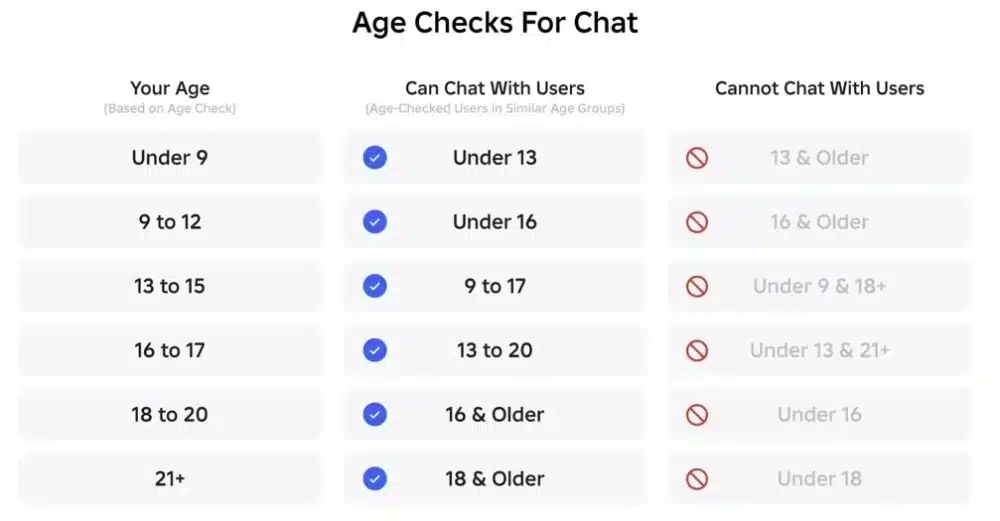
Age checks help Roblox customize what users can access. They are currently required for chat, Restricted Content, certain Trusted Friends communication, and some collaboration functionality.
That makes understanding your roblox age group useful before changing chat settings or trying to access a feature.
Current Roblox age group categories
Roblox currently describes five broad age groups for content and feature access: Under 9, 9–12, 13–15, 16–17, and 18+. However, exact access can also depend on account settings and region.
In general:
- Under 9 accounts have access to age-appropriate content, with parental permission required for certain communication.
- Ages 9–12 gain additional communication possibilities after meeting applicable requirements.
- Ages 13–15 can access more features while still remaining within age-based safeguards.
- Ages 16–17 can access broader content and communication options, excluding 18+ content.
- Ages 18+ receive the broadest access to Roblox games and features.
Roblox has also introduced Roblox Kids and Roblox Select. Roblox Kids generally serves younger users, while Roblox Select provides an age-appropriate catalog for users below 16. Regional differences can apply.
Restricted experiences are specifically limited to age-checked users aged 18 or older. Such experiences can contain stronger violence, stronger language, romantic themes, alcohol references, and other content covered by Roblox’s Restricted label.
How Roblox verifies or estimates your age
Roblox provides two main age-check methods: facial age estimation and ID verification. ID verification is available to users aged 13 and above.
Facial age estimation analyzes facial features to estimate an age range. Roblox states that images and video used for this process are deleted after processing. The resulting estimate can place users into the following brackets:
- 5–8
- 9–12
- 13–15
- 16–17
- 18–20
- 21+
These brackets are more detailed than the broad content-access categories players commonly see.
If Roblox detects a discrepancy, it may request another age check. Users who believe their estimated age is incorrect may also have options to verify or correct their birthday, depending on their age and account situation.
Roblox global chat age groups and communication rules
The roblox global chat age groups system is one of the biggest reasons players need to understand age checks.
Roblox requires users to successfully complete an age check before accessing communication features such as Experience chat, Voice chat, and Friends communication. After completing the process, players can communicate with global users in similar age groups, subject to regional availability and account settings.
How age groups affect Roblox chat
Experience chat lets eligible players communicate with other users while they are inside the same experience.
Roblox says age-checked users can communicate with people in similar age groups within the same server. Experience chat remains filtered to help prevent inappropriate content and personally identifiable information from appearing.
There are additional protections for younger players. Users aged 5–9 require parental consent to enable Experience chat, while users under 16 require parental consent to enable Direct chat.
These rules help explain why two accounts may see different communication options even when they are playing the same game.
Trusted Friends and voice communication
Trusted Friends expand communication possibilities beyond regular friends.
Players aged 9–12 can text and participate in group chats with Trusted Friends while safety filters remain active. For users aged 13 and older, Trusted Friends can enable additional text, group chat, and voice functionality where those features are available.
Voice controls are available to age-checked users aged 13+ in supported regions and experiences that support Voice Chat. Roblox also notes that phone verification is not a valid method for obtaining Voice Chat access under the current system.
Therefore, age checking has become an important part of Roblox’s social ecosystem rather than simply a way to unlock mature content.
How to join a group in Roblox
If you’re searching for how to join a group in roblox, you’ll notice that Roblox now commonly calls these social spaces Communities.
The process itself remains straightforward. Communities allow players to connect around games, creators, interests, development projects, and other shared activities.
How to find Roblox Communities
On the Roblox website, click Communities in the left navigation panel. From there, you can browse your Communities, find another Community, join one, or create your own.
On the Roblox app, open the More menu and select Communities. You can also search for a Community by name.
Therefore, players asking how to join groups in roblox can follow this simple process:
- Sign in to your Roblox account.
- Open the Communities section.
- Search for the Community you want.
- Open its Community page.
- Select Join Community.
- Complete any verification requirements or wait for approval when necessary.
That final step is important because not every roblox group accepts members instantly.
Why some Roblox Communities require approval
Community owners can enable Manual Approval. When that setting is active, selecting Join Community submits a request instead of immediately adding you as a member.
Owners can also establish verification levels.
The available verification requirements range from None through Low, Medium, and High. Depending on the selected level, a prospective member may need email, phone, or ID verification before joining. High verification requires ID verification.
So, if you’re wondering how do you join a group in roblox but the Join button doesn’t immediately add you, check whether approval or account verification is required.
Community owners may also establish specific requirements before approving an application.
How to make a Roblox group or Community
Learning how to make a roblox group is useful for creators, clans, friends, developers, and players who want their own organized space on Roblox.
Roblox currently lets players join up to 100 Communities. Players can also create up to 100 Communities themselves, and creating each new Community requires a one-time payment of 100 Robux.
How to make a group in Roblox step by step
The process for how to make a group in roblox starts from the Communities section.
On the website, log in and select Communities from the navigation panel. In the Roblox app, open the More menu, access Communities, and find the creation option.
Then:
- Select Create.
- Choose your Community name.
- Write a description.
- Add an emblem.
- Configure Community accessibility.
- Review your information.
- Pay the 100 Robux creation fee.
Roblox limits Community names to 50 characters. Owners who want tighter control over membership can enable Manual Approval during configuration.
This process also answers searches such as how to make a group on roblox and how to make a group roblox. While players may still call them groups, the main consumer-facing Roblox interface uses Communities.
What can you do after creating a Community?
Creating the Community is only the beginning.
Owners receive management options covering information, settings, members, roles, revenue, payouts, social links, and other Community functions.
You can create roles with different permissions, review membership requests, remove users, manage Community information, and establish entry requirements.
Communities can also sell eligible clothing. Roblox states that Robux earned through Community clothing sales goes directly to the Community, regardless of which member created the item.
That makes Communities useful for much more than simple social interaction.
Managing Roblox groups and Community permissions
Effective roblox groups need organization, especially when they involve many members or collaborative projects.
Roblox provides Community owners with tools to determine who can enter, what different members can do, and how Community resources are managed.
Roles, members, and verification
Community administrators can access management settings through Configure Community.
From there, authorized users can manage member requests, roles, permissions, information, and entry requirements. Owners can also establish verification levels before new players are allowed to join.
The four verification levels are:
- None: no account verification requirement.
- Low: phone, email, or ID verification.
- Medium: ID verification or both phone and email verification.
- High: ID verification.
Changing these requirements affects prospective members rather than removing existing members who do not meet a newly selected level.
This flexibility can be particularly valuable for creator Communities or organized teams that need tighter membership controls.
Community Walls and age restrictions
Age can affect Community interaction as well.
According to Roblox Support, access to the Community Wall is available to logged-in users aged 13 and above. The Wall functions as an ongoing discussion area where members can post and interact.
Community moderators with the necessary permissions can delete posts and manage members. Roblox also provides reporting tools for content that violates Community Standards.
As a result, roblox age groups can influence social activity even after a player has successfully joined a Community.
How to sell Roblox group ownership safely
Players searching how to sell roblox group should distinguish between Roblox’s official ownership-transfer feature and third-party transactions.
Roblox officially provides a way to transfer Community ownership to another member. However, its Community documentation does not describe an official marketplace specifically for buying and selling Community ownership.
Can you officially sell a Roblox group?
The documented feature is ownership transfer.
Within Community settings, an owner can transfer ownership to another Community member. Roblox warns that this process is not reversible.
Therefore, players should not interpret the ownership-transfer tool itself as an official Roblox system for selling Communities.
Be particularly cautious with external offers involving account credentials, unofficial payments, or promises that require you to surrender control before an agreed transaction is completed.
How Community ownership transfers work
For an official ownership change, the current owner can access the Community’s administrative settings and transfer ownership to another member.
Before making that change, review the Community carefully. Ownership controls can involve Community resources, experiences, member permissions, and revenue-related features.
Also remember that simply leaving a Community you own is different from transferring it. Roblox states that if an owner leaves without transferring ownership first, the Community can become ownerless. An eligible member may later claim ownership.
That makes proper ownership management essential for established Communities.
How Roblox age groups affect friends and social features
The roblox age group assigned after an age check affects more than content.
Communication is increasingly organized around age groups, helping limit unrestricted interaction between adults and minors while still providing ways for friends to connect.
Similar-age communication
After successfully completing an age check, Roblox users can communicate globally with users in similar age groups, subject to regional availability and individual settings.
Roblox also allows eligible players over age 9 to communicate with friends through its Chat interface.
However, communication capabilities differ by age. Younger accounts receive additional restrictions and safety filters, while older age-checked accounts gain broader options.
Players should therefore avoid assuming that a missing chat feature is a technical problem. It may instead be related to age status, parental permissions, region, or privacy settings.
Trusted Friends and cross-age communication
Trusted Friends provide an additional layer to Roblox’s social system.
For ages 9–12, Trusted Friends can participate in text and group chats while safety filters remain enabled. Users aged 13+ can gain broader text, group, and voice communication with Trusted Friends where available.
Users under 9 cannot direct-message friends outside experiences. Their available in-experience communication uses moderated filters and is subject to Roblox’s age and parental requirements.
These differences demonstrate why understanding roblox global chat age groups is important before troubleshooting communication settings.
Roblox age group: chat, content, and features
The current system combines content access, age checks, parental controls, communication rules, and regional requirements.
The table below provides a simplified overview based on Roblox’s current support documentation. Exact availability may vary according to region, account settings, parental controls, and specific features.
| Roblox age group | General content access | Communication | Important considerations |
| Under 9 | Roblox Kids / age-appropriate games | Limited; parental permission required for eligible chat | Strong parental controls |
| 9–12 | Roblox Select / age-appropriate games | Similar-age and eligible Trusted Friends communication after applicable checks | Safety filters and parental requirements apply |
| 13–15 | Roblox Select / age-appropriate games | Similar-age chat and expanded Trusted Friends features | More social features become available |
| 16–17 | Broad Roblox catalog except 18+ content | Similar-age and Trusted Friends communication | Expanded feature access |
| 18+ | Full age-appropriate catalog including eligible Restricted experiences | Broadest communication access | Restricted content still requires age checking |
Facial age estimation uses more detailed brackets, including 5–8, 9–12, 13–15, 16–17, 18–20, and 21+.
Therefore, a player’s precise age-check result and the feature being used both matter.
Roblox groups for creators and communities
Although many players think of a roblox group as a place to find friends, Communities can also support creator collaboration.
Roblox’s current Terms distinguish between Communities generally and Groups involving creators working together on user-generated content.
Why creators use Roblox groups
A well-managed Community can provide a central location for members, experiences, announcements, roles, and collaborative activities.
For creators, roles and permissions become especially useful because not every member needs the same level of control.
For example, a development Community might separate members into roles such as:
- Owner
- Developer
- Builder
- Designer
- Moderator
- Community member
The exact names and permissions depend on how the owner configures the Community.
Community revenue and clothing
Communities can also have financial functions inside Roblox.
Eligible Community clothing can be uploaded and sold through the Community Store. Revenue generated from those sales goes to the Community.
Community administrators can also access revenue information and payout controls when available and appropriately authorized.
For anyone researching how to make a group on roblox, these management features are worth considering before creating one. A Community designed for a handful of friends may require very different permissions from one intended for game development or a large player base.
Roblox age groups and safer Community participation
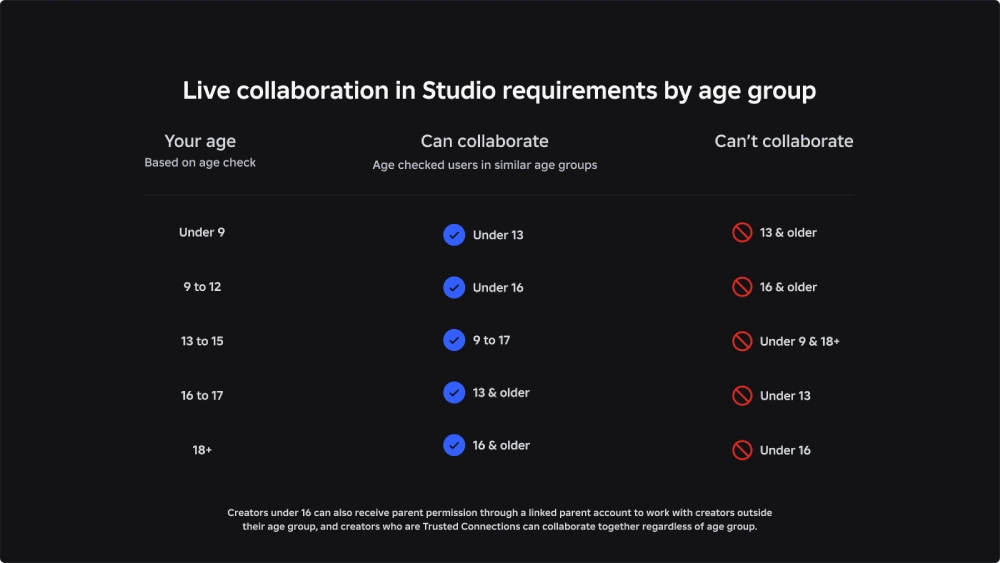
Roblox age groups work alongside Community settings rather than replacing them.
Even if your account is eligible for a particular social feature, a Community owner may still establish additional joining requirements. Likewise, joining a Community does not automatically unlock communication tools unavailable to your age group.
Check settings before assuming something is broken
When a feature appears unavailable, check several things first.
Review your age-check status, communication settings, parental controls, Community membership requirements, and regional availability.
For Community problems, also check whether:
- Manual Approval is enabled.
- Your membership request is still pending.
- The Community requires account verification.
- Your account meets the selected verification level.
- The feature has a separate minimum-age requirement.
For example, Community Wall access currently requires users to be at least 13.
Protect your account when joining Communities
Popular roblox groups can attract large audiences, which makes basic account security important.
Never provide your Roblox password to a Community owner or another member. Similarly, be careful with external links, suspicious offers, and anyone promising special roles or Robux in exchange for account access.
Official Community entry requirements are handled through Roblox’s own verification and membership systems. A legitimate Community verification setting does not require giving another player your password.
Roblox multiplayer performance and ExitLag
Social features are only one part of the Roblox experience. Many popular Roblox titles depend on real-time multiplayer interaction, where unstable routing, packet loss, or latency spikes can make movement and combat feel less responsive.
ExitLag is designed to optimize the network route between supported PC or Mobile players and game servers. Its Real-Time Optimization and Multipath Connection technologies can dynamically optimize data routes and improve connection stability when network routing is contributing to lag.
Why connection stability matters in Roblox
Roblox hosts an enormous variety of multiplayer experiences, from competitive shooters and sports games to survival, role-playing, and social titles.
A connection problem can appear as delayed actions, teleporting characters, inconsistent movement, or sudden latency spikes. In competitive experiences, even brief instability can disrupt an important moment.
Network optimization cannot change your roblox age group, unlock restricted communication, or override Roblox’s safety systems. Instead, ExitLag focuses on connection performance while Roblox controls account permissions and content access.
Using ExitLag with Roblox multiplayer
ExitLag supports PC and Mobile gaming and is built to optimize online gaming routes automatically while still offering configuration options for advanced users.
The setup is simple:
- Create your ExitLag account.
- Download the appropriate PC or Mobile app.
- Find the game you want to optimize.
- Apply the optimized routes.
- Start playing.
For Roblox players who frequently jump between multiplayer experiences, a more stable network route can help maintain smoother online sessions while they enjoy Communities and games with friends.
FAQ
There are several recurring questions surrounding roblox age groups, especially now that age checking affects communication more directly.
Here are the most important answers.
What are the Roblox age groups?
Roblox currently describes broad access groups as Under 9, 9–12, 13–15, 16–17, and 18+. Facial age estimation uses more specific brackets: 5–8, 9–12, 13–15, 16–17, 18–20, and 21+.
Feature availability can also depend on region and account settings.
What are Roblox global chat age groups?
Age-checked players can communicate globally with users in similar age groups. Roblox uses this system as part of its approach to limiting unrestricted communication between adults and minors.
Trusted Friends can provide additional communication options depending on the users’ ages and regions.
How to join a Roblox group?
If you’re looking for how to join a roblox group, open Communities, search for the Community you want, open its page, and select Join Community.
You may enter immediately or need to wait for manual approval. Some Communities also require account verification.
How many Roblox groups can you join?
Roblox currently allows a player to join up to 100 Communities. Players may also create up to 100 Communities themselves.
How to make a group on Roblox?
To learn how to make a group roblox players can open Communities and select Create. Add a name, description, emblem, and membership settings before completing the purchase.
Creating a Community currently costs 100 Robux as a one-time creation fee for each Community.
Can you transfer a Roblox group?
Yes. Roblox officially supports transferring Community ownership to another member through the Community settings.
Roblox warns that the ownership transfer cannot be reversed.
Can you sell a Roblox group?
Roblox documentation describes Community ownership transfers but does not present the transfer function as an official marketplace for selling Communities.
Players searching how to sell roblox group should therefore distinguish between Roblox’s supported ownership-transfer controls and external transactions.
Do you need age verification for Roblox chat?
Roblox currently requires an age check to access communication features. The available features then depend on the player’s age group, settings, region, and parental permissions where applicable.
Can different age groups chat on Roblox?
Roblox generally enables age-checked players to communicate with users in similar age groups. Trusted Friends can enable additional cross-age communication features under Roblox’s age-dependent rules.
Does age affect Roblox Communities?
Yes, some Community functionality has age requirements. For example, Roblox states that Community Wall access is available to logged-in users aged 13 and older.
Individual Communities can also establish their own joining and verification requirements.
Roblox age groups: what players and parents should remember
Roblox age groups now influence important parts of the platform, particularly communication, content access, parental controls, and social interaction. Completing an age check can determine which features become available, while account settings and regional restrictions may add further requirements.
At the same time, knowing how to join a group in roblox, create a Community, manage permissions, and understand ownership makes the social side of Roblox much easier to navigate. Communities can be simple spaces for friends or sophisticated creator organizations with roles, experiences, revenue, and membership controls.
Players should remember that age checks and Community verification serve different purposes. Your age group determines access to certain Roblox features, while Community owners can establish additional requirements for membership.
Finally, connection quality remains important whenever those Communities come together inside multiplayer experiences. Roblox age groups determine which platform features you can use, while ExitLag focuses on optimizing gaming routes, reducing connection instability, and improving online performance on supported PC and Mobile games.
All game images used in this blog belong to Roblox Corporation. They are used for informational/educational purposes only and do not imply endorsement or affiliation with the rights holders.
Got questions or want to connect with other players? Join the conversation at the ExitLag Forum!