

Players jumping into Blue Protocol: Star Resonance know how devastating high ping can be when battles hinge on timing, dodges, and skill combos. At first sight, Blue Protocol: Star Resonance high ping ruins combat flow, breaks rotations, and causes delayed hits that make encounters frustrating. Even more, this issue becomes worse during crowded events or specific regions shown in the supported games list.

What is high ping in Blue Protocol: Star Resonance?
Firstly, Blue Protocol: Star Resonance high ping happens when data packets take too long to travel between your computer and the game server. Ping represents the round-trip time in milliseconds (ms), and the higher the value, the slower your abilities and actions register in-game.
In advance, action MMORPGs rely heavily on responsive controls. Latency, packet travel, and server distance influence how quickly damage, movement, and skill chains appear. Similarly, unstable communication creates lag spikes and interruptions.
Finally, understanding the mechanics behind high ping helps identify whether the source is routing, overloaded networks, or regional server availability. This clarity is essential for reducing Blue Protocol: Star Resonance high ping effectively.
How high ping affects gameplay in Blue Protocol: Star Resonance
- Delayed ability activation
- Slow hit registration
- Rubberbanding during exploration
- Enemies teleporting or desyncing
- Broken dodges and iframe timing
- Long loading when switching zones
- Frequent disconnects in overcrowded areas
Hit registration delays
At first, high ping causes enemy reactions to appear late and skill strikes to land seconds after activation. As well as that, chain abilities often misfire, leading to lost DPS windows.
Dodging and movement instability
Soon after ping spikes occur, dodges fail, movement freezes, and enemy attacks appear unpredictable. In the same way, rubberbanding makes positioning unreliable in dungeons and large-scale events.
Main causes of high ping in Blue Protocol: Star Resonance
Server distance
If you’re connecting from a region far from the official servers, the packet travel time increases naturally. In summary, the farther the server, the higher the Blue Protocol: Star Resonance latency.
ISP / routing issues
ISPs often choose inefficient or congested traffic paths. As a result, players may experience lag Blue Protocol: Star Resonance even with high-speed connections.
Network congestion
Peak-hour usage or local device overload leads to spikes. Constantly, downloads, streaming, or neighbors sharing the same network line cause severe slowdowns.
Outdated hardware
Old routers, limited Wi-Fi range, or outdated drivers create Blue Protocol: Star Resonance connection issues that manifest as consistent ping fluctuations.
Game-specific cause
During massive events, patches, or content releases, server stress increases. Therefore, temporary latency rises, especially when thousands of players gather in the same instance.
How to check and test your ping in Blue Protocol: Star Resonance
Firstly, check your ping through the in-game network display to monitor fluctuations during combat, exploration, or dungeons. This shows whether latency remains constant or spikes unpredictably.
Afterwards, verify stability through OS commands to evaluate long-term packet flow. In other words, run continuous ping or tracert commands to identify specific hops causing instability.
Then, compare your results to reference categories: 0–50ms is excellent, 50–100ms is playable, and 100ms+ begins affecting action responsiveness. In the end, consistent data reveals whether troubleshooting should target your ISP, router, or general routing path.
Ping levels classification
| Ping range (ms) | Classification | Gameplay experience in Blue Protocol: Star Resonance |
| 0–40 ms | Excellent | Near-instant skills, perfect dodging windows. |
| 40–80 ms | Very good | Mild delay, fully playable for all classes. |
| 80–120 ms | Playable | Noticeable delay in combos and timing. |
| 120–180 ms | High ping | Skill chains break, dodges feel inconsistent. |
| 180–250 ms | Very high | Heavy delay, rubberbanding, unstable combat. |
| 250+ ms | Unplayable | Severe desync, unreliable abilities, frequent drops. |
Basic fixes to reduce high ping in Blue Protocol: Star Resonance
Optimize local connection
- Switch from Wi-Fi to Ethernet for stronger stability.
- Close background apps using bandwidth (updates, cloud sync, streaming).
- Update all network drivers and router firmware.
- Restart your router to refresh routing paths.
- Limit other devices from downloading or streaming simultaneously.
- Disable VPNs, proxies, or bandwidth-heavy browser tabs.
Contact your ISP
On the other hand, if issues persist, external routing is likely the cause.
- Ask for diagnostics on your line stability.
- Request verification of routing paths to international servers.
- Confirm whether your region is under congestion or maintenance.
- Check peak-hour quality reports.
- Provide your ISP with ping logs, traceroutes, and timestamps to speed up analysis.
ExitLag: the best solution to fix high ping in Blue Protocol: Star Resonance
In the meantime, if you've already tried every basic fix and Blue Protocol: Star Resonance high ping still disrupts fights, exploration, and skill chaining, the underlying issue is almost always routing. Above all, MMORPGs depend on stable packet delivery, and when your ISP uses unpredictable paths, latency becomes impossible to control. From now on, the proven way to stabilize your route is through the advanced technology behind ExitLag.
What is ExitLag?
ExitLag is specialized software designed for professional connection optimization, built to solve routing instability by correcting packet paths in real time. First of all, it analyzes all possible routes between your PC and the game server, identifying unstable or overloaded segments. According to the official technology documentation, ExitLag uses multi-layer algorithms engineered for fast-paced games like Blue Protocol: Star Resonance.
In advance, ExitLag constantly refreshes your route based on real-time network conditions. That way, your ping remains stable even during international connections, peak hours, or massive player events.

How ExitLag works
- Real-time route analysis ExitLag continuously evaluates packet travel and resolves bottlenecks instantly.
- Multiple routes simultaneously Packets move through several optimized tunnels at once, reducing delays caused by congestion.
- Automatic best route selection ExitLag dynamically switches to whichever route offers the fastest delivery in each moment.
- Hop optimization The software removes unnecessary stops along the internet backbone, shortening travel time.
- Connection stabilization This reduces jitter, spikes, and Blue Protocol: Star Resonance latency, producing smoother gameplay in every zone.
These processes follow the principles shown in the official how it works section, proving why routing optimization is essential for MMORPG players.
Advantages for Blue Protocol: Star Resonance players
1. More responsive combat
ExitLag lowers ping so your skills activate instantly. Even more, skill chains and DPS rotations become precise, especially for classes requiring tight timing windows.
2. Smoother movement and navigation
With stable routing, rubberbanding disappears. Similarly, world traversal, mounts, and dungeon navigation become more fluid.
3. Better performance in crowded zones
Massive events, world bosses, and city hubs often generate heavy load. At the same time, ExitLag’s routing prevents spikes caused by congestion.
4. Improved international connections
Many players connect to servers located in distant regions. ExitLag shortens the route, reducing lag Blue Protocol: Star Resonance significantly.
5. Reduced desync
By stabilizing packet travel, player and enemy positions update accurately. As a result, dodges, iframes, and counters become more reliable.
6. Easy setup
Players can optimize their route with a few clicks, making it suitable for both beginners and veterans.
Is ExitLag worth it for Blue Protocol: Star Resonance?
Definitely. If you struggle with Blue Protocol: Star Resonance high ping, ExitLag delivers real improvements within minutes. Primarily, players connecting from regions without local servers benefit the most because routing becomes the deciding factor in latency.
Furthermore, ExitLag offers flexible subscription plans available in the pricing section. In conclusion, the stability, responsiveness, and combat precision gained make it a valuable upgrade for every player.
How to use ExitLag in Blue Protocol
The process is extremely simple:
Step 1 – Access the official ExitLag website and download the application. There’s a free trial period for new users.
Step 2 – Install and open the program. Log in with your account.
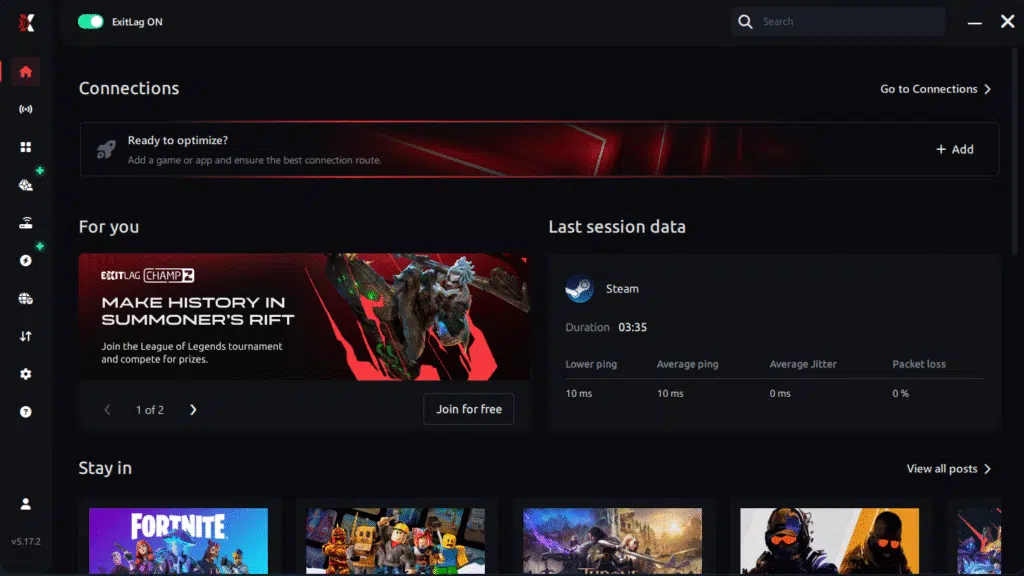
Step 3 – In the search bar, type “Blue Protocol” and select the game from the list.

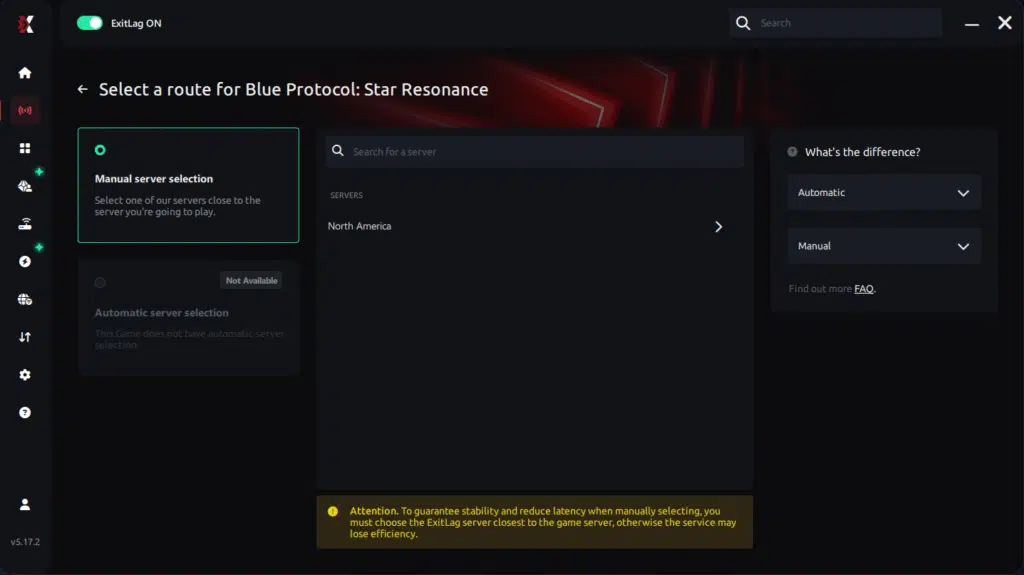
Step 4 – Choose between manual route
Based on the results, you ExitLag the best route manually choose the server that showed the lowest latency for your connection.
Manual route
If you prefer to have full control over your connection, you can manually choose the server based on the ping test results. Simply select the server that showed the lowest latency or the one that best meets your specific gaming needs, allowing complete customization of your experience.
Step 5 – Click “Blue Protocol” or the play button. ExitLag will begin optimizing your connection automatically.
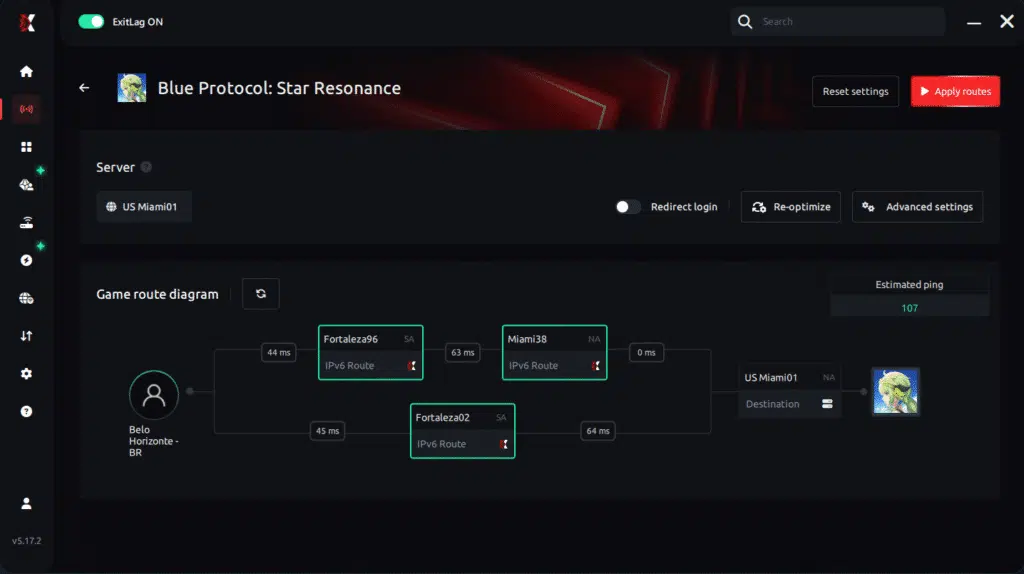
Step 6 – Wait a few seconds until optimization is complete. You’ll see ping indicators in the interface.
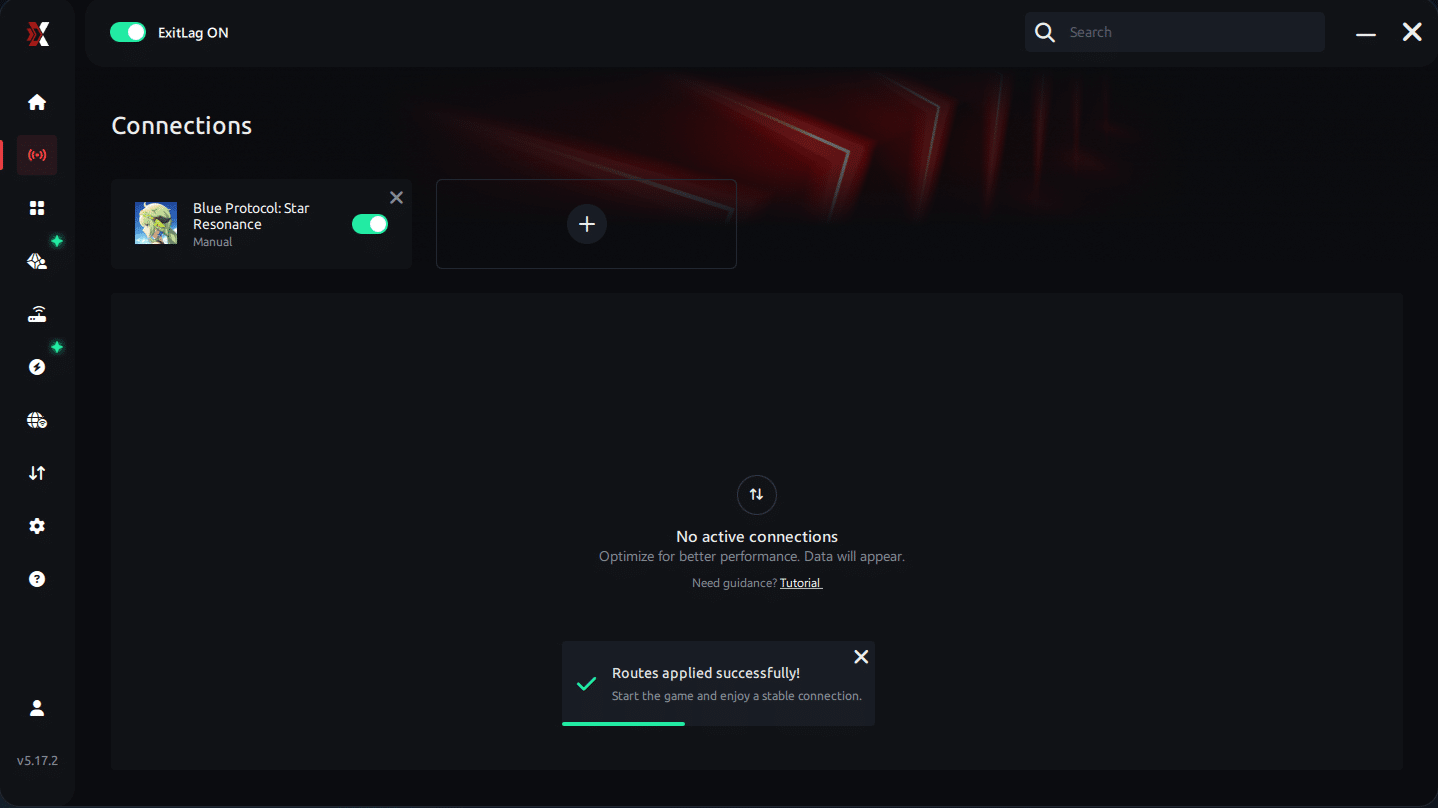
Step 7 – Launch Blue Protocol normally. The optimization will already be active.
ExitLag runs in the background while you play, constantly adjusting routes to maintain the best possible performance.he lowest latency and enter the match knowing your connection is optimized.ter server responses. like that, your connection becomes significantly more consistent.
FAQ: everything about high ping in Blue Protocol: Star Resonance
What causes high ping in Blue Protocol: Star Resonance?
High ping happens due to distance from the server, inefficient ISP routing, overloaded networks, outdated hardware, or major in-game population surges. In many cases, Blue Protocol: Star Resonance connection issues come from unstable external hops rather than your home network.
How do I check my ping in Blue Protocol: Star Resonance?
Use the in-game network display to track latency during combat and exploration. Then, run OS commands to measure long-term packet stability. Soon after comparing both, you’ll detect whether the issue relates to Blue Protocol: Star Resonance latency or general routing problems.
What is good ping for Blue Protocol: Star Resonance?
Anything below 80ms is ideal for responsive combat. Between 80–120ms remains playable but slightly delayed. Above 150ms, lag Blue Protocol: Star Resonance becomes noticeable, affecting IFRAMES, combos, and movement precision.
Can high ping get you banned in Blue Protocol: Star Resonance?
No. High ping alone does not cause bans. However, severe desync caused by unstable routing may lead to disconnects from crowded instances. In advance, improving your connection reduces these disruptions significantly.
Does ExitLag work for Blue Protocol: Star Resonance?
Yes. ExitLag optimizes packet travel using multiple routes, reducing Blue Protocol: Star Resonance high ping, jitter, and desync. As well as that, players notice more reliable movement, combat accuracy, and smoother zone transitions.
Why does my ping get worse during world events?
Large-scale events generate heavy server and network load. From the same point of view, crowded areas amplify routing inefficiencies. ExitLag’s optimized multi-route system stabilizes your connection even during population spikes.
Conclusion
In conclusion, latency issues can destroy the experience in a fast, timing-sensitive MMORPG. However, with proper diagnostics and route optimization tools, you no longer need to accept unstable gameplay. Above all, ExitLag remains the most effective solution to permanently fix Blue Protocol: Star Resonance high ping.
For more insights, tutorials, and tips, visit the official ExitLag blog.
Blue Protocol: Star Resonance high ping no longer needs to ruin your free time. Now that you understand the causes and how to stabilize your connection, you can finally enjoy your gaming smoothly. Start your free trial and see the difference for yourself.



