

Nothing disrupts your gameplay more than trying to enjoy your favorite titles while dealing with Steam games high ping. At first, this issue seems random—one moment everything runs fine, and the next your character freezes, abilities take seconds to activate, or the match desynchronizes. Even more frustrating is that Steam games often run into these problems even when you have fast internet. You can also check the list of supported games directly on the supported games page.

What is Steam games high ping?
At first sight, high ping represents the delay between the action you perform and the moment the server processes it. In other words, ping measures how long it takes for data packets to travel from your device to the server and back. In Steam games high ping scenarios, this delay becomes larger than 100–150 ms, causing visible lag, delayed animations, rubberbanding, and inconsistent combat.
Even more, bold Steam games high ping appears when latency becomes unstable. Ping is measured in milliseconds (ms), and lower numbers mean faster communication. When your packets take longer routes, get stuck in congestion, or jump between different networks, your ping rises, creating instability during gameplay.
How high ping affects gameplay in Steam games
Beforehand, understanding the impact of Steam games high ping helps you identify its symptoms more clearly. Here are the most common effects:
- Delayed hit registration
- Rubberbanding during movement
- Stuttering or micro-freezes
- Late ability activation
- Dodge, jump or attack inputs not registering in time
- Frequent disconnections or timeouts
- Competitive disadvantage in PvP sessions
Input delay during combat
In the meantime, every action in an online match requires immediate communication with the server. When ping spikes, commands such as firing, blocking, or dodging are processed late. This can make skill-based games nearly unplayable.
Desync between server and client
Continuing, if your device receives outdated information from the server, you’ll see enemies teleport, bullets miss targets, or sudden position corrections. That way, even high-skill gameplay feels inconsistent.
Main causes of high ping in Steam games
Server distance
At first, the physical distance between you and the game server significantly affects your latency. When servers are far away, your data must travel through more routers, increasing travel time and creating Steam games latency.
ISP / routing issues
Even so, your internet provider may route your data through inefficient paths. These longer “detours” produce unstable ping spikes and major Steam games connection issues.
Network congestion
Sometimes multiple devices compete for bandwidth: smart TVs, mobile phones, cloud backups, and more. Constantly, this leads to overloaded local networks, creating lag Steam games sessions.
Outdated hardware
Often, network cards, routers, or firmware can become outdated. Even more, old equipment fails to manage fast throughput efficiently, creating extra delay.
Game-specific cause
Finally, some titles experience peak-hour congestion, regional server overload, or poorly optimized networking. While temporary, these issues still contribute to Steam games high ping spikes.
How to check and test your ping in Steam games
Firstly, you can check your ping directly inside most games. Titles like CS2, Dota 2, Lost Ark, and others show real-time latency via their network graphs or scoreboard overlays.
Secondly, you can perform an OS-level test. On Windows:
- Open Command Prompt
- Type ping google.com -t
- Observe if the values fluctuate heavily
If your numbers jump between 20 ms and 200 ms, you’re experiencing bold Steam games high ping instability.
In summary, a ping below 60 ms is good, 60–100 ms is acceptable, while anything above 120–150 ms makes fast-paced Steam titles feel sluggish and inconsistent.
Ping levels classification
| Ping (ms) | Classification | Experience |
| 1–40 | Excellent | Near-instant responses |
| 40–80 | Good | Mostly smooth gameplay |
| 80–120 | Playable | Slight delay in competitive titles |
| 120–180 | Poor | Noticeable lag, delayed inputs |
| 180+ | Unplayable | Severe delay, rubberbanding |
Basic fixes to reduce high ping in Steam games
Optimize local connection
- Switch from Wi-Fi to Ethernet
- Close heavy background applications
- Disable automatic updates on Steam
- Restart your modem and router
- Update your network drivers
- Limit devices connected to your home network
These steps reduce immediate causes of lag Steam games and help stabilize your connection.
Contact your ISP
Often, routing problems originate from your internet provider. Therefore, contacting your ISP and requesting a line check is essential.

What to ask them:
- Check for signal noise
- Evaluate routing to your game region
- Replace outdated modem or ONT
Possible outcomes:
- They identify external line issues
- They adjust routing if possible
- They upgrade your equipment
That’s because ISPs sometimes throttle or reroute traffic without notice.
ExitLag: the best solution to fix high ping in Steam games
ExitLag is the most reliable way to stabilize your connection and fix Steam games high ping.
What is ExitLag?
At first sight, ExitLag is a software designed exclusively to optimize online game onnections, ensuring maximum stability and performance. Unlike common fixes that only reduce minor issues, this tool specializes in advanced connection optimization, ensuring your data takes the fastest, cleanest path to Steam servers. You can also check more about its technology directly on the technology page.
Even more, ExitLag was built for gamers who face Steam games connection issues, offering powerful tools to eliminate routing problems, bypass network congestion, and stabilize gameplay for hundreds of titles. It works on PC and mobile only, delivering an experience tailored for competitive players.
Above all, think of ExitLag as an intelligent connection stabilizer. While your ISP chooses routes automatically, ExitLag analyzes multiple paths simultaneously and forces them through the most efficient ones.
How ExitLag works
ExitLag uses five powerful operating pillars to eliminate Steam games high ping, stabilize routes, and reduce interruptions:
- Real-time route analysis
The software constantly evaluates hundreds of routes between you and the server, switching pathways instantly when connection quality changes. - Multiple routes simultaneously
Your data travels through multiple channels at once. If one becomes overloaded, the others keep your connection stable and lower the chances of lag Steam games. - Automatic best route selection
As well as that, ExitLag chooses the most efficient route based on latency, distance, and congestion—ensuring it always reduce ping Steam games without manual tuning. - Hop optimization
Each “hop” represents a router your data passes through. Fewer hops mean fewer delays. Therefore, ExitLag cuts unnecessary hops to minimize Steam games latency. - Connection stabilization
Finally, the tool maintains constant packet flow, reducing spikes, jitter, and packet loss that cause Steam games connection issues.
These combined technologies work simultaneously, guaranteeing consistent performance for every match you play.
Advantages for Steam games players
Highly stable ping
Firstly, players experience lower and more consistent ping levels due to ExitLag’s real-time route adjustments. When latency stays stable, inputs feel immediate and responsive—even during peak hours.
Elimination of rubberbanding and packet loss
By optimizing routing and stabilizing your packet flow, ExitLag eliminates unpredictable movement issues, micro-freezes, and disconnections. That way, your gameplay becomes far smoother.
Competitive reliability
In the same way, competitive players benefit from predictable timing during fights, skill execution, and movement. Reduced Steam games high ping translates to better accuracy, cleaner aim, and fewer server disagreements.
Works with hundreds of Steam titles
According to ExitLag’s officially supported library, the software supports both classic and newly released Steam games. As a result, players no longer worry about random spikes during important matches.
Easy to use interface
Above all, ExitLag is extremely simple. Select your game, choose the route, and click apply. No technical knowledge required.
Greater consistency during peak hours
Often, servers or ISPs experience congestion in high-traffic periods. Even so, ExitLag’s multi-routing architecture balances this load, smoothing out spikes and helping you reduce ping Steam games noticeably.
Is ExitLag worth it for Steam games?
Definitely. ExitLag is one of the most effective tools for players who constantly struggle with random latency spikes, routing instability, or persistent Steam games high ping issues. It is especially valuable if you:
- Play competitive or ranked matches
- Encounter constant ping oscillations
- Have problems caused by inefficient ISP routing
- Frequently play on international servers
- Experience rubberbanding
- Want maximum consistency and stability
- Need predictable timing for competitive precision
If you want to see pricing or plans, check the official pricing page.
How to use ExitLag with Steam games
The process is extremely simple:
Step 1 – Access the official ExitLag website and download the application. There’s a free trial period for new users.
Step 2 – Install and open the program. Log in with your account.
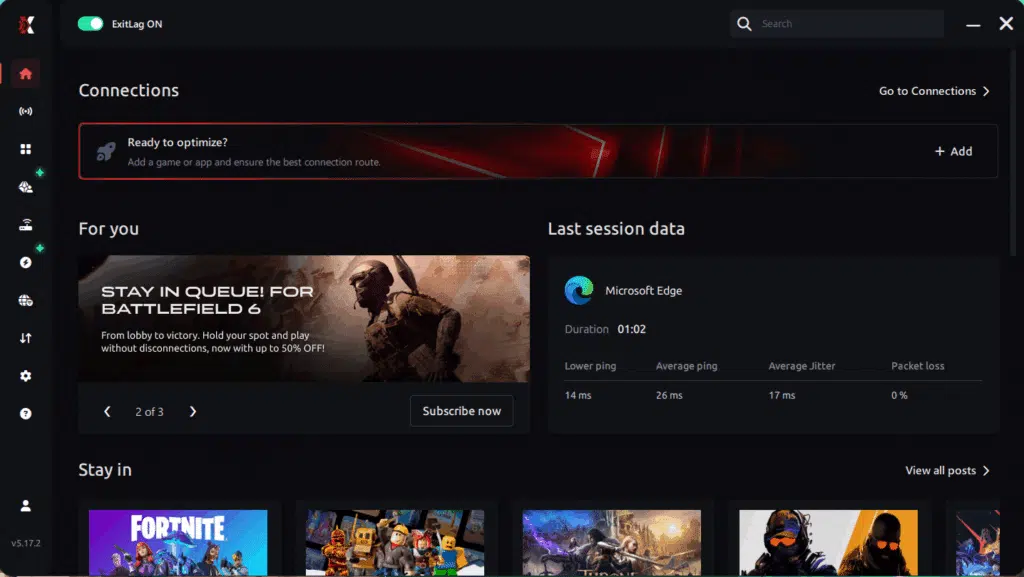
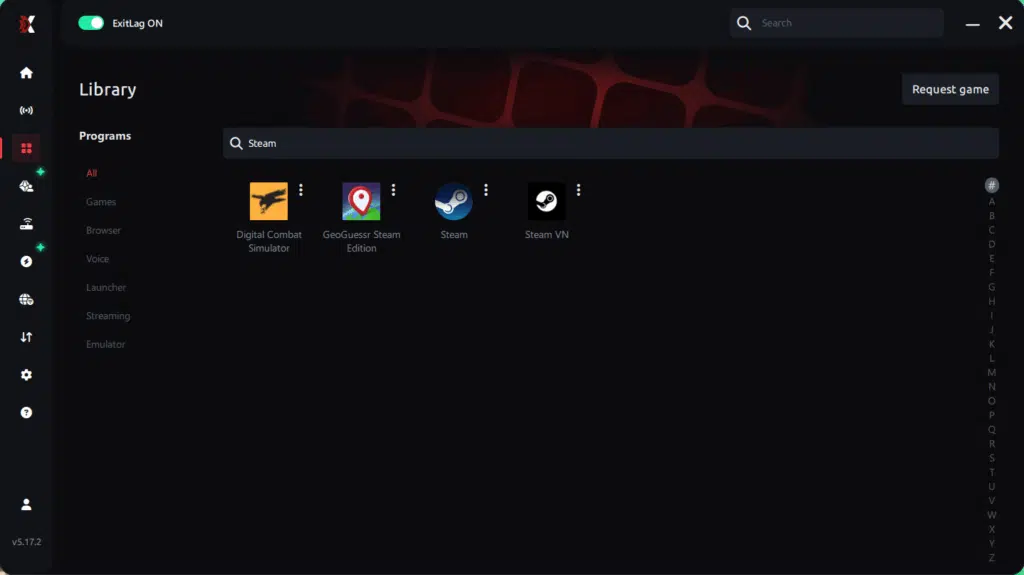
Step 3 – In the search bar, type the name of the Steam game you want to optimize (for example: CS2, Dota 2, PUBG, Rust, etc.) and select the game from the list.
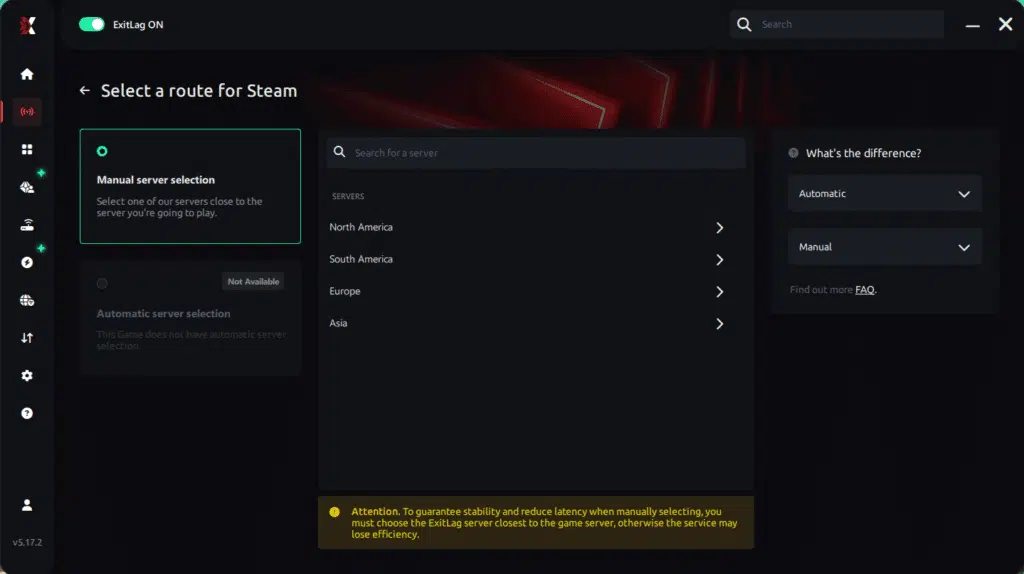
Step 4 – Choose the best server manually
Based on the ping test results, you can manually choose the server that showed the lowest latency for your connection.
Manual route
If you prefer to have full control over your connection, you can manually choose the server based on the ping test results. Simply select the server that showed the lowest latency or the one that best meets your specific gaming needs, allowing complete customization of your experience.
Step 5 – Click “Apply routes” or the play button. ExitLag will begin optimizing your connection automatically.
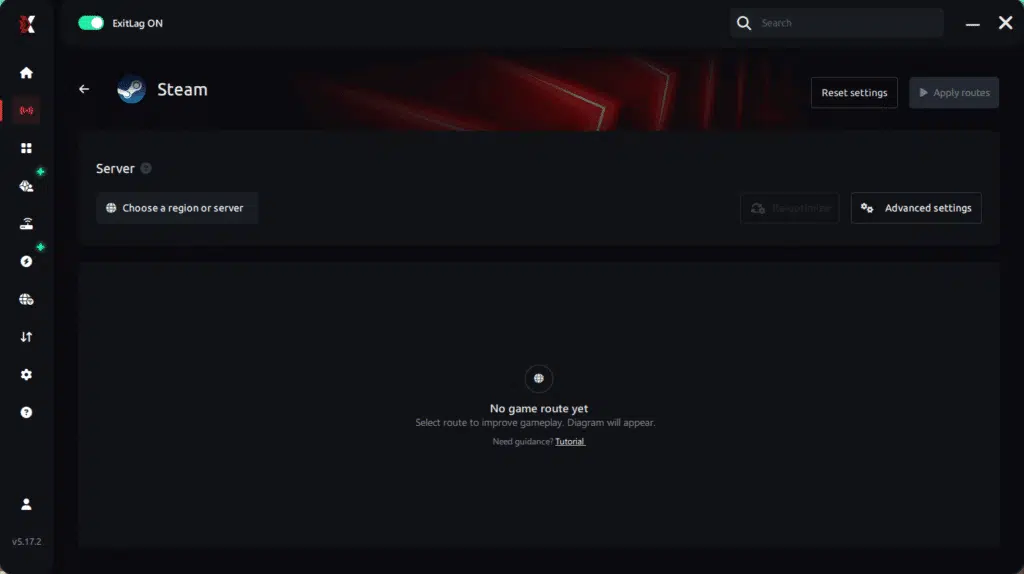
Step 6 – Wait a few seconds until optimization is complete. You’ll see ping indicators in the interface.
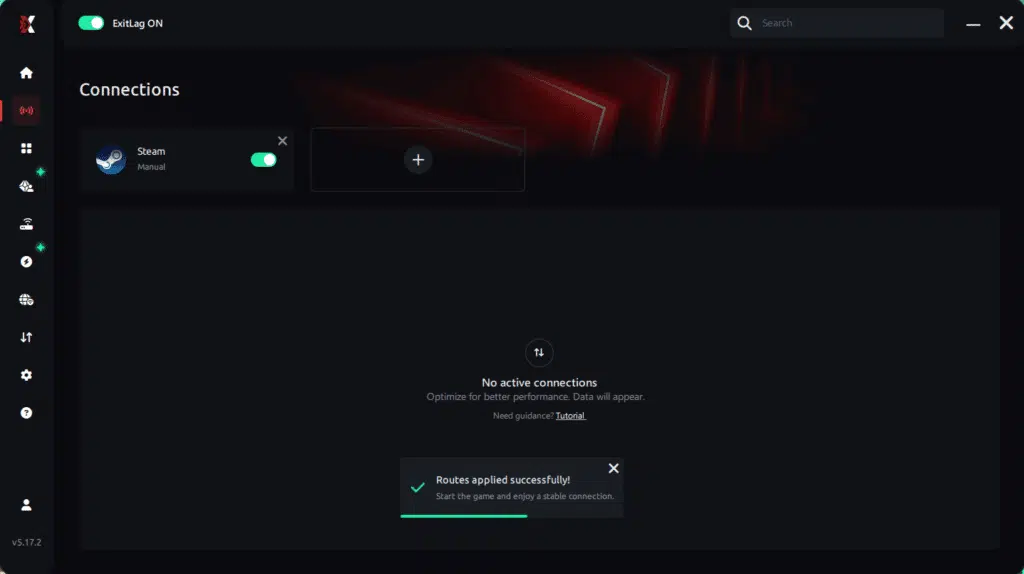
Step 7 – Launch your Steam game normally. The optimization will already be active.
With this information, simply select the server with the lowest latency and launch your Steam game knowing your connection is optimized.
Final thoughts: Play Steam games without lag forever
At the end of the day, lag should never decide your matches. You spend time mastering your aim, reflexes, and strategy your internet connection should never be the reason you lose.
With ExitLag, you finally take control of your network performance. The software finds the fastest routes, eliminates lag, and stabilizes your ping so that every shot, every action, and every clutch happens exactly when you want it to.
Try ExitLag for free right now and experience how smooth your favorite Steam games can be when your connection is fully optimized. Play with confidence, reach your full potential, and make lag a thing of the past.
FAQ: Everything about high ping in Steam games
What causes Steam games high ping?
High ping happens when your connection to the game server takes too long. This may be due to server distance, ISP routing issues, home network congestion, or outdated hardware. Furthermore, temporary server overloads can also produce Steam games high ping spikes. These problems generate inconsistent gameplay, creating symptoms like teleporting enemies and delayed ability responses.
How do I check my ping in Steam games?
Most Steam titles display your ping in-network options or real-time HUD panels. However, if your game doesn’t show it, you can run a command prompt test using the “ping -t” command. Then, observe whether your numbers fluctuate or stay consistent. Large variations often indicate Steam games connection issues, even when average values look acceptable.
What is good ping for Steam games?
Ideally, anything below 60 ms provides a smooth experience. While pings between 60–100 ms remain playable, values above 120 ms start causing Steam games high ping symptoms in competitive titles. Above 150–180 ms, the delay becomes more impactful, especially in shooters, MOBAs, or fast-paced RPGs. Therefore, minimizing ping is crucial for precision-driven gameplay.
Can high ping get you banned in Steam games?
No. High ping alone does not trigger bans on Steam. However, consistently unstable connections can cause repeated timeouts that may affect matchmaking or disconnect you from ranked games. Despite that, punitive actions are never related to ping itself but to in-game violations or cheating detection.
Does ExitLag work for Steam games?
Yes. ExitLag is optimized for hundreds of Steam titles and is constantly updated. It improves routing, stabilizes packet flow, and helps reduce ping Steam games efficiently. The multi-route architecture ensures stable and predictable performance, solving most Steam games connection issues caused by poor routing or congestion.
Why does my ping spike randomly in Steam games?
Random spikes often occur due to bandwidth competition on your home network, Wi-Fi instability, background apps consuming data, or ISP-level congestion. As well as that, some games experience peak-hour overloads. These factors collectively create Steam games high ping variations that affect your connection stability.
Custom question — Why does my game feel smooth one moment and unstable the next?
This instability usually results from jitter—rapid fluctuation in ping. One moment your latency is 40 ms, and the next it jumps to 180 ms. In other words, the problem is not average ping but inconsistent communication with the server. Tools like ExitLag help stabilize this by enforcing reliable routing.
Conclusion
In conclusion, dealing with Steam games high ping can be frustrating, especially when it disrupts crucial moments in competitive matches. However, understanding the causes—whether they relate to distance, routing, congestion, or hardware—empowers you to take control of your connection. Basic fixes help, but advanced routing solutions provide deeper, long-term performance improvements.
That’s why ExitLag stands out as the definitive way to fix unstable routes, reduce latency, prevent packet loss, and ensure smoother gameplay across hundreds of Steam titles.
For more insights, tutorials, and tips, visit the official ExitLag blog.
Steam games high ping no longer needs to ruin your free time. Now that you understand the causes and how to stabilize your connection, you can finally enjoy your gaming smoothly. Start your free trial and see the difference for yourself.
Got questions or want to connect with other players? Join the conversation at the ExitLag Forum!

