

If your friends keep asking what this new banner on the main menu is about, you are not alone. Team Drives Overwatch 2 is one of the freshest additions to Competitive Play, and it rewards squads that keep winning together.
Unlike the older Competitive Drives, which tracked individual Skill Rank gains, this event is built around your group. Furthermore, it introduces a completely new progression currency called Fame.
So, what is Team Drives Overwatch exactly, and how do you clear it before the event window closes? Team Drives is a limited-time Competitive event where winning matches earns Fame, which climbs your Gladiator Rank and unlocks Player Card Frames or Competitive Points. Staying grouped with the same teammates after a win boosts your Fame gain even further, making stacking the fastest route to the top rewards.

Team Drives Overwatch 2: What The Event Actually Tracks
Team Drives replaced the older Signature-based Drive Score with a system called Fame. Each win adds Fame to your personal Gladiator Rank meter, and each loss trims a smaller amount off it.
Notably, the event rewards consistency over grinding volume. Therefore, a tight four or five game winning streak with a stable group is far more efficient than queuing solo for hours.
How Fame Is Calculated
- Winning a match grants base Fame tied to your match performance and Skill Rank movement.
- Staying grouped with teammates from your previous win adds a bonus, up to 300 Fame per win.
- Losing removes Fame, though at a reduced rate compared to what a win grants.
- Queueing solo still works, but progress is noticeably slower than playing as a stack.
The Trial Explained
To fully complete a Team Drive, you need to pass a checkpoint called The Trial. This requires winning 3 out of your last 4 matches, which keeps the event tied to actual performance rather than pure playtime.
- Queue into Competitive Play during the active Team Drive window.
- Track your win and loss record as you play, since only your last 4 matches count.
- Win at least 3 of those 4 matches to clear The Trial and lock in your completion reward.
What Is Team Drives Overwatch: Auto-Grouping Explained
A big part of what makes Team Drives Overwatch different from past events is automatic grouping. Winning a match with a set of teammates keeps that group together for the next queue.
This removes the friction of manually re-inviting five players after every single win. As a result, momentum carries over naturally from match to match.
Enabling Or Disabling Auto-Grouping
- Open your settings menu and go to Social, then General, then Groups.
- Look for the toggle labeled “Enable Auto-Grouping on Team Drive Wins.”
- Turn it off if you prefer queueing alone, though solo completion of The Trial is considerably harder.
- Turn it on if you are actively trying to farm Fame with a consistent squad.
Why Stacking Matters So Much
Consequently, players who coordinate a five-stack, or even a duo, tend to clear Gladiator Ranks far faster than solo queuers. Communication reduces mistakes, and the Fame bonus for staying grouped adds up quickly across a session.
Team Drives Rewards: Gladiator Rank Breakdown
Every time your Fame meter crosses a Gladiator Rank checkpoint, you lock in that reward permanently. Even if you stop playing, the checkpoint reward is already yours.
| Progress Stage | Fame Requirement Type | Reward Type |
|---|---|---|
| Early Gladiator Ranks | Lower Fame thresholds | Competitive Points |
| Mid Gladiator Ranks | Moderate Fame thresholds | Player Card Frame or Competitive Points |
| Passing The Trial | Win 3 of last 4 matches | Exclusive completion reward |
| First 10,000 finishers | Complete The Trial early | Temporary dynamic title |
Indeed, the Player Card Frame rewards are the headline prize here. Unlike Signatures from older Drives, which decorate your BattleTag, these frames are visible wherever your Player Card shows up.
Team Drives Vs Competitive Drives: What Changed
Long-time players who remember Competitive Drives will notice several differences right away. In fact, this comparison helps explain why so many players are searching for Team Drives Overwatch 2 guides right now.
- Competitive Drives tracked Drive Score based on Skill Rank percentage gained or lost per match.
- Team Drives tracks Fame instead, with a heavier bonus tied to staying grouped.
- Competitive Drives rewarded Signatures around your name. Team Drives rewards Player Card Frames.
- Team Drives adds The Trial, a hard win-rate checkpoint that older Drives did not require.
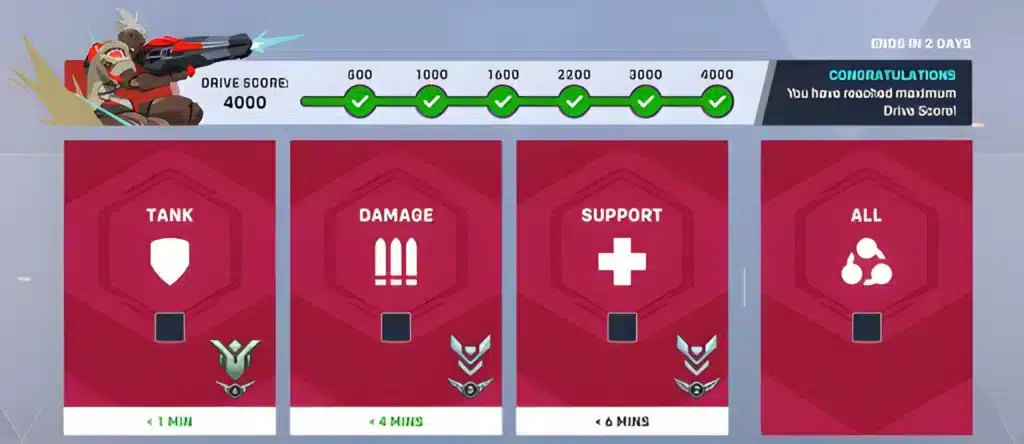
Pro Tips: Team Drives
- Lock in a duo or trio before queueing: Even two committed teammates make auto-grouping far more reliable than relying on random wins to build a group.
- Track your last 4 matches manually: Since The Trial only counts your most recent 4 games, know your current record so you understand exactly how many wins you still need.
- Play during off-peak hours for your rank: Queue times shrink and match quality often improves, which means faster wins and less time spent waiting between games.
- Prioritize comfort heroes over new picks: This is not the moment to learn a new character. Play what you already perform best on to protect your win rate.
- Use a stable, low-latency connection: Desyncs and rubber-banding cost fights you should have won, which directly slows down your Fame progress.
Common Mistakes Team Drives Players Make
- Queueing solo the entire event: Players often skip forming a group and wonder why Fame gains feel slow. Fix: invite even one reliable friend before your first match of the session.
- Ignoring the auto-grouping toggle: Some players do not realize the setting exists and manually re-invite every round. Fix: enable it once in Social, General, Groups, and let it work automatically.
- Tilting after one loss: A single loss can trigger hero swapping or aggressive queueing that snowballs into more losses. Fix: take a short break after a loss to protect your win rate for The Trial.
- Forgetting The Trial only counts the last 4 games: Players sometimes assume their entire session counts toward the checkpoint. Fix: keep a mental or written tally of your most recent 4 results.
Is It Worth Playing Team Drives Solo?
Solo queueing during a Team Drive is possible, but it is clearly the slower path. Without the grouped Fame bonus, every win contributes less toward your Gladiator Rank.
That said, solo players can still pass The Trial. Focus on consistent hero pools and avoid queueing when tilted, since your last 4 matches are what actually matters.
Bringing It All Together For Team Drives Overwatch 2
At its core, Team Drives Overwatch 2 rewards players who commit to a squad and keep the momentum rolling after every win. Fame, Gladiator Rank, and The Trial all work together to push stacked teams toward faster, more consistent rewards.
Whether you are chasing a Player Card Frame or racing for the first 10,000 finisher title, the fundamentals stay the same: group up, protect your win rate, and track your last 4 matches closely.
Frequently Asked Questions About Team Drives
- Does Team Drives replace Competitive Drives permanently? No, both event types can appear at different points across a season, and each uses its own reward track.
- Can I still get rewards if I do not pass The Trial? Yes, Gladiator Rank checkpoints reached along the way are kept even if you never complete The Trial.

Play Team Drives With A Smoother Connection Using ExitLag
Winning 3 of your last 4 matches gets a lot harder when your connection is the reason a fight goes wrong. That is exactly where ExitLag comes in for competitive grinders.
ExitLag is not a VPN. It is a connection optimizer that scans multiple network routes in real time and automatically selects the fastest, most stable one to the Overwatch servers.
For a fast-paced shooter like this, every millisecond matters during a stacked team fight. Here is what makes it useful during a Team Drives grind:
- Real-time Optimization: Reduces delay and packet loss so your abilities and shots land exactly when you expect them to.
- Multipath Technology: Routes your traffic through several paths at once, so a single unstable hop does not tank your whole match.
- Traffic Shaper: Keeps background downloads or streaming apps from stealing bandwidth from your game during a crucial Trial match.
- PC Boost: Frees up RAM and trims background processes for smoother frame rates when the fight gets chaotic.
ExitLag does not modify game files, inject code, or interact with anti-cheat systems in any way, so it is completely safe to use while grinding Gladiator Ranks. If you want to protect your win rate for The Trial, you can grab the ExitLag Download and get set up in a couple of minutes before your next queue.
All game images used in this blog post belong to Blizzard Entertainment. They are used for informational and educational purposes only and do not imply endorsement or affiliation with the rights holders.
Got questions or want to connect with other players? Join the conversation at the ExitLag Forum!
