Malware is not a single thing. It is a broad category covering dozens of distinct threats, each designed to operate differently and cause specific kinds of damage. Understanding the Types Of Malware that exist is essential for anyone who wants to defend their devices effectively.
Types Of Malware range from software that quietly monitors your activity to programs that lock you out of your own files until you pay a ransom. Knowing how each one works tells you exactly what you are up against and which defenses actually matter.
Every day, hundreds of thousands of new malware samples are detected worldwide. The sheer volume makes it impossible to rely on recognition alone. A layered understanding of how malware behaves is your best foundation for protection
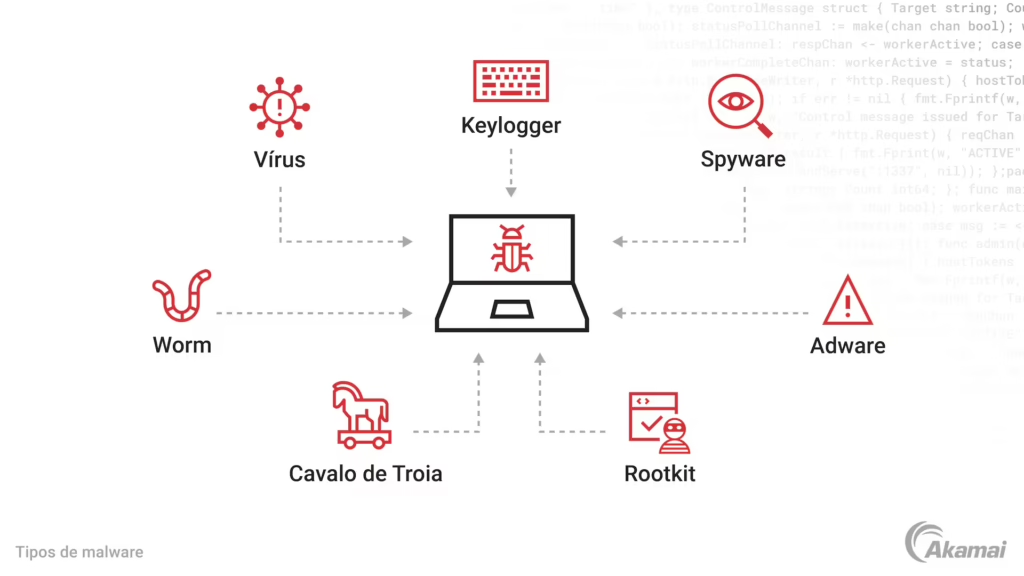
The Most Dangerous Types Of Malware Explained
Ransomware: The Extortion Threat
Ransomware encrypts your files and demands payment in exchange for the decryption key. It is among the most financially damaging types of malware, targeting individuals, hospitals, schools, and corporations alike.
How a ransomware attack typically unfolds:
- The malware enters through a phishing email, malicious download, or unpatched vulnerability
- It silently scans your system for valuable files
- Encryption begins, often completing before any alert is triggered
- A ransom note appears with payment instructions, usually in cryptocurrency
- Even after payment, there is no guarantee files will be recovered
Backups are your primary defense. If you have clean, offline backups, paying the ransom becomes unnecessary.
Trojans: Hidden Threats Disguised as Legitimate Software
Trojans are named after the mythological Trojan Horse because they masquerade as legitimate software to gain access to your system. Unlike viruses, they do not self-replicate. Instead, they rely on you to install them.
Common trojan delivery methods:
- Pirated software and cracked games
- Fake browser updates or plugin installers
- Email attachments disguised as invoices or documents
- Malicious apps downloaded outside official stores
Once installed, trojans can open backdoors for attackers, download additional malware, steal credentials, or give remote access to your system.
Spyware: Silent Surveillance
Spyware operates invisibly, collecting data about your activity and sending it to a remote party. It can capture:
- Browsing history and search queries
- Login credentials and form data
- Screenshots and webcam footage
- File contents and email communications
Spyware is often bundled with free software or browser extensions. Many users install it unknowingly by clicking through installation prompts without reading the fine print.
Worms: Self-Spreading Network Threats
Worms are unique among Types Of Malware because they spread automatically without requiring user interaction. Once a worm infects one device on a network, it scans for other vulnerable devices and replicates itself across them.
Worms exploit unpatched system vulnerabilities, weak passwords, and open network shares. A single unprotected device can spread infection to every connected device in minutes.
Keeping systems patched and segmenting networks are the most effective defenses against worm propagation.
Additional Types Of Malware You Should Know
Adware, Rootkits, and Cryptominers
Beyond the primary categories, several other malware types cause significant harm:
- Adware: Injects unwanted advertisements into your browser or applications. Often arrives bundled with free software. While usually not directly destructive, it can slow systems and open doors to more dangerous threats.
- Rootkits: Deeply embedded in the operating system, rootkits hide the presence of other malware and give attackers persistent, invisible access. They are among the hardest threats to detect and remove.
- Cryptominers: Hijack your CPU and GPU to mine cryptocurrency for the attacker. The main symptom is a dramatic slowdown in system performance, often accompanied by overheating.
- Fileless Malware: Operates entirely in system memory without writing files to disk, making it invisible to traditional file-based scanners.
- Botnets: Infected devices grouped into a network controlled by attackers. Individual devices may show no symptoms while participating in spam campaigns or distributed denial-of-service attacks.
Types Of Malware: How They Compare
| Malware Type | Primary Goal | Spreads Automatically | Main Entry Point |
|---|---|---|---|
| Ransomware | Extortion | Sometimes | Phishing, exploits |
| Trojan | Backdoor access | No | Social engineering |
| Spyware | Data theft | No | Bundled software |
| Worm | Network propagation | Yes | Vulnerabilities |
| Adware | Ad revenue | No | Bundled software |
| Rootkit | Persistence and hiding | No | Other malware |
| Cryptominer | Mining revenue | Sometimes | Drive-by downloads |
How to Protect Against All Types Of Malware
Core Defense Strategies
Protection against malware requires multiple layers working together. No single tool covers every threat type.
Essential protections include:
- Real-time antivirus with behavioral analysis
- Regular system and software updates
- Email filtering and attachment scanning
- Offline backups stored separately from your main system
- Network monitoring for unusual traffic patterns
Pro Tips: Defending Against Every Type Of Malware
- Enable automatic updates for your OS and all software: The majority of malware exploits known vulnerabilities that patches already fix. Delaying updates extends your exposure window significantly.
- Never download software outside official channels: Most trojans and adware enter systems through unofficial download sites. Stick to official app stores, developer websites, and verified repositories.
- Segment your home network: Keep IoT devices, gaming consoles, and work computers on separate network segments. A worm that infects a smart bulb should not be able to reach your laptop.
- Use behavioral monitoring, not just signatures: Signature-based detection misses new malware variants. Security tools that monitor behavior catch threats that have never been seen before.
Common Mistakes That Leave You Vulnerable to Types Of Malware
- Clicking links in unexpected emails without verification: Ransomware and trojans frequently arrive via phishing emails. Fix: Verify the sender’s identity through a separate channel before clicking anything unexpected.
- Using the same password across multiple accounts: When spyware or a data breach exposes one password, attackers try it on every service you use. Fix: Use unique passwords for every account and store them in a password manager.
- Skipping backups until after an incident: Ransomware victims without backups face a painful choice between paying and losing their data permanently. Fix: Maintain at least one offline backup updated regularly. Test restoration periodically.
- Installing browser extensions without reviewing permissions: Many adware and spyware variants arrive as browser extensions requesting broad permissions. Fix: Only install extensions from trusted developers with clear, minimal permission requirements.

Keep Every Type Of Malware Out With ExitLag and Norton 360 For Gamers
Understanding Types Of Malware is the first step. Having the right tools to stop them is the next.
ExitLag delivers comprehensive protection against the full malware spectrum. Norton 360 For Gamers provides real-time threat detection, behavioral analysis, and malware removal that covers ransomware, trojans, spyware, worms, adware, and more. It runs efficiently in the background without impacting your gaming sessions.
ExitLag adds a layer of connection security by routing your gaming traffic through optimized, stable network paths. It does not modify game files or interact with anti-cheat systems, making it completely safe alongside Norton. ExitLag supports 4,000+ titles across 1,500+ servers in 190+ countries.
Whether the threat is a file-encrypting ransomware or a silent spyware collecting your credentials, ExitLag has you covered with the protection your gaming setup deserves.
All images used in this blog post belong to their respective owners and are used for informational and educational purposes only. They do not imply endorsement or affiliation with the rights holders.
Got questions or want to connect with other players? Join the conversation at the ExitLag Forum!