Valheim has become one of the most popular survival games thanks to its immersive Viking world and cooperative gameplay. However, to truly enjoy multiplayer, understanding Valheim Server Hosting is essential for creating a smooth and stable experience.
When it comes to multiplayer performance, Valheim Server Hosting plays a crucial role in reducing lag, improving stability, and ensuring your world is always accessible. Whether you’re playing with friends or building a large community, choosing the right setup can make or break your gameplay. That’s why mastering Valheim Server Hosting is one of the most important steps for serious players.
So what is Valheim Server Hosting, how does it work, and what’s the best way to set up your own Server? In this guide, you’ll learn everything from basic Server types to advanced setup and Hosting options.
Valheim Server Hosting Explained: What It Is and How It Works
What Is a Valheim Server?
A Valheim Server is a multiplayer world that allows players to join the same environment simultaneously. Unlike single-player sessions, Servers keep the world persistent, meaning your progress continues even when you log off.
Types of Valheim Servers
There are three main types of Servers available:
- Local Server (hosted on your PC while playing)
- Dedicated Server (runs independently 24/7)
- Hosted Server (managed by third-party providers)
Each option offers different levels of performance and convenience.
Benefits of Using Valheim Server Hosting
Using best Valheim Server Hosting solutions provides several advantages:
- 24/7 uptime for continuous gameplay
- Better performance and reduced lag
- Easier access for friends and communities
Valheim Dedicated Server: How It Works
What Is a Valheim Dedicated Server?
A Valheim dedicated Server runs separately from your game client, meaning players can join even when the host is offline. This makes it ideal for long-term multiplayer worlds.
Advantages of Dedicated Servers
Running a Valheim dedicated Server offers multiple benefits:
- Always online availability
- More stable gameplay for groups
- Full control over Server settings
Requirements to Run a Dedicated Server
To set up a Server, you’ll need:
- A reliable CPU and at least 8GB RAM
- Stable internet connection
- Basic knowledge of Server configuration
Valheim Dedicated Server Setup: Step-by-Step Guide
How to Install Valheim Dedicated Server
Follow these steps to get started:
- Open Steam and go to Tools
- Download “Valheim Dedicated Server”
- Install Server files
Configuring Server Settings
Once installed, configure your Server:
- Set Server name and world name
- Add password protection
- Configure ports for connectivity
Launching and Managing Your Server
To run your Server:
- Use start scripts provided in files
- Monitor performance regularly
- Apply updates when needed
Best Valheim Server Hosting Options Compared
What to Look for in Hosting Providers
When choosing best Valheim Server Hosting, consider:
- Server location (low latency)
- Hardware performance
- Pricing and scalability
Popular Valheim Hosting Providers
Some well-known providers include:
- G-Portal
- Nitrado
- Shockbyte
These platforms offer ready-to-use Servers with minimal setup.
Pros and Cons of Paid Hosting
Paid Hosting offers convenience, but comes with trade-offs:
Pros:
- Easy setup
- Reliable uptime
- Technical support
Cons:
- Monthly cost
- Less customization than self-Hosting
Valheim Community Server: How Multiplayer Worlds Work
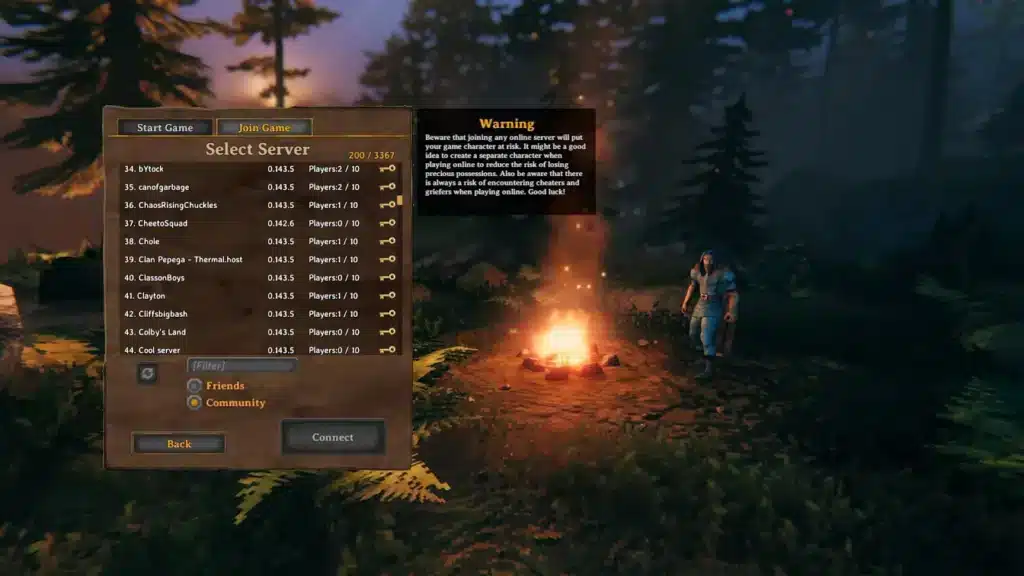
What Is a Valheim Community Server?
A Valheim community Server is a shared world where multiple players interact, build, and explore together. These Servers often have rules, mods, and active communities.
How to Join Community Servers
Joining is simple:
- Use Server lists
- Enter IP address
- Get invited by friends
Benefits of Community Servers
Community Servers provide:
- Active player environments
- Collaborative gameplay
- Unique modded experiences
How ExitLag Improves Valheim Server Hosting Performance
Even with great setup, connection quality can impact Valheim Server Hosting performance.
ExitLag enhances your experience by:
- Reducing latency during multiplayer sessions
- Stabilizing connection routes
- Preventing packet loss and lag spikes
With ExitLag, your Valheim Server Hosting experience becomes smoother, ensuring better synchronization and more responsive gameplay during intense moments.
Valheim Dedicated Server Hosting: Should You Host or Rent?
When choosing Valheim dedicated Server Hosting, one of the biggest decisions is whether to host the Server yourself or rent a professional service.
Self-Hosting vs Dedicated Hosting Explained
There are two main approaches:
- Self-Hosting: running the Server on your own machine
- Dedicated Hosting: renting a Server from a provider
Self-Hosting gives full control, while Hosting services offer convenience and reliability.
Pros and Cons of Each Option
Self-Hosting advantages:
- No monthly cost
- Full customization
- Complete control over files
Self-Hosting disadvantages:
- Requires technical setup
- Needs strong hardware
- Depends on your internet stability
Dedicated Hosting advantages:
- 24/7 uptime
- Easy setup
- Technical support included
Dedicated Hosting disadvantages:
- Monthly subscription
- Limited deep customization
Who Should Use Each Option
- Small groups → self-Hosting works well
- Large communities → dedicated Hosting is recommended

Best Valheim Server Hosting Providers Compared (Detailed)
Choosing the best Valheim Server Hosting provider depends on your needs.
Top Hosting Providers Breakdown
Popular options include:
- G-Portal
- Nitrado
- Shockbyte
- GTXGaming
Each offers different pricing, regions, and performance levels.
Key Features Comparison
When comparing providers, consider:
- Server location (closer = lower ping)
- RAM and CPU allocation
- Pricing tiers and scalability
How to Choose the Best Provider
To pick the right one:
- Identify your region
- Estimate player count
- Set your budget
This ensures optimal performance and cost efficiency.
How to Optimize Valheim Server Performance
Even the best Valheim dedicated Server Hosting setup needs optimization.
Server-Side Optimization Tips
Improve performance with:
- Regular Server restarts
- Limiting unnecessary mods
- Keeping Server updated
Network Optimization Tips
To reduce lag:
- Configure port forwarding correctly
- Avoid bandwidth-heavy apps
- Use a stable internet connection
Hardware Optimization
Performance depends heavily on hardware:
- Strong CPU improves simulation
- More RAM supports more players
- SSD reduces loading times
Valheim Mods and Server Customization
Mods can transform your Server experience.
Popular Valheim Server Mods
Some widely used mods include:
- Valheim Plus
- Better Networking
- Quality-of-life mods
How Mods Affect Server Performance
While mods add features, they can:
- Increase CPU and RAM usage
- Cause compatibility issues
Best Practices for Modded Servers
To maintain stability:
- Use only necessary mods
- Keep them updated
- Test before adding new ones
Common Valheim Server Hosting Problems and Fixes
Even with Valheim Server Hosting, issues can occur.
Server Not Showing in List
Possible fixes:
- Check port forwarding
- Verify Server visibility settings
- Restart the Server
Lag and Desync Issues
These problems often come from:
- Weak internet connection
- Overloaded Server

Connection Errors and Fixes
Try these solutions:
- Disable firewall temporarily
- Ensure game versions match
- Reconnect to Server
Hosting Type Comparison Table
| Hosting Type | Cost | Performance | Ease of Setup | Best For |
| Local Hosting | Free | Medium | Easy | Small groups |
| Dedicated Self | Low | High | Medium | Advanced users |
| Paid Hosting | Monthly | High | Very Easy | Large communities |
How ExitLag Improves Valheim Server Hosting Performance and Stability
When using Valheim Server Hosting, network performance plays a critical role in multiplayer quality.
ExitLag improves your experience by:
- Optimizing routing paths in real time
- Reducing ping and packet loss
- Stabilizing connections during gameplay
With ExitLag, your Valheim Server Hosting becomes more reliable, ensuring smoother combat, building, and exploration.
All game images used in this blog belong to Iron Gate Studio. They are used for informational/educational purposes only and do not imply endorsement or affiliation with the rights holders.
Got questions or want to connect with other players? Join the conversation at the ExitLag Forum!