Dropping into a match and grabbing a helicopter sounds simple until you realize nobody taught you the actual Wardogs Helicopter Controls first. In fact, Wardogs throws you into a 100-player battlefield where air support can decide who holds the objective. Learning to fly well is a genuine skill, not a button you hold down.
Getting comfortable with Wardogs Helicopter Controls is one of the fastest ways to become valuable to your team. A pilot who can insert squads, evacuate the wounded, or strafe an enemy push changes the flow of a match. However, most new players crash within seconds, so here is exactly what this guide walks through:
- The four flight axes and what each one physically does.
- A step-by-step takeoff, hover, and landing sequence you can practice immediately.
- Combat controls for door guns, mounted weapons, and flares.
- Whether keyboard, mouse, or a HOTAS setup fits your playstyle best.
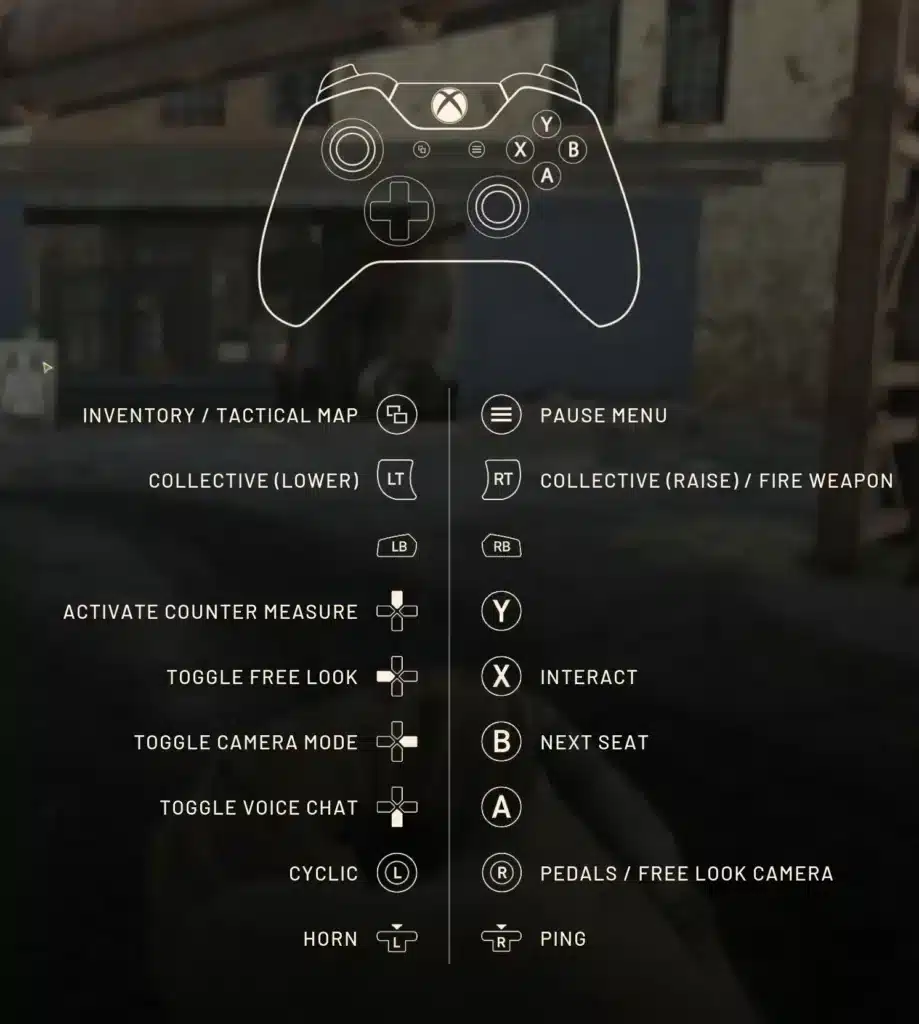
So what are Wardogs Helicopter Controls in practice? They combine a collective input for altitude, cyclic input for pitch and roll, and a yaw input for rotation, all of which you fully remap from the settings menu. Once you separate these four axes in your head, flying stops feeling random and starts feeling mechanical.
This guide focuses purely on the Wardogs Helicopter Controls scheme itself: how to take off, how to hold a stable hover, how to fire from the cockpit, and how to land without turning your helicopter into scrap metal. Sensitivity tuning is its own topic, so we will stay locked on inputs and technique here.

Understanding Wardogs Helicopter Controls Before You Take Off
Before you even queue into a match, it helps to understand who made this game and why the helicopter feels the way it does. Notably, Wardogs is developed by Bulkhead, a British studio, and published by Team17.
In addition, the game supports up to 100 players split across three teams fighting over a shifting control zone inside a massive map. Vehicles, including helicopters, are purchased with in-match cash as part of your loadout, alongside weapons, gear, and utility items.
The Four Flight Axes You Need To Know
Every helicopter in the game, including the commonly used Z20 Lakota transport model, responds to the same four flight axes. Understanding what each one physically does removes most of the guesswork from your first flights with Wardogs Helicopter Controls.
- Collective: Raises or lowers the rotor’s lift, which directly controls altitude.
- Cyclic pitch: Tilts the nose up or down, driving forward and backward movement.
- Cyclic roll: Banks the aircraft left or right for sideways drift and turning arcs.
- Yaw: Rotates the nose left or right without banking, useful for lining up a landing.
Furthermore, most pilots run a hybrid setup where dedicated keys handle collective and yaw while mouse movement handles cyclic pitch and roll. Consequently, the helicopter feels closer to a first-person camera with weight behind it than a rigid on-rails vehicle.
Where To Check And Remap Your Bindings
Wardogs is a young release, and the development team has already adjusted helicopter feel through post-launch patches, including a fix for sluggish pitch response and input damping that now applies evenly across keyboard, mouse, and controller.
Because of that, never assume a video or a wiki page matches your current build exactly. Always open the live settings menu before a match to confirm your actual Wardogs Helicopter Controls setup.
- Open the main menu and go to Settings.
- Select the Controls tab, then find the vehicle or helicopter subsection.
- Review collective, cyclic, and yaw bindings one by one.
- Test each input in the free practice range before trusting it in a live match.
How To Fly A Helicopter In Wardogs Step By Step
Once your bindings are confirmed, the actual flight sequence follows a predictable rhythm. Rushing this sequence is the single biggest reason new pilots flip or stall on takeoff.
Treat every flight as a series of small, deliberate inputs rather than one dramatic pull on the stick. Smooth Wardogs Helicopter Controls inputs keep pilots alive; jerky ones end up as a smoking crater near the pad.
Startup And Takeoff Sequence
Approach the helicopter, interact to enter the pilot seat, and give the engine a moment to spool before applying any collective. Wardogs Heli Controls respond immediately once the rotors are at speed, so early inputs before spool-up simply get wasted.
- Enter the pilot seat and wait for the rotor sound to reach full pitch.
- Apply light, steady collective to lift off vertically.
- Hold a stable hover roughly two to three meters off the ground.
- Add gentle cyclic pitch to transition into forward flight.
- Increase altitude gradually as forward speed builds.
Stabilizing Your Hover Before Moving
A stable hover is the foundation every other maneuver builds on. Indeed, if you cannot hold position over a single spot, combat flying and precision landings will always feel out of reach.
- Make small, frequent corrections instead of large, delayed ones.
- Watch the horizon line, not just your altitude number, for early drift cues.
- Use short yaw taps to hold heading rather than long yaw holds.
- Practice hovering over a fixed landmark until drift stops feeling random.
Wardogs Heli Controls For Combat And Weapons
Transport flights keep your squad alive, but armed helicopters change engagements outright. Therefore, understanding how weapons integrate with your flight inputs matters just as much as mastering the cyclic.
Indeed, combat flying demands that you manage the aircraft and the trigger simultaneously, and this is exactly where Wardogs Heli Controls separate casual pilots from genuinely dangerous ones.
Firing Door Guns And Mounted Weapons
Armed variants and door-gunner positions use a dedicated fire input, typically bound to a mouse button by default, independent from the pilot’s flight inputs. Passengers manning a door gun aim with the mouse while the pilot continues handling collective, cyclic, and yaw.
- Communicate target callouts clearly, since the gunner cannot see your instrument feedback.
- Fly predictable arcs so your gunner can track a moving target without overcorrecting.
- Avoid steep banks mid-engagement, as they throw off the gunner’s aim entirely.
Using Flares And Countermeasures
Some helicopter loadouts include flares or similar countermeasures bound to a separate key from your Wardogs Heli Controls layout. As a result, keep that binding somewhere your fingers can reach without leaving the cyclic hand position.
Notably, one common pitfall involves rebinding flight actions onto keys that already serve another function, such as a parachute eject bind. Always test a new binding in the practice range first so a conflict does not surface mid-fight.
Should You Use Mouse, Keyboard, Or HOTAS For Wardogs Heli Controls?
This question about Wardogs Heli Controls comes up constantly in the community, and the honest answer is that all three work once you commit to one setup. What matters more is consistency between practice sessions and live matches.
Keyboard And Mouse Cyclic Setup
Most players default to keyboard and mouse simply because it requires no extra hardware. Keys handle collective and yaw, while mouse movement handles cyclic pitch and roll, mirroring how first-person aiming already feels.
This Wardogs Heli Controls setup rewards small, deliberate mouse movements over wide sweeping motions. Additionally, it transfers cleanly from infantry play, so there is almost no adjustment period for the camera itself.
Flight Stick And HOTAS Support
Wardogs also supports HOTAS and flight stick hardware, mapping pitch, roll, yaw, and throttle to physical axes instead of keys and mouse movement. Consequently, this setup can feel more natural for players coming from dedicated flight simulators.
However, HOTAS behavior has reportedly shifted between updates as the developers continue tuning input handling. Consequently, confirm your device is recognized correctly in settings before relying on it in a ranked-feeling match.
| Input Method | Best For | Learning Curve |
|---|---|---|
| Keyboard Only | Backup or emergency piloting | Steep, hard to hold fine hovers |
| Keyboard + Mouse Cyclic | Most players, transfers from infantry aim | Moderate, smooths out with practice |
| HOTAS / Flight Stick | Players with flight sim experience | Low once configured, needs setup time |
How Do You Land A Helicopter In Wardogs Without Crashing?
Landing is where most helicopters actually die in Wardogs, not in combat. In fact, even solid Wardogs Helicopter Controls habits fall apart under a rushed approach, turning a routine landing into a rollover in seconds.
Reading The Landing Zone
Before committing to an approach, scan for a flat surface with a clear exit path in case you need to abort. On the other hand, a cramped zone surrounded by obstacles is rarely worth the risk when a flatter spot sits nearby.
- Pick a landing zone with at least one open departure direction.
- Check for allies or vehicles already occupying the space.
- Approach into open terrain rather than directly toward cover.
- Keep a go-around option in mind at every stage of the descent.
The J-Hook Approach Technique
Experienced pilots use a maneuver nicknamed the J-hook to bleed speed quickly while staying in control. It looks aggressive, but it is simply collective, roll, and yaw working together.
- Approach the landing zone at a normal cruising speed.
- Cut collective while rolling toward the intended landing spot.
- Apply matching yaw so the nose stays pointed at the target.
- Level the aircraft out as forward speed bleeds away.
- Add collective back in gently to cushion the final touchdown.
Advanced Wardogs Helicopter Controls: Tips And Fixes
Even experienced infantry players hit a wall when they first move into the cockpit. The tips and mistakes below cover the gap between knowing Wardogs Helicopter Controls on paper and actually flying well under pressure.
Pro Tips: Wardogs Helicopter Controls
- Practice before you queue: Spend time in the free practice range so your first live flight is not also your first hover attempt.
- Separate your hands mentally: Think of collective and yaw as one system and cyclic as another, rather than one blended motion.
- Fly with a spotter: A passenger calling out threats lets you focus entirely on flying instead of scanning for enemies yourself.
- Land before you are critical: Bring a damaged helicopter down early rather than pushing your luck back to base.
- Rebind conflicts away: Move any binding that overlaps a parachute or weapon key before it costs you a helicopter in a real fight.
Common Mistakes Wardogs Players Make
- Yanking the collective on takeoff: Sudden full collective causes wild pitch swings. Fix: apply collective gradually and let the hover settle first.
- Ignoring the practice range: Jumping straight into live matches wastes the safest place to fail. Fix: run hover, yaw, and landing drills before flying in front of enemies.
- Overcorrecting small drift: Small hover wobble often gets met with a large cyclic input, causing an even bigger swing. Fix: use small, frequent taps instead of one large correction.
- Copying outdated keybind guides: Bindings shift as the game receives balance and input updates. Fix: always verify your current Wardogs Helicopter Controls setup in the live settings menu first.
Boost Your Wardogs Helicopter Controls With ExitLag
Flying well depends on your inputs landing exactly when you send them, and that depends on your connection just as much as your muscle memory. In fact, a stray spike of latency during a hover correction can feel identical to a control problem, even when your keybinds are perfect.
Why Connection Quality Matters In The Cockpit
ExitLag is not a VPN. It is a game connection optimizer that scans multiple network paths in real time and routes your traffic through the fastest, most stable path to the Wardogs servers.
Also, it does not encrypt your traffic or mask your IP, and it never touches anything outside the games it supports. For a vehicle-heavy, 100-player shooter like Wardogs, that stability matters every time you commit to a landing under pressure.
Getting Started With ExitLag
ExitLag supports more than 4,000 titles across PC and mobile, backed by over 1,500 servers spread across more than 190 countries. As a result, millions of players rely on it weekly, and here is what makes it useful for a vehicle-focused shooter like this one:
- Multipath technology: Sends your data through several routes at once, so a single bad hop does not stall your inputs mid-flight.
- AI-powered routing: Picks the fastest, most stable path automatically, while manual customization stays available if you prefer to fine-tune it yourself.
- Traffic Shaper: Prioritizes your game traffic over background apps that might otherwise eat into your bandwidth mid-match.
Before your next flight over the Hot Zone, grab the ExitLag Download and get your routing dialed in ahead of takeoff. Mastering Wardogs Helicopter Controls only pays off when your inputs actually arrive on time, so treat your connection as part of the cockpit.
All game images used in this blog post belong to Bulkhead and Team17. They are used for informational and educational purposes only and do not imply endorsement or affiliation with the rights holders.
Got questions or want to connect with other players? Join the conversation at the ExitLag Forum!