If you have jumped into a Casual match recently and seen a strange glowing aura around another car, you are not imagining things. That aura is tied to one of the most talked about community questions right now: What Is Echo In Rocket League? Plenty of players see the term pop up in chat and have no idea what it means.
This confusion is completely normal, since Echo is unlike any cosmetic system Rocket League has used before. Unlike a Trade-Up or a random item drop, What Is Echo In Rocket League actually depends on other players around you. Understanding it changes how you play Casual modes entirely.
So, in short: Echo is a special item mechanic in Rocket League where a cosmetic, like a set of wheels, spreads from player to player through in-game contact. If you bump into someone who owns an Echo item inside an eligible playlist, you unlock that same item for your own garage. It works almost like a chain reaction across the community.
The mechanic first appeared with the Rave Roller Wheels, Rocket League’s very first Echo Item. Since then, the community has treated Echo events as a highlight of the competitive calendar. Below, we break down exactly how it works, how to get the most out of it, and how to keep your connection sharp while you chase it.
What Is Echo In Rocket League? Understanding The Basics
Before diving into strategy, it helps to understand the core idea behind the system. Essentially, Echo turns a cosmetic reward into a living, spreading event rather than a static unlock.
Where Did The Echo Mechanic Come From?
Echo was introduced as part of a limited-time event tied to Rocket League’s anniversary celebrations. Psyonix wanted a way to make cosmetics feel communal instead of purely individual.
Consequently, the studio built a system where ownership itself becomes the reward trigger. Here is the general concept:
- A specific item is tagged as an Echo Item inside designated playlists.
- Players who already own it carry a visible aura or effect.
- Bumping into that player transfers the unlock to you instantly.
- The item then becomes yours to keep permanently once claimed.
The Rave Roller Wheels: The First Echo Item
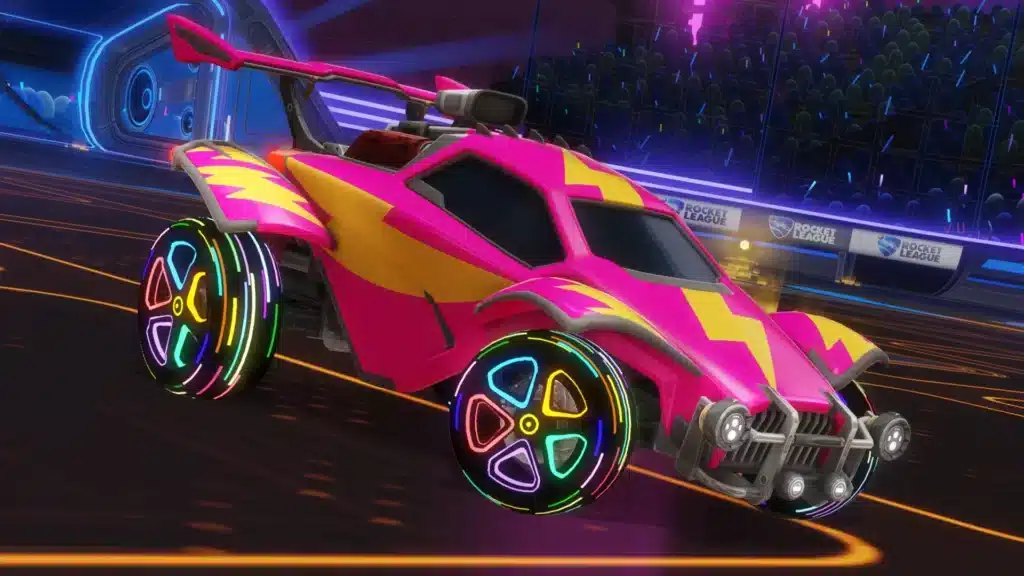
The Rave Roller Wheels hold a special place in Rocket League history as the very first item to use this spreading mechanic. Players could recognize owners instantly thanks to a distinct visual pulse around their car.
Notably, a Gold variant of the same wheels required a different trigger entirely. Instead of a simple bump, players had to bump an owner immediately after a goal was scored, which made the golden version noticeably rarer.
What Is Rocket League Echo And How Does The Spread Work?
Once you understand the basic idea, the next question players usually ask is how the actual mechanics function during a match. What Is Rocket League Echo in practice comes down to timing, playlist choice, and a bit of luck.
The Bump Rule Explained
The core rule is simple on paper. In an eligible Echo Playlist, any physical bump against a car that already carries the Echo Item transfers that item to you.
However, there are a few practical details worth knowing:
- The bump must happen inside a playlist flagged for the Echo event.
- Both cars need to make contact, so a near-miss does not count.
- The unlock is instant and appears in your inventory after the match.
- You keep the item permanently, even after the event playlist rotation changes.
Gold Variant: Bumping After A Goal
The golden version of an Echo Item adds an extra layer of challenge. Therefore, players cannot simply farm bumps at any moment during a match.
Instead, the bump has to land right after a goal has been scored, which is a narrow window. As a result, competitive players often coordinate with teammates to set up these bumps deliberately.
What Does Echo Mean In Rocket League For Everyday Players?
For casual fans, What Does Echo Mean In Rocket League is less about strategy and more about accessibility. Since the mechanic runs through Casual queues, nearly anyone can participate without needing high rank or mechanical skill.
Echo Playlists And Where To Find Them
Echo events typically launch inside specific Casual modes rather than Competitive ranked queues. Early rotations often start in modes like Arcade or Chaos before expanding further.
- Check the playlist selector for any special Echo Playlist tag or banner.
- Look for in-game announcements when a new Echo rotation begins.
- Watch for glowing effects around opposing cars during warmup.
- Join a full lobby quickly, since eligible playlists can shift over time.
Why This Differs From Normal Item Drops
Traditional item drops reward you individually after a match, with no interaction required. Echo, on the other hand, depends entirely on finding another player who already owns the item.
This distinction matters because it turns a normal Casual match into something closer to a scavenger hunt. Consequently, players who understand the system have a real advantage over those who do not.
Echo Rocket League Events Compared To Other Item Systems
It helps to see how Echo stacks up against the other ways Rocket League distributes cosmetics. The table below breaks down the main differences.
| System | How You Get It | Rarity Control | Requires Other Players |
|---|---|---|---|
| Echo Item | Bump a current owner in an eligible playlist | High, tied to a limited event window | Yes, always |
| Item Shop Purchase | Buy directly with Credits | Low, available while listed | No |
| Trade-Up | Combine items of the same rarity | Random outcome | No |
| Competitive Rewards | Earn through Ranked season performance | Moderate, tied to rank | No, indirect |
Echo Chase Vs Item Shop
Item Shop purchases are predictable: you see the price, you pay, you get the item. Echo events flip that model completely, since availability depends on finding the right player at the right time.
As a result, Echo Items often carry more social value inside the community. Owning one during the event window becomes a small badge of participation.
Echo Vs Painted And Certified Variants
Painted and Certified variants change an item’s appearance or stats display, but they do not change how you obtain the base item. Echo instead changes the unlock method itself.
In other words, Echo is not a variant system at all. It is a distribution mechanic layered on top of a brand-new cosmetic.
How To Get The Most Out Of Rocket League Echo Items
Chasing Echo Items efficiently takes more than luck. A few smart habits can dramatically increase how often you cross paths with owners and land clean bumps.
Pro Tips: Maximizing Your Echo Item Hunt
- Queue during peak hours: More players online means more chances to encounter an existing Echo owner in your lobby.
- Prioritize the flagged playlists first: Echo rotations often start in specific modes, so jumping in early increases your odds before the item spreads too far.
- Stay mobile on the field: Sitting in one spot limits your bump opportunities, while active positioning near the ball creates natural contact chances.
- Watch the scoreboard for goal timing: If you are hunting the Gold variant, staying close to an owner right as a goal is scored is essential, since the window closes fast.
- Communicate with your team: In party queues, coordinating who chases which car avoids wasted bumps and improves your group’s overall success rate.
Common Mistakes Rocket League Echo Players Make
- Ignoring playlist rotation: Many players keep queuing into modes that no longer carry the Echo tag. Fix: check event details regularly, since eligible playlists can change during the event.
- Chasing bumps too aggressively: Some players ram opponents recklessly, which often costs goals and rank points. Fix: time your bumps around normal gameplay rather than sacrificing match performance.
- Assuming the item is permanent inventory only during the event: Players sometimes think they need to keep replaying to “save” the unlock. Fix: once you bump an owner successfully, the item is yours for good, so there is no need to panic.
- Overlooking connection issues during contact: A laggy connection can make bumps feel unreliable, since hit registration depends on stable, low-latency data exchange. Fix: optimize your network before jumping into high-traffic Echo lobbies.
Boost Your Connection While Chasing Rocket League Echo Items
Here is something experienced players learn quickly: precise car contact in Rocket League is a timing game, and timing suffers the moment your connection gets shaky. If you are grinding Echo Playlists for hours, connection quality becomes just as important as game sense.
Why Connection Quality Matters For Bumps And Rotations
Bumping another car cleanly requires accurate hit registration, and that depends on how quickly your inputs reach the server. Even small spikes in ping or packet loss can turn a clean bump into a missed opportunity or a costly whiff.
This is exactly the kind of situation where ExitLag earns its place in a competitive player’s toolkit. Rather than functioning as a VPN, ExitLag works as a game connection optimizer that uses real-time multipath routing to find the fastest, most stable path to Rocket League’s servers.
It does not encrypt your traffic or mask your IP, and it never touches files outside the games it supports. Instead, it focuses purely on getting your inputs to the server faster and more consistently, which matters enormously during aerials, fast rotations, and split-second bump attempts.
Features That Help Competitive Rocket League Players
ExitLag currently supports more than 4,000 titles, backed by over 1,500 servers spread across 190-plus countries. With more than 30 million users and roughly 18 million optimizations processed weekly, the scale behind the routing data is substantial.
A few features are particularly useful for a fast-paced game like Rocket League:
- Real-time Optimization: Actively reduces delay and packet loss so your commands land closer to when you actually press the button.
- Multipath Technology: Sends your data through multiple routes simultaneously, so if one path degrades, another keeps your connection stable.
- Multi-Internet: Combines up to four internet connections at once, which helps prevent a dropped bump attempt from a sudden network hiccup.
- Traffic Shaper: Prioritizes your game traffic over background downloads or streaming, keeping your bandwidth focused where it counts.
- AI-powered routing: Automatically selects the fastest stable path with one click, while still allowing manual server selection if you prefer control.
Furthermore, ExitLag does not modify game files, inject code, or interact with anti-cheat systems in any way, which makes it safe to run alongside Rocket League and other supported titles. Just avoid pairing it with a VPN, since running both together can reduce its effectiveness.
If your bumps keep missing or your rotations feel a step behind during Echo Playlists, grabbing the ExitLag Download is a simple way to rule out your connection as the problem.
What Is Echo In Rocket League: Final Takeaway
At this point, the mechanics behind the system should feel much clearer. What Is Echo In Rocket League ultimately comes down to a simple idea: cosmetics that travel between players through direct contact, rather than sitting behind a static purchase or drop.
Quick Recap
To summarize the entire system in a few key points:
- Echo Items spread through physical bumps inside eligible Casual playlists.
- The Rave Roller Wheels were the first cosmetic to use this mechanic, with a rarer Gold variant tied to post-goal bumps.
- Playlist rotations can shift during an event, so checking details regularly matters.
- A stable, low-latency connection makes bump timing far more consistent.
Should You Chase Echo Items?
If you enjoy Casual modes and like collecting unique cosmetics, absolutely. The social, chain-reaction nature of the system makes it more engaging than a typical item drop.
Ultimately, understanding what is echo rocket league content gives you an edge over players who are still confused by the glowing aura in their lobby. Now that you know how it works, you can jump in, hunt efficiently, and add a genuinely rare piece to your garage.
All game images used in this blog post belong to Psyonix. They are used for informational and educational purposes only and do not imply endorsement or affiliation with the rights holders.
Got questions or want to connect with other players? Join the conversation at the ExitLag Forum!