

The wait is over. Aion 2 Global is officially live, and players across the Americas, Europe and Asia can finally jump into Atreia on their own regional servers without workarounds.
Aion 2 Global launched today, October 5, as a free-to-play PC release on Steam and NC’s PURPLE launcher. Furthermore, the global build is not a straight copy of the Korean version, so there are real differences you should know before creating your Daeva.
So, when did Aion 2 Global release? The full free-to-play Aion 2 Global launch went live on October 5 at 13:00 UTC, after a five-day Founder’s Pack Early Access that started on September 30.
In short, if you have a PC and a Steam or PURPLE account, you can play right now at no cost.

Aion 2 Global Launch: Is the Game Live Right Now?
Yes, and the numbers already show how big this launch is. During Early Access alone, Aion 2 hit the top of Steam’s global best-seller chart in more than 10 regions and peaked at over 171,000 concurrent players.
Therefore, expect busy servers, login queues and crowded starting zones during the first days. Here is the quick snapshot of what the Aion 2 Global service looks like at launch:
- Price: Free-to-play, with optional cosmetic purchases
- Platform: PC only, through Steam and NC’s PURPLE launcher
- Server regions: North America, South America, Europe and Asia (Japan)
- Languages: English, French, German, Spanish, Brazilian Portuguese, Japanese, Russian and Korean
- Classes: 8 playable classes for both factions
Steam or PURPLE: Which Launcher Should You Use?
Both launchers lead to the same servers, so your choice is mostly about convenience. However, keep in mind that Founder’s Pack purchases are tied to the platform where you bought them.
In other words, if you bought your pack on Steam, keep playing on Steam. Switching launchers mid-progression is one of the easiest ways to “lose” rewards you already paid for.
Did Early Access Progress Carry Over?
Yes. Players who started during Early Access transition seamlessly into the full launch, keeping their characters and progress.
Notably, Early Access characters live on dedicated launch servers, with cross-server matching enabled alongside the standard servers. If you are a new player arriving today, you simply start fresh on any open server in your region.
Aion 2 Global Release Date and Launch Time by Region
The official Aion 2 Global Release Date is October 5, with the gates opening at the same instant worldwide. Before that, servers went through maintenance from 05:00 to 13:00 UTC to transition from Early Access to the public launch.
Here is the full Aion 2 Release Date Global breakdown, converted to local times:
| Region | Time Zone | Local Launch Time (October 5) |
|---|---|---|
| North America (West) | PDT | 6:00 AM |
| North America (East) | EDT | 9:00 AM |
| South America (Brazil) | BRT | 10:00 AM |
| Europe (Central) | CEST | 3:00 PM |
| Asia (Japan) | JST | 10:00 PM |
You can always confirm the current status, Founder’s Pack tiers and specs on the official Aion 2 Steam store page. For the full pre-launch timeline, including the Launch Scale Test, check our complete Aion 2 Global Release Date schedule.
When Did Aion 2 Global Release Compared to Korea and Taiwan?
Many players searching When Aion 2 Global Release are surprised by the gap. In fact, Aion 2 has been live in Korea and Taiwan since last November, almost a full year before the global servers opened.
Consequently, the global version benefits from months of balance patches, server fixes and community feedback. That is a real advantage for anyone starting today.
What Did Founder’s Pack Early Access Include?
Early Access ran from September 30 to October 4 for players who bought one of three Founder’s Pack tiers. Here is how they compared on Steam:
- Standard Founder’s Pack ($24.99): Early Access plus a starter supply chest and an exclusive title
- Deluxe Founder’s Pack ($49.99): Everything in Standard, plus armor and weapon cosmetic skins
- Ultimate Founder’s Pack ($99.99): Everything in Deluxe, plus a mount, wings and a styling chest
Importantly, none of these tiers sell raw stats. They are cosmetic and convenience bundles, so free players are not starting the race behind on power.
Aion 2 What’s New: Global Changes You Need to Know
If you played the Korean version or watched streams from Asia, the Aion 2 What’s New list for the global build matters a lot. NC adjusted several systems specifically for the Western launch.
Key Differences in the Global Version
The most important changes confirmed for the global servers include:
- Fewer Stigma slots: You can equip up to 4 Stigma skills at launch, instead of 6 in the Korean build
- Simplified Expeditions: Expeditions launch with three difficulty tiers (1-star, 2-star and 3-star) during Season 1
- No Brawler yet: The ninth class from Korea is not part of the global launch roster
- New character presets: Extra appearance presets were added for global players
- DLSS 4.5 support: Improved image quality and performance on compatible NVIDIA cards
As a result, tier lists and builds copied from Korean sources can be misleading. A rotation built around 6 Stigmas simply does not translate to a 4-slot setup.
Core Features That Make Aion 2 Stand Out
Beyond the global adjustments, the core game is massive. Built on Unreal Engine 5, Aion 2 offers a world 36 times larger than the original Aion.
- Aerial and underwater combat: Flight is a combat mechanic, not just travel, and you can also dive underwater
- 200+ dungeons: Solo challenges, 5-player party content and 10-player group dungeons
- Faction war: Elyos and Asmodians clash in the Abyss, Battlefields and large-scale realm PvP
- Deep customization: More than 200 character creation options, plus outfits, mounts and wings
- Shugo Festival: Mini-games like pet races and wave defense with exclusive cosmetic rewards
Which Classes Are Available in Aion 2 Global?
Eight classes are available at launch, covering every role in the classic holy trinity. Here is the quick role map:
- Templar: Main tank who holds aggro and protects the party
- Gladiator: Durable melee bruiser with strong area damage
- Assassin: Fast melee burst built on mobility and positioning
- Ranger: Physical ranged damage with great kiting potential
- Sorcerer: Ranged magic damage and crowd control
- Spiritmaster: Summoner focused on control and damage over time
- Cleric: Dedicated healer with resurrection tools
- Chanter: Hybrid support mixing melee, buffs and healing
How to Get Ready for Aion 2 Global on Day One
Launch day is chaotic in any MMORPG, so a bit of preparation goes a long way. First, check if your hardware is ready, because the global client requires around 100 GB of storage.
Aion 2 Global PC Requirements
According to the official Steam listing, these are the specs for the global client:
| Component | Minimum | Recommended |
|---|---|---|
| OS | Windows 10/11 (64-bit) | Windows 10/11 (64-bit) |
| Processor | Ryzen 5 2600 / Core i5-10500 | Ryzen 7 3700X / Core i7-11700 |
| Memory | 8 GB RAM | 16 GB RAM |
| Graphics | GTX 1050 Ti (4 GB) | RTX 2070 (8 GB) |
| Storage | 100 GB (SSD recommended) | 100 GB (SSD recommended) |
Additionally, NC recommends lowering the graphics preset at Full HD on entry-level machines. An SSD is not mandatory, but it dramatically cuts loading times in crowded cities.
Picking the Right Server for Your Region
Your server choice affects your ping for the entire lifespan of your character. Since transfers are rarely available early in an MMORPG, choose carefully from the start.
- Pick the region physically closest to you, not the one your favorite streamer uses
- Prefer a medium-population server to avoid long queues during peak hours
- Coordinate with your guild before creating characters, since factions are locked per server
- Remember that there is no Oceania server at launch, so players in Australia and New Zealand will connect to another region
North American players can find region-specific details in our Aion 2 North America launch guide.
Pro Tips: Aion 2 Global Launch Week
- Log in during off-peak hours: Queues build fastest in the evening of each region. Playing early in the morning keeps waits short while the world is less crowded.
- Build around 4 Stigmas, not 6: Global builds are tighter, so prioritize Stigmas that cover your biggest weakness. This avoids copying Korean rotations that fall apart on global servers.
- Use flight for vertical advantage: Altitude is a real combat edge in Aion 2. Gaining height before an engagement gives you better angles and easier escapes in PvP.
- Test your route before raids: A quick ping check before 10-player content prevents wipes caused by your connection, not your skill.

How ExitLag Keeps Aion 2 Global Smooth During Launch Rush
Launch week is the worst time for your connection. Millions of players hit the same data centers, and your internet provider often sends your traffic through congested routes you cannot control.
This is where ExitLag makes a real difference. ExitLag is not a VPN: it is a game connection optimizer that analyzes multiple network paths in real time and picks the fastest, most stable route to the Aion 2 servers.
Why MMORPG Players Need Stable Routing
In an MMORPG like Aion 2, a single lag spike during a boss mechanic or an aerial fight can wipe your whole party. Moreover, faction wars in the Abyss put dozens of players on screen at once, which punishes unstable connections.
ExitLag tackles these issues with features built for exactly this scenario:
- Multipath Technology: Sends packets through multiple routes at once, so if one path fails, the others keep you connected
- Multi-Internet: Combines up to 4 internet connections, switching instantly if one drops
- Traffic Shaper: Prioritizes game traffic over downloads and background apps
- PC Boost: Frees RAM and trims background processes for smoother FPS in crowded hubs
- AI-powered routing: Selects the best route in one click, with manual control if you prefer
Before you log in, you can also run a free check with the Aion 2 ping test using Ping for Games to see which regional server gives you the lowest latency.
How to Use ExitLag With Aion 2
How to Use ExitLag in Aion 2
The process is very simple:
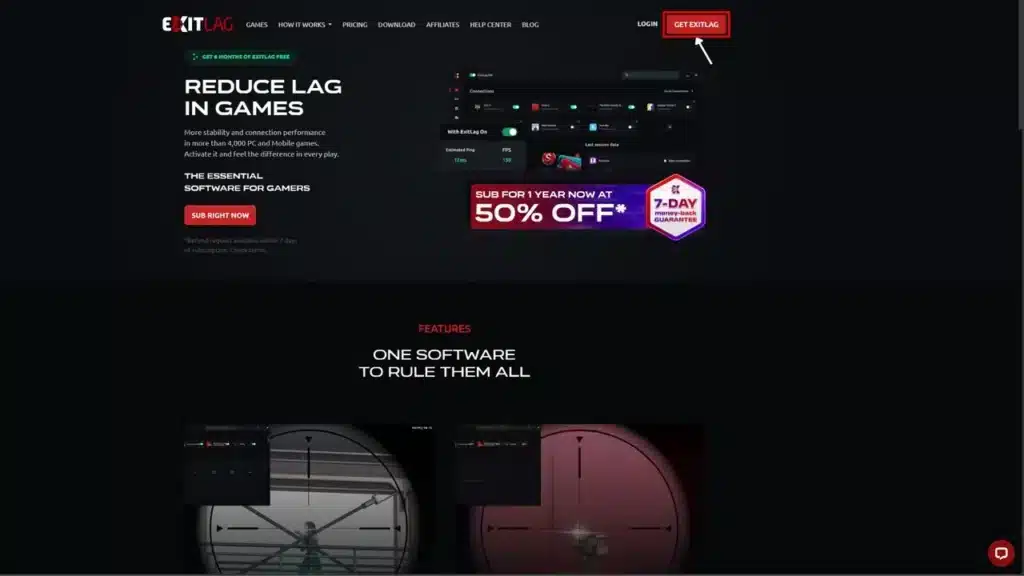
Step 1: Go to the official ExitLag website and download the app. New users can start with a free trial.
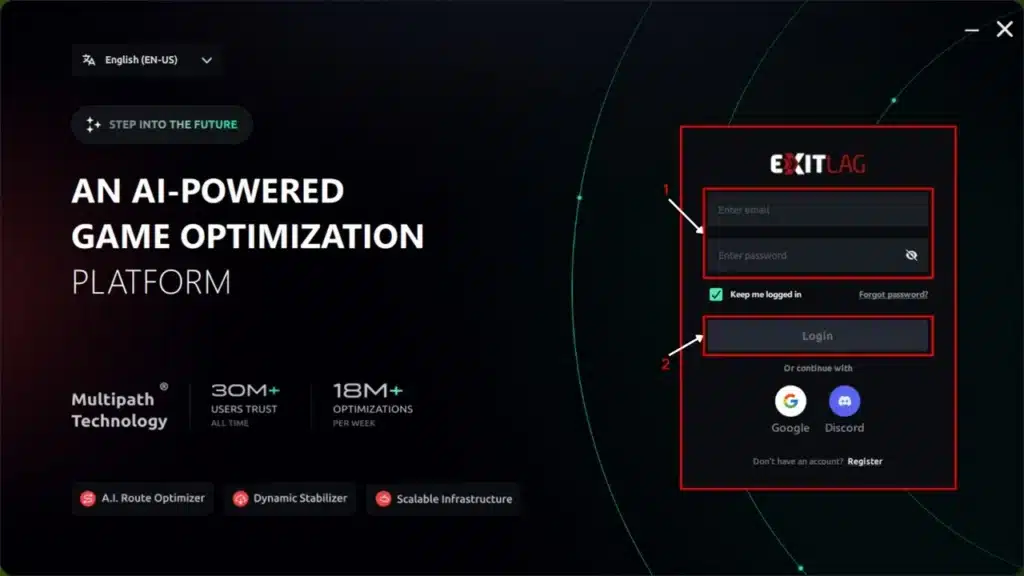
Step 2: Install and open the program. Log in to your account.
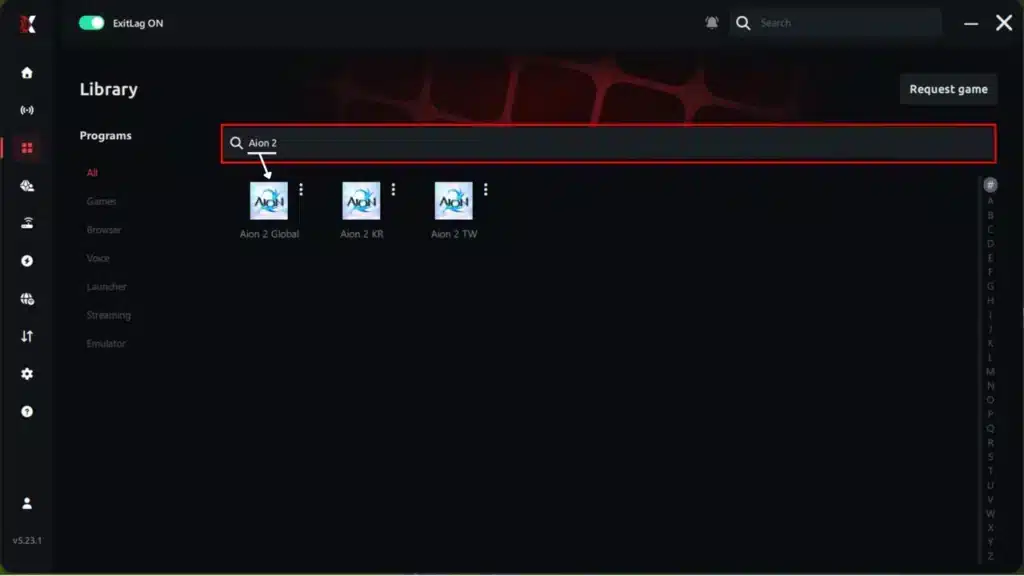
Step 3: In the search bar, type “Aion 2” and select the game.
Step 4: Choose between an automatic or manual route.
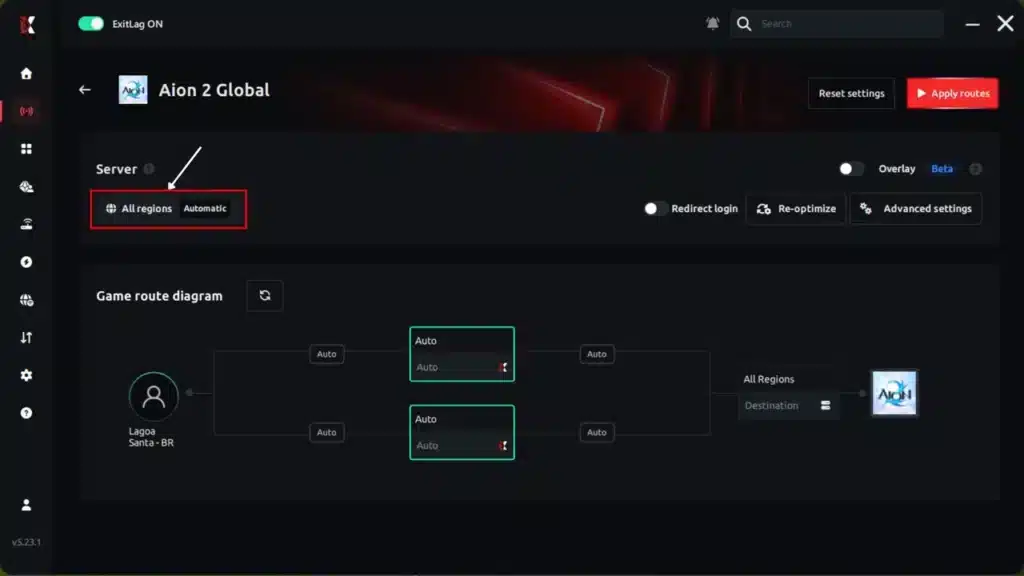
AI-optimized automated route:
The system analyzes multiple routes in real time and automatically selects the most efficient one.
Manual route:
If you prefer full control, manually select the server with the lowest latency.
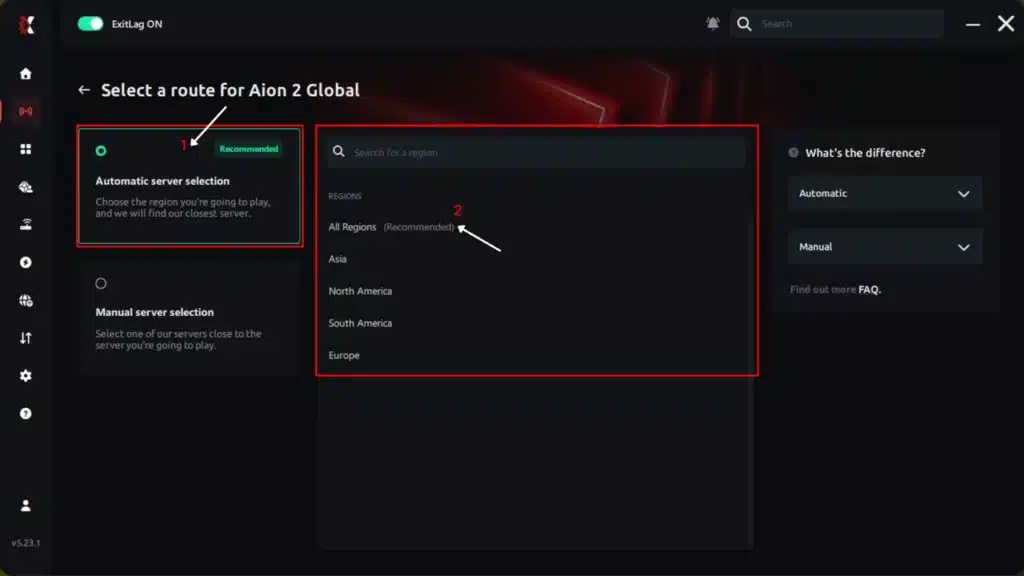
Step 5: Click Apply routes or the play button. ExitLag will automatically start optimizing your connection.
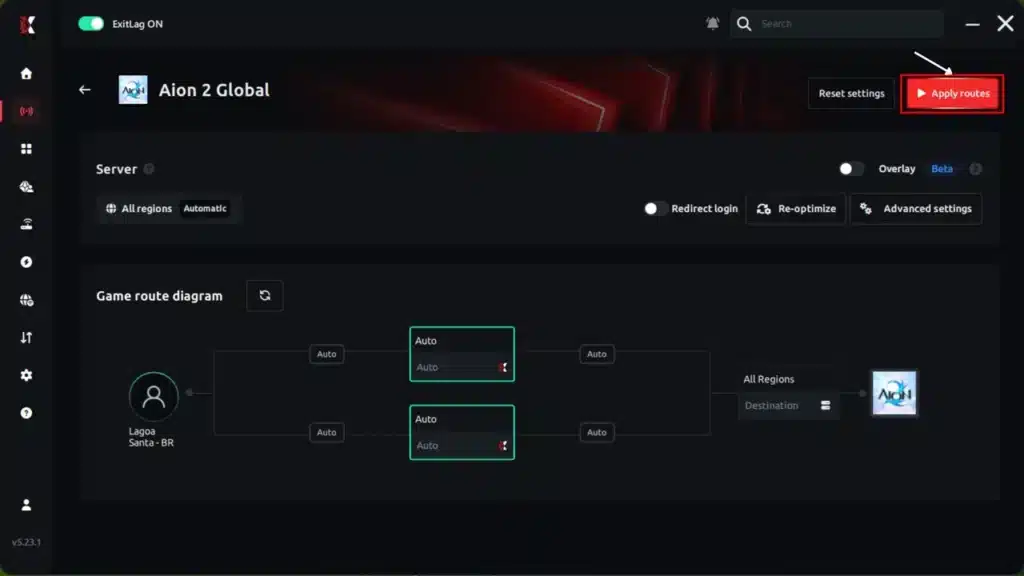
Step 6: Wait a few seconds while the optimization is completed. You will see ping indicators in the interface.
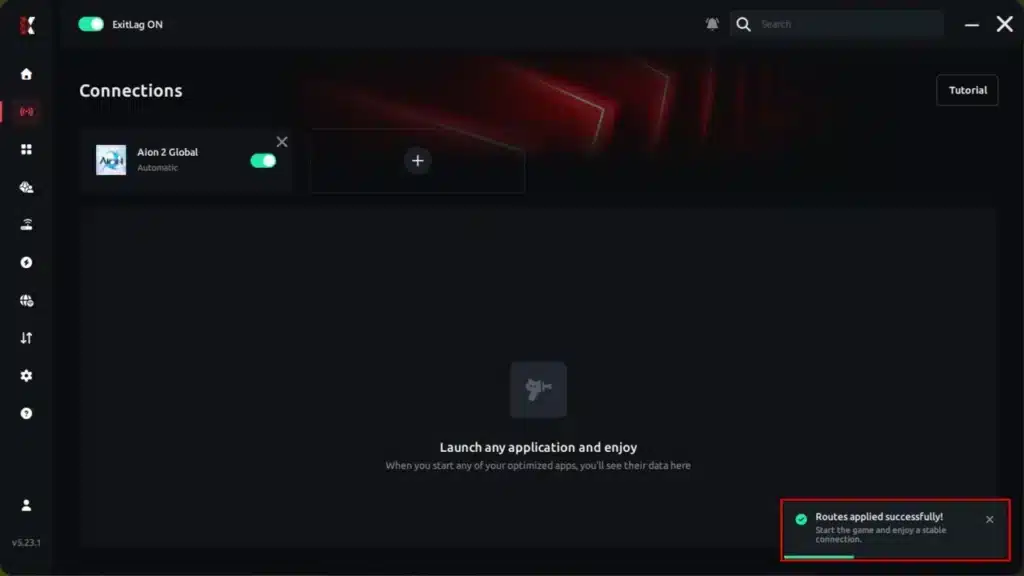
Step 7: Launch Aion 2 normally. The optimization will remain active in the background.
ExitLag automatically adjusts your connection while you play, helping maintain the best available routes.
ExitLag supports 4,000+ games with 1,500+ servers in 190+ countries, trusted by more than 30 million players.
It does not modify game files, inject code or interact with anti-cheat systems, so it is safe to use with Aion 2. Just avoid running it alongside a VPN.
Ready for the launch rush? Grab the ExitLag Download and start your journey in Atreia with a stable connection from the very first login.
Final Thoughts on Aion 2 Global
Common Mistakes Aion 2 Global Players Make
- Copying Korean builds blindly: Korean guides assume 6 Stigma slots and a ninth class. Fix: adapt builds to the 4-slot global system and the current 8-class roster.
- Picking a server only because friends are there: Overcrowded servers mean long queues for weeks. Fix: agree on a medium-population server with your group before anyone creates a character.
- Mixing launchers after buying a Founder’s Pack: Pack rewards are tied to the platform of purchase. Fix: always launch through the same platform where you bought the pack.
- Ignoring connection quality until a raid wipe: Most players only check their network after things go wrong. Fix: test your ping and optimize your route before group content.
Is Aion 2 Global Worth Playing Right Now?
For MMORPG fans, absolutely. It is free, it arrives with a year of polish from the Asian servers, and its aerial combat still feels unlike anything else in the genre.
Ultimately, Aion 2 Global gives Western players the best version of the game they have ever had access to. Pick your faction, choose your class, secure a stable connection and claim your place in the skies of Atreia.
All game images used in this blog post belong to NC (NCSOFT). They are used for informational and educational purposes only and do not imply endorsement or affiliation with the rights holders.
Got questions or want to connect with other players? Join the conversation at the ExitLag Forum!





