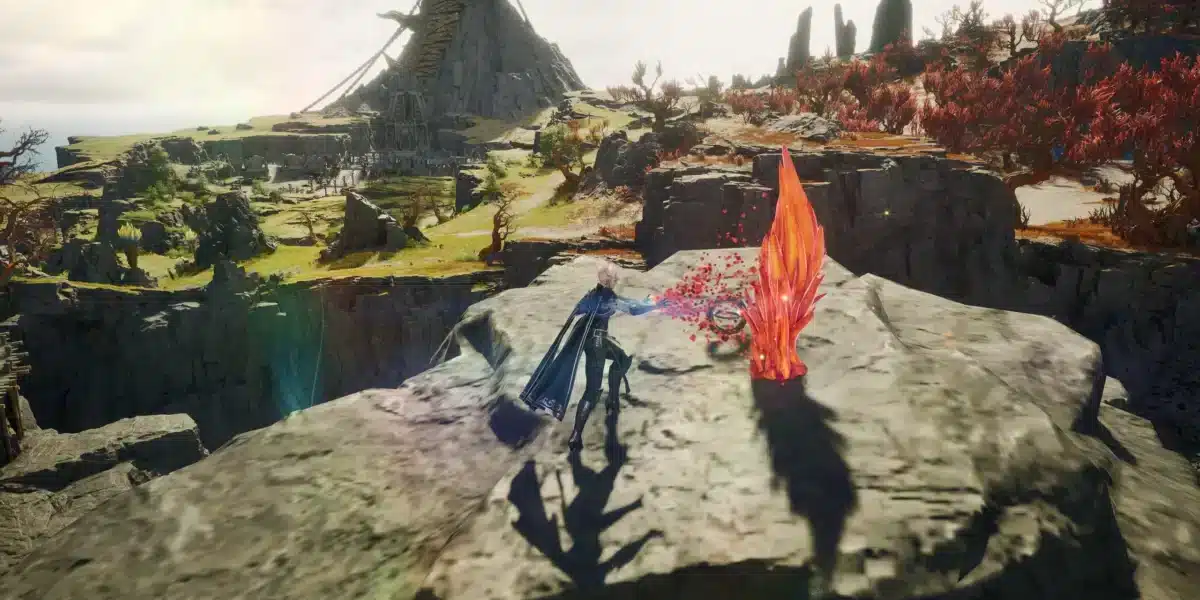
MMORPG players constantly search for stable performance, responsive combat and smooth online gameplay during large multiplayer battles. That is exactly why Aion 2 has quickly become a major topic among fans of competitive MMORPG experiences.
As the successor to the classic Aion franchise, Aion 2 promises large-scale online battles, fast-paced combat systems and visually advanced environments designed for modern MMORPG audiences. In addition, players expect intense PvP encounters, large open-world activities and highly active multiplayer servers.
So, what makes Aion 2 especially demanding for online performance? Aion 2 combines high player density, real-time combat mechanics and large multiplayer interactions that require stable connectivity and optimized system performance.
Whether players focus on PvP, raids or open-world exploration, Aion 2 depends heavily on stable internet connections and low latency for smoother gameplay. Furthermore, performance optimization becomes increasingly important during crowded servers and competitive encounters.

Aion 2 gameplay and online performance challenges
The gameplay structure of Aion 2 focuses heavily on real-time combat, fast reactions and multiplayer coordination.
Because of this, connection quality directly affects overall gameplay responsiveness.
Why MMORPGs are sensitive to lag
Modern MMORPGs constantly exchange information between players and servers.
Important online systems include:
- Combat synchronization;
- Skill activation;
- Enemy positioning;
- Raid coordination;
- PvP responsiveness.
Even small connection interruptions can negatively impact gameplay performance during intense encounters.
Causes lag in Aion 2
Many players search for what causes lag in Aion 2 because performance problems may come from multiple different sources.
Common causes include:
| Lag Cause | Gameplay Impact |
| High ping | Delayed actions |
| Packet loss | Skill desync |
| Wi-Fi instability | Random lag spikes |
| Server congestion | Slow responsiveness |
| Background applications | FPS and connection drops |
Understanding these issues helps players diagnose performance problems more efficiently.
How to fix lag in Aion 2
Players searching for How to fix lag in Aion 2 often need to optimize both internet stability and in-game settings.
Performance improvements usually require multiple adjustments working together.
Basic optimization settings
Several simple changes can improve overall gameplay stability.
Recommended adjustments include:
- Closing background applications;
- Using wired internet instead of Wi-Fi;
- Updating graphics drivers;
- Lowering unnecessary graphical settings;
- Restarting the router regularly.
These optimizations help reduce system strain and improve online responsiveness.
Why connection stability matters in Aion 2
Fast-paced MMORPG combat depends heavily on precise timing.
Lag spikes may negatively affect:
- PvP reaction speed;
- Raid mechanics;
- Dodging attacks;
- Ability rotations;
- Team communication.
Because of this, stable internet routing becomes extremely important for competitive gameplay.
How to use ExitLag in Aion 2
Many players search for How to use ExitLag in Aion 2 because route optimization tools can significantly improve connection stability.
ExitLag focuses specifically on optimizing gaming traffic routes instead of functioning like a traditional VPN.
What ExitLag does for MMORPG players
ExitLag helps improve route communication between players and game servers.
Potential benefits include:
- Lower packet loss;
- More stable routing;
- Reduced lag spikes;
- Faster server communication;
- Improved gameplay responsiveness.
These improvements become especially useful during large-scale PvP battles and crowded MMORPG environments.
Step-by-step setup for Aion 2
Players learning How to use ExitLag in Aion 2 can usually complete setup in only a few minutes.
Basic setup steps include:
- Install ExitLag;
- Search for Aion 2 inside the app;
- Select optimized server routes;
- Apply route optimization;
- Launch the game normally.
This process helps create more stable online routing during gameplay sessions.
How to use Ping for Games: step-by-step guide
Many MMORPG players also search for How to use Ping for Games: step-by-step guide information while troubleshooting connection problems.
Understanding ping is essential for identifying latency-related gameplay issues.
What ping means in online games
Ping measures how long data takes to travel between your device and the game server.
Lower ping usually results in:
- Faster reactions
- Better responsiveness
- Smoother movement
- Improved PvP timing
- Better raid coordination
High ping, however, may create delayed actions and inconsistent gameplay behavior.
How to monitor ping properly
Players can monitor performance by checking:
| Network Metric | Why It Matters |
| Ping | Overall latency |
| Packet loss | Data stability |
| Jitter | Connection consistency |
| FPS | System performance |
| Server location | Distance impact |
Understanding these metrics helps diagnose whether problems come from internet routing or hardware limitations.
Aion 2 PvP and competitive gameplay
Competitive PvP will likely become one of the biggest attractions in Aion 2.
Because of this, players are especially focused on performance optimization.
Why low latency matters in PvP
In PvP environments, even milliseconds can influence combat outcomes.
Important PvP factors affected by lag include:
- Skill timing;
- Target tracking;
- Dodging mechanics;
- Combo execution;
- Movement precision.
Stable connectivity becomes essential for competitive performance.
Large-scale battles and server stability
MMORPGs like Aion 2 often include large-scale faction wars and crowded combat zones.
These environments place heavy pressure on:
- Server synchronization;
- Internet stability;
- Hardware performance;
- Combat responsiveness.
As a result, optimization tools become increasingly valuable for competitive players.
Best hardware and system optimization tips for Aion 2
Besides connection quality, hardware optimization also plays a major role in overall Aion 2 gameplay performance.
Because modern MMORPGs process large multiplayer environments, complex visual effects and real-time combat systems simultaneously, poorly optimized hardware can create serious gameplay issues during raids, PvP battles and crowded zones.
Many players searching for How to fix lag in Aion 2 focus only on internet stability. However, system bottlenecks can also generate stuttering, delayed rendering, FPS drops and inconsistent combat responsiveness.
This becomes especially noticeable during large-scale PvP encounters where dozens of players, abilities and animations appear on screen simultaneously.
Recommended optimization strategies
Players can improve Aion 2 performance significantly through both hardware upgrades and system maintenance.
Recommended optimization strategies include:
- SSD installation;
- Higher RAM capacity;
- Updated GPU drivers;
- Modern CPUs;
- Stable internet routing.
Installing the game on an SSD is one of the most important upgrades because it helps reduce loading times and improves texture streaming during exploration and combat transitions.
Higher RAM capacity also helps maintain smoother multitasking performance, especially for players who run communication apps, browsers or streaming software while gaming.
Keeping GPU drivers updated is another essential step for players trying to reduce stuttering and graphical instability. Updated drivers frequently include optimization patches designed specifically for newer online games.
At the same time, players researching causes lag in Aion 2 should understand that unstable internet routing may create performance issues even on powerful hardware. That is why many MMORPG players combine hardware optimization with tools like ExitLag for better overall gameplay stability.
Balancing graphics and performance
Many players prefer lowering specific settings to maintain smoother gameplay instead of maximizing visual quality.
This approach becomes especially important in competitive MMORPG content where responsiveness matters more than graphical detail.
Important settings often adjusted include:
| Graphics Setting | Performance Benefit |
| Shadows | Higher FPS |
| Particle effects | Reduced visual clutter |
| Draw distance | Improved stability |
| Motion blur | Better visibility |
| Texture quality | VRAM optimization |
If you look at the table above, you can see that some graphical settings have a much larger impact on performance than others.
For example, shadows and particle effects are often among the most demanding options in MMORPGs. Lowering these settings may significantly improve FPS during crowded combat situations without heavily affecting overall visual quality.
Reducing motion blur can also improve visibility during fast combat encounters, making enemy movement and skill animations easier to track during PvP battles.
Meanwhile, adjusting draw distance and texture quality helps reduce VRAM usage and improve performance consistency during exploration-heavy gameplay.
Players searching for How to use Ping for Games: step-by-step guide information should also remember that low FPS and unstable frame pacing may feel similar to network lag. Because of this, balancing graphics settings correctly becomes just as important as improving internet stability.
Finding the right balance between visuals, FPS and network optimization helps maintain consistent Aion 2 performance during raids, PvP battles and large multiplayer events.
How to Use ExitLag in Aion 2
The process is very simple:
Step 1
Go to the official ExitLag website and download the app. New users can start with a free trial.
Step 2
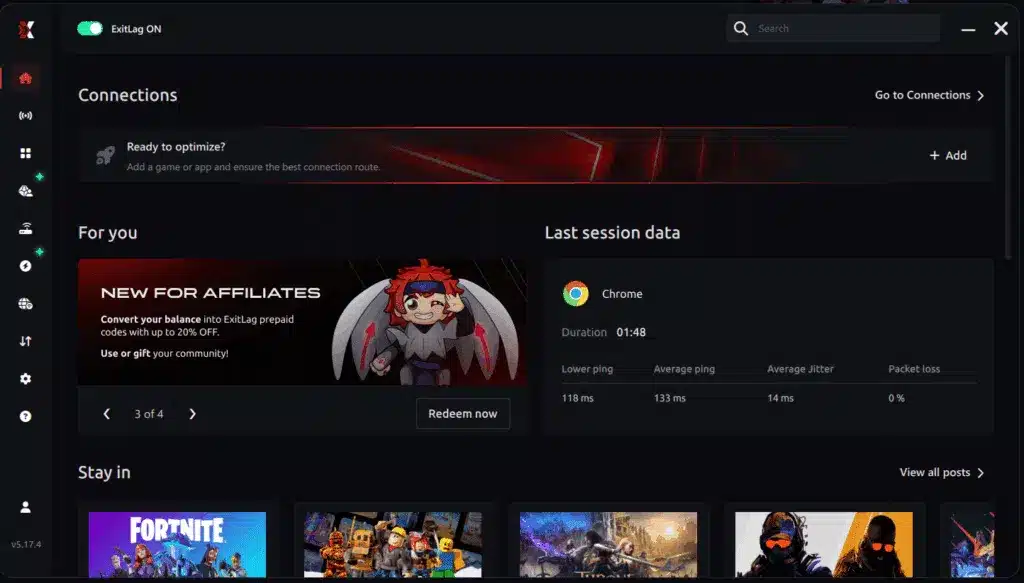
Install and open the program. Log in to your account.
Step 3
In the search bar, type “Aion 2” and select the game.
Step 4
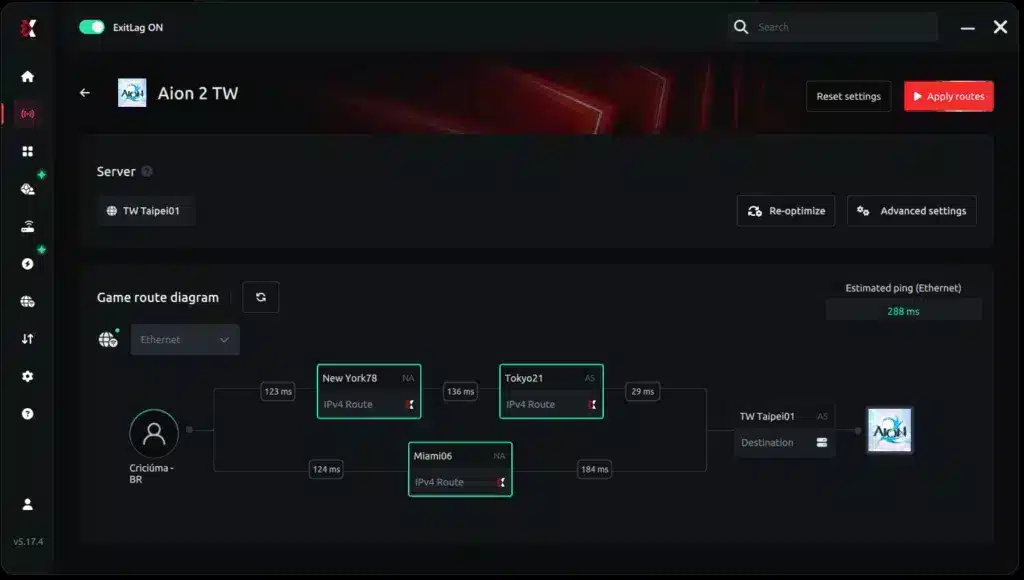
Choose between an automatic or manual route.
AI-optimized automated route
The system analyzes multiple routes in real time and automatically selects the most efficient one.
Manual route
If you prefer full control, manually select the server with the lowest latency.
Step 5
Click Apply routes or the play button. ExitLag will automatically start optimizing your connection.
Manual route
Step 6
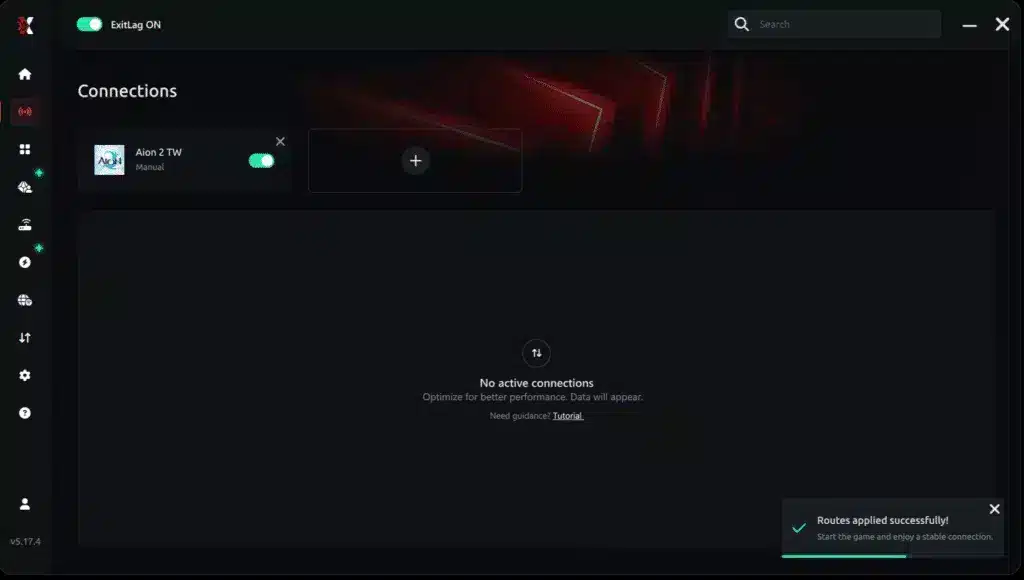
Wait a few seconds while the optimization is completed. You will see ping indicators in the interface.
Step 7
Launch Aion 2 normally. The optimization will remain active in the background.
ExitLag automatically adjusts your connection while you play, helping maintain the best available routes.
How to Use Ping for Games: Step-by-Step Guide
Checking your connection before joining a match has never been easier. Here’s how to use Ping for Games:
-
-
Open the ExitLag software.
-
Go to the Network Analyzer tool.
-
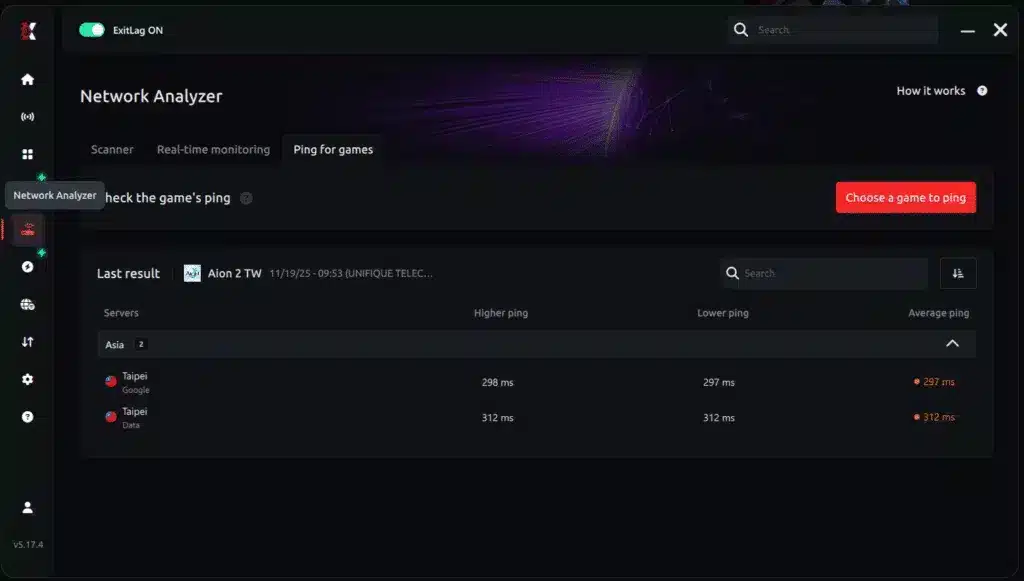
3. Select the game you want to test.
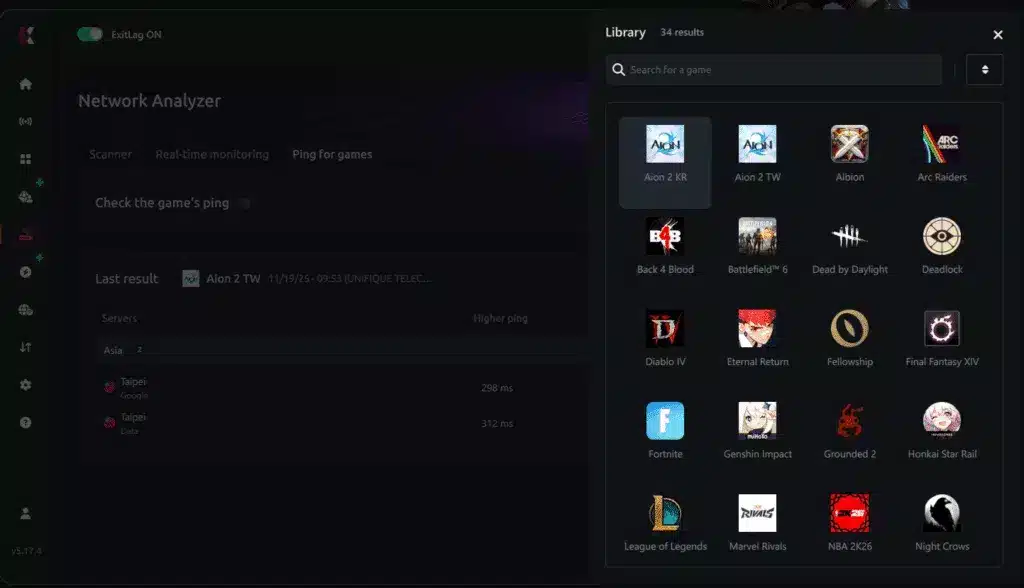
4. Choose the specific server.
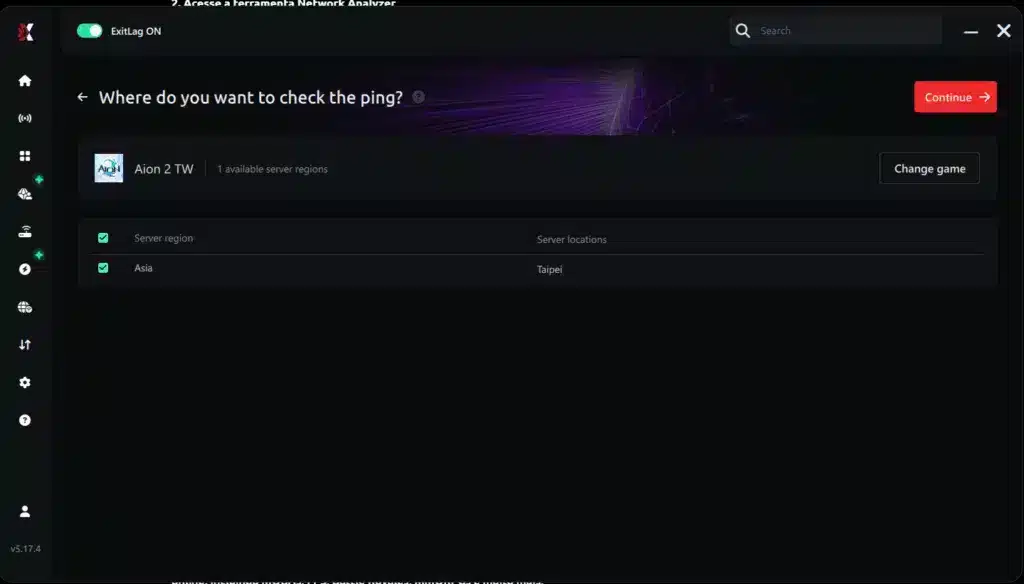
5. Start the ping test.
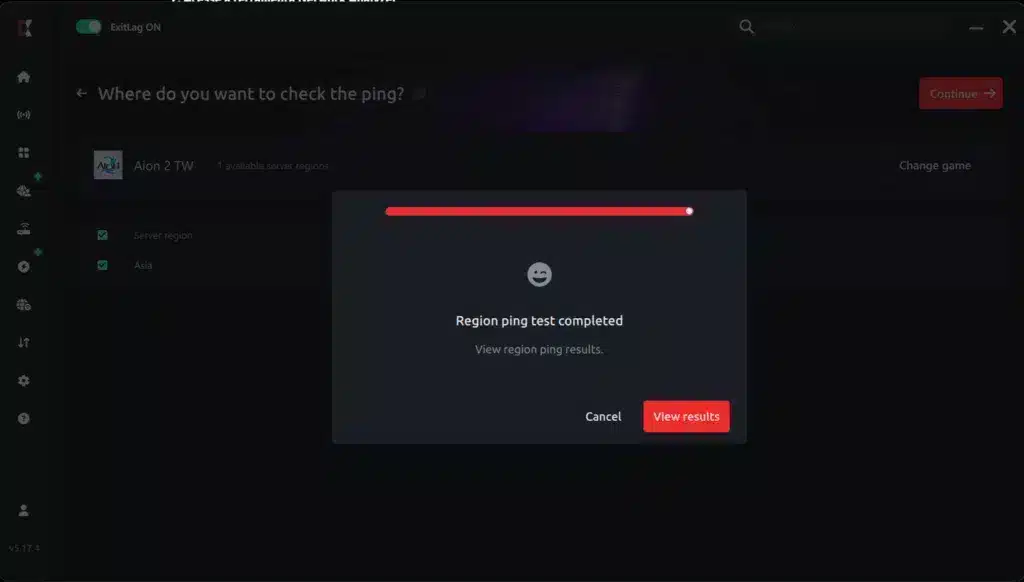
6. Analyze the results in milliseconds (ms).
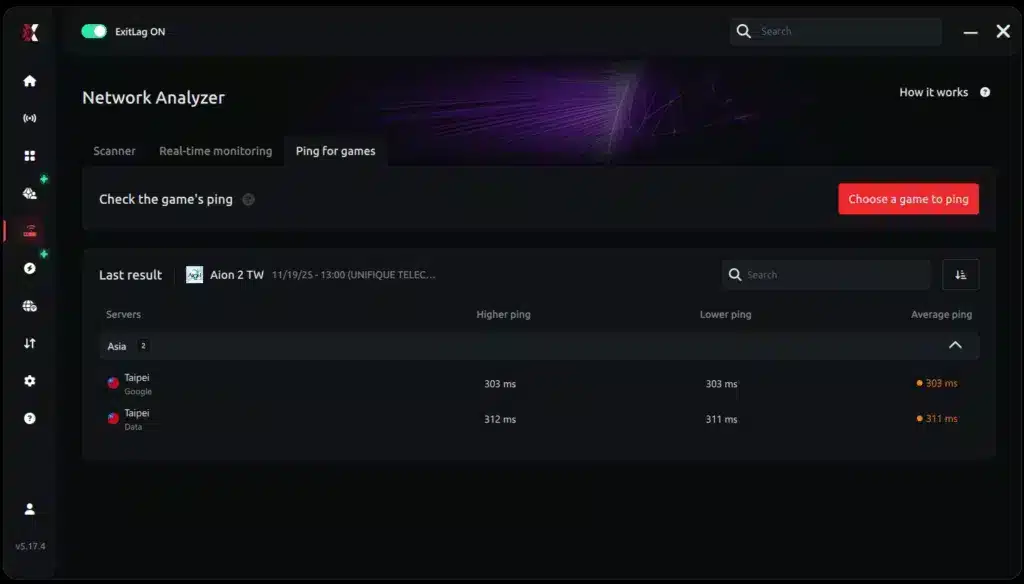
7. Select the server with the lowest latency and enjoy the game.
FAQ
Lag may be caused by high ping, packet loss, Wi-Fi instability, server congestion or background applications.
Players should optimize graphics settings, improve internet stability and reduce unnecessary background usage.
Install ExitLag, select Aion 2 inside the app and apply optimized routing before launching the game.
Ping directly affects combat responsiveness, skill timing and multiplayer synchronization.
ExitLag can help optimize game traffic routes and improve online connection stability.
Improve your Aion 2 gameplay with ExitLag
The excitement surrounding Aion 2 continues growing as MMORPG players prepare for large-scale battles, competitive PvP and immersive online exploration.
From fast-paced combat to crowded multiplayer encounters, Aion 2 demands stable connectivity and optimized performance for the best possible experience. However, lag spikes and unstable routing can negatively affect gameplay responsiveness and combat precision.
That is why many players choose ExitLag to optimize online routes, reduce packet loss and improve multiplayer stability.
Ready to improve your Aion 2 experience? Try ExitLag and enjoy smoother MMORPG gameplay today.
Got questions or want to connect with other players? Join the conversation at the ExitLag Forum!