

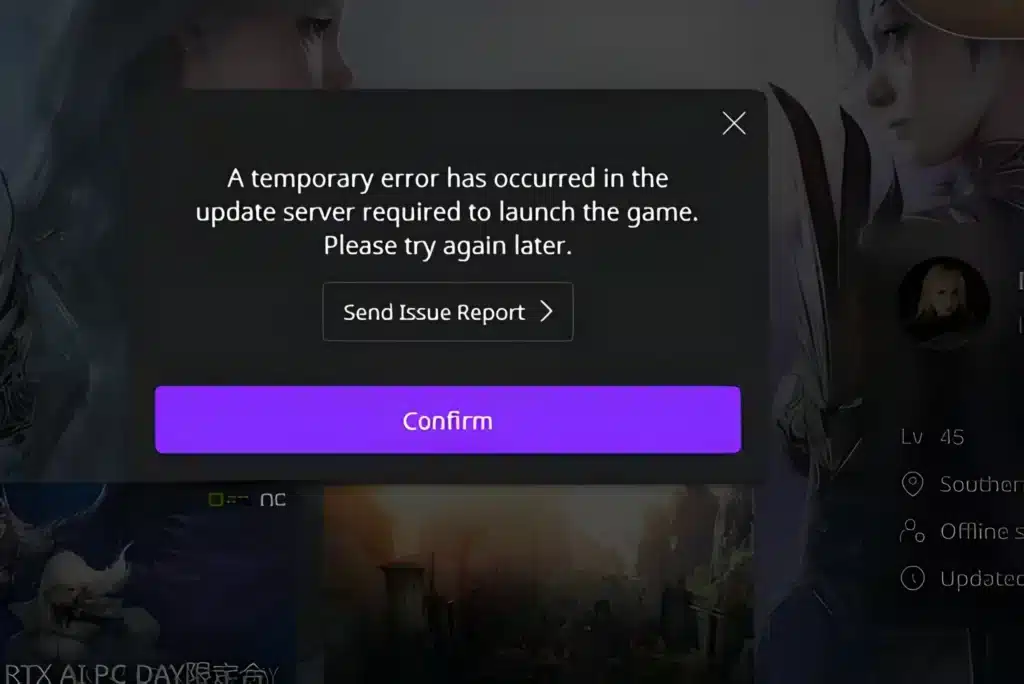
Seeing the Aion 2 Temporary Error Occurred popup right when you are ready to log in is frustrating. It usually shows up with no warning, kicks you back to the launcher, and leaves you guessing.
The good news is that this message is rarely random. It almost always traces back to a handful of network or server conditions that you can actually diagnose.
This guide takes a checklist approach. Instead of just listing causes, we will walk through the exact diagnostic steps to isolate whether the problem sits on your end or on the server side.
If you already tried restarting once and got the same Aion 2 Temporary Error Occurred screen, that is a signal to move past guesswork. Let’s run a proper diagnostic pass.

What Does Aion 2 Temporary Error Occurred Actually Mean?
The Aion 2 Temporary Error Occurred message is a generic client-side notice. It fires whenever the game client cannot complete a handshake with NCSoft’s authentication or login servers within an expected window.
In plain terms, your PC sent a request and either got no response, got a broken response, or got a rejection tied to server load. The client does not know the exact cause, so it shows a catch-all message instead of a specific one.
That matters because it means the fix depends on diagnosis, not memorization. You need to check a short list of possibilities in order rather than assume it is always the same root cause.
- Server-side congestion during peak hours or scale tests
- Scheduled or emergency maintenance windows
- Local network instability, including Wi-Fi drops or ISP hiccups
- DNS resolution failures pointing to the wrong or slow server
- Firewall or antivirus software blocking the Purple Launcher
Is Aion 2 Temporary Error Occurred The Same As A Server Outage?
Not always. Sometimes the servers are fully online but your specific connection path is unstable, which produces the same generic message.
Other times, particularly during the Launch Scale Test windows or right after launch day, the servers genuinely are overloaded. Distinguishing between these two scenarios is the entire point of the checklist below.
Step-By-Step Diagnostic Checklist For Aion 2 Temporary Error Occurred
Before changing any settings, run through this sequence in order. Each step rules out one possible cause.
- Check official server status first. Look at the in-game announcement board or the Purple Launcher news feed for maintenance notices before touching your PC.
- Restart your router completely. Power it off, wait at least 30 seconds, then power it back on to clear temporary routing glitches.
- Run a basic ping test to a general internet address to confirm your connection is stable outside of the game itself.
- Close background downloads and streams that could be saturating your bandwidth during the login handshake.
- Switch from Wi-Fi to a wired connection if possible, since wireless interference is a frequent hidden cause.
- Flush your DNS cache to eliminate stale records that might be routing you to an unresponsive server address.
- Allowlist the Purple Launcher and Aion 2 in your firewall and antivirus settings.
- Wait 10 to 15 minutes and retry if all of the above checks pass, since server-side congestion often clears on its own.
Working through this list in order saves time because you are testing from the most common cause to the least common one.
How Do You Know If It’s A Network Issue Or A Server Issue?
The simplest test is timing. If the Aion 2 error occurred fix attempt fails for you but friends on different networks are logging in fine, the issue is local to your connection.
If everyone reports the same error at the same time, particularly right after an update or during a known high-traffic window, that points to server-side congestion instead. Community channels and the launcher’s own status board are the fastest way to confirm this.
Understanding The Aion 2 Connection Issue Error Pattern
The aion 2 connection issue error pattern tends to cluster around specific moments rather than happening randomly all day. Recognizing these patterns helps you decide whether to keep retrying or step away for a bit.
- Right at daily reset or scheduled maintenance completion
- During the first hour after a patch goes live
- At peak evening hours in the region tied to your account
- During stress tests or scale tests meant to load servers intentionally
- Immediately following a regional network outage from an ISP
Most of these situations resolve within 15 to 30 minutes without any action needed on your end. The exception is when the issue is genuinely local, which the checklist above will reveal.
Why Does The Aion 2 Server Error Message Repeat On Every Retry?
If the aion 2 server error message appears every single time you retry within seconds, the client is likely hitting the same broken path repeatedly. Spamming the retry button rarely helps because you are resending the request through the same faulty route.
Instead, close the client fully, wait a couple of minutes, and relaunch rather than clicking retry inside the same session. This forces a fresh connection attempt rather than reusing a stalled one.
Comparing Common Causes And Fixes
Use this table as a quick reference once you have identified which category your situation falls into.
| Cause Category | Typical Trigger | Recommended First Fix |
|---|---|---|
| Server congestion | Peak hours, scale tests, launch day | Wait 15-30 minutes, retry later |
| Scheduled maintenance | Posted maintenance window | Check official status page, wait it out |
| Local network instability | Wi-Fi interference, ISP drops | Restart router, switch to wired connection |
| DNS resolution failure | Stale cache, ISP DNS issues | Flush DNS, try a public DNS resolver |
| Firewall or antivirus block | Overly strict security software | Allowlist launcher and game executable |
This table is not exhaustive, but it covers the categories responsible for the vast majority of reported cases.
Aion 2 Login Error Solution: A Focused Approach
When you specifically need an aion 2 login error solution rather than a general connection fix, narrow your focus to the authentication step itself. This is the moment where your account credentials talk to NCSoft’s servers.
- Confirm your Purple account credentials are current and not mid-reset
- Make sure two-factor or one-time password settings are not stuck waiting on a code
- Verify your account region matches the launcher’s selected region
- Log out and back into the Purple Launcher itself before retrying the game
Many login-specific failures clear up once the launcher session itself is refreshed, separate from the game client.
Should You Reinstall The Game After An Aion 2 Temporary Error Message?
Reinstalling should be your last resort, not your first move. A full reinstall does not fix server congestion, maintenance windows, or ISP routing problems, so it often wastes time without changing anything.
Only consider reinstalling if you have confirmed your network is stable, other players are logging in without issue, and the aion 2 temporary error message still appears specifically on your installation after every other step above.
Pro Tips: Aion 2 Temporary Error Occurred
- Test at off-peak hours: Logging in during quieter hours reduces the odds of hitting server congestion, since fewer players are competing for the same authentication slots.
- Keep a wired backup ready: Wireless signal drops are invisible until they cause a login failure, so having an ethernet cable on hand lets you rule out Wi-Fi instantly.
- Monitor official channels before retrying blindly: Checking the status board first saves you from repeatedly hammering a server that is already known to be down for maintenance.
- Separate launcher issues from client issues: Restarting the Purple Launcher alone, without touching your router or firewall, isolates whether the problem is authentication-specific or connection-wide.
- Log the time of each failure: Noting when errors happen helps you spot a pattern, such as always failing at the same hour, which usually points to a recurring congestion window.
Common Mistakes Aion 2 Players Make
- Spamming the retry button repeatedly: This resends requests through the same failing path and can worsen perceived lag. Fix: close the client fully and relaunch after a short wait instead.
- Assuming it is always a server problem: Many players blame NCSoft immediately without checking their own router or firewall first. Fix: run the local diagnostic steps before assuming the servers are at fault.
- Skipping the official status page: Jumping straight into troubleshooting without checking for a known maintenance window wastes time. Fix: always check announcements first, since a scheduled outage needs no local fix at all.
- Ignoring DNS as a possible cause: Many players never consider that a stale DNS cache could be routing them incorrectly. Fix: flush DNS and consider switching to a reliable public resolver if issues persist.
Fixing Aion 2 Temporary Error Occurred With A Stable Route
Once you have ruled out maintenance and confirmed your local network is technically online, the remaining culprit is often routing quality between your ISP and the game’s authentication servers. This is where a dedicated connection optimizer becomes useful.
ExitLag is not a VPN. It is a game connection optimizer that continuously analyzes multiple network paths in real time and automatically selects the fastest, most stable route to the game’s servers.
For an MMORPG like Aion 2, this stability matters most during login handshakes, world transfers, and long raid or boss sessions where a dropped packet can trigger the exact kind of generic error this guide covers.
- Multipath Technology sends your data through multiple routes at once, so if one path degrades, another keeps the connection alive.
- Multi-Internet support lets you combine up to four internet connections, meaning a single ISP hiccup does not have to end your session.
- Real-time Optimization actively reduces packet loss and delay, which directly targets the kind of instability behind many connection-related errors.
- AI-powered routing picks the best available path automatically, while manual server selection is still available if you prefer control.
ExitLag does not modify game files, does not inject code, and does not interact with anti-cheat systems, so it works safely alongside Aion 2 and the Purple Launcher. You can grab the ExitLag Download to test a more stable route the next time a connection error interrupts your login.
Final Thoughts On Aion 2 Temporary Error Occurred
The Aion 2 Temporary Error Occurred message will likely keep appearing occasionally, especially around launch windows, scale tests, and peak play hours. However, treating it as a diagnostic puzzle rather than a random glitch puts you back in control.
Work through the checklist in order: check server status, verify your local network, clear DNS issues, and Allowlist the game in your firewall. Most cases resolve within this sequence without needing a reinstall.
If local network instability keeps resurfacing as the culprit, pairing a stable route with the troubleshooting steps above gives you the best chance of a smooth, uninterrupted login every time you queue up for Aion 2.
All game images used in this blog post belong to NCSoft. They are used for informational and educational purposes only and do not imply endorsement or affiliation with the rights holders.
Got questions or want to connect with other players? Join the conversation at the ExitLag Forum!



