

Few things ruin a squad push faster than a sudden kick screen. Arma Reforger Server Issues have frustrated players since launch, and the problem has not fully disappeared even now, in August 2026. Timeouts, replication errors, and server browser glitches keep showing up across community forums.
The good news is that most of these problems have real, repeatable fixes. Arma Reforger Server Issues usually trace back to a handful of causes: unstable routing, backend outages, mod conflicts, or local network hiccups. Once you know which one you are dealing with, the fix is often quick.
So what actually causes Arma Reforger Server Issues, and how do you stop them for good? In most cases, the culprit is packet loss or high latency between your client and the game server, combined with occasional Bohemia Interactive backend outages that block authentication and server listing. Fixing your local network path, keeping your client updated, and routing traffic more efficiently solves the majority of disconnects.
This guide breaks down every major issue, from Server Browser Problems to Connection Timeout errors, and gives you practical fixes you can apply today. Furthermore, we will cover the tools experienced players use to keep their sessions stable during long operations.
Understanding Arma Reforger Server Issues
Before jumping into fixes, it helps to understand what is actually happening under the hood. Arma Reforger relies on a replication layer that keeps every player’s movement, shots, and vehicle state synced in real time.
When that layer breaks down, the server drops you rather than risk corrupted match state. Therefore, most disconnects are really “protection kicks” rather than random crashes.
What Triggers a Kick
- Replication timeout: the client stops sending state updates in time, often flagged as “group=1 REPLICATION, reason=4 TIMEOUT”.
- Replication stall: packets arrive but too slowly, triggering “reason=6 STALLED”.
- BattlEye query timeout: the anti-cheat service cannot verify the client fast enough.
- Backend outage: Bohemia’s authentication servers go down, blocking logins entirely.
Why It Feels Random
Many players report that Arma Reforger Server Issues seem to strike without warning, even on a strong internet connection. However, the issue is rarely your download speed.
Instead, it is almost always about consistency: jitter, microbursts of packet loss, or a congested route to the specific data center hosting your server. A connection can look perfectly fine in a speed test and still fail under Reforger’s strict replication timing.
Common Connection And Desync Problems
Desync and packet loss are the two complaints that show up most often when players search for Arma Reforger Server Issues. Both stem from the same root cause: unstable data delivery between you and the host.
Notably, video and performance settings can make this worse. When your frame rate tanks, your CPU falls behind on processing incoming network packets, which looks identical to a bad connection even though it started as a graphics problem.
Packet Loss While Driving Or In Combat
Several players specifically report spikes in packet loss during vehicle sequences or firefights, which is exactly when the replication layer has the most data to sync. Consider these quick checks:
- Lower your view distance and shadow quality to free up CPU headroom.
- Close background apps, especially anything using bandwidth like streaming or cloud sync.
- Run a wired Ethernet connection instead of Wi-Fi whenever possible.
- Restart your router before long sessions to clear built-up congestion.
Session Errors And Kick Codes
Session errors (“Internal error has occurred”) are almost always tied to a specific kick cause code. Recognizing the code tells you exactly where to look:
| Kick Cause Code | Likely Meaning | First Fix To Try |
|---|---|---|
| REPLICATION, reason=4 TIMEOUT | Client not syncing fast enough | Check for packet loss, restart router |
| REPLICATION, reason=6 STALLED | Data arriving too slowly | Lower graphics settings, close background apps |
| BATTLEYE, reason=2 Query_Timeout | Anti-cheat verification failed | Set BattlEye service to automatic in Windows |
| Backend Initialization Error | Bohemia servers unreachable | Wait, check forums, retry later |
Why Does Arma Reforger Keep Disconnecting Me?
This is the question most players type into search bars after their third kick in one evening. In most cases, the answer combines two things: an unstable route to the server and background interference on your own machine.
Consequently, the fix is rarely just one setting. It is a checklist.
Local Network Fixes
- Add armareforge.exe to your firewall exception list. Some Windows firewall configurations silently drop packets, and this stops constant disconnects for many players.
- Change your DNS provider. Community reports show switching to Google’s alternate DNS (8.8.4.4) resolved BattlEye update errors when other DNS options failed.
- Pause downloads and updates during play. Any background transfer competes for bandwidth exactly when the replication layer needs it most.
- Power cycle your router for thirty seconds before joining a fresh server, especially after a long browsing session.
Server-Side Fixes
- Verify you are running the same build as the server (Stable versus Experimental clients cannot connect to each other).
- Confirm the server is not mid-restart or updating to a new patch.
- Check Bohemia’s known issues page for an active backend outage before assuming it is your setup.
Server Browser Problems And How To Solve Them
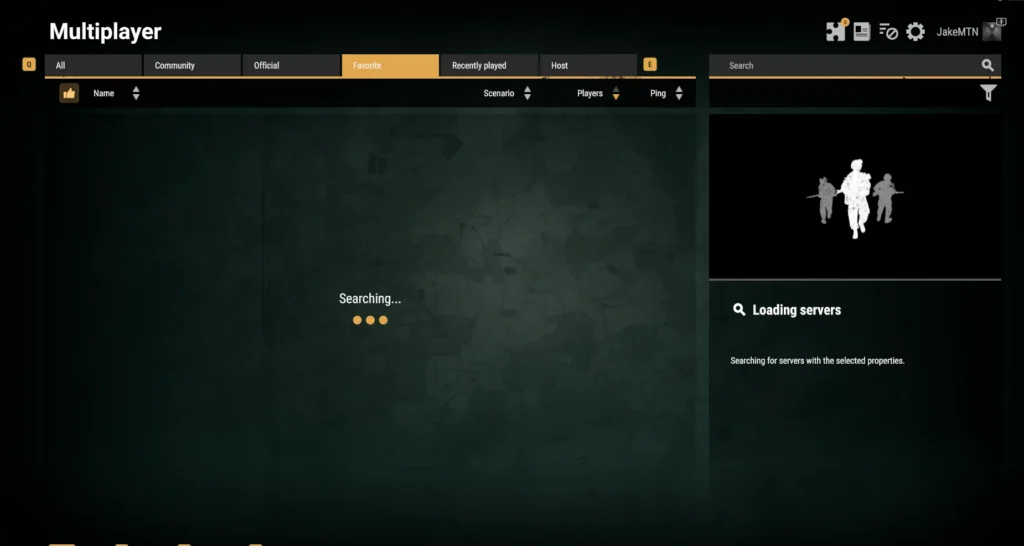
The Server Browser is its own frequent source of frustration. Players often report an empty list even though servers are clearly online and populated elsewhere.
Indeed, this is one of the more misleading Arma Reforger Server Issues because it looks like a personal connection problem when it is often a backend hiccup.
My Server Browser Is Empty, What Now?
First, wait roughly a minute and hit refresh rather than restarting immediately. If that does not work, back out to the main menu and reopen the Multiplayer Browser directly, rather than through the Play or Scenarios menu, since accessing it through those routes can apply hidden filters.
- Confirm your client version matches the servers you are trying to see (Stable and Experimental branches do not overlap).
- Clear any active filters, including region and mod filters, which can silently hide most of the list.
- Restart the game fully if a refresh does not populate results after a couple of minutes.
- Check whether Bohemia’s backend services are degraded, since server listing depends entirely on their availability.
Is It My Connection Or Bohemia’s Backend?
A quick way to tell: if your in-game ping indicator shows 999ms or a red status icon, that is almost always a backend authentication failure, not your local network. On the other hand, if you can browse servers but get kicked mid-session, the problem is more likely routing or local packet loss.
Fixing Desync And Lag During Long Sessions
Long operations, the kind Arma Reforger is built for, put sustained pressure on your connection over hours rather than minutes. Small instability that you would never notice in a short match becomes a real problem over a three hour session.
As a result, stability matters more than raw speed for this specific game.
Optimizing Your Setup For Marathon Matches
- Use a wired connection. Wi-Fi introduces variable latency that compounds over long sessions, even on a fast router.
- Monitor your Ping consistently, not just at the start. A stable 40ms is better than a session that swings between 20ms and 300ms.
- Keep your client updated. Outdated builds frequently cause mismatch errors that look like network problems.
- Verify game files periodically through Steam to catch corrupted data before it causes mid-match errors.
Server Performance Vs Your Connection
It is worth separating two very different problems. One is server-side capacity, where a crowded or under-resourced host struggles to process all players at once.
The other is your own path to that server, which can be congested regardless of how well the server itself performs. Understanding which one you are facing changes what you should actually fix.
Pro Tips: Reducing Arma Reforger Server Issues
- Pick servers closer to your region: shorter physical distance generally means fewer hops and lower baseline latency, which reduces your exposure to replication timeouts.
- Avoid peak-hour server hopping: jumping between crowded servers during peak hours increases your odds of hitting an overloaded host, since congestion is rarely evenly distributed.
- Keep BattlEye services set to automatic: this prevents the anti-cheat handshake from timing out before it starts, which is a common trigger for kick errors.
- Test with a wired connection before blaming the server: if disconnects disappear over Ethernet, your Wi-Fi was the actual root cause the whole time.
- Watch your background bandwidth usage: cloud backups and auto-updates running silently in the background are a frequent, invisible cause of mid-match packet loss.
Common Mistakes Arma Reforger Players Make
- Ignoring the specific kick cause code: many players restart the game blindly instead of reading the error. Fix: note the exact code (Timeout, Stalled, Query_Timeout) since each one points to a different solution.
- Blaming the server for every disconnect: it is easy to assume Bohemia’s backend is always at fault. Fix: check your own packet loss and firewall settings first, since local issues are more common than people expect.
- Running outdated game or driver versions: an old client build often causes mismatches that resemble connection failures. Fix: check for updates before every session, not just when problems start.
- Overlooking graphics settings as a network factor: players assume desync is purely a networking issue. Fix: lower view distance and shadows if your frame rate drops during busy scenes, since CPU overload delays packet processing too.
Is ExitLag Worth Using For Arma Reforger?
After trying every local fix, from firewall rules to DNS changes, the one thing that consistently makes the biggest difference for me is the actual route my packets take to the server. That is where ExitLag comes in.
ExitLag is not a VPN. It is a game connection optimizer that scans multiple network paths in real time and automatically picks the fastest, most stable route between your PC and the game server, without encrypting traffic or masking your IP.
For a game built around tight replication timing like Arma Reforger, that distinction matters. Consequently, ExitLag targets the exact problems behind most Arma Reforger Server Issues:
- Multipath Technology: sends your packets through multiple routes simultaneously, so if one path degrades or fails, the others keep your connection alive instead of triggering a replication timeout.
- Multi-Internet: supports up to four simultaneous internet connections with automatic failover, which is a genuine safety net during long operations where a single dropped path used to mean an instant kick.
- Real-time routing: continuously reduces delay and packet loss, which directly addresses the STALLED and TIMEOUT kick codes covered earlier in this guide.
ExitLag currently supports over 4,000 titles on PC and Mobile, backed by 1,500+ servers spread across 190+ countries, and is trusted by more than 30 million users processing 18 million optimizations every week. Furthermore, it does not modify game files, inject code, or interact with BattlEye or any anti-cheat system, so it stays safe to run alongside Arma Reforger. Just avoid pairing it with a VPN, since the two can conflict and reduce effectiveness.
If server browser headaches and mid-mission disconnects have been wearing you down, grabbing the ExitLag Download for PC takes a couple of minutes and lets you test a more stable route before your next long operation.
Final Word On Arma Reforger Server Issues
At the end of the day, most disconnects come down to a mix of local network instability, background interference, and occasional backend outages outside your control. Therefore, working through the checklist above, from firewall exceptions to DNS changes, solves the majority of cases.
Arma Reforger Server Issues are unlikely to disappear completely, since any large-scale multiplayer title with strict replication timing will always be sensitive to network quality. However, combining smart local fixes with a more stable routing solution puts you in a much stronger position for your next session.
All game images used in this blog post belong to Bohemia Interactive. They are used for informational and educational purposes only and do not imply endorsement or affiliation with the rights holders.
Got questions or want to connect with other players? Join the conversation at the ExitLag Forum!


