Learning how to create clothes on Roblox is a great starting point for players who want to customize avatars or explore Roblox creation. Depending on what you want to make, you can work with classic T-shirts, Shirts, Pants, or more advanced 3D clothing.
If you want to understand how to create clothes on Roblox, Roblox shirt template files are especially important for classic Shirts. They show where different parts of your design will appear when the clothing wraps around an avatar.
So, how to create clothes on Roblox? For classic clothing, you create an image using Roblox's clothing templates or supported image format, edit it with an image editor, test the design, upload it through Roblox's creator tools, and follow the current publishing requirements before making it available.
How to Create Clothes on Roblox: Understanding Clothing Types
Before learning how to create clothes on Roblox, you need to decide what type of clothing you want to make.
Roblox supports different avatar clothing systems, and they are not created in exactly the same way.
For beginners, classic clothing is usually the easiest concept to understand.
What is classic clothing on Roblox?
Classic clothing uses 2D images applied to an avatar. The main classic clothing categories include:
- Classic T-shirts;
- Classic Shirts;
- Classic Pants.
Although they all belong to classic clothing, their creation methods differ.
A classic T-shirt is essentially an image placed on the front of an avatar's torso. Shirts and Pants use templates that wrap artwork around multiple parts of the avatar body.
Therefore, if you want a design that looks like a complete top rather than an image printed on the front, a classic Shirt is usually the more appropriate option.
What is layered clothing?
Layered clothing is a more advanced system involving 3D accessories that can fit over different avatar bodies and other clothing layers.
This is fundamentally different from designing a classic Shirt using a flat image template.
Creating layered clothing can involve:
- 3D modeling;
- Meshes;
- Textures;
- Rigging considerations;
- Roblox Studio;
- Specialized 3D software;
- Technical avatar requirements.
Therefore, this guide focuses primarily on classic clothing for beginners while explaining where layered clothing differs.
Once you are comfortable with basic Roblox create workflows, you can explore more advanced avatar creation.
Roblox Clothing Creation Guide Design & Sell Fast
Roblox Shirt Template: How the Template Works
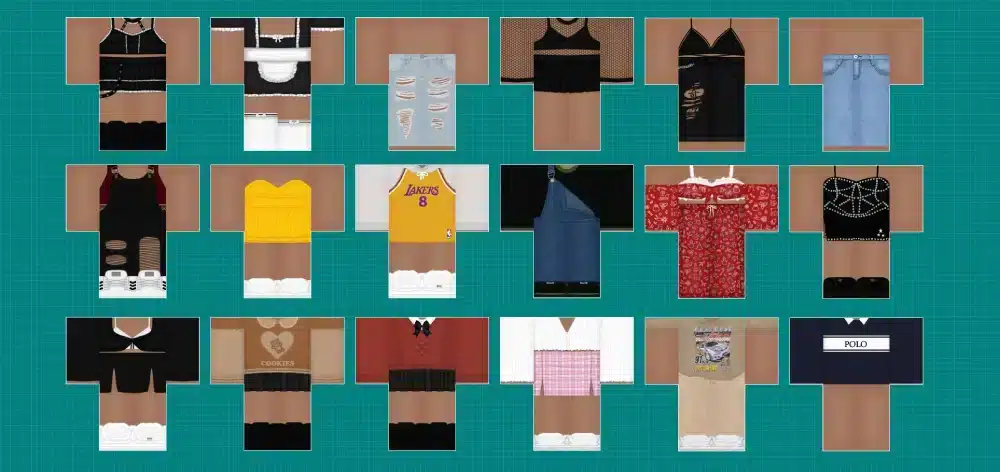
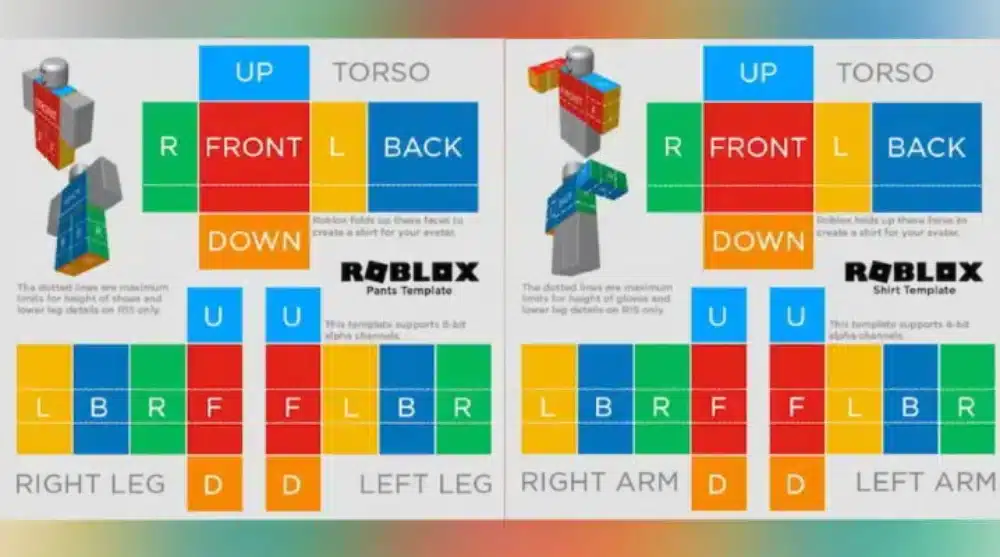
A Roblox shirt template acts as a guide for placing artwork around an avatar's body.
Instead of creating one rectangular image and expecting Roblox to determine where everything belongs, the template separates different body surfaces.
Understanding this layout is one of the most important parts of creating a good classic Shirt.
What is the Roblox shirt template?
The template maps parts of your image onto areas of the avatar. Different sections correspond to surfaces such as the torso and arms.
Think of it like cutting out a paper model. A flat piece of paper contains several sections. When those sections are folded into position, they form a three-dimensional object.
A shirt template in Roblox follows a similar principle. You design on a flat template, and Roblox wraps those areas around the avatar.
Why should you use the official template?
Using the correct template helps your design align properly. If you simply create an image with arbitrary dimensions and attempt to use it as a classic Shirt, different sections may not appear where you expect.
The official template gives you clear visual boundaries. This helps with:
- Sleeve placement;
- Front and back alignment;
- Side details;
- Collar positioning;
- Patterns that cross multiple surfaces;
- Consistent proportions.
Keep an untouched copy of the template before beginning.
That way, you can always return to the original if your working file becomes difficult to edit.
Roblox T-Shirt vs. Shirt: What's the Difference?
When learning how to create clothes on Roblox, one of the first sources of confusion is the difference between a Roblox t shirt and a classic Shirt.
The names sound similar, but the assets behave differently. Choosing the correct format before designing can save considerable time.
How do T-shirts on Roblox work?
Classic t shirts on Roblox use a relatively simple image-based system. The image appears on the front area of the avatar's torso rather than wrapping around the full torso and arms like a classic Shirt.
This makes T-shirts useful for simple graphics. For example, they can work well for:
- Logos;
- Simple symbols;
- Badges;
- Graphic designs;
- Front-facing artwork.
A Roblox t shirt can therefore be a good first project if you have never created avatar clothing before.
The design process is simpler because you do not need to align multiple surfaces.
How is a classic Shirt different?
A classic Shirt uses a template to wrap a design around the avatar's torso and arms.
This provides much more creative control.
The table below compares the main beginner-friendly options.
| Clothing type | Design method | Coverage | Difficulty |
| Classic T-shirt | Single image | Primarily front torso | Easy |
| Classic Shirt | 2D template | Torso and arms | Beginner to intermediate |
| Classic Pants | 2D template | Lower body | Beginner to intermediate |
| Layered clothing | 3D workflow | Dynamic avatar clothing | Advanced |
As the table shows, classic Shirts provide more coverage without requiring the full 3D workflow associated with layered clothing.
For many beginners, this makes Shirts a good next step after experimenting with T-shirts.
How to Make a Roblox Shirt Template Design
The design stage is where learning how to create clothes on Roblox becomes creative. You can use an image editor that supports the file formats and image features you need.
The most important factor is maintaining the correct template structure while you work.
Choose an image editor
You do not necessarily need expensive professional software to create a classic Shirt.
Many image editors can work with clothing templates. Look for basic features such as:
- Layers;
- Transparency;
- Selection tools;
- Text tools;
- Shapes;
- Color adjustments;
- Export controls.
Layers are particularly helpful.
For example, keep the original Roblox shirt template on one layer and your artwork on separate layers.
This lets you hide the template guides before exporting without permanently removing them.
Start with a simple design
Your first Shirt does not need complex shading or dozens of details.
Start with something you can easily align. For example, you might create:
- A base color for the torso;
- A second color for the sleeves;
- A simple collar;
- A small front graphic;
- Basic details on the back;
- Subtle shading around edges.
Then check how the pieces connect.
If a stripe moves from the front of the shirt onto the side, make sure both sections line up on the template.
This attention to alignment can make a simple design look much more polished.
Shirt Template in Roblox: How to Design Each Section
Working with a shirt template in Roblox can look confusing at first because the image is separated into several boxes.
However, each section has a specific purpose. Once you understand how the template wraps around the avatar, designing becomes much easier.
Design the torso first
Start with the main torso area. This is usually where the most recognizable part of your design belongs.
Consider elements such as:
- Main color;
- Jacket opening;
- Shirt graphic;
- Buttons;
- Pockets;
- Collar;
- Front patterns.
Then develop the back. If the design uses continuous patterns, make sure the side sections visually connect the front and back.
Do not add extremely small details before the basic structure works.
Test the large shapes first.
Add sleeves and side details
Once the torso looks correct, move to the arms. Decide whether both sleeves should match.
Asymmetrical clothing can work well, but intentional differences should still look coherent.
Pay attention to boundaries between the torso and sleeves. A design that looks perfect as a flat image may reveal obvious alignment problems once wrapped around an avatar.
Testing is therefore essential.
How to Create a Roblox T-Shirt
Creating a Roblox t shirt is simpler than building a full classic Shirt.
Because you are working with a front-facing image instead of a wrapping clothing template, you can focus primarily on the artwork itself.
This is a useful introduction to avatar asset creation.
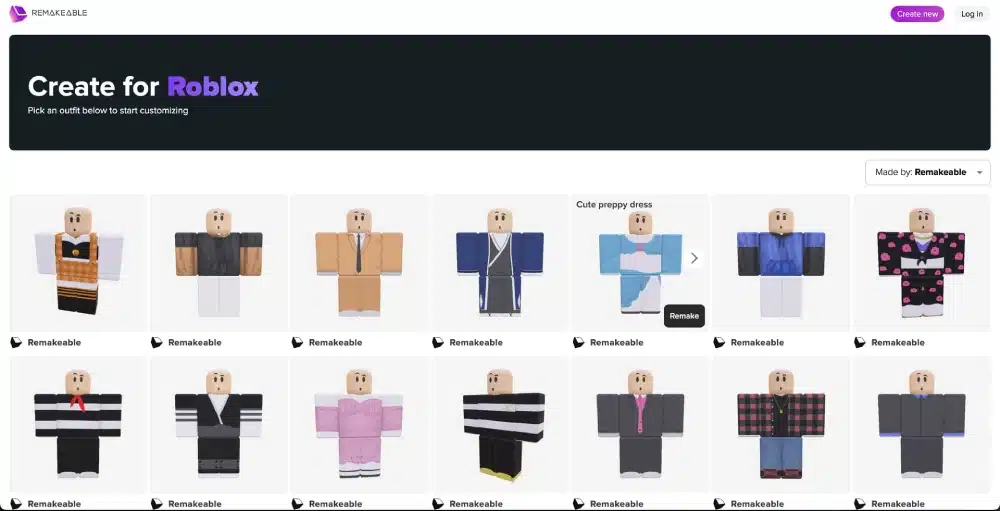
Create your T-shirt image
Start by creating or selecting artwork you have the right to use. You might design:
- An original logo;
- A simple illustration;
- Text-based artwork;
- A fictional team emblem;
- A geometric design.
Avoid simply downloading artwork from the internet and uploading it as your own. Copyright and intellectual property rules still apply to avatar content.
Once your image is ready, export it in a supported format. Then use Roblox's current creator workflow to upload the asset.
Keep T-shirt designs readable
Remember that the image will appear on an avatar. Extremely detailed artwork may become difficult to see at normal gameplay distances.
For t shirts on Roblox, bold shapes and recognizable designs often work better than tiny details.
Check your design at different sizes before uploading.
If the most important part disappears when the image becomes smaller, simplify it.
How to Upload Clothes to Roblox
After learning how to create clothes on Roblox, you need to upload your finished design.
Roblox's creator interface can change over time, so older tutorials may show menus that no longer match what you see.
Currently, classic clothing management is handled through Roblox creator tools.
Upload classic clothing
Use the Roblox Creator Dashboard and navigate to the section for avatar items and classic clothing.
Depending on the asset you created, select the appropriate category. The general process is:
- Sign in to your Roblox account;
- Open the Creator Dashboard;
- Navigate to avatar creation tools;
- Find the classic clothing section;
- Select the appropriate clothing type;
- Choose your finished image file;
- Add the required asset information;
- Upload the design;
- Wait for processing or moderation;
- Review the item before publishing or using it.
Always check the current Roblox interface because menu names and publishing workflows can change.
If your upload fails, read the displayed error before attempting random fixes.
Does uploading Roblox clothing cost Robux?
Roblox's publishing and marketplace requirements can include fees and creator eligibility requirements depending on the asset type and what you intend to do with it.
These policies can change.
Therefore, avoid relying on an old tutorial that gives one permanent Robux amount for every type of clothing upload or sale.
Before publishing, check the current Roblox Creator documentation and the information shown directly in the Creator Dashboard.
This is particularly important if your goal is selling clothing rather than simply creating and testing designs.
How to Test Roblox Clothes Before Publishing
Testing is an essential part of learning how to create clothes on Roblox.
A flat template can look perfect in your image editor while displaying obvious problems once wrapped around an avatar.
Always inspect the final result before considering the design finished.
What should you check?
Look at your clothing from several angles. Pay particular attention to:
- Front alignment;
- Back alignment;
- Sleeves;
- Side seams;
- Collar;
- Pattern continuity;
- Image quality;
- Unexpected transparent areas;
- Distorted graphics.
Rotate the avatar and inspect areas that are difficult to judge from the front.
If something looks wrong, return to your working file rather than attempting to hide the problem with more details.
Fix seams and alignment problems
Visible seams are common in early clothing designs. They usually happen when colors, patterns, or lines do not match correctly between adjacent template sections.
For example, a horizontal stripe on the front may sit slightly higher than the corresponding stripe on the side.
Correct the position in your editor and test again. This process may require several attempts.
That is normal.
Good classic clothing often comes from repeated testing rather than getting every template section perfect on the first attempt.
How to Sell Clothes on Roblox
Some creators learn how to create clothes on Roblox because they eventually want to make their designs available to other players.
Roblox provides marketplace systems for eligible avatar content. However, creating an image and selling an item are separate steps.
Check current marketplace requirements
Roblox can update creator eligibility, publishing fees, marketplace rules, and other requirements.
Therefore, always review the current official requirements before planning around clothing sales.
Do not assume that advice from an older video or article still applies. Check:
- Creator eligibility;
- Publishing requirements;
- Applicable Robux fees;
- Marketplace rules;
- Content policies;
- Intellectual property requirements.
This prevents surprises after you finish your design.
Create original clothing
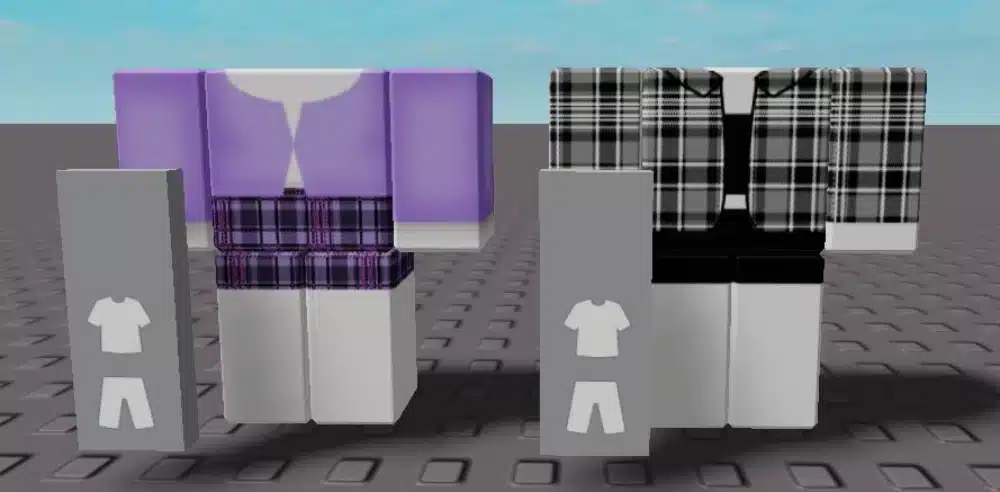
If you want other players to discover your clothing, originality matters. Avoid copying another creator's work.
Instead, develop recognizable themes and visual styles. For example, you could create a small collection with:
- Matching color palettes;
- Similar graphic styles;
- Coordinated Shirts and Pants;
- Seasonal themes;
- Original fictional branding.
Consistency can make individual items feel like part of a larger collection.
It also gives you an opportunity to improve your design skills across multiple projects.
Common Roblox Clothing Creation Mistakes
Even after understanding how to create clothes on Roblox, beginners often encounter the same problems.
Most are easy to fix once you know what caused them. Template alignment is one of the biggest challenges.
Using the wrong template
Make sure the template matches the asset you are creating. Do not use a classic Shirt workflow when you actually intend to create a T-shirt.
Similarly, layered clothing requires a completely different process. Before starting, identify:
- Clothing type;
- Required template or model;
- Supported file format;
- Current upload workflow;
- Publishing requirements.
This simple preparation prevents wasted work.
Leaving template guides visible
Another common mistake is exporting the design while template labels or colored guides are still visible. Keep the guide on a separate layer.
Before exporting, hide anything that should not appear on the final clothing. Other common mistakes include:
- Misaligned seams;
- Low-quality graphics;
- Tiny unreadable details;
- Incorrect transparency;
- Copying copyrighted designs;
- Using outdated upload instructions;
- Forgetting to test the clothing;
- Designing for the wrong clothing type.
Take time to review your exported file before uploading.
Roblox Create Tips for Better Clothing Designs
The broader Roblox create ecosystem gives players many opportunities to develop visual and technical skills.
Clothing design is a good entry point because you can start with basic image editing before exploring more advanced 3D workflows.
Improvement usually comes from making several designs rather than trying to make the first one perfect.
Build reusable design files
Keep editable versions of your projects. Do not save only the final flattened image. An organized working file might include separate layers for:
- Template;
- Base colors;
- Shading;
- Logos;
- Details;
- Sleeves;
- Collar;
- Effects.
This makes future changes much easier.
You can also reuse your own original structure when creating a coordinated collection.
Learn from each test
When something looks wrong on the avatar, identify why. For example, if the sleeve design does not align, compare the relevant template sections.
If a graphic looks stretched, reconsider its placement. This process gradually teaches you how the flat Roblox shirt template translates onto the avatar.
Eventually, you will begin anticipating these issues before testing.
Roblox Clothing Rules and Safety
Learning how to create clothes on Roblox also means understanding that uploaded content must follow platform rules.
Not every image that can be created should be uploaded. Roblox moderates user-generated content.
Follow Roblox content rules
Before uploading clothing, make sure the design follows Roblox's current Community Standards and creator requirements.
Avoid content that violates platform policies. You should also consider intellectual property rights. Do not use someone else's:
- Artwork;
- Brand logo;
- Character design;
- Photograph;
- Clothing design;
- Protected graphic.
unless you have appropriate permission or the use is otherwise legally permitted. Creating original designs is the safest approach.
Protect your Roblox account
You do not need unofficial software or websites to create classic Roblox clothing.
Be cautious if a website asks you to enter Roblox credentials to access a “special clothing creator.” Never provide:
- Your password;
- Verification codes;
- Recovery information;
- Session credentials;
- Sensitive account information.
Use official Roblox creator tools for uploading and managing your assets.
Image editing can be done with reputable design software without giving that software access to your Roblox login.
From Roblox Shirt Template to Layered Clothing
Once you understand how to create clothes on Roblox with classic templates, you may want to explore layered clothing.
This is a much larger step. Instead of designing only a flat image, you begin working with 3D assets.
When should you try layered clothing?
Consider moving to layered clothing after you are comfortable with basic design concepts and want to learn 3D creation. You may need to understand concepts such as:
- 3D modeling;
- UV mapping;
- Texturing;
- Mesh topology;
- Fitting;
- Roblox Studio;
- Avatar specifications.
Do not feel pressured to start here.
Classic clothing can teach useful fundamentals about visual design, color, texture, and avatar aesthetics.
Classic or layered clothing?
Choose based on your goal. If you want to make a simple Roblox t shirt, classic clothing is appropriate.
If you want a traditional wrapping Shirt or Pants design, use classic templates. If you want a 3D jacket or clothing item that fits dynamically over avatars, layered clothing is the relevant system.
Each method has a different learning curve. Starting simple gives you a stronger foundation for advanced creation later.
How to Create Clothes on Roblox and Play With ExitLag
Creating clothing is only one part of the how to create clothes on Roblox experience. After designing, uploading, and testing your items, you can use them while exploring the huge variety of online experiences available across Roblox.
Because Roblox is an online platform, gameplay can also be affected by network conditions such as high ping, packet loss, latency spikes, and unstable routing.
Why connection stability matters in Roblox
Your clothing design does not affect your network connection. Likewise, connection optimization will not fix a misaligned shirt template in Roblox.
These are separate parts of the experience. However, while playing online Roblox experiences, your device needs to communicate with Roblox's online infrastructure.
Network routing problems can sometimes contribute to inconsistent responsiveness during gameplay.
How ExitLag can help Roblox players
ExitLag is designed to optimize network routes for supported online games such as Roblox.
Its technology analyzes multiple connection paths and works to select faster and more stable routes for supported game traffic.
ExitLag is not a traditional VPN focused on changing your location or hiding your IP address.
Instead, its purpose is game connection route optimization.
Therefore, you can focus on creating your clothing and enjoying Roblox while ExitLag works on supported network routing during online gameplay.
FAQ
Players learning how to create clothes on Roblox often have questions about templates, T-shirts, uploads, Robux, and selling.
Here are answers to some of the most common questions.
How do you create clothes on Roblox?
For classic clothing, start with the appropriate Roblox template or supported image format.
Create your design in an image editor, export it correctly, upload it through Roblox's creator tools, and follow the current publishing requirements.
Where can I get the Roblox shirt template?
Use Roblox's official creator documentation and resources to obtain current classic clothing templates.
Using official templates reduces the risk of working with incorrect dimensions or outdated guides.
What is the difference between a Roblox T-shirt and Shirt?
A classic Roblox t shirt primarily displays an image on the front of the torso. A classic Shirt uses a template that wraps the design around the torso and arms.
Therefore, Shirts allow more detailed clothing designs.
Can you create Roblox clothes for free?
Designing an image itself can be done using free image-editing software.
However, Roblox may have fees or eligibility requirements related to uploading, publishing, or selling certain avatar items.
Check the current Creator Dashboard and official Roblox documentation before publishing.
Do you need Roblox Premium to create clothes?
Roblox's creator and marketplace requirements have changed over time.
Do not rely on older guides that present Premium membership as a permanent universal requirement for every clothing workflow.
Check the current requirements for the specific asset you want to upload or sell.
Can you sell clothes on Roblox?
Eligible creators can make supported avatar items available through Roblox's marketplace systems when they meet the current requirements.
Publishing fees, eligibility rules, and other conditions may apply.
What program should I use to make Roblox clothes?
You can use an image editor capable of working with the required templates, transparency, layers, and supported export formats.
For advanced layered clothing, you may also need 3D modeling software and Roblox Studio.
Why does my Roblox shirt look wrong?
Common causes include template misalignment, visible guide layers, incorrect transparency, poor image quality, or using the wrong clothing format.
Test the design on an avatar and correct each section in your editable source file.
How to Create Clothes on Roblox: Create and Play With ExitLag
Learning how to create clothes on Roblox starts with choosing the right clothing type, using the correct template, creating an original design, and testing it carefully before publishing.
Once your design is ready, you can equip your creation and enjoy it across your favorite Roblox experiences.
Create your Roblox style, jump into the game, and optimize your online connection with ExitLag!