If you’re building a sustainable farm or trying to optimize resources, understanding the Composter Minecraft system is essential. It’s one of those blocks that looks simple, but can completely change how you manage materials.
Many players ignore the composter at first. But once you understand how Composter Minecraft works, it becomes a powerful tool for farming, trading, and resource efficiency.
So, what does a Composter Minecraft actually do? It converts organic items into bone meal, which can be used to speed up crop growth and improve your overall progression.
In this guide, you’ll learn everything about Composter Minecraft, from crafting and usage to automation strategies that can take your gameplay to the next level.
Composter Minecraft: what it is and what it does
Before crafting anything, you need to understand why this block matters.
What does a composter do in Minecraft?
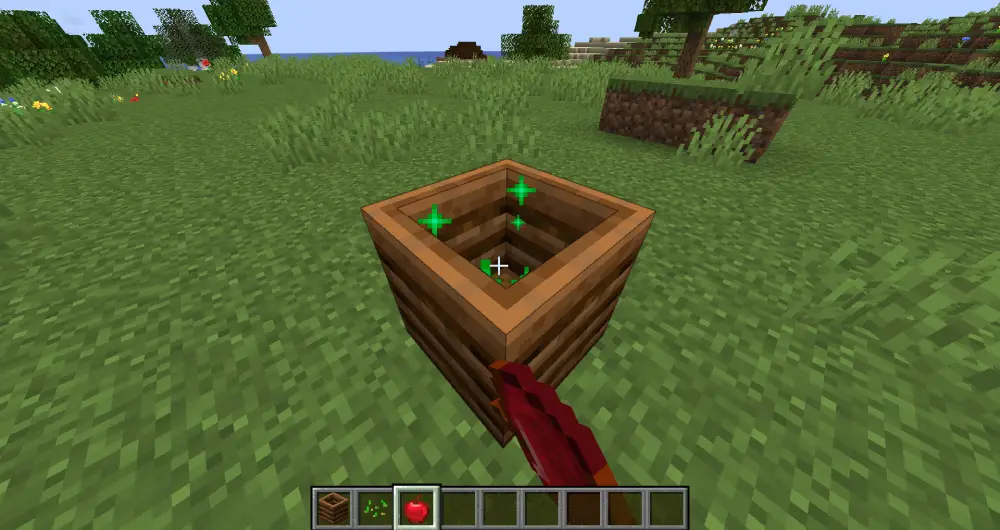
The Composter Minecraft is a utility block that allows you to convert organic materials into bone meal.
This answers a common question: what does a composter do in Minecraft?
It works by filling up with compostable items until it reaches a full level. Once complete, it produces bone meal, which is one of the most useful resources in farming.
Why composting is important
Using the compost Minecraft system gives you several advantages:
- Faster crop growth using bone meal;
- Efficient recycling of excess items;
- Useful for villagers (farmer profession);
- Essential for sustainable farming systems.
In other words, instead of wasting resources, you turn them into something valuable.
How to make a composter in Minecraft step by step
Now let’s build one together.
Composter recipe Minecraft explained
To craft a composter, you’ll need:
- 7 wooden slabs (any type).
This is the standard composter recipe Minecraft and works in all modern versions.
How to craft a composter in Minecraft
Follow this layout:
- Open your crafting table;
- Place 3 slabs on the bottom row;
- Place 2 slabs on each side (middle row);
- Leave the center empty.
This is the classic Minecraft composter recipe, and once crafted, you can place it anywhere.
Crafting table overview
| Item Needed | Quantity | Notes |
| Wooden Slabs | 7 | Any wood type works |
This simple recipe makes it accessible even early in the game.
How to use composter Minecraft efficiently
Now that you have one, let’s talk about usage.
How to use a composter in Minecraft
To use it:
- Right-click the composter with compostable items;
- Watch the level increase;
- Once full, collect bone meal.
That’s the core mechanic behind how to use composter Minecraft.
Best items to compost
Not all items have the same efficiency. Here are good options:
- Seeds;
- Wheat;
- Bread;
- Leaves;
- Vegetables.
Using efficient items improves your Minecraft compost results.
Auto composter Minecraft: how to automate the process
If you want to scale things up, automation is the next step.
Automatic composter Minecraft setup
An auto composter Minecraft system typically uses:
- Hoppers;
- Chests;
- Redstone (optional).
The idea is to feed items automatically and collect bone meal without manual interaction.
Simple automation flow
- Place a hopper above the composter;
- Feed items into the hopper;
- Place another hopper below;
- Collect bone meal in a chest.
This creates a basic automatic composter Minecraft system.
Automation overview table
| Component | Function |
| Hopper (top) | Inserts compostable items |
| Composter | Processes items into bone meal |
| Hopper (bottom) | Collects bone meal |
| Chest | Stores output |
How to understand this system
Think of it as a production line:
- Top → input;
- Middle → processing;
- Bottom → output.
This setup allows continuous composting with minimal effort.
Composter Minecraft tips for better efficiency
If you’ve already learned the basics, now is the moment where things start to get interesting. Using the Composter Minecraft efficiently isn’t just about throwing items inside, it’s about making smarter decisions every time you interact with it.
Think about this: every item you compost can either speed up your progress, or slow it down. And once you understand how to use a composter in Minecraft strategically, you’ll start to see your entire farming system evolve.
Smart composting strategies
To get the most out of the Composter Minecraft, you need to focus on efficiency and consistency. Here are the strategies that actually make a difference:
- Use high-efficiency items first (like bread, crops, and certain plants);
- Automate your system early with an auto composter Minecraft setup;
- Combine composting with your farms to create a continuous production loop;
- Store bone meal and use it strategically for large-scale farming.
These habits transform basic Minecraft compost usage into a reliable resource system.
Compost efficiency comparison
Not all items behave the same way in the composter, and this is where many players lose efficiency without realizing it.
| Item Type | Compost Efficiency | Best Use Case |
| Seeds | Low | Early game or excess items |
| Leaves | Medium | Bulk composting |
| Crops (Wheat, Carrots) | Medium-High | Farming integration |
| Bread | High | Fast bone meal generation |
| Cake/Pumpkin Pie | Very High | Maximum efficiency (late game) |
How to use this table
Here’s how you should think about it:
- If you’re early in the game, use whatever you have (seeds, leaves);
- As your farm grows, shift to crops for better results;
- Later, prioritize high-value items like bread for faster composting.
Understanding this simple difference already puts you ahead of most players using the Composter Minecraft.
Common mistakes players make
Now let’s talk about what usually goes wrong, because avoiding mistakes is just as important as doing things right.
Many players struggle with how to use composter Minecraft efficiently because they:
- Use low-efficiency items all the time without upgrading their strategy;
- Ignore automation and keep doing everything manually;
- Forget to collect bone meal, causing wasted production;
- Don’t integrate composting into their farming system.
These mistakes don’t seem big at first, but over time, they slow down your entire progression.
A better way to approach composting
Instead of thinking of the composter as a “secondary tool,” start seeing it as part of your core system.
When you align your farm, your resources, and your automation, the Composter Minecraft becomes:
- A constant source of bone meal;
- A way to eliminate waste;
- A tool to accelerate your growth.
And that’s when the game really changes.
If you apply these strategies and avoid the common mistakes, your composting system won’t just work, it will scale with you as your world grows.
Performance and smooth gameplay matter too
Even in a game like Minecraft, performance impacts your experience.
Why performance matters
Large farms and automated systems can:
- Cause lag spikes;
- Reduce FPS;
- Impact gameplay responsiveness.
How ExitLag helps
ExitLag improves your connection by:
- Optimizing data routes;
- Reducing packet loss;
- Stabilizing online gameplay.
Important: ExitLag is not a VPN. It does not change your IP or location.
Composter Minecraft: final tips to master it
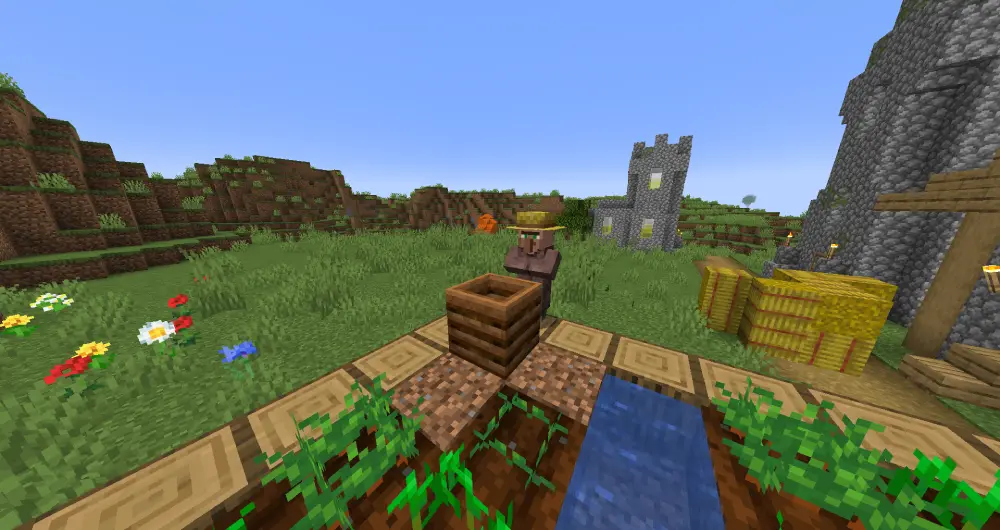
To truly master the Composter Minecraft, you need to stop thinking of it as just a simple block and start treating it as part of a larger system.
The difference between casual use and optimized gameplay comes from how well you integrate composting into your overall strategy.
Many players only use it occasionally, but if you understand what does a composter do in Minecraft and how to scale it, you can turn excess items into a constant supply of bone meal.
And that changes everything, especially when farming becomes a core part of your progression.
Best habits to follow
If you want to get consistent value from the Composter Minecraft, these habits will make a huge difference over time:
- Always reuse organic materials instead of discarding them;
- Prioritize high-efficiency items when using the compost Minecraft system;
- Combine composting with your crop farms for a continuous loop;
- Build an auto composter Minecraft setup as early as possible;
- Keep your bone meal organized for quick access.
Once you apply these habits, you’ll start to notice how much more efficient your world becomes.
How to think strategically about composting
Here’s something important: composting isn’t just about bone meal, it’s about optimization.
When you understand how to use composter Minecraft correctly, you create a cycle:
- Farm crops;
- Use leftovers as Minecraft compost;
- Generate bone meal;
- Speed up new crops.
This loop allows you to grow faster, build faster, and progress faster.
Simple action plan to follow
If you’re unsure where to start, follow this step-by-step plan:
- Learn how to make a composter in Minecraft using the basic composter recipe Minecraft;
- Start using it immediately with seeds, crops, and food;
- Upgrade to an automatic composter Minecraft system using hoppers;
- Integrate composting into your farm design;
- Scale your production as your world grows.
This is the easiest way to move from beginner to advanced usage.
Why this changes your gameplay
When used correctly, the Composter Minecraft becomes much more than a utility block.
It helps you:
- Reduce waste and improve efficiency;
- Maintain a steady supply of bone meal;
- Automate part of your resource generation;
- Support larger farming systems.
In the long run, mastering how to use a composter in Minecraft allows you to build more sustainable and scalable worlds.
What starts as a small feature quickly becomes a core mechanic, and once you optimize it, you’ll never ignore composting again.
FAQ
It converts organic items into bone meal.
Use 7 wooden slabs in a crafting table.
Seeds, crops, food, and plant-based items.
Yes, using hoppers and chests.
Yes, it significantly speeds up crop growth.
Boost your Minecraft experience with ExitLag
Mastering the Composter Minecraft system is a great way to improve your efficiency, but performance also plays a key role in your gameplay.
With ExitLag, you get smoother, more stable gameplay, especially when running complex farms and automation systems.
Composter Minecraft setups feel even better when your game runs without lag or interruptions.
Try ExitLag now and enjoy smoother, more responsive gameplay!
Got questions or want to connect with other players? Join the conversation at the ExitLag Forum!