

Nothing ruins a decisive play or a perfectly timed through ball more than EA Sports FC 26 high ping, especially when every millisecond determines whether your pass connects or your shot delays. Above all, when EA Sports FC 26 becomes unresponsive due to high ping, players experience slow inputs, delayed animations, and severe desynchronization. In advance, this guide explains the real reasons behind latency issues and how tools compatible with supported games help solve ping issues.

What is high ping in EA Sports FC 26?
At first, understanding EA Sports FC 26 high ping is the foundation for fixing gameplay instability. Ping measures how long it takes for data packets to reach the game’s servers, expressed in milliseconds (ms). The higher this value, the longer it takes for your actions to be registered. When ping increases suddenly, players see input delays, missed tackles, late passes, and inconsistent animations.
Even more, high ping is not necessarily caused by bad internet. Instead, it comes from unstable latency, inefficient routing, or overloaded traffic paths created by your ISP. Like this, even players with excellent broadband speeds can suffer EA Sports FC 26 latency when their connection takes poorly optimized routes.
In summary, EA Sports FC 26 high ping is simply the delay between your input and the game server’s reaction. This delay directly affects every dribble, tackle, skill move, and pass during competitive matchmaking.
How high ping affects gameplay in EA Sports FC 26
High ping doesn’t only slow down your actions—it changes how the game behaves entirely. Soon after ping spikes begin, every animation becomes unpredictable.
Here are the most common problems:
- Delayed hit registration in shoulder challenges
- Rubberbanding while sprinting down the field
- Unexpected disconnections, affecting results
- Massive competitive disadvantage in Rivals or Champions
- Delayed passes, tackles, and skill moves
- Tackle “ghosting” where players slide past opponents
Input delay and skill execution
First of all, EA Sports FC 26 heavily depends on input timing. In the same way, high ping causes inputs to take too long to register, making skill chains inconsistent. As a result, even simple dribbling loses accuracy.
Player movement and responsiveness
From the same point of view, players may freeze momentarily, then jump ahead unpredictably. Above all, this disrupts your defensive structure, timing in duels, and counter-attack opportunities.
Main causes of high ping in EA Sports FC 26
Server distance
At first sight, if you are located far from EA’s game servers, packet travel time increases significantly. Definitely, remote players face higher EA Sports FC 26 connection issues.
ISP / routing issues
According to your ISP’s routing protocol, traffic might take long or unstable paths before reaching EA servers. That way, even fast internet plans experience lag EA Sports FC 26.
Network congestion
Often, high traffic—either in your region or home network—slows down packet delivery. Consequently, ping fluctuates, creating unstable EA Sports FC 26 latency.
Outdated hardware
Beforehand, old routers, faulty cables, and inconsistent Wi-Fi channels increase delay. Updating or replacing hardware can drastically improve stability.
Game-specific cause
EA Sports FC titles often face temporary congestion during events, promos, and peak hours. These surges magnify EA Sports FC 26 high ping temporarily.
How to check and test your ping in EA Sports FC 26
Firstly, EA Sports FC 26 displays your connection quality during online gameplay. If numbers constantly jump—for example, 30ms to 200ms—your routing path is unstable.
On the other hand, testing your connection with OS commands like ping, pathping, or tracert allows you to identify problematic hops between you and the EA servers, revealing deeper EA Sports FC 26 connection issues.
In conclusion, values below 40ms are optimal, under 100ms are acceptable, but anything above introduces lag EA Sports FC 26.
Ping levels classification
| Ping level | Gameplay experience |
| 0–40 ms | Excellent, smooth inputs |
| 40–100 ms | Playable with slight delays |
| 100–160 ms | Noticeable lag EA Sports FC 26 issues |
| 160–250 ms | Significant delay, inconsistent gameplay |
| 250+ ms | Nearly unplayable |
Basic fixes to reduce high ping in EA Sports FC 26
Optimize local connection
- Use a wired Ethernet connection
- Close bandwidth-heavy applications
- Restart modem and router
- Update network drivers
- Reduce network devices connected at the same time
- Disable automatic updates in launchers or store apps
Contact your ISP
Even so, if consistent ping spikes persist, your ISP must verify network issues and routing problems. They can analyze packet loss, physical line quality, or congestion patterns.

Bullet list:
- Ask if your region has ongoing instability
- Request a check for packet loss
Second bullet list:
- Confirm whether your router is outdated
- Ask if an alternative routing method is available
Required numbered list:
- Request routing profile refresh
- Ask for peak-hour diagnostics
- Verify whether international routes are congested
ExitLag: the best solution to fix high ping in EA Sports FC 26
Right away, ExitLag becomes the most effective way to stabilize unstable routes and eliminate the EA Sports FC 26 high ping that disrupts competitive gameplay. Instead of relying on your ISP’s inconsistent routing, ExitLag intelligently redirects your connection through the fastest and most stable pathways, making your inputs smoother and your matches more responsive.
What is ExitLag?
In advance, ExitLag is a specialized software designed for precise connection optimization, reducing delays, stabilizing routes, and ensuring consistent gameplay performance. Unlike generic fixes, ExitLag targets the real cause of EA Sports FC 26 latency: inefficient routing. You can explore its routing engine inside the technology section.
Above all, ExitLag guarantees predictable responses during matches, removing the instability that causes delayed tackles, late passes, and unpredictable animations.
How ExitLag works
ExitLag uses advanced routing systems made specifically for online gaming:
- Real-time route analysis
It constantly evaluates every possible connection path to EA servers to identify the fastest available route. - Multiple routes simultaneously
Like this, instead of sending your traffic through a single unstable path, ExitLag duplicates it across multiple routes for redundancy. - Automatic best route selection
As a result, ExitLag always picks the path with the lowest latency, improving the responsiveness of every match. - Hop optimization
By reducing the number of hops between you and EA servers, ExitLag cuts out unnecessary delays that create lag EA Sports FC 26. - Connection stabilization
Finally, ExitLag prevents sudden spikes and jitter, creating a smoother, more predictable online experience. You can see these mechanisms in detail in the how it works section.
Advantages for EA Sports FC 26 players
Better input responsiveness
Firstly, ExitLag removes delays between button presses and in-game actions, making dribbling, passing, and skill chains faster and more precise.
Reduced rubberbanding during movement
In the same way, route stabilization prevents sudden position “jumps,” especially during explosive sprints or defensive recoveries.
More consistent matchmaking experience
Above all, stabilized ping ensures you play on predictable latency, improving timing for tackles, interceptions, and long shots.
Improved hit registration
Due to fewer routing delays, collisions, tackles, and challenges register correctly, reducing the feeling of desynchronization.
Reliable performance during peak hours
As a result, even when servers become busy, your gameplay remains smooth, avoiding evening-hour spikes and widespread EA Sports FC 26 connection issues.
Supports hundreds of games
ExitLag works with a wide library of online titles. You can browse all supported options in the supported games section.
Is ExitLag worth it for EA Sports FC 26?
Definitely. If you are experiencing EA Sports FC 26 high ping, inconsistent tackles, delayed skills, slow animations, or sudden disconnections, ExitLag provides immediate improvement. It is especially valuable for competitive modes like Rivals, Champions, and Online Seasons. To explore plan options, visit the pricing page.
How to use ExitLag in EA Sports FC 26
The process is extremely simple:
Step 1 – Access the official ExitLag website and download the application. There’s a free trial period for new users.
Step 2 – Install and open the program. Log in with your account.
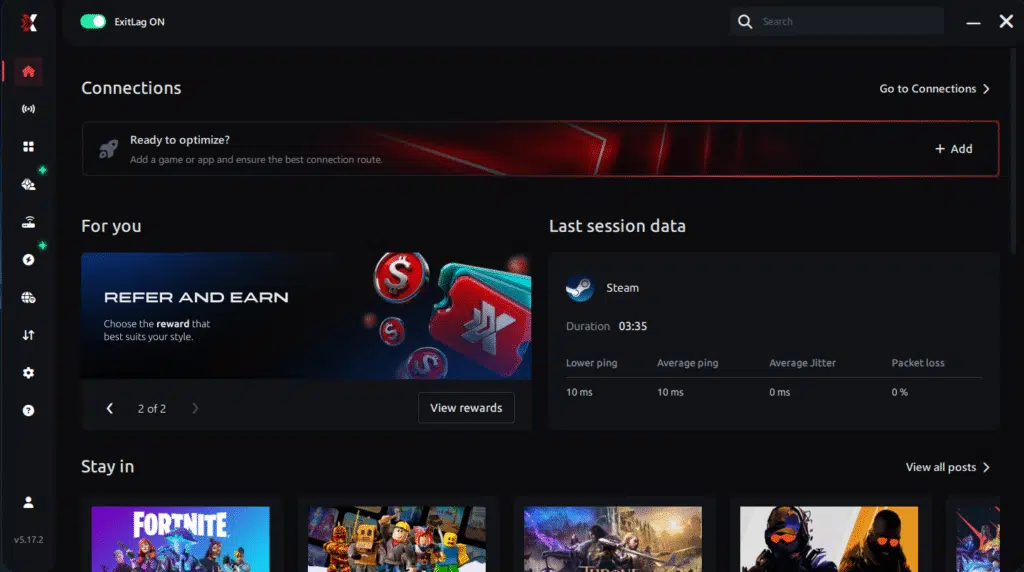
Step 3 – In the search bar, type “EA Sports FC 26” and select the game from the list.
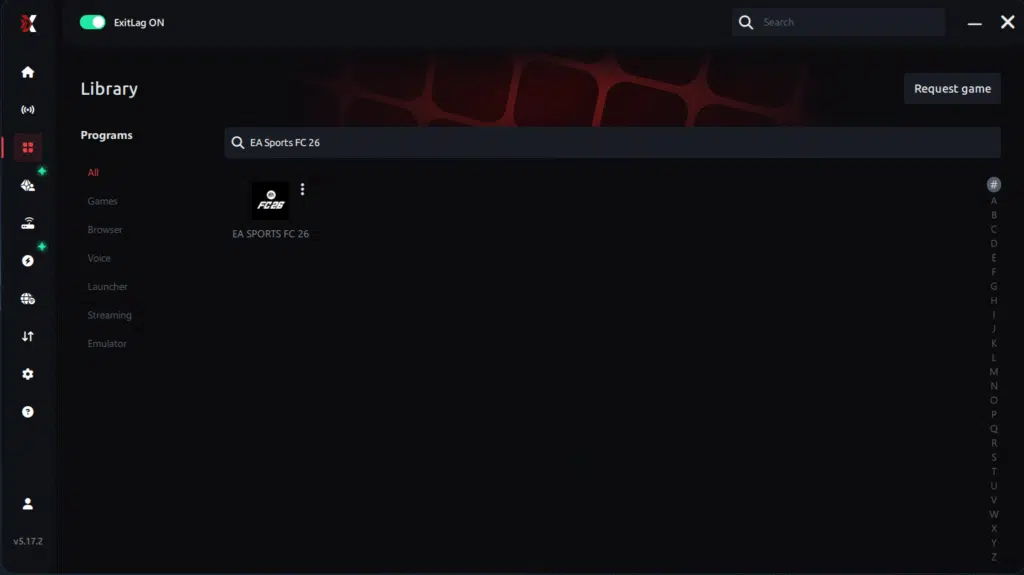
Step 4 – Choose between automated or manual route
Based on the results, you can let ExitLag automatically select the best route or manually choose the server that showed the lowest latency for your connection.
AI-optimized automated route
Based on the results, you can let ExitLag automatically select the best route through AI optimization. The system analyzes multiple connection paths in real time and automatically identifies the most efficient route for your connection, ensuring the lowest possible latency without requiring manual choices.
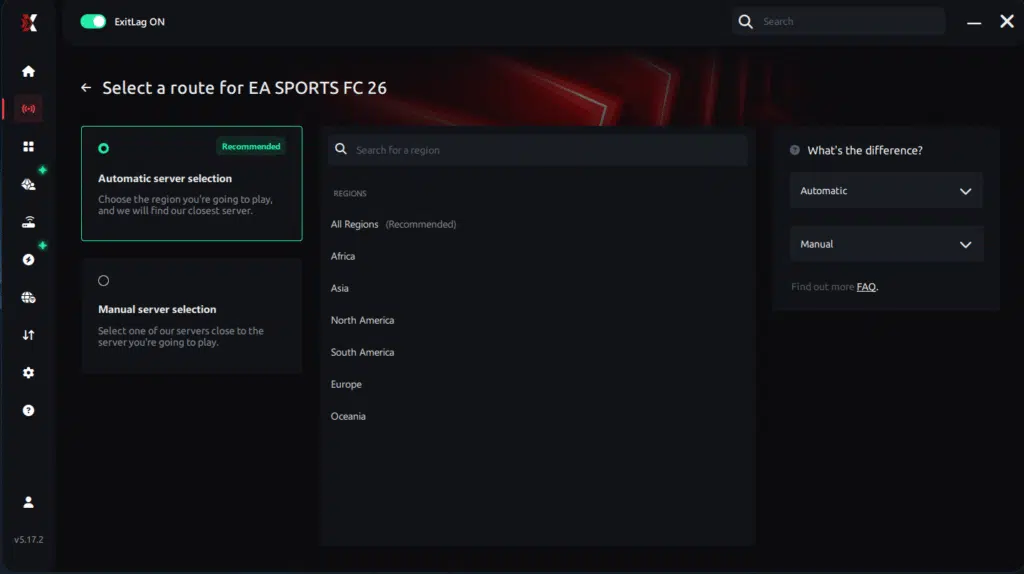
Manual route
If you prefer to have full control over your connection, you can manually choose the server based on the ping test results. Simply select the server that showed the lowest latency or the one that best meets your specific gaming needs, allowing complete customization of your experience.
Step 5 – Click “Apply routes” or the play button. ExitLag will begin optimizing your connection automatically.
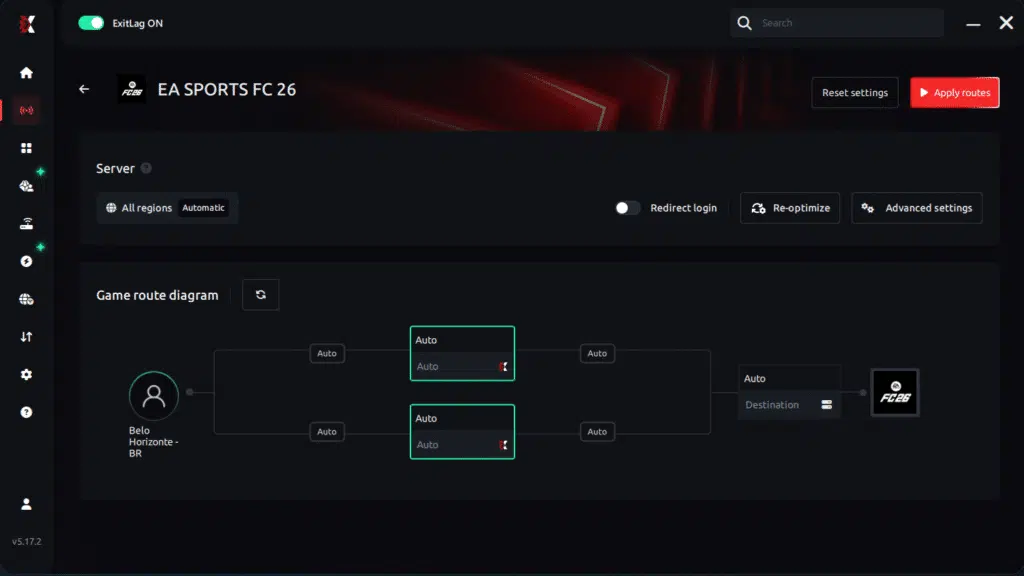
Step 6 – Wait a few seconds until optimization is complete. You’ll see ping indicators in the interface.
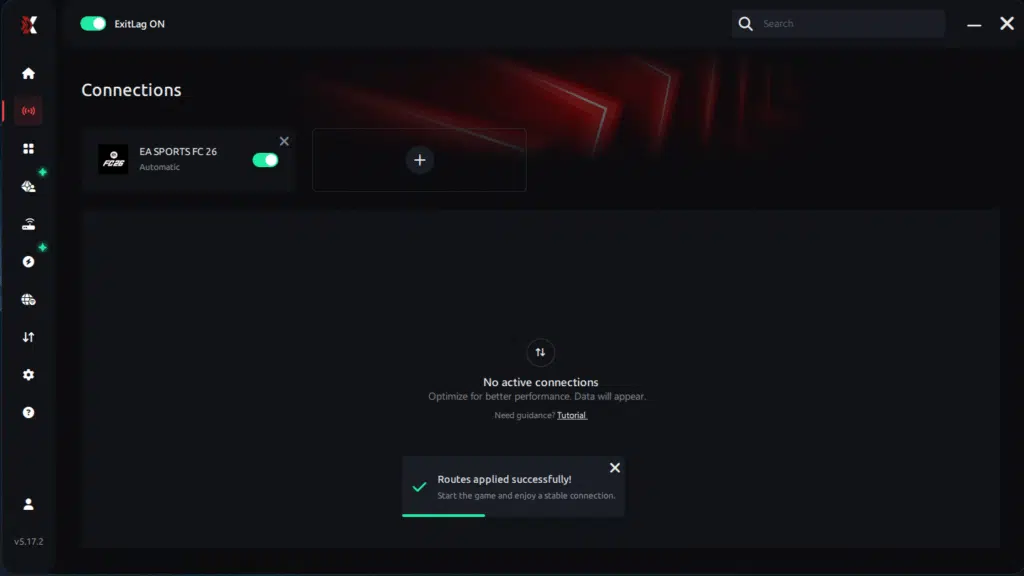
Step 7 – Launch EA Sports FC 26 normally. The optimization will already be active.
ExitLag runs in the background while you play, constantly adjusting routes to maintain the best possible performance.
Final thoughts: Play EA Sports FC 26 without lag forever
At the end of the day, EA Sports FC 26 lag should never decide your matches. Whether you’re grinding Ultimate Team, playing Pro Clubs, Seasons, or online friendlies, your internet connection should never be the reason for delayed passes or missed chances.
With ExitLag, you finally take control of your network performance. The software finds the fastest routes, eliminates lag, and stabilizes your ping so that every pass, every shot, and every defensive action happens exactly when you want it to.
Try ExitLag for free right now and experience how smooth EA Sports FC 26 can be when your connection is fully optimized. Play with confidence, dominate the pitch, and make lag a thing of the past.
FAQ: everything about high ping in EA Sports FC 26
What causes high ping in EA Sports FC 26?
At first sight, EA Sports FC 26 high ping is caused by long-distance routing, ISP limitations, regional congestion, overloaded servers, or unstable home networks. Even with fast broadband, poor routing decisions made by your provider can create large delays.
Furthermore, home Wi-Fi interference, outdated hardware, and peak-hour traffic often worsen EA Sports FC 26 connection issues, making gameplay inconsistent.
How do I check my ping in EA Sports FC 26?
The game displays your connection quality during online matches. If your ping jumps drastically—such as from 30ms to 150ms instantly—you’re dealing with unstable routing.
On the other hand, OS tests like ping, tracert, and pathping show where your delay occurs, helping diagnose deeper EA Sports FC 26 latency problems.
What is good ping for EA Sports FC 26?
Under 40ms is excellent for competitive gameplay. Between 40–100ms is manageable, but beyond that, lag EA Sports FC 26 effects become noticeable, especially during skill moves or defensive reactions.
In conclusion, consistent ping is more valuable than low ping—stability improves gameplay even more than raw speed.
Can high ping get you banned in EA Sports FC 26?
No. High ping is not a bannable offense. EA does not punish players for connection instability. In summary, EA Sports FC 26 high ping only affects your performance, not your account safety.
Does ExitLag work for EA Sports FC 26?
Yes. ExitLag is widely used by competitive players to stabilize routing, prevent packet loss, reduce latency spikes, and ensure smooth gameplay. This makes it especially helpful for reducing EA Sports FC 26 connection issues during intense matches.
Why does EA Sports FC 26 lag more during weekend events?
During Weekend League, server demand increases drastically. Combined with peak-hour congestion, this leads to temporary spikes, amplifying EA Sports FC 26 high ping. Optimizing your route mitigates these effects significantly.
Conclusion
In conclusion, understanding the causes of latency and applying effective fixes gives you the control needed to stabilize your connection. With the right tools and optimizations, you can finally overcome EA Sports FC 26 high ping and enjoy smooth, consistent matches in every mode.
For more insights, tutorials, and tips, visit the official ExitLag blog.
EA Sports FC 26 high ping no longer needs to ruin your free time. Now that you understand the causes and how to stabilize your connection, you can finally enjoy your gaming smoothly. Start your free trial and see the difference for yourself.
Got questions or want to connect with other players? Join the conversation at the ExitLag Forum!


