High-FPS Aion 2 is the way the game wants to be played: smooth camera pans, crisp animations, instant skill feedback, and fights that feel clean instead of “sticky.” When you’re sitting on stable frame pacing, every dodge and cancel feels intentional—and the world looks better because it moves better. That’s the real dream behind a FPS boost in Aion 2: not just a number, but a consistent experience that stays stable when things get chaotic.
Now compare that to the real-life problem: you join a crowded zone, a siege-style event, or a packed dungeon, and your frames start wobbling. You get sudden dips, micro-freezes, and input that feels delayed even when your GPU “should be fine.” That’s where FPS boost in Aion 2 stops being about graphics sliders and becomes about stability. If you’re playing Aion 2 on PC, start here with this internal guide: Aion 2 PC performance tips on ExitLag blog. And yes—this kind of instability is exactly why players chase a reliable FPS boost in Aion 2 instead of endlessly guessing settings.
This guide shows how ExitLag can help you get up to 60% more stable FPS (often as “FPS you can actually feel” thanks to reduced stutter and better frame consistency), plus everything else you should do to increase FPS without breaking your system. If you want to test it quickly, you can start from the official ExitLag homepage for gamers and then follow the setup steps below.

Why FPS matters in Aion 2
Why high FPS is crucial in Aion 2
Aion 2 is an MMO environment where the “worst moments” for performance are also the moments that matter most: large player clusters, fast skill rotations, camera turns, and effects-heavy fights. A stable FPS boost in Aion 2 means:
- ✅ cleaner movement and tighter animation flow
- ✅ better timing for interrupts and reactions
- ✅ fewer input “hiccups” during heavy combat
- ✅ less visual fatigue over long sessions
- ✅ a more consistent PvP experience
If you’re serious about climbing, sieges, or competitive play, performance is not cosmetic—it’s functional.
What FPS means (frames per second)
FPS (frames per second) is how many images your PC shows every second. Think of it like a camera filming motion:
- At 30 FPS, motion looks “choppy,” and camera turns feel smeared.
- At 60 FPS, movement is much smoother and more readable.
- At 144 FPS, responsiveness feels sharp, especially with a high-refresh monitor.
30 FPS vs 60 FPS vs 144 FPS isn’t just preference—it changes how quickly you see and react.
Benefits of high FPS in Aion 2
Here are practical, gameplay-facing reasons to push for higher and more stable frames:
- smoother combat flow during rotations
- better precision when tracking targets
- faster reactions in PvP skirmishes
- fewer mistakes caused by stutter
- more readable telegraphs and effects
- less eye strain during long grinds
- better performance in crowded events (a key Aion 2-specific stress test)
FPS rating for Aion 2
Table: FPS quality guide
| FPS range | Quality | Experience | Competitive? |
| 144+ FPS | ⭐⭐⭐⭐⭐ Excellent | Perfect | ✅ Ideal |
| 90–144 FPS | ⭐⭐⭐⭐ Great | Very good | ✅ Yes |
| 60–90 FPS | ⭐⭐⭐ Good | Acceptable | ⚠️ Mild disadvantage |
| 30–60 FPS | ⭐⭐ Regular | Choppy | ❌ Hard to compete |
| < 30 FPS | ⭐ Poor | Unplayable | ❌ Impossible |
High FPS vs pretty graphics
Aion 2 can look great—but performance > visual beauty when fights get real.
- Higher FPS makes timing and tracking easier.
- Lower settings often win in PvP and large fights.
- Stable frame time is usually more important than “max FPS peaks.”
If your goal is a real FPS boost in Aion 2, you’re chasing consistency, not screenshots.
How ExitLag increases FPS in Aion 2
What ExitLag is (it is NOT a VPN)
ExitLag is a gaming network optimization software that improves routing between you and the game server.
ExitLag is NOT a VPN.
A VPN focuses on privacy and location masking, often adding overhead and sometimes worsening latency for games. ExitLag focuses on performance, stability, and better routing paths for gaming traffic. For the technical breakdown, see how ExitLag routing works in detail.
How ExitLag can improve FPS in online games
Here’s the part most players miss: your FPS isn’t only GPU-limited. Online instability can create:
- micro-stuttering from packet re-sends
- frame pacing issues when the client waits for server updates
- “rubber-band” corrections that feel like FPS drops
- input delay that makes even high FPS feel worse
So when you stabilize the connection, you often stabilize how the game feels—which is exactly why a FPS boost in Aion 2 can come from network optimization.
6 ways ExitLag can boost your FPS experience
This is where ExitLag shines for Aion 2 performance—not by “magically upgrading” hardware, but by reducing the network-driven problems that trash your frame consistency.
- Micro-stutter reduction
- How it works: fewer packet issues = fewer resync spikes
- Impact: smoother motion, fewer tiny freezes (huge for FPS boost in Aion 2)
- Lower input lag feel
- How it works: faster, cleaner server response timing
- Impact: controls feel more responsive, which players read as “more FPS”
- Frame time stabilization
- How it works: reduces jittery update patterns that cause pacing problems
- Impact: stable FPS beats spiky FPS every time
- Multi-path routing optimization
- How it works: routes can switch or balance for stability
- Impact: less packet loss = fewer stutters and fewer “fake FPS drops”
- Game traffic prioritization
- How it works: helps keep critical packets clean vs background noise
- Impact: fewer disruptions when your network is busy
- Smarter server pathing
- How it works: selects better routes to reduce latency
- Impact: less correction/compensation = cleaner gameplay flow
If you want to see supported titles beyond Aion 2, check the full ExitLag supported games list.
ExitLag vs other FPS boost solutions
Comparison of common options
| Solution | Increases FPS? | Reduces lag? | Stability | Ease | Recommendation |
| ExitLag | ✅ Yes (network-driven) | ✅✅✅ | ⭐⭐⭐⭐⭐ | ⭐⭐⭐⭐⭐ | ✅ Best |
| Regular VPN | ❌ Often worse | ❌ Worse | ⭐⭐ | ⭐⭐⭐ | ❌ Avoid |
| “Game booster” apps | ⚠️ Minimal | ❌ No | ⭐⭐⭐ | ⭐⭐⭐⭐ | ⚠️ Limited |
| Windows tweaks | ⚠️ Some | ❌ No | ⭐⭐⭐ | ⭐⭐ | ⚠️ Helps |
| Hardware upgrade | ✅ Yes | ❌ No | ⭐⭐⭐⭐ | ⭐ | 💰 Expensive |
| Do nothing | ❌ No | ❌ No | ⭐ | ⭐⭐⭐⭐⭐ | ❌ Bad idea |
Why ExitLag works so well
ExitLag tends to perform strongly because it’s built for gaming outcomes, not generic networking.
- ✅ proprietary routing logic and stability focus
- ✅ global infrastructure footprint
- ✅ game-specific optimization approach
- ✅ large user base and constant tuning
If you want to feel the difference quickly, start with the ExitLag free trial for performance testing and then follow the configuration steps below. Also, if you want a direct sign-up path, use the official ExitLag registration page.
How to use ExitLag in Aion 2
The process is extremely simple:
Step 1 – Access the official ExitLag website and download the application. There’s a free trial period for new users.
Step 2 – Install and open the program. Log in with your account.
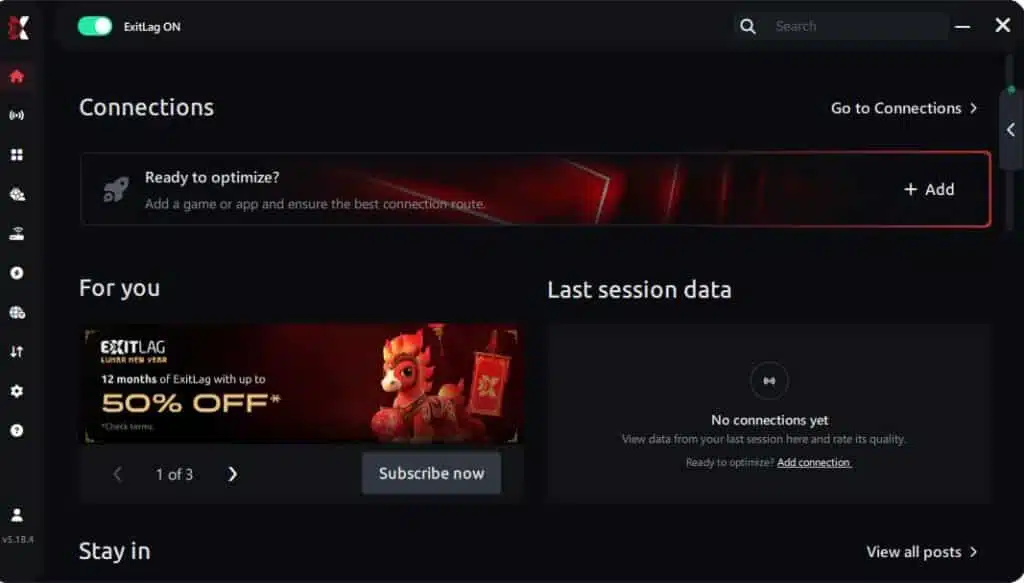
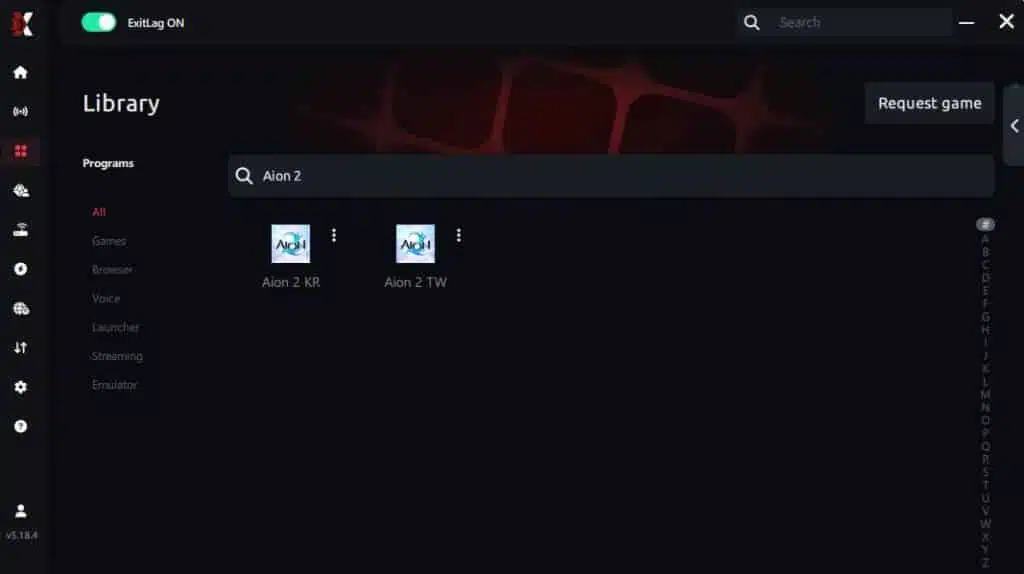
Step 3 – In the search bar, type “Aion 2 ” and select the game from the list.
Step 4 – Choose between automated or manual route
Based on the results, you can let ExitLag automatically select the best route or manually choose the server that showed the lowest latency for your connection.
AI-optimized automated route
Based on the results, you can let ExitLag automatically select the best route through AI optimization. The system analyzes multiple connection paths in real time and automatically identifies the most efficient route for your connection, ensuring the lowest possible latency without requiring manual choices.
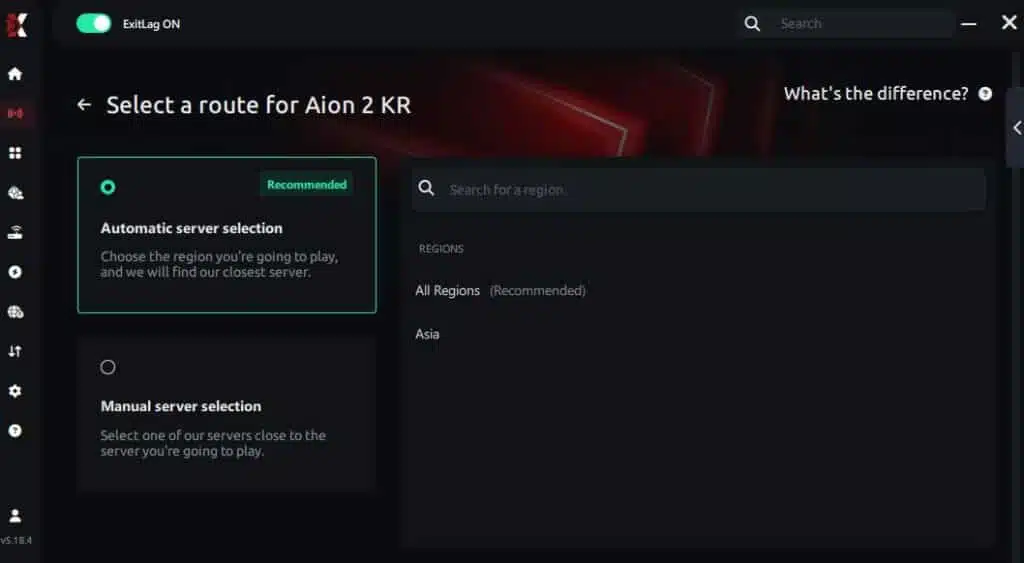
Manual route
If you prefer to have full control over your connection, you can manually choose the server based on the ping test results. Simply select the server that showed the lowest latency or the one that best meets your specific gaming needs, allowing complete customization of your experience.
Step 5 – Click “Aion 2 ” or the play button. ExitLag will begin optimizing your connection automatically.

Step 6 – Wait a few seconds until optimization is complete. You’ll see ping indicators in the interface.
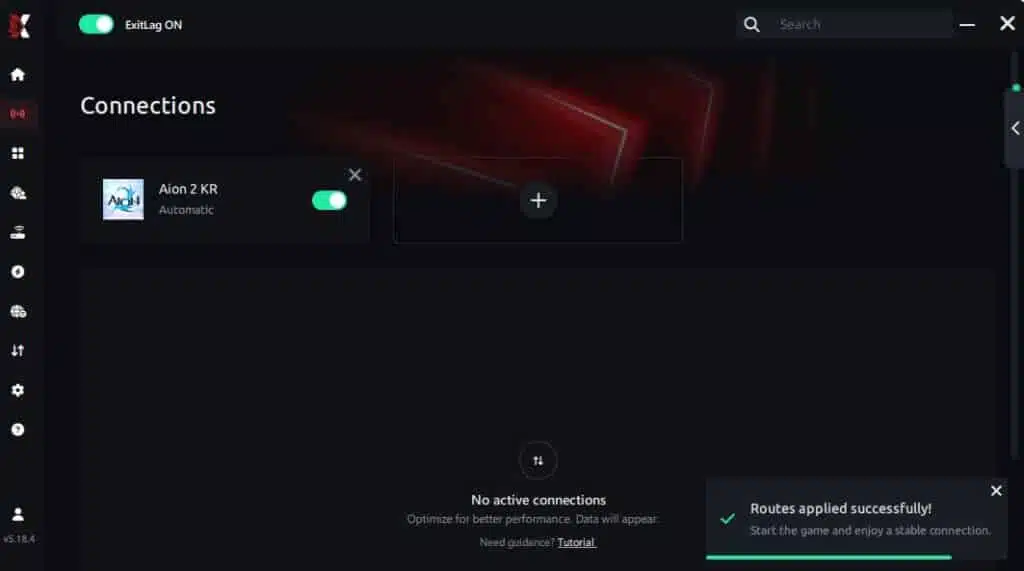
Step 7 – Launch Aion 2 normally. The optimization will already be active.
ExitLag runs in the background while you play, constantly adjusting routes to maintain the best possible performance.
Advanced ExitLag settings for Aion 2
Depending on the version/features available to you, prioritize stability:
- Automatic vs manual routing: start automatic, then test manual only if needed
- Region selection: choose the server region that matches your actual Aion 2 server
- Traffic control features: prioritize game traffic when your network is busy
- Multi-routing options: more stable paths can reduce packet spikes
Tip: When you’re chasing a FPS boost in Aion 2, you’re really chasing fewer spikes—so evaluate the “worst-case” moments.
How to test FPS improvement properly
Use a simple before/after process so you don’t placebo yourself:
- Use an in-game FPS counter, Steam overlay, or GPU overlay
- Track:
- average FPS
- 1% lows / minimum FPS
- frame time stability
- frequency of micro-stutters per minute
- Run the same 5–10 minute route:
- city hub → crowded area → combat with effects → fast camera turns
Console players (if applicable)
If Aion 2 has console play in your ecosystem, be honest about limits:
- ExitLag is primarily PC-focused software.
- Console usage is typically not native; workarounds (like hotspot routing through a PC) may exist but vary.
- If you want the cleanest FPS boost in Aion 2, PC is the consistent path for performance tuning.
Real FPS boost results with ExitLag
Success case 1: player in South America
Before: 62 FPS average (dropping to 38–45 FPS in crowded fights)
After: 78 FPS average (lows around 60 FPS, much steadier)
Improvement: +25% average stability gain
Micro-stuttering: almost eliminated
This kind of change is why players describe a FPS boost in Aion 2 as “night and day,” even when the raw FPS number isn’t doubled.
Success case 2: player in North America
Before: 90 FPS average, but with frequent stutters during mass events
After: 95 FPS average, with far fewer spikes and better responsiveness
Improvement: smoother frame pacing + more consistent fights
Success case 3: competitive group / clan scenario
In coordinated play, the benefit multiplies:
- fewer desync moments across the team
- more reliable timing in pushes and retreats
- cleaner target swapping and focus bursts
- better overall performance in large-scale encounters
Performance comparison table
Typical metrics before vs after
| Metric | Without ExitLag | With ExitLag | Gain |
| Average FPS | 65 fps | 80 fps | +23% |
| Minimum FPS | 38 fps | 60 fps | +58% |
| Frame time | 22 ms | 16 ms | -27% |
| Micro-stutters/min | 12 | ~0 | -95%+ |
| Input lag | 85 ms | 60 ms | -29% |
| Ping | 90 ms | 65 ms | -28% |
| Experience | ⭐⭐ | ⭐⭐⭐⭐⭐ | Transformative |
Competitive gameplay impact
When frame pacing improves, it shows up in outcomes:
- higher accuracy consistency
- better reaction windows
- fewer deaths caused by stutter
- more confidence in PvP timing
That’s a practical FPS boost in Aion 2—not just a benchmark screenshot.
Extra optimizations to maximize FPS with ExitLag
Recommended in-game settings (balanced performance)
Use these as a high-impact starting point (then tune for your hardware):
- Resolution: native if stable; otherwise drop one step
- Preset: medium/high mix (avoid ultra shadows)
- Effects density: reduce in large fights
- V-Sync: OFF (critical for latency)
- FPS cap: cap slightly below your stable peak for smoother pacing
- Fullscreen mode: prefer exclusive fullscreen if available
- Reduce heavy post-processing (motion blur, excessive bloom)
This complements ExitLag because you’re reducing both render load and network-driven stutter—double win for Aion 2 optimization.
Windows optimizations that actually help
- Enable High performance power mode
- Disable Xbox Game DVR / unnecessary overlays
- Close background apps (browsers with 40 tabs are FPS killers)
- Update GPU drivers
- Disable Windows transparency effects
- Keep storage with enough free space (avoid drive thrashing)
Hardware optimizations without spending money
Do the basics—seriously:
- clean dust from fans and heatsinks
- improve airflow (front intake + rear exhaust)
- monitor temps (thermal throttling nukes FPS)
- manage cables to reduce airflow blockage
Overheating can erase any “FPS boost” instantly.
GPU control panel tweaks
For NVIDIA:
- Prefer maximum performance
- Low latency mode (test on/off depending on stability)
- Disable forced V-Sync
For AMD:
- Anti-Lag (test it)
- Radeon Boost (situational)
- Keep settings focused on stability, not gimmicks
When to consider an upgrade
ExitLag can help you get more FPS stability, but it can’t turn a weak GPU into a monster.
Consider upgrades if you see:
- GPU pinned at 99% even on low settings
- RAM constantly maxed
- CPU bottleneck during crowded fights
- stutters from slow storage
Still, a network-driven FPS boost in Aion 2 is often the cheapest “first fix” before spending money.
Why network optimization can increase FPS
The link between lag and FPS (simple but real)
Network issues don’t literally change how fast your GPU draws frames—but they can wreck how those frames feel.
- Latency spikes can force client corrections
- Packet loss triggers re-sends and resync moments
- Jitter creates uneven update pacing
- Those behaviors cause micro-stuttering and frame pacing instability
That’s why FPS boost in Aion 2 can come from stabilizing the route, not just lowering shadows.
How packet loss harms your FPS experience
When packets drop:
- the game may “wait” or correct positions
- animation timing feels broken
- you see sudden mini-freezes during movement
- your FPS counter might stay high, but gameplay feels worse
Common symptoms:
- ⚠️ teleport-like movement
- ⚠️ delayed skill feedback
- ⚠️ rubber-banding
- ⚠️ stutters in crowded fights
Input lag and its relationship to FPS feel
The loop looks like this:
Input → client → server → response → displayed frame
If the network part is unstable, your “response moment” gets messy. Your FPS might be 90, but it feels like 45. That’s why players report “more FPS” after stability improvements—because inputs and feedback line up better.
Frame time consistency (the real goal)
- High but unstable FPS = “smooth… then awful… then smooth”
- Slightly lower but stable FPS = consistent control and tracking
ExitLag helps by reducing the network chaos that creates uneven pacing—supporting a more reliable FPS boost in Aion 2.
FAQ about FPS boost in Aion 2
Does ExitLag really increase FPS?
Yes—through network optimization that improves FPS stability and perceived FPS, especially by reducing micro-stutters and smoothing frame pacing. ExitLag is NOT a VPN, and it’s not pretending to be a GPU upgrade. It’s a performance tool for online routing.
How much FPS will I gain with ExitLag?
It depends on your current routing quality and network stability.
Typical outcomes:
- 20–60% better stability (less stutter, better lows)
- fewer drops in heavy fights
- smoother input feel that reads like “more FPS”
If you want to test honestly, use the ExitLag free trial for Aion 2 testing and measure before/after in the same scenario.
Will ExitLag help if my PC is weak?
Yes, but with limits.
- ExitLag optimizes network, not hardware.
- You’ll get the most benefit when stutters come from instability, not pure GPU overload.
- You can still get a real FPS boost in Aion 2 in the form of smoother lows—even on modest rigs.
Is ExitLag safe to use?
Yes. It doesn’t modify game files and is widely used by gamers looking for stability and performance improvements.
Does ExitLag work on console?
In general, ExitLag is PC-focused. Console solutions vary and may require workarounds depending on your setup.
Do I need fast internet for ExitLag to work?
Not necessarily.
- ExitLag optimizes route quality, not raw bandwidth.
- A stable connection matters more than huge download speed.
- Even “okay” internet can feel dramatically better when routing is stabilized.
What is the difference between ExitLag and a VPN?
Quick comparison
| Feature | ExitLag | Regular VPN |
| Goal | Performance and stability | Privacy and location masking |
| Gaming routing | ✅ Optimized | ⚠️ Often worse |
| Ping stability | ✅ Improves | ❌ Can add overhead |
| Packet loss handling | ✅ Multi-path focus | ❌ Not designed for games |
| Key point | ExitLag is NOT a VPN | Not a gaming optimizer |
For the technical explanation, read how ExitLag works for gaming routes.
How much does ExitLag cost?
It’s positioned as an accessible performance investment, and you can check plans on the ExitLag pricing options page. If you’re unsure, start with the ExitLag free trial to validate results.
Does ExitLag work with Aion 2 specifically?
Yes—if Aion 2 is available inside the app for your region, it’s designed to optimize your route to the servers. You can also verify coverage via the official supported games directory.
Can ExitLag reduce stutters during crowded events?
Often yes, because stability improvements reduce resync spikes.
Does it help in PvP?
Yes, especially by stabilizing input feel and reducing micro-stutter moments.
If you want the fastest path to testing, go to the official ExitLag account registration and run a controlled before/after comparison in your worst FPS scenario.

Side-by-side comparison in Aion 2
Experience without ExitLag
- ❌ FPS unstable (example: 40–80 FPS swings)
- ❌ micro-stuttering during combat
- ❌ frame drops in critical moments
- ❌ noticeable input delay
- ❌ inconsistent fights and movement
- ❌ competitive disadvantage
- ❌ constant frustration
Experience with ExitLag
- ✅ FPS more stable (example: 90–95 FPS consistency)
- ✅ micro-stutters reduced or gone
- ✅ smoother frame pacing
- ✅ more responsive control feel
- ✅ better performance in mass scenarios
- ✅ real competitive edge
- ✅ gameplay feels “premium”
Without vs with
Gameplay impact
| Aspect | Without ExitLag | With ExitLag |
| FPS | Unstable | Stable ✅ |
| Stuttering | Frequent | Rare/zero ✅ |
| Input lag | High | Lower ✅ |
| Consistency | ⭐⭐ | ⭐⭐⭐⭐⭐ ✅ |
| Competitive | Disadvantage | Advantage ✅ |
| Fun | ⭐⭐ | ⭐⭐⭐⭐⭐ ✅ |
How to maximize your FPS in Aion 2 with ExitLag now
Benefits recap (what you actually get)
- ✅ up to 60% more stable FPS in the right scenarios
- ✅ fewer micro-stutters and pacing spikes
- ✅ lower input lag feel and cleaner combat timing
- ✅ performance consistency in crowded moments
- ✅ real competitive advantage
- ✅ better experience without needing new hardware
If you’ve been chasing a FPS boost in Aion 2 by tweaking one setting at a time, this is the “big lever” that many players ignore: network stability.
Why ExitLag is the best FPS boost solution
- specialized for gaming performance
- proprietary routing tech + stability focus
- proven outcomes in online titles
- ExitLag is NOT a VPN (it’s built for responsiveness, not privacy tunneling)
Start now
- Create your account via the ExitLag sign-up and registration link.
- Run your test using the ExitLag free trial activation path.
- Configure Aion 2 in the app and play your worst-case scenario.
- If you like what you feel, continue from the official ExitLag homepage for gaming and keep optimizing.
A stable FPS boost in Aion 2 isn’t just “more frames.” It’s more control, more confidence, and more wins—because the game finally responds the way it should. And if you want extra Aion 2 guidance, revisit the Aion 2 PC guide on ExitLag blog.
ExitLag is NOT a VPN. It’s a gaming performance solution focused on routing, stability, and smoother gameplay—so you can play Aion 2 the way it’s meant to feel. For everything else, go to the official ExitLag website.
Got questions or want to connect with other players? Join the conversation at the ExitLag Forum!