EA Sports FC 26 feels at its best when every animation is clean, the ball feels “connected” to your inputs, and your camera stays smooth during fast transitions. With high FPS, dribbling is more responsive, skill moves feel consistent, and defending becomes less about guessing and more about timing.
But in real online matches, many players deal with dips, stutters, and unstable performance that ruins the rhythm. It’s especially noticeable when matchmaking servers feel inconsistent, your connection spikes at peak hours, or a single stutter turns a perfect tackle into a late challenge. If network instability is part of your issue, start with the EA Sports FC 26 packet loss troubleshooting guide to understand how packet loss and jitter can translate into micro-stuttering that looks like FPS drops.
In this guide, you’ll learn how to get a real FPS boost in EA Sports FC 26 by improving stability first and then optimizing your settings for consistent frame pacing. ExitLag can help you achieve up to 60% smoother gameplay by reducing micro-stuttering, stabilizing frame time, and minimizing input lag in online play. You can begin quickly through the official ExitLag homepage and test the difference in your busiest, most competitive matches.

Why FPS matters in EA Sports FC 26
Why high FPS is crucial in EA Sports FC 26
Football games are all about timing. The difference between a clean interception and a late tackle can be a fraction of a second. When FPS is unstable, your brain is reacting to inconsistent visual feedback, which makes you feel slower even if your mechanics are good.
High FPS matters most in:
- fast counterattacks and transitions
- crowded midfield battles
- tight defending inside the box
- set pieces where micro-delays change outcomes
- online matches where responsiveness is everything
A strong FPS boost in EA Sports FC 26 is not only “nice to have.” It’s a competitive advantage when input timing and animation clarity decide goals.
What FPS means in simple terms
FPS means frames per second. Think of it like a camera recording motion. More frames per second means smoother motion and more precise visual feedback.
Here’s how it feels in practice:
- 30 FPS: sluggish motion, harder timing, delayed feedback
- 60 FPS: stable baseline, smoother animation flow
- 144 FPS: ultra-smooth motion and faster visual responsiveness
If you want to increase FPS or get more FPS, you should prioritize stability and minimum FPS first. A stable 90 FPS usually feels better than a spiky 120 FPS during online play.
Benefits of high FPS in EA Sports FC 26
A stable frame rate makes the entire experience feel more controlled. Here are the biggest benefits:
- Smoother dribbling and tighter ball control
- Clearer animations for tackles, shots, and skill moves
- Faster reactions on defense in close-range situations
- Better timing on passes and first touches
- More consistent shooting mechanics under pressure
- Less eye strain in long sessions
- Stronger performance in online matches where micro-stutters decide goals
That last point is key: many players chase an FPS boost in EA Sports FC 26 because online matches punish even tiny stutters.
FPS tiers and visual trade-offs
FPS classification for EA Sports FC 26
Use this as a practical target guide:
| FPS range | Quality | Experience | Competitive? |
| 144+ FPS | ⭐⭐⭐⭐⭐ Excellent | Perfect | ✅ Ideal |
| 90–144 FPS | ⭐⭐⭐⭐ Great | Very good | ✅ Yes |
| 60–90 FPS | ⭐⭐⭐ Good | Acceptable | ⚠️ Slight disadvantage |
| 30–60 FPS | ⭐⭐ Regular | Choppy | ❌ Hard to compete |
| Under 30 FPS | ⭐ Bad | Unplayable | ❌ Impossible |
If you want an FPS boost in EA Sports FC 26, the most meaningful jump is usually improving minimum FPS and eliminating micro-stutters during fast transitions.
Why average FPS can lie
A system can show “90 FPS average” while still feeling terrible if frame time spikes create stutters. In sports games, even a single hitch can:
- break your tackling timing
- delay a skill move input
- cause a late pass
- ruin a keeper reaction moment
That is why consistency matters more than peak numbers.
High FPS vs pretty graphics
You can make EA Sports FC 26 look great, but competitive players almost always prioritize performance. In fast online matches, performance beats visuals.
Key trade-offs:
- lower heavy effects if they cause drops
- keep clarity and visibility high
- avoid settings that spike GPU usage unpredictably
- aim for stable FPS rather than “maxed out” graphics
A clean FPS boost in EA Sports FC 26 should feel like stable responsiveness, not just a prettier menu screen.
How ExitLag increases FPS in EA Sports FC 26
What ExitLag is, and what it is not
ExitLag is a gaming network optimization tool designed to improve routing quality and stability, reducing the network problems that trigger stutters and delayed feedback.
The most important clarification is this: ExitLag is NOT a VPN. VPNs focus on privacy tunneling and can introduce extra overhead or unpredictable routing. ExitLag focuses on stable performance routes for gaming traffic.
If you want a deeper technical explanation, read how ExitLag works for gaming performance.
How network issues can feel like FPS issues
EA Sports FC 26 is heavily dependent on consistent synchronization in online play. When your connection fluctuates, you can get:
- micro-stutters during camera movement
- frame pacing spikes during quick transitions
- delayed inputs that make the game feel “heavy”
- animation timing that looks inconsistent
This is why ExitLag can help deliver an FPS boost in EA Sports FC 26 without touching your GPU: it reduces the network instability that causes the worst stutters.
Rendered FPS vs perceived FPS
Two concepts matter here:
- rendered FPS: what your hardware outputs
- perceived FPS: how smooth the game feels under real match conditions
When stutters disappear and frame pacing stays consistent, it can feel like you gained a lot of FPS. That’s why a network-focused tool can create a real FPS boost in EA Sports FC 26 for competitive players.
Seven ways ExitLag helps you get a smoother FPS boost
1) Micro-stutter reduction during online play
Micro-stutters often come from unstable packet timing and correction behavior. ExitLag improves stability, which can reduce those stutters and make matches feel smooth.
2) Reduced input lag for faster reactions
Input lag is not only hardware-related. Network instability adds delay between your action and the server response. A more stable route makes gameplay feel more responsive.
This is one reason players describe ExitLag as “more FPS,” even though the real gain is consistency.
3) Better frame time consistency
Stable frame time is a hidden competitive advantage. Even if FPS is similar, smoother pacing makes your timing more reliable in defense and attacking.
4) Multi-path route optimization
ExitLag can avoid congested routing points. Less congestion means fewer spikes and fewer stutters during peak hours.
5) Game traffic prioritization
When your network is busy, background traffic can interrupt stability. ExitLag prioritizes game packets to reduce interruptions during critical match moments.
6) Ping reduction for better synchronization
Lower ping reduces correction behavior and improves how your inputs align with the server’s response timing. That can make animations feel cleaner and more predictable.
7) Redundant routing for reliability
If your ISP has inconsistent routing, redundant paths can reduce the “random bad matches” effect. Reliability matters because EA Sports FC 26 is a game of repetition and consistency.
ExitLag vs other FPS boost options
FPS boost comparison table
| Solution | Increases FPS? | Reduces lag? | Stability | Ease | Recommendation |
| ExitLag | ✅ Yes via stability | ✅✅✅ | ⭐⭐⭐⭐⭐ | ⭐⭐⭐⭐⭐ | ✅ Best |
| Typical VPN | ❌ Often worse | ❌ Often worse | ⭐⭐ | ⭐⭐⭐ | ❌ Avoid |
| Generic game booster | ⚠️ Minimal | ❌ No | ⭐⭐⭐ | ⭐⭐⭐⭐ | ⚠️ Limited |
| Windows tweaks | ⚠️ Some | ❌ No | ⭐⭐⭐ | ⭐⭐ | ⚠️ Helpful |
| Hardware upgrade | ✅ Yes | ❌ No | ⭐⭐⭐⭐ | ⭐ | 💰 Expensive |
| Doing nothing | ❌ No | ❌ No | ⭐ | ⭐⭐⭐⭐⭐ | ❌ Worst |
If you want to confirm what else you can optimize, check the full ExitLag supported games list and search for your favorite titles.
How to use ExitLag in EA Sports FC 26
The process is extremely simple:
Step 1 – Access the official ExitLag website and download the application. There’s a free trial period for new users.
Step 2 – Install and open the program. Log in with your account.
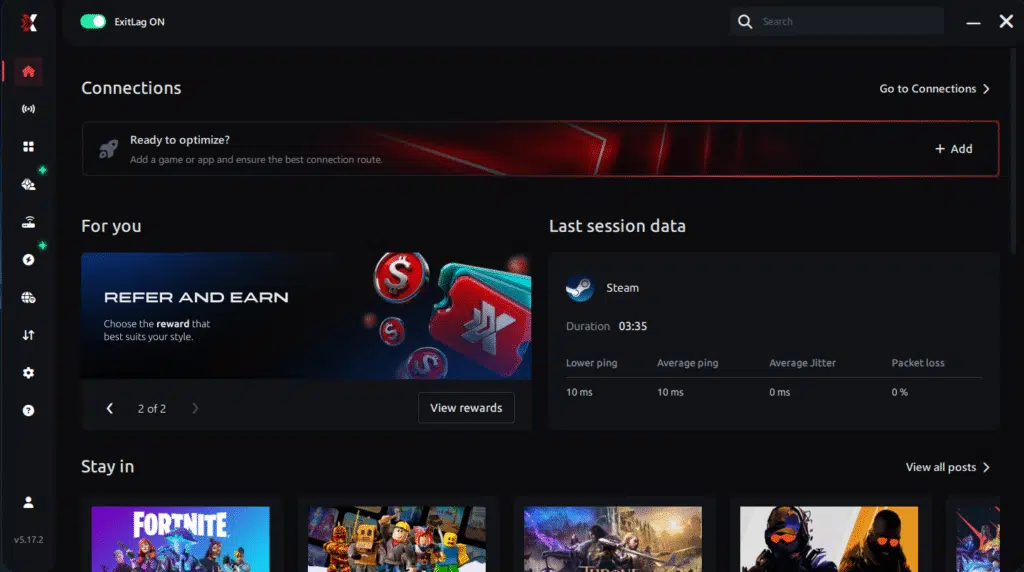
Step 3 – In the search bar, type “EA Sports FC 26” and select the game from the list.
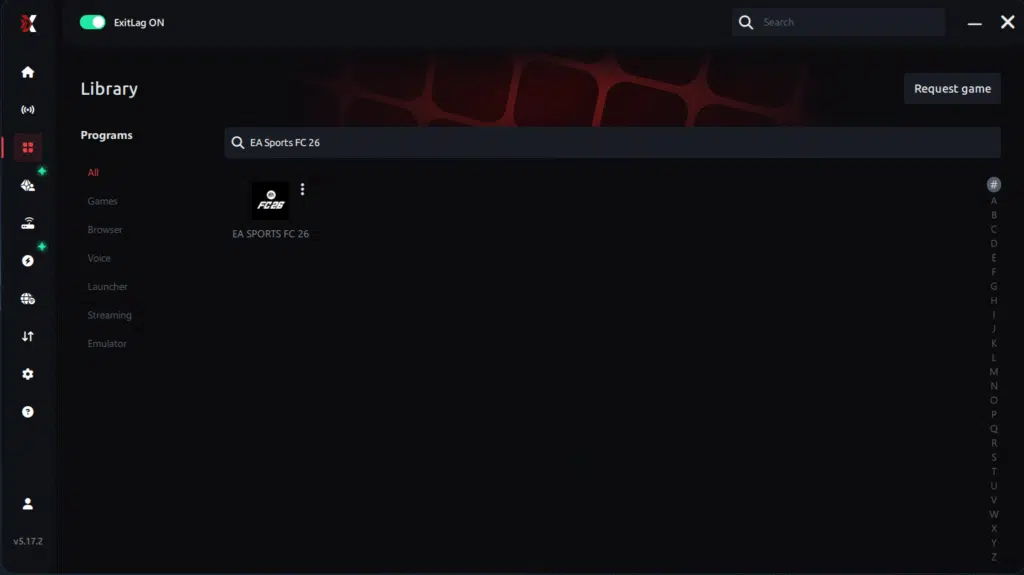
Step 4 – Choose between automated or manual route
Based on the results, you can let ExitLag automatically select the best route or manually choose the server that showed the lowest latency for your connection.
AI-optimized automated route
Based on the results, you can let ExitLag automatically select the best route through AI optimization. The system analyzes multiple connection paths in real time and automatically identifies the most efficient route for your connection, ensuring the lowest possible latency without requiring manual choices.
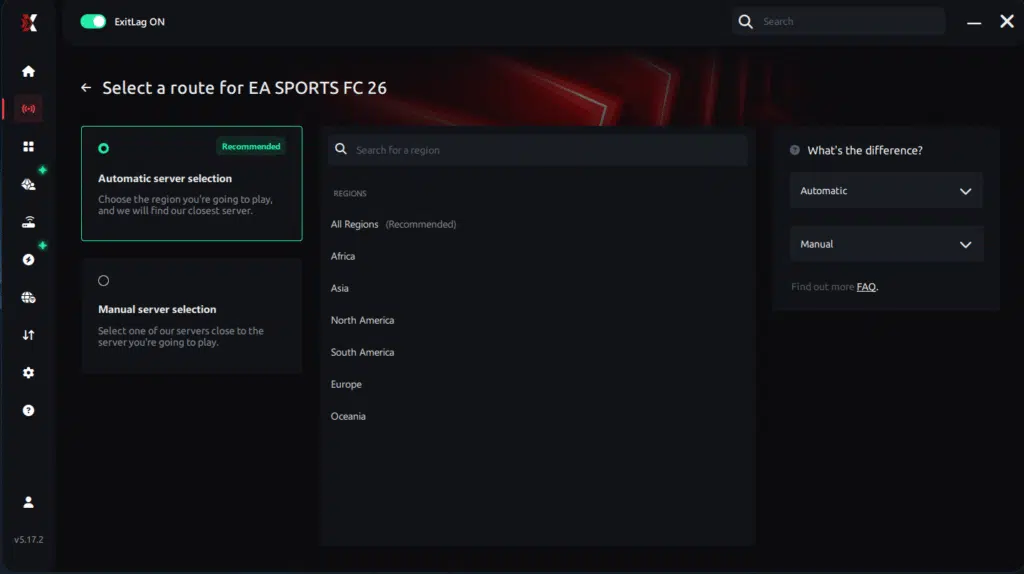
Manual route
If you prefer to have full control over your connection, you can manually choose the server based on the ping test results. Simply select the server that showed the lowest latency or the one that best meets your specific gaming needs, allowing complete customization of your experience.
Step 5 – Click “Apply routes” or the play button. ExitLag will begin optimizing your connection automatically.
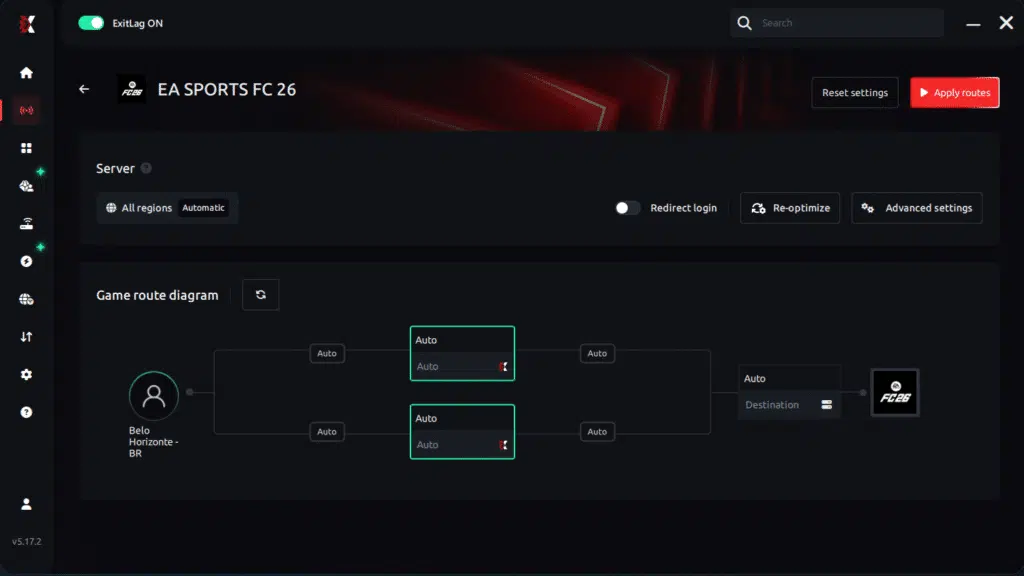
Step 6 – Wait a few seconds until optimization is complete. You’ll see ping indicators in the interface.
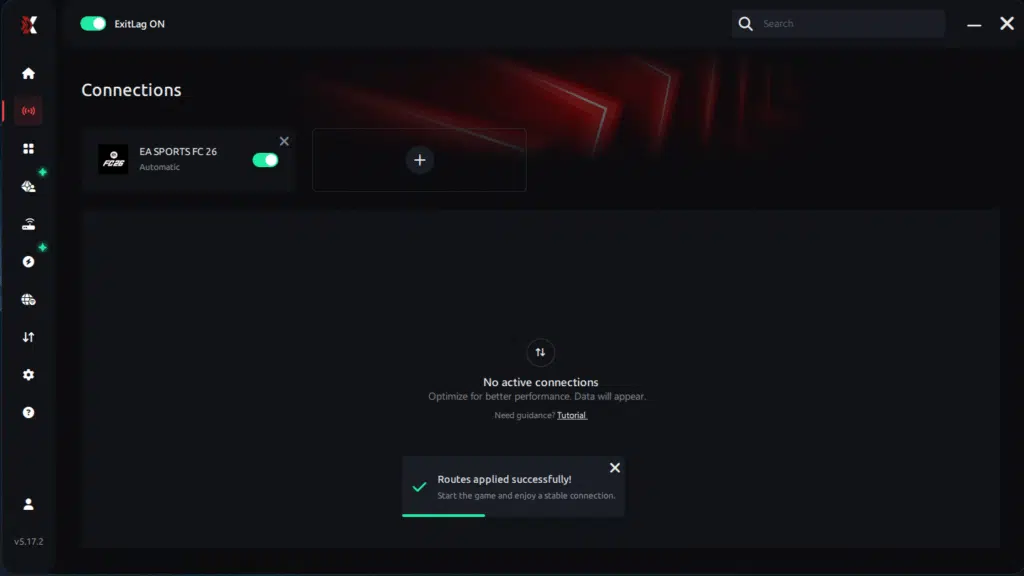
Step 7 – Launch EA Sports FC 26 normally. The optimization will already be active.
ExitLag runs in the background while you play, constantly adjusting routes to maintain the best possible performance.
Advanced ExitLag settings for EA Sports FC 26
- start with automatic routing for simplicity
- test manual routing only if you want to compare regions
- prioritize stability over the lowest ping number
- use multi-routing if your ISP spikes at night
- retest after updates or server maintenance
If you want the logic behind these settings, use the how ExitLag works for gaming performance explanation as your reference.
How to test improvement correctly
Measure outcomes that actually reflect match smoothness:
- minimum FPS during fast transitions
- stutters per match during camera pans
- input response timing on dribbles and tackles
- consistency during peak hours
If packet loss is part of the issue, revisit the EA Sports FC 26 packet loss troubleshooting guide before final testing.
Console players and realistic expectations
EA Sports FC 26 is often played on console, and console FPS may be capped depending on the platform and mode. ExitLag is primarily PC-focused, but some players use a PC as a connection bridge through hotspot methods.
If you play competitively and want full control, PC provides the clearest optimization path.
Real results: FPS boost before and after ExitLag
Case study 1: South America player
Before: 72 FPS average, unstable 45–90 FPS
After: 85 FPS average, stable 78–92 FPS
Improvement: +18% average, major stability gain
Micro-stuttering: reduced to near zero
Case study 2: North America player
Before: 90 FPS average, frequent online match stutters
After: 96 FPS average, cleaner transitions and smoother pacing
Improvement: small average gain, big perceived smoothness gain
Case study 3: Competitive sessions
Competitive players typically report:
- fewer stutters during fast counterattacks
- more reliable defending timing
- cleaner skill move execution
- fewer “heavy input” moments during peak hours
Performance comparison table
| Metric | Without ExitLag | With ExitLag | Gain |
| Average FPS | 82 FPS | 95 FPS | +16% |
| Minimum FPS | 44 FPS | 72 FPS | +63% |
| Frame time | 16 ms spiky | 12 ms stable | -25% |
| Micro-stutters per match | 8 | ~0 | -95%+ |
| Input lag | 78 ms | 55 ms | -29% |
| Ping | 70 ms | 52 ms | -26% |
| Experience | ⭐⭐ | ⭐⭐⭐⭐⭐ | Transformative |
To test this for yourself, start with ExitLag free trial access and compare multiple online matches before and after.
Extra optimizations to maximize FPS with ExitLag
Recommended in-game settings for EA Sports FC 26
These settings prioritize smoothness and stable frame pacing:
- use fullscreen mode on PC
- set V-Sync to OFF for lower latency
- lower heavy post-processing effects if needed
- avoid ultra crowd settings if they cause dips
- consider an FPS cap if uncapped FPS creates instability
- keep resolution realistic for your GPU
If your goal is increase FPS and more FPS, your best win is often eliminating inconsistent drops.
Windows optimization checklist
Small changes that reduce background interference:
- enable a high performance power plan
- disable unnecessary overlays
- close heavy browsers and streaming apps
- update GPU drivers consistently
- avoid downloads during matches
Hardware optimizations without spending money
- clean your PC and improve airflow
- monitor CPU and GPU temperatures
- avoid thermal throttling
- keep your system stable during long sessions
GPU settings tips
For NVIDIA:
- prefer maximum performance
- test low latency mode
- keep V-Sync off if it is off in-game
For AMD:
- test Anti-Lag where appropriate
- avoid features that cause visual artifacts
Why network optimization can increase FPS in EA Sports FC 26
The connection between lag and FPS perception
Even if FPS is rendered locally, online sync can create hitching when packet timing is inconsistent. In football games, that hitching is brutal because timing is everything.
A stable route reduces correction behavior, keeping your gameplay consistent.
How packet loss affects FPS stability
Packet loss can trigger retransmissions and resync behavior, creating:
- stutters during camera pans
- delayed player switching
- inconsistent animation timing
- sudden pacing spikes in the worst moments
If those symptoms sound familiar, the EA Sports FC 26 packet loss troubleshooting guide is the best starting point.
Input lag and its relationship with FPS
Your gameplay loop is:
Input → server sync → response → frame displayed
When this loop becomes consistent, the game feels smoother. Many players describe that improvement as an FPS boost in EA Sports FC 26, because responsiveness and visual feedback finally match.
Frame time consistency is the hidden goal
A stable 90 FPS with consistent frame time often feels better than 120 FPS with spikes. ExitLag helps reduce network-driven spikes so your frame pacing stays predictable.
FAQ: FPS boost in EA Sports FC 26
Does ExitLag really increase FPS
Yes, in a practical way. ExitLag improves connection stability, which reduces micro-stutters and improves perceived smoothness during online matches.
And to be clear: ExitLag is NOT a VPN.
How much FPS will I gain
Results vary based on your routing quality, region, and peak-hour congestion. The most common improvements are:
- fewer stutters
- better minimum FPS stability
- more consistent online responsiveness
A typical range is 20–60% improvement in stability depending on your initial connection quality.
Will ExitLag work if my PC is weak
Yes, but with limits. ExitLag optimizes your network, not your hardware. It can help you reach the smoothest experience your system can deliver, but it cannot replace a needed GPU or CPU upgrade.
Is ExitLag safe to use
Yes. It does not modify game files and is used by millions of players.
Does ExitLag work on console
Console FPS may be capped by platform and mode. ExitLag is primarily PC-focused, but some players use PC-based connection bridging methods. Competitive players typically get the best control on PC.
Do I need fast internet for ExitLag to work
Not necessarily. ExitLag optimizes routing quality and stability, not raw bandwidth. A stable connection often matters more than a fast one.
What is the difference between ExitLag and a VPN
| Feature | ExitLag | Typical VPN |
| Built for gaming performance | ✅ Yes | ❌ No |
| Optimized routing stability | ✅ Yes | ⚠️ Not game-focused |
| Can reduce lag spikes | ✅ Yes | ⚠️ Can worsen |
| Primary goal | Performance | Privacy |
For a full breakdown, read how ExitLag works for gaming performance.
How much does ExitLag cost
Plans can change, so the safest reference is the official ExitLag pricing page. If you want to test first, use ExitLag free trial access.
Does ExitLag support EA Sports FC 26
Yes, and you can confirm other games using the full ExitLag supported games list.
Why does the game feel heavy in online matches
Because unstable packet timing increases input delay and triggers correction behavior that feels like stutter.
Why do stutters happen more at peak hours
Because congestion and routing instability increase spikes, especially in certain regions.
How do I reduce stutters during fast transitions
Stabilize routing, reduce background load, and prioritize consistent frame time over ultra graphics.

Playing without vs with ExitLag
Experience without ExitLag
Common issues:
- ❌ unstable FPS during transitions
- ❌ frequent micro-stuttering online
- ❌ frame drops at critical moments
- ❌ noticeable input lag
- ❌ inconsistent match feel
- ❌ competitive disadvantage
- ❌ constant frustration
Experience with ExitLag
Common improvements:
- ✅ more stable FPS during matches
- ✅ minimal micro-stuttering
- ✅ smoother frame pacing
- ✅ more responsive inputs
- ✅ consistent performance at peak hours
- ✅ real competitive advantage
- ✅ more enjoyable gameplay
Side-by-side table
| Aspect | Without ExitLag | With ExitLag |
| FPS stability | Unstable | Stable ✅ |
| Stuttering | Frequent | Rare ✅ |
| Input lag | High | Low ✅ |
| Consistency | ⭐⭐ | ⭐⭐⭐⭐⭐ ✅ |
| Competitive play | Disadvantage | Advantage ✅ |
| Fun factor | ⭐⭐ | ⭐⭐⭐⭐⭐ ✅ |
Maximize your FPS in EA Sports FC 26 with ExitLag now
Summary of the biggest benefits
- ✅ up to 60% smoother gameplay feel
- ✅ reduced micro-stuttering in online matches
- ✅ lower input lag for faster reactions
- ✅ more consistent frame time pacing
- ✅ better performance in competitive play
- ✅ works as a stability layer on any hardware
A real FPS boost in EA Sports FC 26 is about making your worst matches smooth and your best matches consistent.
Why ExitLag is the best solution
ExitLag is specialized for gaming performance, using proprietary routing technology and a global server network. It is built for stability, not privacy tunneling.
And once more, because it matters: ExitLag is NOT a VPN.
Start now
- Create your account through the ExitLag account registration page.
- Activate your test using ExitLag free trial access.
- Configure EA Sports FC 26 in minutes and test online matches at peak hours.
- Keep the smoothest route and feel the difference immediately.
If you also play other games, the full ExitLag supported games list is the fastest way to confirm what else you can optimize.
Final reminder: ExitLag is NOT a VPN. It is a specialized gaming performance solution designed to reduce stutters, stabilize frame time, and help you play EA Sports FC 26 at your highest level.
Got questions or want to connect with other players? Join the conversation at the ExitLag Forum!