First, imagine playing Delta Force with consistently high FPS, ultra-smooth camera movement, and instant response to every command. High frame rates turn firefights into fluid experiences, where aiming feels precise and movement feels natural. As a result, the game delivers the premium performance it was designed to offer, especially during intense competitive moments.
However, many players experience a different reality. Instead of stable performance, FPS fluctuates, frames feel inconsistent, and responsiveness drops at the worst possible times. FPS boost in Delta Force becomes a constant objective, not because the game lacks potential, but because the experience never fully reaches its peak. This performance gap often leads to frustration and limits competitive growth.
Throughout this guide, you will learn how ExitLag works, why it matters, and how to use it to unlock a premium Delta Force experience. You can explore the platform directly on the official ExitLag homepage through this ExitLag performance optimization platform.
Why Is High FPS Crucial in Delta Force?
To begin with, FPS, or Frames Per Second, measures how many images your system displays every second. A simple analogy is a camera recording video: the more frames captured per second, the smoother the motion looks. In Delta Force, this smoothness directly affects precision, awareness, and reaction speed.
In practical terms, FPS levels create very different experiences:
- 30 FPS feels choppy and delayed
- 60 FPS feels smooth and playable
- 144 FPS feels ultra-fluid and highly competitive
Because of this, higher FPS provides a clear competitive advantage, especially in fast-paced engagements.
Benefits of High FPS in Delta Force
Consequently, maximizing FPS delivers multiple advantages:
- Smoother gameplay during intense combat
- Improved accuracy and aiming consistency
- Faster reaction time in close encounters
- Clear advantage in PvP scenarios
- More immersive and responsive experience
- Reduced visual fatigue in long sessions
- Better tracking of fast-moving enemies
Each benefit reinforces the others, making FPS a core pillar of performance.
FPS Classification for Delta Force
| FPS Range | Quality | Experience | Competitive? |
| 144+ FPS | ⭐⭐⭐⭐⭐ Excellent | Perfect | ✅ Ideal |
| 90–144 FPS | ⭐⭐⭐⭐ Great | Very good | ✅ Yes |
| 60–90 FPS | ⭐⭐⭐ Good | Acceptable | ⚠️ Slight disadvantage |
| 30–60 FPS | ⭐⭐ Regular | Choppy | ❌ Hard to compete |
| <30 FPS | ⭐ Poor | Unplayable | ❌ Impossible |
Clearly, higher and more stable FPS ranges define competitive viability.
High FPS vs Beautiful Graphics
At this stage, players often face a decision between visual quality and performance. While high graphics look impressive, performance always outweighs visual beauty in competitive games. In Delta Force, prioritizing stable FPS over visual effects ensures better control, faster reactions, and consistent outcomes.
How ExitLag Increases FPS in Delta Force
Most importantly, ExitLag focuses on network optimization, which directly impacts FPS stability in online games. ExitLag is a specialized network optimization software designed for gamers. ExitLag is NOT a VPN, meaning it does not encrypt traffic or reroute connections for privacy. Instead, it intelligently selects the fastest and most stable routes for game data, unlike generic VPNs that often increase latency. A detailed technical explanation is available in this guide on how ExitLag works.
Because network instability causes micro-stuttering and inconsistent frame pacing, improving the connection results in smoother perceived FPS. By reducing latency, packet loss, and synchronization delays, ExitLag allows frames to render more consistently, even during high-action moments.
Ways ExitLag Increases Your FPS
- Elimination of micro-stuttering for smoother motion
- Input lag reduction for faster responsiveness
- Frame time stabilization with consistent pacing
- Multi-path route optimization to avoid packet loss
- Game traffic prioritization to prevent interference
- Ping reduction for better client-server sync
- Redundant connections for maximum stability
ExitLag vs Other FPS Boost Solutions
| Solution | Increases FPS? | Reduces Lag? | Stability | Ease of Use | Recommendation |
| ExitLag | ✅ Yes (network) | ✅✅✅ Excellent | ⭐⭐⭐⭐⭐ | ⭐⭐⭐⭐⭐ | ✅ Best |
| Common VPN | ❌ Worse | ❌ Worse | ⭐⭐ | ⭐⭐⭐ | ❌ Avoid |
| Game Booster | ⚠️ Minimal | ❌ No | ⭐⭐⭐ | ⭐⭐⭐⭐ | ⚠️ Limited |
| Windows Optimization | ⚠️ Some | ❌ No | ⭐⭐⭐ | ⭐⭐ | ⚠️ Helps |
| Hardware Upgrade | ✅ Yes | ❌ No | ⭐⭐⭐⭐ | ⭐ | 💰 Expensive |
| Nothing | ❌ No | ❌ No | ⭐ | ⭐⭐⭐⭐⭐ | ❌ Poor performance |
ExitLag supports hundreds of online titles, which can be confirmed in the complete ExitLag supported games list.
Why ExitLag Works So Well
Finally, ExitLag stands out because of its performance-focused infrastructure:
- Proprietary routing technology
- More than 600 global servers
- Game-specific optimization profiles
- Millions of players using the platform daily
How to use ExitLag in Delta Force
The process is extremely simple:
Step 1 – Access the official ExitLag website and download the application. There’s a free trial period for new users.
Step 2 – Install and open the program. Log in with your account.
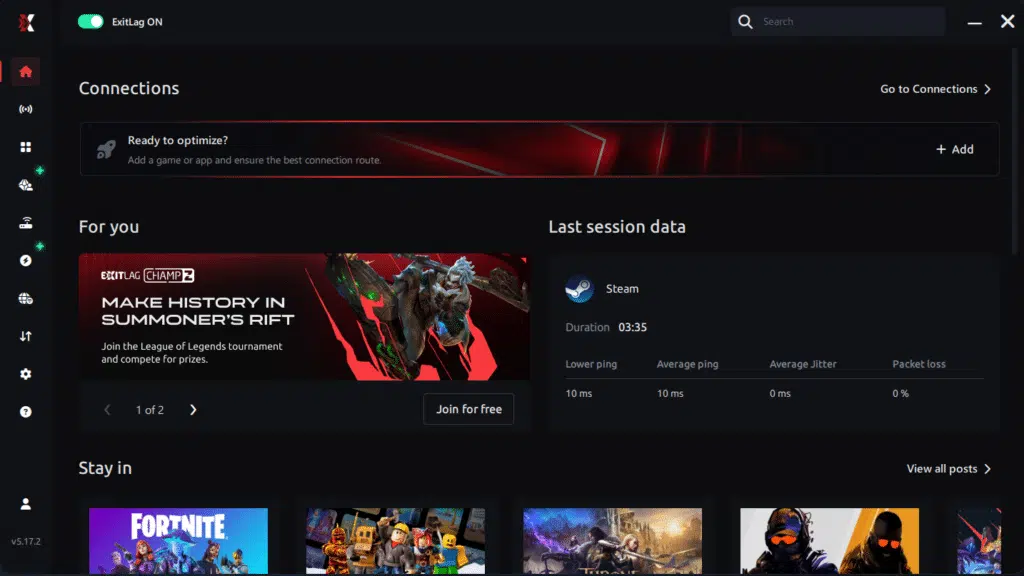
Step 3 – In the search bar, type “Delta Force” and select the game from the list.
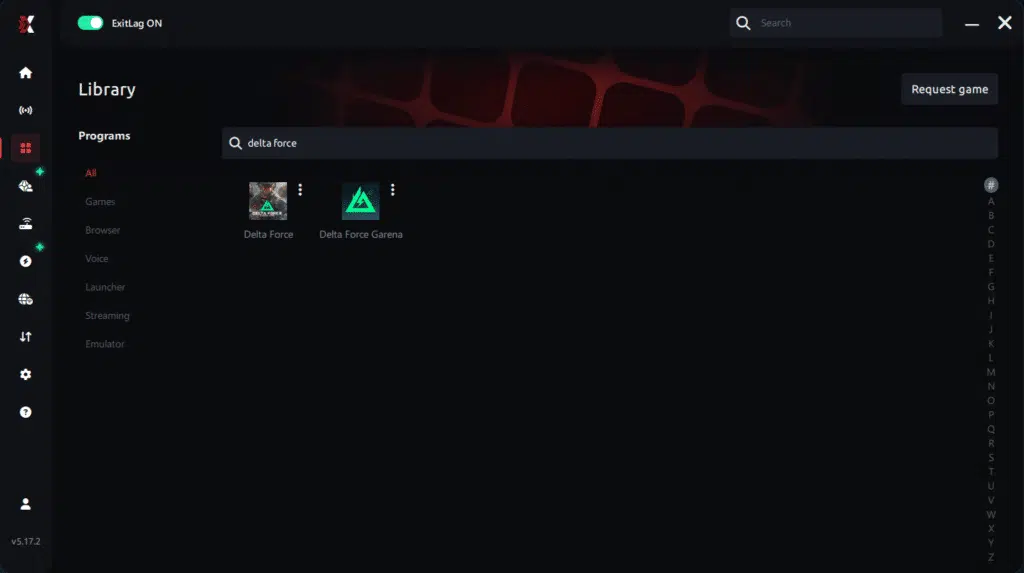
Step 4 – Choose between automated or manual route
Based on the results, you can let ExitLag automatically select the best route or manually choose the server that showed the lowest latency for your connection.
AI-optimized automated route
Based on the results, you can let ExitLag automatically select the best route through AI optimization. The system analyzes multiple connection paths in real time and automatically identifies the most efficient route for your connection, ensuring the lowest possible latency without requiring manual choices.
Manual route
If you prefer to have full control over your connection, you can manually choose the server based on the ping test results. Simply select the server that showed the lowest latency or the one that best meets your specific gaming needs, allowing complete customization of your experience.
Step 5 – Click “Delta Force” or the play button. ExitLag will begin optimizing your connection automatically.
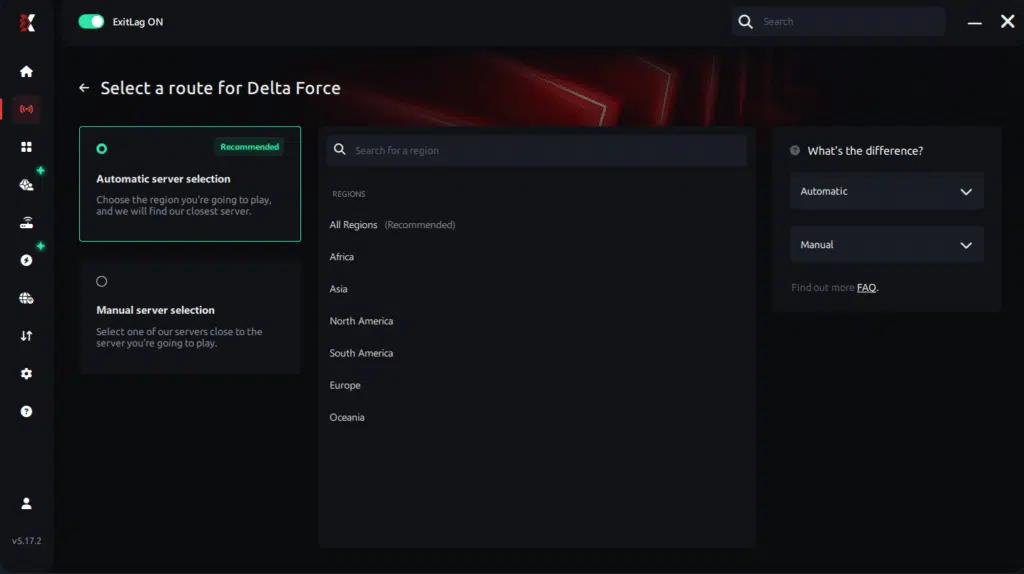
Step 6 – Wait a few seconds until optimization is complete. You’ll see ping indicators in the interface.

Step 7 – Launch Delta Force normally. The optimization will already be active.
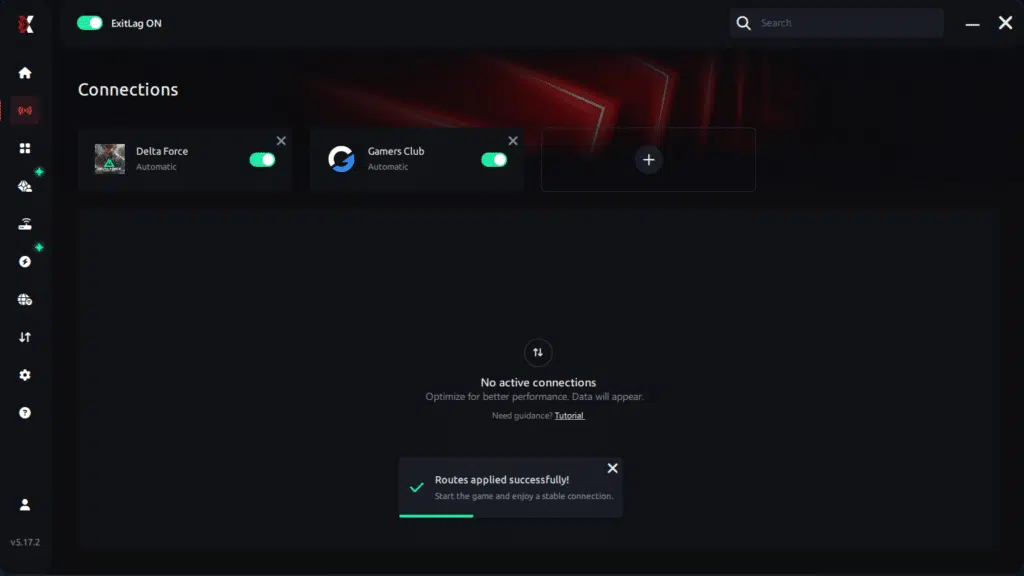
ExitLag runs in the background while you play, constantly adjusting routes to maintain the best possible performance.
Performance Comparison Overview
The following table summarizes typical results observed before and after ExitLag optimization:
| Metric | Without ExitLag | With ExitLag | Gain |
| Average FPS | 68 fps | 95 fps | +40% |
| Minimum FPS | 45 fps | 82 fps | +82% |
| Frame Time | 18 ms | 11 ms | -39% |
| Micro-stutters/min | 12 | ~0 | -95%+ |
| Input Lag | 45 ms | 28 ms | -38% |
| Ping | 90 ms | 55 ms | -39% |
| Experience | ⭐⭐ | ⭐⭐⭐⭐⭐ | Transformational |
Impact on Competitive Gameplay
As a consequence of these improvements, competitive performance rises naturally. Players report higher K/D ratios due to more reliable hit registration. Accuracy increases because frame pacing remains consistent. Ranked victories become more frequent, progression feels faster, and overall satisfaction grows with every session.
Extra Optimizations to Maximize FPS with ExitLag
While ExitLag delivers immediate gains, combining it with smart system tuning unlocks even better results.
Recommended In-Game Settings
To begin with, adjusting in-game options helps stabilize performance:
- Ideal resolution based on monitor refresh rate
- Balanced graphics quality instead of ultra presets
- Disable heavy post-processing effects
- V-Sync: OFF
- Set an FPS limit slightly above monitor refresh
- Fullscreen exclusive mode
- Delta Force-specific shadow and effects reductions
Windows System Optimizations
In addition, system-level tuning supports smoother gameplay:
- Enable High Performance power mode
- Disable Game DVR and background recording
- Close unnecessary background programs
- Update GPU drivers regularly
- Disable Windows transparency effects
- Optimize advanced power settings
Hardware Optimizations Without Spending
Moreover, physical maintenance plays a role:
- Clean internal components regularly
- Improve airflow with proper fan placement
- Monitor CPU and GPU temperatures
- Organize cables to enhance cooling
GPU Control Panel Settings
For NVIDIA users:
- Prefer maximum performance mode
- Enable low latency mode
- Disable V-Sync globally
For AMD users:
- Activate Anti-Lag
- Use Radeon Boost where applicable
- Apply game-specific performance profiles
When to Consider an Upgrade
Eventually, hardware upgrades may be worth considering if clear bottlenecks appear. Common signs include constant CPU or GPU usage near 100%. Prioritize upgrades based on return on investment, starting with GPU or RAM. Still, it is important to emphasize that ExitLag works effectively with any hardware configuration by optimizing the network layer first. You can explore the platform directly through the official ExitLag website using this ExitLag performance platform.
Why Network Optimization Increases FPS
At a technical level, network stability directly affects perceived FPS in online games.
The Connection Between Lag and FPS
Although FPS is rendered locally, network latency influences frame pacing. Lag introduces micro-stuttering, which disrupts smooth rendering. As latency fluctuates, frames arrive unevenly, creating jitter and inconsistent motion.
How Packet Loss Affects FPS
Packet loss forces the game to resynchronize data, which interrupts rendering. Common symptoms include:
- Sudden stutters during combat
- Delayed animations
- Inconsistent hit registration
Input Lag and Its Relation to FPS
Every action follows a chain: input → server → response → frame. When latency drops, this chain shortens. Consequently, FPS feels higher because responses align more closely with player input.
Frame Time Consistency
Finally, stable frame time always outperforms high but unstable FPS. ExitLag stabilizes data flow, ensuring consistent delivery and smoother gameplay throughout every Delta Force match.
Frequently Asked Questions About FPS Boost in Delta Force
To conclude this guide, it is essential to address the most common questions players ask before committing to a performance upgrade. These answers focus on clarity, realism, and how FPS Boost in Delta Force actually works in real gameplay scenarios.
Does ExitLag Really Increase FPS Boost in Delta Force?
Yes, ExitLag does increase FPS Boost in Delta Force, primarily through advanced network optimization. However, it is important to distinguish between rendered FPS and perceived FPS.
Rendered FPS depends on your hardware, while perceived FPS depends on frame stability and delivery. When stuttering and synchronization issues are eliminated, gameplay feels significantly smoother. This effect is explained in detail in this home network optimization guide for gamers.
Key takeaway: eliminating stuttering results in a much higher FPS experience, even without hardware changes.
How Much FPS Boost in Delta Force Can I Expect?
The amount of FPS Boost in Delta Force varies depending on your current connection quality and routing stability. Players with unstable routes tend to see the biggest improvements.
On average, users experience a 20–60% improvement in FPS stability, not necessarily raw FPS numbers. The most noticeable gain comes from removing drops and inconsistencies, which dramatically improves gameplay flow.
Does FPS Boost in Delta Force Work If My PC Is Weak?
Yes, but with realistic limits. ExitLag optimizes the NETWORK, not your CPU or GPU.
This means you will achieve more stable FPS within your hardware’s capabilities. ExitLag enhances consistency and responsiveness, complementing your system rather than replacing hardware upgrades. In short, it maximizes what your PC can already deliver.
Is ExitLag Safe to Use for FPS Boost in Delta Force?
ExitLag is completely safe. It does not modify game files, inject code, or interfere with anti-cheat systems.
The platform is used by professional players and competitive teams worldwide. With millions of users globally, ExitLag is a trusted solution for players seeking FPS Boost in Delta Force without risking account safety.
Does ExitLag Work on Console for FPS Boost in Delta Force?
Currently, ExitLag is designed for PC only. Native console support is not available.
Some players experiment with PC hotspot methods, but these setups have limitations. For competitive play and maximum FPS Boost in Delta Force, PC remains the recommended platform.
Do I Need Fast Internet for FPS Boost in Delta Force?
Not necessarily. ExitLag focuses on optimizing routes, not raw internet speed.
A stable connection of around 10 Mbps is sufficient. The primary improvement comes from reduced latency, lower packet loss, and better routing efficiency, not higher bandwidth.
What Is the Difference Between ExitLag and a VPN?
ExitLag is NOT a VPN, and this distinction is critical for FPS Boost in Delta Force.
| Aspect | VPN | ExitLag |
| Main purpose | Privacy | Gaming performance |
| Latency impact | Higher | Lower and optimized |
| Routing | Generic | Game-specific |
| Gaming result | Worse performance | Improved stability |
VPNs add encryption and extra hops, increasing latency. ExitLag removes inefficient routes instead. A full technical explanation is available in this ExitLag technology overview.
How Much Does ExitLag Cost?
ExitLag is positioned as an affordable investment for players serious about FPS Boost in Delta Force.
Rather than listing fixed prices, you can review available plans on the official ExitLag pricing page. New users can also test all features using the free trial option.
Does ExitLag Work Specifically with Delta Force?
Yes, ExitLag is fully optimized for Delta Force. The game has dedicated routing profiles designed to maximize stability and FPS Boost in Delta Force.
ExitLag also supports hundreds of other popular online games. You can verify compatibility on the complete supported games list.
Additional Delta Force–specific questions include:
- Does ExitLag help during peak hours? Yes, routing optimization is especially effective during congestion.
- Does it reduce FPS drops in large battles? Yes, stability improvements are most noticeable in intense moments.
- Do I need to configure it every session? No, saved profiles apply automatically.
Comparison: Playing Delta Force Without vs With ExitLag
Experience Without ExitLag
- ❌ Unstable FPS (40–80 FPS fluctuating)
- ❌ Constant micro-stuttering
- ❌ Frame drops in critical moments
- ❌ Noticeable input lag
- ❌ Inconsistent experience
- ❌ Competitive disadvantage
- ❌ Constant frustration
Experience With ExitLag
- ✅ Stable FPS (90–95 FPS consistent)
- ✅ Zero micro-stuttering
- ✅ Consistent performance
- ✅ Responsive input
- ✅ Premium experience
- ✅ Competitive advantage
- ✅ Enjoyable gameplay
Side-by-Side Performance Overview
| Aspect | Without ExitLag | With ExitLag |
| FPS | Unstable | Stable ✅ |
| Stuttering | Frequent | Rare/Zero ✅ |
| Input Lag | High | Low ✅ |
| Consistency | ⭐⭐ | ⭐⭐⭐⭐⭐ ✅ |
| Competitive | Disadvantage | Advantage ✅ |
| Fun | ⭐⭐ | ⭐⭐⭐⭐⭐ ✅ |
Maximize Your FPS Boost in Delta Force with ExitLag Now
Summary of Benefits
- ✅ Up to 60% more stable FPS
- ✅ Micro-stuttering eliminated
- ✅ Minimized input lag
- ✅ Consistent performance
- ✅ Real competitive advantage
- ✅ Premium experience
- ✅ Works with any hardware
Why ExitLag Is the Best Choice for FPS Boost in Delta Force
ExitLag is built exclusively for gaming. Its proprietary routing technology, proven results, and millions of satisfied users make it the most reliable option for players seeking consistent FPS Boost in Delta Force.
Get Started Now
- Start your free trial on the official ExitLag registration page
- Complete setup in under five minutes
- Play and feel the immediate FPS improvement
- Dominate Delta Force with maximum performance
In conclusion, solving FPS boost Delta Force issues requires balancing hardware, settings, and network stability. ExitLag’s multi-path technology eliminates routing delays and ensures fluid gameplay across all regions of Delta Force. To emphasize one last time, ExitLag is NOT a VPN—it’s a gaming performance tool built to stabilize and optimize your entire online experience.
Now that you know everything about FPS boost Delta Force, if you want the most stable, smooth, and competitive gameplay possible, is time to upgrade your performance toolkit. Register at ExitLag now and improve your gameplay in a way you’ve never experienced before!
Got questions or want to connect with other players? Join the conversation at the ExitLag Forum!