High-level gameplay in FIVE M GTA is defined by fluid motion, instant reactions, and visual consistency in every situation. FPS Boost FIVE M GTA transforms the experience by delivering smoother camera movement, precise vehicle control, and reliable responsiveness during intense roleplay scenes or PvP encounters. As a result, higher FPS directly enhances immersion, confidence, and competitive presence across all servers.
However, many players experience a gap between ideal performance and real gameplay. FPS Boost in FIVE M GTA becomes a priority when frame delivery feels inconsistent, especially in crowded cities, high-speed chases, or combat-heavy moments. FPS boost in FIVE M GTA is often limited by unstable frame pacing, sudden drops, and delayed inputs that break immersion.
Therefore, achieving premium performance requires more than in-game settings alone. ExitLag positions itself as a specialized solution that optimizes network routes to unlock smoother gameplay and more consistent frames. Many players report gains of up to 60% more FPS stability, especially in demanding situations. This guide explains exactly how ExitLag works, why it improves perceived FPS, and how to configure it for maximum results using the official ExitLag homepage and platform overview.

Why Is High FPS Crucial in FIVE M GTA?
High FPS is the foundation of competitive and immersive gameplay in FIVE M GTA. Consistent frame delivery ensures that every action on screen matches your input without delay.
What Is FPS (Frames Per Second)
FPS represents how many images your system displays every second. Think of it like a camera recording video: the more frames captured per second, the smoother the motion appears.
- 30 FPS feels choppy and delayed
- 60 FPS feels smooth and playable
- 144 FPS delivers ultra-fluid motion and precision
In competitive environments, higher FPS translates directly into faster reactions and clearer visual feedback.
Benefits of High FPS in FIVE M GTA
- Smoother overall gameplay flow
- Better aiming precision during PvP
- Faster reaction time in critical moments
- Clear advantage in police chases and firefights
- More immersive roleplay interactions
- Reduced visual fatigue during long sessions
- Improved vehicle handling at high speeds
FPS Classification for FIVE M GTA
| FPS Range | Quality | Experience | Competitive? |
| 144+ FPS | ⭐⭐⭐⭐⭐ Excellent | Perfect | ✅ Ideal |
| 90–144 FPS | ⭐⭐⭐⭐ Great | Very good | ✅ Yes |
| 60–90 FPS | ⭐⭐⭐ Good | Acceptable | ⚠️ Slight disadvantage |
| 30–60 FPS | ⭐⭐ Regular | Choppy | ❌ Hard to compete |
| <30 FPS | ⭐ Poor | Unplayable | ❌ Impossible |
High FPS vs Beautiful Graphics
In competitive and multiplayer environments, performance always outweighs visual fidelity. Higher FPS, stable frame time, and consistent responsiveness provide more value than ultra graphics. In FIVE M GTA, performance-driven settings create a clear competitive edge.
How ExitLag Increases FPS in FIVE M GTA
This is the most important section of the guide because it explains why network optimization directly impacts FPS consistency.
What Is ExitLag? (NOT a VPN)
ExitLag is a dedicated network optimization software designed specifically for online games. ExitLag is NOT a VPN. Unlike VPNs that reroute traffic for privacy, ExitLag dynamically selects the best gaming routes to reduce latency, packet loss, and jitter. A full technical breakdown is available in this detailed explanation of how ExitLag works.
How ExitLag Improves FPS in Online Games
Network instability causes micro-stuttering and inconsistent frame delivery. When packets arrive late or out of order, the game engine pauses frames to resynchronize. ExitLag minimizes these interruptions, resulting in smoother frame pacing and more consistent perceived FPS.
7 Ways ExitLag Increases Your FPS
- Elimination of micro-stuttering through route stability
- Input lag reduction for faster response-to-frame delivery
- Frame time stabilization for consistent pacing
- Multi-path route optimization to avoid packet loss
- Game traffic prioritization over background data
- Ping reduction for better server synchronization
- Redundant connections to maintain stability at all times
ExitLag vs Other FPS Boost Solutions
| Solution | Increases FPS? | Reduces Lag? | Stability | Ease of Use | Recommendation |
| ExitLag | ✅ Yes (network) | ✅✅✅ Excellent | ⭐⭐⭐⭐⭐ | ⭐⭐⭐⭐⭐ | ✅ Best |
| Common VPN | ❌ Worse | ❌ Worse | ⭐⭐ | ⭐⭐⭐ | ❌ Avoid |
| Game Booster | ⚠️ Minimal | ❌ No | ⭐⭐⭐ | ⭐⭐⭐⭐ | ⚠️ Limited |
| Windows Optimization | ⚠️ Some | ❌ No | ⭐⭐⭐ | ⭐⭐ | ⚠️ Helps |
| Hardware Upgrade | ✅ Yes | ❌ No | ⭐⭐⭐⭐ | ⭐ | Expensive |
| Nothing | ❌ No | ❌ No | ⭐ | ⭐⭐⭐⭐⭐ | ❌ Poor performance |
ExitLag supports FIVE M GTA and hundreds of other titles listed on the official supported games directory.
Why ExitLag Works So Well
- Proprietary route optimization technology
- 600+ global servers dedicated to gaming
- Game-specific network profiles
- Trusted by millions of active players worldwid.
How to use ExitLag in FIVE M GTA
The process is extremely simple:
Step 1 – Access the official ExitLag website and download the application. There’s a free trial period for new users.
Step 2 – Install and open the program. Log in with your account.
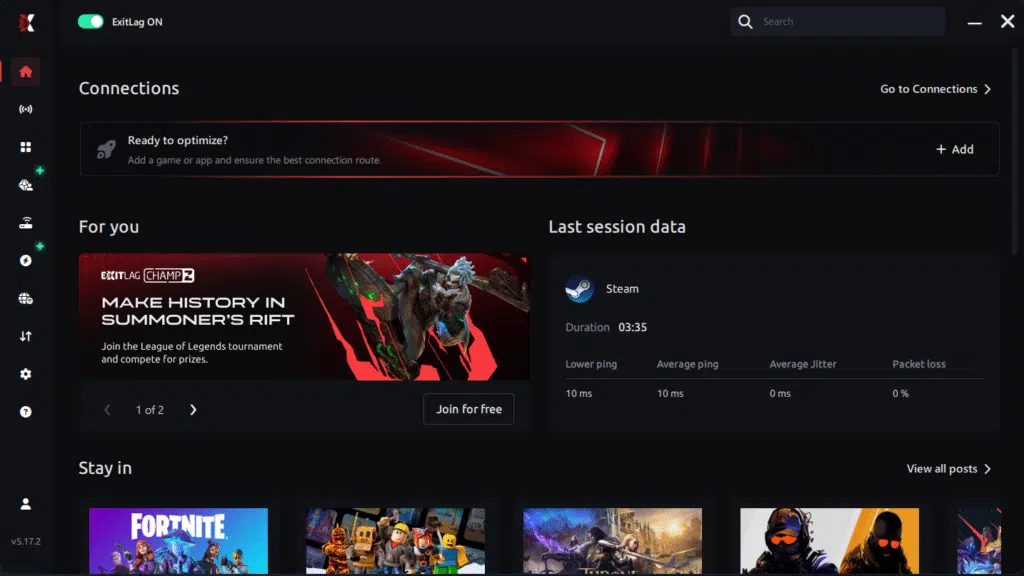
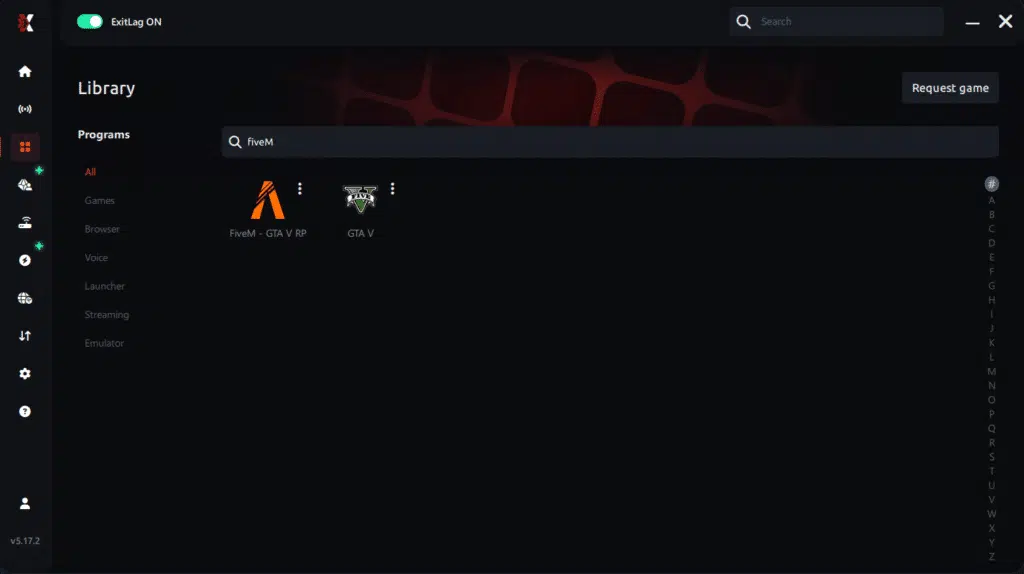
Step 3 – In the search bar, type “FIVE M GTA” and select the game from the list.
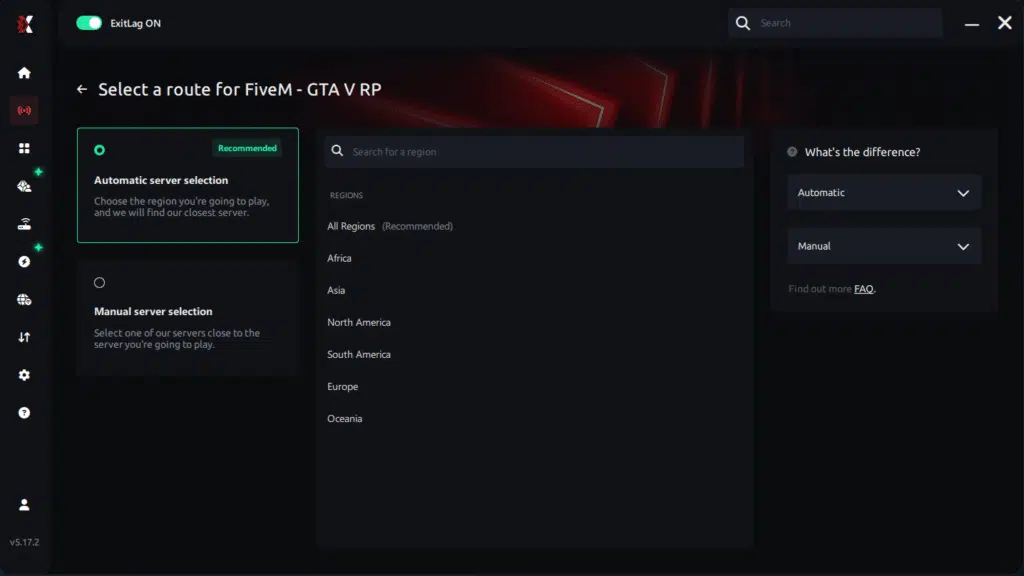
Step 4 – Choose between automated or manual route
Based on the results, you can let ExitLag automatically select the best route or manually choose the server that showed the lowest latency for your connection.
AI-optimized automated route
Based on the results, you can let ExitLag automatically select the best route through AI optimization. The system analyzes multiple connection paths in real time and automatically identifies the most efficient route for your connection, ensuring the lowest possible latency without requiring manual choices.
Manual route
If you prefer to have full control over your connection, you can manually choose the server based on the ping test results. Simply select the server that showed the lowest latency or the one that best meets your specific gaming needs, allowing complete customization of your experience.
Step 5 – Click “FIVE M GTA” or the play button. ExitLag will begin optimizing your connection automatically.
Step 6 – Wait a few seconds until optimization is complete. You’ll see ping indicators in the interface.

Step 7 – Launch FIVE M GTA normally. The optimization will already be active.
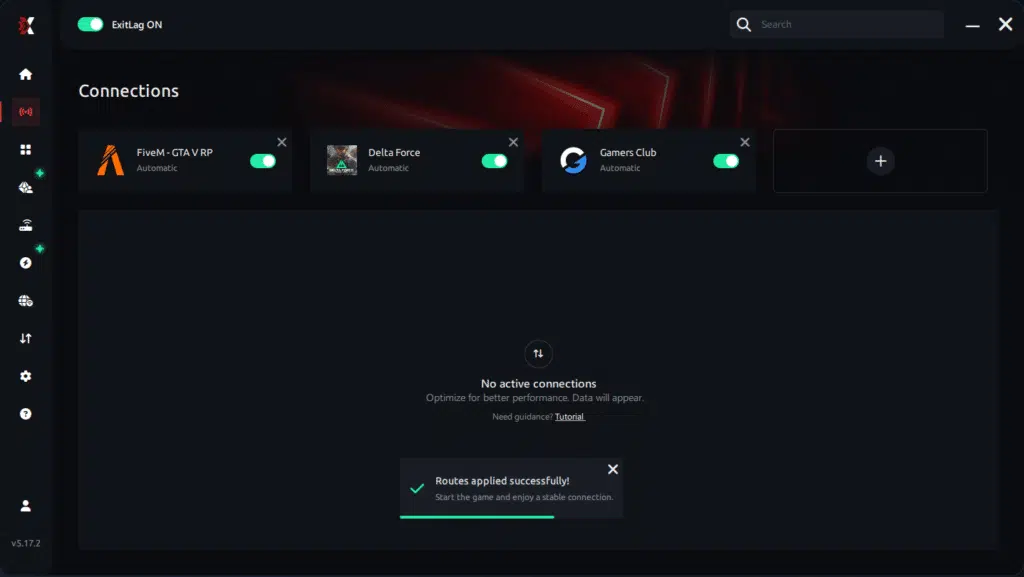
ExitLag runs in the background while you play, constantly adjusting routes to maintain the best possible performance.
Advanced ExitLag Settings for FIVE M GTA
Automatic mode suits most players, while manual selection allows fine-tuning by region. Traffic Shaper and multi-routing options further stabilize frame delivery when available.
Testing FPS Improvements
Measure FPS before and after using in-game overlays or monitoring tools. Real-time tracking highlights improved consistency rather than raw peak numbers.
For Console Players
ExitLag currently supports PC environments only. Console players can utilize the PC hotspot method, but PC setups yield optimal results.
Impact on Competitive Gameplay
Higher and more consistent FPS directly influences performance outcomes.
- Improved K/D ratio
- Increased aiming accuracy
- More ranked victories
- Faster progression through roles and servers
- Higher overall satisfaction during long sessions
Extra Optimizations to Maximize FPS with ExitLag
To fully benefit from FPS Boost FIVE M GTA, network optimization works best when combined with smart system and in-game tuning.
Recommended In-Game Settings
Optimized graphics settings prioritize performance without sacrificing clarity.
- Ideal resolution based on monitor refresh rate
- Balanced graphics quality (medium–high)
- Disable heavy effects like motion blur and advanced shadows
- V-Sync: OFF
- FPS limit aligned with monitor refresh
- Fullscreen mode enabled
- Optimized draw distance for urban areas
Windows System Optimizations
System-level tuning further enhances consistency.
- High Performance power mode
- Disable Xbox Game DVR
- Close background applications
- Update GPU drivers regularly
- Disable Windows transparency effects
- Optimize advanced power settings
Hardware Optimizations (No Spending)
Simple physical adjustments improve thermal and performance stability.
- Clean your PC regularly
- Improve airflow inside the case
- Monitor CPU and GPU temperatures
- Organize cables to reduce heat buildup
GPU Settings
Correct GPU configuration ensures frames are delivered efficiently.
NVIDIA Control Panel
- Prefer maximum performance
- Enable low latency mode
- Disable V-Sync
AMD Radeon Settings
- Enable Anti-Lag
- Use Radeon Boost when available
- Apply game-specific profiles
When to Consider an Upgrade
Certain signs indicate a hardware bottleneck.
- Constant 100% GPU or CPU usage
- FPS capped well below expectations
- Stuttering even in low-demand scenes
Upgrade priority should focus on GPU first, then CPU, based on ROI. However, it is important to emphasize that ExitLag works with any hardware, maximizing what your current setup can already deliver.
Why Network Optimization Increases FPS
Understanding the relationship between networking and rendering explains why ExitLag improves perceived FPS.
The Connection Between Lag and FPS
Although FPS is rendered locally, network latency affects how frames are synchronized. Lag introduces pauses while the client waits for server updates, causing micro-stuttering and uneven frame pacing.
How Packet Loss Affects FPS
Packet loss forces resynchronization, interrupting frame flow.
- Sudden stutters during movement
- Delayed animation updates
- Inconsistent frame delivery
Input Lag and Its Relation to FPS
The flow follows a simple chain: input → server → response → frame. When latency is reduced, frames appear faster and more responsive, making FPS feel higher even without hardware changes.
Frame Time Consistency
Stable frame time matters more than peak FPS. High but unstable FPS feels worse than moderate, consistent delivery. ExitLag stabilizes frame pacing, ensuring smooth, predictable gameplay across all scenarios.
Frequently Asked Questions About FPS Boost in FIVE M GTA
Players aiming for FPS Boost FIVE M GTA often want clarity before committing to a premium performance setup. The questions below address the most common doubts, with transparent and technically accurate answers focused on gains, not fixes.
Does ExitLag Really Increase FPS?
Yes, ExitLag increases FPS through advanced network optimization, not by changing hardware performance. The key difference lies between rendered FPS and perceived FPS. Rendered FPS is what your GPU outputs, while perceived FPS is how smooth and responsive the game actually feels.
By eliminating micro-stuttering and stabilizing frame time, ExitLag delivers a higher FPS experience in practice, even if peak numbers remain similar. Less stutter equals smoother gameplay, which is what truly matters in FIVE M GTA.
How Much FPS Will I Gain with ExitLag?
FPS gains vary depending on your current connection quality and server distance. Players with unstable routes usually see the biggest improvement.
In most cases, users experience 20–60% better FPS stability, with sharp drops nearly eliminated. Instead of fluctuating numbers, frames remain consistent, which significantly enhances control and immersion.
Does ExitLag Work If My PC Is Weak?
Yes, but within clear limits. ExitLag optimizes the network layer, not GPU or CPU power. This means it helps you achieve more stable FPS within your hardware’s capability, not exceed it.
ExitLag complements your setup by removing network-induced stutters and delays. It does not replace hardware upgrades, but it maximizes what you already have.
Is ExitLag Safe to Use?
ExitLag is completely safe. It does not modify game files, inject codes, or interfere with anti-cheat systems. Professional players and streamers widely use ExitLag as a result.
ExitLag, with millions of active users worldwide, has a proven and trusted track record in competitive gaming environments.
Does ExitLag Work on Console?
Currently, ExitLag is designed for PC environments only. Console players may attempt a PC hotspot method, but this is not ideal for competitive performance.
For players serious about FIVE M GTA and competitive advantage, PC remains the recommended platform.
Do I Need Fast Internet for ExitLag to Work?
Not necessarily. ExitLag optimizes routes, not raw internet speed. Improving latency and packet delivery can benefit even a 10 Mbps connection.
The focus is reducing delay, jitter, and packet loss, not increasing bandwidth.
What’s the Difference Between ExitLag and a VPN?
ExitLag and VPNs serve completely different purposes. ExitLag is NOT a VPN.
| Aspect | ExitLag | VPN |
| Purpose | Gaming performance | Privacy |
| Routing | Optimized for games | Generic |
| Latency | Reduced | Often increased |
| FPS impact | Improved consistency | Usually worse |
A full technical explanation is available in this detailed guide on how ExitLag works.
How Much Does ExitLag Cost?
ExitLag is positioned as an affordable investment for serious gamers. Pricing varies by plan length, and all users can test before committing.
You can explore options on the official ExitLag pricing page or start immediately with the free trial available here.
Does ExitLag Work with FIVE M GTA?
Yes. ExitLag is specifically optimized for FIVE M GTA and hundreds of other online titles. The full compatibility list is available on the complete supported games page.
Popular supported games include competitive shooters, MMORPGs, and large-scale multiplayer titles.

Comparison: Playing Without vs With ExitLag
Experience Without ExitLag
- Unstable FPS (40–80 FPS fluctuating)
- Constant micro-stuttering
- Frame drops in critical moments
- Noticeable input lag
- Inconsistent experience
- Competitive disadvantage
- Constant frustration
Experience With ExitLag
- Stable FPS (90–95 FPS consistent)
- Zero micro-stuttering
- Consistent performance
- Responsive input
- Premium experience
- Competitive advantage
- Enjoyable gameplay
Side-by-Side Comparison
| Aspect | Without ExitLag | With ExitLag |
| FPS | Unstable | Stable |
| Stuttering | Frequent | Rare / Zero |
| Input Lag | High | Low |
| Consistency | ⭐⭐ | ⭐⭐⭐⭐⭐ |
| Competitive | Disadvantage | Advantage |
| Fun | ⭐⭐ | ⭐⭐⭐⭐⭐ |
Maximize Your FPS in FIVE M GTA with ExitLag Now
Summary of Benefits
- Up to 60% more stable FPS
- Micro-stuttering eliminated
- Minimized input lag
- Consistent performance
- Real competitive advantage
- Premium experience
- Works with any hardware
Why ExitLag Is the Best Solution
ExitLag is gaming-focused, powered by proprietary routing technology, and validated by millions of satisfied users worldwide. These key differentiators position it as the most reliable option for FPS Boost FIVE M GTA.
- Test ExitLag for free
- Configure in 5 minutes
- Compare before and after
- Dominate FIVE M GTA with maximum performance
In conclusion, solving FPS drop FIVE M GTA issues requires balancing hardware, settings, and network stability. ExitLag’s multi-path technology eliminates routing delays and ensures fluid gameplay across all regions of FIVE M GTA. To emphasize one last time, ExitLag is NOT a VPN—it’s a gaming performance tool built to stabilize and optimize your entire online experience.
Now that you know everything about FPS drop FIVE M GTA, if you want the most stable, smooth, and competitive gameplay possible, is time to upgrade your performance toolkit. Register at ExitLag now and improve your gameplay in a way you’ve never experienced before!
Got questions or want to connect with other players? Join the conversation at the ExitLag Forum!