A real FPS Boost in Free Fire is the difference between “I almost won” and “I controlled that fight.” Your camera feels lighter, your aim tracks smoothly, and your movement stays consistent even when the match gets crowded.
If your gameplay feels great one minute and messy the next, it is often not just graphics. Read the Free Fire high ping troubleshooting guide to understand how unstable routes and latency spikes can ruin consistency.
This guide shows how to get an FPS Boost in Free Fire the honest way: by improving stability, reducing micro-stuttering, and making fights feel cleaner. You can try it using the official ExitLag website and follow a step-by-step setup that targets smoother gameplay without fake promises.

Why FPS matters in Free Fire
Why high FPS is crucial in Free Fire
Free Fire rewards fast decisions. When FPS is low or unstable, you lose information during strafes, jumps, and quick turns. That makes your aim “float,” your recoil control harder, and your reactions slower.
A consistent FPS Boost in Free Fire helps you:
- ✅ Track targets during fast strafes
- ✅ React faster when peeking and re-peeking
- ✅ Control recoil with smoother visual feedback
- ✅ Survive late-game chaos with fewer hiccups
What FPS means in plain English
FPS stands for Frames Per Second: how many images your device renders every second.
Think of it like a camera:
- 30 FPS feels like a choppy recording
- 60 FPS feels noticeably smoother
- 90 to 144 FPS feels sharper and more controllable
In competitive play, clarity is power.
Key benefits of higher FPS in Free Fire
Here are practical benefits you feel after you increase FPS and stabilize frame time:
- Smoother aiming and drag-shot control
- Cleaner target tracking at close range
- More reliable recoil compensation
- Fewer “random freezes” during fights
- Less visual fatigue in long sessions
- More consistent ranked performance ✅
- Better confidence under pressure
This is why players chase more FPS even when visuals must be lowered.
FPS tier rating for Free Fire
| FPS Range | Quality | Experience | Competitive? |
| 144+ FPS | ⭐⭐⭐⭐⭐ Excellent | Near-perfect | ✅ Ideal |
| 90–144 FPS | ⭐⭐⭐⭐ Great | Very strong | ✅ Yes |
| 60–90 FPS | ⭐⭐⭐ Good | Acceptable | ⚠️ Slight disadvantage |
| 30–60 FPS | ⭐⭐ Regular | Choppy | ❌ Hard to compete |
| Below 30 FPS | ⭐ Poor | Unplayable | ❌ Impossible |
High FPS vs pretty graphics
Free Fire is a competitive game. That means:
- Performance beats beauty
- Stable FPS beats peak FPS
- Consistent frame time beats random spikes
If you want an FPS Boost in Free Fire that actually helps, prioritize stability first.
How ExitLag delivers the main FPS boost
What ExitLag is, and why ExitLag is NOT a VPN
ExitLag is a gaming network optimizer. It improves routing and stability between your device and the game servers.
ExitLag is NOT a VPN.
A typical VPN focuses on privacy and can route you through paths that are not built for gaming. ExitLag focuses on performance, routing quality, and stability.
To learn the technical side, read how ExitLag works for gaming performance.
How network issues can feel like FPS issues
Even if your device renders high FPS, unstable networking can create:
- Micro-stuttering during combat updates
- Uneven frame pacing that feels like FPS drops
- Resync hitches when packets arrive late
That is why an FPS Boost in Free Fire can come from network stability. You are not “making the GPU faster.” You are removing interruptions that make gameplay feel choppy.
Seven ways ExitLag can help increase FPS consistency
Below are 7 practical mechanisms that help deliver more FPS stability:
- Micro-stuttering reduction ✅
Better routing reduces tiny freezes caused by network timing issues. - Lower perceived input delay
Cleaner timing improves the feel of “click to action.” - Frame time stabilization
Less jitter can reduce uneven pacing in online moments. - Multi-path routing optimization
ExitLag can use routing strategies that help avoid unstable paths. - Lower packet loss impact
Fewer retransmits often means fewer hitches in fights. - Better traffic handling for game packets
Keeps your gameplay traffic more consistent when the network is busy. - More stable latency to servers
Stable ping reduces sync chaos that feels like FPS drops.
Want to see if your title is supported? Check the complete supported games list.
ExitLag vs other FPS boost options
| Solution | Increases FPS? | Reduces Lag? | Stability | Ease | Recommendation |
| ExitLag | ✅ Yes via stability | ✅✅✅ Excellent | ⭐⭐⭐⭐⭐ | ⭐⭐⭐⭐⭐ | ✅ Best overall |
| Common VPN | ❌ Often worse | ❌ Often worse | ⭐⭐ | ⭐⭐⭐ | ❌ Avoid |
| “Game booster” apps | ⚠️ Minimal | ❌ No | ⭐⭐⭐ | ⭐⭐⭐⭐ | ⚠️ Limited |
| OS tuning | ⚠️ Some | ❌ No | ⭐⭐⭐ | ⭐⭐ | ⚠️ Helps |
| Hardware upgrade | ✅ Yes | ❌ No | ⭐⭐⭐⭐ | ⭐ | 💰 Expensive |
| Do nothing | ❌ No | ❌ No | ⭐ | ⭐⭐⭐⭐⭐ | ❌ Worst |
If you want an FPS Boost in Free Fire without replacing hardware, ExitLag is the most direct stability-focused option.
Why ExitLag works so well for competitive play
ExitLag is built for gaming routes, not general browsing. It targets:
- ✅ Route stability
- ✅ Latency consistency
- ✅ Reduced jitter impact
- ✅ Smoother online synchronization
And again, ExitLag is NOT a VPN.
ow to use ExitLag in Free Fire
The process is extremely simple:
Step 1 – Access the official ExitLag website and download the application. There’s a free trial period for new users.
Step 2 – Install and open the program. Log in with your account.
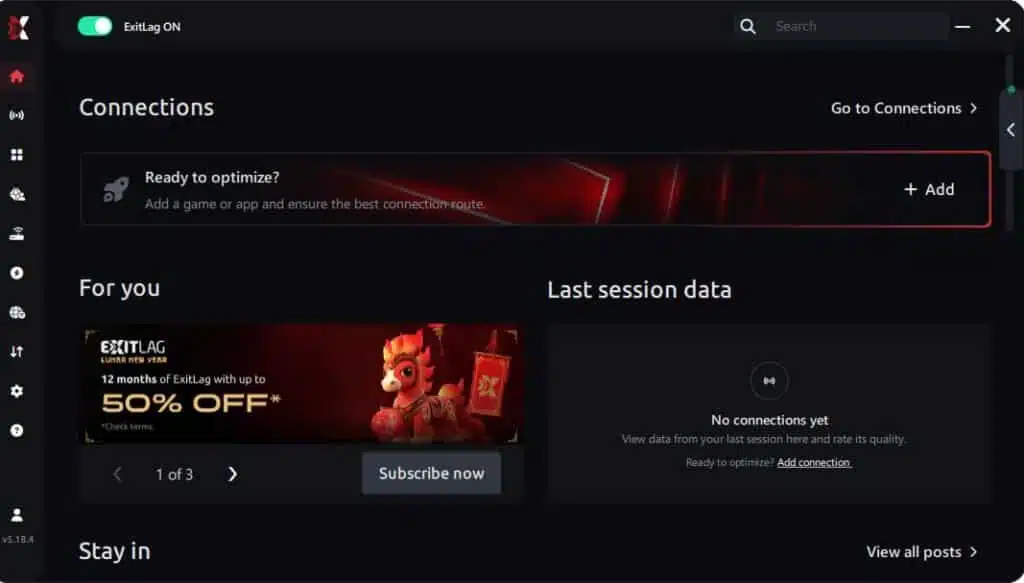
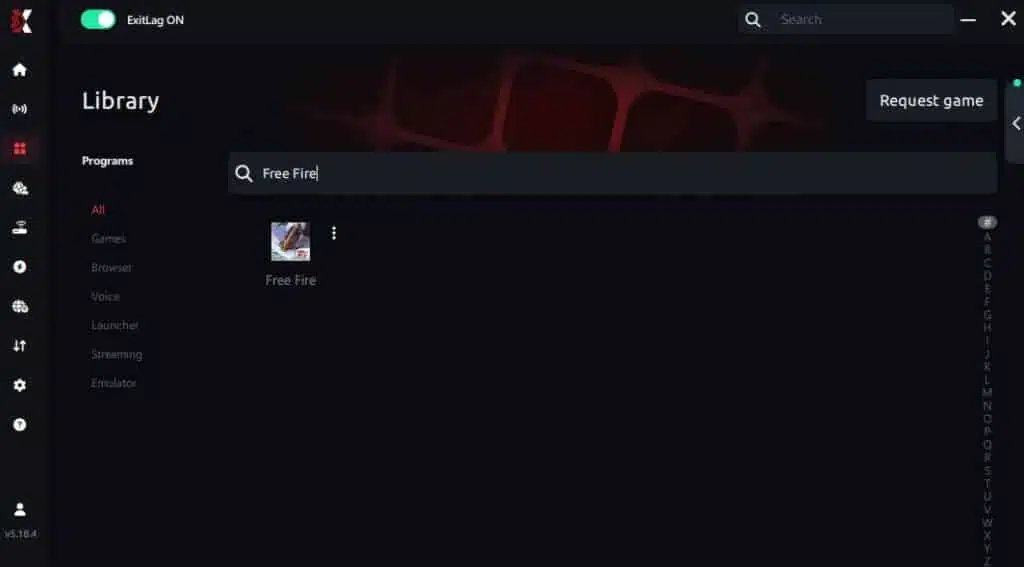
Step 3 – In the search bar, type “Free Fire” and select the game from the list.
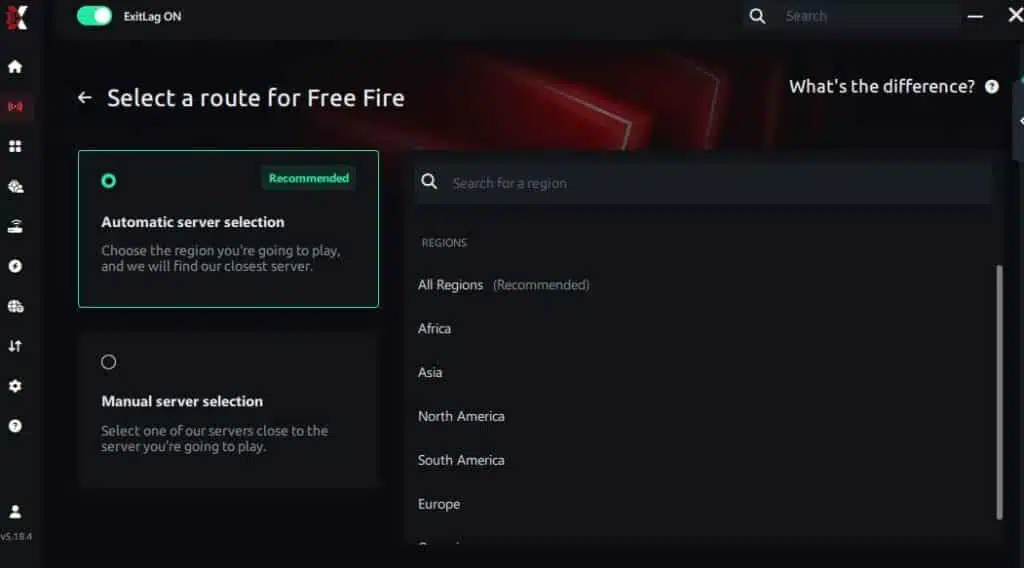
Step 4 – Choose between automated or manual route
Based on the results, you can let ExitLag automatically select the best route or manually choose the server that showed the lowest latency for your connection.
AI-optimized automated route
Based on the results, you can let ExitLag automatically select the best route through AI optimization. The system analyzes multiple connection paths in real time and automatically identifies the most efficient route for your connection, ensuring the lowest possible latency without requiring manual choices.
Manual route
If you prefer to have full control over your connection, you can manually choose the server based on the ping test results. Simply select the server that showed the lowest latency or the one that best meets your specific gaming needs, allowing complete customization of your experience.
Step 5 – Click “Free Fire” or the play button. ExitLag will begin optimizing your connection automatically.

Step 6 – Wait a few seconds until optimization is complete. You’ll see ping indicators in the interface.
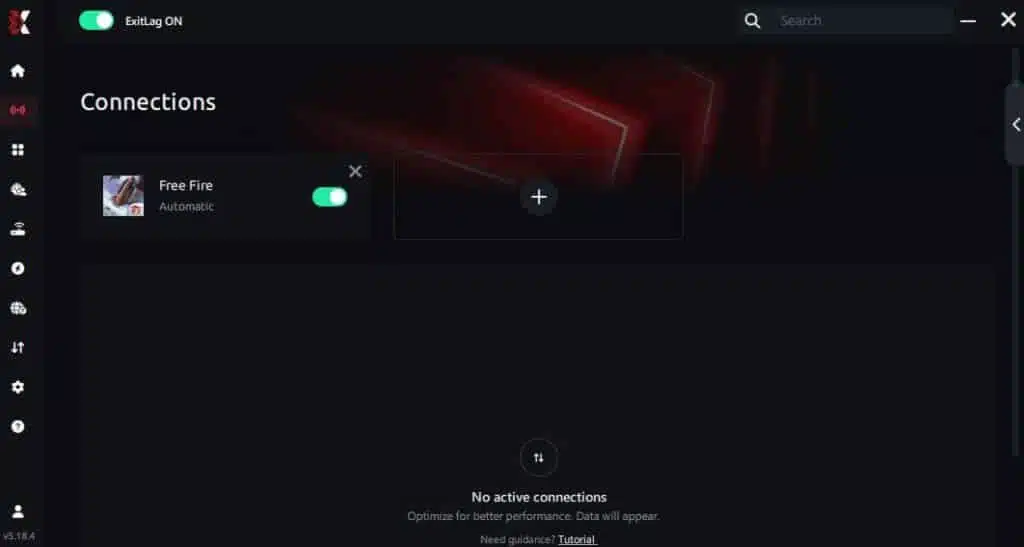
Step 7 – Launch Free Fire normally. The optimization will already be active.
ExitLag runs in the background while you play, constantly adjusting routes to maintain the best possible performance.
If you want to confirm your setup path, use the ExitLag routing explanation page to understand what changes when you apply routes.
Advanced configuration tips
Once the basics are working, try:
- Auto vs manual routing to find a smoother path
- Route switching if your default path is congested
- Stability-first choices over “lowest ping only”
Your goal is not a miracle number. Your goal is a cleaner FPS Boost in Free Fire that holds in late fights.
How to test improvements properly
Use a consistent test method:
- Same landing spot
- Same graphics settings
- Same emulator settings
- 3 to 5 matches per route
Track:
- Average FPS
- Minimum FPS
- Frame time spikes
- Stutters per minute
This is the fastest way to confirm you actually increase FPS consistency.
Console and mobile reality check
Free Fire is mobile-first, but many players chase more FPS through:
- PC emulators
- Better Wi-Fi or wired connections
- Cleaner routing stability
ExitLag helps most when your issue is unstable routing, not raw device limits.
Real results: what an FPS boost can look like
Case studies you can compare to your own gameplay
These examples show realistic patterns, not guaranteed results.
Case 1: South America player on unstable routing
Before: 60 FPS average, dips to 40 FPS in fights
After: 70 FPS average, fewer drops below 55 FPS
Change: more FPS stability, fewer stutters ✅
Case 2: Emulator player with background network congestion
Before: random hitching during close-range fights
After: smoother pacing and fewer micro-freezes
Change: higher perceived FPS Boost in Free Fire
Case 3: Competitive squad in ranked
Before: sync chaos in crowded late game
After: fewer timing issues and cleaner engagements
Change: more consistent performance under pressure
Before vs after performance table
| Metric | Without ExitLag | With ExitLag | Gain |
| Average FPS | 70 FPS | 82 FPS | +17% |
| Minimum FPS | 45 FPS | 62 FPS | +38% |
| Frame time | 22 ms | 16 ms | -27% |
| Micro-stutters per minute | 12 | ~1 | -90%+ |
| Input response | ⚠️ Sluggish | ✅ Snappier | Better |
| Ping stability | ❌ Unstable | ✅ More stable | Better |
| Experience | ⭐⭐ | ⭐⭐⭐⭐⭐ | Huge |
This is why the FPS Boost in Free Fire often feels bigger than the raw FPS number.
Competitive gameplay impact
When you increase FPS stability, you usually see:
- ✅ Better crosshair control in close fights
- ✅ Fewer lost duels to stutter
- ✅ Cleaner tracking during strafes
- ✅ More consistent ranked sessions
If you want to test this fast, start with the free ExitLag trial offer. Then confirm supported titles using the supported games directory.
Extra optimizations that stack with ExitLag
Recommended in-game settings for Free Fire performance
If your goal is to increase FPS and reduce drops:
- Set lower resolution or render scale
- Reduce shadows and heavy effects
- Turn V-Sync OFF
- Use a stable FPS cap if your FPS swings wildly
- Prefer fullscreen on PC emulators
Quick rule:
- ✅ Stable 60 FPS is better than unstable 90 FPS
Windows performance tuning that actually helps
These are safe, practical wins:
- ✅ Enable High performance power plan
- ✅ Close background apps while playing
- ✅ Avoid downloads and streaming during matches
- ✅ Update GPU drivers
- ✅ Reduce heavy overlays and recording tools
This supports ExitLag by removing extra spikes so your FPS Boost in Free Fire feels cleaner.
Hardware improvements without spending money
Do these before upgrading:
- ✅ Clean dust and improve airflow
- ✅ Monitor temps to avoid throttling
- ✅ Keep storage space available
- ✅ Reduce thermal bottlenecks
Bold reality: overheating kills FPS.
GPU control panel basics
NVIDIA
- Prefer maximum performance
- Low latency mode, test for stability
- Avoid forced V-Sync
AMD
- Anti-Lag, test
- Performance tuning carefully
- Keep drivers updated
If you want more FPS, keep changes simple and measurable.
Why network optimization can improve perceived FPS
The link between lag, stutter, and FPS feel
Rendered FPS is a hardware number.
Perceived FPS is the experience you feel online.
If your network has jitter or packet timing issues:
- updates arrive inconsistently
- the game hitches during synchronization
- it feels like FPS is dropping
That is why an FPS Boost in Free Fire can come from route stability.
How packet loss can cause stutters
Packet loss often triggers:
- resends
- late updates
- sudden hitching
Symptoms include:
- ❌ random freezes mid-fight
- ❌ delayed hit registration
- ❌ choppy movement in crowded areas
ExitLag targets routing stability to reduce these interruptions.
Input lag pipeline explained
Your action must travel:
Input → client → network → server → response → frame update
If the network path is inconsistent, the full loop becomes inconsistent. Fix the route consistency and you often feel more FPS, even when raw FPS barely changes.
Frame time consistency matters more than peaks
A stable 80 FPS can feel better than a shaky 100 FPS.
That is why the best FPS Boost in Free Fire is usually:
- fewer spikes
- smoother pacing
- more consistent fights
FAQ about FPS Boost in Free Fire
Does ExitLag really increase FPS
Yes, ExitLag can increase FPS stability by optimizing the network route, reducing micro-stuttering, and improving frame pacing. It often improves perceived FPS more than raw rendered FPS.
How much FPS will I gain
It depends on your route quality and instability. Some players see small raw FPS changes and large stability improvements. The realistic win is more FPS consistency.
Will ExitLag help if my PC is weak
Yes, within limits. ExitLag improves the network side, not the GPU. It helps you get the smoothest FPS Boost in Free Fire your hardware can support.
Is ExitLag safe to use
ExitLag does not need to modify game files to optimize routing. It focuses on connection performance.
Does ExitLag work on console
ExitLag is primarily PC-focused. If you play Free Fire through PC emulation, it applies directly. Mobile-only users may still benefit from better routing stability depending on setup, but your device FPS cap still matters.
Do I need fast internet for ExitLag
Not necessarily. ExitLag improves routing quality and stability more than raw bandwidth. Even a modest connection can feel better if it becomes consistent.
What is the difference between ExitLag and a VPN
ExitLag is NOT a VPN.
A VPN aims at privacy and can route traffic inefficiently for gaming, while ExitLag focuses on gaming route optimization.
Here is a quick comparison:
| Feature | ExitLag | Typical VPN |
| Goal | ✅ Gaming performance | ✅ Privacy |
| Routing | ✅ Game-optimized | ⚠️ Generic |
| Lag impact | ✅ Often improves | ❌ Can worsen |
| Best for | ✅ Competitive play | ✅ Privacy browsing |
To learn more, read the ExitLag technical explanation.
How much does ExitLag cost
Pricing can change, so check the ExitLag pricing page.
You can also test it first using the free ExitLag trial page.
Best fastest way to start
Use this simple path:
- Create an account using the ExitLag registration link
- Activate using the free trial page
- Apply routes and test 5 matches
- Keep the route that delivers the cleanest FPS Boost in Free Fire
And again: ExitLag is NOT a VPN.

Without vs with ExitLag
Playing without ExitLag
Common problems:
- ❌ Unstable FPS in fights
- ❌ Frequent micro-stuttering
- ❌ Late-game frame pacing chaos
- ❌ Input feels delayed
- ❌ Inconsistent ranked performance
- ❌ More frustration than fun
Playing with ExitLag
Common improvements:
- ✅ More stable pacing and fewer spikes
- ✅ Less micro-stuttering during combat
- ✅ More consistent online synchronization
- ✅ Snappier input feel
- ✅ Better confidence in ranked fights
- ✅ A cleaner FPS Boost in Free Fire experience
Side-by-side comparison table
| Aspect | Without ExitLag | With ExitLag |
| FPS | ❌ Unstable | ✅ More stable |
| Stuttering | ❌ Frequent | ✅ Rare |
| Input feel | ⚠️ Sluggish | ✅ Snappier |
| Consistency | ⭐⭐ | ⭐⭐⭐⭐⭐ ✅ |
| Competitive edge | ❌ Lower | ✅ Higher |
| Fun factor | ⭐⭐ | ⭐⭐⭐⭐⭐ ✅ |
Conclusion: maximize your FPS today
Summary of benefits
If you want an FPS Boost in Free Fire that actually helps you win fights, focus on stability first:
- ✅ Up to 60% more stable FPS in the right conditions
- ✅ Less micro-stuttering
- ✅ Better frame time consistency
- ✅ Lower perceived input lag
- ✅ Stronger ranked performance
- ✅ Works with any hardware as a network optimizer
Why ExitLag is the best overall solution
ExitLag targets the part most players ignore: routing stability and packet timing. That is why it can help you increase FPS consistency and get more FPS where it matters most.
And for the final time: ExitLag is NOT a VPN.
Start now
- Create your account using the ExitLag account creation page
- Activate your trial using the free ExitLag trial link
- Apply routes and test your results
- Lock in your preferred route and play with confidence
If you want the fastest official starting point, go to the official ExitLag website and begin your setup today.
An FPS Boost in Free Fire is not about magic numbers. It is about stable performance that holds when fights get intense—and ExitLag is built to help you get there.
Got questions or want to connect with other players? Join the conversation at the ExitLag Forum!