

Picture Blue Protocol Star Resonance running buttery smooth, with clean camera pans, snappy skills, and fights that feel “locked in” from start to finish. With FPS Boost in Blue Protocol Star Resonance, every dodge window feels clearer, and every combo chain looks sharper. Most importantly, the game feels premium, not random.
However, even strong PCs can feel inconsistent when Blue Protocol Star Resonance gets busy or your connection adds extra jitter. That’s why FPS Boost in Blue Protocol Star Resonance becomes a real advantage, not just a nice-to-have. If you’ve ever felt the flow break mid-fight, you already know how frustrating that contrast can be. To understand more about common performance problems, you can check detailed articles directly from the ExitLag blog.
So, here’s the good news: ExitLag can help you reach FPS Boost in Blue Protocol Star Resonance by optimizing the network side of online play, which improves smoothness and stability. In many setups, players report improvements of up to 60% in perceived stability, especially when micro-stuttering is tied to routing and packet issues. To get started fast, visit the official ExitLag website and follow this complete guide.

Why Is High FPS Crucial in Blue Protocol Star Resonance?
High FPS changes how Blue Protocol Star Resonance feels moment to moment. As a result, your timing improves, your camera control feels cleaner, and your actions look exactly like you intended.
What Is FPS (Frames Per Second)
FPS is simply how many frames your PC shows every second. Think of it like a camera recording: the more frames you capture, the smoother the motion looks on playback.
- 30 FPS: playable, but motion looks “steppy”
- 60 FPS: smoother and easier on the eyes
- 144 FPS: ultra-responsive feel with clearer movement reading
Benefits of High FPS in Blue Protocol Star Resonance
When you push for higher FPS, you’re investing in consistency. Therefore, you gain more control in combat and more comfort during long sessions.
- Smoother gameplay in crowded scenes
- Better accuracy on quick aim adjustments
- Faster reaction time to enemy tells
- More confidence in PvP trades
- More immersive exploration and traversal
- Less visual fatigue over time
- Cleaner animation readability during burst damage windows
FPS Classification for Blue Protocol Star Resonance
| FPS Range | Quality | Experience | Competitive? |
| 144+ FPS | Excellent | Perfect | Yes |
| 90–144 FPS | Great | Very good | Yes |
| 60–90 FPS | Good | Acceptable | Slight disadvantage |
| 30–60 FPS | Regular | Choppy | Hard to compete |
| <30 FPS | Poor | Unplayable | Impossible |
High FPS vs Beautiful Graphics
Sometimes you must trade visuals for speed. In other words, performance usually beats pretty graphics when you want consistent fights, stable camera turns, and cleaner input response.
How ExitLag Increases FPS in Blue Protocol Star Resonance
This is where optimization becomes strategic. ExitLag improves the network layer, which helps stabilize frame pacing and reduces spikes that can feel like FPS instability in online play.
What Is ExitLag? (NOT a VPN)
ExitLag is network optimization software built for online games. It finds better routes, reduces packet instability, and keeps your connection more consistent while you play.
ExitLag is NOT a VPN
To understand the tech behind it, check how ExitLag works for online games.
How ExitLag Improves FPS in Online Games
Online instability can create stutters that feel like performance drops. Therefore, when you reduce network latency swings and packet problems, you often improve perceived smoothness, frame time consistency, and even responsiveness tied to input lag.
6 Ways ExitLag Increases Your FPS Feel
- Reduces micro-stuttering by stabilizing routes
- Lowers input lag perception with faster server feedback
- Improves frame time consistency by cutting jitter peaks
- Uses multi-path routing to avoid unstable hops
- Prioritizes game traffic over background noise
- Reduces “lag compensation” moments by improving sync
ExitLag vs Other FPS Boost Solutions
| Solution | Increases FPS? | Reduces Lag? | Stability | Ease of Use | Recommendation |
| ExitLag | Yes (network) | Excellent | High | High | Best |
| Common VPN | Worse | Worse | Low | Medium | Avoid |
| Game Booster | Minimal | No | Medium | High | Limited |
| Windows Optimization | Some | No | Medium | Low | Helps |
| Hardware Upgrade | Yes | No | High | Low | Expensive |
| Nothing | No | No | Very low | High | Poor |
For game availability, see the full list of supported games.
How to Configure ExitLag in Blue Protocol Star Resonance for Maximum FPS
Setup is quick, and the goal is consistency first. Then, you can fine-tune for the best region and routing behavior.
How to use ExitLag in Blue Protocol
The process is extremely simple:
Step 1 – Access the official ExitLag website and download the application. There’s a free trial period for new users.
Step 2 – Install and open the program. Log in with your account.
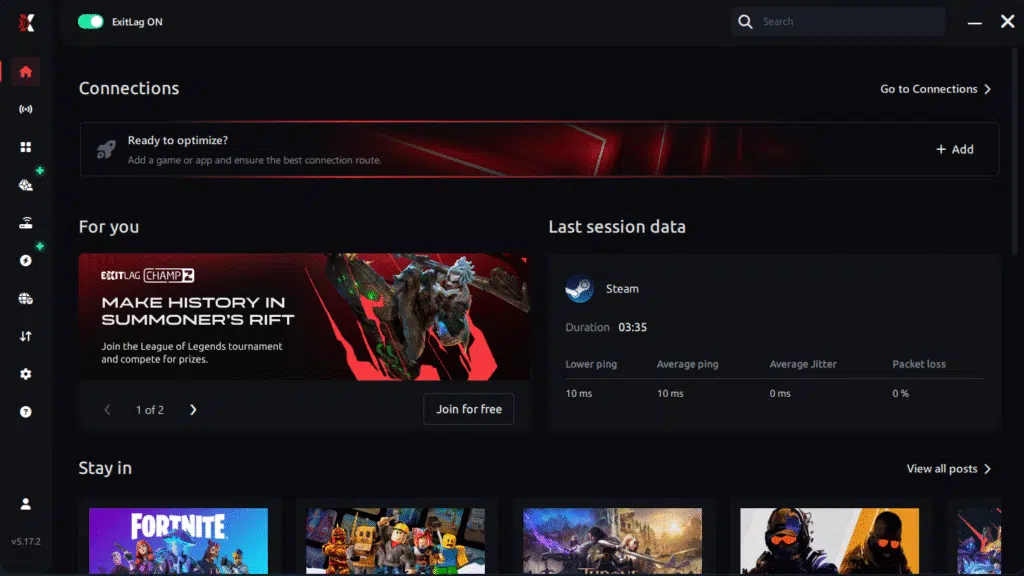
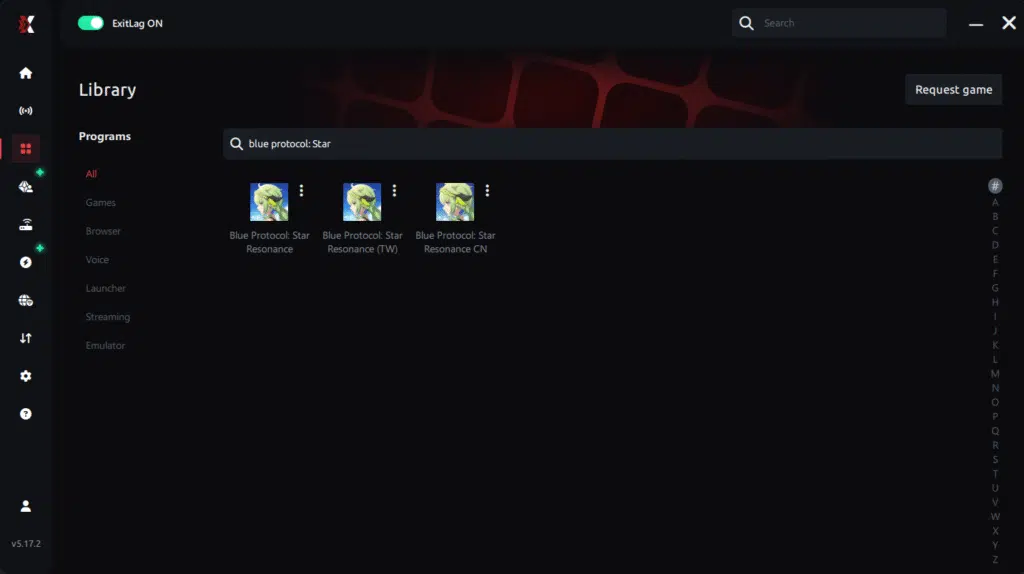
Step 3 – In the search bar, type “Blue Protocol” and select the game from the list.
Step 4 – Choose between automated or manual route
Based on the results, you can let ExitLag automatically select the best route or manually choose the server that showed the lowest latency for your connection.
AI-optimized automated route
Based on the results, you can let ExitLag automatically select the best route through AI optimization. The system analyzes multiple connection paths in real time and automatically identifies the most efficient route for your connection, ensuring the lowest possible latency without requiring manual choices.
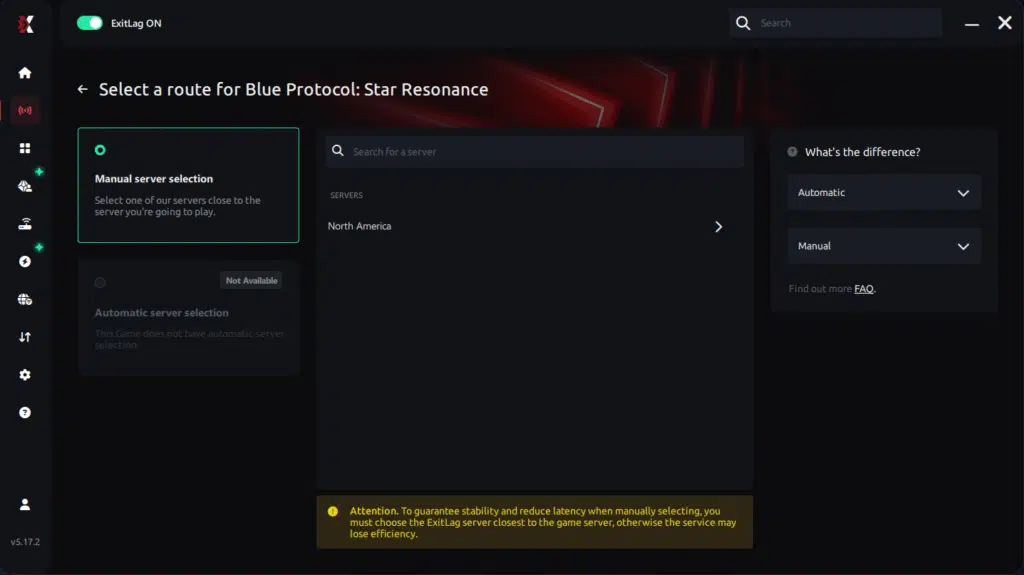
Manual route
If you prefer to have full control over your connection, you can manually choose the server based on the ping test results. Simply select the server that showed the lowest latency or the one that best meets your specific gaming needs, allowing complete customization of your experience.
Step 5 – Click “Blue Protocol” or the play button. ExitLag will begin optimizing your connection automatically.
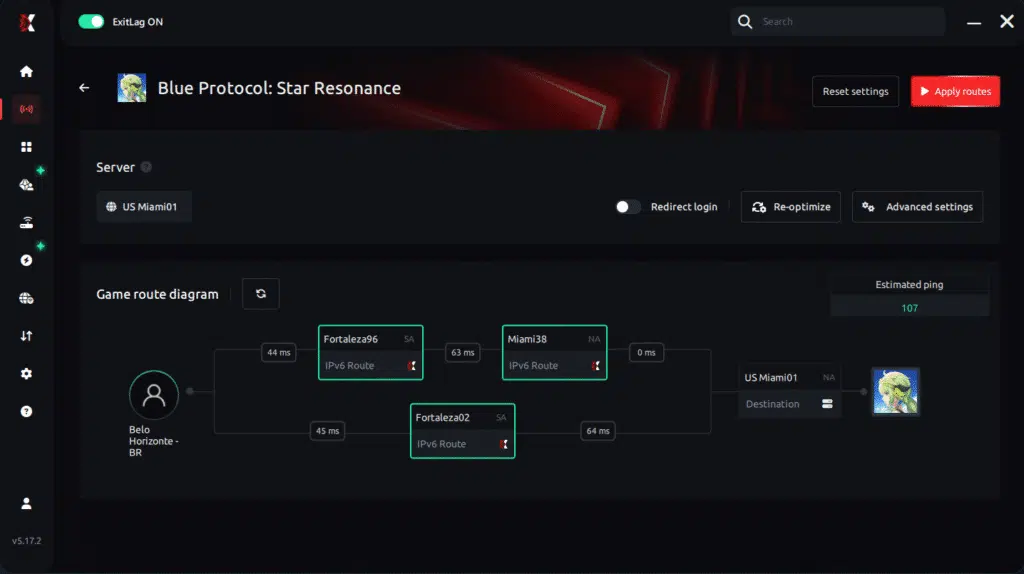
Step 6 – Wait a few seconds until optimization is complete. You’ll see ping indicators in the interface.
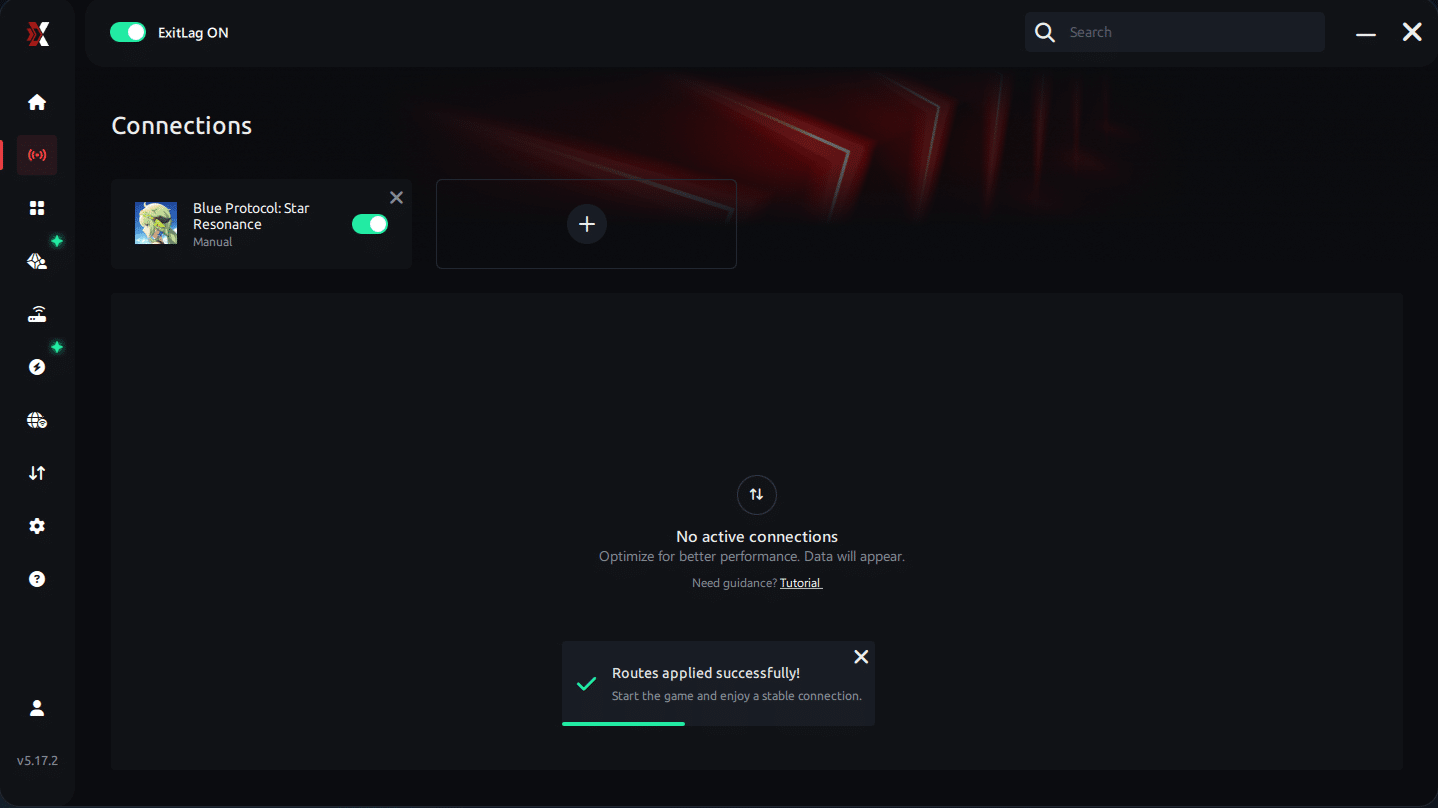
Step 7 – Launch Blue Protocol normally. The optimization will already be active.
ExitLag runs in the background while you play, constantly adjusting routes to maintain the best possible performance.
Advanced ExitLag Settings for Blue Protocol Star Resonance
Use automatic mode first, then test manual routes. If available, Traffic Shaper and multi-routing can further improve stability during peak hours.
For Console Players (If Applicable)
ExitLag is primarily a PC solution. However, some players test a PC hotspot method to route traffic, depending on their setup and platform limits.
Extra Optimizations to Maximize FPS with ExitLag
ExitLag works best when combined with smart local optimizations. Together, these adjustments help reinforce FPS Boost in Blue Protocol Star Resonance.
Recommended In-Game Settings
Fine-tuning visuals keeps performance balanced without sacrificing clarity.
- Ideal resolution based on monitor
- Balanced graphics quality
- Disable heavy post-processing effects
- V-Sync: OFF
- Set a stable FPS limit
- Use fullscreen mode
- Optimize shadows and particles
Windows System Optimizations
At the system level, small changes add up. Consequently, background stability improves.
- High Performance power mode
- Disable Xbox Game DVR
- Close background applications
- Update GPU drivers regularly
- Disable Windows transparency
- Optimize advanced power settings
Hardware Optimizations (No Spending)
Even without upgrades, maintenance helps performance consistency.
- Clean your PC regularly
- Improve airflow inside the case
- Monitor CPU and GPU temperatures
- Organize cable management
GPU Settings
For NVIDIA users, control panel adjustments can improve responsiveness. Meanwhile, AMD users have similar tools available.
NVIDIA Control Panel
- Prefer maximum performance
- Enable low latency mode
- Disable V-Sync
AMD Radeon Settings
- Enable Anti-Lag
- Use Radeon Boost when available
When to Consider an Upgrade
Eventually, hardware limits appear. However, ExitLag still provides value regardless of specs.
- Identify CPU or GPU bottlenecks
- Prioritize GPU upgrades first
- Evaluate performance return per component
Even then, ExitLag continues to optimize the network layer, which benefits every setup. You can always revisit the official ExitLag website to refine your configuration.
Why Network Optimization Increases FPS
Understanding the network-FPS relationship explains why FPS Boost in Blue Protocol Star Resonance often improves without hardware changes.
The Connection Between Lag and FPS
Network instability disrupts frame pacing. As latency spikes occur, the game waits for data, which creates stutters and uneven motion.
How Packet Loss Affects FPS
Packet loss forces resynchronization. Consequently, frames arrive late or out of order.
- Sudden stutters
- Camera hitching
- Delayed ability activation
Input Lag and Its Relation to FPS
The chain is simple: input → server → response → frame. When latency drops, actions feel instant, making FPS feel higher even if numbers stay similar.
Frame Time Consistency
High but unstable FPS feels worse than slightly lower but stable FPS. ExitLag stabilizes routing and reduces jitter, which keeps frame delivery even and gameplay smooth.
Frequently Asked Questions About FPS Boost in Blue Protocol Star Resonance
When players look for FPS Boost in Blue Protocol Star Resonance, questions naturally come up about how ExitLag works and what kind of results to expect. Below, you’ll find clear, honest answers based on real gameplay scenarios and technical facts.
Does ExitLag Really Increase FPS?
Yes, ExitLag increases FPS through network optimization. Instead of changing your hardware, it improves how your connection delivers game data.
More importantly, ExitLag reduces stuttering and frame pacing issues. As a result, perceived FPS feels much higher, even when rendered FPS stays similar. You can learn more by checking this detailed guide on optimizing your home network for gaming.
Less stuttering, stable frame time, and smoother delivery are what define the experience.
How Much FPS Will I Gain with ExitLag?
The gain varies from player to player. That said, most improvements depend on your current network quality and routing stability.
Typically, players see a 20–60% improvement in stability, especially by eliminating sudden drops. This consistency is what makes FPS Boost in Blue Protocol Star Resonance feel impactful over long sessions.
Does ExitLag Work If My PC Is Weak?
Yes, but with realistic limits. ExitLag optimizes the NETWORK, not your CPU or GPU.
That means you’ll get smoother FPS within your system’s natural cap. In other words, ExitLag complements your hardware rather than replacing it, making gameplay feel more consistent.
Is ExitLag Safe to Use?
ExitLag is completely safe. It does not modify game files or interfere with anti-cheat systems.
Because of that, professionals and competitive players trust it daily. Today, millions of users rely on ExitLag to stabilize online gameplay.
Does ExitLag Work on Console?
Currently, ExitLag is designed for PC. Console support is limited by platform restrictions.
However, some users test a PC hotspot method as an alternative. Still, for competitive play, PC remains the recommended platform.
Do I Need Fast Internet for ExitLag to Work?
Not necessarily. ExitLag optimizes ROUTES, not raw speed.
Even a 10 Mbps connection can benefit, since latency and packet stability matter more than bandwidth. Therefore, smoother routing often matters more than faster plans.
What Is the Difference Between ExitLag and a VPN?
ExitLag focuses on gaming traffic optimization. A VPN reroutes all traffic and often increases latency.
ExitLag is NOT a VPN
For a technical breakdown, see how ExitLag works for gaming connections.
| Feature | ExitLag | VPN |
| Gaming optimization | Yes | No |
| Latency reduction | Yes | Often worse |
| Route stability | High | Variable |
| FPS experience | Improved | Degraded |
How Much Does ExitLag Cost?
ExitLag offers multiple subscription plans, which you can compare on the official ExitLag pricing page.
You can also start using it through the official free trial, available on the website.
Does ExitLag Work with Blue Protocol Star Resonance?
Yes, ExitLag is specifically optimized for Blue Protocol Star Resonance. It also supports many other popular online titles.
You can explore the full catalog on the supported games list.
Comparison: Playing Without vs With ExitLag
Experience Without ExitLag
- ❌ Unstable FPS (40–80 FPS fluctuating)
- ❌ Constant micro-stuttering
- ❌ Frame drops in critical moments
- ❌ Noticeable input lag
- ❌ Inconsistent experience
- ❌ Competitive disadvantage
- ❌ Constant frustration
Experience With ExitLag
- ✅ Stable FPS (90–95 FPS consistent)
- ✅ Zero micro-stuttering
- ✅ Consistent performance
- ✅ Responsive input
- ✅ Premium experience
- ✅ Competitive advantage
- ✅ Enjoyable gameplay
Side-by-Side Comparison
| Aspect | Without ExitLag | With ExitLag |
| FPS | Unstable | Stable |
| Stuttering | Frequent | Rare/Zero |
| Input Lag | High | Low |
| Consistency | ⭐⭐ | ⭐⭐⭐⭐⭐ |
| Competitive | Disadvantage | Advantage |
| Fun | ⭐⭐ | ⭐⭐⭐⭐⭐ |
Maximize Your FPS in Blue Protocol Star Resonance with ExitLag Now
Summary of Benefits
- ✅ Up to 60% more stable FPS
- ✅ Micro-stuttering eliminated
- ✅ Minimized input lag
- ✅ Consistent performance
- ✅ Real competitive advantage
- ✅ Premium experience
- ✅ Works with any hardware
Why ExitLag Is the Best Solution
ExitLag is built specifically for gaming. Its proprietary technology, global server network, and proven results make it stand out.

With millions of satisfied users, ExitLag consistently delivers smoother online gameplay.
Get Started Now
- Start your free trial through the ExitLag registration page
- Configure everything in under five minutes
- Play and feel immediate FPS improvements
In conclusion, solving FPS boost Blue Protocol Star Resonance issues requires balancing hardware, settings, and network stability. ExitLag’s multi-path technology eliminates routing delays and ensures fluid gameplay across all regions of Blue Protocol Star Resonance. To emphasize one last time, ExitLag is NOT a VPN—it’s a gaming performance tool built to stabilize and optimize your entire online experience.
Now that you know everything about FPS boost Blue Protocol Star Resonance, if you want the most stable, smooth, and competitive gameplay possible, is time to upgrade your performance toolkit. Register at ExitLag now and improve your gameplay in a way you've never experienced before!



