

First, imagine playing Chaos Zero Nightmare at consistently high frame rates, where every movement feels fluid and every action responds instantly. In this ideal scenario, high FPS transforms combat into a smooth, cinematic experience, allowing you to react faster and stay fully immersed. As a result, gameplay feels premium, controlled, and deeply satisfying.
However, many players experience a different reality. Instead of fluid performance, they face unstable frame rates that break immersion and reduce precision. In this context, achieving a FPS boost in Chaos Zero Nightmare becomes essential, not as a fix for errors, but as a way to unlock the game’s true potential. Consequently, frustration grows when performance never matches the game’s design. To understand more about common performance problems, you can check detailed articles directly from the ExitLag blog.
Therefore, ExitLag appears as a performance-focused solution designed to maximize your experience. By optimizing network routes and stabilizing frame delivery, ExitLag can deliver up to 60% improvement in perceived FPS. With direct access through the official ExitLag homepage, this guide will show how to achieve maximum performance step by step.

Why Is High FPS Crucial in Chaos Zero Nightmare?
High FPS directly affects how Chaos Zero Nightmare feels and plays. Essentially, FPS determines how many frames your system displays each second, shaping smoothness and responsiveness. As a visual analogy, think of FPS like a camera recording video: more frames mean clearer, smoother motion.
- 30 FPS feels choppy and limits precision
- 60 FPS delivers acceptable smoothness
- 144 FPS offers elite responsiveness and control
As a result, higher FPS provides a clear competitive advantage, especially in fast-paced encounters.
Benefits of High FPS in Chaos Zero Nightmare
With higher FPS, players gain tangible advantages during gameplay. Most importantly, these benefits enhance both comfort and performance.
- Smoother gameplay flow
- Better accuracy and aiming control
- Faster reaction times in combat
- Clear PvP advantage
- More immersive environments
- Less visual fatigue over long sessions
- Improved timing in Chaos Zero Nightmare combat mechanics
FPS Classification for Chaos Zero Nightmare
| FPS Range | Quality | Experience | Competitive? |
| 144+ FPS | ⭐⭐⭐⭐⭐ Excellent | Perfect | ✅ Ideal |
| 90–144 FPS | ⭐⭐⭐⭐ Great | Very good | ✅ Yes |
| 60–90 FPS | ⭐⭐⭐ Good | Acceptable | ⚠️ Slight disadvantage |
| 30–60 FPS | ⭐⭐ Regular | Choppy | ❌ Hard to compete |
| <30 FPS | ⭐ Poor | Unplayable | ❌ Impossible |
High FPS vs Beautiful Graphics
Although high visual quality looks appealing, performance matters more in competitive games. In Chaos Zero Nightmare, performance > visual beauty, because higher FPS ensures smoother reactions and consistent control. Therefore, prioritizing FPS delivers a superior competitive experience.
How ExitLag Increases FPS in Chaos Zero Nightmare
This section is the foundation of the FPS boost in Chaos Zero Nightmare strategy. ExitLag is a network optimization software designed specifically for online gaming. ExitLag is NOT a VPN, because it does not reroute traffic for privacy or location masking. Instead, it focuses on selecting the most stable and efficient routes between you and game servers. You can learn more through the ExitLag how-it-works page.
How ExitLag Improves FPS in Online Games
Network instability often causes micro-stuttering, even when hardware is capable. By reducing latency variation, ExitLag improves frame pacing and client-server synchronization. Consequently, FPS feels smoother and more stable.
7 Ways ExitLag Increases Your FPS
- Elimination of micro-stuttering for smoother frame delivery
- Input lag reduction for faster responsiveness
- Frame time stabilization for consistent pacing
- Multi-path route optimization to avoid packet loss
- Game traffic prioritization over background data
- Ping reduction to game servers for better sync
- Redundant connections ensuring stable FPS at all times
ExitLag vs Other FPS Boost Solutions
| Solution | Increases FPS? | Reduces Lag? | Stability | Ease of Use | Recommendation |
| ExitLag | ✅ Yes (network) | ✅✅✅ Excellent | ⭐⭐⭐⭐⭐ | ⭐⭐⭐⭐⭐ | ✅ Best |
| Common VPN | ❌ Worse | ❌ Worse | ⭐⭐ | ⭐⭐⭐ | ❌ Avoid |
| Game Booster | ⚠️ Minimal | ❌ No | ⭐⭐⭐ | ⭐⭐⭐⭐ | ⚠️ Limited |
| Windows Optimization | ⚠️ Some | ❌ No | ⭐⭐⭐ | ⭐⭐ | ⚠️ Helps |
| Hardware Upgrade | ✅ Yes | ❌ No | ⭐⭐⭐⭐ | ⭐ | 💰 Expensive |
| Nothing | ❌ No | ❌ No | ⭐ | ⭐⭐⭐⭐⭐ | ❌ Poor performance |
You can explore more compatible titles in the official supported games directory, where we maintain an updated list of all optimized games.
Why ExitLag Works So Well
- Proprietary optimization technology
- Over 600 global servers
- Game-specific routing logic
- Trusted by millions of players worldwide
How to use ExitLag in Chaos Zero Nightmare
The process is extremely simple:
Step 1 – Access the official ExitLag website and download the application. There’s a free trial period for new users.
Step 2 – Install and open the program. Log in with your account.
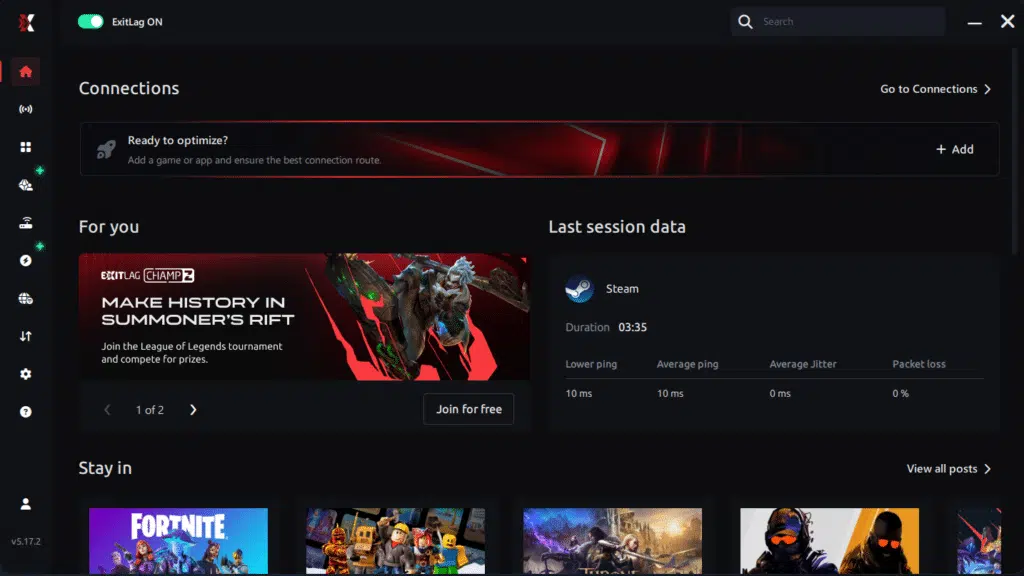
Step 3 – In the search bar, type “Chaos Zero Nightmare” and select the game from the list.
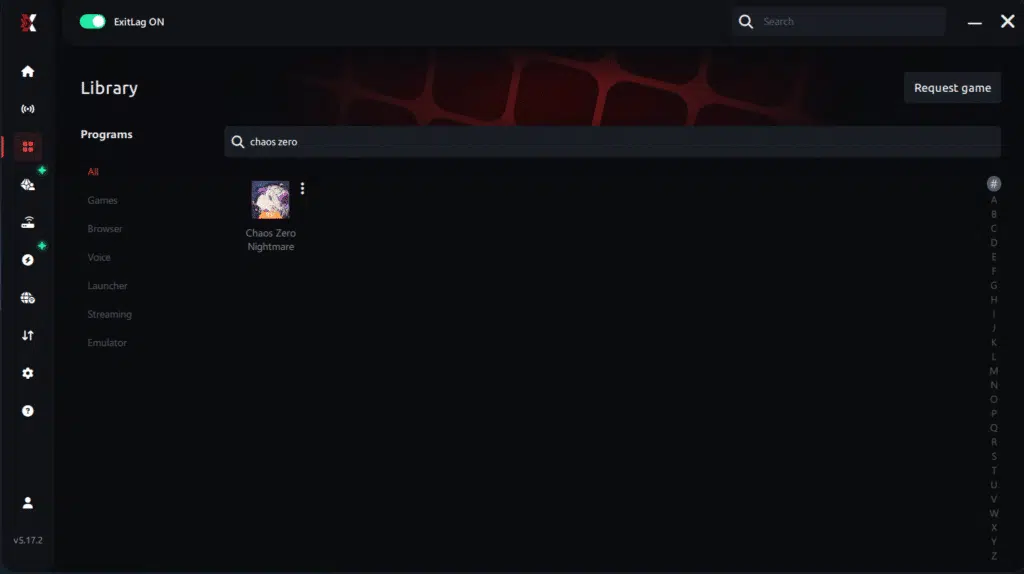
Step 4 – Choose between automated or manual route
Based on the results, you can let ExitLag automatically select the best route or manually choose the server that showed the lowest latency for your connection.
AI-optimized automated route
Based on the results, you can let ExitLag automatically select the best route through AI optimization. The system analyzes multiple connection paths in real time and automatically identifies the most efficient route for your connection, ensuring the lowest possible latency without requiring manual choices.
Manual route
If you prefer to have full control over your connection, you can manually choose the server based on the ping test results. Simply select the server that showed the lowest latency or the one that best meets your specific gaming needs, allowing complete customization of your experience.
Step 5 – Click “Chaos Zero Nightmare” or the play button. ExitLag will begin optimizing your connection automatically.
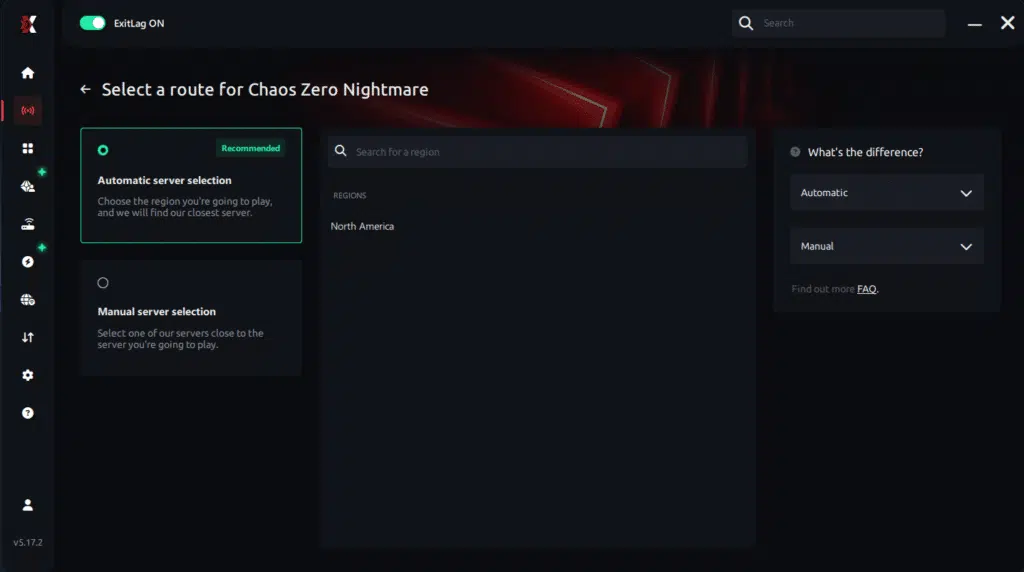
Step 6 – Wait a few seconds until optimization is complete. You’ll see ping indicators in the interface.

Step 7 – Launch Chaos Zero Nightmare normally. The optimization will already be active.
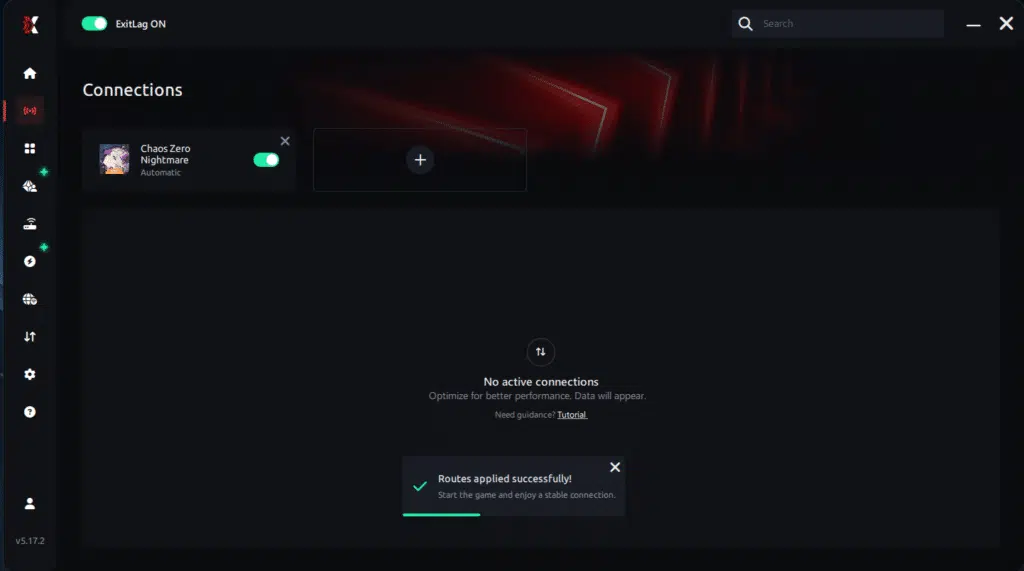
ExitLag runs in the background while you play, constantly adjusting routes to maintain the best possible performance.
Advanced ExitLag Settings for Chaos Zero Nightmare
Use automatic mode for simplicity or manual mode for fine control. Choosing the best region and enabling traffic shaping ensures optimal routing. When available, FPS stabilizer and multi-routing options further enhance consistency.
Testing FPS Improvements
Measure FPS before and after using in-game benchmarks and real-time monitoring tools. This comparison highlights the tangible gains delivered by ExitLag.
For Console Players
Currently, ExitLag works on PC only. Console players may use a PC hotspot method as an alternative, but full optimization remains PC-focused.
Impact on Competitive Gameplay
What changes when performance becomes consistent
First, stability improves the parts of Chaos Zero Nightmare that matter most: reaction windows, crosshair placement, and ability timing. When frame time is steadier, your muscle memory lands more reliably, and movement feels cleaner. As a result, your confidence rises in every duel.
Moreover, players often notice performance gains in outcomes, not just visuals. For example, many report:
- Better K/D consistency over longer sessions
- Increased accuracy in fast engagements
- More ranked victories from reliable timing
- Faster progression due to fewer “messy” fights
- Higher satisfaction from smooth gameplay
Therefore, if you want a practical path to increase FPS consistency, start by optimizing what the match depends on most: the network layer.
Extra Optimizations to Maximize FPS with ExitLag
Recommended in-game settings for Chaos Zero Nightmare
First, keep visuals balanced so your system can sustain more FPS while staying sharp in combat. Recommended tuning includes:
- Ideal resolution for your monitor while maintaining stability
- Balanced graphics quality instead of extreme presets
- Disable heavy post-processing effects when possible
- V-Sync: OFF for lower input lag
- FPS limit set slightly below your stable average
- Fullscreen mode for consistent rendering
Consequently, these choices support a stronger FPS Boost in Chaos Zero Nightmare without compromising clarity.
Windows system optimizations
Next, small system adjustments can protect your performance ceiling:
- High Performance power plan
- Disable Game DVR / background captures
- Close background programs before ranked sessions
- Update GPU drivers regularly
- Disable Windows transparency effects
- Optimize power settings for stability
Additionally, combining these with ExitLag’s routing creates a smoother overall experience through network optimization and better pacing. To get started quickly, use the tools available on the official ExitLag website.
Why Network Optimization Increases FPS
The connection between latency and FPS perception
First, FPS is rendered locally, but online games constantly synchronize your actions with servers. When latency varies, your client may wait, resync, or receive delayed confirmations, which creates uneven pacing and visible stutters. Therefore, even strong hardware can “feel” inconsistent when the network layer fluctuates.
How packet loss affects FPS consistency
Next, packet loss can indirectly hurt smoothness because the game must recover missing data and re-align states. Common symptoms include:
- Small freezes during ability effects
- Sudden pacing shifts mid-fight
- Camera turns that feel uneven
- Timing that becomes harder to predict
- Short bursts of micro-stuttering
Consequently, improving route stability helps the game deliver frames more consistently, which supports improve FPS perception.
Frame time consistency as the real advantage
Finally, high but unstable FPS often feels worse than moderately high but consistent FPS. When ExitLag stabilizes routes, it reduces jitter in delivery and supports steadier frame time. As a result, the game feels smoother, aiming feels tighter, and the overall experience matches what players expect from a true FPS Boost in Chaos Zero Nightmare.
Frequently Asked Questions About FPS Boost in Chaos Zero Nightmare
Does ExitLag really increase FPS?
First, yes, ExitLag increases FPS through advanced network optimization, not by changing your hardware. By stabilizing routes and reducing latency variation, the game delivers frames more consistently. As a result, the experience feels smoother even when raw FPS numbers stay similar.
Moreover, it is important to understand perceived FPS versus rendered FPS. Rendered FPS is what your GPU outputs, while perceived FPS is how smooth the game feels during action. By eliminating stuttering and resync delays, ExitLag creates a higher-quality FPS experience. You can explore deeper network tuning concepts in the ExitLag guide on how to optimize your home network.
When to Consider an Upgrade
Certain signs indicate a hardware bottleneck.
- Constant 100% GPU or CPU usage
- FPS capped well below expectations
- Stuttering even in low-demand scenes
Upgrade priority should focus on GPU first, then CPU, based on ROI. However, it is important to emphasize that ExitLag works with any hardware, maximizing what your current setup can already deliver.
How much FPS will I gain with ExitLag?
In practice, gains vary depending on your current connection quality. If your routes are unstable, the impact is stronger. Typically, players report 20–60% improvement in stability, with major FPS drop elimination.
Therefore, instead of chasing unrealistic numbers, the real win is consistency. With ExitLag, FPS feels steadier, reactions become predictable, and competitive situations become easier to manage. This is the core value of a FPS Boost in Chaos Zero Nightmare.
Does ExitLag work if my PC is weak?
Yes, but with clear limits. ExitLag optimizes the network, not the CPU or GPU. That means it cannot push your system beyond its hardware ceiling.
However, it will deliver more stable FPS within your existing limits. In other words, ExitLag complements your hardware instead of replacing it, ensuring the smoothest possible performance for your setup.
Is ExitLag safe to use?
Absolutely. ExitLag is completely safe and does not modify game files or inject code. It works externally by optimizing traffic paths.
Additionally, ExitLag is trusted by professionals and used by millions of players worldwide. As a result, you can focus on performance without worrying about account safety.
Does ExitLag work on console?
Currently, ExitLag is PC-only. Console players cannot run the application directly.
That said, some players use a PC hotspot method as an alternative. Still, for competitive play, PC remains the recommended platform to fully benefit from FPS Boost in Chaos Zero Nightmare.
Do I need fast internet for ExitLag to work?
Not necessarily. ExitLag optimizes routes, not raw speed. Even a 10 Mbps connection can perform well if latency is stable.
The focus is reducing delay, jitter, and packet loss. Therefore, consistency matters more than bandwidth when aiming to improve FPS experience.
What is the difference between ExitLag and a VPN?
| Aspect | VPN | ExitLag |
| Purpose | Privacy & location masking | Gaming performance |
| Effect on FPS | Often worse | Improves stability |
| Routing | Generic | Game-specific |
| Result | Higher latency | Lower latency |
Most importantly, ExitLag is NOT a VPN. VPNs add overhead, while ExitLag removes inefficiencies. A full technical explanation is available on the ExitLag how-it-works page.
How much does ExitLag cost?
ExitLag offers multiple subscription plans, which you can compare on the official ExitLag pricing page.
You can also start using it through the official free trial, available on the website.
Does ExitLag work with Chaos Zero Nightmare?
Yes, ExitLag is specifically optimized for Chaos Zero Nightmare. It continuously updates routes to match server behavior.
In addition, ExitLag supports hundreds of other popular titles. You can see the full list on the supported games page.
Extra Chaos Zero Nightmare questions
- Does ExitLag help during large-scale fights? Yes, route stability reduces frame pacing issues.
- Does it help in international matchmaking? Yes, optimized paths reduce cross-region latency spikes.
- Is ExitLag useful for long sessions? Yes, stability improves comfort and reduces fatigue.
Comparison: Playing Without vs With ExitLag
Experience without ExitLag
- ❌ Unstable FPS (40–80 FPS fluctuating)
- ❌ Constant micro-stuttering
- ❌ Frame drops in critical moments
- ❌ Noticeable input lag
- ❌ Inconsistent experience
- ❌ Competitive disadvantage
- ❌ Constant frustration
Experience with ExitLag
- ✅ Stable FPS (90–95 FPS consistent)
- ✅ Zero micro-stuttering
- ✅ Consistent performance
- ✅ Responsive input
- ✅ Premium experience
- ✅ Competitive advantage
- ✅ Enjoyable gameplay
Side-by-side comparison
| Aspect | Without ExitLag | With ExitLag |
| FPS | Unstable | Stable ✅ |
| Stuttering | Frequent | Rare/Zero ✅ |
| Input Lag | High | Low ✅ |
| Consistency | ⭐⭐ | ⭐⭐⭐⭐⭐ ✅ |
| Competitive | Disadvantage | Advantage ✅ |
| Fun | ⭐⭐ | ⭐⭐⭐⭐⭐ ✅ |
Maximize Your FPS in Chaos Zero Nightmare with ExitLag Now
Summary of benefits
- ✅ Up to 60% more stable FPS
- ✅ Micro-stuttering eliminated
- ✅ Minimized input lag
- ✅ Consistent performance
- ✅ Real competitive advantage
- ✅ Premium experience
- ✅ Works with any hardware
Why ExitLag is the best solution
ExitLag is gaming-focused, powered by proprietary technology, and backed by proven results. With millions of satisfied users, it stands out as a performance-first solution. These key differentiators make ExitLag the smartest choice for competitive players.
Get started now
- Test ExitLag for free
- Configure in 5 minutes
- Compare before and after
- Dominate Chaos Zero Nightmare with maximum performance
In conclusion, solving FPS boost Chaos Zero Nightmare issues requires balancing hardware, settings, and network stability. ExitLag’s multi-path technology eliminates routing delays and ensures fluid gameplay across all regions of Chaos Zero Nightmare. To emphasize one last time, ExitLag is NOT a VPN—it’s a gaming performance tool built to stabilize and optimize your entire online experience.
Now that you know everything about FPS boost Chaos Zero Nightmare, if you want the most stable, smooth, and competitive gameplay possible, is time to upgrade your performance toolkit. Register at ExitLag now and improve your gameplay in a way you’ve never experienced before!
Got questions or want to connect with other players? Join the conversation at the ExitLag Forum!


