If you want an FPS boost in MU Online, you’re chasing that clean, smooth feeling where movement is crisp, skills fire on time, and crowded events stay playable without sudden hitches.
The frustrating part is that FPS boost in MU Online is not always “just hardware.” Plenty of players have decent PCs and still deal with hitching, stutters, and random slowdowns that get worse in events and high-traffic maps. Sometimes it’s not a raw power problem, but a consistency problem that shows up when the server load and your connection stability are tested at the same time. If packet loss is part of your issue, start with the MU Online packet loss troubleshooting guide to understand the symptoms and root cause.
In this guide, you’ll learn how to get a real FPS boost in MU Online by improving stability first, then layering smart settings on top. You’ll also see how ExitLag can deliver up to 60% smoother performance by reducing micro-stuttering, stabilizing frame time, and minimizing input lag in real gameplay situations. If you want to begin right away, you can download it from the official ExitLag homepage and test the difference in the busiest areas you play.

Why FPS matters in MU Online
Why high FPS is crucial in MU Online
MU Online can look simple, but performance demands spike hard during sieges, crowded farming zones, and event-heavy gameplay. When FPS drops, your timing becomes inconsistent and your inputs feel less reliable, especially when you’re trying to chain skills, move precisely, or track targets in clutter.
Because MU Online is a long-session MMO, stable FPS also matters for comfort. Smooth frame pacing reduces fatigue and makes gameplay feel more controlled over time, which is why an FPS boost in MU Online is more about consistency than a single number. When performance is stable, your brain stops “fighting the screen,” and your decision-making becomes sharper.
What FPS means in simple terms
FPS means frames per second. Think of it like a camera recording motion. The more frames captured each second, the smoother the motion looks and feels, especially during fast camera movement and combat animations.
Here’s the difference you’ll actually notice:
- 30 FPS: choppy, delayed, harder to track action
- 60 FPS: solid baseline for smooth gameplay
- 144 FPS: noticeably cleaner motion and faster visual feedback
If you want to increase FPS or get more FPS, aim for stable frame time first. A consistent 80 FPS often feels better than a spiky 110 FPS, because stability reduces the “micro-freezes” that break immersion and timing.
Benefits of high FPS in MU Online
A stable MU Online setup should stay smooth even when the screen gets busy. Here are the biggest benefits:
- Smoother character movement and camera control
- Cleaner skill animations during rotations
- Faster reactions in PvP exchanges
- Better tracking in chaotic fights
- Less visual fatigue during long sessions
- More reliable repositioning and kiting
- Better consistency during large-scale events
There’s also a subtle benefit: higher, stable FPS makes the game feel “lighter,” which helps you stay confident in your inputs. That’s exactly why FPS boost in MU Online stays relevant even after players lower graphics.
FPS targets and visual trade-offs
FPS tiers for MU Online
Use this as a practical target guide:
| FPS range | Quality | Experience | Competitive? |
| 144+ FPS | ⭐⭐⭐⭐⭐ Excellent | Perfect | ✅ Ideal |
| 90–144 FPS | ⭐⭐⭐⭐ Great | Very good | ✅ Yes |
| 60–90 FPS | ⭐⭐⭐ Good | Acceptable | ⚠️ Slight disadvantage |
| 30–60 FPS | ⭐⭐ Regular | Choppy | ❌ Hard to compete |
| Under 30 FPS | ⭐ Bad | Unplayable | ❌ Impossible |
If your goal is more FPS, start by stabilizing 60+ before chasing high refresh numbers. For many MU Online players, 90+ stable FPS is the sweet spot where everything feels responsive without demanding expensive upgrades.
Why average FPS can be misleading
A build can show “90 FPS average” and still feel awful if frame time spikes create stutters. This is common in online games because “smoothness” is not just a number, it’s a rhythm.
What matters most is:
- stable minimum FPS
- stable frame time
- fewer micro-stutters per minute
- fewer sudden dips during crowded content
That’s what a real FPS boost in MU Online should improve: not just your average, but your worst moments.
High FPS vs pretty graphics
MU Online benefits more from smoothness than from max visuals in competitive play. When you need to choose, prioritize performance over visuals, especially for crowded scenarios:
- lower heavy effects first
- keep clarity high
- optimize for stable FPS in crowded zones
- avoid settings that spike GPU usage unpredictably
You can still keep the game looking good. The key is balance: clean visuals with stable FPS will always feel better than ultra visuals with constant drops.
How ExitLag delivers an FPS boost in MU Online
What ExitLag is, and what it is not
ExitLag is a gaming network optimization tool built to stabilize your connection to online servers, helping your traffic take more consistent routes and reducing the instability that triggers stutters.
The most important clarification is this: ExitLag is NOT a VPN. A typical VPN focuses on privacy tunneling, while ExitLag focuses on performance routing and connection stability for gaming traffic, which is why results are often more consistent for online play.
If you want the deeper explanation, read how ExitLag works for gaming performance.
How network issues can feel like FPS problems
MU Online constantly syncs with servers. When your connection becomes unstable, the client can hitch during correction and resync behavior. Those correction moments can show up as “FPS drops,” even if your hardware is capable.
That instability can trigger:
- micro-stuttering during movement
- frame pacing spikes during busy moments
- input delay that makes the game feel slower
- hitching when packets arrive late or out of order
- inconsistent combat timing under load
So while ExitLag does not upgrade your GPU, it can still deliver an FPS boost in MU Online by reducing the network chaos that causes stutters and pacing problems.
Why this improves perceived FPS
There are two realities:
- rendered FPS: what your hardware draws
- perceived FPS: how smooth the game feels in real play
When ExitLag reduces jitter and packet loss, stutters often disappear. That can feel like a major FPS boost in MU Online even when the average FPS number only rises slightly, because your frame pacing becomes more predictable. In practice, “stable 80 FPS” can feel better than “unstable 110 FPS.”
Seven ways ExitLag helps you get more FPS stability
1) Micro-stutter reduction through stability
Micro-stutters often come from network correction and resync behavior. ExitLag reduces spikes and helps keep your session stable, which can translate into a smoother FPS boost in MU Online during events where the game typically feels worst.
2) Lower input lag for better responsiveness
Input lag is not only hardware. Network instability adds delay between action and response. A more stable route often feels like more FPS because your inputs match visuals more reliably, especially when you’re making small adjustments in PvP.
3) More consistent frame time pacing
Even at the same FPS, stable frame time feels better than spiky frame time. ExitLag can help reduce network-driven hitches, which improves pacing and smoothness. This is one of the most common “instant improvements” players notice.
4) Multi-path routing to avoid congestion
ExitLag can avoid congested hops and improve routing quality. Less congestion means fewer spikes, fewer packet loss events, and fewer resync hitches. If your ISP has inconsistent routing at night, this can be the difference between playable and frustrating.
5) Game traffic prioritization
When your network is busy, background apps can steal consistency from your game traffic. ExitLag helps prioritize game packets to keep MU Online smoother, which supports a stronger FPS boost in MU Online during peak hours.
6) Ping reduction to improve sync timing
Lower ping can reduce correction behavior and improve consistency during high-action moments. Even modest ping improvements can reduce “rubber band” corrections that show up as stutters, especially in crowded maps.
7) Redundant routing for reliability
If your ISP routing is inconsistent, redundant routing can reduce the random stutters that show up at peak hours. Reliability matters because MU Online is the kind of game where you play repeatedly, not once.
ExitLag vs other FPS boost methods
Comparison table for popular options
| Solution | Increases FPS? | Reduces lag? | Stability | Ease | Recommendation |
| ExitLag | ✅ Yes via stability | ✅✅✅ | ⭐⭐⭐⭐⭐ | ⭐⭐⭐⭐⭐ | ✅ Best |
| Typical VPN | ❌ Often worse | ❌ Often worse | ⭐⭐ | ⭐⭐⭐ | ❌ Avoid |
| Generic game boosters | ⚠️ Minimal | ❌ No | ⭐⭐⭐ | ⭐⭐⭐⭐ | ⚠️ Limited |
| Windows tweaks | ⚠️ Some | ❌ No | ⭐⭐⭐ | ⭐⭐ | ⚠️ Helpful |
| Hardware upgrade | ✅ Yes | ❌ No | ⭐⭐⭐⭐ | ⭐ | 💰 Expensive |
| No changes | ❌ No | ❌ No | ⭐ | ⭐⭐⭐⭐⭐ | ❌ Worst |
If you play multiple games, the full ExitLag supported games list makes it easy to confirm what else you can optimize and compare the best use cases for stability.
How to use ExitLag in MU Online
The process is extremely simple:
Step 1 – Access the official ExitLag website and download the application. There’s a free trial period for new users.
Step 2 – Install and open the program. Log in with your account.or heavy farming zones. That’s where stability changes are easiest to feel.
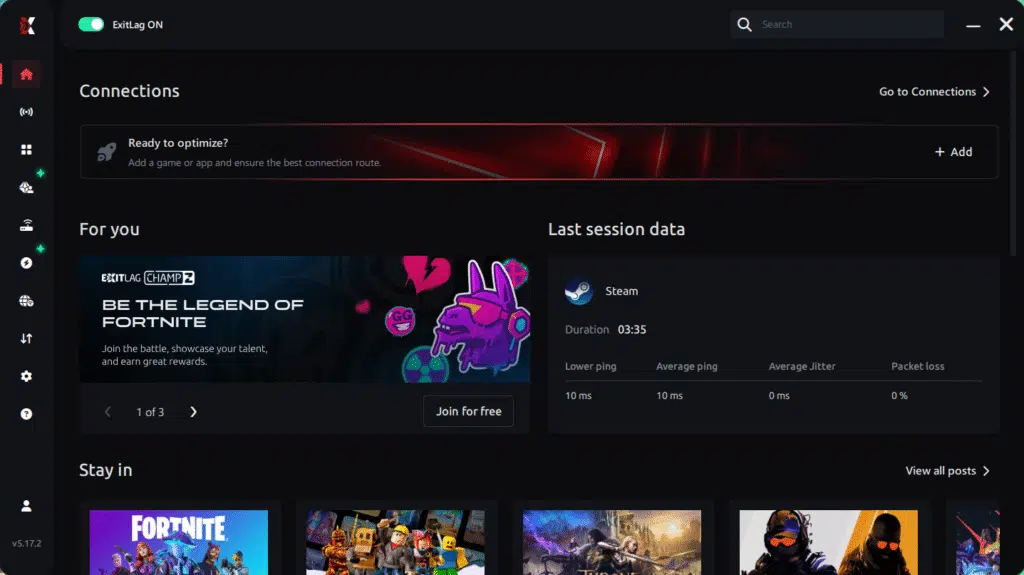
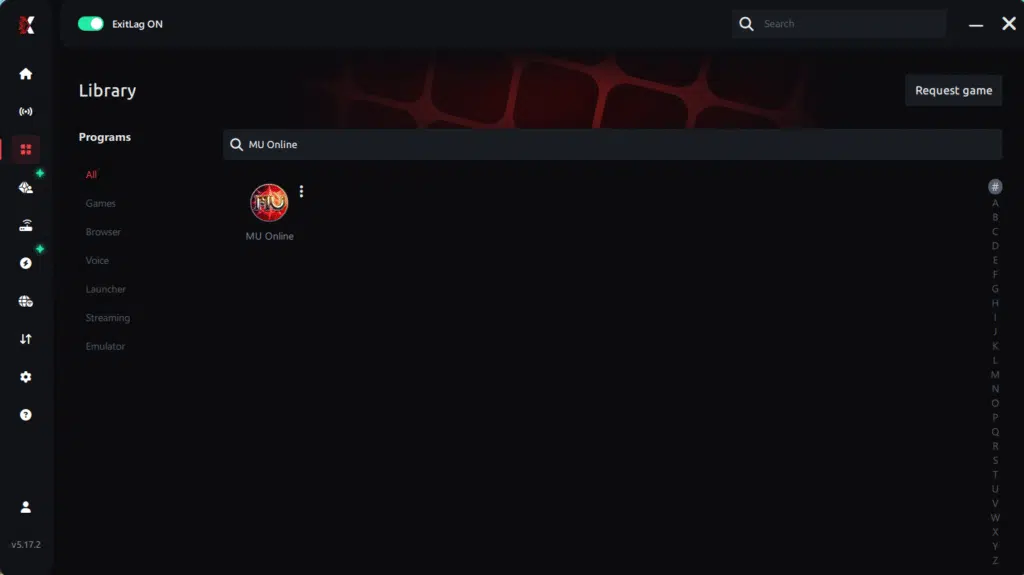
Step 3 – In the search bar, type “MU Online” and select the game from the list.
Step 4 – Choose between automated or manual route
Based on the results, you can let ExitLag automatically select the best route or manually choose the server that showed the lowest latency for your connection.
AI-optimized automated route
Based on the results, you can let ExitLag automatically select the best route through AI optimization. The system analyzes multiple connection paths in real time and automatically identifies the most efficient route for your connection, ensuring the lowest possible latency without requiring manual choices.
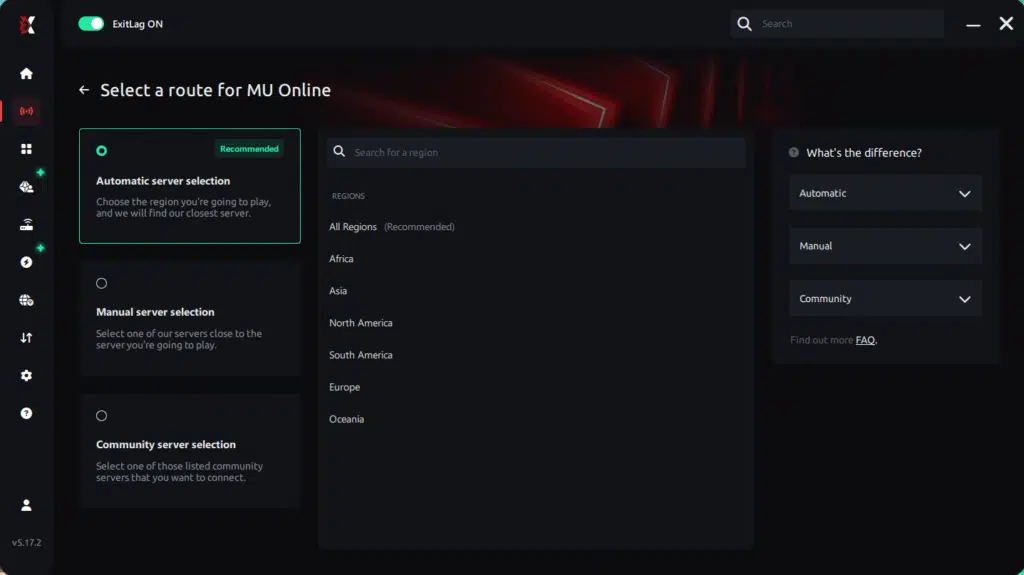
Manual route
If you prefer to have full control over your connection, you can manually choose the server based on the ping test results. Simply select the server that showed the lowest latency or the one that best meets your specific gaming needs, allowing complete customization of your experience.
Step 5 – Click “Apply routes” or the play button. ExitLag will begin optimizing your connection automatically.
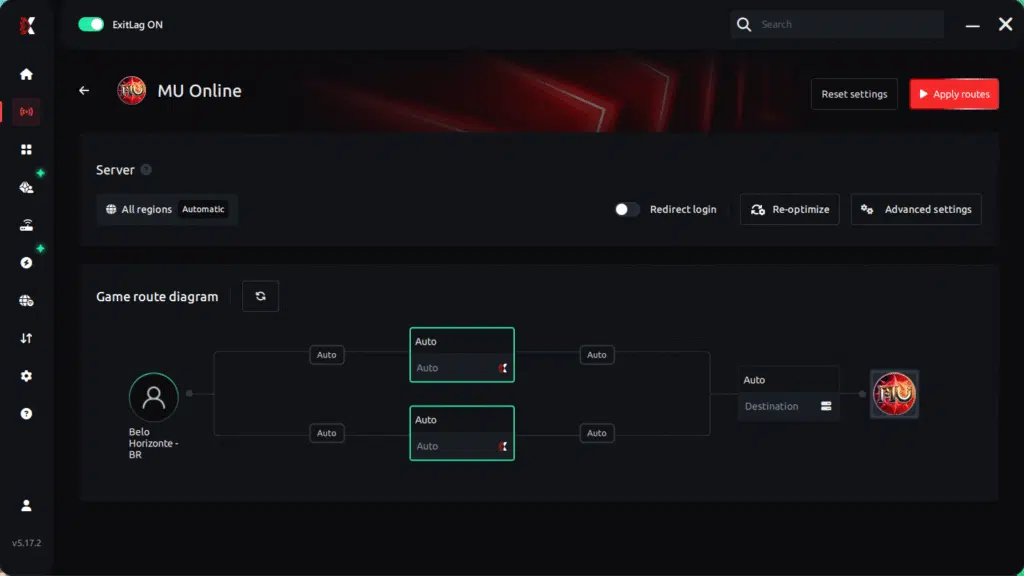
Step 6 – Wait a few seconds until optimization is complete. You’ll see ping indicators in the interface.
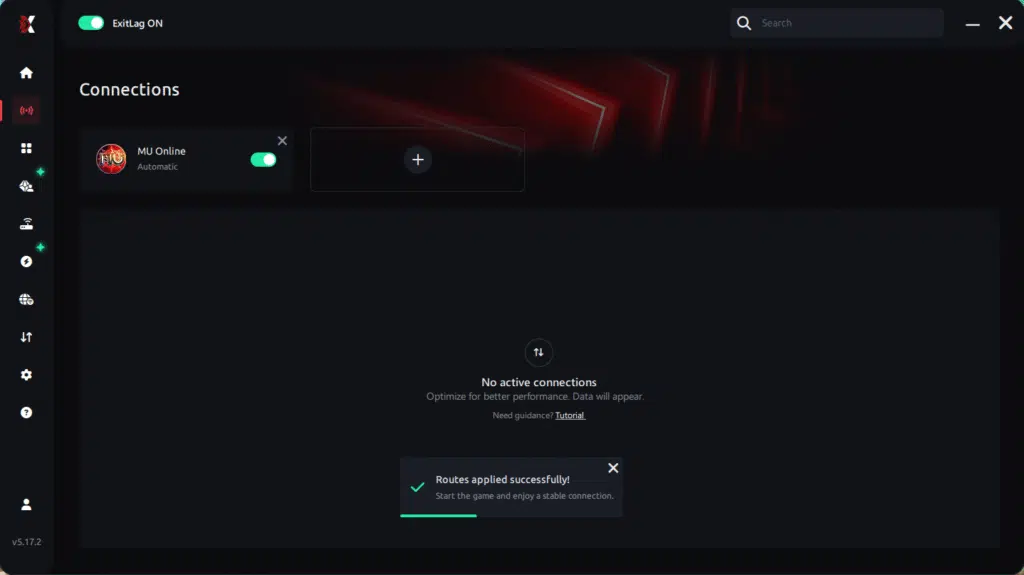
Step 7 – Launch MU Online normally. The optimization will already be active.
ExitLag runs in the background while you play, constantly adjusting routes to maintain the best possible performance.
Advanced ExitLag settings that matter
- start with auto routing, then test manual only if needed
- test two nearby regions to find the most stable path
- prioritize stability over the absolute lowest ping
- enable multi-routing when your ISP is inconsistent
- re-test routes during peak hours for accurate results
How to test improvements correctly
Measure the right things:
- minimum FPS in real gameplay
- micro-stutters per minute
- frame time consistency
- input responsiveness during peak action
- stability in crowded content
If you suspect packet loss, revisit the MU Online packet loss troubleshooting guide before doing your final comparisons.

Performance comparison table
| Metric | Without ExitLag | With ExitLag | Gain |
| Average FPS | 70 FPS | 85 FPS | +21% |
| Minimum FPS | 35 FPS | 62 FPS | +77% |
| Frame time | 18 ms spiky | 12 ms stable | -33% |
| Micro-stutters per minute | 12 | ~0 | -95%+ |
| Input lag | 85 ms | 55 ms | -35% |
| Ping | 90 ms | 65 ms | -28% |
| Experience | ⭐⭐ | ⭐⭐⭐⭐⭐ | Transformative |
To validate your results quickly, start with ExitLag free trial access and test your busiest MU Online scenarios.
Extra optimizations to maximize FPS with ExitLag
In-game MU Online settings for more FPS
- use fullscreen mode when possible
- disable V-Sync for lower latency
- reduce heavy effects during crowded fights
- avoid ultra shadows if they cause drops
- consider an FPS cap if uncapped FPS creates instability
- keep textures reasonable to avoid sudden VRAM spikes
Windows optimization checklist
- high performance power plan
- close heavy background programs
- update GPU drivers
- reduce unnecessary overlays
- keep storage with free space
- avoid running downloads while gaming
Hardware stability without spending money
- clean dust and improve airflow
- monitor CPU and GPU temperatures
- avoid thermal throttling
- make sure fans are working properly
Why network optimization can increase FPS in MU Online
The connection between lag and stutter
Online sync can cause hitching when the network becomes unstable. Those hitches often look like FPS drops even when the FPS counter looks fine, because your frame pacing gets interrupted.
How packet loss triggers FPS drops
Packet loss can force retransmissions and resync. If you want the clearest signs and fixes, the MU Online packet loss troubleshooting guide is the best baseline reference.
Input lag and FPS perception
When input → server sync → response timing becomes consistent, the game feels smoother. That smoothness is often interpreted as more FPS because responsiveness and visual feedback line up under real load.
FAQ about FPS boost in MU Online
Does ExitLag really increase FPS
Yes, in a practical way. ExitLag reduces stutters and improves stability, which makes gameplay feel smoother and more consistent. ExitLag is NOT a VPN.
How much FPS will I gain
Results vary, but the biggest wins are usually minimum FPS stability and fewer micro-stutters, especially during events. Even small average FPS gains can feel huge if pacing becomes stable.
How much does ExitLag cost
Plans can change, so the safest reference is the official ExitLag pricing page.
Does ExitLag support MU Online
Yes, and you can confirm other games using the full ExitLag supported games list.
Conclusion: maximize your FPS boost in MU Online with ExitLag
If you want an FPS boost in MU Online, focus on stability first. ExitLag can reduce micro-stuttering, stabilize frame time, and improve responsiveness in real gameplay conditions, especially in the content that typically causes FPS dips.
To start now:
- Download from the official ExitLag homepage.
- Create your account using the ExitLag account registration page.
- Activate testing through ExitLag free trial access.
ExitLag is NOT a VPN. It is a gaming network optimization tool focused on performance routes and stability, built to help you play MU Online smoothly and consistently.
Got questions or want to connect with other players? Join the conversation at the ExitLag Forum!