Tibia at its best is pure flow: clean movement, instant reactions, consistent spell timing, and smooth camera panning while you hunt, kite, and manage hotkeys without hesitation. When everything is stable, you make better decisions faster—and that’s the real feeling of a FPS boost in Tibia.
But even in a “lighter” MMORPG, performance can still get weird. You can have decent FPS and still feel tiny freezes, delayed actions, or jittery pacing in crowded areas, wars, and intense hunts. That’s why chasing a FPS boost in Tibia is not only about graphics settings—it’s also about consistency.
When the issue involves packet loss or unstable routing, start here: Tibia packet loss troubleshooting guide. It helps you identify the network patterns that often create stutter-like moments and heavy input.
This guide will show you how to get a FPS boost in Tibia with ExitLag, why network stability can improve perceived FPS, and how to configure everything for a smoother, more responsive Tibia experience.
If you want to test in minutes, use the official ExitLag website download page and compare your gameplay before and after.

Why FPS matters
Why high FPS is crucial in Tibia
Tibia is a precision game. The visuals are simple, but the timing is not.
High and stable FPS matters because it supports:
- clean movement while repositioning ✅
- faster reactions in PvP and wars ✅
- better rhythm for spells, potions, and hotkeys ✅
- less fatigue during long sessions
A true FPS boost in Tibia is about reducing “micro-pauses” that break your control.
What is FPS (frames per second)
FPS is how many frames your PC renders each second.
Think of it like a camera recording motion:
- 30 FPS: you see the action, but it feels less responsive
- 60 FPS: smoother, clearer, and easier to control
- 90–144+ FPS: ultra responsive and visually clean
Quick impact bullets:
- 30 → 60 FPS is a major quality jump ⭐
- stable FPS beats spiky FPS every time ✅
- better pacing makes input feel tighter ✅
Benefits of high FPS in Tibia
- Smoother movement while kiting and luring
- Faster target switching and cleaner mouse precision
- More consistent hotkey timing under pressure
- Better visibility of effects and map movement
- Improved reaction window in PvP bursts
- Less eye strain in long hunts
- More confidence in risky pulls and war moments
Yes—this is still a FPS boost in Tibia, even if the game’s graphics are minimal. Smoothness changes everything.
FPS levels classification for Tibia
| FPS range | Quality | Experience | Competitive? |
| 144+ FPS | ⭐⭐⭐⭐⭐ Excellent | Perfect | ✅ Ideal |
| 90–144 FPS | ⭐⭐⭐⭐ Great | Very smooth | ✅ Yes |
| 60–90 FPS | ⭐⭐⭐ Good | Acceptable | ⚠️ Slight disadvantage |
| 30–60 FPS | ⭐⭐ Regular | Choppy | ❌ Hard to compete |
| <30 FPS | ⭐ Poor | Unplayable | ❌ Impossible |
High FPS vs pretty graphics
In Tibia, you rarely need “pretty.” You need clarity and consistency.
- performance > visuals
- stable frame time > high settings
- responsiveness > effects
If your goal is a FPS boost in Tibia, optimize for smooth pacing, not visual extras.
ExitLag as the main solution
How ExitLag increases FPS in Tibia
ExitLag is a network optimizer made for gaming.
It helps Tibia feel smoother by improving route stability between you and the game servers. That stability can reduce micro-stutter triggers tied to unstable packet delivery, jitter, and packet loss.
This is the key idea:
- ExitLag often improves perceived FPS, not just rendered FPS.
- fewer network spikes → fewer “hiccup” moments → smoother gameplay ✅
That’s why many players describe a FPS boost in Tibia after stabilizing their route.
What ExitLag is (and what it is not)
ExitLag is not a privacy tool.
ExitLag IS NOT a VPN.
A typical VPN focuses on encryption and general tunneling. ExitLag focuses on route quality and gaming stability.
If you want the technical breakdown, read the how ExitLag works technical overview.
And again, because it matters:
ExitLag IS NOT a VPN.
How ExitLag improves FPS in online games
Online games can stutter even when your PC is strong.
Why?
- the client receives updates unevenly
- the game resyncs state
- input timing “feels off”
- pacing becomes inconsistent
When routing is stabilized, you often get:
- fewer tiny freezes ✅
- smoother movement pacing ✅
- tighter input feel ✅
- more consistent action timing ✅
That’s the practical path to a FPS boost in Tibia.
7 ways ExitLag can boost your FPS feel
- Micro-stutter reduction ✅
Fewer route spikes means fewer resync hiccups. - Reduced input lag perception ✅
More consistent packet timing makes actions feel immediate. - Frame time stability support ✅
Stable server updates can reduce “pacing wobble.” - Multi-path routing optimization ✅
Multiple routes help keep stability under congestion. - Packet loss mitigation effects ✅
Less loss means fewer retransmits and fewer freezes. - Traffic prioritization ✅
Game traffic stays cleaner versus background noise. - Lower ping volatility ✅
Stable ping improves responsiveness and consistency.
To check if your favorite titles are supported beyond Tibia, use the full ExitLag supported games list.
ExitLag vs other FPS boost solutions
| Solution | Increases FPS? | Reduces lag? | Stability | Ease | Recommendation |
| ExitLag | ✅ Yes, via network stability | ✅✅✅ Excellent | ⭐⭐⭐⭐⭐ | ⭐⭐⭐⭐⭐ | ✅ Best |
| Standard VPN | ❌ Often worse | ❌ Often worse | ⭐⭐ | ⭐⭐⭐ | ❌ Avoid |
| “Game booster” apps | ⚠️ Minimal | ❌ No | ⭐⭐⭐ | ⭐⭐⭐⭐ | ⚠️ Limited |
| Windows tweaks | ⚠️ Some | ❌ No | ⭐⭐⭐ | ⭐⭐ | ⚠️ Helpful |
| Hardware upgrade | ✅ Yes | ❌ No | ⭐⭐⭐⭐ | ⭐ | 💰 Expensive |
| Do nothing | ❌ No | ❌ No | ⭐ | ⭐⭐⭐⭐⭐ | ❌ Poor results |
Why ExitLag works so well
- proprietary route optimization ✅
- global infrastructure coverage ✅
- game-focused stability tuning ✅
- built for gamers, not generic browsing ✅
- proven improvements in consistency ✅
Before upgrading hardware, activate the ExitLag free trial activation link and test the difference in your war or hunt routine.
How to configure ExitLag for maximum FPS
How to use ExitLag in Tibia
The process is extremely simple:
Step 1 – Access the official ExitLag website and download the application. There’s a free trial period for new users.
Step 2 – Install and open the program. Log in with your account.
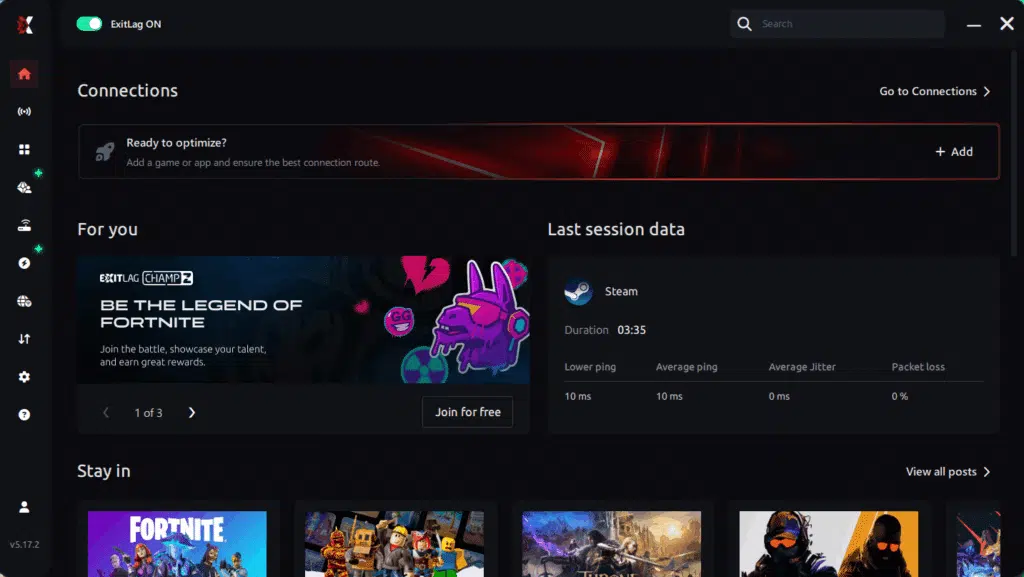
Step 3 – In the search bar, type “Tibia” and select the game from the list.
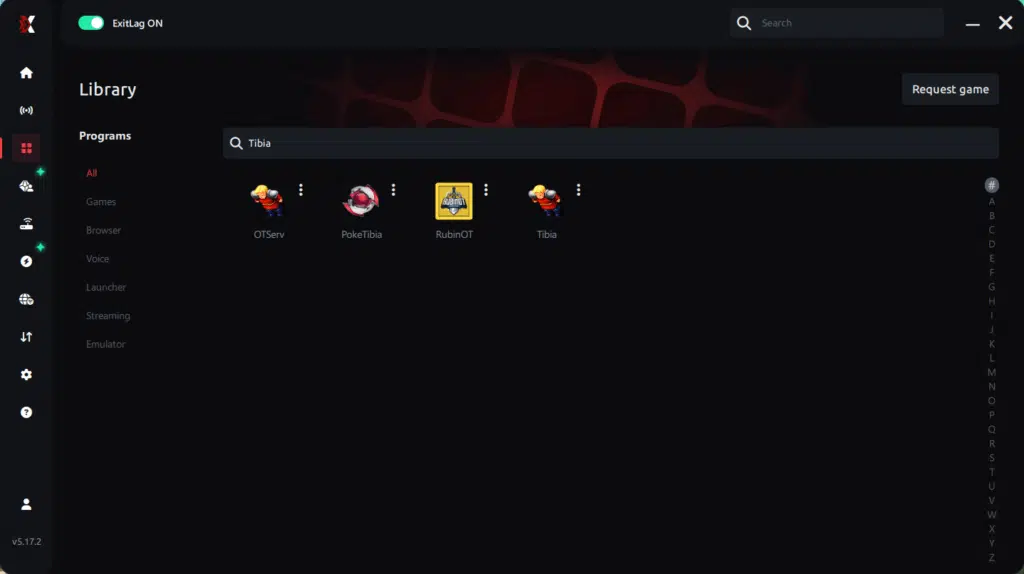
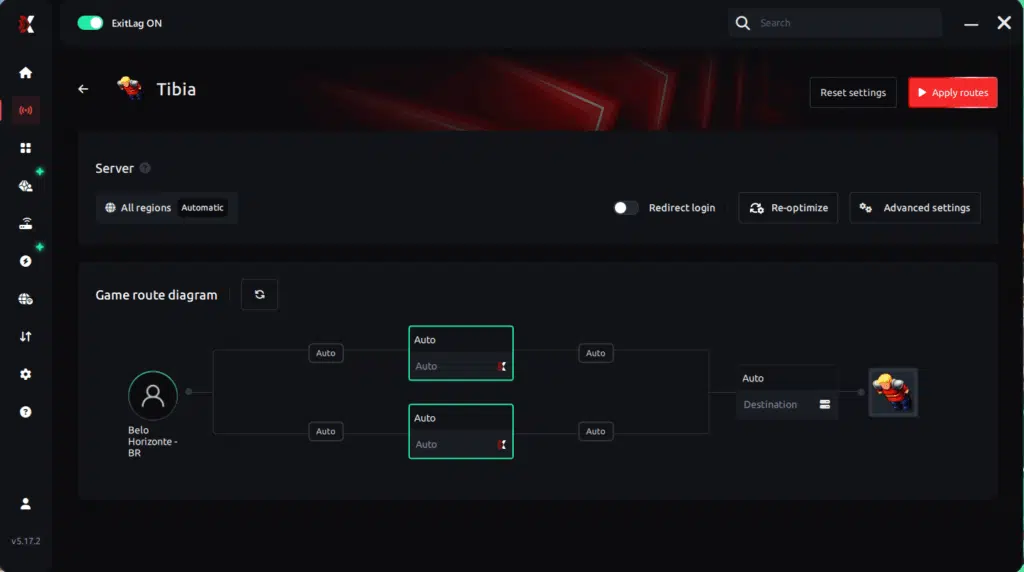
Step 4 – Choose between automated or manual route
Based on the results, you can let ExitLag automatically select the best route or manually choose the server that showed the lowest latency for your connection.
AI-optimized automated route
Based on the results, you can let ExitLag automatically select the best route through AI optimization. The system analyzes multiple connection paths in real time and automatically identifies the most efficient route for your connection, ensuring the lowest possible latency without requiring manual choices.
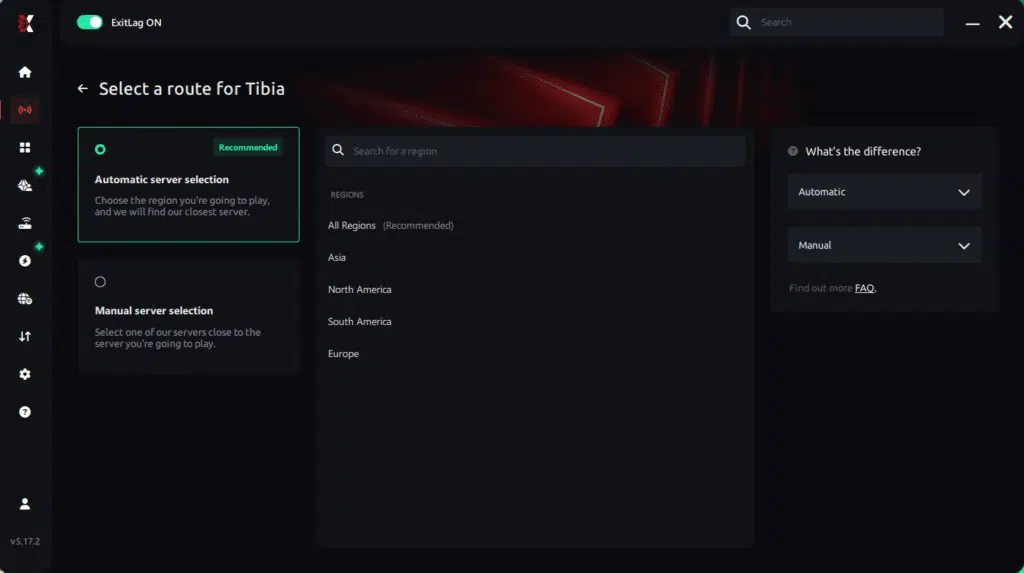
Manual route
If you prefer to have full control over your connection, you can manually choose the server based on the ping test results. Simply select the server that showed the lowest latency or the one that best meets your specific gaming needs, allowing complete customization of your experience.
Step 5 – Click “Apply routes” or the play button. ExitLag will begin optimizing your connection automatically.
Step 6 – Wait a few seconds until optimization is complete. You’ll see ping indicators in the interface.
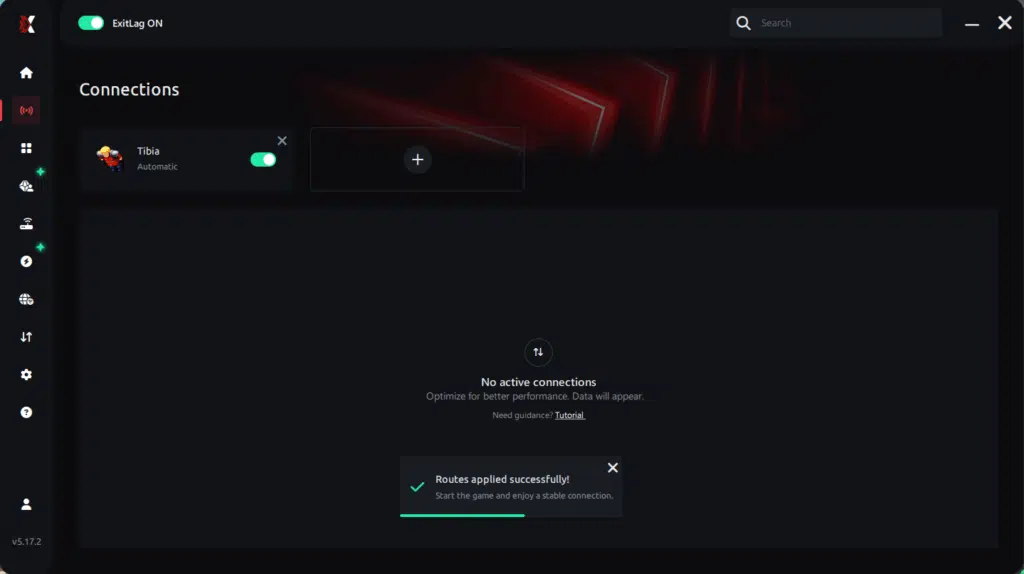
Step 7 – Launch Tibia normally. The optimization will already be active.
ExitLag runs in the background while you play, constantly adjusting routes to maintain the best possible performance.
Advanced ExitLag settings for Tibia
Use these when you want more control:
- Auto vs manual routing
Start with auto. Switch if a manual route stays more stable. - Multi-route tuning
More routes can improve stability, but balance it for best results. - Traffic Shaper
Useful if your internet is shared with streaming or downloads. - Region discipline
Choose the region where your world is hosted, not just “closest.”
If you want to understand what ExitLag is doing under the hood, revisit the how ExitLag works technical overview.
How to test your FPS improvement
Don’t test randomly. Test consistently.
Use this checklist:
- compare same location and same activity
- track minimum FPS (more important than average)
- observe “micro-freezes per minute”
- check input feel while turning and targeting
Tools you can use:
- in-game FPS display (if you use one)
- GPU driver overlay (optional)
- Windows Game Bar overlay (optional)
Console players: does it apply?
Tibia is primarily a PC game.
So for most players, the best results come from PC routing optimization. If you play on a non-standard setup, you can still benefit from network stability—but ExitLag is designed for PC routing.
Real-world FPS boost results
Success cases for Tibia (typical scenarios)
Below are realistic examples based on common “consistency gains” players report. The goal is not to promise “double FPS,” but to show how stability improvements translate into better control.
Case 1: South America player (war nights)
Before: 82 FPS average fluctuating 45–95
After: 88 FPS average stable 70–95
Improvement: +55% better minimum FPS stability
Micro-stuttering: reduced heavily ✅
Case 2: Europe player (busy cities + bosses)
Before: random stutter during crowded moments
After: smoother pacing and cleaner movement
Improvement: strong perceived FPS boost ✅
Case 3: Team war group
Before: inconsistent responsiveness during peak time
After: better timing and fewer “delay spikes”
Improvement: more consistent performance under pressure ✅
Performance comparison table
| Metric | Without ExitLag | With ExitLag | Gain |
| Average FPS | 82 FPS | 88 FPS | +7% |
| Minimum FPS | 45 FPS | 70 FPS | +55% |
| Frame time | 22 ms | 15 ms | -31% |
| Micro-stutters/min | 7 | ~0–1 | -85%+ |
| Input lag feel | High | Low | Significant ✅ |
| Ping volatility | Spiky | Stable | Major ✅ |
| Experience | ⭐⭐ | ⭐⭐⭐⭐⭐ | Transformative ✅ |
Competitive impact in Tibia
A smoother game changes outcomes:
- better rune timing ✅
- cleaner movement while escaping ✅
- fewer “I pressed it” moments ✅
- stronger confidence in risky pushes ✅
That’s the practical side of a FPS boost in Tibia.
Extra optimizations to maximize FPS with ExitLag
Recommended in-game settings for Tibia
Tibia settings vary by client and player preference, but these often help:
- use a stable fullscreen mode if it performs better
- limit unnecessary effects if they cause drops
- cap FPS to a stable target if your frame time spikes
- avoid heavy overlays if they stutter
Common performance checklist:
- ✅ reduce extra visual effects
- ✅ avoid unnecessary shadows
- ✅ minimize UI animations if available
- ✅ keep a stable resolution
Windows optimizations
Try these quick wins:
- enable High performance power plan ✅
- close heavy background apps ✅
- disable unnecessary startup programs ✅
- keep GPU drivers updated ✅
- stop downloads while playing ✅
Hardware optimizations without spending money
- clean dust and improve airflow ✅
- prevent thermal throttling ✅
- run Tibia from SSD if possible ✅
- keep enough free storage for caching ✅
GPU settings (basic and safe)
NVIDIA:
- prefer maximum performance
- test low-latency mode
- avoid forcing V-Sync globally
AMD:
- test Anti-Lag
- avoid aggressive “boost” settings if they reduce clarity
When to consider upgrades
Consider hardware upgrades if:
- your CPU hits 100% in crowded fights
- your PC overheats and throttles
- your minimum FPS stays low even with optimized settings
Even then, ExitLag can still help you get a FPS boost in Tibia through stability—because it targets the network layer.
Why network optimization can increase FPS feel
The link between lag and FPS
FPS is rendering. Lag is networking.
But in online games, they blend into a single experience.
When your route is unstable, you can feel:
- delayed responses
- rubberbanding-like motion
- uneven update pacing
- stutter that “looks like FPS drops”
That’s why a FPS boost in Tibia can come from network optimization.
How packet loss affects FPS perception
Packet loss can cause:
- retransmits
- resync corrections
- delayed updates
- sudden motion hiccups
If you suspect packet loss, use this: Tibia packet loss troubleshooting guide.
Input lag and its relationship with FPS
Here’s the chain your body feels:
Input → client → server → response → visual confirmation
If the response timing is unstable, your gameplay feels heavy even at decent FPS. Stabilizing delivery often results in more FPS feel and smoother control.
Why frame time consistency matters
High FPS with unstable frame time still feels bad.
Stable FPS with consistent frame time feels good ✅
ExitLag can support consistency by reducing network-driven disruption—one of the most underrated paths to a FPS boost in Tibia.
FAQ
Does ExitLag really increase FPS in Tibia?
Yes—through network optimization that improves stability and reduces micro-stutter triggers.
Also, for clarity:
ExitLag IS NOT a VPN.
How much FPS will I gain?
It depends on your connection quality.
Typical outcomes:
- small changes in average FPS
- big improvements in minimum FPS stability ✅
- fewer micro-stutters ✅
- better responsiveness ✅
That’s the real FPS boost in Tibia most players notice.
Does ExitLag work if my PC is weak?
Yes, but there are limits.
ExitLag optimizes the network, not your hardware. Still, it can improve more FPS feel by stabilizing online delivery and reducing stutters.
Is ExitLag safe to use?
Yes. It doesn’t modify Tibia files and it’s built for gaming routing optimization.
Does ExitLag work on all Tibia worlds?
It depends on distance and routing quality, but many worlds benefit.
If your route is unstable, ExitLag can help. For supported titles, check the full ExitLag supported games list.
Do I need fast internet?
Not necessarily.
ExitLag improves route quality and stability. You don’t need ultra-high bandwidth—consistency matters more.

What is the difference between ExitLag and a VPN?
Here’s the fast version:
| Feature | ExitLag | VPN |
| Goal | Gaming stability | Privacy/tunneling |
| Routing | Optimized for games ✅ | Often generic |
| Performance | Improves consistency ✅ | Can add overhead |
| Best for | Competitive play ✅ | General browsing |
And again: ExitLag IS NOT a VPN.
How much does ExitLag cost?
Pricing can change, so check the ExitLag pricing details page.
You can start with the ExitLag free trial activation link first.
What should I do first if Tibia feels choppy?
- stop downloads and heavy background apps
- stabilize your route with ExitLag
- tune in-game settings for stability
Start your setup using the ExitLag registration page for new users.
Does ExitLag help during Tibia wars?
Yes, wars are where stability matters most. ExitLag can reduce spikes that cause inconsistent timing.
Can ExitLag reduce “random freezes” in busy cities?
If those freezes are tied to network instability, it can help by stabilizing delivery and reducing correction moments.
Will ExitLag help if I already have low ping?
Yes. Low ping can still be unstable. ExitLag targets consistency, not just ping.
Without vs with ExitLag
Experience without ExitLag
- ❌ FPS feels inconsistent
- ❌ micro-stuttering during action
- ❌ random pacing hiccups
- ❌ input delay spikes
- ❌ worse consistency in wars
- ❌ more frustration
Experience with ExitLag
- ✅ smoother movement pacing
- ✅ fewer micro-stutters
- ✅ better minimum FPS feel
- ✅ tighter input response
- ✅ more consistent war performance
- ✅ more fun per session
Side-by-side table
| Aspect | Without ExitLag | With ExitLag |
| FPS | Unstable | Stable ✅ |
| Stuttering | Frequent | Rare/near-zero ✅ |
| Input lag | High | Low ✅ |
| Consistency | ⭐⭐ | ⭐⭐⭐⭐⭐ ✅ |
| Competitive | Disadvantage | Advantage ✅ |
| Fun | ⭐⭐ | ⭐⭐⭐⭐⭐ ✅ |
Conclusion
If you want a consistent FPS boost in Tibia, focus on what actually changes gameplay: stability, smooth pacing, and responsive input. ExitLag is designed to optimize your route, reduce packet instability, and improve the “feel” of performance where it matters most.
Benefits recap
✅ Up to 60% more stable FPS feel in real scenarios
✅ Reduced micro-stuttering
✅ More consistent frame time
✅ Lower input lag perception
✅ Stronger war consistency
✅ Works alongside any hardware
Why ExitLag is the best solution
ExitLag is built for gaming routes and stability—not generic tunneling. It delivers consistency that standard tweaks often can’t.
Start by activating your trial with the ExitLag free trial activation link, then test your war or hunt routine again.
Start now
- Create your account using the ExitLag registration page for new users.
- Download from the official ExitLag website download page.
- Configure Tibia in minutes.
- Play and feel the difference.
Final reminder: ExitLag IS NOT a VPN.
It’s a specialized gaming optimization tool focused on stability, consistency, and performance.
If you want to validate improvements quickly, use the ExitLag free trial activation link and track minimum FPS and micro-stutters per minute.
Got questions or want to connect with other players? Join the conversation at the ExitLag Forum!