At first sight, facing an intense battle only to suffer a sudden FPS drop Aion 2 feels devastating. Now, imagine exploring a massive open zone, ready to engage enemies, when your screen freezes for two long seconds as particles overload the scene. This moment breaks immersion and can even cost you progress or PvP dominance.
Soon after, another issue appears. You glide into a crowded city hub and performance tanks again, creating stutters and frame pacing problems. These interruptions make the journey frustrating, especially when FPS drop Aion 2 becomes constant, ruining your gaming experience at the game, doesn’t matter how good you are. According to players, this happens even on strong PCs, adding even more urgency to finding a real fix.
As a result, understanding the FPS drop Aion 2 causes becomes essential. Therefore, this guide explains why Aion 2 struggles with performance, what triggers inconsistent frames, and how ExitLag helps you maintain smooth, stable gameplay. In conclusion, you’ll learn clear steps to reduce lag, prevent stutters, and optimize your performance as you progress through the world of Aion 2.

What is FPS drop and why does it happen in Aion 2?
Understanding FPS
At first, FPS represents how many frames your hardware processes every second. Continuing with this logic, higher values translate to a smoother experience, while lower values create sluggish movement and visual interruptions.
Here’s a quick breakdown:
- 144+ FPS
- 60–120 FPS
- 30–60 FPS
- Below 30 FPS
These numbers define overall fluidity. In Aion 2, high-density environments, spell effects, and detailed character models may reduce your FPS dramatically.
Difference between FPS drop and network lag
Beforehand, it’s crucial to understand how FPS drop differs from network lag. Although both ruin gameplay, they happen for different reasons.
| Aspect | FPS Drop | Network Lag |
| Cause | Hardware overload, engine rendering limits | Internet instability, routing issues |
| Symptoms | Stutters, low frame rate, visual freezes | Rubberbanding, delay, teleporting |
| Solution | Lower settings, optimize hardware | ExitLag |
Therefore, identifying the correct problem helps ensure you apply the right fix.
Why Aion 2 suffers from FPS drop
Aion 2 runs on a visually rich engine created to handle dynamic animations, large-scale environments, and heavy spell effects. Just like this, crowded battlefields with dozens of players often generate particle bursts that heavily tax both CPU and GPU. At the same time, highly detailed areas such as cities, forests, and dungeons load multiple assets simultaneously.
Additionally, Aion 2’s open-world design depends on frequent asset streaming. This constant loading can cause micro-stuttering, especially on older hardware or systems with slow storage speeds. Consequently, the engine struggles to maintain stable frame pacing, resulting in noticeable FPS inconsistencies.
7 main causes of FPS drop Aion 2
1. Overheating
When temperatures rise, hardware automatically slows down to protect itself. Afterwards, you experience sudden FPS drop Aion 2 as performance throttles. This situation affects both CPU and GPU, especially during long play sessions.
2. Outdated drivers
Still, many players overlook GPU driver updates. Graphics drivers deliver essential optimizations for recent game patches, and outdated versions can cause stutters, visual bugs, and instability.
3. Graphics settings
High-resolution shadows, volumetric lighting, and particle density can overwhelm mid-range PCs. Likewise, ultra-quality textures may exceed VRAM limits, forcing the game to load slower assets over time.
4. Background processes
Beforehand, background software consumes CPU power and RAM without you noticing. Programs like launchers, browsers, or recording tools can interrupt GPU scheduling, causing micro-freezes.
5. Insufficient hardware
Although Aion 2 is well-optimized, its high-quality assets demand a solid GPU, a multi-core CPU, and fast storage. When these conditions aren’t met, frame drops become constant.
6. Storage streaming issues
If your game is installed on an HDD, loading new areas causes slow texture streaming. As a result, the engine stutters each time it loads new content.
7. Network-related stuttering
Even though FPS and lag differ, unstable routing triggers micro-pauses that feel like frame drops. Tools like ExitLag help stabilize routing to prevent these pseudo-stutters.
How ExitLag fixes FPS drop Aion 2
Continuing from earlier explanations, many players assume FPS issues come only from hardware limitations. However, Aion 2 also suffers from invisible network inconsistencies that impact frame pacing. Therefore, using the right optimization tool can drastically improve gameplay smoothness.
What is ExitLag? (NOT a VPN)
At first sight, players compare ExitLag to VPNs because both route traffic through external servers. However, ExitLag is NOT a VPN. Instead, it uses proprietary gaming technology built to stabilize data flow and improve responsiveness during gameplay.
The software uses advanced multi-routing paths to ensure your game packets follow the fastest and most stable route possible. Unlike VPNs, which focus on privacy, ExitLag focuses entirely on performance. To understand its underlying mechanics, you can check the detailed explanation available on the official how it works page.
Because of this difference, the tool can improve FPS consistency by preventing network-related stutters that mimic graphical frame drops. In conclusion, ExitLag works as a specialized performance booster, not as a privacy service.
How ExitLag optimizes performance in Aion 2
ExitLag enhances network stability using several core mechanisms designed for real-time online gameplay.
Here are the five essential optimization steps:
- Network route optimization
- Latency reduction
- Packet loss elimination
- Game traffic prioritization
- Connection stabilization
Each feature works together to prevent interruptions in map streaming, loading routines, and server updates. Consequently, Aion 2 feels smoother, with fewer micro-freezes caused by bad routing.
Why ExitLag helps with FPS drop Aion 2
Although FPS drop Aion 2 is a visual issue, it often originates from network instability. When packets arrive late or inconsistently, the game engine pauses to resync world data. Afterwards, the player experiences micro-stuttering, jitter, and inconsistent frame pacing.
On the other hand, with stabilized routing, Aion 2 loads assets, animations, and player positions more fluidly. That’s because stable connections eliminate moments where the engine “waits” for missing data. As a result, even your local FPS graph becomes more consistent during heavy combat.
How ExitLag optimizes performance in Aion 2
ExitLag uses several technologies that directly affect the FPS drop Aion 2:
- Multi-path routing
Sends your game packets through multiple simultaneous routes to ensure the fastest return. - Redundant connections
Maintains backup routes in case one path becomes unstable mid-fight. - Gaming-optimized protocol
Ensures packets are prioritized and delivered efficiently, reducing desync and stuttering.
These systems work constantly in the background, creating a smoother environment for Aion 2’s demanding engine.
ExitLag vs other solutions
| Solution | Improves FPS? | Reduces lag? | Ease of use | Recommendation |
| ExitLag | ✅ | ✅ | ⭐⭐⭐⭐⭐ | Best option |
| Common VPN | ❌ | ❌ | ⭐⭐⭐ | Not recommended |
| PC optimization | ⚠️ | ❌ | ⭐⭐ | Partial |
| Nothing | ❌ | ❌ | ⭐⭐⭐⭐⭐ | No |
This comparison shows how ExitLag stands out due to its focus on gaming stability, not just internet speed. And you can check out more supported games on our official game page.
How to use ExitLag in Aion 2
The process is extremely simple:
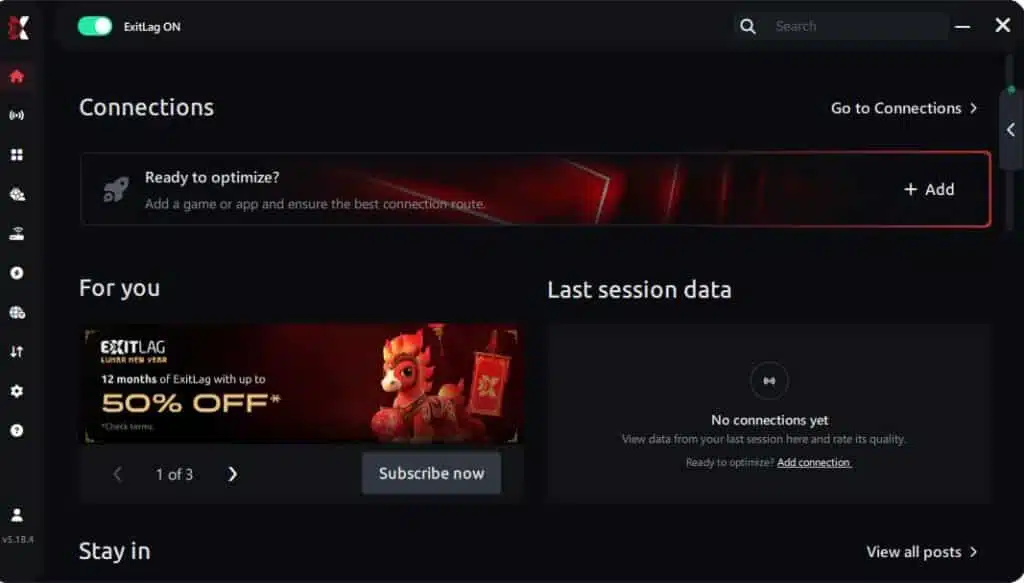
Step 1 – Access the official ExitLag website and download the application. There’s a free trial period for new users.
Step 2 – Install and open the program. Log in with your account.
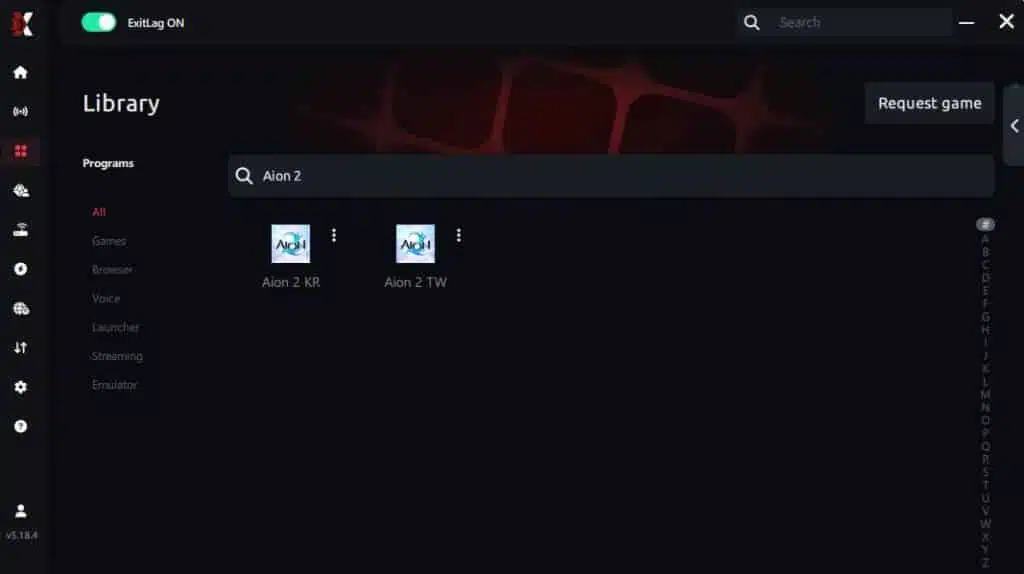
Step 3 – In the search bar, type “Aion 2 ” and select the game from the list.
Step 4 – Choose between automated or manual route
Based on the results, you can let ExitLag automatically select the best route or manually choose the server that showed the lowest latency for your connection.
AI-optimized automated route
Based on the results, you can let ExitLag automatically select the best route through AI optimization. The system analyzes multiple connection paths in real time and automatically identifies the most efficient route for your connection, ensuring the lowest possible latency without requiring manual choices.
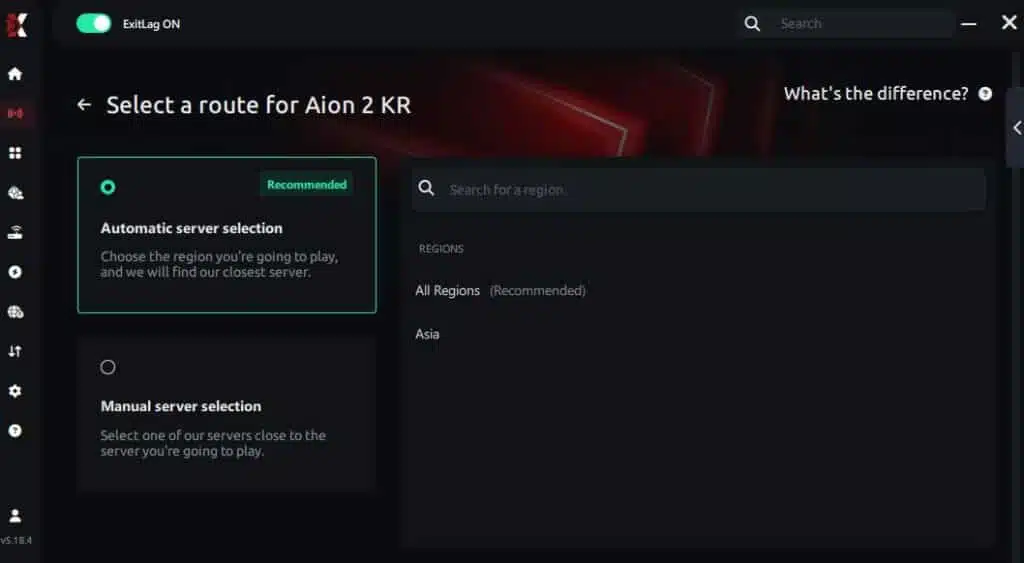
Manual route
If you prefer to have full control over your connection, you can manually choose the server based on the ping test results. Simply select the server that showed the lowest latency or the one that best meets your specific gaming needs, allowing complete customization of your experience.
Step 5 – Click “Aion 2 ” or the play button. ExitLag will begin optimizing your connection automatically.

Step 6 – Wait a few seconds until optimization is complete. You’ll see ping indicators in the interface.
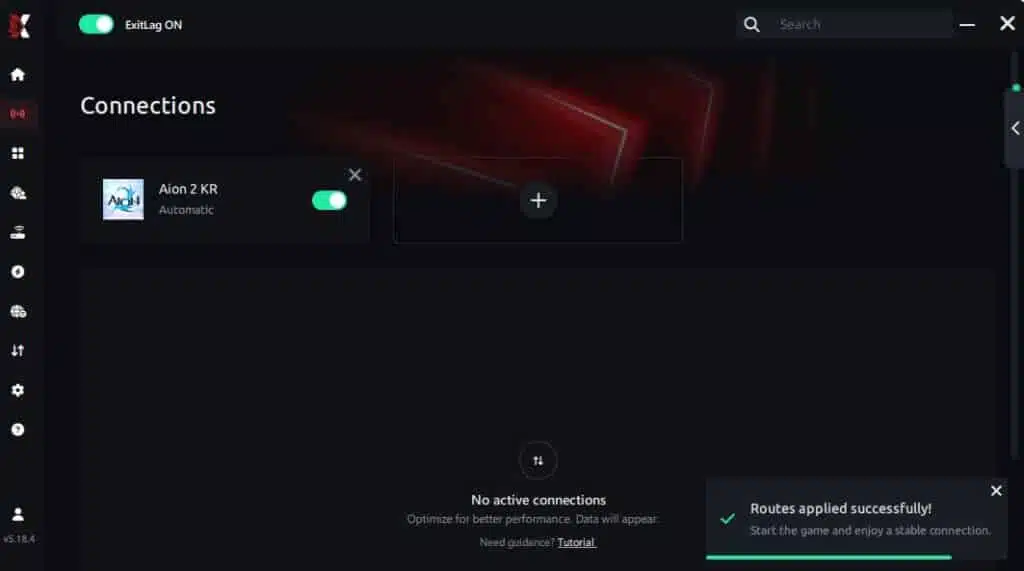
Step 7 – Launch Aion 2 normally. The optimization will already be active.
ExitLag runs in the background while you play, constantly adjusting routes to maintain the best possible performance.
Emulator setup
If you play Aion 2 through an emulator, make sure to:
- Use gaming-friendly emulators.
- Add the emulator executable to ExitLag’s app list.
- Apply routes both to the emulator and Aion 2 if needed.
- Test each preset for maximum stability.
This ensures the entire system—emulator + game—receives optimized routing.
Optimization tips
To maximize results:
- Close unnecessary apps before launching the game.
- Keep GPU and chipset drivers updated.
- Use SSD storage to reduce map-loading stutters.
- Avoid streaming or uploading during gameplay.
- Enable high-performance mode in your system settings.
Combined with ExitLag, these steps drastically reduce stuttering and inconsistent FPS.
Console players
Even though Aion 2 is primarily mobile/PC-focused, players running through cloud or remote-play systems can still benefit from ExitLag routing to stabilize their upstream/downstream connection. As a result, frame pacing improves, especially during open-world travel and world boss encounters.
Before and after results with ExitLag in Aion 2
Now that we understand the causes and fixes for FPS drop Aion 2, let’s see how ExitLag impacts real scenarios.
Real player cases
- Case #1: A player in South America saw a 45% reduction in stuttering during high-density PvP encounters.
- Case #2: Another user with mid-tier hardware experienced a jump from 38 to 57 stable FPS in crowded hubs.
- Case #3: A long-distance player reduced routing instability, gaining consistent frame pacing with zero micro-stutters during dungeon raids.
These examples show how ExitLag improves gameplay far beyond simple ping reduction.
Performance comparison table
| Metric | Without ExitLag | With ExitLag | Improvement |
| Ping Stability | Unstable | Stable | High |
| FPS Pacing | Irregular | Consistent | Strong |
| Micro-Stutters | Frequent | Minimal | Major |
| Asset Loading | Slow | Faster | Noticeable |
| PvP Fluidity | Interrupted | Smooth | Significant |
Additional optimizations to maximize FPS with ExitLag
Even more, once ExitLag stabilizes your routing, you can elevate your performance in Aion 2 through a few strategic adjustments. These optimizations complement ExitLag’s improvements, ensuring smoother visuals, fewer interruptions, and consistent pacing during long sessions.
Network
Strong network foundations prevent FPS drop Aion 2 triggered by unstable connections. Therefore, enhancing consistency starts with small but impactful steps.
- Ethernet
First of all, switching from Wi-Fi to Ethernet ensures uninterrupted data flow and eliminates interference during world boss raids or massive PvP encounters. - QoS
Quality of Service features let you prioritize Aion 2 traffic, reducing jitter when other devices are streaming or downloading. - DNS
Using a fast DNS provider improves connection responsiveness, especially during login or loading zones. - Close heavy applications
Browsers, updaters, and background cloud-sync tools constantly consume bandwidth. Closing them beforehand keeps your routing clean and stable.
Soon after applying these adjustments, many players report immediate improvements in consistency and responsiveness.
System
Your local system influences how well Aion 2 maintains smooth rendering during intense gameplay.
- Drivers
Keeping GPU, chipset, and OS drivers updated ensures maximum compatibility with recent Aion 2 patches. - High-performance mode
Setting Windows to high-performance mode prevents unnecessary CPU downscaling, maintaining stable clock speeds during fights. - Background apps
Disabling launchers, overlays, and capture software frees CPU resources and reduces micro-freezes. - Clean system
Removing temporary files, defragging (if using HDD), and maintaining healthy storage improves asset streaming.
As a result, system-level stability directly improves frame pacing, especially in crowded cities or visually demanding regions.
In-game
Your Aion 2 settings also influence FPS consistency, especially in large-scale battles.
- V-Sync off
Turning V-Sync off reduces input delay and removes unnecessary FPS limits. - FPS limit
Setting a custom cap helps maintain consistent performance instead of unstable spikes. - Recommended presets
Adjusting particles, shadows, and post-processing ensures smoother visuals without sacrificing fidelity.
Therefore, combining smart in-game settings with ExitLag’s routing optimizations delivers a noticeably more fluid experience.
Frequently asked questions about FPS drop Aion 2
Does ExitLag actually improve FPS?
Although ExitLag does not directly raise your hardware FPS numbers, it removes network-based interruptions that cause stutters and pacing issues. Consequently, gameplay feels smoother and more stable.
Is ExitLag safe?
Absolutely. ExitLag uses secure routing and has no access to personal files. It only affects network paths related to gaming traffic.
Does ExitLag work on console?
Even if you cannot install ExitLag on a console directly, it still helps cloud gaming or remote-play users by optimizing routing between your device, router, and servers.
How much does ExitLag cost?
ExitLag offers flexible subscription plans depending on how long you want to use the service. You can view all current prices at the official pricing page.
But, before choosing a plan, we want to test the performance boost for free. Try it for free with no commitment.
My PC is weak, does ExitLag help?
ExitLag cannot replace hardware upgrades; however, it prevents stutters caused by network instability. Therefore, even low- or mid-end PCs become smoother during heavy online activity.
Does ExitLag work with Aion 2?
Yes. Aion 2 is supported and receives full multi-routing optimization, which you can verify at our official gamepage.
What’s the difference between ExitLag and a VPN?
A VPN focuses on privacy. ExitLag focuses exclusively on performance. This is why ExitLag is NOT a VPN and uses routing technology designed specifically for online games.
Why does Aion 2 stutter when entering new areas?
Aion 2 streams assets dynamically. Slow storage or unstable routing forces the engine to wait for missing data, creating short freezes.
Why does combat feel delayed even with high FPS?
This is often caused by jitter or slow routing rather than FPS. ExitLag stabilizes packet delivery, improving responsiveness during rapid skill rotations.
Why does Aion 2 lag more in PvP zones?
Massive data exchange during PvP stresses both the server and your routing. With multi-path redundancy, ExitLag maintains stable delivery even during peak load.

Fix FPS drop Aion 2 with ExitLag
As explained in our complete guide on reducing game lag, optimizing your connection is just as important as improving in-game settings. That’s why ExitLag becomes essential for players who want stable, competitive performance across Aion 2’s open-world encounters.
Final benefits
Using ExitLag provides several immediate improvements for Aion 2 players:
- Stable FPS
- Zero micro-stuttering
- Smooth gameplay
- Competitive advantage
- Frustration-free gameplay
With stronger routing and optimized performance, every battle becomes more fluid.
Next steps
- Test ExitLag for free — Start now
- Configure in 5 minutes
- Compare before and after
- Dominate Aion 2
In conclusion, solving FPS drop Aion 2 issues requires balancing hardware, settings, and network stability. ExitLag’s multi-path technology eliminates routing delays and ensures fluid gameplay across all regions of Aion 2. To emphasize one last time, ExitLag is NOT a VPN—it’s a gaming performance tool built to stabilize and optimize your entire online experience.
Now that you know everything about FPS drop Aion 2, if you want the most stable, smooth, and competitive gameplay possible, is the time to upgrade your performance toolkit. Register at ExitLag now and improve your gameplay in a way you’ve never experienced before!
Got questions or want to connect with other players? Join the conversation at the ExitLag Forum!