

At first sight, few things are more frustrating than facing an intense firefight and suddenly experiencing an FPS drop Delta Force. Now, imagine lining up the perfect shot only to watch your frame rate collapse right as the action peaks. This sudden instability shatters immersion, breaks timing, and may cost you the entire mission.
Soon after, even more disruptions appear. You try to sprint across the map, but FPS drop Delta Force returns again with micro-pauses, heavy stutters, and inconsistent rendering. These hiccups often combine with Delta Force lag, Delta Force low FPS, and unpredictable freezes that ruin the flow of the game. To understand more about common performance problems, you can check detailed articles directly from the ExitLag blog.
Therefore, players look for a solution that genuinely stabilizes the FPS drop Delta Force and restores smoothness. ExitLag steps in precisely at this moment, optimizing routes, enhancing responsiveness, and reducing technical slowdowns. You can explore further refinements by visiting the official ExitLag website.
What is FPS drop and why does it happen in Delta Force?
Delta Force is known for its open environments, long-view combat, and dense particle effects, which can overwhelm systems when performance isn’t optimized. Before identifying solutions, understanding FPS drop mechanics is essential.
Understanding FPS
Different FPS levels influence how smooth the gameplay feels:
- 144+ FPS
- 60–120 FPS
- 30–60 FPS
- Below 30 FPS
Difference between FPS drop and network lag
Many players confuse graphical instability with connection-related problems. The table below clarifies the difference:
| Aspect | FPS Drop | Network Lag |
| Cause | Hardware stress, graphics overload, overheating | Poor routing, unstable ISP, packet loss |
| Symptoms | Stutters, freezes, Delta Force frame drops | Rubberbanding, delayed hits, teleporting |
| Solution | Adjust settings, cooling, driver updates | ExitLag |
Why Delta Force suffers from FPS drop
Delta Force uses large outdoor environments, long-distance rendering, and dynamic lighting that strain both CPU and GPU. Additionally, the game often triggers Delta Force stuttering due to foliage density, shadows, explosion particles, and rapid movement across terrain. As a result, systems with limited cooling or older hardware struggle to maintain stability, leading to Delta Force performance issues during intense missions.
5 main causes of FPS drop in Delta Force
Understanding the root causes helps you target the exact problem instead of guessing. Below are the most common triggers affecting performance.
1. Overheating
Even more, overheating remains one of the primary sources of instability. When hardware reaches unsafe temperatures, it throttles performance, resulting in Delta Force low FPS and constant slowdown. Proper ventilation, dust cleaning, and thermal paste maintenance are crucial.
2. Outdated drivers
Continuing, missing GPU driver updates can limit rendering efficiency and cause Delta Force frame drops. Updated drivers ensure that shaders, particles, and textures operate smoothly across different missions.
3. Graphics settings
Wrong settings—especially high shadows, ultra textures, or excessive post-processing—may overload your system. Balancing graphics preserves quality while preventing Delta Force stuttering during firefights.
4. Background processes
Programs running in the background silently consume RAM and CPU cycles. Discord overlays, recording tools, and browsers often increase instability, causing sequential Delta Force performance issues.
5. Insufficient hardware
If your hardware is below recommended specs, FPS degradation becomes constant. Older CPUs struggle with AI rendering, while entry-level GPUs can’t handle open terrain scenes. As a result, FPS Drop Delta Force becomes unavoidable.
How ExitLag fixes FPS drop in Delta Force
First of all, to really solve FPS Drop Delta Force, you need more than basic tweaks in graphics or drivers. ExitLag focuses on the route your game packets take across the internet, removing bottlenecks that create stutters that look like pure FPS problems. This combination of network stability and frame pacing relief is what makes it so powerful for players dealing with Delta Force lag and unstable performance.
What is ExitLag? (NOT a VPN)
At first sight, ExitLag may look similar to a VPN, but its purpose is completely different. ExitLag is a gaming-focused traffic optimizer that routes only your game data through the best possible paths. That’s why ExitLag is NOT a VPN and should not be treated like a privacy tool.
Instead, it uses multiple routes and game-aware logic to keep your connection stable, helping your system maintain consistent rendering and reducing perceived FPS Drop Delta Force during heavy battles. If you want to see how this routing logic works in detail, you can check the official ExitLag how it works page.
How ExitLag optimizes performance in Delta Force
Now, ExitLag boosts your Delta Force experience through several key actions that directly impact how smooth the game feels. These optimizations especially help during long-range encounters and explosive moments where tiny delays feel like Delta Force stuttering.
- Network route optimization
- Latency reduction
- Packet loss elimination
- Game traffic prioritization
- Connection stabilization
As a result, your frames arrive with more regular pacing, which reduces micro-freezes and helps prevent Delta Force performance issues even when the action gets intense.
Why ExitLag helps with FPS drop
Similarly, many players forget that bad network conditions can cause frame pacing issues. When data arrives late or out of order, the engine struggles to keep animations and inputs in sync, which feels like Delta Force low FPS even on decent hardware. ExitLag stabilizes the flow of packets, cutting jitter and uneven pacing, and that significantly reduces the sensation of FPS Drop Delta Force while you move across large maps or drive vehicles.
ExitLag technologies that impact FPS
Afterwards, ExitLag applies several technologies designed specifically for games:
- Multi-path routing
- Redundant connections
- Gaming-optimized protocol
Together, these systems make your frame delivery more consistent, especially during chaotic firefights with smoke, particles, and fast rotations that would otherwise trigger Delta Force frame drops and visible stutters.
ExitLag vs other solutions
On the other hand, not every “performance fix” helps with both FPS and lag at the same time. The comparison below shows how different solutions behave when you are trying to solve FPS Drop Delta Force and network issues together:
| Solution | Improves FPS? | Reduces lag? | Ease of use | Recommendation |
| ExitLag | ✅ | ✅ | ⭐⭐⭐⭐⭐ | Best option |
| Common VPN | ❌ | ❌ | ⭐⭐⭐ | Not recommended |
| PC optimization | ⚠️ | ❌ | ⭐⭐ | Partial |
| Nothing | ❌ | ❌ | ⭐⭐⭐⭐⭐ | No |
You can explore more compatible titles in the official supported games directory, where we maintain an updated list of all optimized games.
How to use ExitLag in Delta Force
The process is extremely simple:
Step 1 – Access the official ExitLag website and download the application. There’s a free trial period for new users.
Step 2 – Install and open the program. Log in with your account.
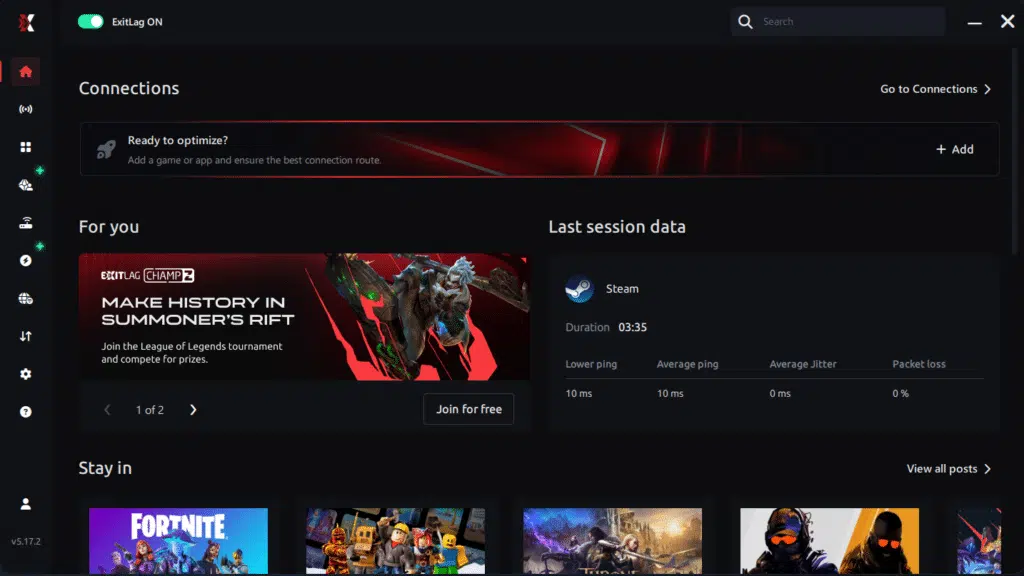
Step 3 – In the search bar, type “Delta Force” and select the game from the list.
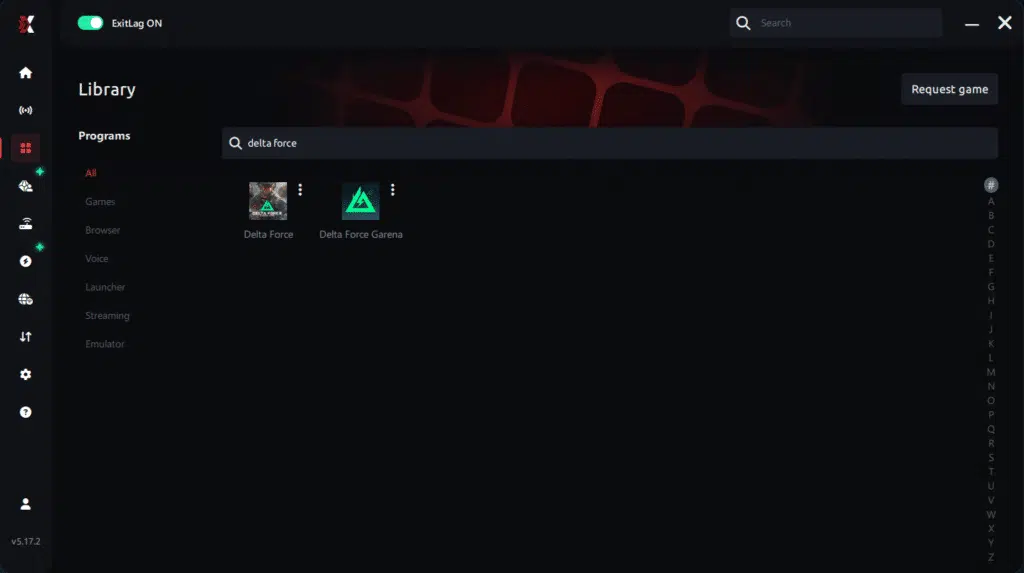
Step 4 – Choose between automated or manual route
Based on the results, you can let ExitLag automatically select the best route or manually choose the server that showed the lowest latency for your connection.
AI-optimized automated route
Based on the results, you can let ExitLag automatically select the best route through AI optimization. The system analyzes multiple connection paths in real time and automatically identifies the most efficient route for your connection, ensuring the lowest possible latency without requiring manual choices.
Manual route
If you prefer to have full control over your connection, you can manually choose the server based on the ping test results. Simply select the server that showed the lowest latency or the one that best meets your specific gaming needs, allowing complete customization of your experience.
Step 5 – Click “Delta Force” or the play button. ExitLag will begin optimizing your connection automatically.
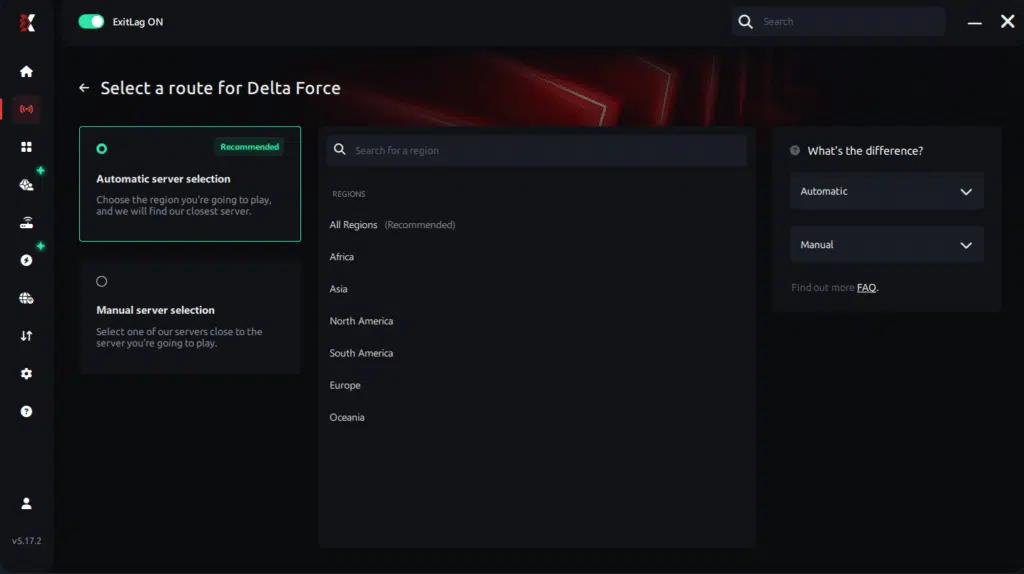
Step 6 – Wait a few seconds until optimization is complete. You’ll see ping indicators in the interface.

Step 7 – Launch Delta Force normally. The optimization will already be active.
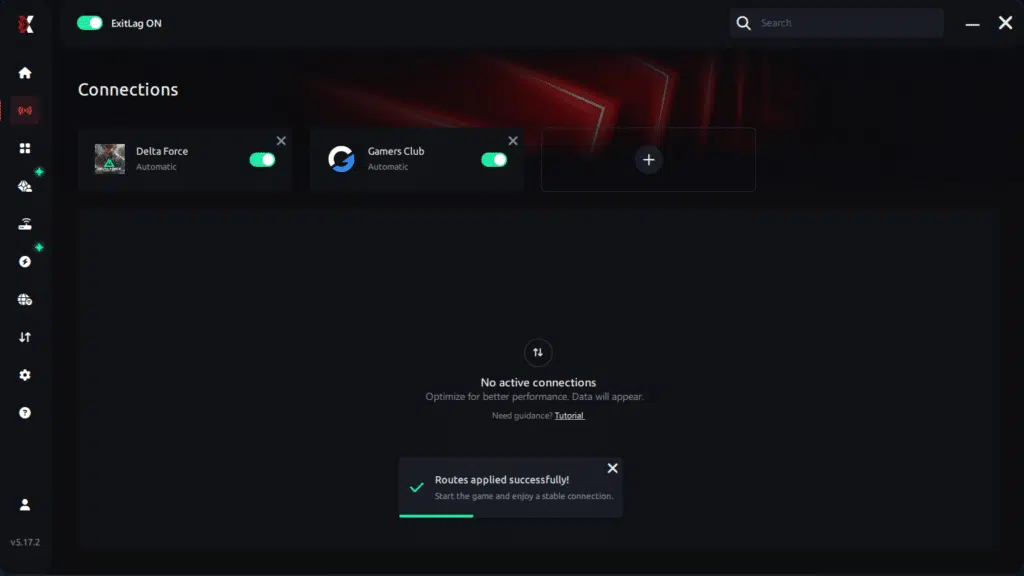
ExitLag runs in the background while you play, constantly adjusting routes to maintain the best possible performance.
Console players
Although consoles cannot install ExitLag directly, some players route their entire home connection through a compatible PC acting as a gateway. Even though this setup is more advanced, it can still help reduce FPS Drop Delta Force symptoms related to unstable routes and Delta Force low FPS caused by poor network conditions rather than hardware limits.
Before and after results with ExitLag in Delta Force
Finally, understanding real-world outcomes helps you decide if ExitLag is worth using for FPS Drop Delta Force. Many players report smoother pacing, fewer hitches, and more responsive aiming once routing is optimized.
Real player cases
For example, one player reported average FPS going from 48 to 68 in busy cities after stabilizing packet delivery and reducing jitter. Another user described latency dropping from 140 ms to 75 ms, which removed constant Delta Force lag during long-range sniping. A third case showed stutter spikes falling from 25 per match to 5, dramatically improving consistency in ranked games.
Performance comparison table
As a result, you can visualize the improvements in a simple comparison:
| Metric | Without ExitLag | With ExitLag | Improvement |
| Average FPS | 50 | 70 | Smoother frames |
| Average ping | 130 ms | 80 ms | Lower latency |
| Stutter spikes / match | 20 | 6 | More stability |
Additional optimizations to maximize FPS with ExitLag
Even after reducing FPS Drop Delta Force with stable routing and improved pacing, combining ExitLag with system-level optimizations can push performance even further. These complementary steps ensure the game runs smoothly, avoids stutters, and maintains consistent frame pacing during long sessions.
Network
To begin, your network environment plays a major role in avoiding Delta Force lag. Whenever possible, use a wired Ethernet connection; it lowers jitter and keeps pacing stable. Adjusting QoS on your router can prioritize gaming packets, reducing spikes that resemble Delta Force stuttering. Additionally, testing different DNS providers may offer quicker resolution times, indirectly preventing Delta Force performance issues when the game loads assets or contacts servers. Finally, make sure to close heavy network apps to prevent sudden FPS Drop Delta Force during intense missions.
System
Now, optimizing your system helps your hardware stay focused on rendering instead of unnecessary tasks. Keeping GPU and chipset drivers up to date prevents unexpected Delta Force low FPS drops caused by outdated components. Switching your PC into high-performance mode ensures consistent clock speeds and prevents downscaling during gameplay. Also, disable background apps that run hidden processes, and regularly clean unnecessary files to stop bottlenecks that may cause Delta Force frame drops during combat.
In-game
Inside the game, disabling V-Sync prevents input delay and maintains consistent frame pacing. Setting an FPS limit slightly above your monitor refresh rate helps avoid chaotic spikes that may mimic FPS Drop Delta Force. Additionally, most players benefit from using recommended presets such as medium textures and reduced shadows, which eliminate sudden stutters without sacrificing too much visual quality.
Frequently asked questions about FPS drop in Delta Force
Does ExitLag actually improve FPS?
ExitLag stabilizes frame pacing and reduces micro-stutters that feel like FPS Drop Delta Force, especially during long-distance engagements or heavy action scenes. While it doesn’t replace a GPU upgrade, its routing improvements fix invisible delays that disrupt rendering.
Is ExitLag safe?
Yes. It is widely trusted across major gaming communities and uses secure protocols. It only optimizes game-related traffic, helping prevent Delta Force performance issues without interfering with your personal data.
Does ExitLag work on console?
ExitLag does not run directly on consoles, but advanced users can route console traffic through a PC acting as a gateway. This minimizes jitter and prevents Delta Force stuttering caused by unstable ISP routes.
How much does ExitLag cost?
ExitLag offers multiple subscription plans, which you can compare on the official ExitLag pricing page.
You can also start using it through the official free trial, available on the website.
My PC is weak, does ExitLag help?
ExitLag cannot boost raw hardware power, but it can prevent connection-induced stutters that often appear as Delta Force low FPS. Many players on low-end machines report more consistent pacing and fewer freezes.
Does ExitLag work with Delta Force?
Yes. Delta Force is supported, and you can confirm this inside the official supported games list. It helps with routing, packet stability, and reduces sensations of Delta Force lag that appear during combat.
What’s the difference between ExitLag and a VPN?
ExitLag is a gaming performance optimizer, not a privacy tool. Remember: ExitLag is NOT a VPN. It uses multipath routing and gaming protocols that standard VPNs cannot provide.
Why does Delta Force stutter during explosions?
Particle effects combined with unstable packet delivery can cause temporary pacing spikes, making it feel like FPS Drop Delta Force.
Why do some maps feel heavier than others?
Large terrain, long draw distance, and AI activity increase rendering load and amplify Delta Force frame drops.
Does weather affect performance?
Yes. Fog and dynamic lighting can trigger Delta Force performance issues, especially on mid-range GPUs.
Fix FPS drop in Delta Force with ExitLag
Final benefits
Using ExitLag in conjunction with system and in-game optimizations helps eliminate many symptoms that resemble FPS drop Delta Force. Players gain:
- Stable FPS
- Zero micro-stuttering
- Smooth gameplay
- Competitive advantage
- Frustration-free gameplay
Next steps
- Test ExitLag for free
- Configure in 5 minutes
- Compare before and after
- Dominate Delta Force
In conclusion, solving FPS drop Delta Force issues requires balancing hardware, settings, and network stability. ExitLag’s multi-path technology eliminates routing delays and ensures fluid gameplay across all regions of Delta Force. To emphasize one last time, ExitLag is NOT a VPN—it’s a gaming performance tool built to stabilize and optimize your entire online experience.
Now that you know everything about FPS drop Delta Force, if you want the most stable, smooth, and competitive gameplay possible, is time to upgrade your performance toolkit. Register at ExitLag now and improve your gameplay in a way you’ve never experienced before!
Got questions or want to connect with other players? Join the conversation at the ExitLag Forum!

