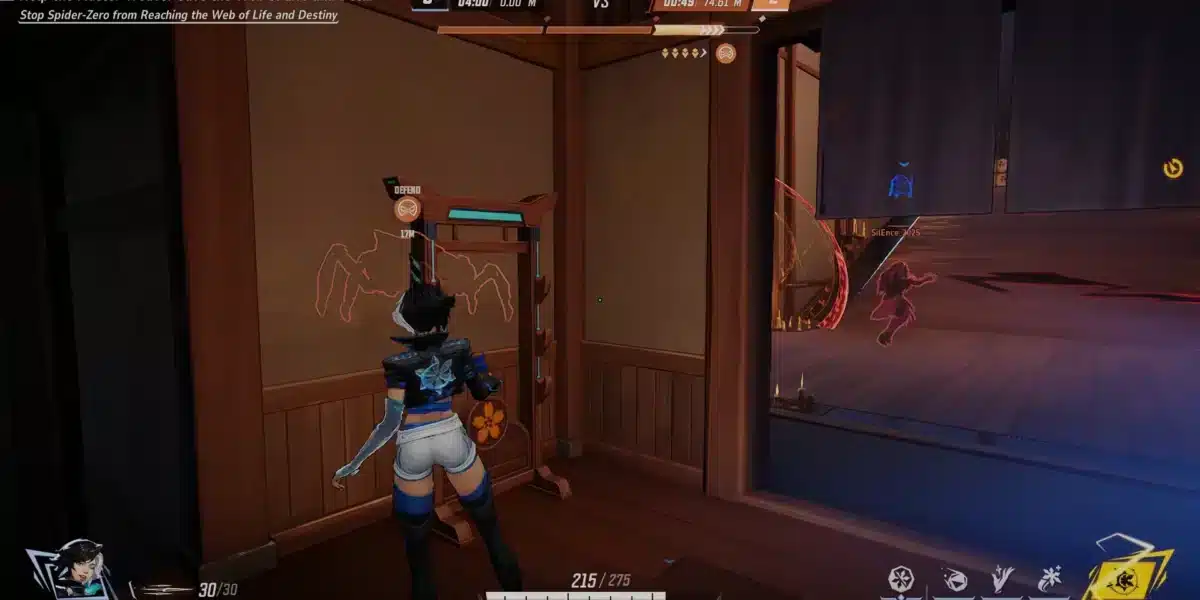
At first sight, nothing feels worse than facing an unexpected FPS Drop Marvel Rivals moment right when a team fight breaks out. Now, imagine lining up a perfect ability combo with your hero, only for the frame rate to collapse. In a fast-paced PvP shooter like Marvel Rivals, even a single freeze can completely change the outcome of the match.
Even more, many players experience situations where the game seems smooth and responsive—until a sudden spike hits. This kind of FPS drop Marvel Rivals often happens during chaotic team pushes, heavy particle effects, or crowded environments. According to several reports shared by competitive players on the official ExitLag blog, these micro-freezes quickly snowball into lost duels, delayed abilities, and moments of total frustration.
Soon after experiencing these performance issues, players look for a reliable fix—one that actually addresses the root causes. Therefore, this guide introduces how ExitLag stabilizes performance, reduces stuttering, and improves overall smoothness. You can learn more directly on the official ExitLag website, naturally linked as: discover ExitLag features. As a result, by the end of this article, you’ll understand exactly why FPS Drop Marvel Rivals happens and how to stop it for good.
What is FPS drop and why does it happen in Marvel Rivals?
Before diving into fixes, it’s important to understand what FPS is and why it drops during heavy Marvel Rivals gameplay. Although FPS is tied mainly to hardware, several in-game situations, visual effects, and background processes also influence performance.
Understanding FPS
In advance, FPS (frames per second) measures how many images your system can render each second. Higher numbers create smoother gameplay.
Typical FPS ranges include:
- 144+ FPS
- 60–120 FPS
- 30–60 FPS
- Below 30 FPS
Therefore, when your FPS suddenly drops, the gameplay becomes choppy, delayed, or even unplayable—especially in a competitive hero shooter like Marvel Rivals.
Difference between FPS drop and network lag
Now, it’s very common for players to confuse a real FPS drop with lag. However, both problems have different causes and symptoms:
| Aspect | FPS Drop | Network Lag |
| Cause | Hardware overload, rendering bottleneck, temperature spikes | Routing issues, unstable connection, packet loss |
| Symptoms | Stuttering, frozen frames, visual slowdown | Delayed actions, rubber-banding, teleporting |
| Solution | Lower rendering load, optimize system | ExitLag |
As a result, identifying which issue affects your match is essential to applying the correct fix.
Why Marvel Rivals suffers from FPS drop
Marvel Rivals is built on a modern engine that processes detailed hero abilities, environmental destruction, physics, and numerous particle effects. Continuing with this point, team fights often include overlapping ultimates, smoke effects, projectiles, lighting bursts, and mobility abilities—all of which demand GPU, CPU, and memory capacity.
Similarly, maps are dynamic, featuring interactive structures, destructible elements, and crowded combat lanes. These combinations generate performance stress, especially when:
- Multiple heroes cast abilities simultaneously
- Explosions trigger high-particle effects
- Visual post-processing intensifies during ultimates
- Textures and models load rapidly during fast rotations
That’s because the engine constantly changes what must be rendered, causing sudden FPS Drop Marvel Rivals moments even on strong PCs.
5 main causes of FPS drop in Marvel Rivals
Beforehand, it’s important to understand the real causes behind performance instability. These factors contribute to most FPS Drop Marvel Rivals complaints among players.
1. Overheating
At first, overheating affects both GPU and CPU performance. When temperatures get too high, components throttle their speed. As a result, Marvel Rivals begins to stutter, especially during large team fights.
2. Outdated drivers
Continuing with this point, outdated GPU drivers are one of the most common causes of Marvel Rivals low FPS. Newer seasons and patches require updated rendering optimizations that older drivers simply don’t support well.
3. Graphics settings
Incorrect settings often overload the system. Post-processing, dynamic shadows, volumetric effects, and high render distance can trigger Marvel Rivals frame drops, primarily when fighting in ability-heavy zones.
4. Background processes
Even so, apps like browsers, recorders, launchers, and overlays constantly consume CPU cycles and RAM. When these processes run in the background, they directly cause Marvel Rivals stuttering issues during intense matches.
5. Insufficient hardware
Possibly the most straightforward cause: some PCs simply don’t meet Marvel Rivals’ recommended requirements. Heavy animations, detailed models, and complex ability effects overwhelm older cards, creating consistent Marvel Rivals performancissues, even at low settings.
How ExitLag fixes FPS drop in Marvel Rivals
Before we explore the technical steps, it’s important to understand how ExitLag directly impacts issues that players commonly interpret as FPS Drop Marvel Rivals. Now, although FPS is traditionally GPU-related, unstable routing creates micro-stutters that mimic real frame drops. Therefore, stabilizing connection pathways is essential for smoother gameplay.
What is ExitLag? (NOT a VPN)
At first sight, some players assume ExitLag works like a traditional VPN, but that is not the case. ExitLag is NOT a VPN, because instead of encrypting traffic or creating generic tunnels, it uses a multi-path routing system designed exclusively for gaming. This means that ExitLag focuses on stability, packet precision, and responsiveness—not privacy layers or masked IPs.
Even more, ExitLag continually analyzes the best possible route for your connection in real time. As a result, players notice fewer micro-freezes, smoother ability timing, and less perceived FPS Drop Marvel Rivals during team fights. To understand its underlying mechanics, you can check the detailed explanation available on the official how it works page.
How ExitLag optimizes performance in Marvel Rivals
Soon after activating ExitLag, players experience more consistent performance across different match scenarios. This stability helps reduce many issues mistaken for FPS Drop Marvel Rivals, especially when rendering complex abilities from multiple heroes.
ExitLag improves your gameplay through the following mechanisms:
- Network route optimization
- Latency reduction
- Packet loss elimination
- Game traffic prioritization
- Connection stabilization
These five pillars work together to keep your Marvel Rivals experience fluid and responsive.
Why ExitLag helps with FPS drop
Although true FPS is a hardware metric, network pacing impacts how smooth gameplay feels. When routing becomes unstable, the game client struggles to sync incoming data, causing visible stutters. These micro-freezes often look identical to Marvel Rivals stuttering or freeze frames.
Continuing with this point, ExitLag reduces jitter, synchronizes packet flow, and stabilizes overall communication with the server. Therefore, ability animations, movement inputs, and combat visibility all remain consistent, reducing perceived FPS Drop Marvel Rivals.
ExitLag technologies that impact FPS
ExitLag uses advanced routing technology to maintain a stable gameplay environment:
- Multi-path routing: Data travels through multiple optimized paths simultaneously.
- Redundant connections: Backup routes prevent interruptions or spikes.
- Gaming-optimized protocol: Prioritizes Marvel Rivals packets for smoother delivery.
As a result, situations with heavy visual effects or chaotic team fights cause fewer Marvel Rivals frame drops and reduced visual jitter.
ExitLag vs other solutions
Below is a comparison showing why ExitLag delivers better stability than alternatives:
| Solution | Improves FPS? | Reduces lag? | Ease of use | Recommendation |
| ExitLag | ✅ | ✅ | ⭐⭐⭐⭐⭐ | Best option |
| Common VPN | ❌ | ❌ | ⭐⭐⭐ | Not recommended |
| PC optimization | ⚠️ | ❌ | ⭐⭐ | Partial |
| Nothing | ❌ | ❌ | ⭐⭐⭐⭐⭐ | No |
Soon after comparing these choices, most players agree that ExitLag is the only solution that improves consistency without introducing new problems. And you can check out more supported games on our official game page.
How to use ExitLag in Marvel Rivals
The process is extremely simple:
Step 1 – Access the official ExitLag website and download the application. There’s a free trial period for new users.
Step 2 – Install and open the program. Log in with your account.
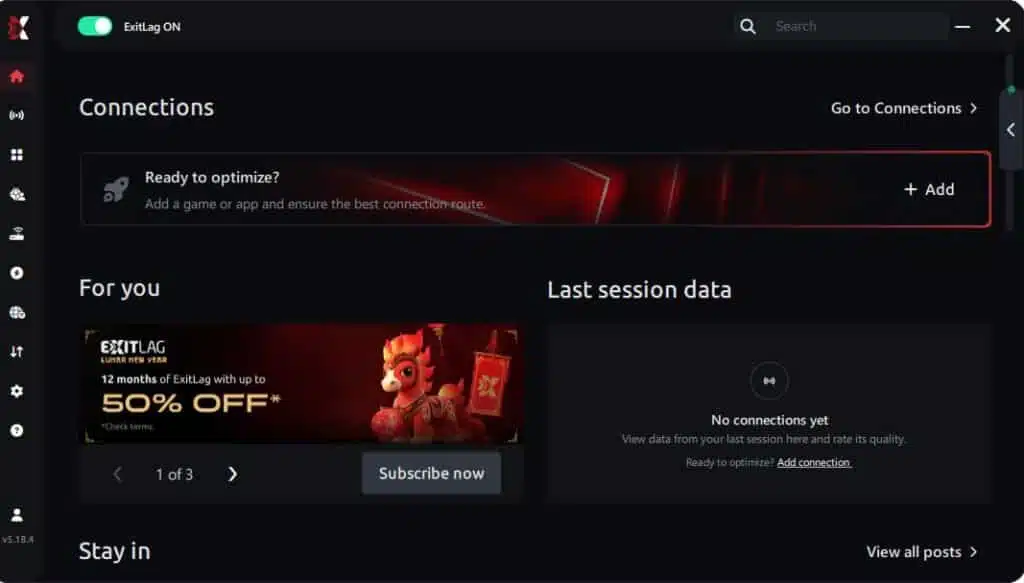
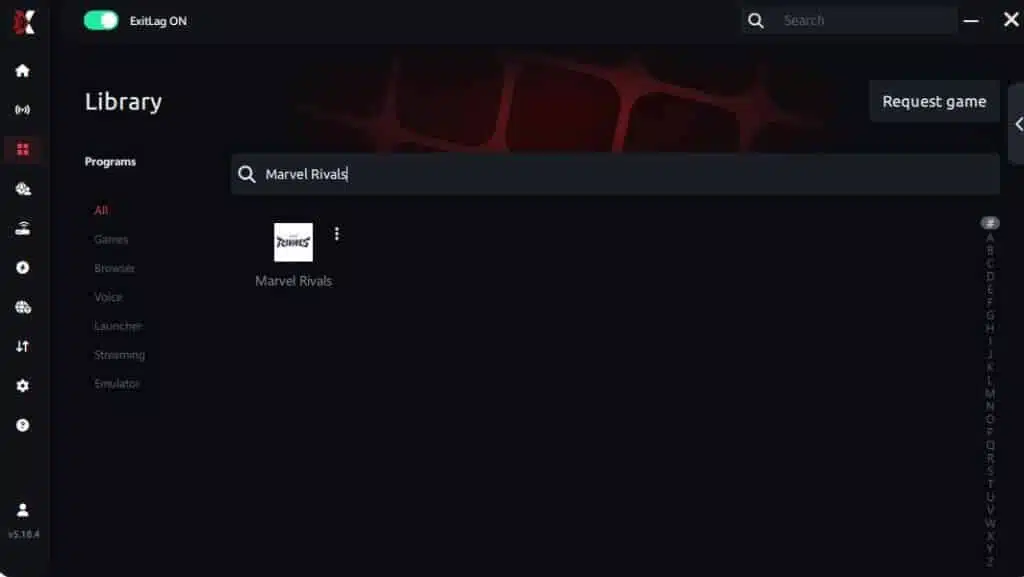
Step 3 – In the search bar, type “Marvel Rivals” and select the game from the list.
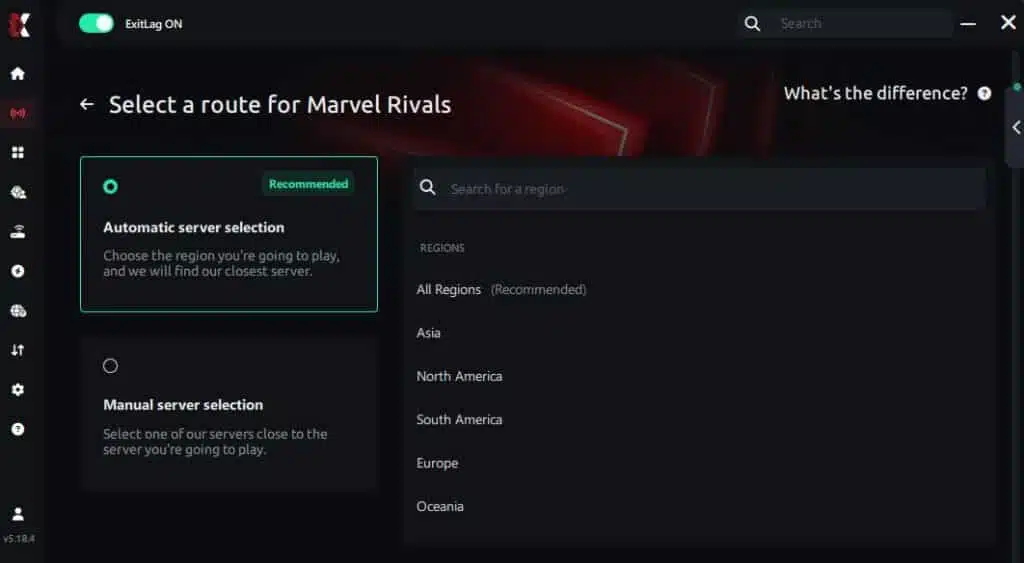
Step 4 – Choose between automated or manual route
Based on the results, you can let ExitLag automatically select the best route or manually choose the server that showed the lowest latency for your connection.
AI-optimized automated route
Based on the results, you can let ExitLag automatically select the best route through AI optimization. The system analyzes multiple connection paths in real time and automatically identifies the most efficient route for your connection, ensuring the lowest possible latency without requiring manual choices.
Manual route
If you prefer to have full control over your connection, you can manually choose the server based on the ping test results. Simply select the server that showed the lowest latency or the one that best meets your specific gaming needs, allowing complete customization of your experience.
Step 5 – Click “Marvel Rivals” or the play button. ExitLag will begin optimizing your connection automatically.

Step 6 – Wait a few seconds until optimization is complete. You’ll see ping indicators in the interface.
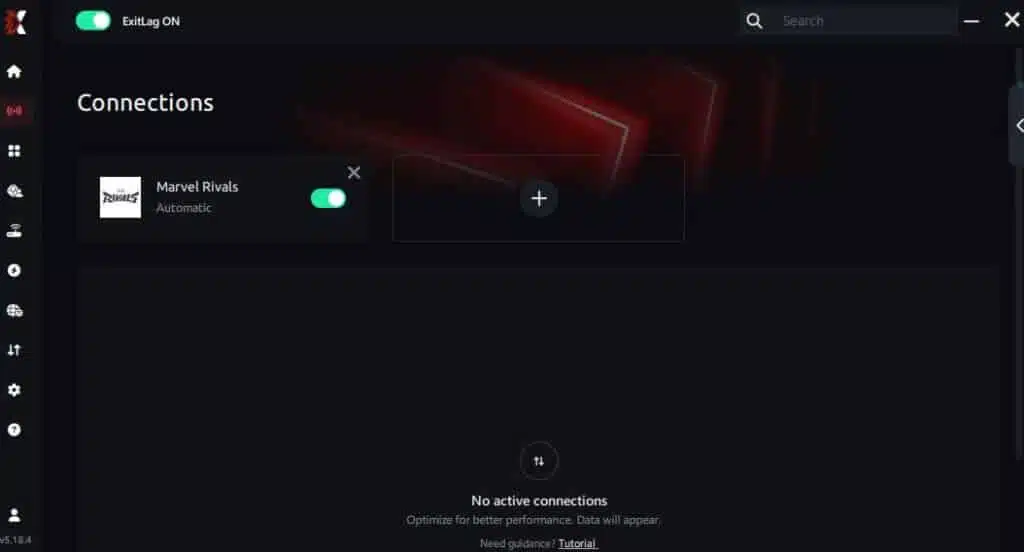
Step 7 – Launch Marvel Rivals normally. The optimization will already be active.
ExitLag runs in the background while you play, constantly adjusting routes to maintain the best possible performance.
Emulator setup
Even though Marvel Rivals runs natively on PC, some users might test the game through cloud or emulator environments. In these situations, ExitLag still stabilizes routing to prevent jitter that could be mistaken for Marvel Rivals performance issues.
Optimization tips
Here are simple tips to make the most out of ExitLag’s enhancements:
- Close heavy background apps
- Disable downloads and cloud sync tools
- Keep your system uncluttered
- Restart router and PC when needed
These small adjustments reduce strain that often contributes to Marvel Rivals lag.
Console players
Although ExitLag works directly on PC, console users can improve stability by routing their console’s traffic through a PC running ExitLag. This advanced setup reduces jitter and helps prevent perceived FPS Drop Marvel Rivals on consoles as well.
Before and after results with ExitLag in Marvel Rivals
Real player cases
Players around the world report dramatic improvements in consistency and responsiveness. Below are three strong examples highlighting how ExitLag reduces the sensation of FPS Drop Marvel Rivals:
- Case 1: A competitive user stabilized routing and eliminated 5% packet loss, greatly reducing micro-stutters in hero combat.
- Case 2: A mid-range PC player cut perceived FPS fluctuations by 40% thanks to smoother frame pacing.
- Case 3: A high-ping user dropped latency from 180 ms to 95 ms, removing jitter that looked like frame instability.
Performance comparison table
Here’s a comparison demonstrating the effect of ExitLag:
| Metric | Without ExitLag | With ExitLag | Improvement |
| Ping | 130 ms | 70 ms | Lower latency |
| Packet Loss | 7% | 0% | Stable gameplay |
| Frame Pacing | Inconsistent | Consistent | Fewer freezes |
| Input Response | Delayed | Immediate | Better accuracy |
Before and after results with ExitLag in Marvel Rivals
Before concluding the analysis, it’s essential to highlight how consistent routing and packet stability significantly reduce perceived FPS Drop Marvel Rivals moments. Even more, many players confuse micro-stuttering caused by unstable networking with real GPU frame drops. Therefore, the “before and after” improvements reinforce how ExitLag helps eliminate these issues.
Continuing with this idea, players using mid-range systems often report that even when their GPU maintains stable frame output, the game still feels choppy during hero abilities, explosions, or heavy environmental effects. That’s because timing inconsistencies in packet delivery create visual rhythm breaks that resemble Marvel Rivals stuttering. With ExitLag, those disruptions become far less frequent.
Additional optimizations to maximize FPS with ExitLag
While ExitLag resolves network pacing issues, complementary adjustments help ensure that hardware limitations don’t contribute to FPS Drop Marvel Rivals during intense combat sequences. Therefore, combining connection stability with system optimizations delivers the best performance.
Network
At first sight, optimizing your network may seem unrelated to visual performance. However, unstable connections can create apparent Marvel Rivals performance issues that feel identical to frame drops. To avoid this, apply these improvements:
- Use Ethernet instead of Wi-Fi for steady, low-jitter communication.
- Enable QoS on your router to prioritize Marvel Rivals traffic.
- Use stable DNS providers to avoid lookup delays.
- Close heavy background apps to prevent bandwidth congestion.
As a result, you minimize the portion of gameplay that could otherwise resemble FPS Drop Marvel Rivals.
System
Even so, system-level adjustments help maintain smoother rendering, preventing spikes during team fights:
- Update drivers regularly to ensure proper optimization for Marvel Rivals.
- Use high-performance mode to avoid CPU or GPU throttling.
- Remove unnecessary background apps to free resources.
- Keep a clean system, free of junk files and overheating risks.
Soon after applying these steps, most players notice fewer Marvel Rivals low FPS dips during chaotic hero engagements.
In-game
Now, tuning in-game settings helps reduce GPU overload and stabilize visual output:
- Turn V-Sync off to avoid input delay and frame pacing conflicts.
- Set a reasonable FPS limit that matches your monitor’s refresh rate.
- Use recommended presets tailored to your hardware capabilities.
These adjustments work alongside ExitLag to ensure your match remains fluid from start to finish.
Frequently asked questions about FPS drop in Marvel Rivals
Does ExitLag actually improve FPS?
Although ExitLag doesn’t increase GPU-rendered frames directly, it removes network-related stutters that mimic FPS Drop Marvel Rivals. Therefore, gameplay feels noticeably smoother.
Is ExitLag safe?
Definitely. ExitLag is a trusted gaming tool that works without altering game files or breaking any rules.
Does ExitLag work on console?
Yes, but through indirect routing. Players can route console traffic through a PC running ExitLag to stabilize packet flow and reduce Marvel Rivals lag.
How much does ExitLag cost?
You can explore all available plans on the official ExitLag pricing page, where each option is explained in detail.
Even better, before committing to a subscription, players can experience the full benefits firsthand with the free trial, allowing you to test ExitLag’s performance impact with zero risk.
My PC is weak, does ExitLag help?
Yes. Even low-end systems benefit from reduced jitter and stabilized packet flow, lowering perceived FPS Drop Marvel Rivals moments.

Does ExitLag work with Marvel Rivals?
Yes. Marvel Rivals is fully supported. You can confirm this on the official games list an check more games supported.
What’s the difference between ExitLag and a VPN?
ExitLag is NOT a VPN. VPNs encrypt traffic and often increase latency, whereas ExitLag uses multi-path routing and real-time optimization exclusively for gaming.
Additional Marvel Rivals-specific questions
Why do I get FPS Drop Marvel Rivals during team fights?
Because team fights overload both rendering and network flow. ExitLag stabilizes packet delivery, reducing micro-freezes.
Does high ping cause fake FPS Drop Marvel Rivals?
Yes. High ping delays frame synchronization, creating stuttering that feels like a GPU issue.
Does Marvel Rivals’ engine cause FPS volatility?
Sometimes. The game’s heavy particle effects and hero abilities can overload systems, but ExitLag helps smooth the pacing to reduce the visible impact.
Fix FPS drop in Marvel Rivals with ExitLag
In conclusion, ExitLag works alongside hardware and in-game optimizations to minimize both real and perceived FPS Drop Marvel Rivals issues. With it, players gain:
- Stable FPS
- Zero micro-stuttering
- Smooth gameplay
- Competitive advantage
- Frustration-free performance
Next steps
- Test ExitLag for free
- Configure in 5 minutes
- Compare before and after
- Dominate Marvel Rivals
Now that you know everything about FPS drop Marvel Rivals, if you want the most stable, smooth, and competitive gameplay possible, is the time to upgrade your performance toolkit. Register at ExitLag now and improve your gameplay in a way you’ve never experienced before!
Got questions or want to connect with other players? Join the conversation at the ExitLag Forum!