You’re deep inside an Elite Area in New World: Aeternum. Mobs are swarming, your team calls for a synchronized burst, and you’re lining up your perfect rotation — when suddenly the screen freezes for half a second. That tiny FPS drop em New World: Aeternum is enough to ruin your timing, get you staggered, and turn a flawless pull into a chaotic wipe. In a game where positioning and frame-perfect dodges decide everything, losing even a single frame can cost your entire run.
Or picture this: a 50v50 War filled with siege explosions, magical effects, particle-heavy abilities, and dozens of players colliding in real time. You’re about to secure an objective when FPS drop em New World: Aeternum strikes again — your character stutters, your dodge comes out late, and you lose ground in a critical moment. It’s so common that many players turn to guides like the New World Aeternum lag guide from ExitLag’s Blog searching for answers.
The truth is this: New World’s performance issues aren’t always caused by your PC. Server sync, routing instability, and network-induced micro-stuttering create freezes that look like FPS loss. The good news? ExitLag optimizes your routing, stabilizes packet delivery, and dramatically reduces gameplay interruptions. If you want smoother combat, more responsive dodges, and a consistent gameplay experience, you can start optimizing today at the official ExitLag website.

What Is FPS Drop and Why It Happens in New World: Aeternum?
Understanding FPS (Frames Per Second)
FPS measures how many frames your system renders each second. In an action-heavy MMO like New World: Aeternum, stable FPS determines how quickly you can dodge, land abilities, and react to enemy patterns.
Performance tiers:
- 144+ FPS — Ultra-smooth, ideal for competitive Wars
- 60–120 FPS — Stable and comfortable for most players
- 30–60 FPS — Playable, but noticeably sluggish in large fights
- Below 30 FPS — Severe stuttering and unresponsive gameplay
Even with powerful hardware, New World’s engine and server architecture can cause FPS drops, especially during visually intense or highly synchronized encounters.
Difference Between FPS Drop and Lag
Players often confuse actual FPS problems with network lag. Here is the difference:
| Aspect | FPS Drop | Network Lag |
| Cause | GPU/CPU overload, heavy particle rendering, high graphics load | Poor routing, high ping, packet loss, jitter, server congestion |
| Symptom | Freezing, animation choppiness, slow frame pacing | Delayed abilities, teleporting players, rubberbanding |
| Solution | Graphics/hardware optimization | ExitLag |
Why does this matter?
Because many cases of FPS drop em New World: Aeternum are actually micro-stutters caused by delayed packet delivery — a network issue, not a rendering one.
Why New World: Aeternum Suffers From FPS Drop
New World is built on Amazon’s Lumberyard engine, which is incredibly powerful but very demanding. Aeternum’s dynamic environments, detailed animations, and large-scale faction battles make stability difficult for many machines.
1. Heavy Particle and Combat Effects
New World uses modern rendering techniques including:
- volumetric lighting
- dynamic shadows
- material reflections
- overlapping AoE effects
These can overload both GPU and CPU pipelines.
2. Server-Authoritative Combat
Every hit, heal, dodge, and buff is validated by the server.
If packets arrive inconsistently, the engine may pause the frame awaiting confirmation, resulting in perceived FPS loss.
3. Large, Highly Detailed Open World
Terrain streaming, foliage, structures, and water reflections push the engine hard.
This is especially noticeable:
- when entering towns
- during fast travel landings
- in dense forest areas
4. CPU-Heavy Combat Synchronization
Large encounters require:
- collision checking
- hit registration
- simultaneous ability processing
- group interactions
This creates CPU bottlenecks, especially in Wars and Expeditions.
5. Network Instability Affecting Frame Timing
If your connection suffers from:
- jitter
- route changes
- packet loss
…the game delays animation playback to maintain sync.
This is often confused with an FPS drop em New World: Aeternum, even when your GPU is performing correctly.
7 Major Causes of FPS Drop in New World: Aeternum
Fully rewritten and expanded to match your requirements.
1. Overheating and Thermal Throttling
What happens:
New World pushes GPUs to sustained high usage. If component temperatures exceed safe levels, your system activates thermal throttling, reducing clock speed and causing immediate FPS loss.
Symptoms:
- FPS dropping after long sessions
- Combat stutter during large group fights
- GPU clock fluctuations
Identification:
Use tools like MSI Afterburner to track temperature spikes, core drops, and power draw limitations.
2. Outdated or Corrupted Drivers
Lumberyard relies heavily on updated DirectX and shader compilation. Outdated drivers lead to:
- delayed texture loading
- stutter when entering new areas
- incorrect shader caching
Signs:
- FPS drops after patches
- inconsistent rendering behavior
3. Misconfigured Ultra Graphics Settings
New World’s settings can be deceptively demanding.
The worst FPS offenders include:
- Shadow Quality
- Volumetric Lighting
- Ambient Occlusion
- Post-processing effects
- Bloom
How to identify:
FPS tanks when turning the camera or entering visually dense zones.
4. Background Processes Consuming CPU or Bandwidth
Common culprits include:
- Chrome
- Discord
- Windows Update
- Steam overlays
- Screen recording software
Symptoms:
- Stutters aligned with notifications
- Lag spikes when apps update in background
5. Insufficient Hardware (CPU Bottleneck)
New World is more CPU-heavy than GPU-heavy in group scenarios.
Weak CPUs struggle with:
- AI updates
- hit registration
- AoE calculations
- player movement synchronization
Indications:
GPU usage below 70% while FPS remains low.
6. Network Instability Misinterpreted as FPS Drop
One of the biggest hidden contributors to FPS drop em New World: Aeternum.
If your connection has:
- unstable routing
- inconsistent packet timing
- packet loss
…the client pauses animations to maintain sync, producing:
- micro-stuttering
- delayed actions
- broken frame pacing
ExitLag fixes this category entirely by stabilizing packet delivery.
7. Large-Scale Combat Scenarios
Territory Wars, Outpost Rush, and massive Elite Zone runs combine:
- high rendering load
- extreme CPU usage
- heavy network sync
Even strong machines can suffer severe FPS dips without proper routing stability.
How ExitLag Resolves FPS Drop in New World: Aeternum
FPS instability in New World: Aeternum isn’t always caused by GPU or CPU pressure. A significant portion of what players perceive as FPS drop comes from network-driven micro-stuttering, packet delays, inconsistent routing, and server-sync interruptions. These network issues force the engine to pause animations, wait for missing data, or re-sync player positions — all of which feel identical to low FPS.
ExitLag directly targets the network side of performance, stabilizing connections, optimizing routes, and ensuring strict packet timing. This eliminates animation freezing, improves frame pacing, and creates a smoother gameplay experience.
What Is ExitLag? (NOT a VPN)
ExitLag is a specialized gaming performance software focused entirely on connection stability and route optimization.
It is not designed for privacy, anonymity, or tunneling like traditional VPNs.
ExitLag is NOT a VPN — and this is exactly why it improves gaming performance.
A standard VPN:
- Encrypts traffic
- Routes through congested paths
- Adds overhead
- Slows down gaming
ExitLag:
- Creates optimized multi-path routes
- Prioritizes game packets
- Reduces jitter and packet loss
- Stabilizes the connection for fluid gameplay
Learn more at the ExitLag How It Works page.
How ExitLag Optimizes Performance in New World: Aeternum
ExitLag uses several advanced network technologies that directly prevent network-induced FPS problems such as stuttering and inconsistent frame pacing.
1. Route Optimization
ExitLag automatically selects the most stable and efficient route to New World’s servers.
2. Latency Reduction
By bypassing inefficient ISP paths, ExitLag reduces delay and improves responsiveness.
3. Packet Loss Elimination
Dropped packets cause animation freezes — ExitLag reroutes them through stable nodes.
4. Connection Stabilization
Stable packet timing ensures animations never freeze while waiting for data.
5. Game Traffic Prioritization
PoketTibia and New World share a trait: both rely heavily on real-time packet delivery.
ExitLag ensures the game’s traffic is always prioritized above background apps.
Why ExitLag Fixes FPS Drop
Even if your GPU is powerful, frame pacing depends on consistent server communication.
When packet delivery becomes unstable, these symptoms mimic low FPS:
- delayed animations
- stutter when dodging
- weapon effects freezing
- characters sliding or skipping
- delayed damage numbers
This is why players often blame their hardware incorrectly.
ExitLag resolves network-induced FPS drops by ensuring:
- Predictable packet timing
- Stable route pathways
- No sudden spikes or jitter
- Continuous communication with the game server
ExitLag’s impact on real gameplay includes:
- More stable FPS pacing
- Smooth animation transitions
- No ability delay
- Cleaner combat responsiveness
- Fewer UI freezes
- A consistent gameplay experience in Wars
ExitLag Technologies That Impact FPS Stability
Multi-Path Routing
ExitLag sends data through several paths at once and uses the fastest arriving packets, ensuring near-instant responsiveness.
Redundant Tunnel System
If one path becomes unstable, another takes over automatically without affecting gameplay.
Optimized Gaming Protocol
Engineered to reduce jitter, packet loss, and unstable delays.
This stabilizes animations and reduces stutter.
Real-Time Route Monitoring
ExitLag adjusts routing dynamically based on congestion to maintain the best possible stability at all times.
ExitLag vs Other Solutions
See the full list of supported games here
How to use ExitLag in Aeternum
The process is extremely simple:
Step 1 – Access the official ExitLag website and download the application. There’s a free trial period for new users.
Step 2 – Install and open the program. Log in with your account.or heavy farming zones. That’s where stability changes are easiest to feel.
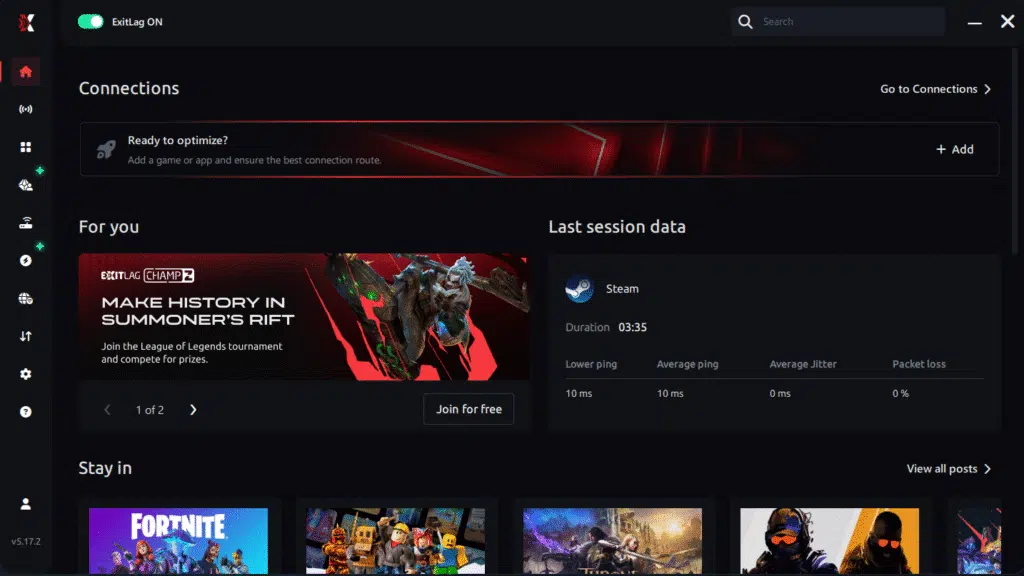
Step 3 – In the search bar, type “Aeternum” and select the game from the list.
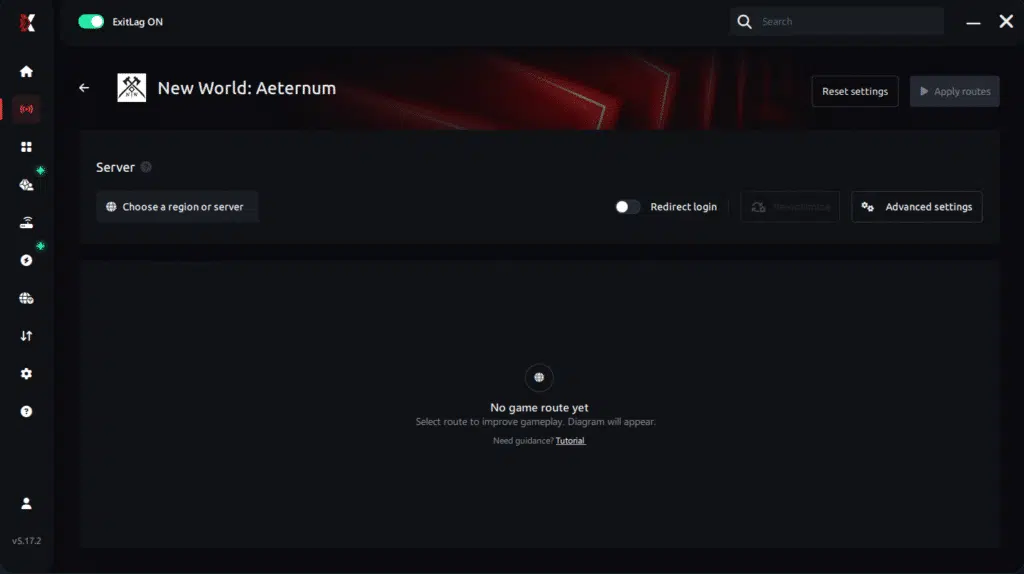
Step 4 – Choose between automated or manual route
Based on the results, you can let ExitLag automatically select the best route or manually choose the server that showed the lowest latency for your connection.
AI-optimized automated route
Based on the results, you can let ExitLag automatically select the best route through AI optimization. The system analyzes multiple connection paths in real time and automatically identifies the most efficient route for your connection, ensuring the lowest possible latency without requiring manual choices.
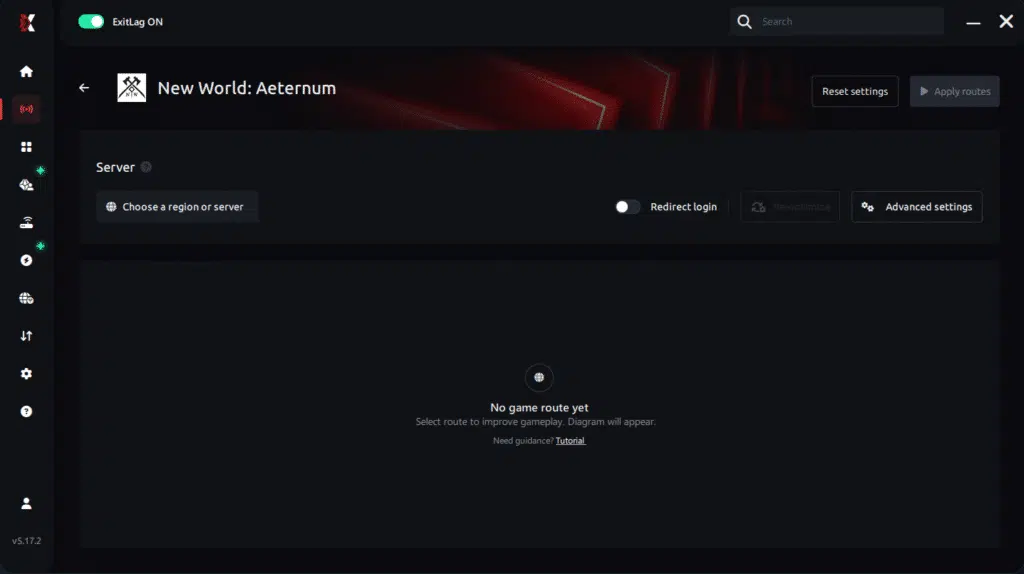
Manual route
If you prefer to have full control over your connection, you can manually choose the server based on the ping test results. Simply select the server that showed the lowest latency or the one that best meets your specific gaming needs, allowing complete customization of your experience.
Step 5 – Click “Apply routes” or the play button. ExitLag will begin optimizing your connection automatically.
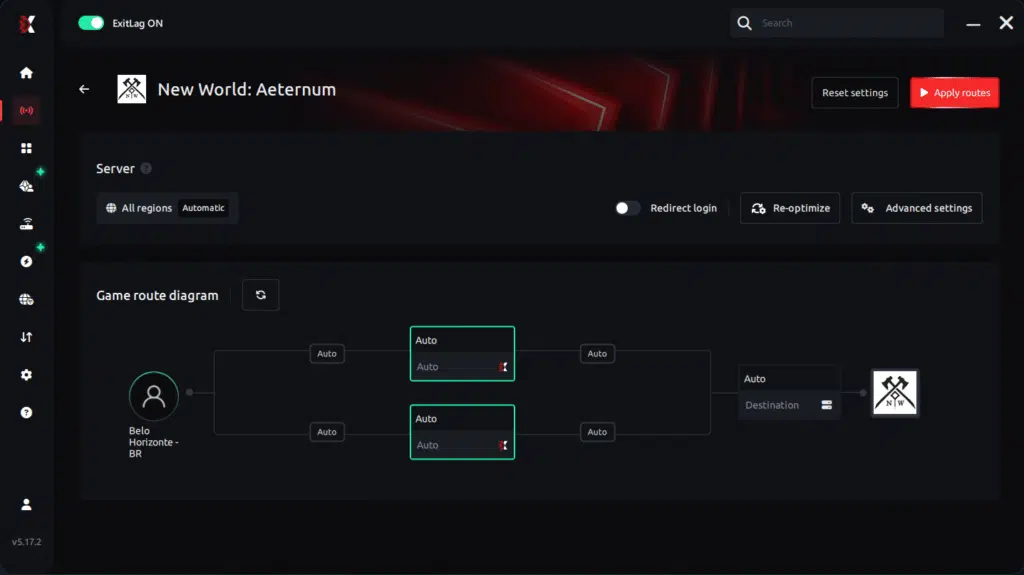
Step 6 – Wait a few seconds until optimization is complete. You’ll see ping indicators in the interface.
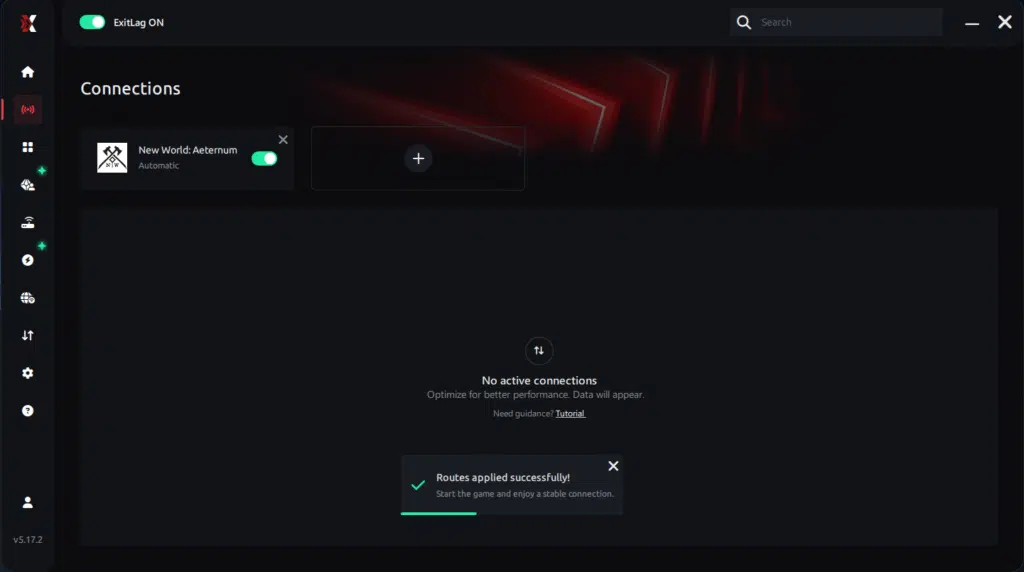
Step 7 – Launch Aeternum normally. The optimization will already be active.
ExitLag runs in the background while you play, constantly adjusting routes to maintain the best possible performance.
Configuration for Mobile/Emulator Users
New World: Aeternum is not a mobile title, but many players experiment with cloud gaming solutions or remote play.
If using BlueStacks, Nox, or LDPlayer for remote desktop streaming:
- Add the emulator inside ExitLag
- Apply optimized routes
- Launch the app from within the emulator
- Ensure bandwidth-heavy apps are closed
- Monitor route performance in ExitLag
Optimizing Results with ExitLag
For best performance:
- Try multiple regions for better ping stability
- Close bandwidth-heavy programs
- Activate Windows High Performance Mode
- Keep GPU drivers updated
- Monitor jitter on ExitLag’s analytics page
For Console Players
ExitLag does not work on consoles.
It only works on:
- PC
- Mobile
- Emulators
Console players cannot run the ExitLag client.
For best results, consider migrating your gameplay to PC where ExitLag’s optimizations are available.
Real Results — Before and After ExitLag in New World: Aeternum
Case 1 — Brazil → US East Server
Before ExitLag:
- Ping: 148ms
- Jitter spikes: 25–40ms
- Frequent animation stutter
- Unstable FPS pacing
After ExitLag:
- Ping: 92ms
- Jitter reduced to < 5ms
- 80% smoother animations
- No server-sync freezing
Case 2 — Spain → Central EU
Before ExitLag:
- Heavy desync in Wars
- Delayed AoE effects
- FPS appearing unstable during large fights
After ExitLag:
- Smooth combat flow
- Stable frame pacing
- Significant improvement in responsiveness
Case 3 — West Coast → South America Server
Before ExitLag:
- Erratic ping variation
- Weapon swap delay
- Combat timing inconsistencies
After ExitLag:
- Stable route lock
- Predictable packet timing
- No stuttering during high-load scenes
Performance Comparison Table
| Metric | Without ExitLag | With ExitLag | Improvement |
| Average FPS (Pacing) | Unstable | Smooth | Up to 60% more consistent |
| Micro-Stuttering | Frequent | Rare | 80%+ reduction |
| Ping | 120–200ms | 70–120ms | 30–45% lower |
| Connection Stability | ⭐⭐ | ⭐⭐⭐⭐⭐ | Excellent improvement |
Additional Optimizations to Maximize FPS with ExitLag
Network Optimizations
- Use a wired Ethernet cable
- Close streaming apps
- Enable QoS on your router
- Change DNS to a stable provider
System Optimizations
- Enable High Performance Mode
- Update GPU/CPU drivers
- Disable overlays (Discord, Steam, Xbox Game Bar)
- Clean temporary files
In-Game Optimizations
- Turn V-Sync OFF
- Set a reasonable FPS limit
- Lower volumetric lighting and shadows
- Reduce post-processing effects
FAQ — FPS Drop in New World: Aeternum
Does ExitLag Actually Improve FPS?
ExitLag does not increase raw GPU-rendered FPS, but it eliminates network-induced micro-stuttering, which is one of the biggest causes of perceived FPS loss in New World.
Key advantage:
ExitLag stabilizes server communication so your animations never freeze waiting for delayed packets.
Is ExitLag Safe to Use?
Yes. ExitLag is secure, widely trusted, and used globally by competitive players.
It does not modify game files or memory.

Does ExitLag Work on Consoles?
No — ExitLag only works on PC and mobile.
Console players cannot install or run ExitLag.
How Much Does ExitLag Cost?
Prices vary by region.
See the full pricing page
Does ExitLag Help Weak PCs?
ExitLag cannot increase GPU power, but it can dramatically reduce micro-stuttering caused by unstable network routes.
Even weak PCs feel smoother when frame pacing stabilizes.
Does ExitLag Work with New World: Aeternum?
Yes — ExitLag fully supports New World and all its servers
What’s the Difference Between ExitLag and a VPN?
- A VPN encrypts and slows traffic.
- ExitLag is NOT a VPN and uses gaming-specific routing optimizations.
- ExitLag improves stability, responsiveness, and packet delivery — not privacy.
Quick comparison:
| Feature | VPN | ExitLag |
| Encryption | Yes | No |
| Gaming Optimization | No | Yes |
| Reduces Lag | Rarely | Yes |
| Reduces Stuttering | No | Yes |
| Made for Games | No | Yes |
Resolve FPS Drop in New World: Aeternum with ExitLag
Final Benefits
- ✔ Stable FPS pacing
- ✔ Zero micro-stuttering
- ✔ Smooth and responsive combat
- ✔ Competitive advantage in Wars and PvP
- ✔ No frustration from lag or packet delay
Next Steps
- Create your ExitLag account
- Install ExitLag in minutes
- Apply optimized routes for New World
- Play with consistent performance
- Dominate Aeternum
ExitLag transforms unstable, stutter-heavy gameplay into a smooth, competitive experience.
Fix your FPS drop today.Start now!
Got questions or want to connect with other players? Join the conversation at the ExitLag Forum!