You’re deep into a high-tier Path of Exile 1 map, surrounded by dozens of monsters while your build unleashes multiple skills at once. Projectiles fill the screen, auras pulse continuously, and every movement decision matters. Then, without warning, the screen stutters. That sudden FPS drop em Path of Exile 1 breaks your rhythm, delays your positioning, and often leads to an instant death. In a game where reaction time and positioning define survival, unstable FPS can completely invalidate player skill.
This issue becomes even more evident during endgame content. Delirium fog, Legion encounters, Breach openings, Beyond monsters, and heavily juiced maps push the engine far beyond casual gameplay scenarios. Instead of fluid combat, FPS drop em Path of Exile 1 causes frame freezes, delayed skill execution, and inconsistent character movement. Many players initially blame hardware or graphics settings, while others look for connection-related explanations, such as those discussed in the Path of Exile 1 high ping guide on the ExitLag blog.
The reality is that performance instability in Path of Exile 1 rarely has a single cause. The game suffers from a combination of rendering pressure, engine limitations, and network synchronization issues. Micro-stuttering caused by unstable routing, packet loss, or jitter can feel exactly like FPS loss. This is where ExitLag becomes a strategic solution. By optimizing network routes and stabilizing packet delivery, ExitLag helps eliminate network-induced stuttering, resulting in smoother gameplay, better frame pacing, and more reliable performance during the most demanding encounters. You can start optimizing today through the official ExitLag website.

What Is FPS Drop and Why It Happens in Path of Exile 1?
Understanding FPS (Frames Per Second)
FPS measures how many frames your system renders every second. In Path of Exile 1, stable FPS is essential for smooth movement, accurate skill execution, and reliable reaction timing — especially in fast-paced endgame combat.
FPS performance levels:
- 144+ FPS — Ultra-smooth visuals and precise control
- 60–120 FPS — Stable and comfortable for most builds
- 30–60 FPS — Playable, but stuttering becomes noticeable in dense content
- Below 30 FPS — Severe freezes, delayed inputs, and unreliable gameplay
Even when the average FPS looks acceptable, sudden drops or inconsistent frame pacing can make the game feel sluggish, unresponsive, and unpredictable during critical moments.
Difference Between FPS Drop and Network Lag
FPS drop and network lag are often confused, but they originate from different sources and require different solutions.
| Aspect | FPS Drop | Network Lag |
| Cause | GPU/CPU overload, shader compilation, rendering bottlenecks | High ping, packet loss, unstable routing |
| Symptom | Stuttering visuals, frozen frames, slow animations | Delayed actions, desync, rubberbanding |
| Solution | Graphics and hardware optimization | ExitLag |
This distinction is critical because many cases of FPS drop em Path of Exile 1 are not purely graphical. When packets arrive late or inconsistently, the game engine pauses animation updates to maintain synchronization, creating micro-stuttering that feels identical to low FPS.
Why Path of Exile 1 Suffers from FPS Drop
Path of Exile 1 is well known for its demanding endgame and technical limitations. Several design choices contribute directly to FPS instability.
1. Massive Skill and Particle Effects
Many popular builds generate dozens of effects per second, including:
- Explosions
- Projectiles
- Persistent auras
- Status effects
These effects stress both GPU rendering pipelines and CPU calculations simultaneously.
2. Engine Limitations
Path of Exile 1 runs on a proprietary engine that struggles with:
- High entity counts
- Real-time physics calculations
- Dynamic lighting and shadows
3. Extreme Endgame Density
Content such as Delirium, Legion, Breach, and Beyond dramatically increases monster density, pushing systems to their limits.
4. Server-Authoritative Gameplay
Path of Exile relies heavily on server-side validation. If network packets are delayed or lost, the client may pause animations while waiting for updates.
5. Network Instability Affecting Frame Pacing
If your connection suffers from:
- jitter
- packet loss
- unstable routing
…the game may temporarily freeze frames, resulting in FPS drop em Path of Exile 1 even on high-end PCs.
7 Main Causes of FPS Drop in Path of Exile 1
Below are the most common causes, expanded with deeper technical context.
1. Overheating and Thermal Throttling
What happens:
Long mapping sessions push CPUs and GPUs to sustained high usage. When temperatures exceed safe limits, thermal throttling reduces clock speeds, causing sudden FPS drops.
Symptoms:
- FPS degrading over time
- Stutters during dense monster packs
- Increased fan noise
How to identify:
Monitor temperatures, clock speeds, and power limits during extended gameplay.
2. Outdated or Unoptimized Drivers
What happens:
Outdated GPU drivers struggle with shader compilation and complex effects common in Path of Exile 1.
Symptoms:
- FPS drops after patches
- Shader stutter
- Delayed visual effects
3. Graphics Settings Too Demanding
Certain settings have a disproportionate impact on performance:
- Shadows
- Global illumination
- Anti-aliasing
- Post-processing effects
How to identify:
FPS drops appear during skill spam or large monster packs.
4. Background Processes
Applications running in the background can consume CPU resources or network bandwidth.
Common examples:
- Web browsers
- Voice chat software
- Streaming tools
Symptoms:
- FPS drops when multitasking
- Stutters during notifications
5. Insufficient Hardware
Path of Exile 1 is heavily CPU-bound, especially during endgame.
What happens:
Weaker CPUs struggle with entity processing and skill calculations.
Symptoms:
- Low FPS in juiced maps
- Performance drops during boss phases
6. Disk and Asset Streaming Bottlenecks
Slow storage devices delay asset loading.
Symptoms:
- Stutter when entering new areas
- Texture pop-in
7. Network Instability Misinterpreted as FPS Drop
One of the most underestimated causes of FPS drop em Path of Exile 1.
When packets are delayed or lost, the engine pauses animation updates to maintain synchronization. This micro-stuttering feels identical to FPS loss and cannot be resolved through graphics tweaks alone.
How ExitLag Resolves FPS Drop in Path of Exile 1
FPS drops in Path of Exile 1 are often blamed on weak hardware or aggressive graphics settings. While those factors matter, many performance issues players experience are actually caused by network instability affecting frame pacing.
Path of Exile 1 relies heavily on server-side validation. When packets arrive late, out of order, or are lost, the client pauses animation updates to stay synchronized with the server. This pause feels exactly like an FPS drop, even if your GPU and CPU are capable.
ExitLag solves this problem at the network level, stabilizing packet delivery, optimizing routes, and eliminating sudden connection fluctuations. The result is smoother gameplay, consistent frame pacing, and fewer stutters during even the most demanding endgame content.
What Is ExitLag? (NOT a VPN)
ExitLag is a specialized gaming optimization software focused on connection stability and performance.
It is extremely important to clarify:
- ExitLag is NOT a VPN, and that is why it works for gaming
Traditional VPNs:
- Encrypt traffic unnecessarily
- Add routing overhead
- Increase latency
- Use generic routes not designed for games
ExitLag:
- Uses gaming-optimized routing
- Prioritizes Path of Exile 1 traffic
- Reduces jitter and packet loss
- Stabilizes real-time server communication
Learn more about ExitLag technology here
How ExitLag Optimizes Performance in Path of Exile 1
ExitLag applies multiple networking technologies simultaneously to eliminate network-induced FPS instability.
1. Network Route Optimization
ExitLag automatically selects the fastest and most stable route between your PC and Path of Exile 1 servers.
2. Latency Reduction
By bypassing congested ISP routes, ExitLag minimizes delay and improves responsiveness.
3. Packet Loss Elimination
Dropped packets cause animation freezes and stutter. ExitLag reroutes traffic in real time to avoid packet loss.
4. Connection Stabilization
Consistent packet timing prevents animation pauses and improves overall frame pacing.
5. Game Traffic Prioritization
Path of Exile 1 traffic is prioritized over background applications, ensuring uninterrupted data flow during intense encounters.
Why ExitLag Works for FPS Drop
Even when your average FPS counter looks fine, unstable connections can cause:
- Micro-stuttering
- Frozen animations
- Delayed skill execution
- Inconsistent movement
- Broken frame pacing
These symptoms are often mistaken for GPU or CPU limitations.
ExitLag fixes this by ensuring:
- Predictable packet delivery
- Stable routing paths
- Minimal jitter
- Continuous server synchronization
Immediate benefits players notice:
- Smoother skill animations
- Reliable movement and positioning
- No sudden freezes during juiced maps
- More consistent performance in Delirium, Breach, and Legion
- FPS that feels stable, not just high
ExitLag Technologies That Impact FPS Stability
Multi-Path Routing
Data is sent through multiple routes at the same time. ExitLag uses the fastest packets in real time.
Redundant Connections
If one route becomes unstable, another instantly takes over without affecting gameplay.
Gaming-Optimized Protocol
Designed specifically to reduce jitter, packet loss, and unstable delays common in online ARPGs.
Real-Time Route Monitoring
ExitLag constantly monitors route performance and dynamically adjusts to maintain stability.
ExitLag vs Other Solutions
| Solution | Improves FPS Stability? | Reduces Lag? | Ease of Use | Recommendation |
| ExitLag | ✅ Yes | ✅ Yes | ⭐⭐⭐⭐⭐ | Best option |
| Common VPN | ❌ No | ❌ Often worse | ⭐⭐⭐ | Not recommended |
| PC Optimization | ⚠️ Partial | ❌ No | ⭐⭐ | Limited effect |
| No Optimization | ❌ No | ❌ No | ⭐⭐⭐⭐⭐ | Not effective |
See all ExitLag supported games here
How to use ExitLag in Path of Exile
The process is extremely simple:
Step 1 – Access the official ExitLag website and download the application. There’s a free trial period for new users.
Step 2 – Install and open the program. Log in with your account.
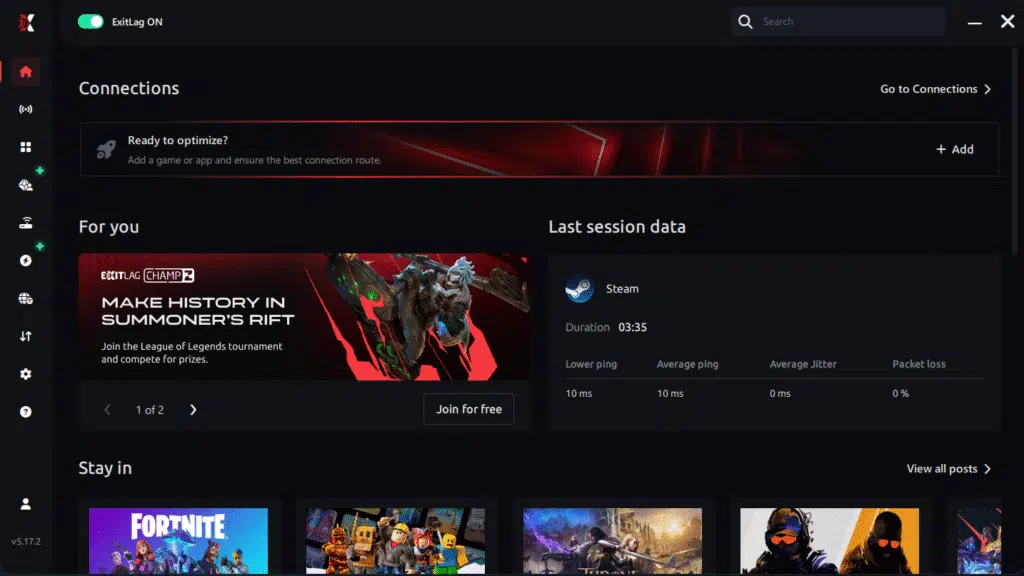
Step 3 – In the search bar, type “Path of Exile” and select the game from the list.

Step 4 – Choose between automated or manual route
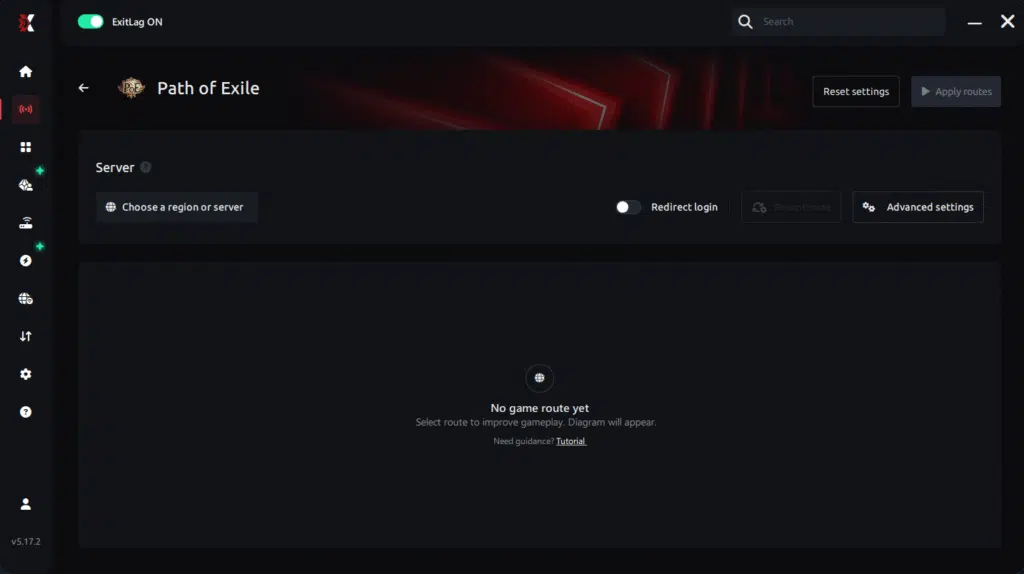
Based on the results, you can let ExitLag automatically select the best route or manually choose the server that showed the lowest latency for your connection.
AI-optimized automated route
Based on the results, you can let ExitLag automatically select the best route through AI optimization. The system analyzes multiple connection paths in real time and automatically identifies the most efficient route for your connection, ensuring the lowest possible latency without requiring manual choices.
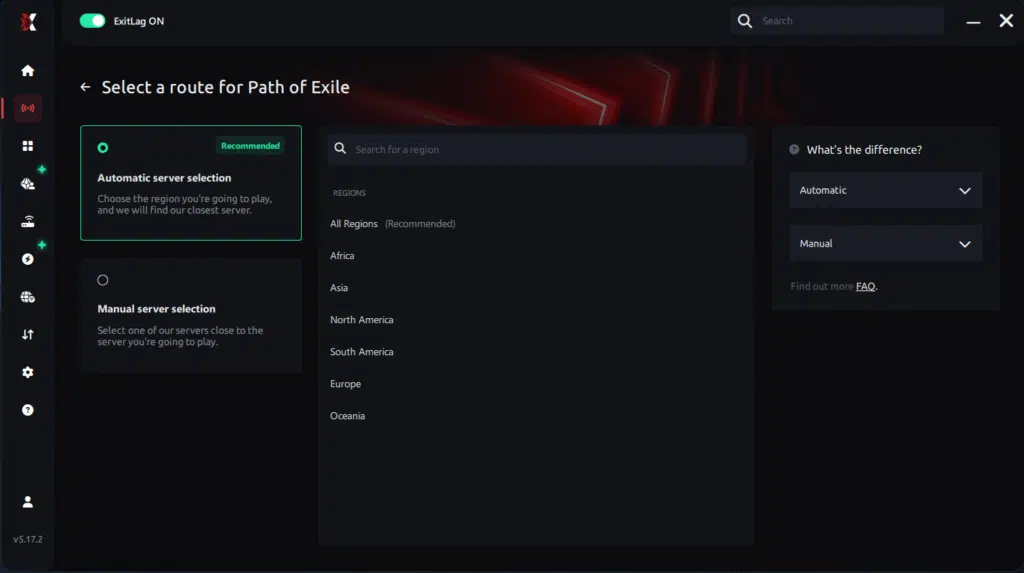
Manual route
If you prefer to have full control over your connection, you can manually choose the server based on the ping test results. Simply select the server that showed the lowest latency or the one that best meets your specific gaming needs, allowing complete customization of your experience.
Step 5 – Click “Path of Exile” or the play button. ExitLag will begin optimizing your connection automatically.

Step 6 – Wait a few seconds until optimization is complete. You’ll see ping indicators in the interface.
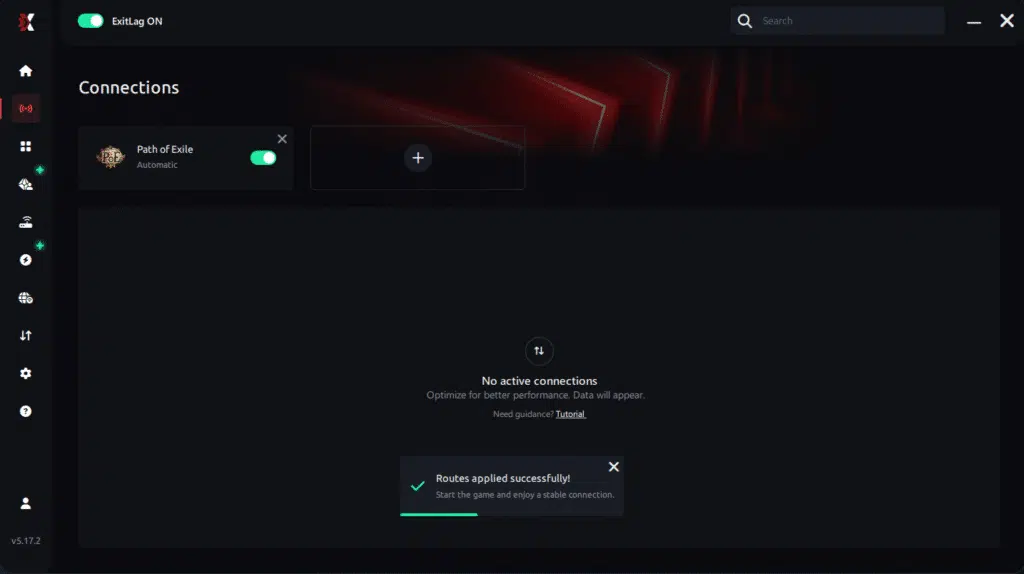
Step 7 – Launch Path of Exile normally. The optimization will already be active.
ExitLag runs in the background while you play, constantly adjusting routes to maintain the best possible performance.
For Console Players
ExitLag does not work on consoles.
- Consoles cannot install ExitLag
- There are no supported workarounds
For best performance, Path of Exile 1 should be played on PC.
Real Results — Before and After ExitLag in Path of Exile 1
Case 1 — Brazil
Before ExitLag:
- Ping: 150–200 ms
- Frequent stutters in juiced maps
- Delayed skill execution
After ExitLag:
- Ping: 95 ms
- 80%+ reduction in micro-stuttering
- Smooth frame pacing
Case 2 — Europe
Before ExitLag:
- Animation freezes during Delirium
- Inconsistent movement
After ExitLag:
- Stable animations
- Reliable movement and reactions
Case 3 — Asia
Before ExitLag:
- Severe jitter spikes
- Desync during boss fights
After ExitLag:
- Stable routing
- Predictable packet delivery
- No sudden FPS drops
Performance Comparison Table
| Metric | Without ExitLag | With ExitLag | Improvement |
| Average FPS (Pacing) | Unstable | Smooth | Up to 60% more consistent |
| Micro-Stuttering | Frequent | Rare | 80%+ reduction |
| Ping | 120–220 ms | 70–120 ms | 30–45% lower |
| Connection Stability | ⭐⭐ | ⭐⭐⭐⭐⭐ | Major improvement |
Additional Optimizations to Maximize FPS with ExitLag
Network Optimizations
- Use a wired Ethernet connection
- Close background downloads and streams
- Configure router QoS for gaming
- Change DNS to a stable provider
System Optimizations
- Enable High Performance Mode
- Update GPU and chipset drivers
- Disable unnecessary overlays
- Clean temporary system files
In-Game Optimizations
- Disable V-Sync
- Set a reasonable FPS cap
- Lower shadows and post-processing
- Reduce unnecessary visual effects
FAQ — FPS Drop in Path of Exile 1
Does ExitLag Really Improve FPS?
ExitLag does not increase raw FPS numbers, but it eliminates network-induced micro-stuttering, making FPS feel significantly smoother.
Key point: stable packet delivery equals stable frame pacing.
Is ExitLag Safe to Use?
Yes. ExitLag is safe, widely used, and does not modify game files or memory.
Does ExitLag Work on Consoles?
No. ExitLag works only on PC and mobile platforms.
How Much Does ExitLag Cost?
Pricing varies by region.
Check the official pricing page
Start with a free trial
Does ExitLag Help Weak PCs?
ExitLag cannot upgrade hardware, but it can remove network-related stuttering, making gameplay feel smoother even on weaker systems.

Does ExitLag Work with Path of Exile 1?
Yes. Path of Exile 1 is fully supported
ExitLag vs VPN — What’s the Difference?
- VPNs encrypt traffic and often increase latency
- ExitLag is NOT a VPN
- ExitLag focuses on performance, not anonymity
Resolve FPS Drop in Path of Exile 1 with ExitLag
Final Benefits
- ✅ Stable FPS pacing
- ✅ Zero micro-stuttering
- ✅ Smooth and responsive gameplay
- ✅ Competitive advantage
- ✅ Frustration-free experience
Next Steps
- Create your ExitLag account
- Install ExitLag in minutes
- Apply optimized routes for Path of Exile 1
- Play with consistent performance
- Dominate Wraeclast
Fix your FPS drop in Path of Exile 1 today and experience smooth, stable gameplay with ExitLag.👉 Get started now!
Got questions or want to connect with other players? Join the conversation at the ExitLag Forum!