Playing Path of Exile 1 can quickly become frustrating when every skill activation, movement, or dodge feels delayed due to Path of Exile 1 High Ping. This problem appears even for players with good internet, and situations like mapping, boss fights, or trading become unstable because of lag Path of Exile 1. Therefore, one of the biggest challenges is understanding why latency spikes occur and what can be done to stabilize the gameplay experience through tools supported by platforms like Exitlag.
However, for many players, latency issues are not just occasional they become constant disruptions that affect survivability and overall flow. When casting high-impact abilities or entering juiced maps, any tiny delay can lead to desynchronization and rubberbanding. Like this, even well-geared characters struggle to perform efficiently, and the cause often lies in routing problems rather than PC performance, contributing directly to Path of Exile 1 High Ping during intense instances.
Finally, to ensure smooth gameplay, it is essential to explore what creates high ping, how to identify it, and how to apply an effective, definitive solution. Players must understand each factor influencing server communication so they can properly fix Path of Exile 1 High Ping and enjoy a consistent experience without interruptions or unnecessary deaths.

What is high ping in Path of Exile 1
High ping represents the time it takes for data to travel between your PC and the game’s servers. This delay, measured in milliseconds (ms), directly impacts responsiveness during combat, trading, and movement. In Path of Exile 1, where thousands of data packets move every second to synchronize your character, monsters and loot, any instability creates noticeable lag.
Therefore, high ping means the server is taking longer to process your actions, causing misaligned animations and slow skill responses. Low latency results in smooth execution, while high latency causes delays that can completely ruin boss strategies or difficult encounters. Like this, understanding how the game communicates helps players detect the real reason behind unstable performance.
Finally, because the game uses instance-based zones, each new area requires an optimal server route. When the path your data travels becomes overloaded or inefficient, high ping emerges and destabilizes the entire gameplay rhythm.
How high ping affects gameplay in Path of Exile 1
Below are the main problems caused by latency spikes:
- Rubberbanding during movement, especially in crowded or corrupted maps
- Delayed skill activation, making dodge or burst combos unreliable
- Hit registration issues, leading to skills missing or appearing late
- Failed item pickups, particularly in high-density loot rooms
- Desynchronization, causing monsters to appear in unexpected positions
- Instant deaths, where damage registers before the animation appears
Main causes of high ping in Path of Exile 1
Distance from servers
Your physical distance affects the travel time of packets. Therefore, regions farther from game servers naturally experience increased delays and unstable responses.
ISP-related issues
Some internet providers use cost-oriented routing instead of performance-oriented paths. However, these cheaper routes often cause spikes, packet loss, and overall instability.
Inefficient routing
When your packets follow a long or congested route, actions reach the server slower than expected. Like this, routing becomes a primary cause of Path of Exile 1 High Ping in many cities.
Network congestion
Peak hours overload nodes along the path to the server, especially in densely populated regions. Therefore, evening gameplay tends to suffer more instability.
Outdated equipment
Old routers, Wi-Fi interference, or inconsistent cables interrupt data flow and create spikes in Path of Exile 1 latency.
How to identify and test high ping in Path of Exile 1
Path of Exile 1 offers an in-game graph (F1) showing real-time latency. Sudden vertical spikes or constant waves indicate unstable routing. Therefore, players should monitor the line while entering different zones or maps.
You can also use system commands like “ping” or “tracert” to analyze communication routes with the server. However, these tests only show part of the picture, since real gameplay uses different packet behavior. Like this, evaluating performance in-game is essential.
Finally, consider the following reference values:
| Ping Level | Gameplay Quality |
| 0–40 ms | Excellent |
| 40–80 ms | Playable |
| 80–120 ms | Noticeable delays |
| 120–200 ms | Difficult gameplay |
| 200+ ms | Unstable, frequent rubberbanding |
Basic solutions to reduce high ping
Optimize local connection
- Use a wired Ethernet cable
- Close background apps
- Update network driver
- Restart modem/ router
- Choose closest gateway when possible
Contact your ISP
If you experience frequent spikes, inform your provider and request route optimization. However, ISPs rarely guarantee changes, which is why an independent optimization tool becomes essential.
Exitlag: the best solution for Path of Exile 1
What is Exitlag?
Exitlag is a software designed to provide advanced connection optimization, ensuring that your packets always use the fastest possible route. Through its cutting-edge technology, it stabilizes communication with game servers, reducing spikes and improving responsiveness.
Therefore, instead of relying on automatic ISP routing, Exitlag gives you consistent control of the path your packets travel, eliminating instability from external factors and preventing Path of Exile 1 connection issues.
How Exitlag reduces high ping
Using Multi-Internet routing, Exitlag constantly analyzes the best path and corrects connection instability.
Key functions:
- Real-time route analysis
- Multiple simultaneous paths
- Automatic best route selection
- Optimized hops
- Connection stabilization
Advantages for Path of Exile players
- Drastic ping reduction
- No packet loss, preventing rubberbanding
- Stable connection during mapping and bossing
- Better hit registration for responsive combat
- Easy to use with quick setup
- Multi-server support, ideal for different regions
Is Exitlag worth it for poe?
Exitlag provides consistent, immediate improvement for Path of Exile 1 players with routing issues, guaranteeing smoother gameplay during all activities.

How to use ExitLag in Path of Exile
The process is extremely simple:
Step 1 – Access the official ExitLag website and download the application. There’s a free trial period for new users.
Step 2 – Install and open the program. Log in with your account.

Step 3 – In the search bar, type “Path of Exile” and select the game from the list.

Step 4 – Choose between automated or manual route

Based on the results, you can let ExitLag automatically select the best route or manually choose the server that showed the lowest latency for your connection.
AI-optimized automated route
Based on the results, you can let ExitLag automatically select the best route through AI optimization. The system analyzes multiple connection paths in real time and automatically identifies the most efficient route for your connection, ensuring the lowest possible latency without requiring manual choices.
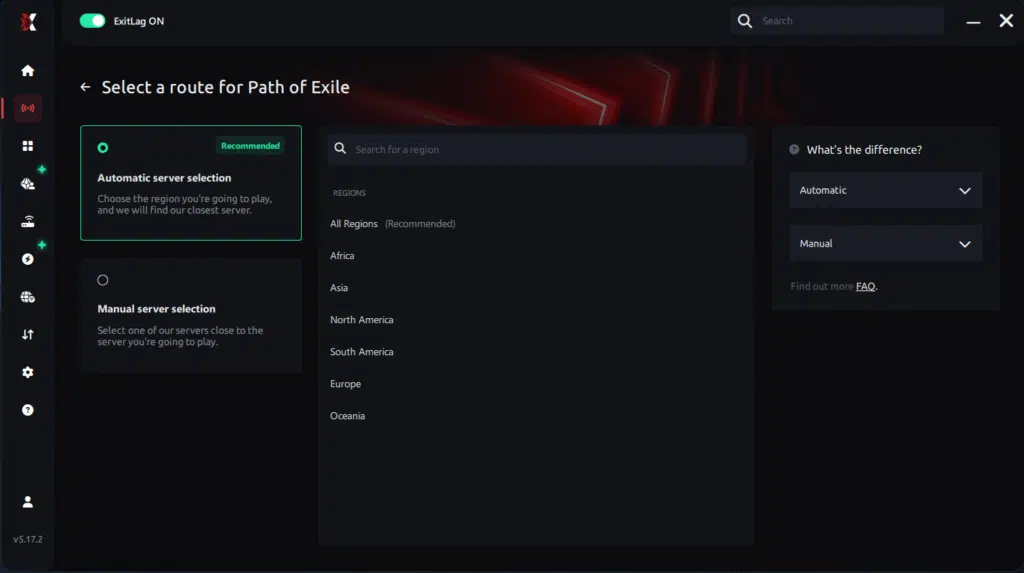
Manual route
If you prefer to have full control over your connection, you can manually choose the server based on the ping test results. Simply select the server that showed the lowest latency or the one that best meets your specific gaming needs, allowing complete customization of your experience.
Step 5 – Click “Path of Exile” or the play button. ExitLag will begin optimizing your connection automatically.

Step 6 – Wait a few seconds until optimization is complete. You’ll see ping indicators in the interface.

Step 7 – Launch Path of Exile normally. The optimization will already be active.
ExitLag runs in the background while you play, constantly adjusting routes to maintain the best possible performance.
Faq about high ping in Path of Exile 1
What causes high ping in Path of Exile 1?
High ping is usually caused by distance to servers, ISP routing, congestion or packet loss. Therefore, even good internet plans can experience spikes.
How do I check my ping in Path of Exile 1?
Press F1 to display the network graph. However, external tests may also help identify routing problems.
What is good ping for Path of Exile 1?
Values under 60 ms are ideal. However, anything above 120 ms may cause rubberbanding and desync.
Can high ping get you banned?
No, latency issues do not cause bans. Like this, players can safely use optimization tools.
Does ExitLag work for Path of Exile 1?
Yes, ExitLag is fully compatible and improves routing instantly, reducing latency and preventing packet loss.
Why do I lag in maps but not in towns?
Instances vary in server assignment and load, which may cause instability depending on routing quality.
Conclusion
High ping in Path of Exile 1 disrupts mapping, bossing and overall progression, creating delays that ruin the experience. Therefore, identifying the cause is essential, but solving it permanently requires optimized routing that keeps communication stable across all instances.
Finally, ExitLag offers the definitive solution by stabilizing routes, reducing latency and eliminating packet loss ensuring flawless gameplay even in the most demanding scenarios. With it, you can eliminate Path of Exile 1 High Ping and enjoy the action smoothly.
Got questions or want to connect with other players? Join the conversation at the ExitLag Forum!