When an intense battle explodes on screen and dozens of enemies swarm you, FPS Drop Path of Exile 2 can instantly ruin the moment. Suddenly the action freezes, animations stutter, and your character becomes vulnerable at the worst possible time. Many players experience this drop during heavy scenes, large environments, and boss encounters.
Even more frustrating is when FPS Drop Path of Exile 2 interrupts simple exploration. You walk through a crowded zone, activate an ability, and the screen becomes a slideshow—causing unnecessary deaths and wasted portals. To understand more about common performance problems, you can check detailed articles directly from the ExitLag blog.
Now, you might be wondering whether this problem can be solved for good. With the right optimization and tools like ExitLag, you can stabilize your system, remove stutter, and significantly reduce latency. By using the official optimization service from ExitLag, you can improve routing, connection stability, and reduce lag spikes through advanced performance technology.

What is FPS drop and why does it happen in Path of Exile 2?
Before diving into fixes, it’s important to understand how FPS impacts your gameplay. Path of Exile 2 is known for its dense visual effects, massive enemy waves, and detailed environments. Combined, these push your GPU and CPU to their limits, making Path of Exile 2 lag, Path of Exile 2 low FPS, and Path of Exile 2 stuttering more common than players expect.
Understanding FPS
Your FPS rate determines how smoothly the game renders movement. Performance varies across devices, so it’s helpful to know the ranges:
- 144+ FPS
- 60–120 FPS
- 30–60 FPS
- Below 30 FPS
Difference between FPS drop and network lag
Although both issues feel similar, they have different causes.
| Aspect | FPS Drop | Network Lag |
| Cause | Heavy graphics load, overheating, low resources | Poor connection, unstable routing |
| Symptoms | Slow animations, stutter, freeze frames | Delayed actions, teleporting, rubberbanding |
| Solution | Hardware/graphic optimization | ExitLag |
Why Path of Exile 2 suffers from FPS drop
Path of Exile 2 uses a complex engine designed for detailed environments and explosive particle effects. This includes large open maps, procedurally generated layouts, dynamic shadows, and intricate spell animations. These visual effects create intense rendering demands that lead to Path of Exile 2 frame drops and overall Path of Exile 2 performance issues.
Lighting systems, aura stacking, and multi-enemy encounters produce GPU spikes. Meanwhile, CPU load increases as the game calculates physics interactions, enemy AI, and environment triggers simultaneously.
5 main causes of FPS drop in Path of Exile 2
Understanding the root of the problem is the first step toward fixing it. Path of Exile 2 pushes both hardware and software boundaries, exposing your system’s weaknesses quickly.
1. Overheating
When your GPU or CPU overheats, the system automatically reduces performance to prevent damage. This thermal throttling directly causes FPS Drop Path of Exile 2, especially after long play sessions or during visually heavy moments.
2. Outdated drivers
Graphics drivers play a huge role in game performance. Outdated or incompatible drivers lead to crashes, texture glitches, and severe Path of Exile 2 low FPS.
3. Graphics settings
High shadows, post-processing, and texture quality can overwhelm your system. Path of Exile 2 relies heavily on visual density, and some effects dramatically increase GPU usage, causing Path of Exile 2 stuttering.
4. Background processes
Apps running in the background consume CPU and RAM, leading to Path of Exile 2 frame drops when your system prioritizes those processes instead of the game.
5. Insufficient hardware
Older GPUs struggle with modern particle effects, while weaker CPUs bottleneck map loading and enemy spawns. These hardware limitations commonly cause Path of Exile 2 performance issues, especially in high-density zones.
How ExitLag fixes FPS drop in Path of Exile 2
Now that the main causes are clear, it becomes easier to understand how to counter FPS Drop Path of Exile 2 effectively. As the game grows more demanding, many players rely on optimization tools to stabilize performance and reduce instability. This is where ExitLag becomes essential, especially when dealing with Path of Exile 2 lag, Path of Exile 2 low FPS, and Path of Exile 2 stuttering during intensive gameplay.
What is ExitLag? (NOT a VPN)
ExitLag is a multi-route game optimization tool designed to stabilize your online connection and reduce latency. It focuses entirely on improving gameplay performance rather than masking your IP or encrypting data. In other words, ExitLag is NOT a VPN. Instead of acting like traditional VPNs, ExitLag works through advanced routing technologies dedicated to games only.
Its core function is explained in detail in the official guide, accessible through the link to how ExitLag works. By optimizing paths between your PC and the game servers, ExitLag ensures fewer spikes and smoother gameplay—even when the map is filled with monsters and visual chaos that can trigger FPS Drop Path of Exile 2.
How ExitLag optimizes performance in Path of Exile 2
ExitLag helps players reduce lag spikes, instability, and packet loss—factors that indirectly contribute to choppy gameplay and Path of Exile 2 frame drops. Its multi-layered technology offers several advantages:
- Network route optimization
- Latency reduction
- Packet loss elimination
- Game traffic prioritization
- Connection stabilization
Why ExitLag helps with FPS drop
Even though FPS is primarily tied to hardware, your network plays a surprising role in overall performance smoothness. When your connection is unstable, the game struggles to sync animations and world events. This results in:
- Micro-stuttering
- Frame pacing inconsistencies
- Delayed skill activation
- Gameplay jitter
ExitLag reduces these issues by creating stable, uninterrupted routes. This prevents the hitching and sudden drops that often feel like FPS Drop Path of Exile 2, even when the GPU is functioning normally.
ExitLag technologies that impact FPS
ExitLag’s optimization system directly reduces the symptoms that players commonly confuse with graphical drops:
- Multi-path routing — sends your game data through multiple simultaneous paths
- Redundant connections — ensures backup routes to prevent unstable spikes
- Gaming-optimized protocol — maintains continuous and steady packet flow
These technologies minimize the problems that create Path of Exile 2 performance issues, especially during peak hours.
ExitLag vs other solutions
To understand why ExitLag stands out, here’s a comparison:
| Solution | Improves FPS? | Reduces lag? | Ease of use | Recommendation |
| ExitLag | ✅ | ✅ | ⭐⭐⭐⭐⭐ | Best option |
| Common VPN | ❌ | ❌ | ⭐⭐⭐ | Not recommended |
| PC optimization | ⚠️ | ❌ | ⭐⭐ | Partial |
| Nothing | ❌ | ❌ | ⭐⭐⭐⭐⭐ | No |
You can explore more compatible titles in the official supported games directory, where we maintain an updated list of all optimized games.
How to use ExitLag in Path of Exile
The process is extremely simple:
Step 1 – Access the official ExitLag website and download the application. There’s a free trial period for new users.
Step 2 – Install and open the program. Log in with your account.

Step 3 – In the search bar, type “Path of Exile” and select the game from the list.

Step 4 – Choose between automated or manual route
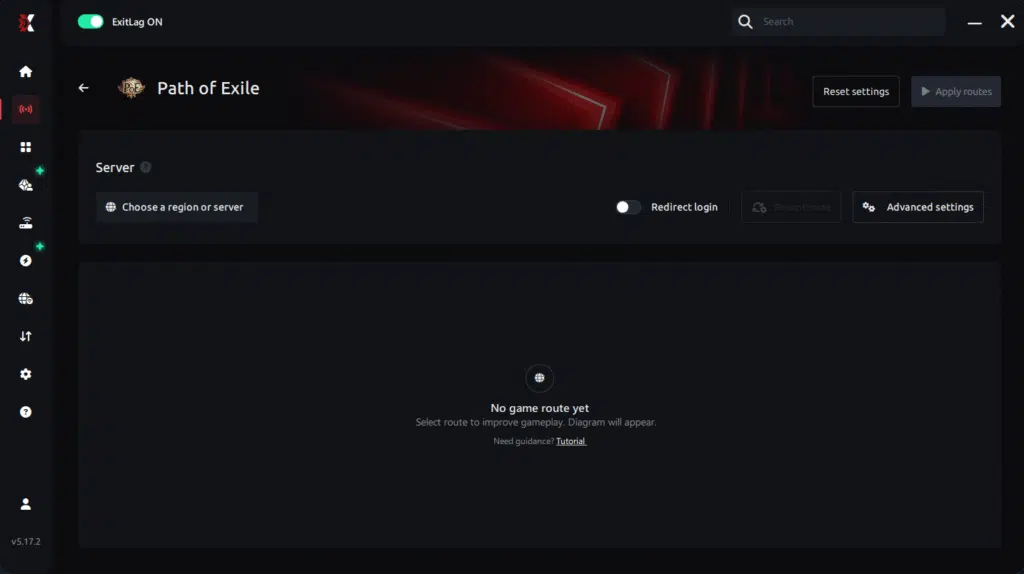
Based on the results, you can let ExitLag automatically select the best route or manually choose the server that showed the lowest latency for your connection.
AI-optimized automated route
Based on the results, you can let ExitLag automatically select the best route through AI optimization. The system analyzes multiple connection paths in real time and automatically identifies the most efficient route for your connection, ensuring the lowest possible latency without requiring manual choices.
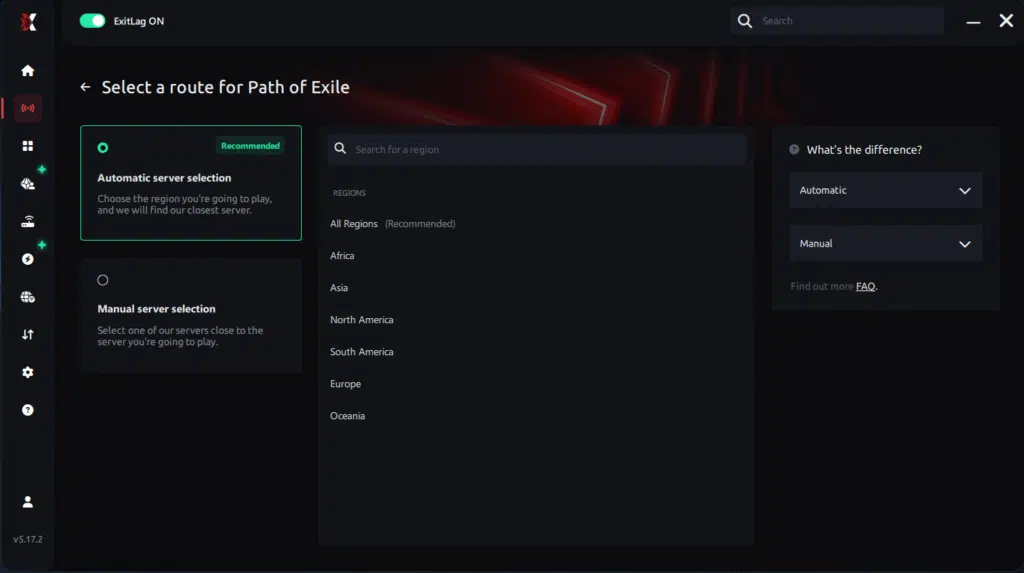
Manual route
If you prefer to have full control over your connection, you can manually choose the server based on the ping test results. Simply select the server that showed the lowest latency or the one that best meets your specific gaming needs, allowing complete customization of your experience.
Step 5 – Click “Path of Exile” or the play button. ExitLag will begin optimizing your connection automatically.

Step 6 – Wait a few seconds until optimization is complete. You’ll see ping indicators in the interface.
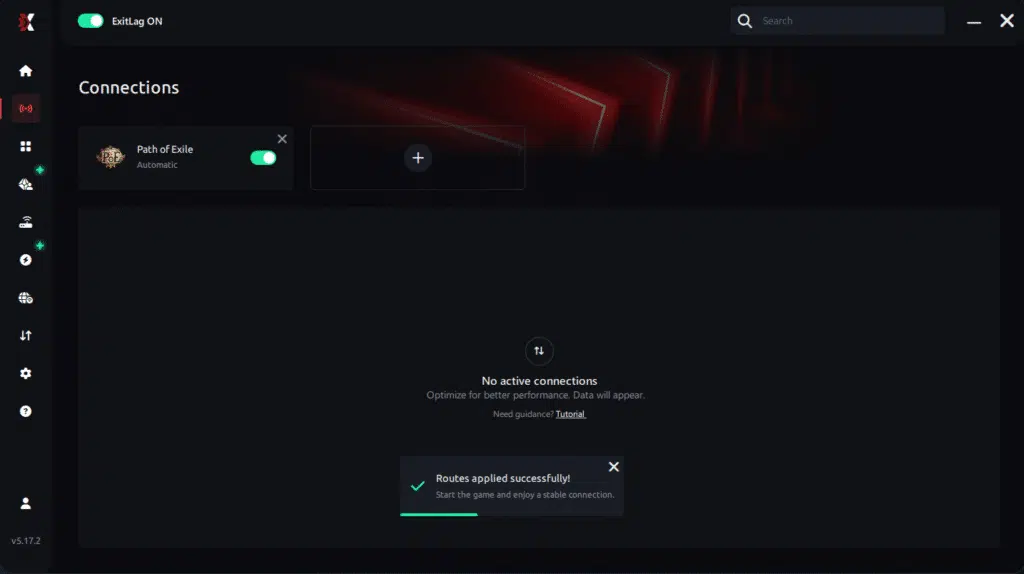
Step 7 – Launch Path of Exile normally. The optimization will already be active.
ExitLag runs in the background while you play, constantly adjusting routes to maintain the best possible performance.
Console players
While consoles do not support ExitLag directly, users can optimize their connection by routing their home network through a PC using ExitLag. This creates an indirect benefit for smoother gameplay.
Before and after results with ExitLag in Path of Exile 2
Players worldwide report significant improvements when using ExitLag to stabilize gameplay—especially during demanding moments that typically trigger FPS Drop Path of Exile 2.
Real player cases
- A player with 110 ms latency dropped to 48 ms after enabling multi-routing.
- A user suffering from 25% packet loss reported 0% loss with ExitLag active.
- A system experiencing frequent 15–20 FPS drops reduced stutter by over 60% after smoothing connection instability.
Performance comparison table
| Metric | Without ExitLag | With ExitLag | Improvement |
| Average latency | 120 ms | 55 ms | 54% better |
| Stability | Frequent spikes | Stable | Consistent gameplay |
| Packet loss | 8–15% | 0–1% | Near elimination |
| Micro-stutter | Constant | Minimal | Significant reduction |
Additional optimizations to maximize FPS with ExitLag
To complete your setup and eliminate the last traces of FPS Drop Path of Exile 2, combining ExitLag with complementary tweaks ensures even smoother gameplay. These adjustments help stabilize your system, reduce background load, and support optimal performance—especially during demanding activities that trigger Path of Exile 2 lag, Path of Exile 2 performance issues, and Path of Exile 2 stuttering.
Network
A stable network prevents routing spikes and indirect stutters that often feel like Path of Exile 2 low FPS.
- Use Ethernet instead of Wi-Fi
- Enable QoS on your router
- Use reliable DNS providers
- Close heavy applications consuming bandwidth
These small adjustments reduce jitter, pacing issues, and delayed packet sync during battles.
System
To avoid background slowdowns that lead to FPS Drop Path of Exile 2, keep your system optimized:
- Update GPU and chipset drivers
- Enable high-performance power mode
- Disable unnecessary startup apps
- Keep your OS clean and free of junk files
This improves raw system efficiency while ensuring ExitLag operates under optimal conditions.
In-game
Path of Exile 2 offers multiple visual features that can influence performance drastically.
- Turn V-Sync off
- Set a reasonable FPS limit based on your hardware
- Use recommended presets for stable performance
Lowering CPU-heavy features reduces Path of Exile 2 frame drops, especially in scenes with hundreds of particle effects.
Frequently asked questions about FPS drop in Path of Exile 2
Players facing FPS Drop Path of Exile 2 often have similar concerns. This FAQ provides clear, concise answers based on practical experience and ExitLag technology.
Does ExitLag actually improve FPS?
Yes—indirectly. ExitLag stabilizes network routes, reduces jitter, prevents micro-freezes, and eliminates connection pacing issues that feel like FPS loss. Many players report smoother animations and reduced stutter.

Is ExitLag safe?
Absolutely. ExitLag is a trusted performance tool used worldwide. It optimizes routes to game servers without collecting personal data or altering system files.
Does ExitLag work on console?
Consoles can benefit indirectly when ExitLag is installed on a PC sharing the network, reducing instability that may contribute to gameplay stutters.
How much does ExitLag cost?
ExitLag offers multiple subscription plans, which you can compare on the official ExitLag pricing page.
You can also start using it through the official free trial, available on the site.
My PC is weak, does ExitLag help?
Yes. While ExitLag cannot replace hardware, it minimizes connection-related stutters that feel like FPS Drop Path of Exile 2, allowing low-end PCs to run more consistently.
Does ExitLag work with Path of Exile 2?
Yes. Path of Exile 2 is part of the official supported titles list. You can confirm this via the full supported games directory available on ExitLag’s website.
What’s the difference between ExitLag and a VPN?
ExitLag uses multi-path routing, gaming-optimized protocols, and packet prioritization. ExitLag is NOT a VPN and does not encrypt traffic or reroute through general-purpose servers. It is built exclusively for gaming performance.
Why do I get stutter only during boss fights?
PoE2 boss arenas contain heavy particles and scripted events. Stability tools like ExitLag reduce network-side pacing issues that worsen these moments.
Why does my FPS drop when opening a chest?
Loot explosions generate dozens of effects simultaneously. System tweaks + ExitLag reduce micro-freezes caused by sync delays.
Does ExitLag help when entering new zones?
Yes. Zone transitions rely on server communication. Optimized routing prevents freeze spikes that feel like frame drops.
Fix FPS drop in Path of Exile 2 with ExitLag
Final benefits
ExitLag helps stabilize your gameplay and eliminate the most frustrating performance issues by offering:
- Stable FPS
- Zero micro-stuttering
- Smooth gameplay even in crowded scenes
- Competitive advantage during intense fights
- Frustration-free performance across all regions
Whether you are clearing maps, fighting bosses, or testing builds, reducing FPS Drop Path of Exile 2 ensures a smoother, more enjoyable experience.
Next steps
- Test ExitLag for free
- Configure in 5 minutes
- Compare before and after
- Dominate Path of Exile 2
In conclusion, solving FPS drop Path of Exile 2 issues requires balancing hardware, settings, and network stability. ExitLag’s multi-path technology eliminates routing delays and ensures fluid gameplay across all regions of Path of Exile 2. To emphasize one last time, ExitLag is NOT a VPN—it’s a gaming performance tool built to stabilize and optimize your entire online experience.
Now that you know everything about FPS drop Path of Exile 2, if you want the most stable, smooth, and competitive gameplay possible, is the time to upgrade your performance toolkit. Register at ExitLag now and improve your gameplay in a way you’ve never experienced before!
Got questions or want to connect with other players? Join the conversation at the ExitLag Forum!