A sudden FPS Drop PUBG can ruin an entire match. At first, everything feels smooth, but then your screen freezes for a split second during a firefight. That tiny delay is enough to miss a shot or get eliminated, turning an intense moment into pure frustration.
Even more, when FPS Drop PUBG happens repeatedly, the game begins to feel unstable. The stutters increase, your aim becomes unpredictable, and performance issues mix with PUBG lag, PUBG low FPS, PUBG stuttering, PUBG frame drops, and PUBG performance issues. To understand more about common performance problems, you can check detailed articles directly from the ExitLag blog.
That’s because FPS Drop PUBG is often related to both system limitations and network factors. With ExitLag, you can stabilize your routes, reduce latency and packet loss, and achieve smoother gameplay. You can explore all the benefits directly on the official ExitLag website, which explains how optimized routing boosts PUBG performance.
What is FPS drop and why does it happen in PUBG?
Understanding FPS
Primarily, FPS represents how many frames your system renders per second. Higher values create smoother motion, while lower values cause choppiness. Typical FPS ranges include:
- 144+ FPS
- 60–120 FPS
- 30–60 FPS
- Below 30 FPS
These ranges directly affect gunfights, movement accuracy, and overall responsiveness.
Difference between FPS drop and network lag
Although they feel similar, FPS problems and network lag come from different sources. The table below clarifies the distinction:
| Aspect | FPS Drop | Network Lag |
| Cause | Hardware or graphics overload | Unstable routing or high ping |
| Symptoms | Stutter, visual freezes | Delayed actions, rubber-banding |
| Solution | Adjusting settings, cooling, upgrades | ExitLag |
Why PUBG suffers from FPS drop
PUBG is heavy because of its large maps, complex assets, and high particle effects. Additionally, open-world structures, foliage density, and dynamic lighting increase GPU demand. When these features overload your system, FPS Drop PUBG becomes more common, especially on older hardware.
5 main causes of FPS drop in PUBG
1. Overheating
When components overheat, they throttle performance. As a result, your GPU and CPU slow down, causing stutters and PUBG low FPS.
2. Outdated drivers
Old GPU drivers reduce efficiency. Therefore, keeping them updated is essential for smooth gameplay and preventing PUBG performance issues.
3. Graphics settings
Ultra textures, shadows, and foliage can overload your system. Consequently, excessive settings often trigger PUBG stuttering.
4. Background processes
Apps running in the background consume CPU and RAM. Soon after, this leads to PUBG frame drops, especially during intense fights.
5. Insufficient hardware
Older CPUs, weaker GPUs, or low RAM may struggle with PUBG’s demands. This creates a constant pattern of instability and FPS Drop PUBG.
How ExitLag fixes FPS drop in PUBG
Now that the main causes are clear, it becomes easier to understand how to counter FPS Drop PUBG effectively. As the game grows more demanding, many players rely on optimization tools to stabilize performance and reduce instability. This is where ExitLag becomes essential, especially when dealing with PUBG lag, PUBG low FPS, and PUBG stuttering during intensive gameplay.
What is ExitLag? (NOT a VPN)
ExitLag is a multi-routing optimization tool designed specifically for gamers. It improves stability, responsiveness, and consistency during online gameplay. Although many players confuse it with virtual private networks, ExitLag is NOT a VPN. Instead of masking your IP or encrypting data for privacy, it focuses entirely on delivering the fastest and most stable path between you and PUBG servers.
To understand the full technical process, you can review the details provided in the official how ExitLag works documentation available on the ExitLag website through this guide to how smart routing technology functions.
How ExitLag optimizes performance in PUBG
ExitLag improves stability using a series of techniques that reduce interruptions and prevent the performance inconsistencies that often contribute to FPS Drop PUBG. These optimizations make gameplay smoother, especially during intense fights, rotations, and long-range engagements.
- Network route optimization
- Latency reduction
- Packet loss elimination
- Game traffic prioritization
- Connection stabilization
Why ExitLag helps with FPS drop
Even though FPS is closely tied to hardware, network instability also contributes to micro-freezes. When jitter, unstable routes, or irregular data pacing appear, gameplay feels choppy. This stuttering blends with existing PUBG lag, PUBG low FPS, PUBG performance issues, and PUBG frame drops, amplifying the problem.
ExitLag reduces jitter and stabilizes routing, which decreases the frequency of micro-stutters. Smooth data flow reduces frame pacing inconsistencies, helping mitigate FPS Drop PUBG during high-load moments. As a result, both rendering and network performance work together without conflict.
ExitLag technologies that impact FPS
ExitLag uses its own gaming-focused infrastructure to ensure consistent performance during PUBG sessions. These technologies include:
- Multi-path routing
- Redundant connections
- Gaming-optimized protocol
These mechanisms guarantee that your game data travels through the most efficient routes, which helps minimize interruptions, prevent PUBG stuttering, and control pacing issues.
ExitLag vs other solutions
Below is a comparison of common alternatives and their impact on PUBG performance:
| Solution | Improves FPS? | Reduces lag? | Ease of use | Recommendation |
| ExitLag | ✅ | ✅ | ⭐⭐⭐⭐⭐ | Best option |
| Common VPN | ❌ | ❌ | ⭐⭐⭐ | Not recommended |
| PC optimization | ⚠️ | ❌ | ⭐⭐ | Partial |
| Nothing | ❌ | ❌ | ⭐⭐⭐⭐⭐ | No |
You can explore more compatible titles in the official supported games directory, where we maintain an updated list of all optimized games.
ow to use ExitLag in PUBG
The process is extremely simple:
Step 1 – Access the official ExitLag website and download the application. There’s a free trial period for new users.
Step 2 – Install and open the program. Log in with your account.
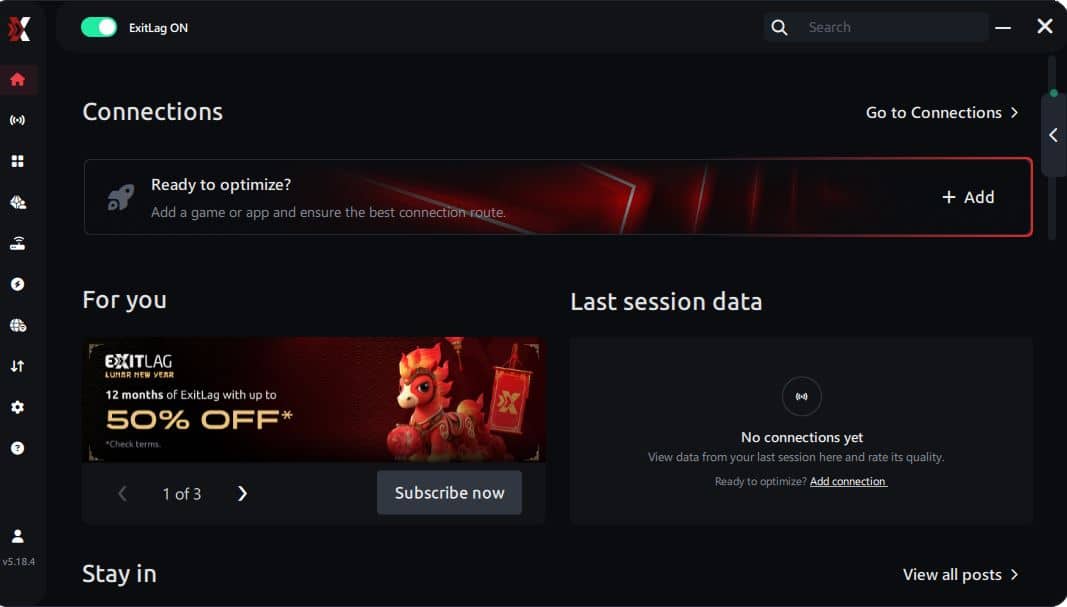
Step 3 – In the search bar, type “PUBG” and select the game from the list.
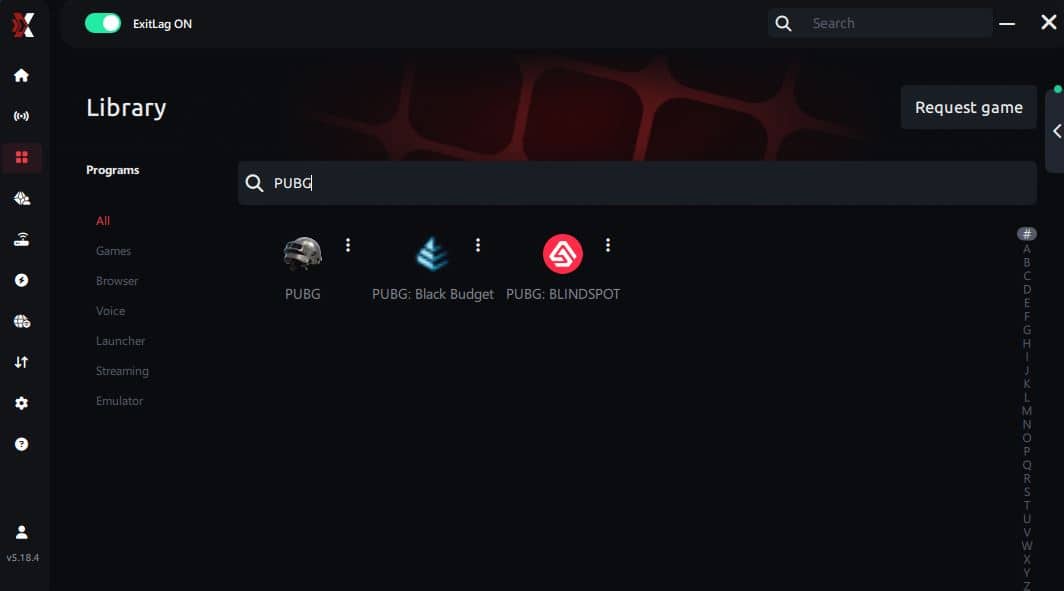
Step 4 – Choose between automated or manual route
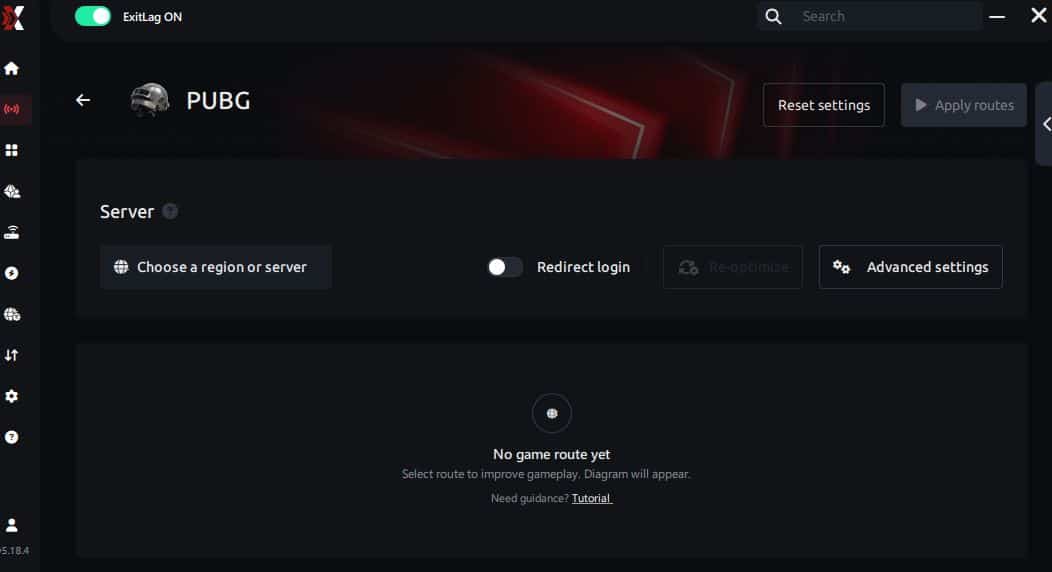
Based on the results, you can let ExitLag automatically select the best route or manually choose the server that showed the lowest latency for your connection.
AI-optimized automated route
Based on the results, you can let ExitLag automatically select the best route through AI optimization. The system analyzes multiple connection paths in real time and automatically identifies the most efficient route for your connection, ensuring the lowest possible latency without requiring manual choices.
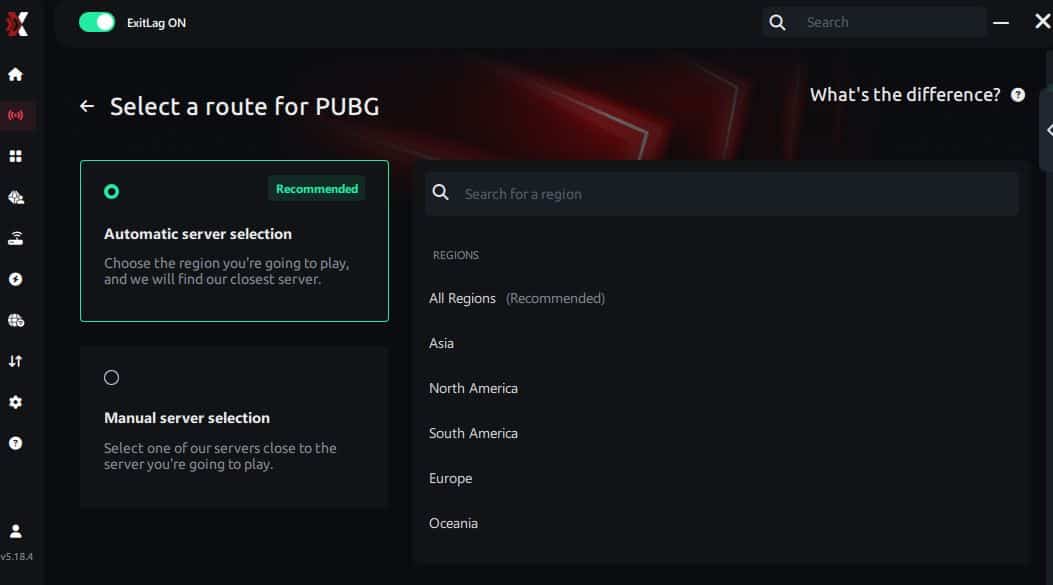
Manual route
If you prefer to have full control over your connection, you can manually choose the server based on the ping test results. Simply select the server that showed the lowest latency or the one that best meets your specific gaming needs, allowing complete customization of your experience.
Step 5 – Click “PUBG” or the play button. ExitLag will begin optimizing your connection automatically.
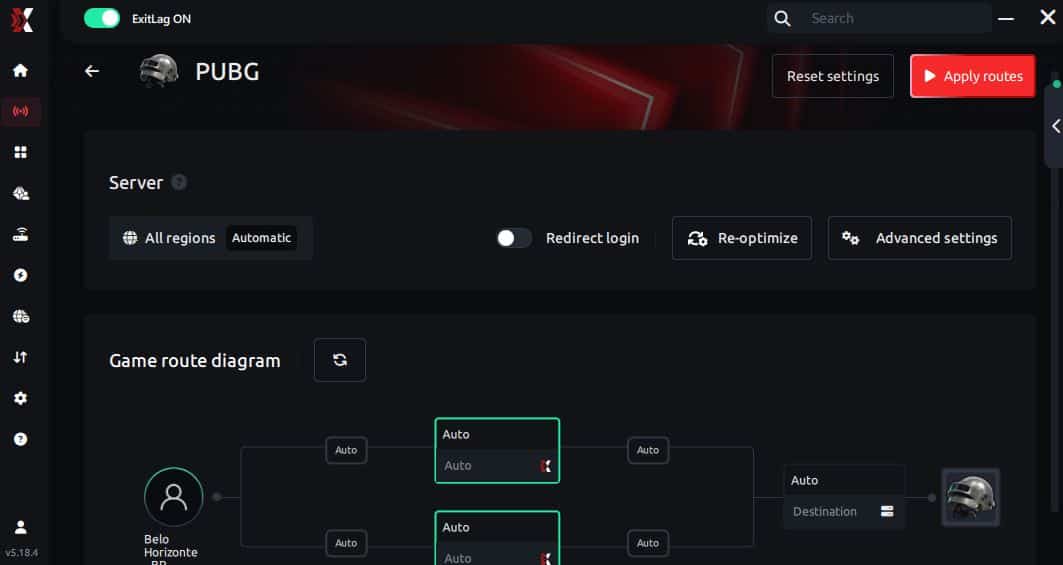
Step 6 – Wait a few seconds until optimization is complete. You’ll see ping indicators in the interface.
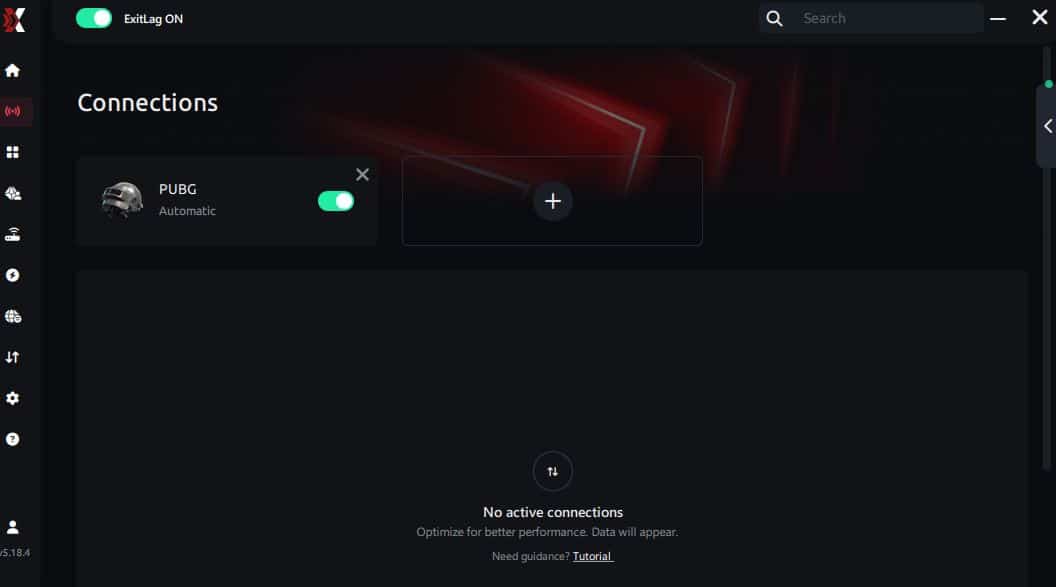
Step 7 – Launch PUBG normally. The optimization will already be active.
ExitLag runs in the background while you play, constantly adjusting routes to maintain the best possible performance.
Emulator setup
If you play PUBG Mobile on an emulator, ExitLag can optimize routes for programs such as BlueStacks and LDPlayer. Select the emulator from the app list, apply PUBG routing, and launch the game normally.
Optimization tips
To reduce PUBG performance issues, consider lowering shadows, controlling temperature, and closing background applications. Using these adjustments together with ExitLag significantly reduces PUBG stuttering and PUBG frame drops.
Console players
While ExitLag cannot be installed on consoles directly, players who use PC-to-console routing (e.g., capture card setups) can still benefit from stable PC routing and reduced jitter.
Before and after results with ExitLag in PUBG
Improving routing stability has a direct impact on how PUBG behaves during intense gameplay moments. When network jitter, packet loss, or poor server paths occur, players often experience symptoms that feel like FPS Drop PUBG, even when their hardware is capable of running the game smoothly. ExitLag minimizes these inconsistencies and creates a more predictable gameplay flow.
Real player cases
Players who struggle with FPS Drop PUBG frequently see immediate improvements when combining in-game optimization with ExitLag’s routing stability.
- Case 1: A player with intense PUBG lag saw their ping drop from 142 ms to 63 ms, reducing micro-stutters during fights.
- Case 2: Another user experiencing PUBG low FPS due to jitter reported a 35% reduction in frame pacing spikes.
- Case 3: A competitive player suffering from PUBG frame drops observed a 65% drop in packet loss, drastically improving input consistency.
Performance comparison table
| Metric | Without ExitLag | With ExitLag | Improvement |
| Ping | High / unstable | Stable / low | Significant |
| Jitter | Frequent spikes | Controlled | Major |
| Packet loss | Up to 8% | 0–1% | Strong |
| Micro-stutters | Common | Reduced | Visible |
| Overall stability | Low | High | Noticeable |
Additional optimizations to maximize FPS with ExitLag
Maximizing performance in PUBG requires combining network stability, system efficiency, and well-balanced in-game settings. While ExitLag already handles routing, packet loss, and jitter, complementary optimizations help reduce the chance of FPS Drop PUBG during intense fights. These adjustments also improve consistency, minimizing problems such as PUBG lag, PUBG frame drops, PUBG stuttering, and PUBG low FPS.
Network
A stable network significantly lowers the frequency of FPS Drop PUBG triggered by inconsistent pacing. Using a wired Ethernet connection prevents jitter spikes that occur on Wi-Fi. Configuring router QoS prioritizes PUBG traffic so no other device interrupts your match. Switching to a faster DNS provider can speed up certain requests, reducing delays before server communication. Finally, closing heavy applications such as streaming software or downloads prevents bandwidth competition and helps avoid PUBG performance issues.
System
System-level optimization is equally important. Keeping your GPU drivers updated ensures proper rendering and avoids micro-stuttering caused by outdated components. Activating high-performance mode in Windows keeps CPU clocks stable and reduces pacing inconsistencies. Disabling unnecessary background apps frees memory and processing power that would otherwise cause instability. Cleaning temporary files and maintaining enough storage space also prevents sudden frame-time spikes that lead to FPS Drop PUBG during large map loading sequences.
In-game
In-game settings influence both smoothness and responsiveness. Turning V-Sync off reduces input delay and avoids artificial frame caps that feel sluggish. Setting a reasonable FPS limit helps balance GPU usage, preventing thermal throttling. PUBG’s recommended presets also work well for players seeking consistent visual quality without risking PUBG low FPS in crowded areas. These adjustments, when combined with ExitLag, significantly reduce moments where stutters interfere with gunfights.
Frequently asked questions about FPS drop in PUBG
Understanding the causes of instability helps players make better decisions. Below are the most common questions about problems related to FPS Drop PUBG and how ExitLag fits into the solution.
Does ExitLag actually improve FPS?
ExitLag stabilizes routing and eliminates jitter, which reduces micro-stutters often perceived as FPS Drop PUBG. Although it does not replace hardware, it improves consistency and frame pacing.

Is ExitLag safe?
Yes. ExitLag is a performance-focused tool that does not alter system files. It only manages network routing paths to ensure a more stable experience.
Does ExitLag work on console?
Consoles cannot install ExitLag directly. However, players using PC-assisted streaming or routing setups can benefit from the PC-side optimization provided by the tool.
How much does ExitLag cost?
ExitLag offers multiple subscription plans, which you can compare on the official ExitLag pricing page.
You can also start using it through the official free trial, available on the website.
My PC is weak, does ExitLag help?
ExitLag cannot increase hardware power, but it reduces network-side stutters and pacing inconsistencies. Many players with older PCs report smoother gameplay thanks to reduced jitter.
Does ExitLag work with PUBG?
Yes. PUBG is fully supported, and players can confirm this by checking the complete list available in the supported games directory, where all compatible titles are displayed.
What’s the difference between ExitLag and a VPN?
ExitLag is NOT a VPN. It does not encrypt traffic or focus on privacy features. Its purpose is purely to optimize performance through multi-routing and stability improvements.
Does ExitLag help in crowded areas of PUBG?
Yes. Crowded zones often cause routing congestion. ExitLag stabilizes server communication and reduces spikes that contribute to FPS Drop PUBG.
Can ExitLag reduce packet loss during PUBG gunfights?
Yes. By using redundant routing and multi-path technology, ExitLag prevents packet loss that often results in PUBG stuttering and desync sensations.
Fix FPS drop in PUBG with ExitLag
Reducing instability requires combining game optimization, system improvements, and reliable connection routing. ExitLag addresses the network side of performance, eliminating jitter, smoothing frame pacing, and reducing packet inconsistencies that often feel like FPS Drop PUBG.
Final benefits
- Stable FPS
- Zero micro-stuttering
- Smooth gameplay
- Competitive advantage
- Frustration-free gameplay
Next steps
- Test ExitLag for free
- Configure in 5 minutes
- Compare before and after
- Dominate PUBG
In conclusion, solving FPS drop PUBG issues requires balancing hardware, settings, and network stability. ExitLag’s multi-path technology eliminates routing delays and ensures fluid gameplay across all regions of PUBG. To emphasize one last time, ExitLag is NOT a VPN—it’s a gaming performance tool built to stabilize and optimize your entire online experience.
Now that you know everything about FPS drop PUBG, if you want the most stable, smooth, and competitive gameplay possible, is the time to upgrade your performance toolkit. Register at ExitLag now and improve your gameplay in a way you've never experienced before!