

Every frame matters in Mortal Kombat 1. Whether you’re executing a flawless combo with Scorpion, timing a perfect Kameo assist, or trying to land a Fatal Blow in a clutch Kombat League match, high ping can turn a winning play into a frustrating loss.
In a fighting game where inputs are measured in individual frames, even a small delay can mean the difference between pulling off a devastating juggle and getting punished for a dropped combo. If you’ve been dealing with lag, teleporting opponents, or inputs that simply don’t come out when they should, this guide covers everything you need to know to fix your connection and get back to fighting at your best.
Mortal Kombat 1 is one of the many games supported by optimization tools designed specifically for competitive online play.

What is high ping in Mortal Kombat 1?
Ping is the time it takes for a data packet to travel from your device to the game server and back, measured in milliseconds (ms). In Mortal Kombat 1, this round-trip time directly determines how responsive your inputs feel during online matches. When you press a button to throw a punch, your command travels to the server, gets processed, and the result is sent back to your screen. The lower your ping, the faster this happens.
Mortal Kombat 1 uses a rollback-based netcode system, which means the game predicts what your opponent will do and corrects itself when the prediction is wrong. While this is designed to make online play smoother, it still relies heavily on a stable, low-latency connection. When your ping is high, the game has to make larger corrections, which leads to visual glitches, dropped inputs, and matches that feel nothing like playing offline.
The difference between low and high ping in a fighting game is dramatic. At under 50ms, the game feels tight and responsive, almost identical to offline play. Between 50ms and 100ms, you may start noticing slight delays in your inputs. Above 100ms, combos become unreliable, reactions feel sluggish, and the game starts adding input delay to compensate, making the entire experience feel like you’re fighting underwater.
How high ping affects your gameplay in Mortal Kombat 1
High ping creates a cascade of problems that directly impact your ability to compete in Mortal Kombat 1:
- Dropped combo inputs: Your carefully practiced juggle combos fail because button presses arrive at the server too late, causing the game to interpret them as mistimed inputs. Multi-hit strings and dial-in combos are especially vulnerable to this.
- Failed Kameo assist timing: The Kameo Fighter system in MK1 requires precise timing to extend combos and create pressure. High ping makes it nearly impossible to reliably call your Kameo assist at the exact frame needed for optimal combo routes.
- Unreliable Fatal Blow and Fatality inputs: These signature moves require specific button sequences that need to register cleanly. Latency can cause inputs to be swallowed or delayed, leading to failed attempts at crucial moments.
- Rubberbanding and teleporting opponents: Your opponent appears to jump between positions on screen as the game’s rollback netcode corrects large prediction errors caused by your unstable connection.
- Hit registration failures: Attacks that visually connect on your screen don’t register as hits because the server’s version of events differs from what you see locally. This is particularly devastating during close-range pressure and punish situations.
- Massive competitive disadvantage in Kombat League: In MK1’s ranked mode, every match directly affects your rank. Losing points because your connection couldn’t keep up rather than being outplayed is one of the most frustrating experiences in competitive fighting games.
- Increased input delay: When the connection is poor, Mortal Kombat 1 adds additional frames of input delay to compensate, making the game feel sluggish and forcing you to adjust your muscle memory for every combo and punish.
Main causes of high ping in MK 1
Distance from game servers
Mortal Kombat 1 routes online matches through dedicated servers located in specific regions. The physical distance between your location and these servers directly impacts your ping. Players in regions without nearby MK1 servers, such as parts of South America, Africa, and the Middle East, often experience significantly higher latency simply due to the distance data must travel. Even within well-served regions, being far from a server cluster can add 30-50ms to your base ping.
Problems with your internet service provider (ISP)
Your ISP plays a critical role in your online gaming experience. Many providers use congested or poorly optimized routing paths that send your data packets through unnecessary hops before reaching the game server. During peak hours, ISP infrastructure can become overloaded, causing sudden latency spikes that disrupt your matches. Some ISPs also deprioritize gaming traffic in favor of streaming or general browsing, adding further delay to your connection.
Inefficient routing
Internet traffic doesn’t travel in a straight line. Your data passes through multiple routers, switches, and network nodes before reaching the Mortal Kombat 1 servers. If any of these intermediate points are congested, misconfigured, or geographically inefficient, your ping increases substantially. This is one of the most common and difficult-to-solve causes of high ping, since it occurs entirely outside of your home network.
Network congestion
Multiple devices sharing your internet connection can drastically impact your gaming performance. If someone in your household is streaming video, downloading large files, or running cloud backups while you’re playing, your gaming packets compete for bandwidth. This creates latency spikes and jitter that make online matches in MK1 feel inconsistent and unpredictable.
Outdated hardware and equipment
An aging router, outdated network drivers, or a Wi-Fi adapter running on older standards can all contribute to high ping. Routers that haven’t been updated or restarted in months can develop performance issues. Similarly, using Wi-Fi instead of a wired connection introduces interference and instability that is especially damaging in a precision-demanding fighting game like Mortal Kombat 1.
Mortal Kombat 1’s server-side architecture
MK1 uses a server-relayed connection model rather than a pure peer-to-peer system. This means that even when playing against someone in your same city, your data still travels through a game server. While this approach has benefits for matchmaking and anti-cheat, it adds an inherent layer of latency that makes optimized routing even more critical for a smooth experience.
How to identify and test high ping in Mortal Kombat 1
Mortal Kombat 1 displays connection quality indicators during online matches, though the information is more limited compared to some other fighting games. During a match, pay attention to the connection indicator icon, which appears in the corner of the screen.
A green indicator generally means the connection is stable, yellow signals moderate issues, and red means severe latency problems. Unfortunately, MK1 does not display a precise ping number in milliseconds during gameplay, making external testing important.
For Mortal Kombat 1 on PC via Steam, you can also monitor your network performance through Steam’s built-in network tools, or use third-party software like PingPlotter to visualize your connection path over time. This is especially useful for identifying patterns, such as consistent spikes during specific hours or routing problems through specific network nodes.
As a reference, here are the values you should aim for: under 30ms is excellent and provides a near-offline experience in MK1. Between 30ms and 60ms is good and playable for most situations. From 60ms to 100ms, you’ll start noticing delays, especially on tighter combo links. Above 100ms, the game becomes significantly harder to play competitively, with heavy input delay compensation kicking in.
Ping level reference for Mortal Kombat 1
| Ping (ms) | Classification | Impact on Mortal Kombat 1 gameplay |
|---|---|---|
| 0–20 ms | Excellent | Feels identical to offline. All combos, Kameo assists, and reaction punishes execute perfectly. Ideal for competitive Kombat League. |
| 20–50 ms | Good | Smooth experience with minimal perceptible delay. Tight combo links and frame-perfect punishes are still reliable. |
| 50–80 ms | Acceptable | Slight input delay becomes noticeable. Some advanced combo routes may require timing adjustments. Kameo assist timing needs extra attention. |
| 80–120 ms | Poor | Significant delay on all inputs. Combos frequently drop, and the game adds noticeable input delay compensation. Rubberbanding may occur. |
| 120–200 ms | Very poor | The game feels “underwater.” Dropped inputs are constant, hit registration is unreliable, and competitive play becomes extremely frustrating. |
| 200+ ms | Unplayable | Severe desynchronization, constant rollback corrections, and matches often end in disconnection. Not viable for any online mode. |
Basic solutions to reduce high ping in Mortal Kombat 1
Optimize your local connection
- Use a wired Ethernet cable: Wi-Fi is one of the biggest enemies of a stable fighting game connection. A direct Ethernet cable eliminates wireless interference, reduces jitter, and provides a consistently lower ping. For MK1, where every frame of input delay matters, this is the single most impactful change you can make at home.
- Close background applications: Streaming services, cloud sync tools (Google Drive, OneDrive, Dropbox), web browsers with multiple tabs, and automatic update services all consume bandwidth. Before launching Mortal Kombat 1, close everything that isn’t essential. On PC, check Task Manager for hidden processes that might be using your network.
- Update your network drivers: Outdated network adapter drivers can cause packet handling inefficiencies. Visit your motherboard or network adapter manufacturer’s website and install the latest drivers. This is particularly important after major Windows updates, which can sometimes reset or replace drivers with generic versions.
- Configure QoS (Quality of Service) on your router: Most modern routers allow you to prioritize specific types of traffic. Access your router’s admin panel and set gaming traffic or your PC/console’s IP address as high priority. This ensures that your MK1 data packets get processed before less time-sensitive traffic like file downloads or streaming.
- Restart your router and modem regularly: Network equipment accumulates cache data and can develop routing inefficiencies over time. A simple restart clears these issues and forces your devices to re-establish fresh connections. Make it a habit to restart your networking equipment at least once a week.
- Disable other devices during competitive sessions: If you’re about to enter a Kombat League set, ask others on your network to pause downloads or streaming temporarily. Even a smart TV running in the background can generate enough traffic to cause ping spikes during critical moments.
Contact your ISP
If you’ve optimized everything on your end and still experience consistently high ping in Mortal Kombat 1, the problem may lie with your internet service provider. Contact your ISP and explain that you’re experiencing high latency specifically during online gaming. Ask them to check your line quality, routing paths, and whether any traffic shaping or throttling policies are affecting your connection. In some cases, upgrading to a plan with lower latency (not just higher speed) or requesting a different routing path can make a significant difference.
It’s also worth asking your ISP if they offer a gaming-optimized tier or if there are known issues with routing to Warner Bros. Games servers in your region. Document your ping test results and share them during the call to help the support team understand the issue.
ExitLag: the best solution to reduce high ping in Mortal Kombat 1
What is ExitLag?
ExitLag is a network optimization software built specifically for online gaming. Unlike generic solutions that treat all internet traffic the same way, ExitLag focuses exclusively on finding the fastest, most stable route between your device and the game server. It analyzes your connection in real time and intelligently routes your gaming data through optimized paths, bypassing the congestion and inefficiencies that cause high ping.
For fighting game players, where even a few milliseconds of added latency can ruin a combo or turn a winning read into a losing trade, ExitLag provides the kind of precise connection optimization that standard internet setups simply cannot deliver. You can learn more about the technology behind ExitLag and how it differs from traditional approaches to network optimization.
How does ExitLag work to reduce high ping?
ExitLag uses its proprietary Multi-Internet technology to transform how your gaming data travels across the internet. Instead of relying on a single, often inefficient path chosen by your ISP, ExitLag takes a fundamentally different approach. Here’s how it works in practice:
- Real-time connection analysis: ExitLag continuously monitors the quality of multiple network paths between your device and the Mortal Kombat 1 servers, measuring latency, packet loss, and stability across each route.
- Multiple simultaneous routes: Using Multi-Internet technology, ExitLag sends your data through several optimized routes at the same time. If one path experiences congestion or a spike, your data seamlessly continues through the best available alternative.
- Automatic best-route selection: The software intelligently selects and switches between routes in real time, always prioritizing the path with the lowest latency and highest stability without any manual intervention from you.
- Hop optimization: ExitLag reduces the number of intermediate network hops your data must pass through, eliminating unnecessary detours that add milliseconds to your ping. Fewer hops mean faster, more direct communication with MK1 servers.
- Connection stabilization: Beyond just reducing ping, ExitLag stabilizes your connection by smoothing out jitter and preventing the sudden spikes that cause rollback corrections and dropped inputs in Mortal Kombat 1.
Advantages of ExitLag for Mortal Kombat 1 players
- Drastic ping reduction: ExitLag optimizes the actual path your data travels, often reducing ping by 30-60% compared to your default ISP route. For MK1 players, this can mean the difference between a smooth 40ms match and a sluggish 100ms+ experience. Lower ping translates directly to tighter combos, faster reactions, and more reliable Kameo assist timing.
- Elimination of packet loss: Packet loss is devastating in fighting games because it causes the game to lose track of your inputs entirely. ExitLag’s multi-route technology ensures that if packets are lost on one path, they arrive through another, virtually eliminating this problem and keeping your inputs consistent throughout every match.
- Stable and consistent connection: Consistency is arguably more important than raw ping numbers in Mortal Kombat 1. A stable 50ms connection is far more playable than one that fluctuates between 30ms and 120ms. ExitLag smooths out these variations, giving you a predictable, reliable experience every time you enter a match.
- Ease of use: You don’t need to be a networking expert to benefit from ExitLag. The software is designed for gamers, with an intuitive interface that makes optimization as simple as selecting your game and clicking start. There’s no manual configuration of ports, routes, or server addresses required.
- Support for multiple game servers: MK1 routes matches through different regional servers depending on matchmaking. ExitLag automatically optimizes your connection regardless of which server you’re connected to, ensuring consistent performance across all your matches whether you’re fighting opponents from your region or cross-region.
- Optimized for fighting game demands: Fighting games have unique networking requirements compared to shooters or MOBAs. ExitLag understands that MK1 needs ultra-low latency with zero jitter, and its optimization is tuned to deliver exactly that kind of precision connectivity.
Is ExitLag worth using for Mortal Kombat 1?
Absolutely. Mortal Kombat 1 is a game where connection quality directly determines your ability to compete. The game’s rollback netcode does its best to mask latency, but it can only compensate so much. When your ping is high or unstable, you’ll feel it in every dropped combo, every missed punish, and every match lost to input delay rather than skill difference. ExitLag addresses the root cause of these problems by optimizing how your data reaches the game servers, providing a measurably better online experience. You can check out the available pricing plans to find the option that fits your needs.
How to use ExitLag in Mortal Kombat 1: Step by Step
The process is extremely simple:
Step 1 – Access the official ExitLag website and download the application. There’s a free trial period for new users.
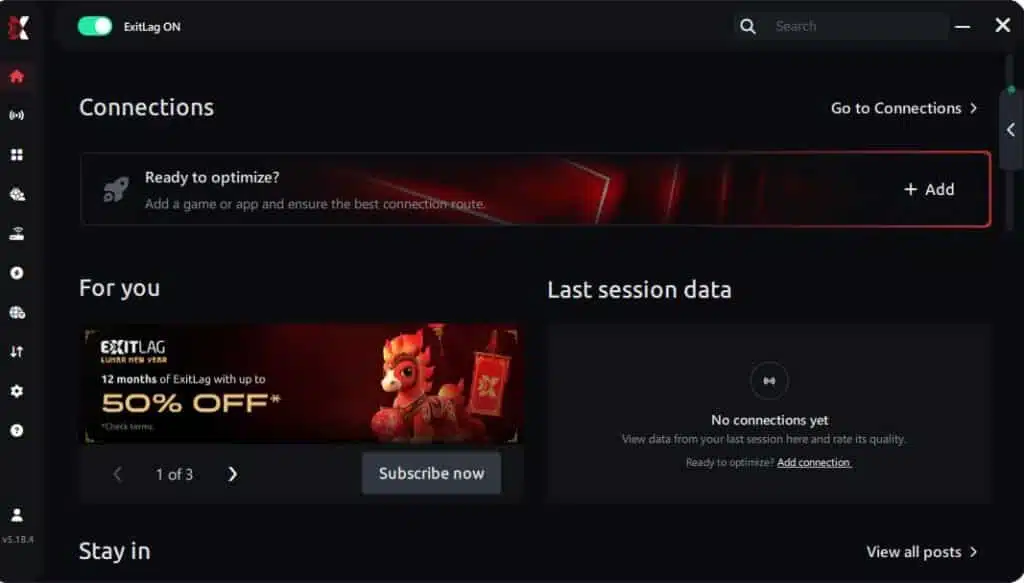
Step 2 – Install and open the program. Log in with your account.
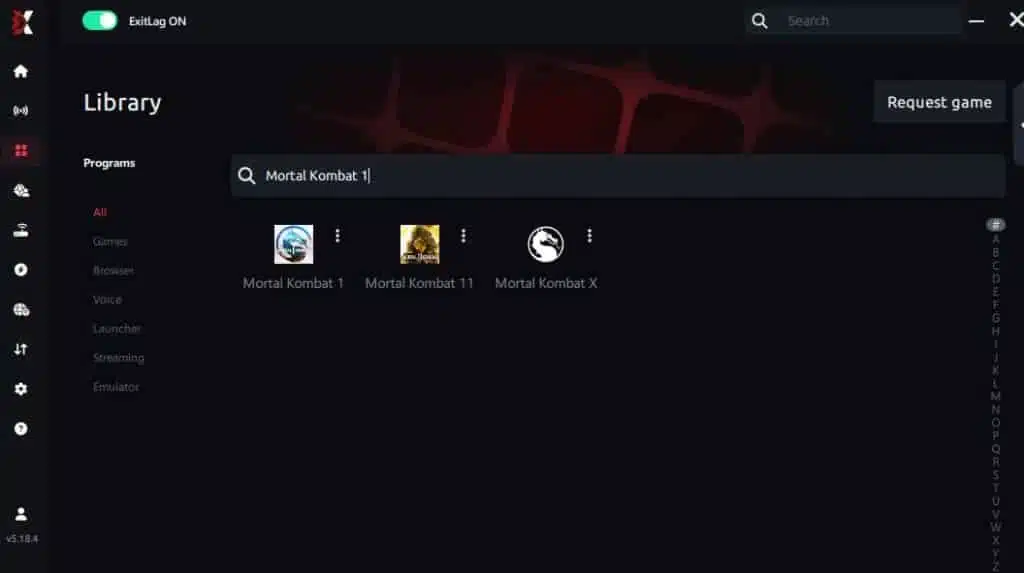
Step 3 – In the search bar, type “Mortal Kombat 1” and select the game from the list.
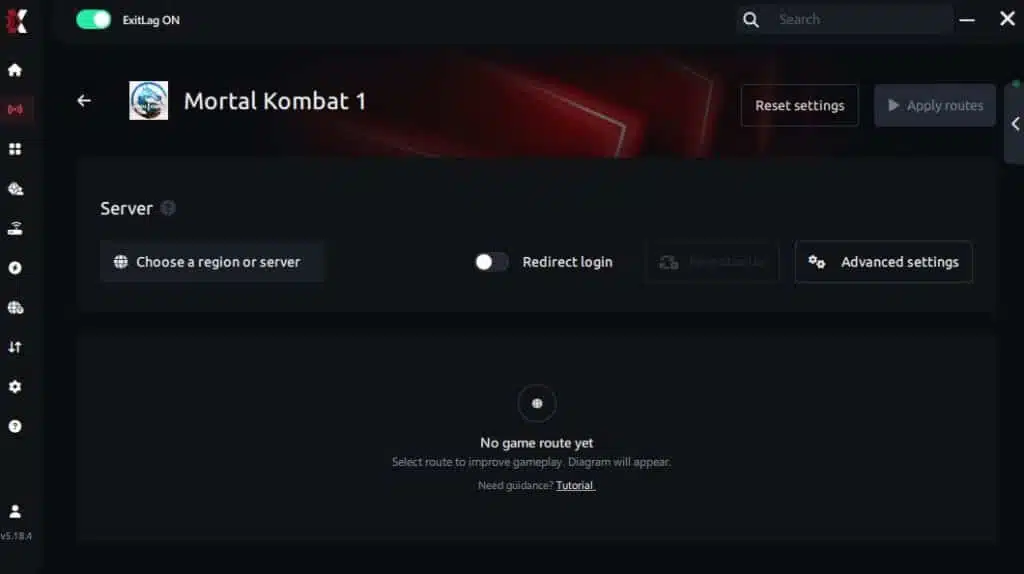
Step 4 – Choose between automated or manual route
Based on the results, you can let ExitLag automatically select the best route or manually choose the server that showed the lowest latency for your connection.
AI-optimized automated route
You can let ExitLag automatically select the best route through AI optimization. The system analyzes multiple connection paths in real time and automatically identifies the most efficient route for your connection, ensuring the lowest possible latency without requiring manual choices.
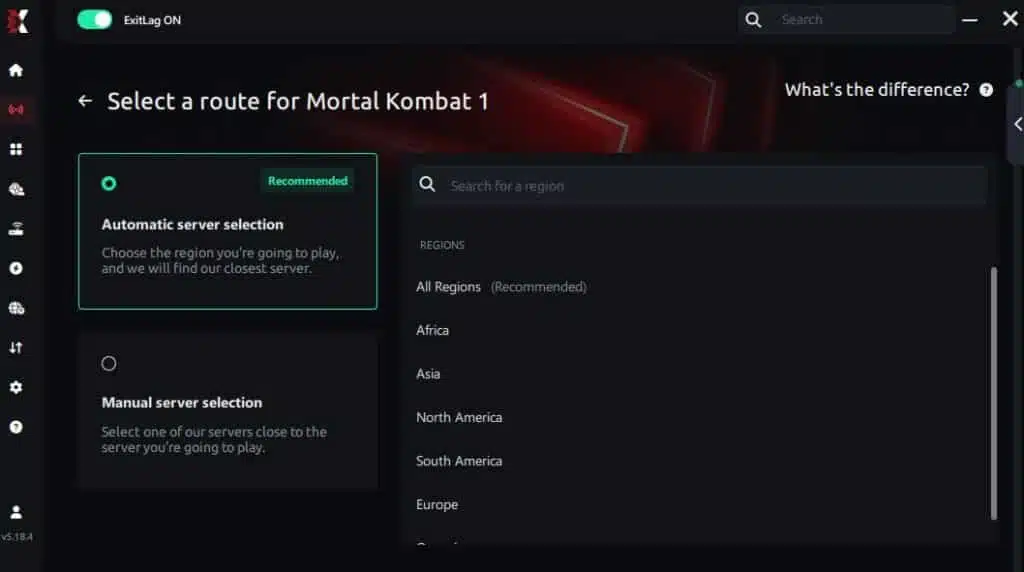
Manual route
If you prefer to have full control over your connection, you can manually choose the server based on the ping test results. Simply select the server that showed the lowest latency or the one that best meets your specific gaming needs, allowing complete customization of your experience.
Step 5 – Click “Apply routes” or the play button. ExitLag will begin optimizing your connection automatically.
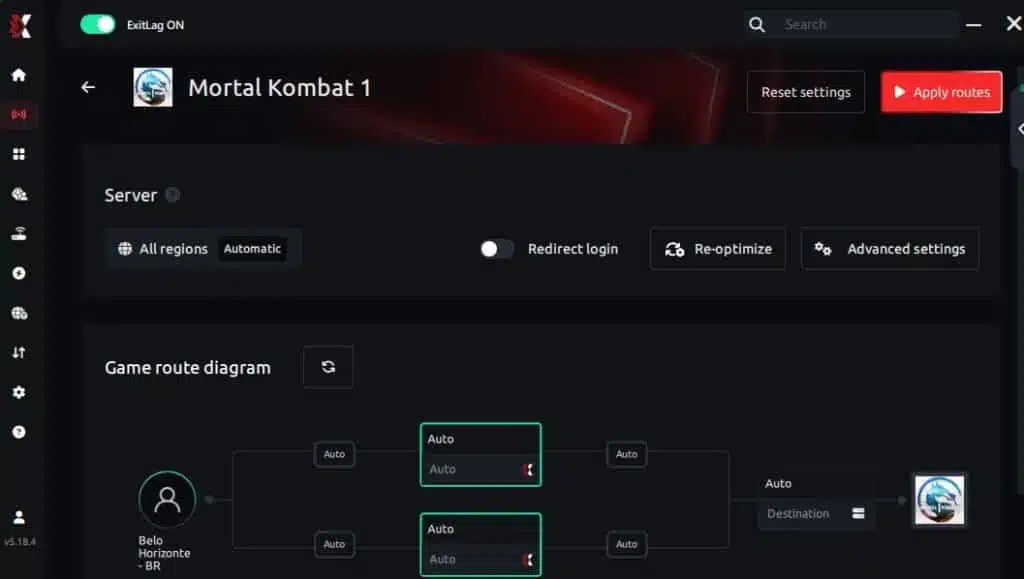
Step 6 – Wait a few seconds until optimization is complete. You’ll see ping indicators in the interface.
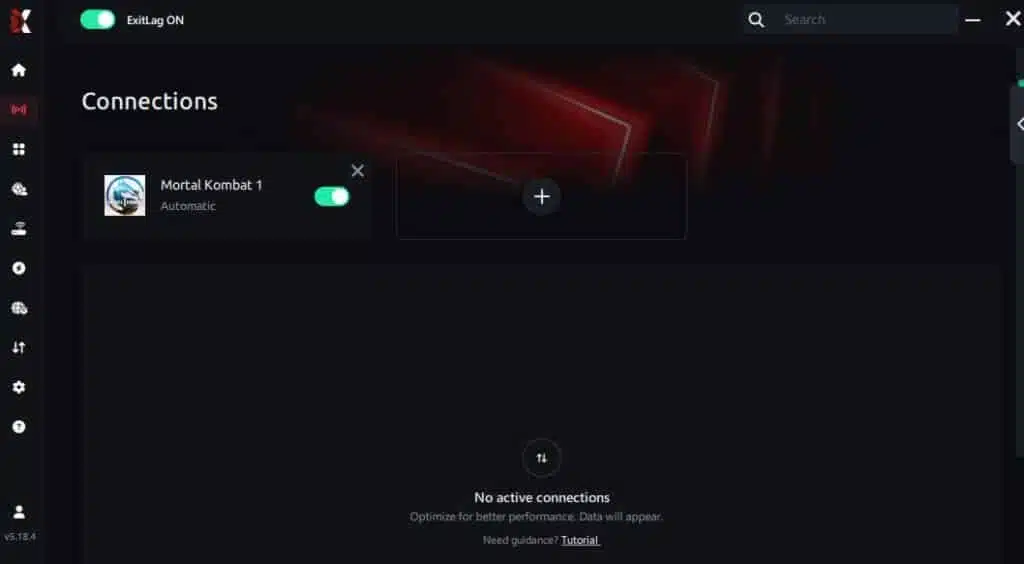
Step 7 – Launch Mortal Kombat 1 normally. The optimization will already be active.
ExitLag runs in the background while you play, constantly adjusting routes to maintain the best possible performance.
How to use Ping for Games: Step-by-Step Guide (Mortal Kombat 1)
Checking your connection quality before entering a match has never been easier. Here’s how to use Ping for Games in just a few steps:
1. Open the ExitLag software on your PC – Ensure the application is installed and open. The feature is integrated into the platform and available for free to all users.
2. Access the Network Analyzer tool – Locate the Network Analyzer in the software menu. This is where you’ll find Ping for Games along with other connection analysis features.
3. Select the game you want to test – Choose Mortal Kombat 1 from the list. The tool supports major online multiplayer games, including FPS, Battle Royales, MOBAs, MMORPGs, and more.
4. Choose the specific server – Select the exact Mortal Kombat 1 server you want to test instead of a generic region. This ensures more accurate results for your match.
5. Start the ping test – With one click, the measurement is performed in real time between your device and the selected Mortal Kombat 1 server, considering your current connection (cable or Wi-Fi).
6. Analyze the results – Results appear in milliseconds (ms), automatically sorted from best to worst ping. You can also reorganize the view alphabetically if you prefer.
7. Choose the best server and play worry-free – With this information, simply select the server with the lowest latency and jump into Mortal Kombat 1 knowing your connection is optimized.
FAQ about high ping in Mortal Kombat 1
What causes high ping in Mortal Kombat 1?
High ping in MK1 is typically caused by a combination of factors. The most common is inefficient routing by your internet service provider, which sends your data through unnecessary intermediate points before it reaches the game servers. Physical distance from MK1’s regional servers also plays a major role, especially for players in regions with limited server coverage. Network congestion from other devices or users on your connection, outdated networking hardware, and Wi-Fi instability are additional common causes.
The server-relayed architecture of Mortal Kombat 1 means that even local matches pass through a dedicated server, which adds a baseline level of latency that makes optimized routing even more important. During peak gaming hours, server load can also increase, further impacting your connection quality.
How do I check my ping in Mortal Kombat 1?
Mortal Kombat 1 displays a connection quality indicator during online matches, but it does not show a precise ping number in milliseconds like some other fighting games do. The indicator uses color coding (green, yellow, red) to give a general sense of connection quality. For more detailed information, you can use external tools like the ping command in your system’s terminal, PingPlotter for visual network analysis, or ExitLag’s built-in monitoring to see your exact latency to game servers.
On PC, you can also use Steam’s network diagnostic tools to monitor your connection performance while playing. For the most accurate picture, combine in-game indicators with external testing to identify patterns and pinpoint issues.
What is a good ping for Mortal Kombat 1?
For Mortal Kombat 1, the ideal ping is under 30ms, which provides a near-offline experience where all combos, Kameo assists, and reaction punishes work exactly as they should. Ping between 30ms and 60ms is still very good and allows for competitive play without significant compromises. Between 60ms and 100ms, you’ll start to feel delays, particularly on tight combo links and frame-dependent interactions.
Above 100ms, the game adds substantial input delay compensation, making the experience feel significantly different from offline play. For competitive Kombat League, aim for under 50ms whenever possible. Stability matters just as much as the raw number — a consistent 50ms is better than a fluctuating 20-80ms connection.
Can high ping get you banned in Mortal Kombat 1?
High ping alone won’t directly result in a ban from Mortal Kombat 1. However, if your connection is so unstable that you frequently disconnect from matches, the game’s disconnect penalty system may apply temporary restrictions. Repeated disconnections in Kombat League can result in point deductions and temporary matchmaking cooldowns, which function similarly to soft bans.
Additionally, extremely high and fluctuating ping can sometimes trigger anti-cheat false positives in online games, though this is rare in MK1 specifically. The best approach is to ensure your connection is as stable as possible before entering ranked matches to avoid both competitive disadvantages and potential penalties.
Does ExitLag work for Mortal Kombat 1?
Yes, ExitLag fully supports Mortal Kombat 1 and is optimized for the game’s specific server infrastructure and networking requirements. ExitLag’s multi-route technology is particularly effective for MK1 because fighting games demand ultra-low latency with zero jitter — exactly the type of connection optimization ExitLag specializes in. Players consistently report significant improvements in ping stability, reduced input delay, and fewer rollback-related visual glitches after activating ExitLag for their MK1 sessions.
Does Mortal Kombat 1 use rollback netcode?
Yes, Mortal Kombat 1 uses rollback netcode, as confirmed by NetherRealm Studios and Warner Bros. Games. Rollback netcode works by predicting what your opponent will do and correcting itself when the prediction is wrong, which generally provides a smoother online experience than traditional delay-based netcode.
Why does my ping spike during Kombat League matches?
Ping spikes during Kombat League can happen for several reasons. The most common is that matchmaking connects you with opponents who are geographically distant, resulting in a longer data travel path. Network congestion during peak hours can also cause sudden spikes, as can background processes on your device or network that intermittently consume bandwidth. Since Kombat League matches are routed through dedicated servers, any instability on the path between you, the server, and your opponent gets amplified. Using a wired connection and a network optimizer like ExitLag significantly reduces the frequency and severity of these spikes.
High ping in Mortal Kombat 1 transforms a precise, competitive fighting game into a frustrating experience where your skill matters less than your connection quality. From dropped combos and failed Kameo assists to unreliable hit registration and constant input delay, latency issues touch every aspect of online play in MK1.
While basic optimizations like switching to Ethernet, closing background applications, and updating your hardware can help, the most impactful solution for persistent ping problems is addressing the root cause: how your data travels from your device to the game servers. ExitLag provides exactly this, using advanced multi-route optimization technology to ensure your connection is as fast, stable, and consistent as possible every time you enter an online match.
Don’t let connection issues hold you back from climbing the Kombat League ranks and experiencing Mortal Kombat 1 the way it was meant to be played. For more tips on improving your gaming performance, check out the ExitLag blog for guides on optimizing your connection across hundreds of popular games.
Ready to eliminate high ping in Mortal Kombat 1? Try ExitLag for free and experience the difference optimized routing makes in every match. Your combos deserve a connection that keeps up with your skills.
Got questions or want to connect with other players? Join the conversation at the ExitLag Forum!
