

Every frame matters in Mortal Kombat 1. In a fighting game where milliseconds separate a perfect combo from a frustrating defeat, lag can be your worst opponent — worse than any Fatality.
The truth is that most MK1 players have already lost matches and ranking points, due to lag and connection instability, especially in competitive online modes. But why does this happen? And more importantly: what actually works to fix it?
In this article, you’ll understand the technical causes of lag in Mortal Kombat 1, learn the difference between lag, ping, and FPS, and discover how ExitLag can transform your online experience in the game.

What causes lag in Mortal Kombat 1?
Mortal Kombat 1 uses a rollback netcode system, considered the most advanced for fighting games. Even so, when the connection between you and the server (or your opponent) is unstable, problems show up.
The main causes are:
- Inefficient connection route: your internet provider automatically chooses the path your data takes to the game server and that path isn’t always the fastest or shortest. Imagine your data needs to travel from New York to a server in another state, but instead of taking a direct route, it makes three or four unnecessary “stops” along the way. This adds latency to every command.
- Packet loss: When data packets are lost along the way, your commands simply don’t reach the server. In MK1, this can mean attacks that don’t register, inputs that get “swallowed,” and combos you executed with perfect timing, but the game didn’t recognize.
- Network congestion: during peak hours, your provider’s infrastructure gets overloaded. Even with high-speed internet, the path to the server becomes “jammed,” increasing response time.
- Geographic distance from the server: the farther you are from the server or your opponent, the longer it takes for data to travel back and forth. Players connecting to servers in distant regions, for example, already start with a natural latency disadvantage.
- ISP instability: fluctuations in your connection — even small ones — cause ping spikes and micro-stutters that, in a frame-by-frame fighting game, are catastrophic.
Lag, Ping, and FPS in Mortal Kombat 1: understanding the difference
Many players confuse these three concepts, and understanding the difference is essential to identifying — and fixing — the real problem.
Lag is the delay between the moment you press a button and the action happens on screen. In Mortal Kombat 1, this means pressing punch and seeing the attack come out late, missing the timing on a combo or a punish.
Ping is the time (in milliseconds) it takes for a data packet to travel from your computer to the server and back. The lower the ping, the more responsive the game. In MK1, a ping above 100ms already seriously impacts the experience in ranked matches.
FPS (frames per second) is related to your hardware’s graphical performance. If the game runs at low FPS, the problem lies with your graphics card or processor — not your connection. MK1 runs at a locked 60 FPS, and any drop directly impacts visual smoothness.
The key takeaway: if your FPS is stable at 60 but you still experience stuttering, teleporting, and delayed inputs, the problem is your connection — not your PC. And that’s exactly what ExitLag fixes.
Why does lag happen in Mortal Kombat 1 even with good internet?
This is the most frustrating question for players. You pay for 500 Mbps internet, run a speed test and everything looks fine — but you hop into MK1 online and the lag shows up.
The explanation lies in your connection route. Internet speed (Mbps) is not the same as route quality. Think of it this way: having fast internet is like having a powerful car, but if the road to the server is full of detours, potholes, and traffic jams, your fast car won’t make a difference.
When you connect to an online Mortal Kombat 1 match, your data passes through multiple “points” (called nodes or hops) to reach the server. Your provider chooses this route automatically, prioritizing cost and availability — not speed or stability. The result: your data hits a digital “traffic jam,” adding latency and instability even with internet that, on paper, is excellent.
That’s why two players with the same internet speed can have completely different experiences in MK1 online. The difference is in the route — and that’s where ExitLag comes in.
How ExitLag Fixes Lag in Mortal Kombat 1
What if you could manually choose the best connection route, avoiding all that congested path? That’s exactly what ExitLag does.
ExitLag is a connection optimization software built specifically for gamers. It uses multi-path routing and intelligent tunneling technology to find the fastest and most stable path between you and the game server — bypassing the problematic routes your provider would automatically choose.
In practice, ExitLag analyzes hundreds of available routes in real time and selects the ideal combination for your connection at that moment. If a route starts showing instability, the system automatically redirects to a better alternative — all in milliseconds, without you even noticing.
Benefits of ExitLag for Mortal Kombat 1 Players
- Lower and more stable ping: every command responds instantly. Combos, punishes, and reactions become precise because the time between input and in-game action is drastically reduced. In a fighting game, this difference is everything.
- Fewer stutters and packet loss: no more attacks that don’t register, opponent teleporting, or “ghost” inputs. ExitLag stabilizes your connection and ensures your data packets reach the server without loss — even during peak hours.
- Reliable hit registration: in MK1, attack accuracy depends directly on the sync between your client and the server. With an optimized connection, your hits land when they should, without the frustration of seeing them “phase through” your opponent.
- Less rubberbanding and desync: no more “time travel” effect where your character seems to move forward and then snaps back to a previous position. The optimized connection keeps sync smooth and predictable.
- Real competitive advantage: in ranked matches and tournaments, whoever has lower latency reacts faster, sees opponent actions with less delay, and gets better hit registration. ExitLag levels — or reverses — that advantage in your favor.
- Easy to use: no complicated settings. In just a few clicks, you select Mortal Kombat 1 and ExitLag handles all the optimization automatically.
How to use ExitLag in Mortal Kombat 1: Step by Step
The process is extremely simple:
Step 1 – Access the official ExitLag website and download the application. There’s a free trial period for new users.
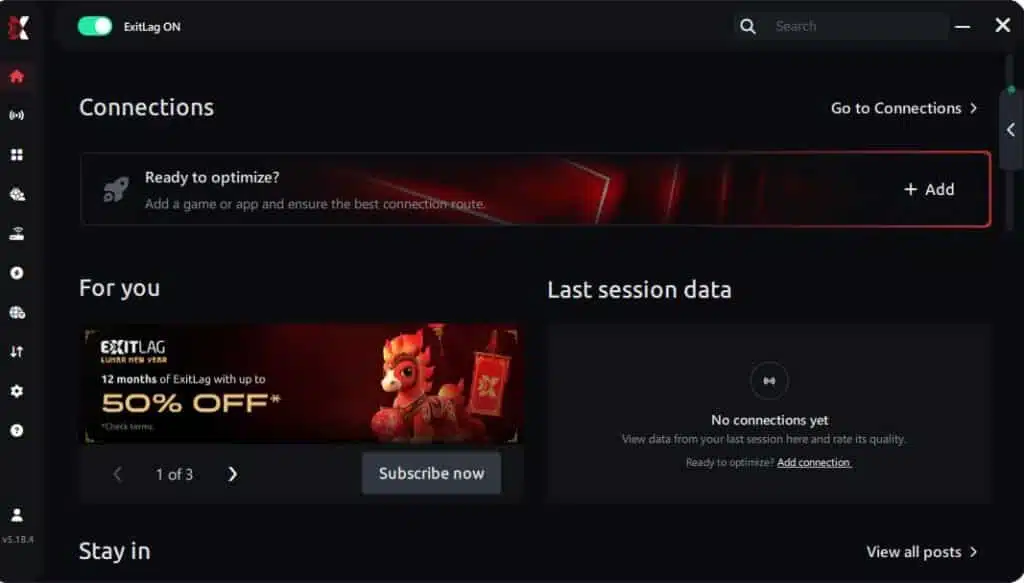
Step 2 – Install and open the program. Log in with your account.
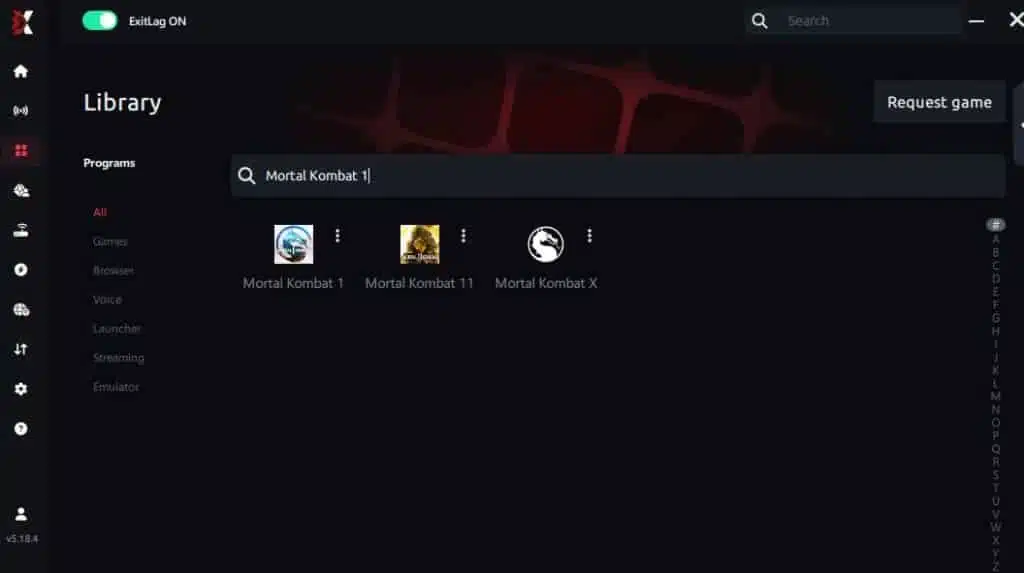
Step 3 – In the search bar, type “Mortal Kombat 1” and select the game from the list.
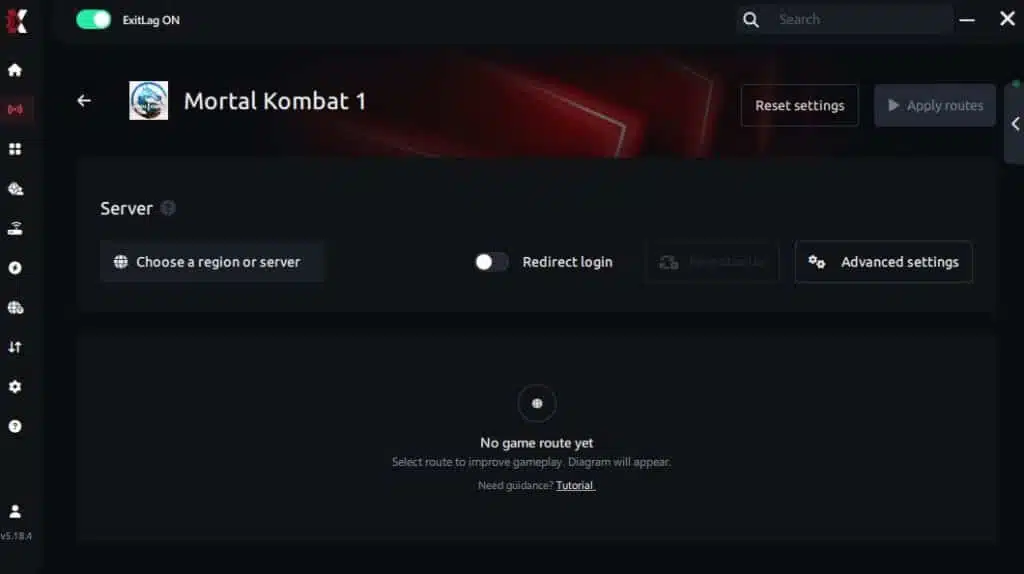
Step 4 – Choose between automated or manual route
Based on the results, you can let ExitLag automatically select the best route or manually choose the server that showed the lowest latency for your connection.
AI-optimized automated route
You can let ExitLag automatically select the best route through AI optimization. The system analyzes multiple connection paths in real time and automatically identifies the most efficient route for your connection, ensuring the lowest possible latency without requiring manual choices.
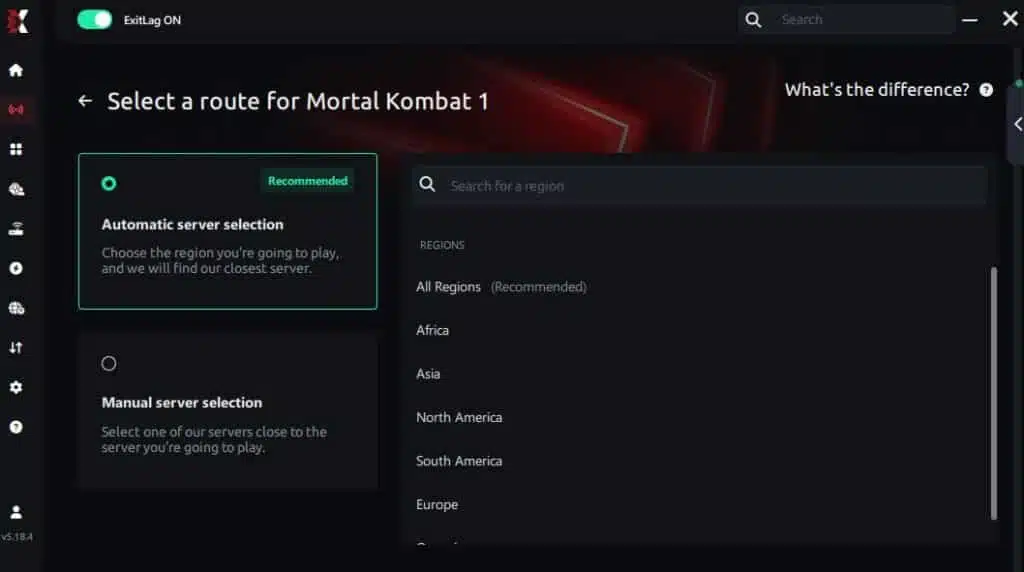
Manual route
If you prefer to have full control over your connection, you can manually choose the server based on the ping test results. Simply select the server that showed the lowest latency or the one that best meets your specific gaming needs, allowing complete customization of your experience.
Step 5 – Click “Apply routes” or the play button. ExitLag will begin optimizing your connection automatically.
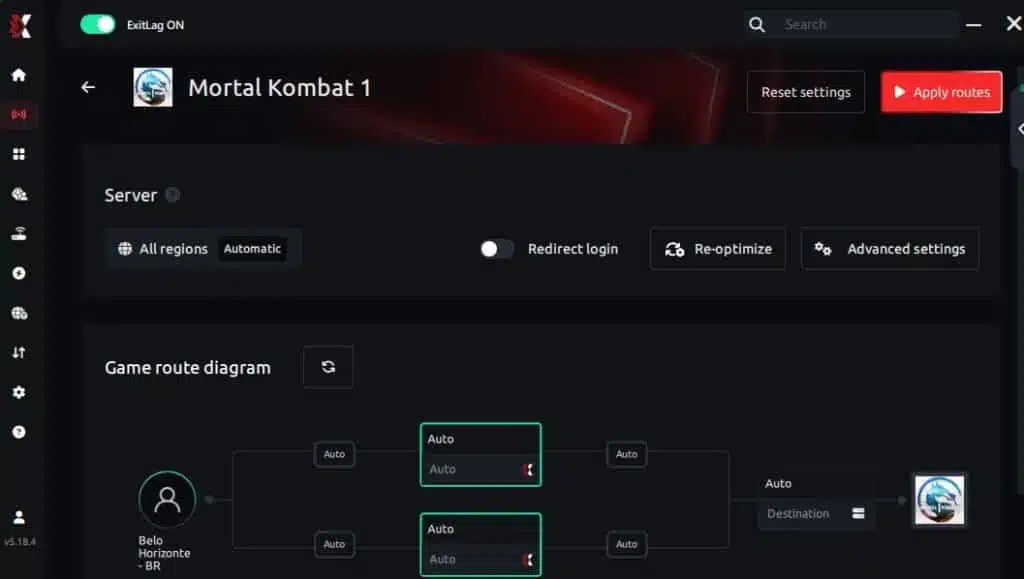
Step 6 – Wait a few seconds until optimization is complete. You’ll see ping indicators in the interface.
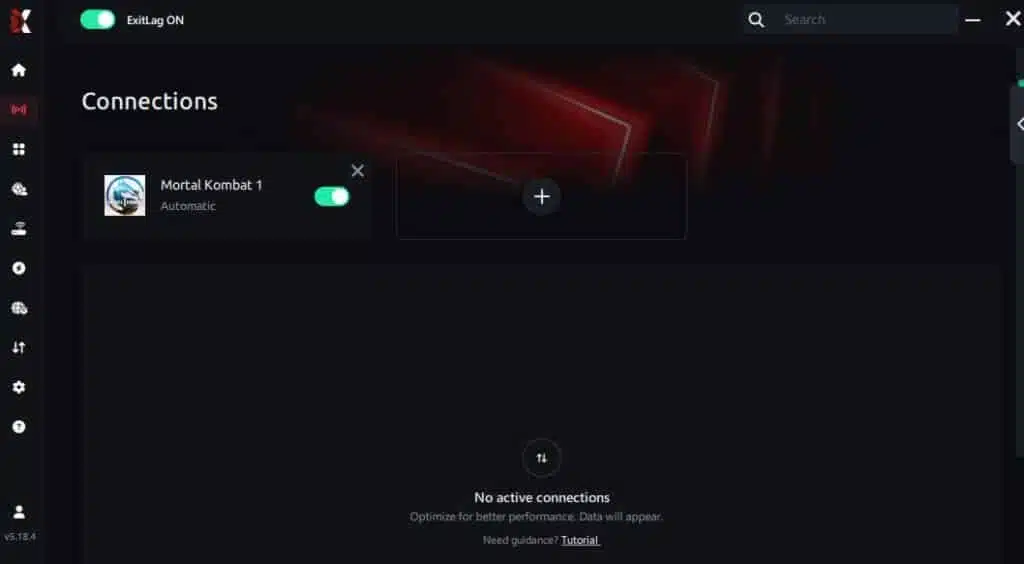
Step 7 – Launch Mortal Kombat 1 normally. The optimization will already be active.
ExitLag runs in the background while you play, constantly adjusting routes to maintain the best possible performance.
How to use Ping for Games: Step-by-Step Guide (Mortal Kombat 1)
Checking your connection quality before entering a match has never been easier. Here’s how to use Ping for Games in just a few steps:
1. Open the ExitLag software on your PC – Ensure the application is installed and open. The feature is integrated into the platform and available for free to all users.
2. Access the Network Analyzer tool – Locate the Network Analyzer in the software menu. This is where you’ll find Ping for Games along with other connection analysis features.
3. Select the game you want to test – Choose Mortal Kombat 1 from the list. The tool supports major online multiplayer games, including FPS, Battle Royales, MOBAs, MMORPGs, and more.
4. Choose the specific server – Select the exact Mortal Kombat 1 server you want to test instead of a generic region. This ensures more accurate results for your match.
5. Start the ping test – With one click, the measurement is performed in real time between your device and the selected Mortal Kombat 1 server, considering your current connection (cable or Wi-Fi).
6. Analyze the results – Results appear in milliseconds (ms), automatically sorted from best to worst ping. You can also reorganize the view alphabetically if you prefer.
7. Choose the best server and play worry-free – With this information, simply select the server with the lowest latency and jump into Mortal Kombat 1 knowing your connection is optimized.
Lag doesn’t have to decide your matches in Mortal Kombat 1 anymore. Every dropped combo, every Fatality that stuttered, every ranked match that slipped away because of your connection — all of that has a solution.
With ExitLag, you get the fastest route to the server, reduce ping, eliminate packet loss, and play with the stability that competitive gaming demands. Your next Flawless Victory might depend less on reflexes and more on the quality of your connection.
Try ExitLag for free and discover what it’s like to play Mortal Kombat 1 with maximum performance and zero lag.
Got questions or want to connect with other players? Join the conversation at the ExitLag Forum!
