Suppose you play Where Winds Meet and experience frustrating moments where your martial arts combos don’t connect properly. In that case, your character teleports during intense PvP battles, or your parkour movements become unpredictable due to high ping, you’re not alone.
This action MMORPG set in ancient China demands precise timing and quick reactions, making high ping one of the most frustrating technical issues that can ruin your gaming experience.

What is high ping in Where Winds Meet?
High ping, also known as high latency, is the delay in communication between your computer and the Where Winds Meet servers. Measured in milliseconds (ms), ping represents the time it takes for data packets to travel from your device to the game server and back.
In Where Winds Meet, where split-second decisions in combat can determine victory or defeat, even a difference of 50-100ms in ping can be the difference between successfully executing a combo or getting eliminated. Low ping (under 50ms) provides responsive gameplay, while high ping (over 100ms) creates noticeable delays that affect every aspect of your performance.
The game’s physics-based combat system and real-time multiplayer interactions make it particularly sensitive to latency issues. When you have high ping, the server receives your commands late, processes them, and sends the response back with additional delay, creating a frustrating disconnect between your actions and what happens on screen.
How high ping affects your gameplay in Where Winds Meet
High ping severely impacts multiple aspects of Where Winds Meet gameplay:
- Combat combo failures: Your carefully timed martial arts sequences break because inputs arrive too late at the server
- Parkour inconsistencies: Movement across rooftops and through the environment becomes unpredictable and dangerous
- PvP disadvantage: Opponents with lower ping see and react to your moves before you see theirs
- Skill activation delays: Your abilities trigger seconds after you press the button, ruining strategic timing
- Hit registration problems: Your attacks appear to connect but don’t register damage due to latency
- Rubberbanding: Your character snaps back to previous positions during movement
- Boss fight failures: Dodging telegraphed attacks becomes nearly impossible with delayed responses
Main causes of high ping in Where Winds Meet
1. Distance from servers
Where Winds Meet hosts servers in specific geographic regions. The farther you are from these server locations, the longer it takes for your data packets to travel, resulting in higher ping. Playing on international servers from another continent can easily add 150-300ms to your latency.
Physical distance is governed by the speed of light – data cannot travel faster than this fundamental limit, making geographic proximity to servers a critical factor in ping.
2. Internet service provider (ISP) issues
Your ISP may have infrastructure problems, congested networks during peak hours, or poor routing to gaming servers. Some providers deprioritize gaming traffic or have inadequate bandwidth capacity, leading to high ping and unstable connections.
Additionally, ISPs often use inefficient routes that send your data through unnecessary intermediate points before reaching the game server, adding significant latency.
3. Inefficient routing
Internet traffic doesn’t travel in a straight line. Your data packets pass through multiple intermediate routers and network nodes. If any of these connection points are congested, poorly configured, or geographically inefficient, your ping increases substantially.
Routing issues are particularly problematic for international connections where data may traverse multiple countries and network providers.
4. Network congestion
Peak gaming hours, multiple devices using your internet connection simultaneously, or bandwidth-heavy activities like streaming and downloads can cause network congestion. This congestion forces gaming packets to wait in queue, increasing ping.
Where Winds Meet requires consistent bandwidth for real-time communication with servers, making it vulnerable to any competition for network resources.
5. Outdated hardware and equipment
Old routers, network cards with outdated firmware, or damaged ethernet cables can introduce additional latency. Wireless connections are particularly susceptible to interference, signal degradation, and inconsistent ping.
Your local network infrastructure forms the first step in your connection to game servers – any weakness here cascades into higher ping.
6. Server load and game-specific factors
During major events, new content releases, or peak player populations, Where Winds Meet servers may experience increased load. While server-side optimization is beyond player control, understanding this factor helps contextualize temporary ping spikes.
How to identify and test high ping in Where Winds Meet
Where Winds Meet typically displays your current ping in the game interface, often in the settings menu or during gameplay in a corner of the screen. Monitor this number regularly to understand your baseline latency.
Testing ping via command line:
Open Command Prompt (Windows) or Terminal (Mac/Linux) and enter:
ping [Where_Winds_Meet_server_IP] -tWatch for consistent response times. Significant variations or packet loss indicate connection problems.
Ping reference values for Where Winds Meet:
- 0-30ms: Excellent – Ideal for competitive PvP
- 30-50ms: Good – Suitable for all content
- 50-80ms: Acceptable – Noticeable in fast-paced combat
- 80-120ms: Poor – Significant handicap in PvP
- 120ms+: Very poor – Game becomes frustrating
Basic solutions to reduce high ping in Where Winds Meet
Optimize your local connection
- Use ethernet cable: Wired connections provide stable, low-latency connectivity compared to Wi-Fi
- Close background applications: Disable bandwidth-consuming programs like streaming services, downloads, and cloud backups
- Update network drivers: Ensure your network adapter has the latest firmware and drivers installed
- Configure QoS on router: Enable Quality of Service to prioritize gaming traffic over other network activities
- Select nearest server: If Where Winds Meet offers server selection, choose the geographically closest option
- Disable VPN services: VPNs typically increase latency and should be disabled during gaming
Contact your ISP
If high ping persists after local optimization, contact your internet provider to report connectivity issues. Request a line quality check and verify that your connection meets advertised speeds. Ask specifically about routing to gaming servers and whether traffic shaping affects gaming performance.
ISPs can sometimes adjust routing or identify infrastructure problems causing high latency on their end.
ExitLag: the best solution to reduce high ping in Where Winds Meet
What is ExitLag?
ExitLag is specialized connection optimization software designed exclusively for online gaming. Unlike generic solutions, ExitLag was developed by gamers for gamers, using proprietary technology to dramatically reduce ping and stabilize connections in Where Winds Meet and hundreds of other titles.
The software acts as an intelligent routing optimizer that finds the fastest, most stable path between you and Where Winds Meet servers. ExitLag isn’t a VPN – it’s a purpose-built gaming solution that improves performance rather than adding encryption overhead that increases latency.
How ExitLag works to reduce high ping
ExitLag operates through advanced Multi-Internet technology that revolutionizes how your data reaches game servers:
1. Real-time analysis The software continuously monitors multiple potential routes to Where Winds Meet servers, measuring latency, stability, and packet loss on each path in real-time.
2. Multiple simultaneous routes Unlike standard connections that use a single path, ExitLag sends your data through multiple optimized routes simultaneously, ensuring redundancy and reliability.
3. Automatic best route selection Advanced algorithms instantly select the fastest, most stable route at any given moment, automatically switching if conditions change.
4. Hop optimization By reducing unnecessary intermediate connection points, ExitLag minimizes the number of routers your data passes through, directly reducing ping.
5. Connection stabilization Consistent route quality eliminates ping spikes and provides smooth, predictable latency that’s essential for Where Winds Meet’s demanding combat system.
Advantages of ExitLag for Where Winds Meet players
Drastic ping reduction ExitLag typically reduces ping by 30-70%, transforming unplayable high latency connections into responsive, competitive experiences. Players regularly report ping dropping from 150ms to 40-60ms.
Packet loss elimination The multi-route technology ensures zero packet loss by using redundant paths. If one route drops packets, others maintain connection integrity, preventing the frustrating teleporting and rubberbanding common with high ping.
Stable connection Experience consistent latency without the spikes and variations that make combat timing impossible. ExitLag maintains steady ping even during peak hours when networks typically degrade.
DDoS protection For streamers and competitive players, ExitLag provides an additional layer of security against DDoS attacks that could compromise your connection during crucial moments.
Easy to use The intuitive interface requires no technical expertise. Simply select Where Winds Meet from the games list, click connect, and enjoy optimized performance. No complicated configuration needed.
Multiple server support Whether you play on official servers or private implementations, ExitLag provides optimized routing for all Where Winds Meet server locations worldwide.
Is ExitLag worth it for Where Winds Meet?
For players experiencing high ping or unstable connections in Where Winds Meet, ExitLag represents excellent value. The software particularly benefits:
International players connecting to distant servers Competitive PvP participants where every millisecond matters Players with ISP routing problems beyond their direct control Streamers requiring stable connections Anyone experiencing ping above 80ms regularly
The investment in ExitLag costs less than most gaming peripherals while providing immediate, measurable performance improvement. With flexible pricing plans and a free trial, you can verify results before committing.
How to use ExitLag in Where Winds Meet
The process is extremely simple:
Step 1 – Access the official ExitLag website and download the application. There’s a free trial period for new users.
Step 2 – Install and open the program. Log in with your account.
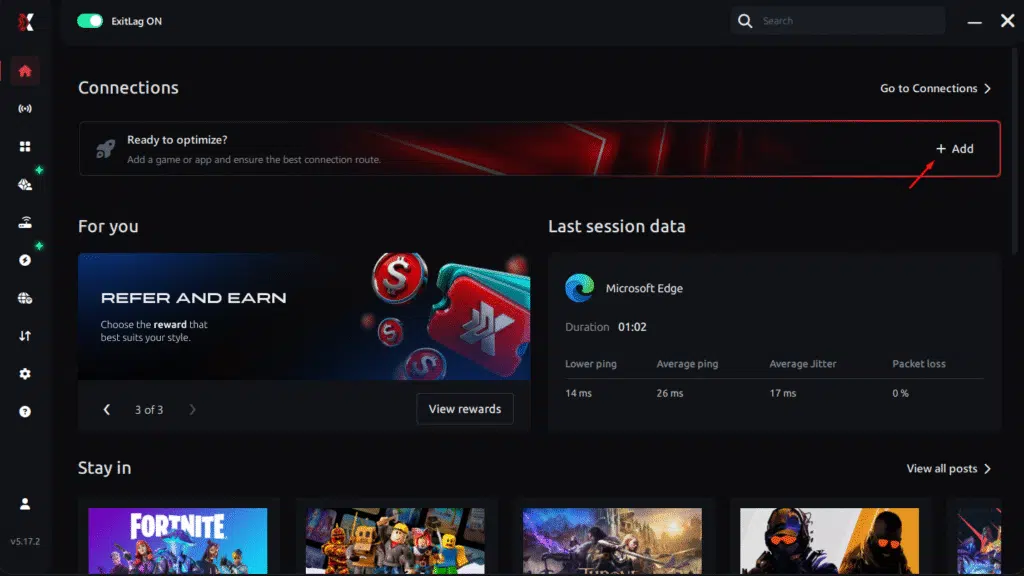
Step 3 – In the search bar, type “Where Winds Meet” and select the game from the list.
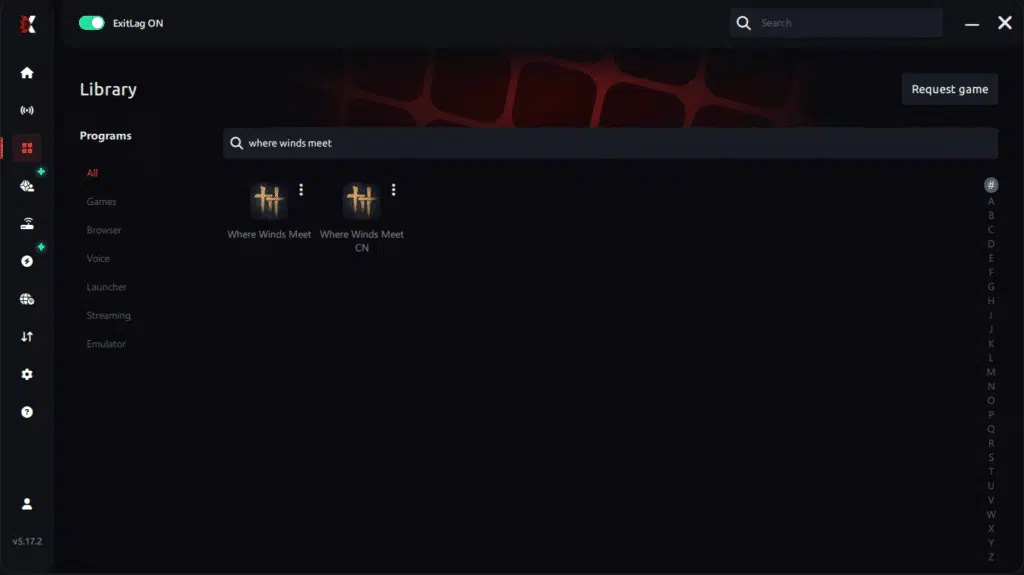
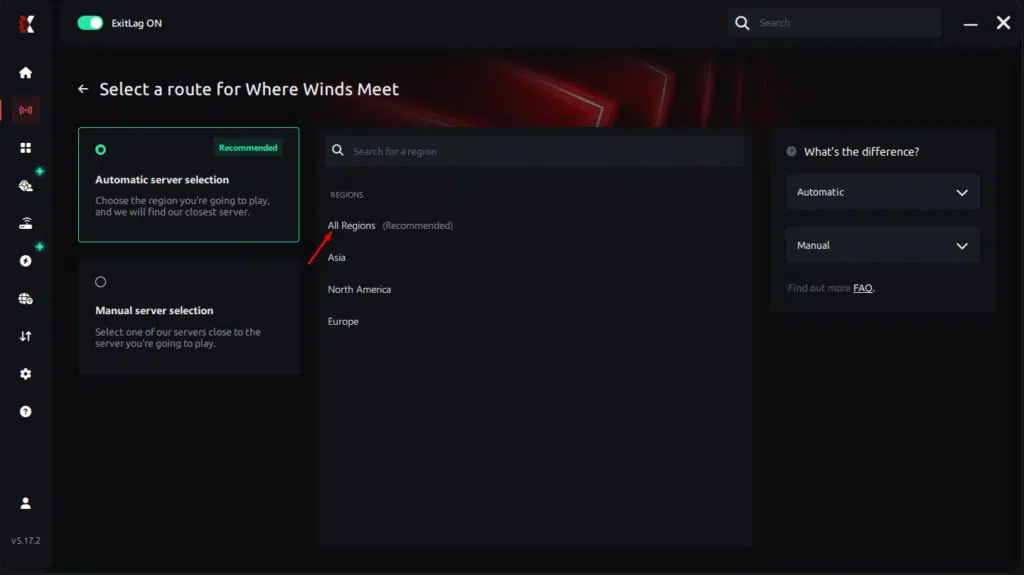
Step 4 – Choose between automated or manual route
Based on the results, you can let ExitLag automatically select the best route or manually choose the server that showed the lowest latency for your connection.
AI-optimized automated route
Based on the results, you can let ExitLag automatically select the best route through AI optimization. The system analyzes multiple connection paths in real time and automatically identifies the most efficient route for your connection, ensuring the lowest possible latency without requiring manual choices.
Manual route
If you prefer to have full control over your connection, you can manually choose the server based on the ping test results. Simply select the server that showed the lowest latency or the one that best meets your specific gaming needs, allowing complete customization of your experience.
Step 5 – Click “Where Winds Meet” or the play button. ExitLag will begin optimizing your connection automatically.
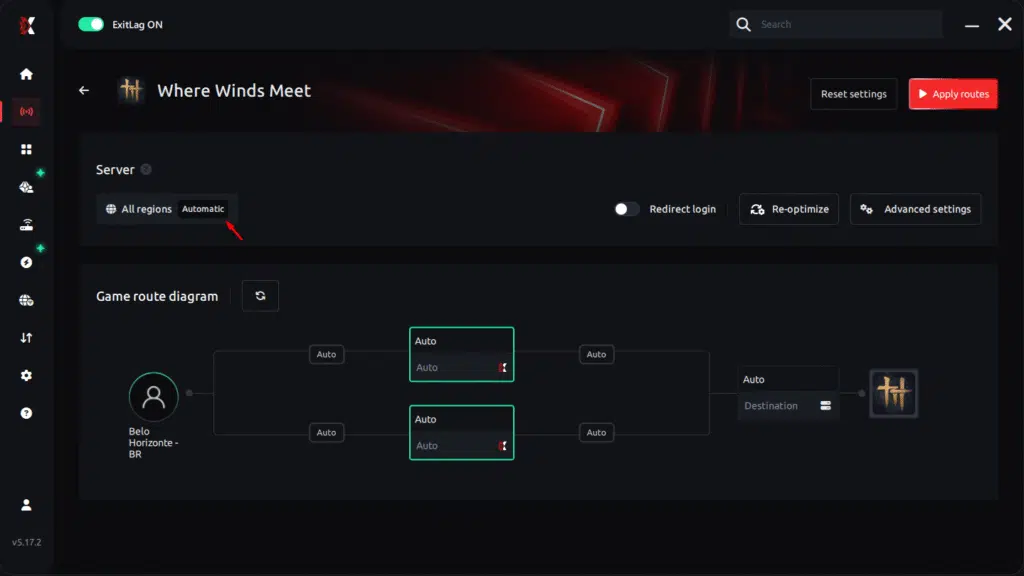
Step 6 – Wait a few seconds until optimization is complete. You’ll see ping indicators in the interface.
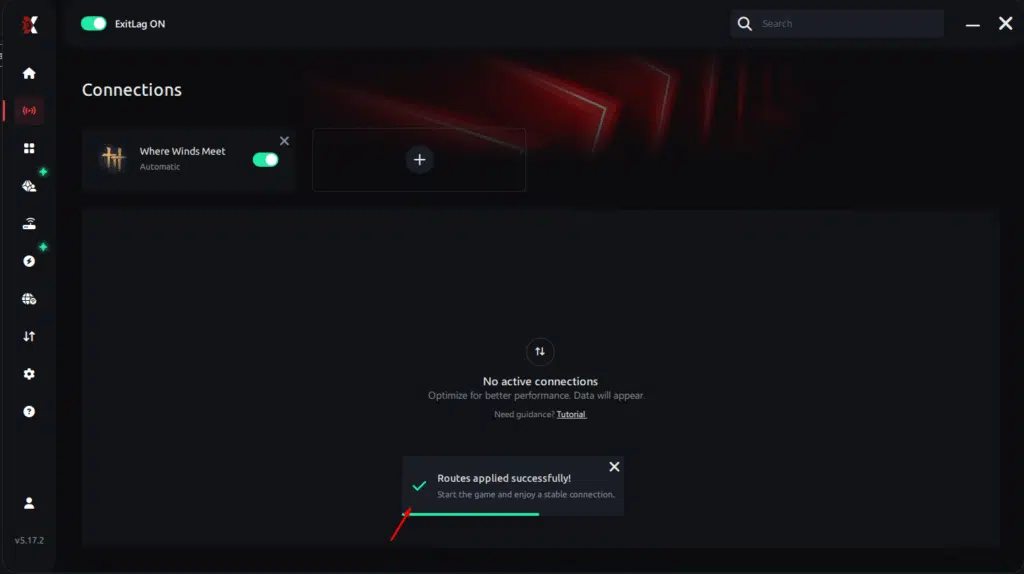
Step 7 – LaunchWhere Winds Meet normally. The optimization will already be active.
ExitLag runs in the background while you play, constantly adjusting routes to maintain the best possible performance.
How to use Ping for Games: step-by-step guide
Checking your connection quality before entering a match has never been easier. Here’s how to use Ping for Games in just a few steps:
1. Open the ExitLag software on your PC
Ensure the application is installed and open. The feature is integrated into the platform and available for free to all users.
2. Access the Network Analyzer tool
Locate the Network Analyzer in the software menu. This is where you’ll find Ping for Games along with other connection analysis features.
3. Select the game you want to test
Choose from the list the title you plan to play. The tool supports major online multiplayer games, including MOBAs, FPS, Battle Royales, MMORPGs, and more.
4. Choose the specific server
Now you select directly the server you want to test, instead of just a generic region. This ensures much more accurate results for your choice.
5. Start the ping test
With one click, the measurement is performed in real-time between your device and the chosen server, considering your current connection (cable or Wi-Fi).
6. Analyze the results
Results appear in milliseconds (ms), automatically sorted from best to worst ping. You can also reorganize the view alphabetically, if you prefer.
7. Choose the best server and play worry-free
With the information in hand, just select the server with the lowest latency and enter the match knowing your connection is optimized.
FAQ: frequently asked questions about high ping in Where Winds Meet
What causes high ping in Where Winds Meet?
High ping in Where Winds Meet results from multiple factors: distance from game servers, inefficient internet routing through your ISP, network congestion, outdated hardware, or Wi-Fi interference. The game’s real-time combat system makes it particularly sensitive to latency issues. Geographic distance is often the primary factor – playing from South America on Asian servers will naturally produce high ping due to physical data travel distance.
How do I check my ping in Where Winds Meet?
Where Winds Meet displays current ping in the game interface, typically in the settings menu or HUD during gameplay. You can also test ping externally using Command Prompt (Windows) or Terminal (Mac/Linux) with the ping command targeting Where Winds Meet server IP addresses. Monitor your ping over time to identify patterns – spikes during evening hours suggest ISP congestion, while consistently high ping indicates routing or distance issues.
What is good ping for Where Winds Meet?
Optimal ping for Where Winds Meet is below 50ms, providing responsive combat and parkour mechanics. Ping between 50-80ms is playable but introduces noticeable delay in fast-paced situations. Above 80ms, combat becomes increasingly difficult, particularly in PvP where opponents with lower latency have significant advantages. For competitive play, aim for sub-30ms ping if possible.
Can high ping get you banned in Where Winds Meet?
High ping alone will not result in a ban from Where Winds Meet. However, extremely unstable connections with severe packet loss may trigger anti-cheat systems or cause automatic disconnections as the server interprets erratic behavior as potential exploitation. Maintain stable, legitimate connections to avoid any complications. ExitLag provides optimized, legitimate routing that improves performance without violating any game terms.
Does ExitLag work for Where Winds Meet?
Yes, ExitLag is specifically optimized for Where Winds Meet and provides dramatic ping reduction and connection stability. The software includes Where Winds Meet in its extensive games library with dedicated routing optimization. Thousands of players use ExitLag successfully with this title, reporting average ping reductions of 40-60% and elimination of lag spikes. The free trial allows you to verify performance improvement before purchasing.
Will ExitLag work with my internet speed?
ExitLag optimizes routing efficiency, not bandwidth speed. Even players with moderate internet speeds (10-20 Mbps) see significant ping improvements because latency depends on routing quality, not connection speed. Fast internet with poor routing still produces high ping, while optimized routing on moderate speeds achieves low latency. ExitLag works with virtually any internet connection that can run Where Winds Meet.
Conclusion: play Where Winds Meet without high ping
High ping doesn’t have to ruin your Where Winds Meet experience. With the right optimization approach, particularly using specialized software like ExitLag, you can dramatically reduce latency, stabilize your connection, and compete on equal footing regardless of your geographic location or ISP limitations.
The combination of local network optimization and ExitLag’s intelligent routing technology provides the comprehensive solution needed for consistently low ping in this demanding action MMORPG. Don’t let high ping prevent you from experiencing Where Winds Meet’s incredible martial arts combat and expansive open world as intended.
Take action today to eliminate high ping and transform your gaming experience. For more tips on optimizing online game performance, visit the ExitLag blog for comprehensive guides and updates.
Got questions or want to connect with other players? Join the conversation at the ExitLag Forum!