

Arc Riders is a highly anticipated free-to-play cooperative sci-fi shooter developed by Embark Studios. Set in a vibrant futuristic world, the game combines teamwork, advanced combat, and strategic coordination against mechanized enemies falling from orbit. Players take on the role of Arc Riders Lag, a resistance group using agility, tactics, and synchronized attacks to survive.
As beautiful as the visuals and gameplay are, many players report connection issues that can make battles frustrating. Arc Riders Lag has become one of the most common complaints among players, especially during intense combat sequences or large-scale encounters.

The developers at Embark Studios have crafted Arc Riders with an impressive focus on immersion, atmosphere, and cooperative play. Every mission encourages collaboration and precise timing, making smooth performance a vital part of the experience.
What is lag in Arc Riders?
Lag in Arc Riders refers to the noticeable delay between your in-game actions and what appears on screen. It can result from unstable internet connections, high ping, or overloaded servers. This delay makes your character move inconsistently, shots register late, and enemies seem to teleport during combat.
Arc Riders Lag can ruin immersion and affect competitive gameplay, especially when timing and teamwork are critical. Fortunately, there are reliable solutions to reduce lag and enhance stability for a smooth gaming experience.
Common causes of lag and high ping in Arc Riders
To fix lag effectively, you first need to identify its root cause. Some of the most common reasons include:
| Cause | Description |
| High Ping | Long distance between your PC and the game server, leading to delayed responses. |
| Poor Network Stability | Wi-Fi interference or limited bandwidth causing inconsistent connectivity. |
| Background Programs | Apps or downloads consuming internet speed while you play. |
| Server Overload | Too many players connecting to the same region, leading to higher latency. |
| Outdated Drivers | Old GPU or network drivers can cause performance drops and stuttering. |
By understanding these factors, players can better target the exact source of performance loss before applying fixes.
How to identify Arc Riders lag issues
Before jumping into solutions, observe your connection and frame rate. If your FPS remains high but actions feel delayed, the issue is likely network-related rather than graphical.
Try these quick checks:
- Run a speed test and ensure upload/download speeds are consistent.
- Switch from Wi-Fi to a wired Ethernet cable for a more stable connection.
- Close unnecessary background apps like browsers or updates.
- Check if Arc Riders servers are undergoing maintenance.
Therefore, these simple diagnostics help confirm if the issue stems from your setup or external sources.
Best ways to Fix lag in Arc Riders
Now that you know what causes lag, let’s dive into proven solutions. Every step below is designed to reduce latency and increase responsiveness.
- Use a Wired Connection
A wired Ethernet cable provides lower latency and fewer packet losses than Wi-Fi. - Close Background Processes
Streaming, downloading, or even running Discord video calls can take away crucial bandwidth. - Update Your Network and GPU Drivers
Always install the latest drivers to ensure maximum performance. - Adjust In-Game Settings
Lowering shadows, reflections, or anti-aliasing can significantly improve FPS and reduce overall input delay. - Optimize with ExitLag
ExitLag routes your connection through optimized paths, ensuring data travels through the fastest and most stable servers available. This often results in dramatically reduced ping and smoother matches.
These optimizations can make the difference between frustration and flawless gameplay.
Using ExitLag to reduce Arc Riders lag
At the midpoint of our guide, it is crucial to mention the effectiveness of ExitLag. This multi-route connection optimizer analyzes your internet traffic and directs it through the most efficient path to Arc Riders servers.
However, players around the world use ExitLag to reduce ping, fix latency spikes, and eliminate rubberbanding effects during intense fights. It’s easy to install, compatible with hundreds of games, and regularly updated for performance consistency.
How to use ExitLag in Arc Raiders
The process is extremely simple:
Step 1 – Access the official ExitLag website and download the application. There’s a free trial period for new users.
Step 2 – Install and open the program. Log in with your account.
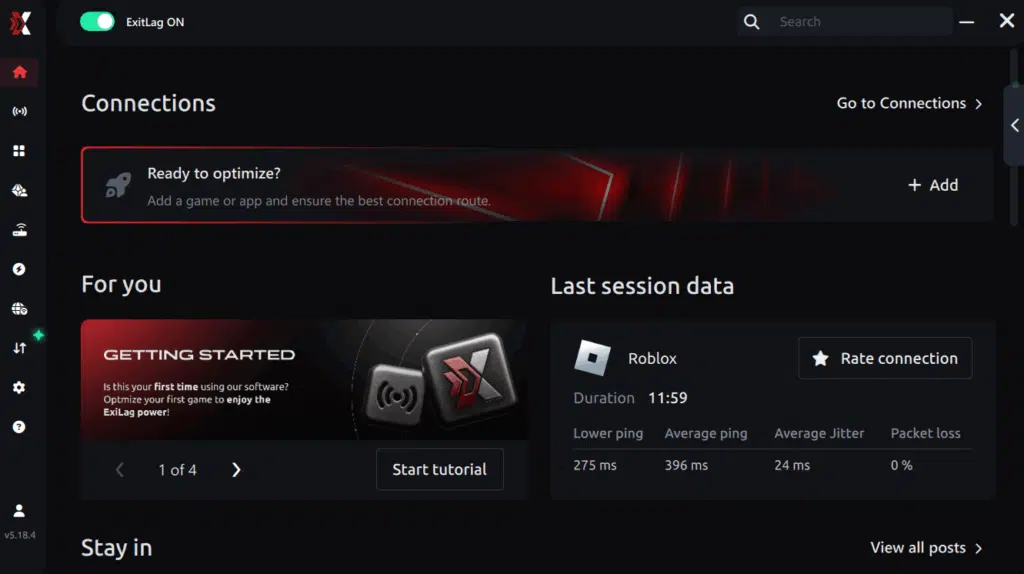
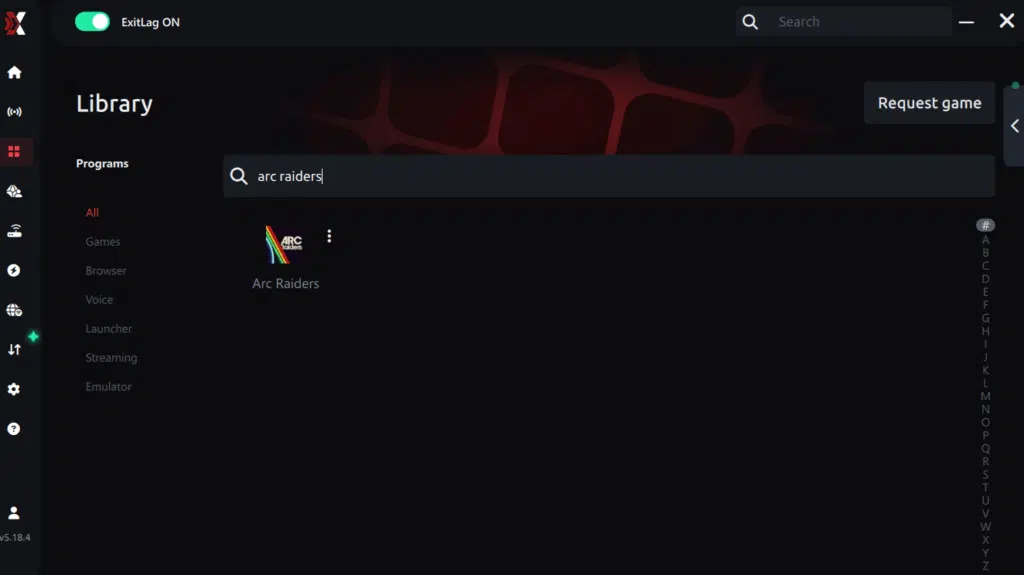
Step 3 – In the search bar, type “Arc Raiders” and select the game from the list.
Step 4 – Choose between automated or manual route
Based on the results, you can let ExitLag automatically select the best route or manually choose the server that showed the lowest latency for your connection.
AI-optimized automated route
Based on the results, you can let ExitLag automatically select the best route through AI optimization. The system analyzes multiple connection paths in real time and automatically identifies the most efficient route for your connection, ensuring the lowest possible latency without requiring manual choices.
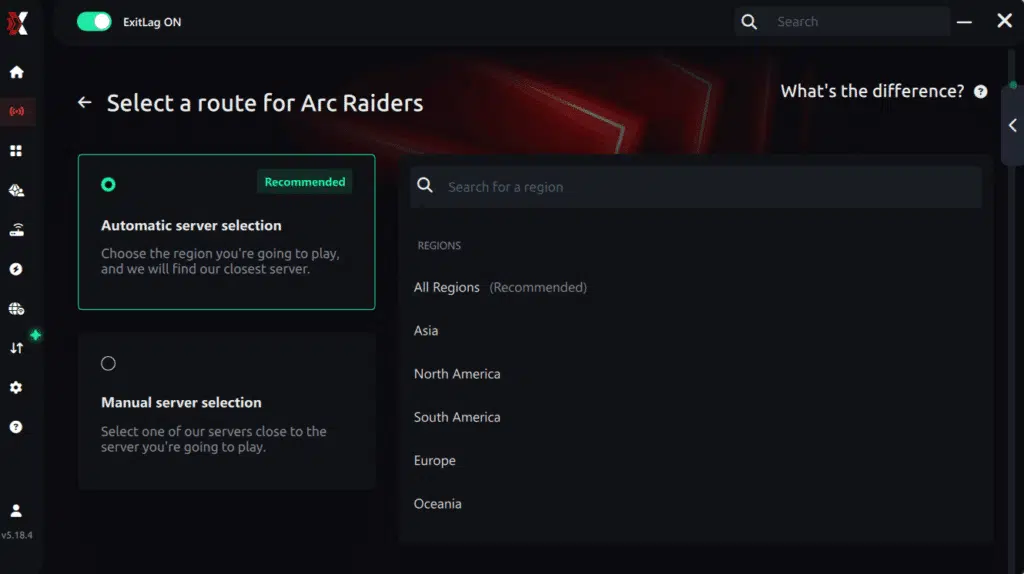
Manual route
If you prefer to have full control over your connection, you can manually choose the server based on the ping test results. Simply select the server that showed the lowest latency or the one that best meets your specific gaming needs, allowing complete customization of your experience.
Step 5 – Click “Apply routes” or the play button. ExitLag will begin optimizing your connection automatically.

Step 6 – Wait a few seconds until optimization is complete. You’ll see ping indicators in the interface.
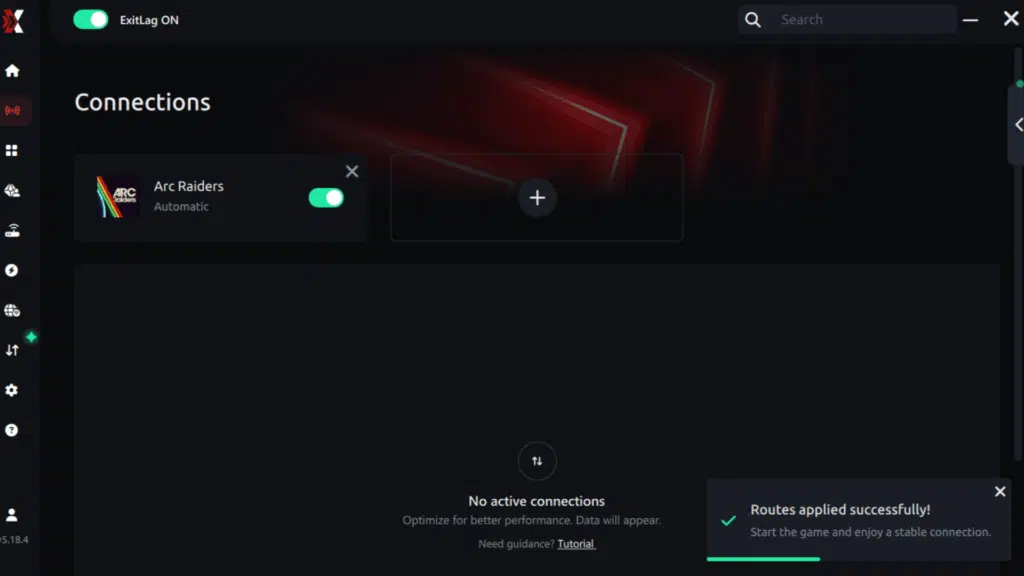
Step 7 – Launch Arc Raiders normally. The optimization will already be active.
ExitLag runs in the background while you play, constantly adjusting routes to maintain the best possible performance.
How to use Ping for Games: step-by-step guide (Arc Raiders)
Checking your connection quality before entering a match has never been easier. Here’s how to use Ping for Games in just a few steps:
1. Open the ExitLag software on your PC
Ensure the application is installed and open. The feature is integrated into the platform and available for free to all users.
2. Access the Network Analyzer tool
Locate the Network Analyzer in the software menu. This is where you’ll find Ping for Games along with other connection analysis features.

3. Select the game you want to test
Choose Arc Raiders from the list. The tool supports major online multiplayer games, including FPS, Battle Royales, MOBAs, MMORPGs, and more.

4. Choose the specific server
Select the exact Arc Raiders server you want to test instead of a generic region. This ensures more accurate results for your match.

5. Start the ping test
With one click, the measurement is performed in real time between your device and the selected Arc Raiders server, considering your current connection (cable or Wi-Fi).

6. Analyze the results
Results appear in milliseconds (ms), automatically sorted from best to worst ping. You can also reorganize the view alphabetically if you prefer.
7. Choose the best server and play worry-free
With this information, simply select the server with the lowest latency and jump into Arc Raiders knowing your connection is optimized.
Final thoughts: Play Arc Raiders without lag forever
At the end of the day, Arc Raiders lag should never decide your matches. You spend time mastering your aim, movement, and strategy — your internet connection should never be the reason you lose.
With ExitLag, you finally take control of your network performance. The software finds the fastest routes, eliminates lag, and stabilizes your ping so that every shot and every action happens exactly when you want it to.
Try ExitLag for free right now and experience how smooth Arc Raiders can be when your connection is fully optimized. Play with confidence, reach your full potential, and make lag a thing of the past.
Once activated, you’ll likely notice more responsive aiming, faster ability casting, and smoother movement a clear advantage in cooperative missions.
Additional tips to improve performance
Besides fixing lag, players can enhance the overall gameplay experience by optimizing their system:
- Enable Game Mode in Windows to prioritize gaming processes.
- Disable V-Sync if it introduces input delay.
- Use SSD storage to reduce load times.
- Keep your system cool overheating components can throttle performance.
- Avoid peak hours when servers might be crowded.
Furthermore, these tweaks, while simple, complement connection improvements and help you achieve consistent frame rates.
Server regions and connection recommendations
Choosing the correct server is essential for stable gameplay. The table below lists general server recommendations based on region proximity and latency performance.
| Region | Recommended Server Location | Average Ping (ms) |
| North America | US East | 30–50 |
| South America | Brazil | 40–70 |
| Europe | Germany | 30–60 |
| Asia | Singapore | 50–90 |
| Oceania | Sydney | 60–100 |
If your ping is much higher than these averages, consider testing different regions using ExitLag’s smart routing to find the most stable connection.
Why connection stability matters
Even with top-tier hardware, connection quality directly impacts your gameplay. A 20ms ping feels almost instantaneous, while anything above 150ms can cause frustrating delays.
Like this, in Arc Riders, where teamwork and precise timing define victory, low latency ensures your attacks land when intended and communications flow smoothly. A stable network connection creates a sense of control, transforming each encounter into a thrilling, fluid experience.
In summary, lag in Arc Riders is often caused by unstable networks, overloaded servers, or poor routing. However, by combining connection optimization tools like ExitLag with smart in-game and system adjustments, you can dramatically enhance your performance.
Finally, remember, addressing Arc Riders Lag early ensures smoother combat, accurate shots, and better synchronization with your teammates. If you are ready to experience fluid, uninterrupted gameplay, try ExitLag today and reclaim full control of your missions.
Got questions or want to connect with other players? Join the conversation at the ExitLag Forum!


