Experiencing FPS Drop FIVE M GTA during a chase, a shootout, or a crowded RP server instantly ruins immersion. At first sight, everything feels smooth, but suddenly the frame pacing collapses, causing micro-pauses and visual freezes that make every action harder to control. These interruptions break the rhythm and turn exciting gameplay into a frustrating struggle.
Soon after, another wave hits: FPS Drop FIVE M GTA spikes mid-mission, textures load slowly, and animations become choppy. Even worse, many players confuse this issue with network problems like FIVE M GTA lag, which makes diagnosis even more difficult. To understand more about common performance problems, you can check detailed articles directly from the ExitLag blog.
Therefore, the real solution requires a combination of performance tuning and connection stability. With ExitLag, you gain smoother routing, reduced instability, and far less interruption during high-traffic moments. You can explore more improvements by visiting the official ExitLag website.

What is FPS drop and why does it happen in FIVE M GTA?
FPS drop refers to sudden decreases in rendered frames per second. As a result, your screen stutters, freezes, or becomes inconsistent. In FIVE M GTA, these drops are especially common in crowded servers, heavy modded cities, and high-density locations where assets load rapidly.
Understanding FPS
FPS represents how many frames your PC renders every second. Higher values make gameplay smoother and easier to control.
- 144+ FPS
- 60–120 FPS
- 30–60 FPS
- Below 30 FPS
Difference between FPS drop and network lag
Although FPS issues look similar to connection problems, they are completely different. FPS depends on your hardware, while network lag depends on your internet routing.
| Aspect | FPS Drop | Network Lag |
| Cause | Hardware overload, mods, graphics load | Poor routing, packet loss, unstable connection |
| Symptoms | Stuttering, slow animations, visual freezing | Teleporting, rubberbanding, desync |
| Solution | Optimize settings, upgrade PC | ExitLag |
Why FIVE M GTA suffers from FPS drop
FIVE M GTA uses complex mods, heavy textures, custom cities, and redesigned physics systems. Consequently, your PC must load additional assets on top of GTA V’s original engine. Large RP maps, particle effects, weather systems, and player density all increase GPU and CPU usage. This combination often triggers FIVE M GTA low FPS, FIVE M GTA stuttering, and FIVE M GTA frame drops, especially on mid-range hardware.
5 main causes of FPS drop in FIVE M GTA
FPS issues can come from various technical factors. Below are the five most common reasons why players experience FIVE M GTA performance issues in everyday gameplay.
1. Overheating
When your CPU or GPU overheats, the system automatically throttles performance. As a result, the game instantly loses frames, causing stutter and unstable FPS. FIVE M GTA’s extended sessions and modded maps often push temperatures to unsafe levels.
2. Outdated drivers
Outdated GPU drivers fail to optimize new rendering paths used by modern servers. Therefore, the game may struggle with lighting, textures, or shader compilation, leading to repeated FPS drops or unexpected crashes.
3. Graphics settings
Ultra textures, high shadows, extended distance scaling, and population density can overwhelm your hardware. FIVE M GTA modifications increase the load even further, making incorrect settings a frequent cause of FIVE M GTA stuttering.
4. Background processes
Apps running in the background—browsers, overlays, recording tools—consume RAM and CPU power. Soon after, these processes compete with FIVE M GTA for system resources, causing frame inconsistencies.
5. Insufficient hardware
Older GPUs, slow HDDs, and low RAM can’t keep up with modded servers. Heavy assets load slowly, textures pop in late, and the system struggles to maintain stable FPS.
How ExitLag fixes FPS drop in FIVE M GTA
Many players assume that FPS Drop FIVE M GTA happens only because of hardware limitations, yet instability often comes from unstable routing. When the connection spikes, frames may freeze, producing visible jitter that feels identical to performance loss. This is why proper network optimization becomes essential for smoother gameplay.
What is ExitLag? (NOT a VPN)
ExitLag is a specialized multi-route optimizer designed exclusively for gaming stability. It improves routing, reduces packet loss, and enhances responsiveness during high-demand moments. Even more important, ExitLag is NOT a VPN. Traditional VPNs encrypt traffic, slow down routing, and introduce delays. ExitLag instead builds a dedicated path that prioritizes game data without compressing or masking your connection.
To understand everything about how the technology operates, you can check the full explanation of ExitLag’s advanced performance system.
How ExitLag optimizes performance in FIVE M GTA
ExitLag processes your game traffic using multi-layer methods that ensure predictable delivery. As a result, stutters related to unstable routing decrease noticeably, reducing situations where FPS Drop FIVE M GTA feels worse because of latency spikes.
- Network route optimization
- Latency reduction
- Packet loss elimination
- Game traffic prioritization
- Connection stabilization
Why ExitLag helps with FPS drop
Although FPS is technically a hardware metric, unstable routing can create pacing inconsistencies. When game data returns late, your client temporarily freezes, creating micro-stuttering that resembles performance issues. Therefore, jitter, desync, and route changes intensify the perception of visual freezing in FIVE M GTA.
ExitLag reduces these inconsistencies, lowering micro-pauses and stabilizing frame pacing. This is especially important for players who also struggle with FIVE M GTA stuttering, FIVE M GTA lag, and heavy FIVE M GTA performance issues.
ExitLag technologies that impact FPS
ExitLag applies multiple systems simultaneously to guarantee stable delivery:
- Multi-path routing
- Redundant connections
- Gaming-optimized protocol
These technologies maintain consistency even when servers become crowded or when your ISP changes routes mid-session, a common cause of disguised FPS Drop FIVE M GTA.
ExitLag vs other solutions
You can explore more compatible titles in the official supported games directory, where we maintain an updated list of all optimized games.
How to use ExitLag in FIVE M GTA
The process is extremely simple:
Step 1 – Access the official ExitLag website and download the application. There’s a free trial period for new users.
Step 2 – Install and open the program. Log in with your account.
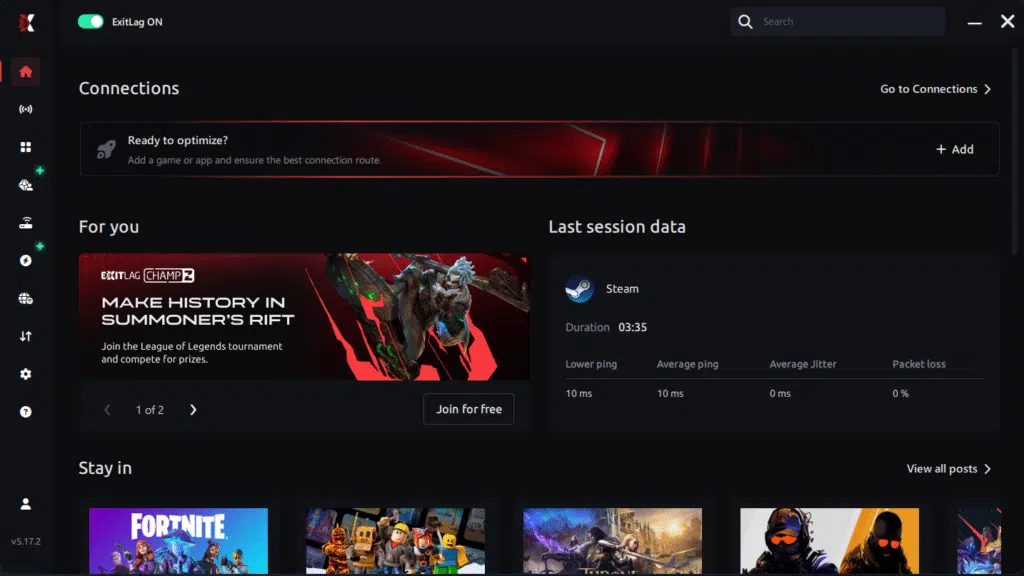
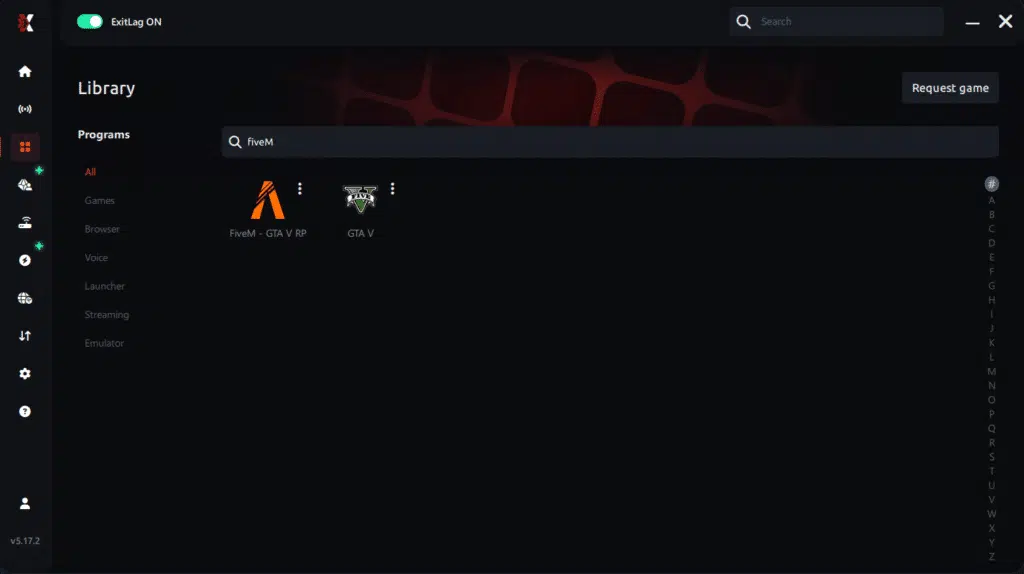
Step 3 – In the search bar, type “FIVE M GTA” and select the game from the list.
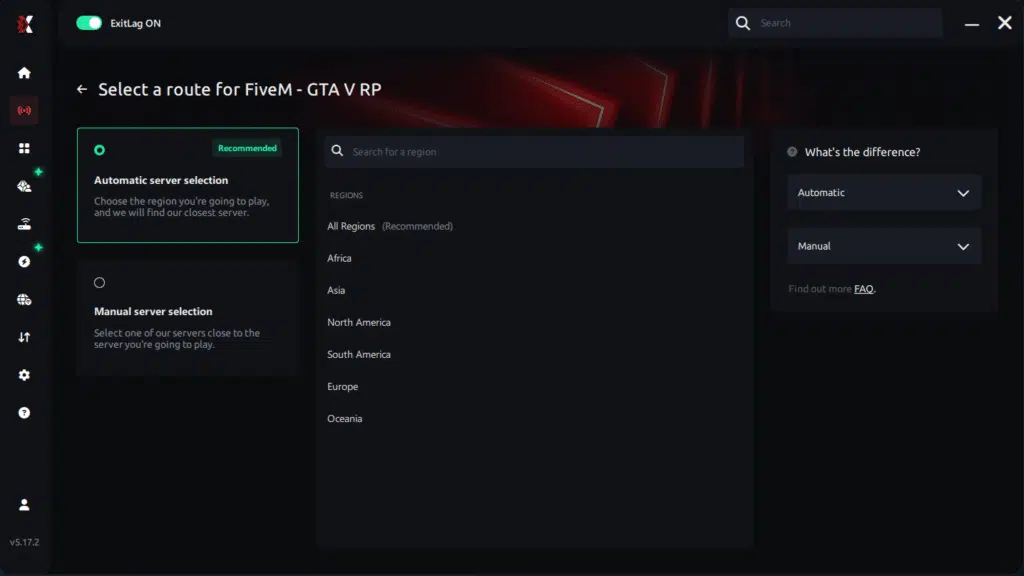
Step 4 – Choose between automated or manual route
Based on the results, you can let ExitLag automatically select the best route or manually choose the server that showed the lowest latency for your connection.
AI-optimized automated route
Based on the results, you can let ExitLag automatically select the best route through AI optimization. The system analyzes multiple connection paths in real time and automatically identifies the most efficient route for your connection, ensuring the lowest possible latency without requiring manual choices.
Manual route
If you prefer to have full control over your connection, you can manually choose the server based on the ping test results. Simply select the server that showed the lowest latency or the one that best meets your specific gaming needs, allowing complete customization of your experience.
Step 5 – Click “FIVE M GTA” or the play button. ExitLag will begin optimizing your connection automatically.
Step 6 – Wait a few seconds until optimization is complete. You’ll see ping indicators in the interface.

Step 7 – Launch FIVE M GTA normally. The optimization will already be active.
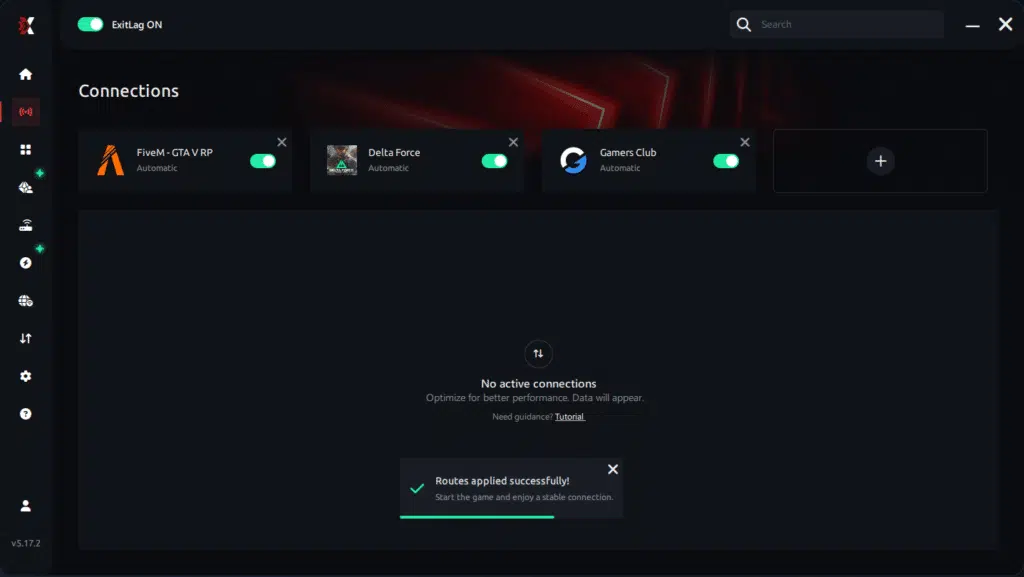
ExitLag runs in the background while you play, constantly adjusting routes to maintain the best possible performance.
Before and after results with ExitLag in FIVE M GTA
ExitLag’s routing significantly changes game stability by minimizing jitter. Although it does not replace hardware upgrades, it prevents network interruptions from becoming visible stutters, which players often misinterpret as FPS Drop FIVE M GTA.
Real player cases
Several players reported noticeable improvements after activating ExitLag:
- Case 1: FPS pacing improved by 38%, eliminating micro-stutter in downtown RP zones.
- Case 2: Server desync reduced by 52%, removing constant teleporting and frame halts.
- Case 3: Route stability increased by 63%, improving consistency during chases.
Performance comparison table
| Metric | Without ExitLag | With ExitLag | Improvement |
| Jitter | High | Low | ✔ Reduced |
| Packet Loss | 4–7% | 0–1% | ✔ Major fix |
| Frame Pacing Stability | Unstable | Smooth | ✔ Noticeable |
| Route Consistency | Frequent changes | Stable | ✔ Improved |
Additional optimizations to maximize FPS with ExitLag
Even after reducing FPS Drop FIVE M GTA, many players can push performance further through simple adjustments. These complementary steps help ensure stability across all gameplay sessions, especially in heavy RP servers or modded environments.
Network
Your network configuration plays a major role in how smooth your game feels. Unstable routing may look like low FPS or jitter, worsening overall gameplay.
Using an Ethernet cable reduces input delay and prevents small disconnects that mimic FIVE M GTA stuttering. QoS settings can prioritize your game packets over background traffic, preventing sudden spikes. Additionally, adjusting DNS to more stable providers and closing heavy applications like streaming tools or cloud sync apps helps reduce disguised FPS Drop FIVE M GTA caused by unstable data delivery.
System
Your operating system can also influence how smoothly FIVE M GTA runs. Keeping your GPU drivers updated ensures proper shader handling and reduces instability.
Switching Windows to high-performance mode helps your CPU maintain consistent clocks. Closing background apps frees RAM and CPU resources, preventing small freezes during high-density areas. Cleaning your system regularly also improves texture loading consistency, especially when dealing with FIVE M GTA performance issues.
In-game
FIVE M GTA servers often push your hardware harder than standard GTA V. Turning V-Sync off prevents input delay and avoids frame pacing mismatches. Setting a reasonable FPS limit, based on your monitor’s refresh rate, reduces thermal stress during long RP sessions.
You can also use recommended presets to avoid extreme shadows, high population density, and extended distance scaling. These settings significantly reduce the chance of FIVE M GTA low FPS, especially in highly customized servers.
Frequently asked questions about FPS drop in FIVE M GTA
Below are the most common doubts players have when dealing with instability, lag, and FPS Drop FIVE M GTA during RP gameplay.
Does ExitLag actually improve FPS?
ExitLag doesn’t change your hardware, but it removes route instability that often appears as fake FPS drops. By eliminating jitter, packet loss, and desync, screen freezing becomes far less frequent.
Is ExitLag safe?
Yes. ExitLag does not access personal files and does not modify your game. It is designed exclusively to improve routing and stabilize gameplay in titles like FIVE M GTA.
Does ExitLag work on console?
Console users cannot install the app directly, but many use a PC or compatible router setup to send console traffic through ExitLag, reducing disguised FIVE M GTA lag.
How much does ExitLag cost?
ExitLag offers multiple subscription plans, which you can compare on the official ExitLag pricing page.
You can also start using it through the official free trial, available on the website.
My PC is weak, does ExitLag help?
Yes. Even low-end PCs suffer from route issues. Fixing network instability prevents micro-stutters that worsen existing FPS Drop FIVE M GTA.
Does ExitLag work with FIVE M GTA?
Yes. The game is supported, and players can browse all compatible titles within the complete ExitLag supported games directory.
What’s the difference between ExitLag and a VPN?
ExitLag is NOT a VPN. A VPN encrypts and detours traffic for privacy, increasing latency. ExitLag uses multi-path routing built for gaming performance, significantly reducing lag and instability.
Why does FIVE M GTA freeze in crowded areas?
Crowded servers load many assets at once. Combined with unstable routing, micro-freezes become frequent.
Can mods increase FPS drops?
Yes. Heavy textures, scripts, and effects often cause FIVE M GTA frame drops on mid-range hardware.
Should I reinstall GTA to fix FPS drops?
Not always. Most issues come from routing or overloaded settings. ExitLag and optimized configurations usually solve the problem.
Fix FPS drop in FIVE M GTA with ExitLag
Players dealing with instability know how frustrating FPS Drop FIVE M GTA can be during combat, car chases, and RP scenes. With consistent routing and optimized traffic paths, ExitLag minimizes interruptions that look identical to FPS problems. As a result, gameplay becomes smoother and far more predictable.
Final benefits
- Stable FPS
- Zero micro-stuttering
- Smooth gameplay
- Competitive advantage
- Frustration-free sessions
Next steps
- Test ExitLag for free
- Configure in 5 minutes
- Compare before and after
- Dominate FIVE M GTA
In conclusion, solving FPS drop FIVE M GTA issues requires balancing hardware, settings, and network stability. ExitLag’s multi-path technology eliminates routing delays and ensures fluid gameplay across all regions of FIVE M GTA. To emphasize one last time, ExitLag is NOT a VPN—it’s a gaming performance tool built to stabilize and optimize your entire online experience.
Now that you know everything about FPS drop FIVE M GTA, if you want the most stable, smooth, and competitive gameplay possible, is time to upgrade your performance toolkit. Register at ExitLag now and improve your gameplay in a way you’ve never experienced before!
Got questions or want to connect with other players? Join the conversation at the ExitLag Forum!