Using how to use enchantment books in Minecraft effectively is one of the most important skills for upgrading your weapons, armor, and tools. In this guide, you will learn everything you need to improve your gear and push your survival, combat, and mining performance to the next level. Whether you’re enchanting a sword, combining books, or planning your enchanting station layout, this guide covers all essential steps.
Understanding how to use enchantment books in Minecraft starts with knowing where they come from, what they do, and how they differ from standard enchanting. Moreover, this guide explains what enchantment books are, where to find them, and who benefits the most from specific enchantments-the kind of answers beginners and advanced players need.
Before diving deeper, it’s crucial to understand what an enchanted book is: an item that stores a magical upgrade and can apply it directly to compatible gear using an anvil.

What Are Enchantment Books in Minecraft?
Enchantment books-sometimes called enchanted book Minecraft items-are magical books that hold a specific enchantment. They allow players to bypass randomness from the enchanting table and apply powerful enchantments directly to armor, tools, and weapons.
Key Features of Enchanted Books
- Store a single or multiple enchantments
- Allow direct combination through anvils
- Enable max‑level upgrades without relying on table RNG
- Can be combined on an anvil to create higher‑tier enchantments
Why Enchantment Books Matter
Using them grants players full control over their builds. Instead of relying on random enchantments, you choose exactly which upgrades your gear will receive.
Where to Find Enchantment Books in Minecraft
To master how to use enchantment books in Minecraft, you first need to acquire them. They appear in various locations and methods, giving players several ways to farm them.
Main Sources to Obtain Enchanted Books
- Fishing – with a high Luck of the Sea enchantment
- Loot Chests – strongholds, mineshafts, desert temples, woodland mansions
- Villager Trading – Librarians are the best source for consistent enchantments
- Enchanting Table – simply place a book in the enchanting slot along with Lapis Lazuli
Recommended Strategy for Fast Book Farming
- Build a villager trading hall
- Target Librarians that roll top‑tier enchantments
- Use a zombie discount system to lower trade costs
This method guarantees long‑term access to rare enchantments like Mending, Protection IV, Unbreaking III, Sharpness V, and more.
How to Enchant a Book in Minecraft
Another essential part of mastering how to use enchantment books in Minecraft is learning how to create enchantments yourself.
Steps to Enchant a Book Using an Enchanting Table
- Craft an enchanting table
- Surround it with 15 bookshelves for max level 30 enchantments
- Place a book into the enchanting slot
- Add Lapis Lazuli
- Choose an available enchantment
Best Practices When Enchanting Books
- Enchanting books is often efficient, though enchanting gear directly can also be optimal depending on XP costs and build strategy
- Use grindstones to reset unwanted enchantments on items only (they do not remove enchantments from books)
- Stack enchantment books later using anvils
This gives you full flexibility and helps you avoid being stuck with unwanted enchantments.
How to Use an Enchantment Book in Minecraft
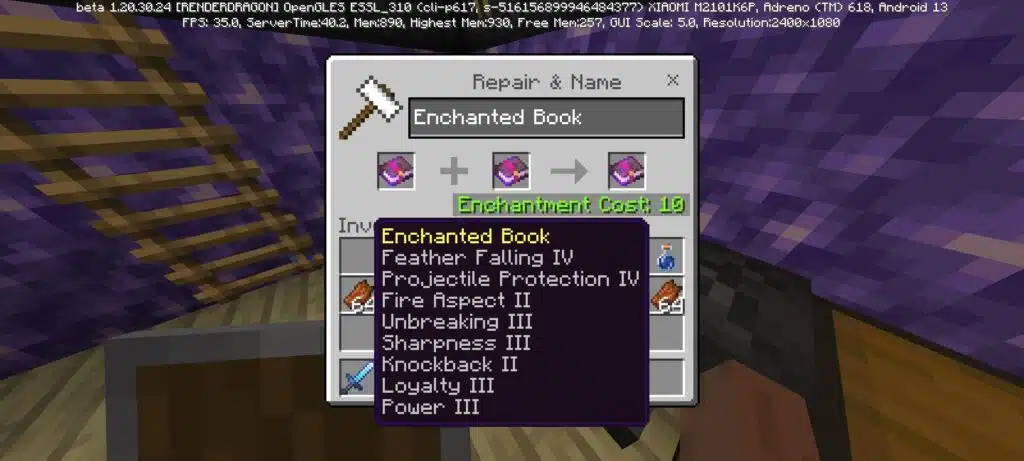
Knowing how to use enchantment books in Minecraft means understanding the anvil system. The anvil lets you combine enchantments, repair tools, and upgrade existing gear.
Step-by-Step: Applying an Enchantment Book to an Item
- Craft an anvil using iron blocks and ingots
- Place the item you want to upgrade in the left slot
- Place the enchantment book in the right slot
- Confirm the XP cost and apply the enchantment
Combining Multiple Books
To reach max power, you may need to combine books together.
Example:
- Combine two Sharpness III books to get Sharpness IV
- Combine two Sharpness IV to get Sharpness V
Key Rules for Anvil Mechanics
- Higher-tier enchantments cost more XP
- Some enchantments are incompatible (e.g., Silk Touch vs Fortune)
- Anvils break with use-keep backups
Best Enchantments for Each Gear Type
To use books wisely, know which upgrades matter most.
Sword Enchantments
- Sharpness V
- Looting III
- Unbreaking III
- Mending
Pickaxe Enchantments
- Efficiency V
- Fortune III or Silk Touch
- Unbreaking III
- Mending
Armor Enchantments
- Protection IV (or specialized versions)
- Unbreaking III
- Mending
- Feather Falling IV (boots)
Bow Enchantments
- Power V
- Infinity
- Flame
- Punch II
- Unbreaking III
- Mending
Crossbow Enchantments
- Multishot
- Piercing
- Quick Charge
- Unbreaking III
- Mending
This roadmap saves time, XP, and materials.
Book Layout for Maximum Enchantment in Minecraft
Optimizing your enchanting setup dramatically affects your success.
The Perfect Enchanting Room Layout
To reach level 30 enchantments, you need:
- 15 bookshelves
- Placed exactly 1 block away from the enchanting table
- No blocks obstructing the space
Recommended Layout Structure
BBB BBB
BBBBBBB
B E B
BBBBBBB
BBB BBB
B = Bookshelf
E = Enchanting table
Additional Enhancements
- Add storage for books and Lapis Lazuli
- Install mob XP farms near the area
- Keep anvils nearby for quick combinations
Creating the Best Enchantment Book Storage System
Managing your book collection keeps your progression smooth.
Ideas for Organization
- Sort books by gear type
- Use item frames to represent enchantments
- Color-code shulker boxes for organization
Example Sorting Categories
- Sword Books
- Armor Books
- Tool Books
- Misc Utility Books
- Max-Level Combined Books
How ExitLag Enhances Gameplay When Using Enchantment Books
Although enchanting itself is offline, Minecraft servers rely heavily on fast and stable connections during gameplay-especially when farming XP, fighting mobs, or trading with villagers. ExitLag ensures your experience is smoother by optimizing your routes instantly.
With ExitLag, you get:
- Stabilized network performance
- Reduced ping and jitter while exploring or fighting
- Worldwide routing for international servers
- Multi-Internet failover support
How to Start Using ExitLag
- Create your ExitLag account
- Download ExitLag
- Choose your game and apply the routes
- Enjoy the best experience with ExitLag ON!
Players on PC benefit the most from smooth trading, combat responsiveness, and reduced lag during high-load mob farms.
Essential Tips for Preparing Long-Term Enchantment Strategies
To maximize the use of your books, always prepare ahead:
Build XP Farms
- Enderman Farm
- Zombie Spawner Farm
- Gold Farm
Secure Rare Villagers
- Mending Librarian
- Protection IV Librarian
Stack High‑Tier Books
- Combine books progressively on an anvil
- Be mindful of the prior work penalty, which increases XP cost with each merge
- Avoid mixing incompatible enchantments
Advanced Anvil Mechanics and Prior Work Penalty
To fully master how to use enchantment books on Minecraft, players must understand the hidden mechanics behind the anvil. The anvil is powerful, but expensive mistakes can ruin your XP progression.
What Is the Prior Work Penalty?
Every time you combine two enchanted items or books, the anvil assigns a hidden cost. This cost increases each time the item is modified.
How the Penalty Works
- Each merge increases the item’s internal “work cost.”
- Eventually, the anvil will show “Too Expensive!”
- Smart planning avoids wasting good enchantments.
Tips to Avoid High Costs
- Combine books first before applying them to gear.
- Always apply low‑cost enchantments first.
- Avoid unnecessary combination steps.
Mastering these rules is essential when learning how do you use enchanting books in Minecraft at the highest level.
Full Workflow for Creating Max‑Level Gear Using Books
This is the definitive process for making perfect tools, weapons, and armor.
1. Gather All Books Before Using the Anvil
This prevents over‑combining or unnecessary steps.
2. Combine Books Based on Category
Example – Sword workflow:
- Sharpness III + Sharpness III → Sharpness IV
- Sharpness IV + Sharpness IV → Sharpness V
- Add Looting III
- Add Unbreaking III
- Add Mending
3. Apply the Final Book to the Weapon
This ensures the minimum possible XP use.
4. Repair With Materials Instead of Anvils When Possible
Repairing with materials avoids adding more prior‑work penalty, since repairs with materials do not increase the anvil work cost.
This workflow is vital knowledge when studying how do you use an enchanted book in Minecraft efficiently.
Best Enchantment Book Combinations (Ultimate Reference Tables)
Below are tables for the strongest, most commonly used book combinations in the game.
Sword Enchantments
| Enchantment | Purpose |
| Sharpness V | Best all‑purpose damage enchantment |
| Looting III | Increases drops significantly |
| Unbreaking III | Extends durability |
| Mending | Repairs with XP |
Bow Enchantments
| Enchantment | Purpose |
| Power V | Maximum bow damage |
| Flame | Adds fire to arrows |
| Infinity | Infinite arrows (incompatible with Mending) |
| Punch II | Knockback on arrows |
Crossbow Enchantments
| Enchantment | Purpose |
| Multishot | Shoots 3 arrows |
| Piercing IV | Arrows pass through multiple mobs |
| Quick Charge III | Faster reload |
Pickaxe Enchantments
| Enchantment | Purpose |
| Efficiency V | Fastest block‑breaking |
| Fortune III | Best for ores |
| Silk Touch | Alternative utility option |
| Unbreaking III | Durability boost |
| Mending | XP‑based repair |
Armor Enchantments
| Armor Piece | Best Enchants |
| Helmet | Respiration III, Protection IV, Unbreaking III, Mending |
| Chestplate | Protection IV, Unbreaking III, Mending |
| Leggings | Protection IV, Unbreaking III, Mending |
| Boots | Feather Falling IV, Depth Strider III, Protection IV, Mending |
This table helps with book of enchantments Minecraft planning.
How to Organize Enchanted Books for Maximum Efficiency
A well‑structured storage system saves hours of gameplay.
Recommended Sorting Method
- Sort by equipment type
- Sort by enchantment type (utility, combat, mining)
- Create a color‑coded shulker system
Example High‑Level Sorting Layout
- Red shulker: Weapon enchantments
- Blue shulker: Armor enchantments
- Green shulker: Tool enchantments
- Yellow shulker: Utility books (Aqua Affinity, Efficiency I leftovers, etc.)
Organizing your books helps immensely when learning minecraft enchanted book strategies.
How to Get Enchant Books in Minecraft (Advanced Farming)
Beyond the basic methods, there are advanced strategies for farming the rarest books.
1. Villager Hall Optimization
Librarians are the best way to obtain specific enchantments.
Tips
- Use zombification + curing to lower prices.
- Assign each villager a single top‑tier enchant.
- Lock trades immediately when a rare enchant appears.
2. Fishing Farm (Java Edition Only)
Although significantly nerfed in recent versions, automated fishing can still provide books.
3. Structure Loot Targeting
Some structures have higher chances of containing rare books.
Best structures:
- Strongholds
- Dungeons
- Ancient Cities
Mastering these systems answers the question how to get enchant books in Minecraft more efficiently.
How to Use Enchanted Books on Minecraft for End‑Game Builds
Once you know the basics, the next step is creating builds that define late‑game gameplay.
Best End‑Game Gear Sets
1. Netherite Mining Pickaxe
- Efficiency V
- Fortune III
- Unbreaking III
- Mending
2. General‑Purpose Sword
- Sharpness V
- Looting III
- Unbreaking III
- Mending
3. Exploration Boots
- Feather Falling IV
- Depth Strider III
- Protection IV
- Mending
These setups are crucial for players who want to optimize enchanted books Minecraft usage.
Common Mistakes When Using Enchantment Books
Even experienced players make these errors.
Mistake 1 – Combining Books One by One
This increases anvil penalties unnecessarily.
Mistake 2 – Adding a Rare Enchant Too Early
Always add Mending last to avoid cost inflation.
Mistake 3 – Mixing Incompatible Enchants
Examples:
- Fortune and Silk Touch
- Infinity and Mending
Mistake 4 – Not Repairing Items Early Enough
Low‑durability items risk breaking during use.
Avoiding these mistakes is important for players searching how do you use an enchanted book in Minecraft correctly.
Advanced Book Layout for Maximum Enchantment Efficiency
A perfect enchanting room setup allows consistent high‑level rolls.
Materials Needed
- 15 bookshelves
- 1 enchanting table
- 1–3 anvils
- Storage chests or shulkers
- A renewable XP source nearby
Upgraded Enchanting Room Ideas
- Add an automatic XP farm adjacent to the room
- Use item frames to mark enchantment types
- Install grindstones (for gear only) for resetting bad rolls
This section reinforces book layout for maximum enchantment Minecraft optimization.
Best XP Farms for Fast Enchanting
1. Enderman Farm (Fastest Method)
Ideal for repairing Mending gear instantly.
2. Zombie or Skeleton Spawner Farm
Easy to set up early in the game.
3. Gold Farm
Provides XP + gold, useful for bartering.
XP flow is essential when progressing through how to enchant books in Minecraft efficiently.
ExitLag and High‑Performance Minecraft Gameplay
While enchanting does not depend on network latency, playing on multiplayer servers absolutely does. For XP farming, villager trading, or exploring large worlds, stable routing makes a noticeable difference.
ExitLag Benefits for Minecraft Players
- Eliminates lag and packet loss
- Reduces ping for distant servers
- Ensures stable connection during XP or mob farms
- Multi‑Internet failover reduces disconnect risk
- Real‑time route optimization picks the best path instantly
How to Start Using ExitLag
- Create your ExitLag account
- Download ExitLag
- Choose your game and apply the routes
- Enjoy the best experience with ExitLag ON!
ExitLag is especially helpful when farming villagers or exploring heavily modded servers.
Final Thoughts on Mastering Enchantment Books
By now, you should have a complete understanding of how to use enchantment books in Minecraft, including advanced strategies, optimized workflows, efficient book management, and end‑game gear building.
Got questions or want to connect with other players? Join the conversation at the ExitLag Forum!