
Learning how to use enchantment books in Minecraft is one of the best ways to upgrade weapons, armor, and tools with more control. Instead of relying only on random enchanting table rolls, enchanted books let you apply specific upgrades through an anvil, combine levels, and build stronger gear for mining, combat, exploration, and survival.
Before going deep into how to use enchantment books in Minecraft, it helps to think about where rare books and enchanted loot can appear. Tools like ExitLag’s guide to finding Minecraft structures more efficiently can support your exploration route when you want to check strongholds, ancient cities, dungeons, villages, mineshafts, or other areas where valuable loot may appear.
How to use enchantment books in Minecraft comes down to three core steps: get an enchanted book, place your item and book in an anvil, then pay the required XP cost to apply the enchantment. Once you understand that process, you can start planning better gear sets instead of wasting diamonds, netherite, levels, and rare books on inefficient combinations.
This guide explains what enchanted books do, how to get them, how to apply them, how to combine books, which enchantments matter most, and how to avoid common mistakes that make anvil costs too expensive.
What Are Enchantment Books in Minecraft?

Enchantment books are special books that store one or more enchantments. They do not work like normal readable books. Instead, they act as upgrade items that can transfer magical effects to compatible weapons, tools, armor, and gear through an anvil.
In practice, enchanted books are useful because they give you more control. An enchanting table gives random options, while an enchanted book can be saved and applied later to the exact item you want.
Players searching how to use enchanted books in Minecraft usually want to know whether they need an enchanting table, an anvil, lapis lazuli, or XP. The simple answer is that you need an anvil and XP to apply the book. You may need an enchanting table, villagers, loot chests, or fishing to obtain the book in the first place.
Why Enchanted Books Matter
Enchanted books matter because they let you plan gear builds. For example, instead of hoping your diamond pickaxe gets Fortune III from the enchanting table, you can find or buy a Fortune III book and apply it directly.
They are useful for:
- Building perfect tools.
- Saving rare enchantments.
- Combining lower-level books.
- Adding treasure enchantments.
- Avoiding bad random rolls.
- Preparing backup gear.
- Customizing weapons for different goals.
This is why how to use an enchanted book in Minecraft is such an important beginner question. The book itself does nothing until you apply it correctly.
Enchanted Books vs Enchanting Table
The enchanting table and enchanted books are connected, but they are not the same system.
| Feature | Enchanting Table | Enchanted Book |
| Main use | Randomly enchant items or books | Apply stored enchantment to gear |
| Requires lapis lazuli | Yes | No, not when using an anvil |
| Requires XP | Yes | Yes |
| Control level | Lower | Higher |
| Best for | Early and mid-game rolls | Planned late-game gear |
| Main block used | Enchanting table | Anvil |
The enchanting table is great for creating enchantments early. Enchanted books are better when you already know exactly what you want.
How Do You Use an Enchantment Book in Minecraft?
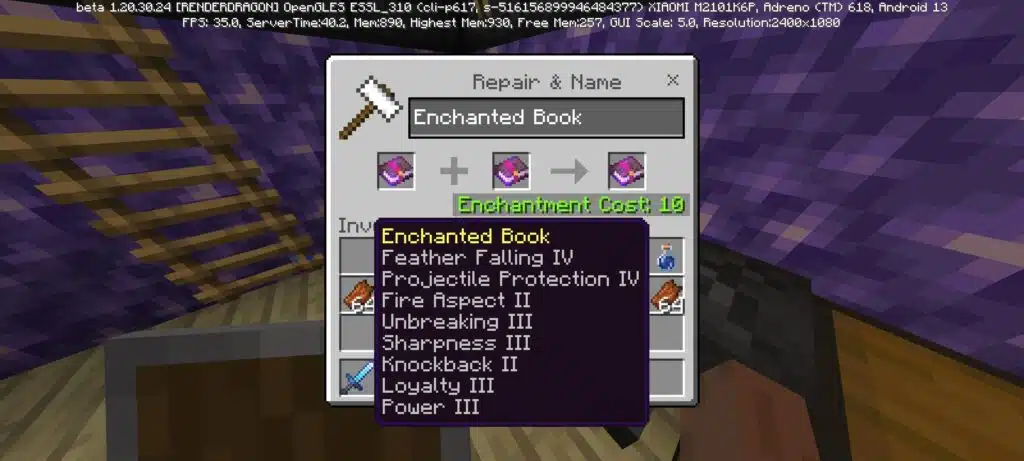
To use an enchantment book in Minecraft, craft or place an anvil, put the item you want to upgrade in the left slot, put the enchanted book in the right slot, check the XP cost, and confirm the result. The book is consumed when the enchantment is applied.
This process is the heart of how to use enchantment books in Minecraft. The anvil decides whether the enchantment can be applied, how much XP it costs, and whether the final result is valid.
Step-by-Step Anvil Method
Follow these steps:
- Place an anvil.
- Open the anvil interface.
- Put the target item in the first slot.
- Put the enchanted book in the second slot.
- Check the result slot.
- Confirm the XP cost.
- Take the upgraded item.
Example:
| Target Item | Book | Result |
| Diamond pickaxe | Fortune III book | Diamond pickaxe with Fortune III |
| Bow | Power IV book | Bow with Power IV |
| Boots | Feather Falling IV book | Boots with Feather Falling IV |
| Sword | Sharpness V book | Sword with Sharpness V |
This is the clearest answer to how to use a enchanted book in Minecraft, even though the grammatically correct phrase is “how to use an enchanted book in Minecraft.”
Why the Book Sometimes Does Not Work
Sometimes the anvil will not let you apply a book. Usually, this happens because the enchantment is incompatible with the item or with another enchantment already on it.
Common incompatibilities include:
- Fortune and Silk Touch.
- Infinity and Mending on bows.
- Sharpness, Smite, and Bane of Arthropods on the same sword.
- Protection, Blast Protection, Fire Protection, and Projectile Protection on the same armor piece in normal survival rules.
- Multishot and Piercing on the same crossbow.
Also, some enchantments only work on specific item types. Power is for bows. Respiration is for helmets and turtle shells. Efficiency is for tools. Feather Falling is for boots.
When learning how to use an enchanting book in Minecraft, always check compatibility before spending XP.
Where Can You Find Enchanted Books in Minecraft?
You can find enchanted books through loot chests, villager trading, fishing, enchanting tables, raids, some structure rewards, and other gameplay systems depending on edition and version. The best method depends on your world stage.
Early-game players may rely on loot and fishing. Mid-game players usually start using enchanting tables. Late-game players often build librarian trading systems and XP farms.
For players who are still learning item categories, durability, tools, and resources, ExitLag’s guide to Minecraft items and how they work can help connect enchanted books with the broader item system. Understanding the item first makes how to use enchanted books in Minecraft easier because every enchantment has a purpose.
Best Sources for Enchanted Books
The most common sources are:
| Source | Why It Helps |
| Librarian villagers | Best for repeatable specific books |
| Loot chests | Good for rare early finds |
| Fishing | Can provide enchanted books with patience |
| Enchanting table | Lets you create random enchanted books |
| Ancient cities | Can contain valuable enchanted loot |
| Strongholds | Useful while preparing for the End |
| Dungeons and mineshafts | Good early exploration sources |
Librarians are usually the most reliable long-term source because trades can provide specific enchantments. However, trade mechanics, prices, and experimental rebalances can vary by version and world settings, so do not rely on outdated tricks without checking your version.
How to Enchant a Book Yourself
To create an enchanted book with an enchanting table, you need:
- 1 book.
- Lapis lazuli.
- XP levels.
- An enchanting table.
- Bookshelves for stronger rolls.
The process is simple:
- Place the enchanting table.
- Add bookshelves around it for higher levels.
- Open the enchanting table.
- Place a normal book in the item slot.
- Add lapis lazuli.
- Choose one of the available enchantments.
- Take the enchanted book.
For maximum enchanting table power, use 15 bookshelves with one block of air between the shelves and the table. Blocks placed between them can prevent the bookshelves from powering the table.
How Do You Combine Enchanted Books in Minecraft?
You combine enchanted books in Minecraft by using an anvil. Place one enchanted book in the first slot and another compatible enchanted book in the second slot. If the combination is valid, the result will be a stronger or multi-enchantment book.
This is a key part of how to use enchantment books in Minecraft efficiently. Instead of applying every small book directly to gear, you can combine books first and then apply a stronger final book to the item.
Combining Same-Level Books
Two books with the same enchantment and same level can combine into the next level, as long as that enchantment supports a higher level.
Examples:
| Book 1 | Book 2 | Result |
| Sharpness III | Sharpness III | Sharpness IV |
| Efficiency IV | Efficiency IV | Efficiency V |
| Protection III | Protection III | Protection IV |
| Power IV | Power IV | Power V |
This is useful when you have several lower-level books. Instead of waiting for one perfect book, you can build your way up.
Combining Different Enchantments
You can also combine books with different compatible enchantments. For example, a sword book might eventually include Sharpness V, Looting III, Unbreaking III, and Mending.
However, the anvil cost increases as you combine items. That is why planning matters. If you add books one by one without thinking, the final cost can become too high.
A better method is to combine books in balanced pairs:
- Combine Book A with Book B.
- Combine Book C with Book D.
- Combine those two results.
- Apply the final book to the item.
This helps reduce unnecessary prior work penalties and keeps the final gear cheaper to create.
What Are the Best Enchantments to Use With Books?
The best enchantments depend on the item, but some upgrades are almost always valuable. Mending, Unbreaking, Protection, Efficiency, Fortune, Sharpness, Power, Feather Falling, and Looting are among the most useful book targets.
When you understand how to use an enchanted book in Minecraft, your next goal is knowing which book deserves your XP first. A rare enchantment is only valuable if it helps your current gear plan.
Best Enchantments by Gear Type
Use this table as a practical reference:
| Item | Best Enchantments |
| Sword | Sharpness V, Looting III, Unbreaking III, Mending, Fire Aspect II |
| Pickaxe | Efficiency V, Fortune III or Silk Touch, Unbreaking III, Mending |
| Axe | Efficiency V, Sharpness V, Unbreaking III, Mending, Silk Touch |
| Shovel | Efficiency V, Unbreaking III, Mending, Silk Touch |
| Helmet | Protection IV, Respiration III, Aqua Affinity, Unbreaking III, Mending |
| Chestplate | Protection IV, Unbreaking III, Mending, Thorns III |
| Leggings | Protection IV, Unbreaking III, Mending, Swift Sneak III |
| Boots | Protection IV, Feather Falling IV, Depth Strider III, Soul Speed III, Mending |
| Bow | Power V, Punch II, Flame, Infinity or Mending, Unbreaking III |
| Crossbow | Quick Charge III, Multishot or Piercing IV, Unbreaking III, Mending |
| Trident | Loyalty III or Riptide III, Impaling, Unbreaking III, Mending |
The most important rule is compatibility. Some choices are mutually exclusive, so decide the item’s purpose first.
Best Early-Game Priorities
Early in survival, do not waste every level chasing perfect gear. Focus on practical upgrades.
Good early priorities include:
- Efficiency on pickaxes.
- Protection on armor.
- Sharpness on swords.
- Power on bows.
- Feather Falling on boots.
- Unbreaking on important tools.
- Mending when available.
Later, when you have farms, villagers, and extra diamonds or netherite, you can focus on perfect builds.
How Do You Avoid Wasting XP With Enchantment Books?
To avoid wasting XP, plan your final gear before using the anvil. Do not apply every book immediately. Combine books carefully, avoid incompatible enchantments, and do not repair the same item on an anvil too many times.
This is one of the most important advanced lessons in how to use enchantment books in Minecraft. The anvil is powerful, but it becomes expensive when you keep modifying the same item.
Understand Anvil Costs
Anvil costs depend on several factors:
- The enchantment type.
- The enchantment level.
- The number of enchantments.
- Previous anvil work.
- Whether you are combining books or items.
- Whether the result is compatible.
- Whether the item is being renamed or repaired.
Over time, an item can become “Too Expensive!” in Survival mode. When that happens, you may not be able to complete the action.
To reduce problems:
- Gather the books first.
- Combine books in pairs.
- Apply the final book to fresh gear.
- Avoid repeated anvil repairs.
- Use Mending instead of constant anvil repair when possible.
- Do not add useless enchantments.
- Keep backup books.
This makes how to use a enchanted book in Minecraft less about one click and more about long-term planning.
Common Mistakes to Avoid
Avoid these mistakes:
- Applying low-level books directly to gear too early.
- Combining books one by one in a long chain.
- Mixing Fortune and Silk Touch by accident.
- Adding Infinity when you wanted Mending.
- Spending rare books on weak gear.
- Forgetting that some books lose incompatible enchantments.
- Using old advice without checking current version behavior.
- Assuming every book works on every item.
A simple rule helps: if the item is not important, do not spend your best book on it.
How Can ExitLag Help Minecraft Players?
ExitLag can help Minecraft players on multiplayer servers by optimizing connection routes and improving connection stability when routing issues affect the game. It does not change enchantment mechanics, increase loot chances, reduce anvil costs, or guarantee lower ping for every player. However, it may help make online gameplay smoother while you farm XP, trade with villagers, or explore servers.
This matters because enchanting often connects to multiplayer progression. You may farm mobs, travel long distances, trade in village hubs, explore structures, or fight in survival servers while collecting books and XP.
Why Connection Stability Matters
Minecraft can feel simple, but multiplayer servers can still be affected by connection problems.
Unstable connections may cause:
- Delayed block breaking.
- Lag during mob farms.
- Villager trading delays.
- Rubber-banding.
- Delayed combat hits.
- Failed elytra movement.
- Stuttering in busy hubs.
- Disconnects during exploration.
If your server connection is unstable, learning how to use enchantment books in Minecraft is only part of the experience. You also need your farming, trading, and exploration sessions to feel consistent.
Performance and FPS Still Matter
Connection is not the only issue. Minecraft can also suffer from FPS drops, especially in modded worlds, large bases, mob farms, redstone machines, shader packs, or multiplayer hubs.
If your game feels choppy while you gather XP or manage gear, ExitLag’s guide to fixing FPS drops in Minecraft is a useful next step. Better FPS makes enchanting sessions, trading halls, storage rooms, and combat practice much easier to manage.
ExitLag helps with routing and connection stability. FPS optimization helps your device run the game more smoothly. Both can matter if you play on busy servers.
What Is the Best Enchanting Setup in Minecraft?
The best enchanting setup includes an enchanting table, 15 bookshelves, multiple anvils, lapis lazuli storage, XP access, organized enchanted book storage, and a safe workspace. This gives you everything needed to create, combine, and apply books efficiently.
A good setup saves time. Instead of running between farms, chests, villagers, and anvils, you can create a central enchanting room for long-term gear progression.
Essential Enchanting Room Components
A strong enchanting room should include:
| Component | Purpose |
| Enchanting table | Creates random enchantments |
| 15 bookshelves | Unlocks level 30 enchantments |
| Anvils | Applies and combines books |
| Grindstone | Removes enchantments when useful |
| Chests or barrels | Stores books and lapis |
| Item frames | Labels storage categories |
| XP farm nearby | Supplies levels |
| Villager hall nearby | Provides repeatable books |
A grindstone can remove enchantments from many enchanted items and books, returning some XP. However, it does not remove curses. Keep that in mind before using cursed gear or cursed books.
Book Storage System
Organized storage is extremely helpful. Enchanted books pile up quickly, and searching through random chests wastes time.
Good categories include:
- Sword books.
- Bow books.
- Crossbow books.
- Tool books.
- Armor books.
- Boots-only books.
- Treasure enchantments.
- Low-level combination books.
- Max-level books.
- Extra books for trading or backups.
You can also sort by enchantment name, but sorting by gear type is usually easier for survival progression.
How Do You Use Enchanted Books for End-Game Gear?
To use enchanted books for end-game gear, decide your final build first, collect every required book, combine the books efficiently, then apply the final result to diamond or netherite gear. This helps avoid wasted XP and expensive anvil mistakes.
End-game enchanting is not only about having the best books. It is about applying them in a smart order.
Example End-Game Gear Builds
Here are useful builds:
| Gear | Recommended Build |
| Mining pickaxe | Efficiency V, Fortune III, Unbreaking III, Mending |
| Silk Touch pickaxe | Efficiency V, Silk Touch, Unbreaking III, Mending |
| General sword | Sharpness V, Looting III, Unbreaking III, Mending, Fire Aspect II |
| Exploration boots | Protection IV, Feather Falling IV, Depth Strider III, Unbreaking III, Mending |
| Elytra | Unbreaking III, Mending |
| Bow | Power V, Flame, Punch II, Infinity, Unbreaking III |
| Trident | Loyalty III, Impaling, Unbreaking III, Mending |
You may want different gear for different goals. For example, a Silk Touch pickaxe is better for collecting blocks, while a Fortune pickaxe is better for ores.
When to Apply Books to Netherite
In many survival worlds, players enchant diamond gear first and upgrade to netherite later. This can be efficient because diamond gear is easier to replace than netherite gear.
However, do not apply your rarest books to gear you plan to abandon. If you already have netherite upgrade materials and a clear build plan, it may be better to prepare the final item first.
When you know how to use an enchanting book in Minecraft correctly, you can avoid turning valuable books into messy, half-finished gear.
Where Can You Learn More About Minecraft Updates?
Minecraft changes over time, so players should check official sources when they want reliable game information. Enchantment basics are stable, but details around villagers, experimental settings, versions, platforms, and server behavior can change.
For official game news, updates, and general information, start with the official Minecraft website. It is the safest source when you need to confirm major announcements, release notes, marketplace content, or official franchise updates.
Why Official Sources Matter
Official sources matter because Minecraft has many editions, versions, snapshots, previews, experiments, mods, and server plugins. A tip that works in one version may not work the same way in another.
This is especially important for:
- Villager trading.
- Experimental trade rebalance features.
- Version-specific enchantments.
- Bedrock and Java differences.
- Snapshot mechanics.
- Server rules.
- Modded enchantments.
- Marketplace add-ons.
Before rebuilding your trading hall or enchanting room, confirm what version your world uses.
Use Video Guides Carefully
Video tutorials can be extremely helpful because enchanting is easier to understand visually. Seeing someone place bookshelves, use an anvil, combine books, or build a trading hall can make the process clearer than reading alone.
The official Minecraft YouTube channel is a good place to follow official videos, trailers, updates, and broader Minecraft content. For specific enchanting tutorials, also check the upload date and game version before copying the exact setup.
A guide from an older version may still explain the basics well, but villager systems, farms, or technical tricks may have changed.
FAQ
Below are common questions about how to use enchantment books in Minecraft, how anvils work, and how to avoid wasting XP.
How do you use enchantment books in Minecraft?
To use an enchantment book, open an anvil, place the target item in the left slot, place the enchanted book in the right slot, pay the XP cost, and take the upgraded item.
How do you use enchanted books in Minecraft?
The answer to how to use enchanted books in Minecraft is the same: use an anvil. Enchanted books cannot be applied directly from your inventory or through the enchanting table.
How do you use an enchanted book in Minecraft?
To use an enchanted book in Minecraft, make sure the enchantment is compatible with the item. Then combine the item and book in an anvil.
How do you use a enchanted book in Minecraft?
The correct phrase is “how to use an enchanted book in Minecraft,” but the method is simple either way. Put the item in the first anvil slot, put the book in the second slot, and pay the XP cost.
How do you use an enchanting book in Minecraft?
Many players say “enchanting book,” but the in-game item is called an enchanted book. You use it with an anvil to apply its stored enchantment to compatible gear.
Can you use enchanted books without an anvil?
No. In normal Survival gameplay, enchanted books need an anvil to apply enchantments to gear.
Can you combine two enchanted books?
Yes. Put both books in an anvil. If the enchantments are compatible, they can combine into a stronger or multi-enchantment book.
Why is my enchanted book not working?
The book may be incompatible with the item, blocked by another enchantment, too expensive to apply, or not useful for that gear type.
Can a grindstone remove enchantments from books?
Yes. A grindstone can disenchant enchanted books, returning a normal book and some XP. It does not remove curses.
What is the best enchanted book in Minecraft?
There is no single best book for every situation, but Mending is one of the most valuable because it repairs gear using XP. Protection IV, Efficiency V, Unbreaking III, Fortune III, Sharpness V, and Feather Falling IV are also top priorities.
Final Thoughts
How to use enchantment books in Minecraft is simple at first, but powerful once you understand the anvil system. You get an enchanted book, place your item in the first anvil slot, place the book in the second slot, pay the XP cost, and upgrade your gear. From there, the real skill is planning.
Use enchanted books to control your progression, build better tools, prepare combat gear, protect armor, and create reliable end-game setups. Combine books carefully, avoid incompatible enchantments, organize your storage, and do not waste rare books on weak items.
For multiplayer players, stable performance also matters. ExitLag can help optimize connection routes and may improve stability on supported Minecraft servers, while FPS tuning can make large bases, farms, and storage systems smoother. Master the enchanting system, keep your setup organized, and use how to use enchantment books in Minecraft as the foundation for stronger gear, smarter survival progression, and better long-term worlds.
All game images used in this article belong to their respective owners. They are used for informational and educational purposes only and do not imply endorsement or affiliation with the rights holders.


