Baldur’s Gate 3 multiplayer is one of the most searched topics among RPG fans who want to experience epic storytelling with friends instead of playing alone. From the first moments of the game, it becomes clear that cooperation, shared choices, and tactical coordination play a huge role in how the adventure unfolds.
If you are asking whether Baldur’s Gate 3 supports multiplayer, the short answer is yes. The long answer is far more interesting, because the game offers multiple co-op formats that dramatically change how the story, combat, and exploration feel.
So, what is Baldur’s Gate 3 multiplayer, where can you play it, and who is it really for? This guide explains everything you need to know before starting a co-op campaign.

Baldur’s Gate 3 Multiplayer Modes Explained
Baldur’s Gate 3 multiplayer is designed to feel like a shared tabletop RPG session. Players are not just tagging along – they actively shape the story together.
Online Co-Op in Baldur’s Gate 3
Online co-op is the most popular way to experience Baldur’s Gate 3 multiplayer. In this mode, friends connect over the internet and share the same campaign world.
Key characteristics of online co-op:
- Up to four players can join the same campaign
- Each player controls their own character
- Players can join or leave during the adventure
- All story decisions affect the entire group
Online multiplayer allows parties to split up, explore different areas, or regroup for combat. This freedom makes Baldur’s Gate 3 multiplayer feel organic rather than restrictive.
Local Split-Screen Co-Op
For players who prefer couch co-op, Baldur’s Gate 3 also supports split-screen multiplayer. This mode lets two players share the same screen while playing on the same system.
Split-screen co-op is ideal for:
- Couples or roommates playing together
- Console players using controllers
- Long campaign sessions without online connectivity
Although limited to two players, split-screen still delivers the full Baldur’s Gate 3 multiplayer experience, including shared dialogue, combat turns, and exploration.
How Baldur’s Gate 3 Multiplayer Actually Works
Understanding how Baldur’s Gate 3 multiplayer works is essential before starting a campaign, especially if you are new to co-op RPGs.
Creating or Joining a Multiplayer Session
To start multiplayer, players access the multiplayer menu from the main screen. One player becomes the host, creating a lobby that others can join.
Typical steps include:
- Open the multiplayer menu
- Create or join a lobby
- Invite friends or allow open joining
- Start the campaign together
The host controls save files and session settings, which is important to remember for long-term play.
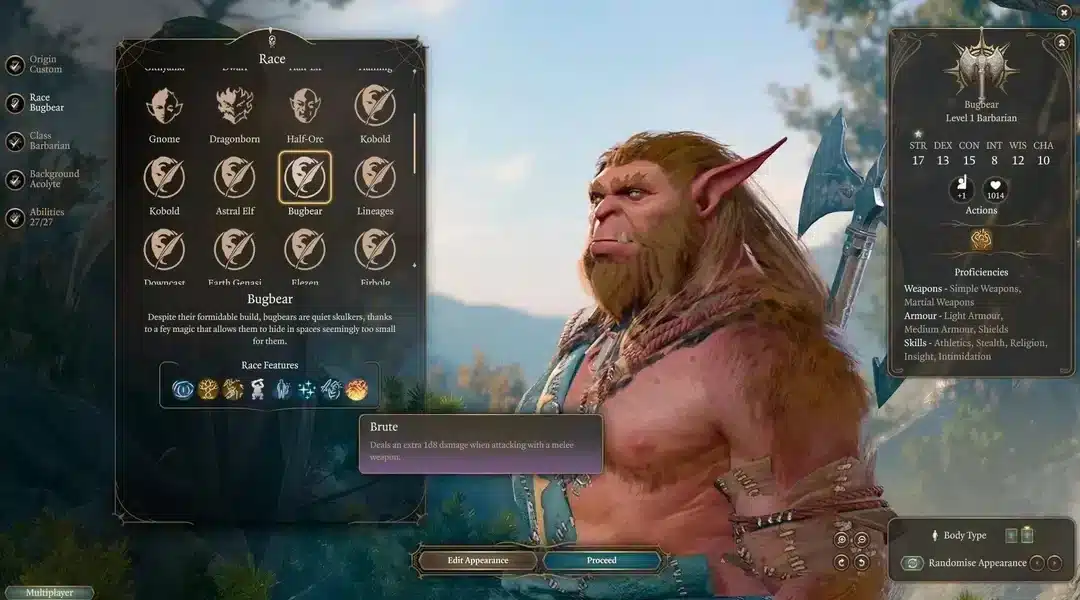
Character Creation in Multiplayer
In Baldur’s Gate 3 multiplayer, each player creates their own character. These characters exist only within that shared campaign and are not imported from solo saves.
This system ensures:
- Balanced progression for all players
- Equal narrative importance
- Unique role-playing opportunities
Every character has their own dialogue options, reactions, and relationships, which can lead to unexpected story outcomes.
Shared Story and Decision-Making
One of the defining features of Baldur’s Gate 3 multiplayer is shared storytelling. Conversations, moral choices, and major plot decisions affect everyone in the party.
Important points to understand:
- Some dialogues are initiated by individual players
- Key story decisions often require party agreement
- Conflicting opinions can change relationships
This structure makes Baldur’s Gate 3 multiplayer feel closer to a real Dungeons & Dragons session than a traditional video game.
Combat in Baldur’s Gate 3 Multiplayer
Combat remains fully turn-based in multiplayer, just like in solo play. However, having multiple human players introduces new layers of strategy.
Turn-Based Combat with Multiple Players
During combat:
- Each player controls their own turns
- Actions are coordinated in sequence
- Positioning and teamwork are critical
Because players are not controlled by AI, communication becomes a major advantage. Coordinated attacks, spell timing, and positioning can decide the outcome of difficult encounters.
Tactical Advantages of Co-Op Play
Multiplayer combat offers several benefits:
- Better coordination than AI companions
- Creative spell and ability combinations
- Flexible battlefield strategies
For players who enjoy tactical depth, Baldur’s Gate 3 multiplayer adds an entirely new dimension to combat encounters.
Limitations and Important Multiplayer Rules
While powerful, Baldur’s Gate 3 multiplayer does have limitations players should understand.
Player Limits and Restrictions
- Maximum of four players online
- Maximum of two players in split-screen
- No full cross-play between platforms
These limits are important when planning who you will play with and on which system.
Save Files and Progression
Progression is tied to the host’s save file. If the host is unavailable, the campaign cannot continue unless the save is shared.
This makes consistent scheduling important for long campaigns.
Why Baldur’s Gate 3 Multiplayer Feels Different
Unlike many co-op games, Baldur’s Gate 3 multiplayer does not treat additional players as side characters. Every participant matters.
Multiplayer changes the experience by:
- Encouraging role-play and discussion
- Creating unpredictable story outcomes
- Turning decisions into group debates
This design is why many players consider Baldur’s Gate 3 multiplayer one of the best co-op RPG experiences available.
Connection Stability and Multiplayer Performance
Even though Baldur’s Gate 3 is not a competitive shooter, multiplayer sessions rely heavily on stable connections. Desyncs, lag spikes, or packet loss can interrupt dialogue, delay turns, or disconnect players.
This is where ExitLag becomes relevant. ExitLag improves routing stability, reduces latency spikes, and keeps multiplayer sessions smooth. For long co-op campaigns, especially online, a stable connection ensures that every decision and combat turn happens exactly as intended.
Baldur’s Gate 3 multiplayer shines when performance issues stay out of the way, letting players focus on storytelling, tactics, and teamwork instead of technical problems.
What to Expect Before Starting Multiplayer
Before jumping into Baldur’s Gate 3 multiplayer, players should be prepared for:
- Longer play sessions
- Shared responsibility for decisions
- A slower but deeper narrative pace
For many players, these elements are not drawbacks but the very reason multiplayer feels so rewarding.
Baldur’s Gate 3 multiplayer is not just an extra mode. It is a core way to experience the game, built around cooperation, creativity, and shared storytelling.
Multiplayer Progression and Save System
Understanding progression is essential before committing to a long Baldur’s Gate 3 multiplayer campaign. Unlike many co-op games, progression is tightly linked to how sessions are hosted and saved.
Host-Based Save Control
In Baldur’s Gate 3 multiplayer, the host owns the campaign save file. This means:
- The host controls when the game is saved
- Progression is tied to the host’s account
- Other players join that same save each session
If the host is unavailable, the campaign cannot continue unless the save file is shared. For long-term groups, choosing a consistent host is critical.
Guest Progression and Characters
Guest players still keep meaningful progression. Their characters retain:
- Levels and class choices
- Equipped items and inventory
- Story flags related to personal decisions
However, those characters only exist within that specific multiplayer save. They are not automatically transferable to solo campaigns.
Joining Mid-Campaign
Players can join an ongoing Baldur’s Gate 3 multiplayer campaign at almost any point. When joining late:
- Characters are created at the current party level
- Gear is often provided to stay balanced
- Narrative context is summarized quickly
This flexibility makes multiplayer more accessible, even for groups with rotating players.
Loot, Inventory, and Party Management
Loot is one of the most common sources of conflict in co-op RPGs, and Baldur’s Gate 3 multiplayer handles it with a shared-world approach.
How Loot Works in Multiplayer
All players see the same loot in the world. Once an item is picked up:
- It disappears for everyone else
- It belongs to the player who collected it
This makes communication essential, especially for rare weapons, armor, or quest items.
Trading Items Between Players
Trading is simple and flexible:
- Items can be dragged directly to another player’s inventory
- Gold can be split or pooled freely
- Equipment can be swapped at any time outside combat
Most groups quickly develop informal loot rules to keep things fair.
Gold Sharing and Etiquette
There is no automatic gold split. Because of this, many Baldur’s Gate 3 multiplayer parties:
- Pool gold with one designated holder
- Share gold manually after major loot events
- Discuss purchases before spending
Clear communication avoids frustration later in the campaign.
Advanced Multiplayer Tips and Strategies
Once the basics are mastered, Baldur’s Gate 3 multiplayer truly shines through teamwork and planning.
Party Composition and Roles
Balanced parties perform better in co-op. Effective groups usually include:
- A frontline fighter or tank
- A damage-focused spellcaster or ranger
- A support or control character
- A flexible utility role
This balance allows parties to adapt to unexpected encounters.
Combat Coordination
Human coordination is a major advantage over AI companions. Successful groups:
- Plan turn order before engagements
- Combine crowd control and burst damage
- Communicate positioning clearly
Even difficult encounters become manageable with proper coordination.
Splitting the Party Strategically
Unlike many RPGs, Baldur’s Gate 3 multiplayer allows parties to split safely.
Useful situations include:
- Scouting dangerous areas
- Triggering dialogue while others prepare
- Setting ambushes before combat
When used carefully, splitting the party adds depth rather than risk.
Cross-Play, Cross-Save, and Platform Considerations
Modern multiplayer expectations include flexibility across platforms, and Baldur’s Gate 3 partially delivers on this.
Cross-Play Support
Cross-play allows players on different platforms to join the same multiplayer session using a shared account system.
Important notes:
- All players must link accounts
- Internet stability is essential
- Some features may vary slightly by platform
Cross-Save Functionality
Cross-save lets players continue the same campaign across supported devices. This is especially useful for players switching between PC setups.
However, cross-save does not replace the host-based save system in multiplayer.
Platform Limitations
Despite its flexibility, Baldur’s Gate 3 multiplayer still has limits:
- Player count caps remain the same
- Local split-screen is limited to two players
- Performance varies by hardware
Knowing these limits helps set expectations early.

Common Multiplayer Issues and Solutions
Even polished co-op systems face challenges. Baldur’s Gate 3 multiplayer is no exception.
Disconnects and Desync
Common causes include:
- Unstable internet connections
- High latency routes
- Background network congestion
These issues can interrupt dialogue, delay turns, or remove players from sessions.
Resolving Party Conflicts
Narrative disagreements are part of the experience. The game supports:
- Dialogue priority based on proximity
- Dice rolls influencing outcomes
- Relationship changes tied to decisions
Groups that discuss expectations beforehand tend to enjoy smoother campaigns.
Improving Multiplayer Stability
For online sessions, connection quality matters as much as gameplay skill. This is where ExitLag plays an important role.
ExitLag optimizes routing paths, reduces packet loss, and stabilizes latency during multiplayer sessions. In long Baldur’s Gate 3 multiplayer campaigns, this prevents desyncs, disconnects, and delayed turns – keeping the focus on storytelling instead of technical problems.
Multiplayer Comparison Table
| Feature | Solo Play | Online Multiplayer | Split-Screen |
| Max Players | 1 | 4 | 2 |
| Save Control | Player | Host Only | Host Only |
| Loot System | Individual | Shared World | Shared World |
| Character Control | Full | Individual | Individual |
| Best For | Story Focus | Team Play | Couch Co-op |
Expanded Multiplayer FAQ
Can players join or leave freely?
Yes. Players can join or leave sessions, though story progress remains tied to the host save.
What happens if a player leaves mid-session?
Their character becomes inactive until they return. Progression resumes normally when they rejoin.
Are there class restrictions in multiplayer?
No. Parties can mix any classes, though balanced compositions are recommended.
Is Baldur’s Gate 3 multiplayer beginner-friendly?
Yes, especially with voice communication and agreed-upon roles.
Why Baldur’s Gate 3 Multiplayer Is Worth It
Baldur’s Gate 3 multiplayer transforms a strong single-player RPG into a shared storytelling experience. Every decision becomes a group moment, every victory feels earned together, and every failure sparks discussion.
For players who enjoy cooperative RPGs, strategic combat, and meaningful choices, multiplayer is not just an option – it is one of the best ways to experience the game.
All game images used in this blog belong to Larian Studios. They are used for informational/educational purposes only and do not imply endorsement or affiliation with the rights holders.
Got questions or want to connect with other players? Join the conversation at the ExitLag Forum!