If you are wondering is Rocket League cross platform, the answer can make a big difference when you want to play with friends on different systems. Rocket League connects players across several platforms, making online matches more accessible.
So, is Rocket League cross platform across PC and consoles? Yes. Players on PC, PlayStation, Xbox, and Nintendo Switch can play together through Rocket League’s cross-platform features.
In short, is Rocket League cross platform? Yes. Cross-platform play allows players using supported systems to join the same online matches. In this guide, you will learn how cross-play works, which platforms are supported, how progression works, and how to play with friends.
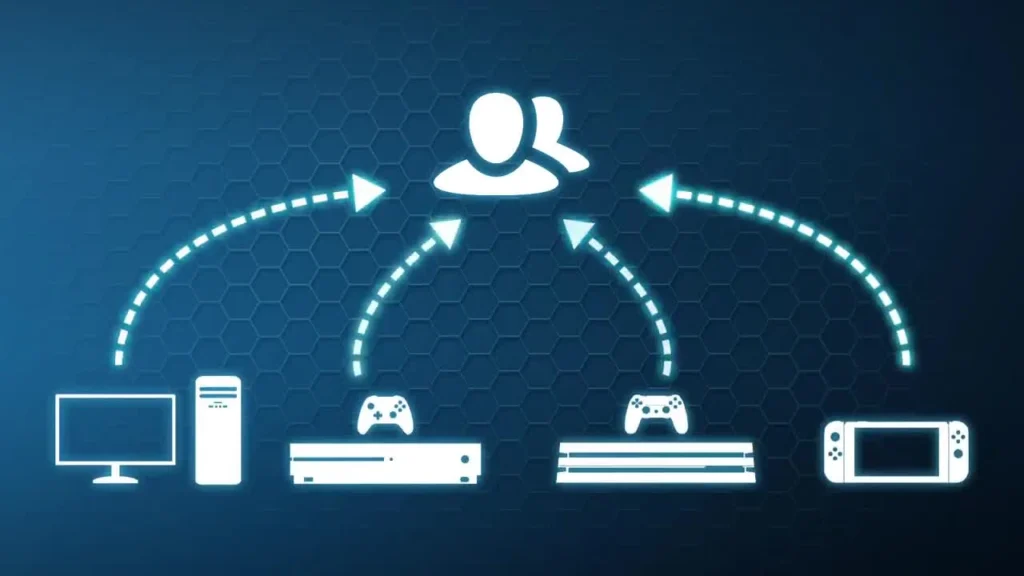
Is Rocket League Cross Platform on PC, PlayStation, Xbox, and Switch?
The simple answer to is Rocket League cross platform remains yes. The game supports cross-play across its main platforms, so you are not restricted to playing only with people using the same device.
That is particularly useful for a game built around fast matchmaking and competitive multiplayer. A larger shared player pool can help you find matches without requiring everyone in your group to own the same console or PC.
Which Rocket League platforms support cross-play?
Rocket League cross-platform matchmaking covers the major platforms where the game is available.
These include:
- PC through the Epic Games Store;
- PC through Steam for existing Steam players;
- PlayStation 4;
- PlayStation 5;
- Xbox One and supported Xbox Series systems;
- Nintendo Switch.
Therefore, a PlayStation player can enter matches involving PC or Xbox players, for example. Likewise, a Nintendo Switch player can compete with friends using other supported systems.
This broad compatibility is one reason Rocket League remains accessible to groups of friends who game on different devices.
Is cross-platform play enabled automatically?
Yes. Cross-platform play is enabled by default in Rocket League.
If it has been disabled, you can turn it back on from the Gameplay section of the Settings menu by enabling the Cross-Platform Play option.
Keeping the feature active gives matchmaking access to players across supported platforms. On the other hand, disabling cross-play limits matchmaking to your own platform and may increase the time required to find a match.
How Does Rocket League Cross-Play Work?
Understanding is Rocket League cross platform becomes easier once you separate cross-play from other features such as account progression.
Cross-play determines who you can play with. Cross-platform progression, meanwhile, concerns the progress and content associated with your linked accounts.
Although these features work together, they are not exactly the same thing.
Cross-play vs. cross-progression
Cross-play lets players using different platforms enter the same online matches. Cross-progression allows certain account progress to remain available when you move between linked platforms.
Here is a quick comparison:
| Feature | What it does | What you should know |
| Cross-play | Lets different platforms play together | Supported across PC, PlayStation, Xbox, and Switch |
| Cross-platform parties | Lets friends on different platforms team up | Uses the Epic friends system |
| Cross-progression | Shares supported progression between linked platforms | Requires properly linked accounts |
| Shared inventory | Makes many items accessible on linked platforms | Some items and balances have restrictions |
| Platform-specific content | Remains connected to certain platforms | Not every item can be shared |
The important takeaway is that multiplayer compatibility does not automatically mean everything attached to one account can be moved freely to another.
For instance, many inventory items can be accessed across linked accounts. However, certain platform-exclusive items and purchased Credit balances have restrictions.
Do you need an Epic Games account?
An Epic Games account plays a central role in Rocket League’s cross-platform ecosystem.
Linking the platforms you use to the same Epic Games account allows supported progression and inventory features to work across those platforms.
Your Epic friends list is also important when playing with people who use a different system. Instead of depending exclusively on PlayStation, Xbox, Nintendo, or PC friend systems, Epic friends help connect players across platform boundaries.
How to Play Rocket League With Friends on Different Platforms
Once you know is Rocket League cross platform, the next question is usually how to actually invite someone who is playing elsewhere.
Fortunately, the process is relatively straightforward. You mainly need cross-platform play enabled and the correct Epic account connection.
Add your friends through Epic Games
Your Epic friends list allows you to connect with players regardless of their gaming platform.
If your friend is on another supported system, make sure you have each other added through the Epic friends system. Then, you can use the in-game friends list to create a party.
This makes it possible to build a group containing players from different platforms before searching for a match.
Steps to enable cross-platform play
If you are having trouble finding players from other systems, first check the cross-play setting.
Follow these steps:
- Launch Rocket League;
- Open Settings from the main menu;
- Select the Gameplay tab;
- Find the Cross-Platform Play option;
- Make sure the box is enabled;
- Return to the menu and invite your friends.
After that, your group should be able to use supported cross-platform matchmaking.
You can also play Private Matches with friends on other platforms. Therefore, cross-play is useful whether you are interested in regular matchmaking or simply want to organize matches with your own group.
Rocket League Cross-Platform Progression and Inventory
Another reason players search is Rocket League cross platform is because they plan to switch devices.
Maybe you started playing on PlayStation and now use a PC. Or perhaps you have access to Rocket League on more than one supported system.
In those situations, cross-progression becomes just as important as cross-play.
What progression can be shared?
When supported platforms are linked correctly to your Epic Games account, Rocket League can synchronize key parts of your progression.
That can include elements such as:
- Competitive Rank;
- Rocket Pass progress;
- XP Level;
- Many inventory items;
- Season Rewards and Titles;
- Rocket Pass items;
- Supported Item Shop purchases.
As a result, moving to another linked platform does not necessarily mean starting your entire Rocket League journey again.
However, linking accounts should not be confused with merging separate accounts. Account information from two different accounts cannot simply be combined into one.
Are all Rocket League items shared?
No. While a large portion of the inventory can be shared, there are exceptions.
For example, platform-exclusive items are not shared across every platform. Purchased Credit balances are also tied to the platform where those Credits were purchased.
Therefore, players should check item-specific restrictions before assuming that every cosmetic or balance will appear everywhere.
This distinction is especially useful if you have been playing Rocket League for a long time and have collected content across several platforms.
Rocket League Multiplayer, Matchmaking, and Communication
The answer to is Rocket League cross platform also affects matchmaking.
Cross-play expands the potential matchmaking pool beyond your own system. That means your matches may include players using several different platforms.
For most players, this happens automatically because cross-platform play is enabled by default.
Can you disable Rocket League cross-play?
Yes. Rocket League allows you to disable Cross-Platform Play through the Gameplay settings.
However, doing so means matchmaking will be restricted to players on your platform. As a result, finding a match may take longer.
You also cannot simply exclude one specific platform while keeping all the others. The cross-platform setting is not designed as an individual platform filter.
Can cross-platform players communicate?
Communication has some platform-related differences.
Party Chat supports communication with friends across platforms. During matches, Quick Chat can also be seen across platforms.
However, regular typed in-game messages have platform restrictions. Players should therefore keep those differences in mind when coordinating with teammates on another system.
In fast matches, features such as Quick Chat remain particularly useful because they allow players to communicate common gameplay intentions without typing long messages.
Rocket League 2D, Rocket Leauge, and Other Common Searches
Searches surrounding is Rocket League cross platform sometimes include unusual phrases, alternate versions, and even misspellings.
For example, players may search for Rocket League 2d, Rocket League coding, or even Rocket Leauge while looking for information about the main game.
These terms do not necessarily refer to the same official Rocket League experience.
What does Rocket League 2D mean?
The term Rocket League 2d is often used informally when discussing simplified concepts, fan-made projects, programming exercises, or games inspired by Rocket League’s car-and-ball formula.
However, this should not be confused with the standard Rocket League game and its official cross-platform functionality.
Similarly, Rocket League Sideswipe is a separate game experience. Progress and items cannot be transferred between Rocket League and Rocket League Sideswipe.
Therefore, when asking is Rocket League cross platform, make sure you are referring to the main Rocket League game rather than another project inspired by its mechanics.
What about Rocket League coding and unusual search terms?
Rocket League coding may appear in searches related to programming, game development, mechanics, or fan projects. It does not describe a special cross-platform mode in the official game.
Likewise, Rocket Leauge is simply a common misspelling players may use while searching for information about the game.
You may even encounter strange search phrases such as Rocket League Rocket League Rocket League. Regardless of the search wording, the official game’s cross-platform features remain tied to the supported versions of Rocket League.
Does Cross-Platform Play Affect Ping or Lag?
Knowing is Rocket League cross platform does not mean every player will have exactly the same network experience.
Your platform is only one part of an online match. Network conditions, your connection to the game server, congestion, routing, and distance can all influence responsiveness.
That matters in a game like Rocket League, where quick reactions are essential.

Why connection stability matters in Rocket League
Rocket League gameplay can change rapidly. A delayed response or unstable connection can make precise movements feel more difficult.
Some common connection problems include:
- High ping;
- Sudden latency spikes;
- Packet loss;
- Unstable network routes;
- Connection fluctuations during peak hours.
These issues are different from cross-platform compatibility itself.
In other words, cross-play determines whether players on different systems can compete together. Your connection determines how efficiently your game data travels between your device and the game server.
Can ExitLag help Rocket League players?
For supported PC and mobile games, ExitLag is designed to optimize the route between your device and the game server.
ExitLag uses a multi-route system that analyzes different connection paths and automatically selects routes designed to provide a faster and more stable connection.
It is important to understand that ExitLag is not a traditional VPN. Its purpose is not to hide your IP address or change your location. Instead, it focuses on optimizing the connection route used for supported online games.
Also, ExitLag does not support consoles such as PlayStation, Xbox, or Nintendo Switch. Therefore, console players can still use Rocket League cross-play, but ExitLag’s optimization features are intended for supported PC and mobile gaming environments.
FAQ
There are a few additional details worth understanding before you start playing across different systems.
The following answers cover some of the most common questions players have about Rocket League cross-play and account compatibility.
Can PC and PlayStation players play Rocket League together?
Yes. PC and PlayStation players can play Rocket League together through cross-platform play.
Make sure Cross-Platform Play is enabled and use the Epic friends system when you want to create a party with a friend on another platform.
Can Xbox and PlayStation players play Rocket League together?
Yes. Rocket League supports cross-play between Xbox and PlayStation.
Players can encounter each other through online matchmaking or join the same cross-platform party when their accounts and friend connections are configured correctly.
Is Rocket League cross platform between Switch and PC?
Yes. Nintendo Switch and PC are included in Rocket League’s supported cross-platform environment.
Players on these systems can participate in online matches together when cross-platform play is active.
Does Rocket League have cross-progression?
Yes. Rocket League supports cross-platform progression through linked platforms associated with an Epic Games account.
However, some content has platform-specific restrictions, so cross-progression should not be interpreted as unrestricted transfer of every item or account balance.
Can I transfer every Rocket League item between platforms?
No. Many items are accessible across linked platforms, but exceptions exist.
Platform-exclusive items and purchased Credit balances are examples of content that may remain platform-specific.
Can I turn off cross-platform play?
Yes. You can disable Cross-Platform Play from the Gameplay settings.
Keep in mind that limiting matchmaking to your own platform may make finding matches take longer.
Is Rocket League Sideswipe cross-progression supported?
No. Rocket League and Rocket League Sideswipe do not share cross-progression or transferable items.
Although both are part of the broader Rocket League universe, they are separate game experiences.
Is Rocket League Cross Platform? Improve Your Connection With ExitLag
So, is Rocket League cross platform? Yes. Players on PC, PlayStation, Xbox, and Nintendo Switch can play together, making it easier to enjoy matches with friends across different systems.
However, cross-play does not prevent connection issues such as high ping, packet loss, or unstable routing.
For supported PC games, ExitLag optimizes the connection route between your device and the game server, helping provide a more stable gaming experience.
Got questions or want to connect with other players? Join the conversation at the ExitLag Forum!