

Few things are more frustrating in Dota 2 than trying to land a crucial spell, secure a perfect last-hit, or react instantly in a high-pressure teamfight while dealing with jitter, fluctuating ping, and unpredictable instability. One moment your hero responds instantly; the next, your movement stutters, your spell comes out late, or your cast point gets delayed at the worst possible time. In such a competitive PvP environment, timing determines everything.
If these issues sound familiar, Dota 2 is one of the many supported titles you can optimize through ExitLag supported games.
What is jitter in Dota 2?
In online games, jitter refers to the irregular variation in latency when communicating with game servers. While ping measures the average response time, jitter measures how inconsistent that timing is. Even if your ping number looks acceptable, unstable variation can make the game feel sluggish and unpredictable.
For example, a smooth connection might sit at 60ms, but jitter makes it jump to 120ms, then 80ms, then 150ms, then 40ms—all in a matter of seconds. That’s when your hero suddenly rubberbands or a spell activates later than expected.
Ideally, your ping variation should stay within 5–10ms. Anything above that introduces instability that seriously affects Dota 2’s combat flow, ability precision, and movement responsiveness.
How jitter affects your gameplay in Dota 2
Jitter breaks gameplay not because it slows your connection, but because it makes your timing unpredictable. In Dota 2, that’s devastating. Here are the biggest problems caused by jitter:
- Inconsistent commands: Sometimes a spell like Blink or Hex activates instantly; other times it feels delayed.
- Dodging issues: Dodging projectiles or abilities like Light Strike Array becomes unreliable due to variable response times.
- Broken combos: Timing-dependent combos like Eul’s → skill setups break when delay fluctuates.
- Sudden deaths: Enemy heroes “teleport” during fights, or you take damage before animations appear.
- PvP frustration: High-MMR and ranked matches become unbearable when your reaction time changes every second.
- Lost resources: Items and abilities with precise timing—BKB, Force Staff, Manta Style—activate too early or too late.
- Inconsistent hit registration: Attacking, orb-walking, and ability targeting become unreliable.
- Precision loss: Last-hits, denies, and movement micro feel inaccurate and inconsistent.
Main causes of jitter in Dota 2
1. Network congestion
Jitter often comes from bandwidth competition. Multiple devices streaming, downloading, or syncing forces your connection to constantly re-prioritize packets.
2. Unstable routing
If your ISP changes routes mid-session or uses inconsistent network paths, your packet travel time varies dramatically, causing jitter spikes.
3. Unstable Wi-Fi
Wi-Fi is extremely vulnerable to interference, distance, and obstacles. This instability causes continuous variation in response time.
4. ISP infrastructure issues
Overloaded or misconfigured regional nodes lead to instability, especially during peak gaming hours.
5. Distance to game servers
Dota 2 servers are distributed globally. If you play far from your closest region, more routing hops increase jitter probability.
6. Game-specific events
Dota 2 servers sometimes experience instability during major patches, tournaments, or regional overload, leading to widespread jitter.
How to identify and measure jitter in Dota 2
Extended ping test
Running a long ping test is the most reliable way to verify jitter. If each line reports a different latency with wide variations, you’re dealing with jitter—not just high ping.
In-game signs of jitter
You may be experiencing jitter if:
- Your in-game ping changes constantly
- Gameplay feels inconsistent from one moment to the next
- Some fights feel smooth while others feel impossibly delayed
- Micro stutters or rubberbanding occur randomly
- Commands and spells trigger with variable delay
- Experience feels unstable despite “low” ping
If these symptoms describe your matches, jitter is affecting your performance.
Jitter levels table
| Jitter Level | Variation (ms) | Gameplay Impact |
| Excellent | 0–5ms | Perfect micro, reliable spell execution |
| Good | 6–15ms | Slight inconsistencies, manageable |
| Moderate | 16–30ms | Delays in spells, last-hits, and reactions |
| Bad | 31–60ms | Rubberbanding, combo failures, unreliable micro |
| Severe | 60ms+ | Unplayable in ranked or competitive settings |
Basic solutions to reduce jitter in Dota 2
Prioritize your connection
- Use an ethernet cable to remove Wi-Fi interference.
- Close background applications such as streaming or cloud sync.
- Limit connected devices to reduce network congestion.
- Disable automatic updates on Steam and your OS.
- Update network drivers to avoid unnecessary instability.
- Select the closest Dota 2 server region for consistent latency.
Configure QoS on your router
Quality of Service (QoS) prioritizes Dota 2 traffic over other devices. This ensures your game packets are transmitted first—even during high network usage—reducing jitter significantly.
Check with your ISP
If jitter persists after basic fixes, your ISP may be introducing inconsistencies through bad routing, degraded cables, or overloaded networks. Requesting a line test can reveal hidden issues.
ExitLag: the definitive solution to eliminate jitter in Dota 2
What is ExitLag?
ExitLag is a specialized software built exclusively for advanced connection optimization, functioning as a real-time network stabilizer. Designed by gamers, it ensures your Dota 2 traffic travels through the most consistent, stable routes possible, solving jitter at its core. See how it works at ExitLag technology.
How ExitLag eliminates jitter in Dota 2
ExitLag’s Multi-Internet technology ensures your packets take only the most stable routes between you and Dota 2 servers. Learn more at how ExitLag works.
ExitLag eliminates jitter using:
- Multiple simultaneous routes
Sends packets through several routes; if one path becomes unstable, others maintain consistency. - Intelligent packet selection
Filters out slow packets and keeps only the fastest arrivals, eliminating jitter. - Real-time route optimization
Constantly evaluates the best paths and switches instantly to maintain stable latency. - Reduced hops
Removes unnecessary routers along the journey, reducing instability points. - Smart buffering
Provides a controlled, stable packet flow even under unstable ISP conditions.
Advantages of ExitLag for Dota 2 players
Complete ping stabilization
Your connection becomes consistent and predictable, essential for reliable reactions.
Full jitter elimination
Multi-route optimization prevents variation and maintains smooth performance.
Improved timing and responsiveness
Perfect spell casts, combos, jukes, and item timings become achievable again.
Competitive advantage
Low, stable latency is crucial for high-MMR and ranked play; ExitLag guarantees it.
Works on every server
Supports all regions and game servers worldwide.
Simple and intuitive
Just choose Dota 2, apply, and play with instant optimization.
Is ExitLag worth using for Dota 2?
ExitLag is highly recommended if you:
- Experience unstable or fluctuating latency
- Play in intense PvP, ranked, or tournaments
- Use Wi-Fi or have ISP routing issues
- Play during peak regional hours
- Lose fights due to inconsistent spell timing
- Want the most stable performance possible
View the plan options at ExitLag pricing.
How to use ExitLag in Dota 2
The process is extremely simple:
Step 1 – Access the official ExitLag website and download the application. There’s a free trial period for new users.
Step 2 – Install and open the program. Log in with your account.
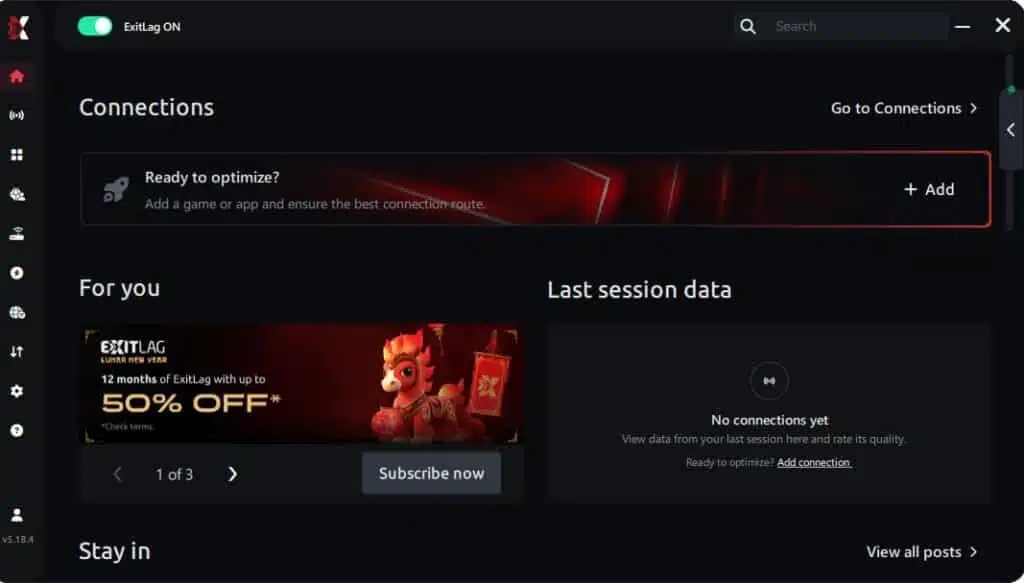
Step 3 – In the search bar, type “Dota 2” and select the game from the list.
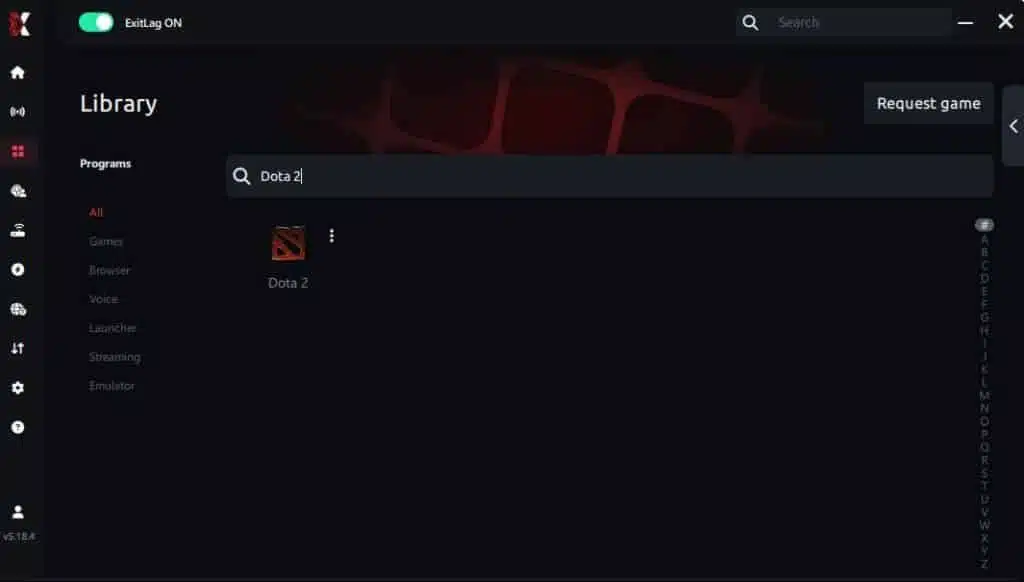
Step 4 – Choose between automated or manual route
Based on the results, you can let ExitLag automatically select the best route or manually choose the server that showed the lowest latency for your connection.
AI-optimized automated route
Based on the results, you can let ExitLag automatically select the best route through AI optimization. The system analyzes multiple connection paths in real time and automatically identifies the most efficient route for your connection, ensuring the lowest possible latency without requiring manual choices.
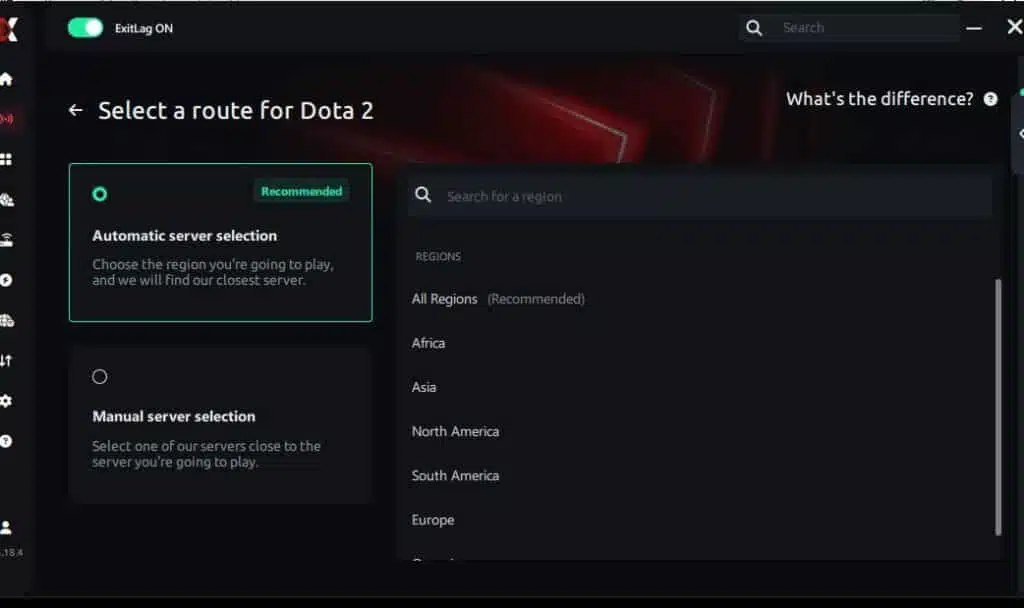
Manual route
If you prefer to have full control over your connection, you can manually choose the server based on the ping test results. Simply select the server that showed the lowest latency or the one that best meets your specific gaming needs, allowing complete customization of your experience.
Step 5 – Click “Dota 2” or the play button. ExitLag will begin optimizing your connection automatically.
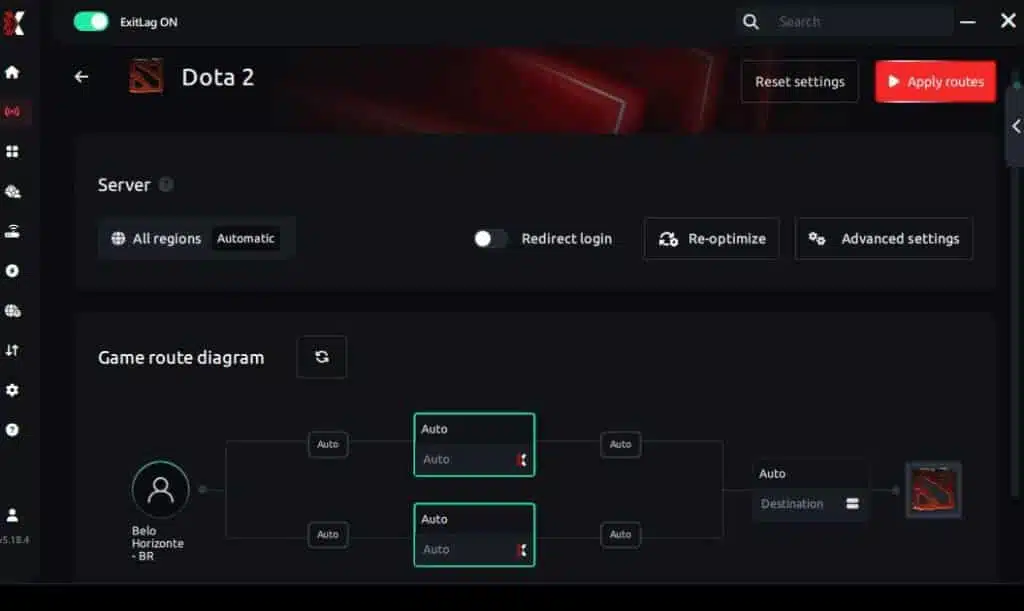
Step 6 – Wait a few seconds until optimization is complete. You’ll see ping indicators in the interface.
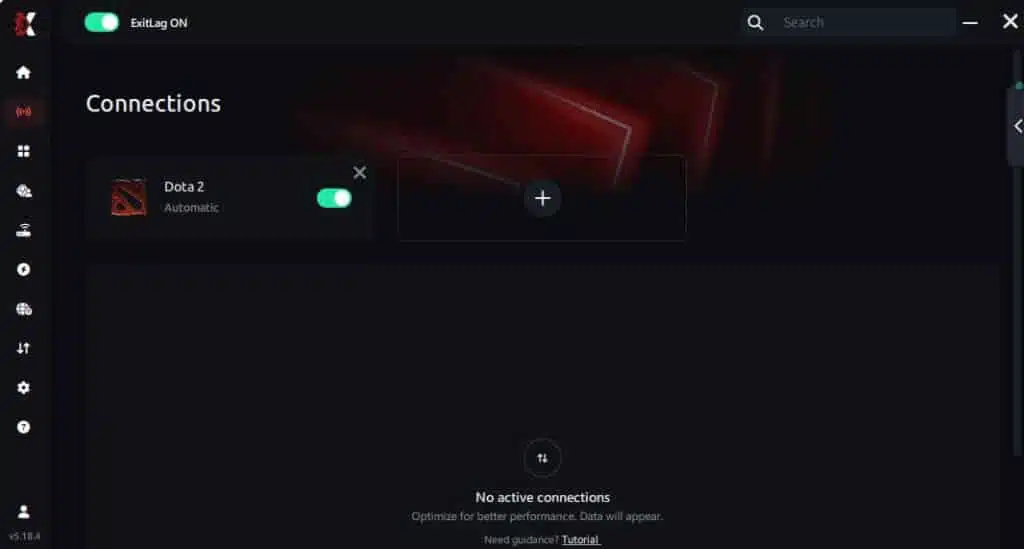
Step 7 – Launch Dota 2 normally. The optimization will already be active.
ExitLag runs in the background while you play, constantly adjusting routes to maintain the best possible performance.
FAQ: frequently asked questions about jitter in Dota 2
What’s the difference between jitter, lag, and packet loss?
Jitter is variation in ping; lag is delay caused by high latency; packet loss happens when data fails to reach the server. You can have low ping but high jitter and still experience severe gameplay problems.
Why does my ping fluctuate in Dota 2?
Network congestion, unstable routing, Wi-Fi issues, and ISP problems are common causes. Server distance also influences how consistent your latency is.
Is jitter worse than high ping in Dota 2?
Often yes. A stable 120ms ping is more playable than a ping that jumps between 30ms and 150ms. Predictability matters more than raw speed.
How do I know if I have jitter?
If your spell casts feel inconsistent, movement stutters, or you see irregular delays even with low ping, jitter is likely the cause. A long ping test will confirm it.
Does Wi-Fi cause jitter?
Yes. Wireless connections are more unstable due to interference and signal loss. Ethernet is always more reliable.
Does ExitLag fix issues beyond jitter?
Yes. ExitLag also reduces ping, prevents packet loss, improves routing, and stabilizes competitive gameplay across hundreds of games.
Do I need to keep ExitLag open while playing?
Yes. The software must stay active during your gaming session to maintain optimization.
Does Dota 2 have server-based jitter?
Some regions do during high player volume or patch releases. Route optimization helps bypass unstable routes.
Conclusion
Jitter can ruin your Dota 2 experience by causing unpredictable delays, broken combos, stuttered movement, and unreliable spell execution. But you don’t have to accept inconsistent gameplay as normal.
With the right setup—and especially with ExitLag—you can eliminate ping variation, stabilize your connection, and play Dota 2 with the precision and responsiveness the game is designed for. Learn more insights at ExitLag blog.
Optimize your connection and eliminate jitter today — start your free trial at ExitLag free trial.
Got questions or want to connect with other players? Join the conversation at the ExitLag Forum!



