You load into a Mortal Kombat 1 match, and the first round feels smooth. Your combos connect, your Kameo assists land perfectly, and you’re reading your opponent like a book.
Then, without warning, everything changes. Your ping starts fluctuating wildly, your inputs feel different every second, and a combo that worked flawlessly moments ago now drops for no apparent reason. This is jitter, and it’s arguably the most frustrating connection problem you can face in a fighting game. Unlike simple high ping, where you can at least adapt to a consistent delay, jitter makes your experience completely unpredictable.
One moment the game responds instantly, the next there’s a half-second gap between pressing a button and seeing the action on screen.
In a game where competitive matches in Kombat League are decided by single frames, this instability makes it impossible to perform at your best. Mortal Kombat 1 is among the games that benefit most from connection optimization, precisely because fighting games demand the kind of consistency that jitter destroys.

What is jitter in Mortal Kombat 1?
Jitter is the irregular variation in your network latency over time. While ping measures how long it takes for data to travel to the game server and back, jitter measures how inconsistent that travel time is from one moment to the next. Think of ping as the speed of your connection, and jitter as the instability of that speed. A stable connection might show a ping of 45ms, 46ms, 44ms, 47ms, barely any variation. A connection suffering from jitter might read 40ms, 120ms, 55ms, 180ms, 70ms jumping unpredictably between values.
In Mortal Kombat 1, this inconsistency is devastating. The game’s rollback netcode system relies on predicting what will happen next and correcting errors when predictions are wrong. When your latency is stable, these corrections are small and barely noticeable.
But when jitter causes your ping to spike and drop constantly, the game has to make large, sudden corrections that result in visual glitches, teleporting characters, and inputs that feel different every time you press a button.
The ideal scenario for online play in MK1 is a ping that varies by no more than 5-10ms. Anything beyond that introduces noticeable instability into your gameplay. You can have a relatively low average ping of 50ms, but if your jitter causes it to swing between 20ms and 130ms, the experience will feel far worse than someone with a stable 80ms connection. This is why jitter is often considered more damaging than simply having high ping — at least with consistent delay, your muscle memory can adjust.
How jitter affects your gameplay in Mortal Kombat 1
Jitter creates a uniquely frustrating set of problems in Mortal Kombat 1 because the game demands frame-perfect precision that becomes impossible when your connection’s response time keeps changing:
- Inconsistent combo execution: The same combo that connected perfectly ten seconds ago now drops mid-string. Your timing hasn’t changed, but the jitter means your inputs reach the server at different speeds each time, making dial-in combos and juggle routes unreliable and unpredictable.
- Kameo assist desynchronization: Mortal Kombat 1’s Kameo system requires precise coordination between your main fighter and your assist. When latency fluctuates, the window for calling your Kameo at the right moment shifts constantly, turning reliable combo extensions into coin flips.
- Impossible defensive reactions: Blocking mixups, teching throws, and reacting to overhead attacks all require consistent timing. With jitter, your defensive reactions arrive at the server at unpredictable intervals, making it impossible to build reliable defensive habits.
- Rubberbanding and teleporting opponents: During severe jitter spikes, opponents appear to jump between positions as the rollback netcode scrambles to correct large prediction errors. One moment they’re across the screen, the next they’re in your face mid-combo.
- Unreliable hit registration: Your attacks visually connect on your screen, but the server’s version of events tells a different story because your data arrived late during a jitter spike. Punishes that should land clean get swallowed, and whiff punishes become guesswork.
- Fatal Blow and Fatality input failures: These signature sequences require clean, sequential button presses. When jitter causes variable delay between each input, the game may interpret your commands incorrectly, leading to failed Fatal Blows at the worst possible moments.
- Destroyed muscle memory: Perhaps the most insidious effect of jitter is that you can never build consistent timing. In offline play or with stable connections, your muscle memory learns exact timings for combos and punishes. Jitter forces you to constantly readjust, preventing you from ever feeling “in the zone.”
- Kombat League frustration and rank loss: Losing ranked points because your connection decided to spike mid-combo rather than being outplayed by your opponent is one of the most demoralizing experiences in competitive fighting games.
Main causes of jitter in Mortal Kombat 1
Network congestion
When multiple devices and applications share your internet connection simultaneously, they compete for bandwidth. Your router must constantly decide which data packets get priority, and this juggling act creates variation in how quickly your gaming data gets processed. A family member starting a video stream, a phone backing up to the cloud, or even a smart home device sending an update can cause sudden jitter spikes that disrupt your Mortal Kombat 1 match without any visible change on your end.
Unstable routing
Internet traffic doesn’t follow a single fixed path. Your data packets may travel through different routes each time, and if these routes have different lengths or congestion levels, the travel time varies from packet to packet. This is one of the primary causes of jitter and is largely outside your control, as routing decisions are made by your ISP and intermediate network providers. When routes shift during a match, you experience sudden changes in how responsive the game feels.
Wi-Fi instability
Wireless connections are inherently more susceptible to jitter than wired ones. Wi-Fi signals are affected by physical obstacles like walls and furniture, interference from other wireless devices and neighboring networks, distance from the router, and even microwave ovens. These factors cause constant micro-fluctuations in signal quality that translate directly into ping variation during gameplay. For a precision fighting game like MK1, these fluctuations are especially damaging.
Problems with your ISP
Internet service providers with overloaded or poorly configured infrastructure deliver inherently inconsistent connections. During peak usage hours, ISP networks become congested, causing jitter to increase dramatically. Some providers also use routing policies that change paths frequently or deprioritize gaming traffic, both of which introduce latency variation that directly impacts your Mortal Kombat 1 experience.
Distance from servers
The farther your data must travel to reach the Mortal Kombat 1 servers, the more intermediate routers and network nodes it passes through. Each additional hop represents another potential point of variation. Players connecting to distant servers not only have higher base ping but also experience more jitter, as there are simply more points along the route where congestion or instability can affect packet timing.
Mortal Kombat 1’s server-relayed architecture
MK1 uses a server-relayed connection model where all match data passes through dedicated game servers rather than traveling directly between players. While this has benefits, it means your data takes a longer path — from your device to the server, then from the server to your opponent. Any instability on either leg of this journey contributes to the overall jitter both players experience, making the game particularly sensitive to routing quality.
How to identify and measure jitter in Mortal Kombat 1
Extended ping test
The most reliable way to measure jitter is through an extended ping test using your system’s command line. On Windows, open Command Prompt and type ping -n 50 8.8.8.8 to send 50 ping requests to Google’s DNS server. On Mac or Linux, use ping -c 50 8.8.8.8. Once the test completes, look at the difference between the minimum and maximum values. If your minimum is 15ms and your maximum is 25ms, your connection is stable. If your minimum is 20ms and your maximum is 180ms, you have significant jitter.
For a more detailed analysis, tools like PingPlotter let you visualize your connection over time, showing exactly where along the route variation occurs. This is invaluable for identifying whether the problem is in your local network, your ISP’s infrastructure, or further along the path to the game servers. Running these tests during your typical gaming hours gives the most accurate picture of what your connection looks like when you’re actually playing.
Signs in the game
Even without running external tests, there are clear indicators of jitter during Mortal Kombat 1 matches:
- The connection indicator icon fluctuates between colors (green to yellow to red and back) during a single match
- Your gameplay experience feels inconsistent — some moments are smooth and responsive, others feel delayed
- Combos that you execute correctly sometimes work and sometimes drop, with no change in your inputs
- Rubberbanding happens intermittently rather than constantly
- Your opponent occasionally teleports or skips animation frames
- The game feels “different” from round to round within the same match
- You experience a sensation that something is “off” even though your displayed ping looks acceptable
If several of these symptoms sound familiar, jitter is very likely the cause. A displayed ping of 50ms means very little if that number is bouncing between 20ms and 120ms behind the scenes.
Jitter level reference for Mortal Kombat 1
| Jitter (ms) | Classification | Impact on Mortal Kombat 1 gameplay |
|---|---|---|
| 0–5 ms | Excellent | Connection feels perfectly stable. All combos, Kameo assists, and reactions execute with offline-like consistency. Ideal for competitive Kombat League. |
| 5–15 ms | Good | Minimal variation. Occasional micro-adjustments may be needed for the tightest combo links, but gameplay feels reliable and predictable overall. |
| 15–30 ms | Moderate | Noticeable inconsistency begins. Some combos drop unpredictably, defensive reactions feel unreliable at times, and Kameo timing requires adjustment between rounds. |
| 30–50 ms | Poor | Significant instability. Combo execution becomes a gamble, rubberbanding occurs intermittently, and the game alternates between feeling smooth and feeling sluggish within the same match. |
| 50–80 ms | Very poor | Severe inconsistency makes competitive play extremely frustrating. Inputs feel different every time, opponents teleport frequently, and building reliable timing is impossible. |
| 80+ ms | Unplayable | Complete unpredictability. The game feels like a slideshow at random intervals, inputs are swallowed or massively delayed, and matches are essentially decided by connection quality rather than skill. |
Basic solutions to reduce jitter in Mortal Kombat 1
Prioritize your connection
- Use an Ethernet cable: This is the single most effective change you can make. Wired connections eliminate the signal instability inherent in Wi-Fi, providing a consistent, interference-free path for your data. For a fighting game like MK1, where jitter destroys your ability to time combos and reactions, switching from wireless to wired can be transformative.
- Close background applications: Applications running in the background create unpredictable bandwidth usage that directly causes jitter. Cloud sync services like Google Drive, OneDrive, and Dropbox are particularly problematic because they upload data in bursts. Streaming services, auto-updaters, torrent clients, and even web browsers with active tabs all contribute to network variation. Close everything non-essential before launching Mortal Kombat 1.
- Limit devices on your network: Every active device on your network adds potential sources of instability. Smart TVs, phones streaming content, gaming consoles downloading updates, and IoT devices all generate traffic that competes with your MK1 data. During competitive sessions, minimize the number of active devices to give your gaming traffic the most stable path possible.
- Disable automatic updates: Windows Update, Steam auto-updates, game launcher updates, and antivirus definition downloads can all kick in unexpectedly, causing sudden jitter spikes mid-match. Set these services to manual or schedule them for times when you’re not gaming. On Windows, you can pause updates temporarily before a gaming session.
- Update network drivers: Outdated network adapter drivers can cause packet handling inefficiencies that manifest as jitter. Visit your motherboard or network adapter manufacturer’s website and install the latest drivers. This is especially important after major operating system updates that may have replaced your optimized drivers with generic versions.
- Use the in-game connection filter wisely: Mortal Kombat 1 allows you to decline matches above 150ms in Kombat League. While this doesn’t directly reduce your jitter, it helps you avoid matches where the combined instability of both connections would make the experience unplayable.
Configure QoS on your router
Quality of Service (QoS) is a router feature that lets you prioritize specific types of network traffic. By configuring QoS to give gaming traffic the highest priority, you ensure that your Mortal Kombat 1 data packets are processed first, even when your network is busy. This doesn’t eliminate jitter caused by issues outside your home network, but it significantly reduces the variation caused by competing traffic from other devices and applications within your household.
Access your router’s admin panel (usually at 192.168.1.1 or 192.168.0.1), find the QoS settings, and prioritize your gaming device’s IP address or gaming traffic category.
Check with your ISP
If you’ve optimized everything within your home network and still experience significant jitter, the problem likely lies with your internet service provider’s infrastructure. Contact your ISP and specifically mention that you’re experiencing latency variation, not just slow speeds. Ask them to check your line quality, test for packet loss on their equipment, and verify that their routing to gaming servers is stable. Document your extended ping test results beforehand to provide concrete evidence of the instability you’re experiencing. In some cases, requesting a line check or equipment replacement can resolve ISP-side jitter issues.
ExitLag: the definitive solution to eliminate jitter in Mortal Kombat 1
What is ExitLag?
ExitLag is a specialized software designed exclusively for optimizing gaming connections. Think of it as an intelligent stabilizer for your internet — while your ISP sends your data through whatever route happens to be available, ExitLag actively manages your connection optimization to ensure your gaming data always takes the most stable, consistent path to the game servers.
What makes ExitLag different from generic network solutions is its singular focus on gaming. The software was developed by gamers who understand that in Mortal Kombat 1, having your ping jump from 40ms to 120ms for even a fraction of a second can cost you a combo, a round, or an entire ranked set. ExitLag doesn’t just reduce your average ping — it stabilizes it, transforming an inconsistent connection into one that delivers predictable, reliable performance match after match.
You can learn more about the technology behind ExitLag and why it’s fundamentally different from other approaches to network optimization. ExitLag is not a VPN — it’s a purpose-built connection optimization tool that reduces latency rather than adding it.
How does ExitLag eliminate jitter in Mortal Kombat 1?
ExitLag uses its proprietary Multi-Internet technology to attack jitter at its source. Here’s how it works to deliver the stable connection Mortal Kombat 1 demands:
- Multiple simultaneous routes: ExitLag sends your data through several optimized paths at the same time. If one route experiences a spike in latency, your data is already traveling through alternatives that remain stable. This redundancy is the core of how ExitLag eliminates jitter — your connection is never dependent on a single, potentially unstable path.
- Intelligent packet selection: The system continuously evaluates which packets arrive fastest across all active routes and delivers those to the game server. Slower packets from congested routes are discarded in favor of faster ones, meaning your game only sees the most stable data stream. This is what transforms a fluctuating connection into a consistent one.
- Real-time route optimization: ExitLag constantly analyzes the quality of all available routes, measuring latency, stability, and packet loss on each one. When conditions change — as they inevitably do throughout an internet session — the software automatically adjusts to maintain the most stable connection possible without any intervention from you.
- Hop reduction: Every intermediate router your data passes through is a potential point of variation. ExitLag reduces the number of hops between your device and the MK1 servers by finding more direct paths, eliminating unnecessary detours that add both latency and instability.
- Intelligent buffer management: ExitLag manages packet delivery to provide the game with a smooth, consistent flow of data, even when your underlying internet connection is experiencing fluctuations. This buffering is carefully calibrated so it doesn’t add noticeable latency while still smoothing out the spikes that cause jitter.
Advantages of ExitLag for Mortal Kombat 1 players
Complete ping stabilization: This is ExitLag’s most critical advantage for fighting game players. Rather than just lowering your average ping, ExitLag transforms an unstable connection with wild fluctuations into one with consistent, predictable latency. For MK1, this means your combos connect the same way every time, your defensive reactions have reliable timing, and your Kameo assists land when you expect them to.
Jitter elimination: The multi-route technology directly targets the root cause of jitter by ensuring your data always has a stable path available. Even if your ISP’s routing is unreliable or congested, ExitLag’s redundant paths guarantee that ping variation is minimized or completely eliminated, giving you the consistent connection fighting games demand.
Improved timing consistency: With a stable ping, your muscle memory becomes reliable again. You can practice combo timings in training mode and trust that those exact timings will work online. The inconsistency that made online play feel like a different game than practice mode disappears, letting you play to your actual skill level.
Competitive advantage: In Kombat League and tournament play, having a stable connection is as important as having good execution. While opponents with jitter drop combos and miss punishes due to unpredictable delay, your stabilized connection ensures your inputs are processed consistently. This reliable performance can be the difference between ranking up and staying stuck.
Works on any server: Whether matchmaking connects you to nearby regional servers or distant ones, ExitLag automatically optimizes your path regardless of destination. You get the same stabilization benefit across all your matches, no matter which MK1 server you’re connected to.
Simple and intuitive interface: You don’t need networking expertise to use ExitLag. Select Mortal Kombat 1, activate the optimization, and play. The software handles all the complex routing decisions in the background while you focus on what matters — your gameplay.
Is ExitLag worth using for Mortal Kombat 1?
ExitLag is worth using if you:
- Experience jitter and connection instability frequently during online matches
- Play on international or distant servers where routing is less predictable
- Compete in Kombat League, ranked sets, or tournaments where consistency matters
- Want stable, predictable performance that lets your skill shine through
- Game during peak hours when your internet becomes unstable
- Use Wi-Fi or have an ISP with poor routing to MK1 servers
- Have lost matches because of unpredictable lag rather than being outplayed
- Want frame-perfect timing on combos, Kameo assists, and defensive reactions
For competitive Mortal Kombat 1 players, connection stability isn’t a luxury — it’s a necessity. You can compare the available pricing plans to find the option that fits your needs.
How to use ExitLag in Mortal Kombat 1: Step by Step
The process is extremely simple:
Step 1 – Access the official ExitLag website and download the application. There’s a free trial period for new users.
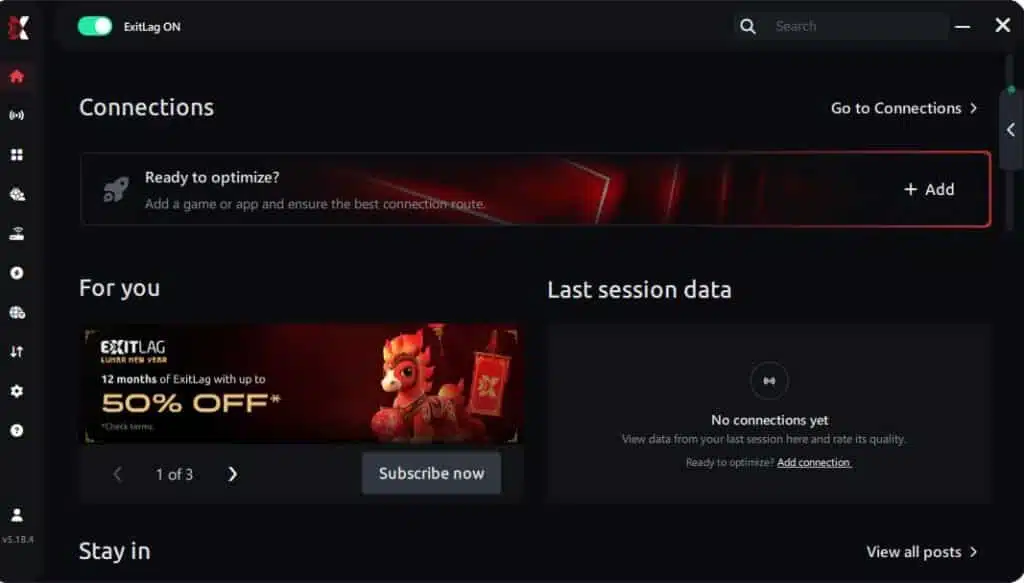
Step 2 – Install and open the program. Log in with your account.
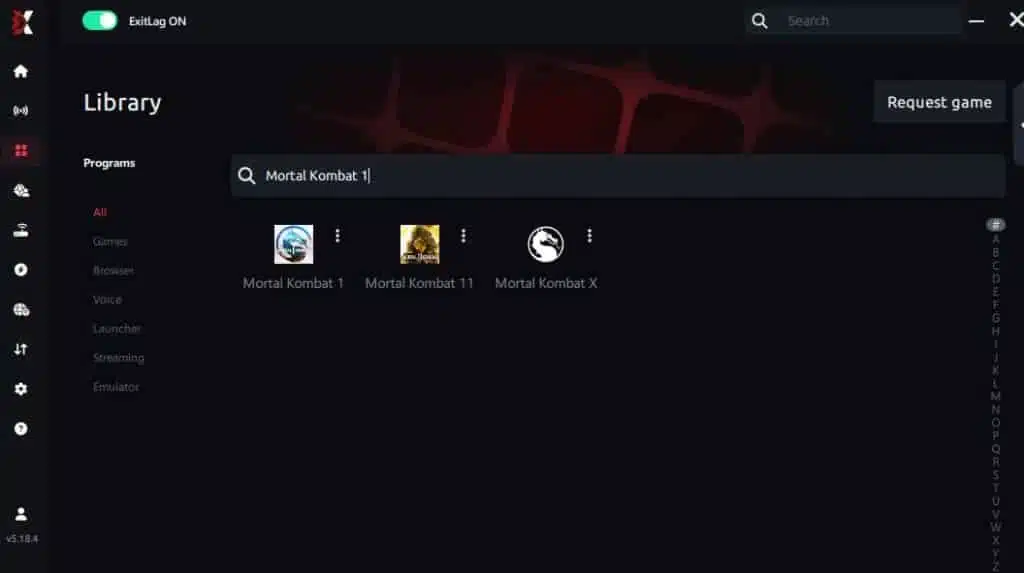
Step 3 – In the search bar, type “Mortal Kombat 1” and select the game from the list.
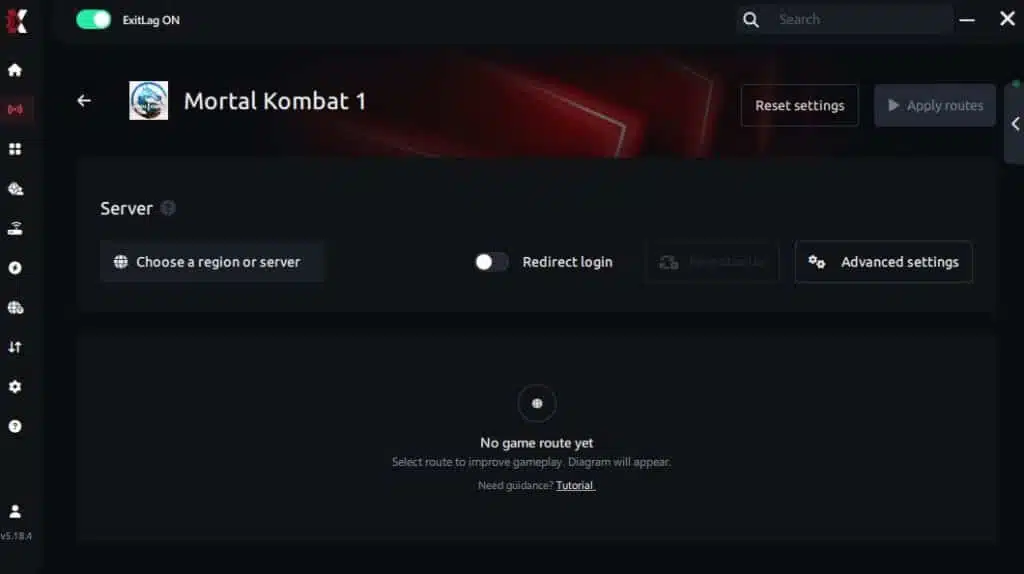
Step 4 – Choose between automated or manual route
Based on the results, you can let ExitLag automatically select the best route or manually choose the server that showed the lowest latency for your connection.
AI-optimized automated route
You can let ExitLag automatically select the best route through AI optimization. The system analyzes multiple connection paths in real time and automatically identifies the most efficient route for your connection, ensuring the lowest possible latency without requiring manual choices.
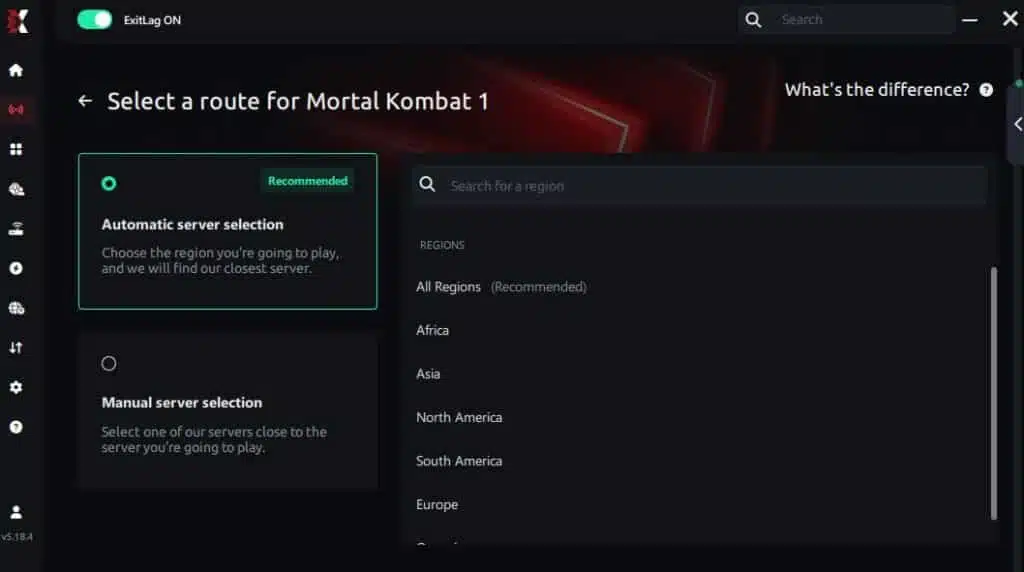
Manual route
If you prefer to have full control over your connection, you can manually choose the server based on the ping test results. Simply select the server that showed the lowest latency or the one that best meets your specific gaming needs, allowing complete customization of your experience.
Step 5 – Click “Apply routes” or the play button. ExitLag will begin optimizing your connection automatically.
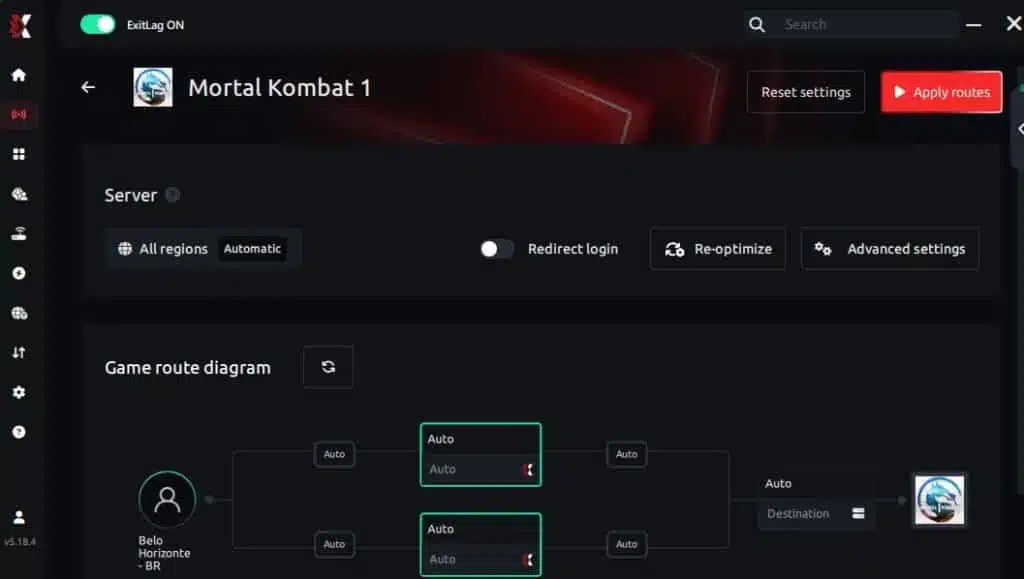
Step 6 – Wait a few seconds until optimization is complete. You’ll see ping indicators in the interface.
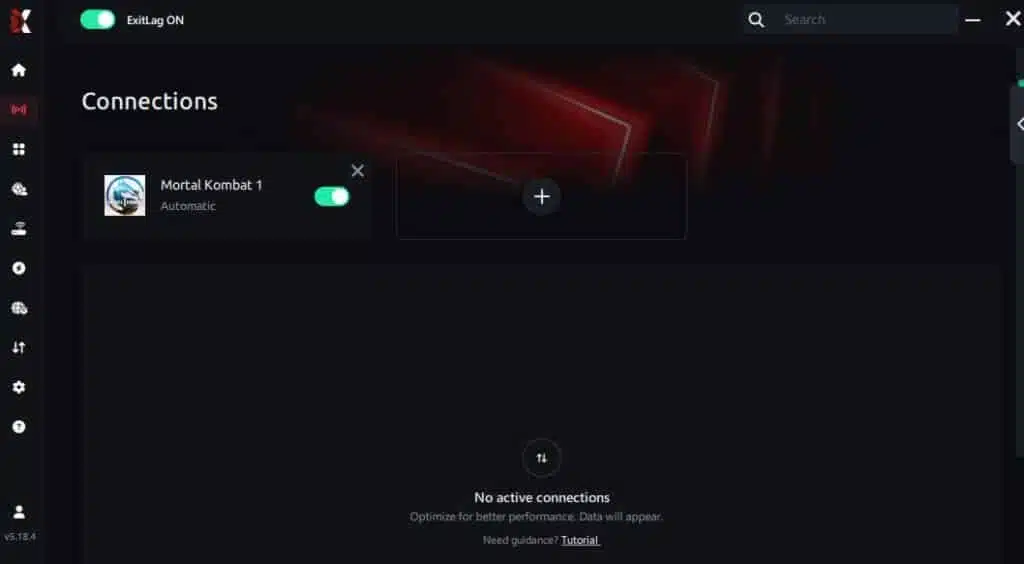
Step 7 – Launch Mortal Kombat 1 normally. The optimization will already be active.
ExitLag runs in the background while you play, constantly adjusting routes to maintain the best possible performanc
How to use Ping for Games: Step-by-Step Guide (Mortal Kombat 1)
Checking your connection quality before entering a match has never been easier. Here’s how to use Ping for Games in just a few steps:
1. Open the ExitLag software on your PC – Ensure the application is installed and open. The feature is integrated into the platform and available for free to all users.
2. Access the Network Analyzer tool – Locate the Network Analyzer in the software menu. This is where you’ll find Ping for Games along with other connection analysis features.
3. Select the game you want to test – Choose Mortal Kombat 1 from the list. The tool supports major online multiplayer games, including FPS, Battle Royales, MOBAs, MMORPGs, and more.
4. Choose the specific server – Select the exact Mortal Kombat 1 server you want to test instead of a generic region. This ensures more accurate results for your match.
5. Start the ping test – With one click, the measurement is performed in real time between your device and the selected Mortal Kombat 1 server, considering your current connection (cable or Wi-Fi).
6. Analyze the results – Results appear in milliseconds (ms), automatically sorted from best to worst ping. You can also reorganize the view alphabetically if you prefer.
7. Choose the best server and play worry-free – With this information, simply select the server with the lowest latency and jump into Mortal Kombat 1 knowing your connection is optimized.
FAQ: frequently asked questions about jitter in Mortal Kombat 1
What is the difference between jitter, lag, and packet loss?
These three terms describe different connection problems, though they can occur together. Jitter is the variation in your ping — your latency bouncing between different values instead of staying consistent. Lag is the perceptible delay caused by high ping, where your actions take noticeably longer to register. Packet loss is when data packets never reach their destination at all, causing inputs to disappear entirely.
You can have low average ping but high jitter, resulting in a frustrating experience where the game feels responsive one second and sluggish the next. You can also have stable ping with packet loss, causing occasional gaps in your inputs. Understanding which problem you’re facing is crucial for applying the right fix, which is why testing with tools like extended ping tests and PingPlotter helps identify the specific issue affecting your MK1 experience.
Why does my ping keep fluctuating in Mortal Kombat 1?
Ping fluctuation in MK1 is most commonly caused by network congestion — too many devices or applications competing for your bandwidth. Unstable routing by your ISP, where your data takes different paths each time, is another major cause. Using Wi-Fi instead of a wired connection introduces natural signal variations that cause jitter. Multiple devices on your network, background downloads, streaming on other devices, and even peak internet usage hours in your area all contribute to ping instability.
MK1’s server-relayed architecture means your data passes through more network infrastructure than a peer-to-peer connection would, giving jitter more opportunities to develop along the route. Players in regions far from game servers are especially susceptible, as the longer data path provides more potential points of variation.
Is jitter worse than high ping?
In many practical scenarios, yes. A high but stable ping — for example, a consistent 100ms — is more playable than a ping that fluctuates between 30ms and 150ms. With stable high ping, your brain and muscle memory can adapt to the consistent delay. You learn that your combos need slightly different timing, and you adjust. With jitter, there’s no consistent delay to adapt to. Each input has an unpredictable response time, making it impossible to build reliable timing for combos, defensive reactions, or Kameo assists.
This is especially true in Mortal Kombat 1, where the rollback netcode handles stable connections far better than unstable ones. A consistent 80ms connection produces small, manageable corrections. A jittery connection that spikes to 150ms creates large, disruptive corrections that manifest as teleporting opponents and dropped inputs.
How do I know if I have jitter?
The simplest test is running an extended ping command in your system’s terminal. On Windows, open Command Prompt and type ping -n 100 8.8.8.8. Watch the results and compare the minimum and maximum values. If the difference is under 10ms, your connection is stable. If it’s over 30ms, you have significant jitter. In-game, if your experience feels inconsistent — sometimes responsive, sometimes delayed, with no change on your end — jitter is very likely the cause. The feeling that something is “off” even when your displayed ping looks acceptable is a classic sign of jitter.
Does Wi-Fi cause jitter?
Yes, and significantly so. Wireless connections are inherently more vulnerable to interference from other Wi-Fi networks, physical obstacles, electronic devices, and even environmental factors. This interference causes constant micro-fluctuations in signal quality that translate directly into jitter during gameplay. Even premium Wi-Fi 6 routers cannot match the stability of a direct Ethernet cable. For Mortal Kombat 1 and fighting games in general, using a wired connection is always the recommended approach. If running an Ethernet cable isn’t feasible, powerline adapters offer a more stable alternative to wireless while using your home’s electrical wiring.
Does ExitLag fix other problems besides jitter?
Absolutely. While ExitLag excels at eliminating jitter through its multi-route technology, it also reduces overall ping by finding faster paths to game servers, eliminates packet loss through redundant data routing, and improves general connection stability. ExitLag supports hundreds of online games, meaning any title you play benefits from the same optimization technology. For Mortal Kombat 1 players specifically, ExitLag addresses the full spectrum of connection issues — high ping, jitter, and packet loss — in a single solution.
Do I need to keep ExitLag running while I play?
Yes, ExitLag needs to remain active throughout your entire gaming session to maintain the optimized routing. The software continuously monitors and adjusts your connection in real time, so closing it mid-session would revert your connection to its default, unoptimized state. You can minimize ExitLag to the system tray while playing — it uses minimal system resources and won’t impact your game’s performance. Just make sure not to close it entirely until you’re done playing.
Why does jitter get worse during peak hours in Mortal Kombat 1?
Peak hours — typically evenings and weekends — see the highest internet usage in most regions. When millions of users stream video, download content, and browse simultaneously, ISP infrastructure becomes congested. This congestion affects routing stability and packet processing times, directly increasing jitter on your connection. MK1’s matchmaking may also connect you with players from more varied geographic locations during peak hours, further straining routing paths. This is one of the situations where ExitLag provides the most dramatic improvement, as its multi-route technology bypasses congested paths that cause instability during high-traffic periods.
Jitter can transform Mortal Kombat 1 from an exhilarating competitive fighting game into an exercise in frustration. When your ping fluctuates unpredictably, every combo becomes a gamble, every defensive reaction a coin flip, and every Kombat League match a test of your connection rather than your skill. The instability strips away the precision and responsiveness that make MK1 so satisfying to play.
You don’t have to accept this as normal. While basic optimizations like switching to Ethernet, closing background apps, and configuring QoS can reduce jitter from local sources, they can’t fix the routing instability and network congestion that cause most jitter problems. ExitLag addresses these root causes directly, using Multi-Internet technology to deliver the stable, consistent connection that Mortal Kombat 1 demands. With ExitLag, you can experience the game the way it was designed — immediate response, perfect timing, no surprises.
Don’t let connection instability ruin your sessions, cost you ranked matches, or waste your practice time. Invest in optimized connectivity and feel the difference in every combo, every punish, and every clutch Fatal Blow. For more guides on improving your gaming experience, visit the ExitLag blog for optimization tips across hundreds of popular games.
Ready to eliminate jitter in Mortal Kombat 1? Try ExitLag for free and discover what your gameplay feels like when your connection is finally stable. Your combos deserve a connection as consistent as your execution.
Got questions or want to connect with other players? Join the conversation at the ExitLag Forum!